Creation of geometries by Coordinate system methods using AutoCad
AIM
To create geometries using all the Co-ordinate system
1. ABSOLUTE CO-ORDINATE SYSTEM
2. RELATIVE RECTANGULAR CO-ORDINATE SYSTEM
3. RELATIVE POLAR CO-ORDINATE SYSTEM
4. DIRECT DISTANCE ENTRY
INTRODUCTION
Open the AUTOCAD application
Start new drawing
Set units
Start the challenge by using line and circle command
PROCEDURE
P1
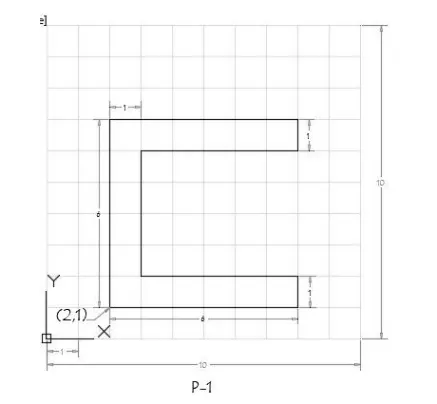
1. ABSOLUTE CO-ORDINATE SYSTEM
Choose the line tool
Line specify first point A - 2,1
Specify next point B - 8,1
Specify next point C - 8,2
Specify next point D - 3,2
Specify next point E - 3,6
Specify next point F - 8,6
Specify next point G - 8,7
Specify next point H - 2,7
Close the line
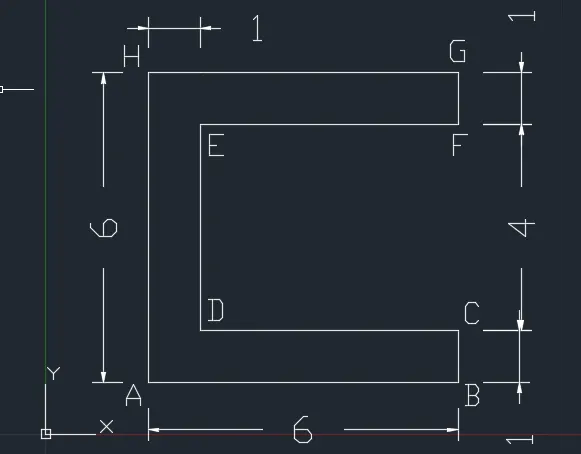
2. RELATIVE RECTANGULAR CO-ORDINATE SYSTEM
Choose the line tool
Line specify first point A - 2,1
Specify next point B - @6,0
Specify next point C - @0,1
Specify next point D - @-5,0
Specify next point E - @0,4
Specify next point F - @5,0
Specify next point G - @0,1
Specify next point H - @-6,0
Close the line
3. RELATIVE POLAR CO-ORDINATE SYSTEM
Choose the line tool
Line specify first point A - 2,1
Specify next point B - @6<0 degree
Specify next point C - @1<90 degree
Specify next point D - @5<180 degree
Specify next point E - @4<90 degree
Specify next point F - @5<0 degree
Specify next point G - @0<90 degree
Specify next point H - @6<180 degree
Close the line
4. DIRECT DISTANCE ENTRY
Choose the line tool
Line specify first point A - 2,1
Specify next point B - position of the cursor towards right side of the screen(East) and enter distance as 6
Specify next point C - position of the cursor towards upward direction of the screen(North) and enter distance as 1
Specify next point D - position of the cursor towards left side of the screen(West) and enter distance as 5
Specify next point E - position of the cursor towards upward direction of the screen(North) and enter distance as 4
Specify next point F - position of the cursor towards right side of the screen(East) and enter distance as 5
Specify next point G - position of the cursor towards upward direction of the screen(North) and enter distance as 1
Specify next point H - position of the cursor towards left side of the screen(West) and enter distance as 6
Close the line
P2
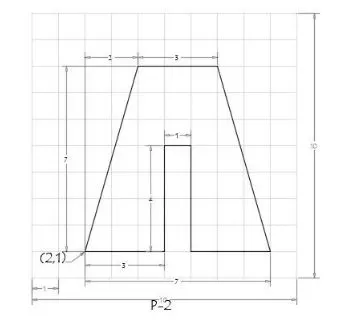
1. ABSOLUTE CO-ORDINATE SYSTEM
Choose the line tool
Line specify first point A - 2,1
Specify next point B - 5,1
Specify next point C - 5,5
Specify next point D - 6,5
Specify next point E - 6,1
Specify next point F - 9,1
Specify next point G - 7,8
Specify next point H - 4,8
Close the line
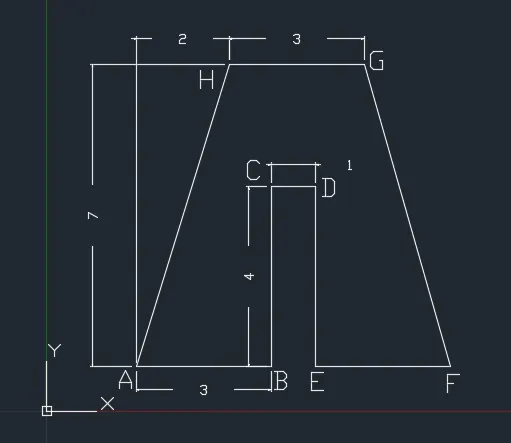
2. RELATIVE RECTANGULAR CO-ORDINATE SYSTEM
Choose the line tool
Line specify first point A - 2,1
Specify next point B - @3,0
Specify next point C - @0,4
Specify next point D - @1,0
Specify next point E - @0,-4
Specify next point F - @3,0
Specify next point G - @-2,7
Specify next point H - @-3,0
Close the line
3. RELATIVE POLAR CO-ORDINATE SYSTEM
Choose the line tool
Line specify first point A - 2,1
Specify next point B - @3<0 degree
Specify next point C - @4<90 degree
Specify next point D - @1<0 degree
Specify next point E - @4<270 degree
Specify next point F - @3<0 degree
Specify next point G - @7<106 degree
Specify next point H - @3<180 degree
Close the line
4. DIRECT DISTANCE ENTRY
Choose the line tool
Line specify first point A - 2,1
Specify next point B - position of the cursor towards right side of the screen(East) and enter distance as 3
Specify next point C - position of the cursor towards upward direction of the screen(North) and enter distance as 4
Specify next point D - position of the cursor towards right side of the screen(East) and enter distance as 1
Specify next point E - position of the cursor towards downward direction of the screen(South) and enter distance as 4
Specify next point F - position of the cursor towards right side of the screen(East) and enter distance as 3
Specify next point G - position of the cursor towards upward direction of the screen(North) and enter distance as 7
Specify next point H - position of the cursor towards left side of the screen(West) and enter distance as 3
Close the line
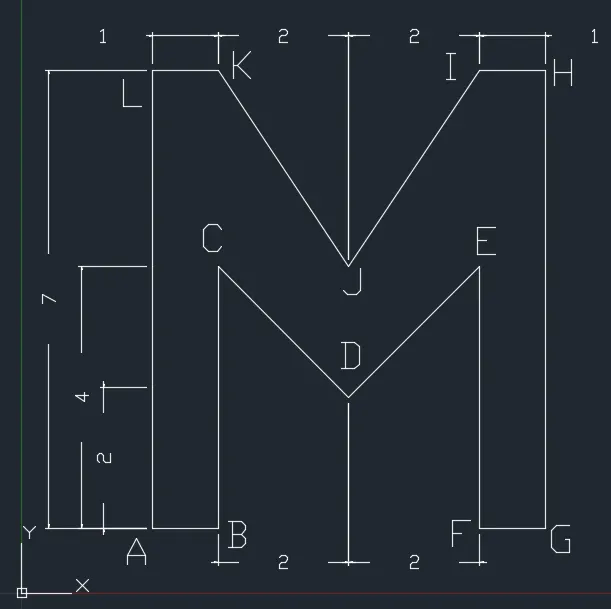
P4
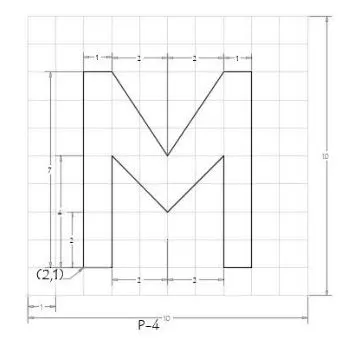
RELATIVE RECTANGULAR CO-ORDINATE SYSTEM
Choose the line tool
Line specify first point A - 2,1
Specify next point B - @1,0
Specify next point C - @0,4
Specify next point D - @2,-2
Specify next point E - @2,2
Specify next point F - @0,-4
Specify next point G - @1,0
Specify next point H - @0,7
Specify next point I - @-1,0
Specify next point J - @-2,-3
Specify next point K - @-2,3
Specify next point L - @-1,0
Close the line
P5
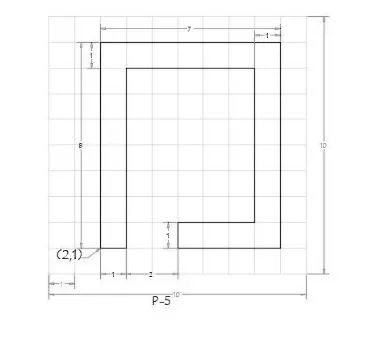
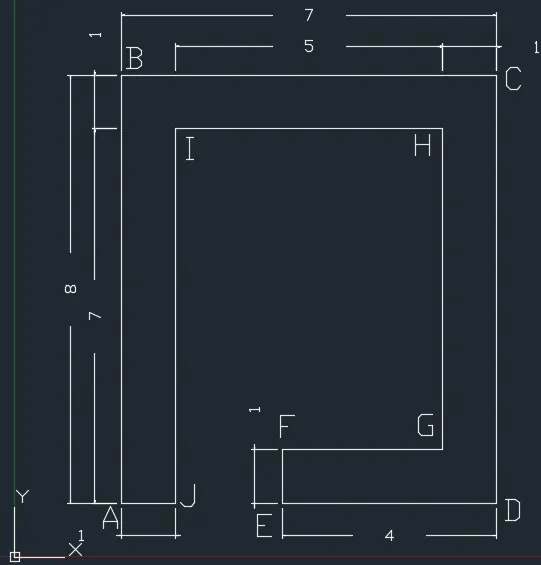
RELATIVE POLAR CO-ORDINATE SYSTEM
Choose the line tool
Line specify first point A - 2,1
Specify next point B - @8<90 degree
Specify next point C - @7<0 degree
Specify next point D - @8<270 degree
Specify next point E - @4<180 degree
Specify next point F - @1<90 degree
Specify next point G - @3<0 degree
Specify next point H - @6<90 degree
Specify next point I - @5<180 degree
Specify next point J - @7<270 degree
Close the line
P7
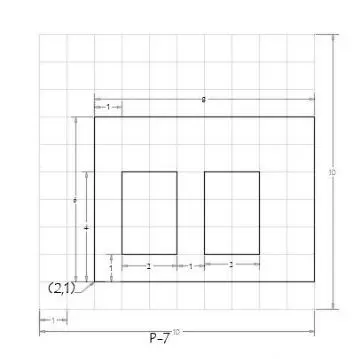
ABSOLUTE CO-ORDINATE SYSTEM
Choose the line tool
Line specify first point A - 2,1
Specify next point B - 2,7
Specify next point C - 10,7
Specify next point D - 10,1
Close the line
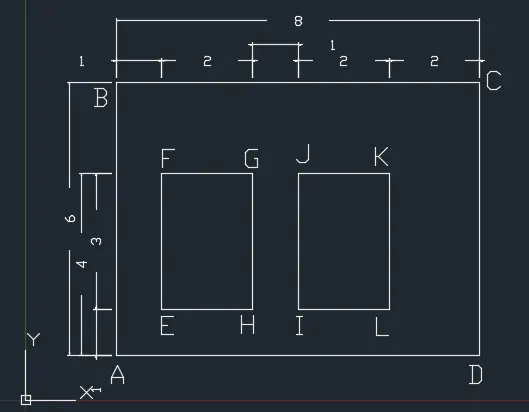
Choose the line tool
Specify next point E - 3,2
Specify next point F - 3,5
Specify next point G - 5,5
Specify next point H - 5,2
Close the line
Choose the line tool
Specify next point I - 6,2
Specify next point J - 6,5
Specify next point K - 8,5
Specify next point L - 8,2
Close the line
P8
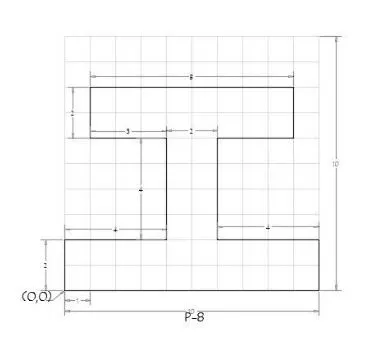
RELATIVE POLAR CO-ORDINATE SYSTEM
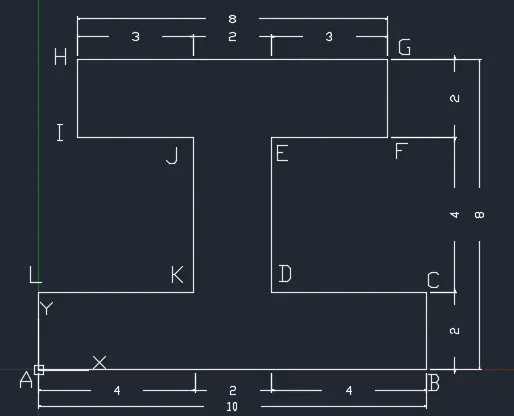
Choose the line tool
Line specify first point A - 0,0
Specify next point B - @10<0 degree
Specify next point C - @2<90 degree
Specify next point D - @4<180 degree
Specify next point E - @4<90 degree
Specify next point F - @3<0 degree
Specify next point G - @2<90 degree
Specify next point H - @8<180 degree
Specify next point I - @2<270 degree
Specify next point J - @3<0 degree
Specify next point K - @4<270 degree
Specify next point L - @4<180 degree
Close the line
P9
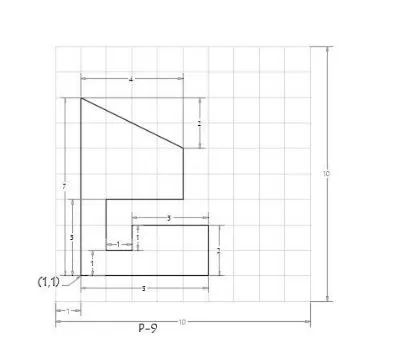
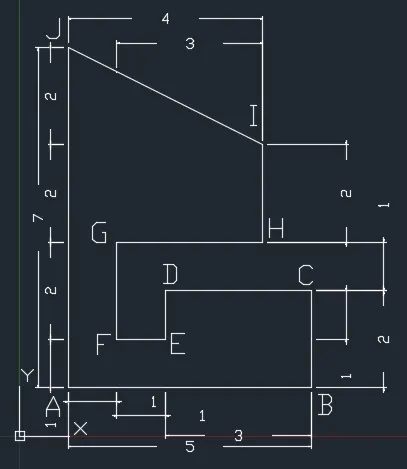
RELATIVE RECTANGULAR CO-ORDINATE SYSTEM
Choose the line tool
Line specify first point A - 1,1
Specify next point B - @5,0
Specify next point C - @0,2
Specify next point D - @-3,0
Specify next point E - @0,-1
Specify next point F - @-1,0
Specify next point G - @0,2
Specify next point H - @3,0
Specify next point I - @0,2
Specify next point J - @-4,2
Close the line
P10
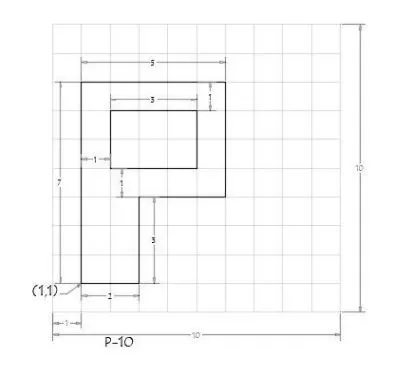
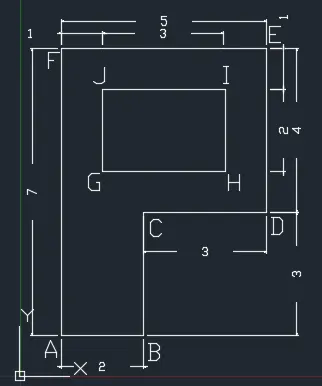
ABSOLUTE CO-ORDINATE SYSTEM
Choose the line tool
Line specify first point A - 1,1
Specify next point B - 3,1
Specify next point C - 3,4
Specify next point D - 6,4
Specify next point E - 6,8
Specify next point F - 1,8
Close the line
Choose the line tool
Specify next point G - 2,5
Specify next point H - 5,5
Specify next point I - 5,7
Specify next point J - 2,7
Close the line
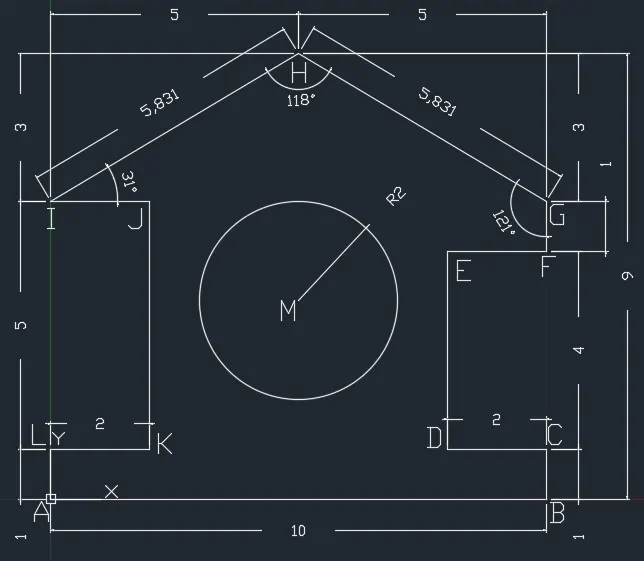
PROFILE - WOOD
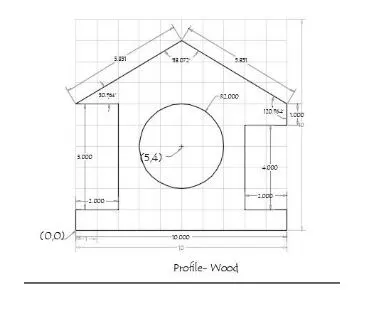
RELATIVE RECTANGULAR CO-ORDINATE SYSTEM
Choose the line tool
Line specify first point A - 0,0
Specify next point B - @10,0
Specify next point C - @0,1
Specify next point D - @-2,0
Specify next point E - @0,-4
Specify next point F - @2,0
Specify next point G - @0,1
Specify next point H - @-5,3
Specify next point I - @-5,-3
Specify next point J - @2,0
Specify next point K - @0,-5
Specify next point L - @-2,0
Close the line
Choose the Circle tool
Circle, radius
Specify center point of circle M - 5,4
Specify radius of circle - 2
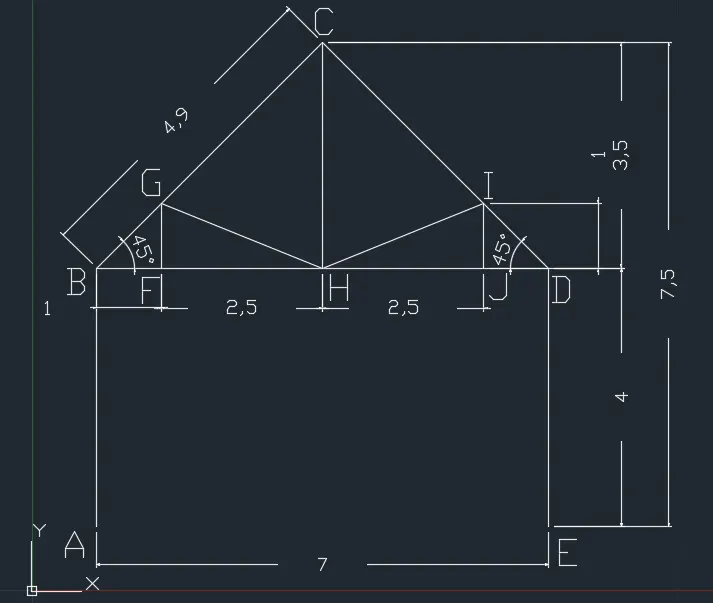
QUEEN POST TRUSS
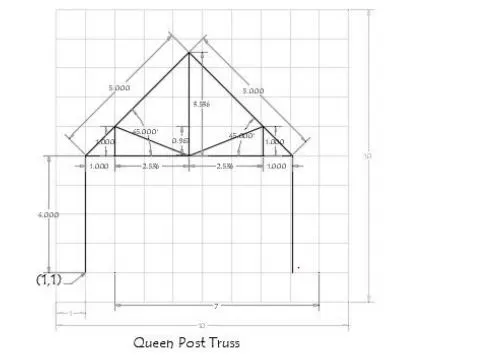
ABSOLUTE CO-ORDINATE SYSTEM
Choose the line tool
Line specify first point A - 1,1
Specify next point B - 1,5
Specify next point C - 4.5,8.5
Specify next point D - 8,5
Specify next point E - 8,1
Close the line
Choose the line tool
Specify next point F - 2,5
Specify next point G - 2,6
Specify next point H - 4.5,5
Specify next point I - 7,6
Specify next point J - 7,5
Close the line
MONO PITCH
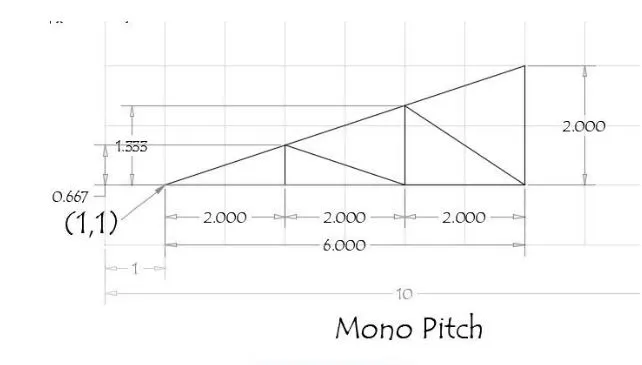
RELATIVE RECTANGULAR CO-ORDINATE SYSTEM
Choose the line tool
Line specify first point A - 1,1
Specify next point B - @6,0
Specify next point C - @0,2
Close the line
Choose the line tool
Line specify first point D - 3,1
Specify next point E - @0,0.667
Specify next point F - @2,-0.667
Specify next point G - @0,1.333
Specify next point H - @2,-1.333
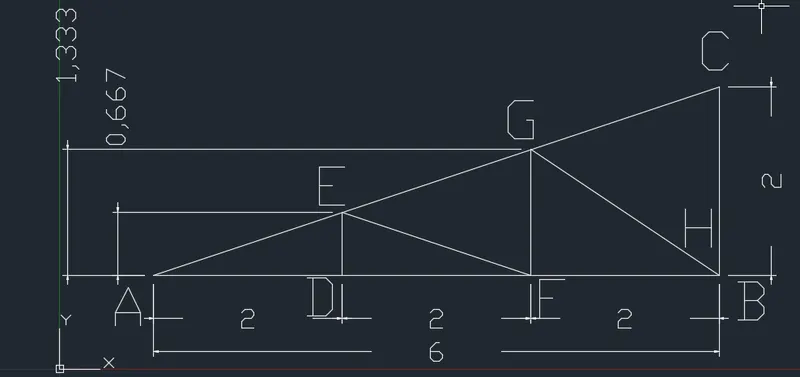
RESULT
The problems given are solved by using the co-ordinate system.