Creation of Column Schedule and Drawing Template using AutoCad
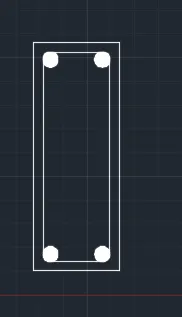
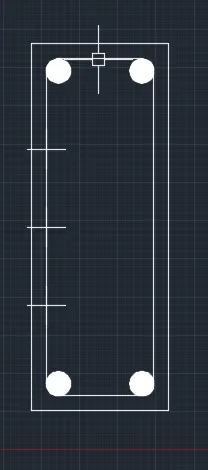
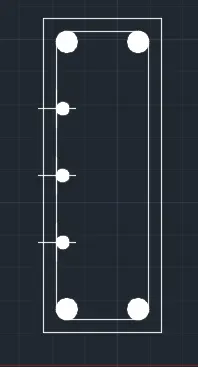
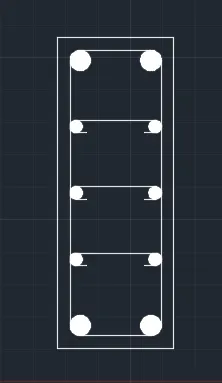
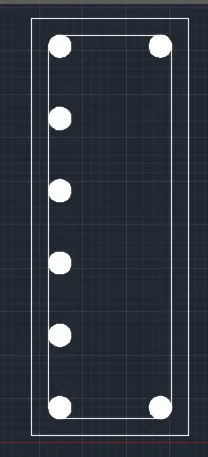
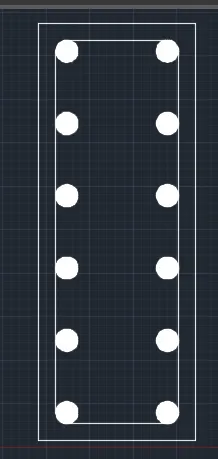
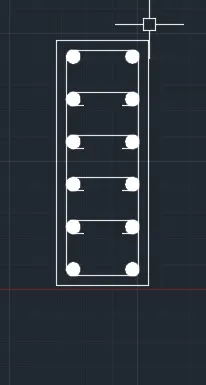
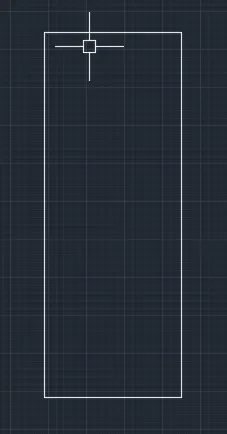
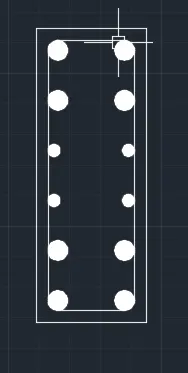
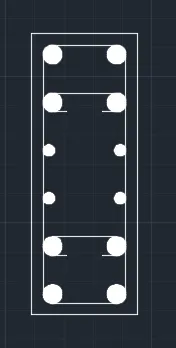
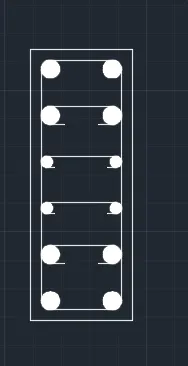
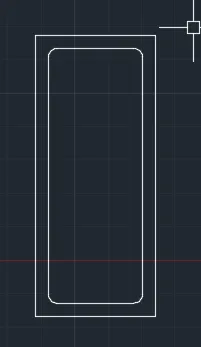
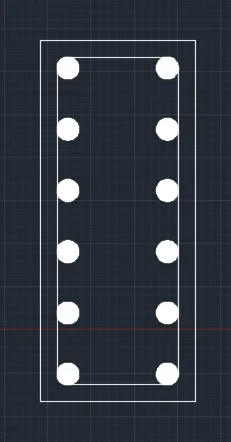
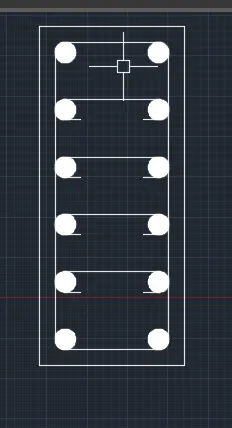
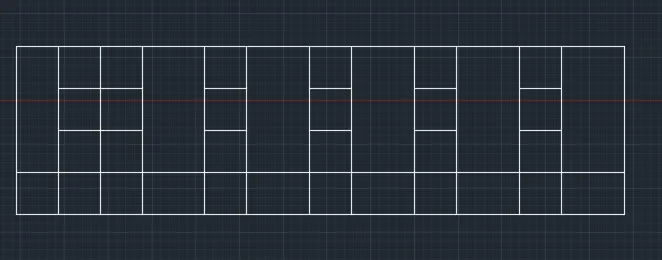
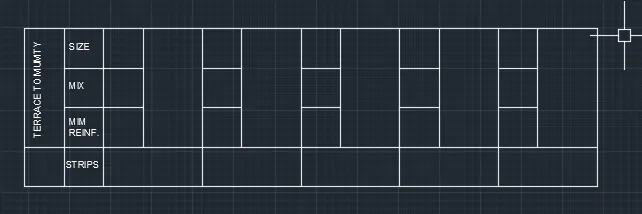
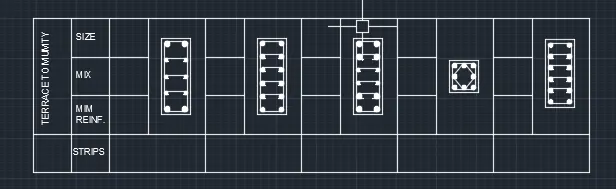
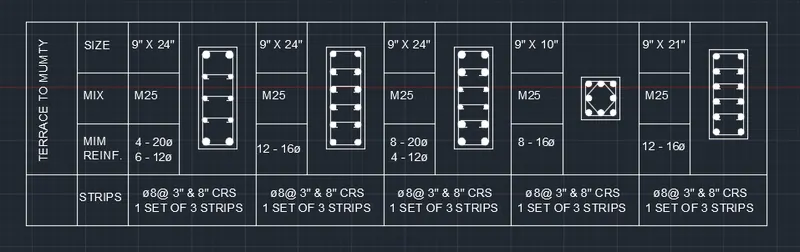
1. Create a column schedule as shown in the figure.
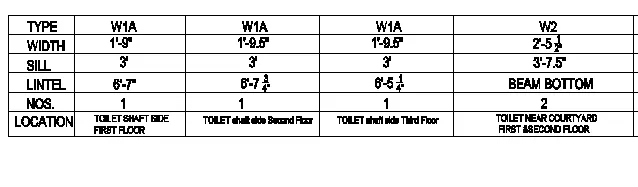
Note: Create a column schedule with the help of lines. Also, insert text with the help of Dtext command or Single Line text.
Hint: Use font name: romans.shx; Height: 8”, Justify: Left
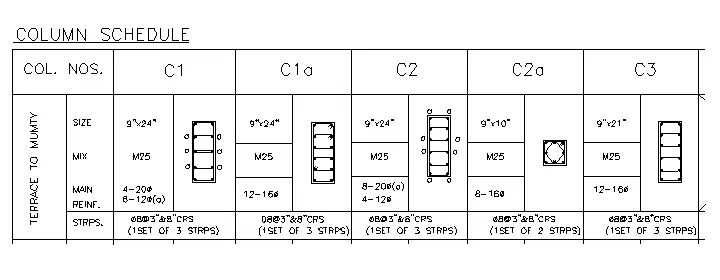
ANS :
AIM :
Create a column schedule as shown in the figure By useing AUTOCAD Tools / Commanads
INTRODUCTION :
The Column schedule which the details of column will be collected in the construction for design purpose. The column scheduling is very important thing in column detailing.
COMMANDS ARE USED IN THIS CHALLENGE :
- UNITS COMMAND
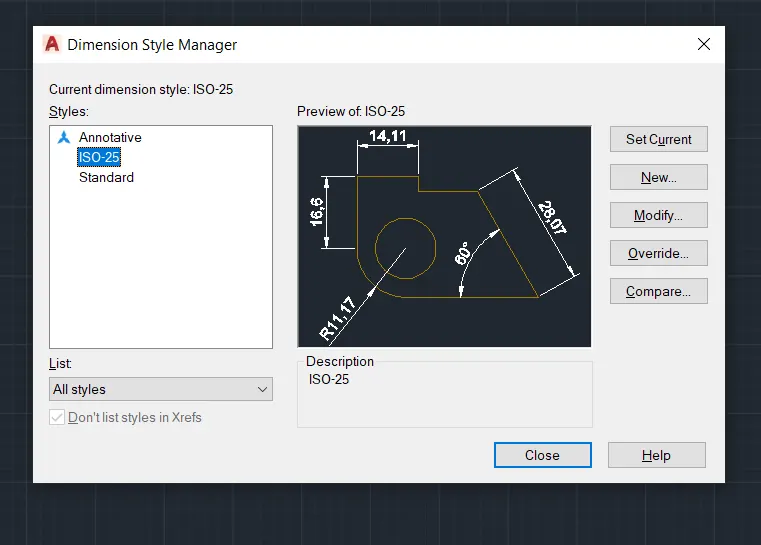
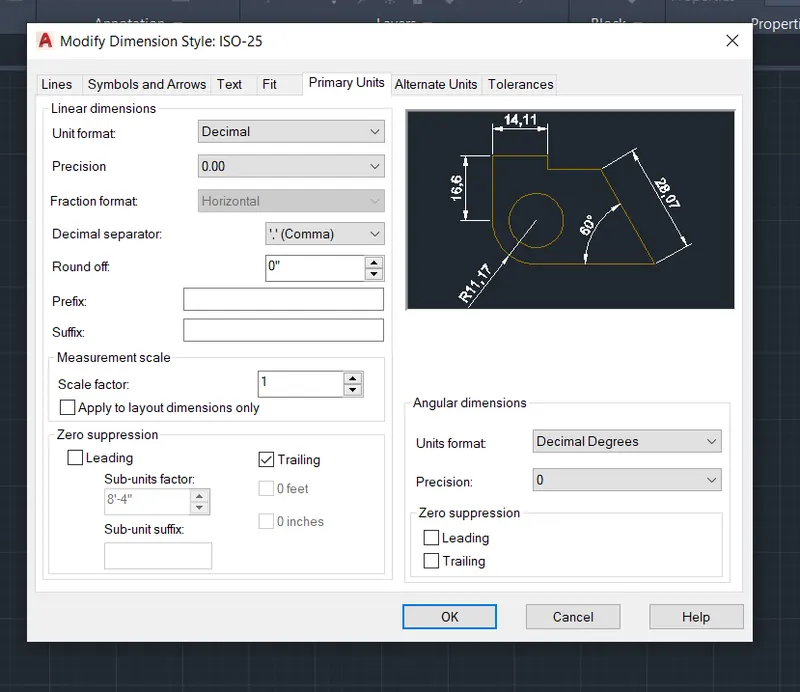
- DIMSTYLE COMMAND
- LIMITS COMMAND
- LINE COMMAND
- CIRCLE COMMAND
- TRIM COMMAND
- OBJECT SNAP COMMAND
- DONUT COMMAND
- SINGLE LINE TEXT COMMAND
- MTEXT COMMAND
- DIMLINEAR COMMAND
- DIVIDE COMMAND
- OFFSET COMMAND
- EXTEND COMMAND
- MIRROR COMMAND
PROCEDURE :
OPEN AUTOCAD TOOL
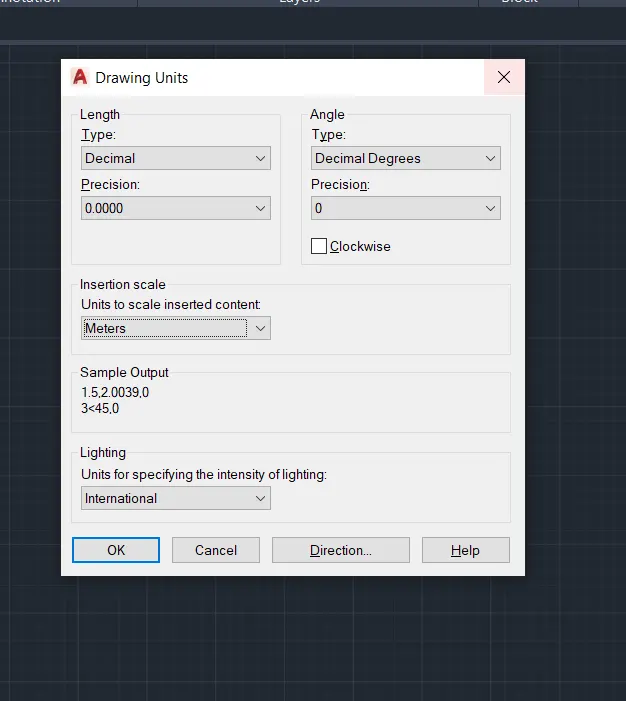
In Startup Settings start from scratch select IMPERIAL ( Feet and Inches )
Type un in command box and press enter
chang units type to as your requred
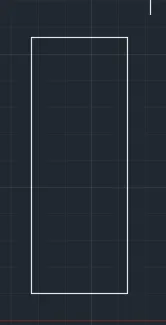
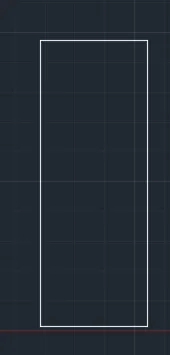
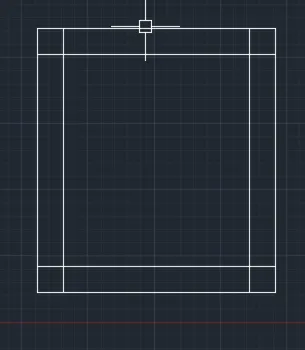
Command: L
LINE
Specify first point:
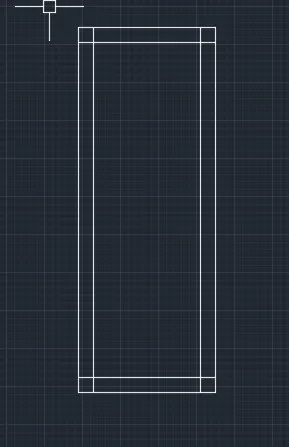
Specify next point or [Undo]: <Ortho on> 24"
Specify next point or [Undo]: 9"
Specify next point or [Close/Undo]: 24"
Specify next point or [Close/Undo]: c
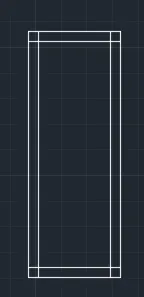
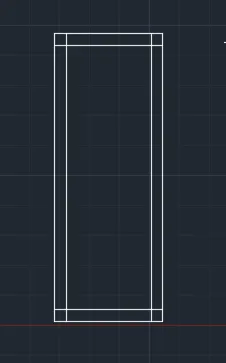
Command: O
OFFSET
Current settings: Erase source=No Layer=Source OFFSETGAPTYPE=0
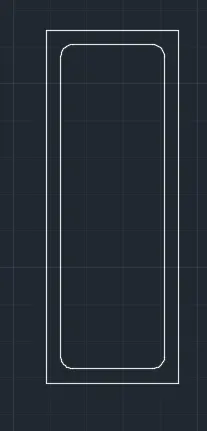
Specify offset distance or [Through/Erase/Layer] <Through>: 0.984"
Select object to offset or [Exit/Undo] <Exit>:
Specify point on side to offset or [Exit/Multiple/Undo] <Exit>:
Select object to offset or [Exit/Undo] <Exit>:
Specify point on side to offset or [Exit/Multiple/Undo] <Exit>:
Select object to offset or [Exit/Undo] <Exit>:
Specify point on side to offset or [Exit/Multiple/Undo] <Exit>:
Select object to offset or [Exit/Undo] <Exit>:
Specify point on side to offset or [Exit/Multiple/Undo] <Exit>:
Select object to offset or [Exit/Undo] <Exit>: *Cancel*
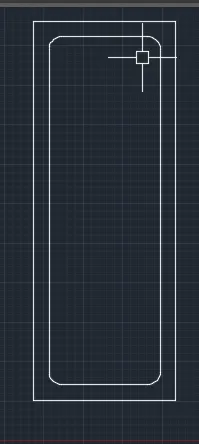
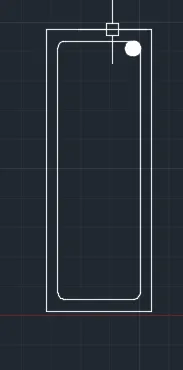
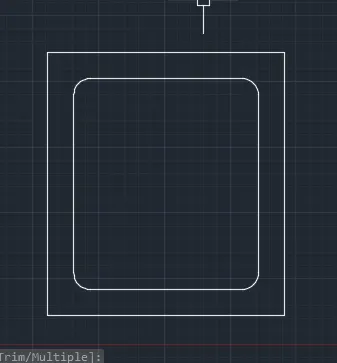
Command: F
FILLET
Current settings: Mode = TRIM, Radius = 0'-0.00"
Select first object or [Undo/Polyline/Radius/Trim/Multiple]: M
Select first object or [Undo/Polyline/Radius/Trim/Multiple]: R
Specify fillet radius <0'-0.00">: 0.787
Select first object or [Undo/Polyline/Radius/Trim/Multiple]:
Select second object or shift-select to apply corner or [Radius]:
Select first object or [Undo/Polyline/Radius/Trim/Multiple]:
Select second object or shift-select to apply corner or [Radius]:
Select first object or [Undo/Polyline/Radius/Trim/Multiple]:
Select second object or shift-select to apply corner or [Radius]:
Select first object or [Undo/Polyline/Radius/Trim/Multiple]:
Select second object or shift-select to apply corner or [Radius]:
Select first object or [Undo/Polyline/Radius/Trim/Multiple]: *Cancel
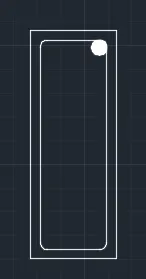
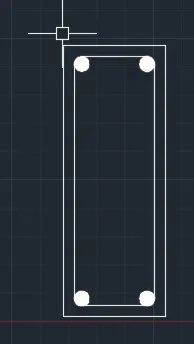
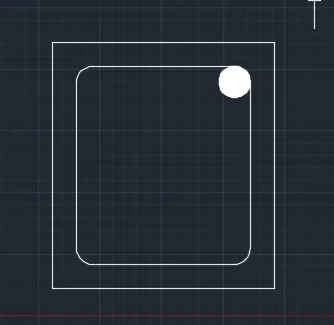
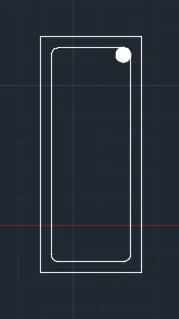
Command: C
CIRCLE
Specify center point for circle or [3P/2P/Ttr (tan tan radius)]:
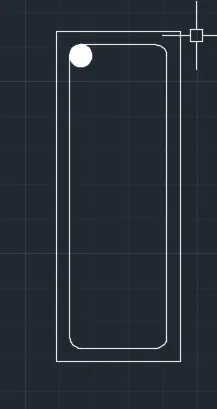
Specify radius of circle or [Diameter]: 0.787
Command: Specify opposite corner or [Fence/WPolygon/CPolygon]:
Command: H
HATCH
Pick internal point or [Select objects/Undo/seTtings]: Selecting everything...
Selecting everything visible...
Analyzing the selected data...
Analyzing internal islands...
Pick internal point or [Select objects/Undo/seTtings]:
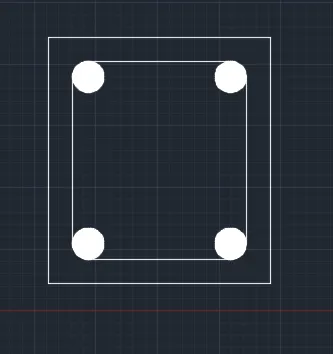
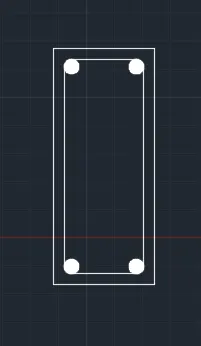
Command: MI
MIRROR
Select objects: Specify opposite corner: 2 found
Select objects: Specify first point of mirror line:
Specify second point of mirror line:
Erase source objects? [Yes/No] <No>:
Command: DIV
DIVIDE
Select object to divide:
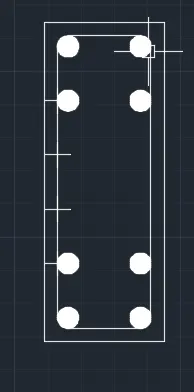
Enter the number of segments or [Block]: 4
Command: DDPTYPE
PTYPE Regenerating model.
Regenerating model.
Command: C
CIRCLE
Specify center point for circle or [3P/2P/Ttr (tan tan radius)]:
Specify radius of circle or [Diameter] <0'-0.79">: 0.472"
Command: H
HATCH
Pick internal point or [Select objects/Undo/seTtings]: Selecting everything...
Selecting everything visible...
Analyzing the selected data...
Analyzing internal islands...
Pick internal point or [Select objects/Undo/seTtings]:
Command: CO
COPY 2 found
Current settings: Copy mode = Multiple
Specify base point or [Displacement/mOde] <Displacement>:
Specify second point or [Array] <use first point as displacement>:
Specify second point or [Array/Exit/Undo] <Exit>:
Specify second point or [Array/Exit/Undo] <Exit>: *Cancel*
Command: MI
MIRROR 6 found
Specify first point of mirror line:
Specify second point of mirror line:
Erase source objects? [Yes/No] <No>:
Command: L
LINE
Specify first point:
Specify next point or [Undo]: <Ortho on>
Specify next point or [Undo]: *Cancel*
Command: Specify opposite corner or [Fence/WPolygon/CPolygon]:
Command: _arc
Specify start point of arc or [Center]:
Specify second point of arc or [Center/End]: _e
Specify end point of arc:
Specify center point of arc (hold Ctrl to switch direction) or [Angle/Direction/Radius]: _d
Specify tangent direction for the start point of arc (hold Ctrl to switch direction):
Command: MI
MIRROR 1 found
Specify first point of mirror line:
Specify second point of mirror line:
Erase source objects? [Yes/No] <No>:
Command: CO
COPY 5 found
Current settings: Copy mode = Multiple
Specify base point or [Displacement/mOde] <Displacement>:
Specify second point or [Array] <use first point as displacement>:
Specify second point or [Array/Exit/Undo] <Exit>:
Specify second point or [Array/Exit/Undo] <Exit>: *Cancel*
Command: L
LINE
Specify first point:
Specify next point or [Undo]: 24"
Specify next point or [Undo]: 9"
Specify next point or [Close/Undo]: 24"
Specify next point or [Close/Undo]: c
Command: O
OFFSET
Current settings: Erase source=No Layer=Source OFFSETGAPTYPE=0
Specify offset distance or [Through/Erase/Layer] <0'-0.98">: 0.984"
Select object to offset or [Exit/Undo] <Exit>:
Specify point on side to offset or [Exit/Multiple/Undo] <Exit>:
Select object to offset or [Exit/Undo] <Exit>:
Specify point on side to offset or [Exit/Multiple/Undo] <Exit>:
Select object to offset or [Exit/Undo] <Exit>:
Specify point on side to offset or [Exit/Multiple/Undo] <Exit>:
Select object to offset or [Exit/Undo] <Exit>:
Specify point on side to offset or [Exit/Multiple/Undo] <Exit>:
Select object to offset or [Exit/Undo] <Exit>: *Cancel*
Command: F
FILLET
Current settings: Mode = TRIM, Radius = 0'-0.79"
Select first object or [Undo/Polyline/Radius/Trim/Multiple]: M
Select first object or [Undo/Polyline/Radius/Trim/Multiple]: R
Specify fillet radius <0'-0.79">: 0.63
Select first object or [Undo/Polyline/Radius/Trim/Multiple]:
Select second object or shift-select to apply corner or [Radius]:
Select first object or [Undo/Polyline/Radius/Trim/Multiple]:
Select second object or shift-select to apply corner or [Radius]:
Select first object or [Undo/Polyline/Radius/Trim/Multiple]:
Select second object or shift-select to apply corner or [Radius]:
Select first object or [Undo/Polyline/Radius/Trim/Multiple]:
Select second object or shift-select to apply corner or [Radius]:
Select first object or [Undo/Polyline/Radius/Trim/Multiple]: *Cancel*
Command: C
CIRCLE
Specify center point for circle or [3P/2P/Ttr (tan tan radius)]:
Specify radius of circle or [Diameter] <0'-0.47">: 0.63"
Command: H
HATCH
Pick internal point or [Select objects/Undo/seTtings]: Selecting everything...
Selecting everything visible...
Analyzing the selected data...
Analyzing internal islands...
Pick internal point or [Select objects/Undo/seTtings]: *Cancel*
Command: MI
MIRROR 2 found
Specify first point of mirror line:
Specify second point of mirror line:
Erase source objects? [Yes/No] <No>:
Command: Specify opposite corner or [Fence/WPolygon/CPolygon]:
Command: MI
MIRROR 4 found
Specify first point of mirror line:
Specify second point of mirror line:
Erase source objects? [Yes/No] <No>:
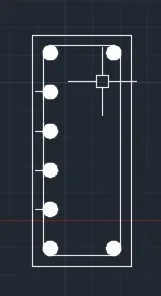
Command: DIV
DIVIDE
Select object to divide:
Enter the number of segments or [Block]: 5
Command: CO
COPY 2 found
Current settings: Copy mode = Multiple
Specify base point or [Displacement/mOde] <Displacement>:
Specify second point or [Array] <use first point as displacement>:
Specify second point or [Array/Exit/Undo] <Exit>:
Specify second point or [Array/Exit/Undo] <Exit>:
Specify second point or [Array/Exit/Undo] <Exit>:
Specify second point or [Array/Exit/Undo] <Exit>: *Cancel*
Command: MI
MIRROR 8 found
Specify first point of mirror line:
Specify second point of mirror line:
Erase source objects? [Yes/No] <No>:
Command: LINE
Specify first point:
Specify next point or [Undo]:
Specify next point or [Undo]: *Cancel*
Command:
Command:
Command: _arc
Specify start point of arc or [Center]:
Specify second point of arc or [Center/End]: _e
Specify end point of arc:
Specify center point of arc (hold Ctrl to switch direction) or [Angle/Direction/Radius]: _d
Specify tangent direction for the start point of arc (hold Ctrl to switch direction):
Command: MI
MIRROR 2 found
Specify first point of mirror line:
Specify second point of mirror line:
Erase source objects? [Yes/No] <No>:
Command: CO
COPY 5 found
Current settings: Copy mode = Multiple
Specify base point or [Displacement/mOde] <Displacement>:
Specify second point or [Array] <use first point as displacement>:
Specify second point or [Array/Exit/Undo] <Exit>:
Specify second point or [Array/Exit/Undo] <Exit>:
Specify second point or [Array/Exit/Undo] <Exit>:
Command: L
LINE
Specify first point:
Specify next point or [Undo]: 24"
Specify next point or [Undo]: 9"
Specify next point or [Close/Undo]: 24"
Specify next point or [Close/Undo]: c
Command: O
OFFSET
Current settings: Erase source=No Layer=Source OFFSETGAPTYPE=0
Specify offset distance or [Through/Erase/Layer] <0'-0.98">: 0.984"
Select object to offset or [Exit/Undo] <Exit>:
Specify point on side to offset or [Exit/Multiple/Undo] <Exit>:
Select object to offset or [Exit/Undo] <Exit>:
Specify point on side to offset or [Exit/Multiple/Undo] <Exit>:
Select object to offset or [Exit/Undo] <Exit>:
Specify point on side to offset or [Exit/Multiple/Undo] <Exit>:
Select object to offset or [Exit/Undo] <Exit>:
Specify point on side to offset or [Exit/Multiple/Undo] <Exit>:
Select object to offset or [Exit/Undo] <Exit>: *Cancel*
Command: F
FILLET
Current settings: Mode = TRIM, Radius = 0'-0.63"
Select first object or [Undo/Polyline/Radius/Trim/Multiple]: M
Select first object or [Undo/Polyline/Radius/Trim/Multiple]: R
Specify fillet radius <0'-0.63">: 0.787
Select first object or [Undo/Polyline/Radius/Trim/Multiple]:
Select second object or shift-select to apply corner or [Radius]:
Select first object or [Undo/Polyline/Radius/Trim/Multiple]:
Select second object or shift-select to apply corner or [Radius]:
Select first object or [Undo/Polyline/Radius/Trim/Multiple]:
Select second object or shift-select to apply corner or [Radius]:
Select first object or [Undo/Polyline/Radius/Trim/Multiple]:
Select second object or shift-select to apply corner or [Radius]:
Select first object or [Undo/Polyline/Radius/Trim/Multiple]:
Command: C
CIRCLE
Specify center point for circle or [3P/2P/Ttr (tan tan radius)]:
Specify radius of circle or [Diameter] <0'-0.63">: 0.787"
Command: H
HATCH
Pick internal point or [Select objects/Undo/seTtings]: Selecting everything...
Selecting everything visible...
Analyzing the selected data...
Analyzing internal islands...
Pick internal point or [Select objects/Undo/seTtings]:
Command: MI
MIRROR 2 found
Specify first point of mirror line:
Specify second point of mirror line:
Erase source objects? [Yes/No] <No>:
Command: Specify opposite corner or [Fence/WPolygon/CPolygon]:
Command: MIRROR
4 found
Specify first point of mirror line:
Specify second point of mirror line:
Erase source objects? [Yes/No] <No>:
Command: DIV
DIVIDE
Select object to divide:
Enter the number of segments or [Block]: 5
Command: Specify opposite corner or [Fence/WPolygon/CPolygon]:
Command: CO
COPY 2 found
Current settings: Copy mode = Multiple
Specify base point or [Displacement/mOde] <Displacement>:
Specify second point or [Array] <use first point as displacement>:
Specify second point or [Array/Exit/Undo] <Exit>:
Specify second point or [Array/Exit/Undo] <Exit>: *Cancel*
Command: C
CIRCLE
Specify center point for circle or [3P/2P/Ttr (tan tan radius)]:
Specify radius of circle or [Diameter] <0'-0.79">: 0.472
Command: H
HATCH
Pick internal point or [Select objects/Undo/seTtings]: Selecting everything...
Selecting everything visible...
Analyzing the selected data...
Analyzing internal islands...
Pick internal point or [Select objects/Undo/seTtings]:
Command: MI
MIRROR 4 found
Specify first point of mirror line:
Specify second point of mirror line:
Erase source objects? [Yes/No] <No>:
Command: L
LINE
Specify first point:
Specify next point or [Undo]:
Specify next point or [Undo]:
Command: LINE
Specify first point:
Specify next point or [Undo]:
Specify next point or [Undo]:
Command: _arc
Specify start point of arc or [Center]:
Specify second point of arc or [Center/End]: _e
Specify end point of arc:
Specify center point of arc (hold Ctrl to switch direction) or [Angle/Direction/Radius]: _d
Specify tangent direction for the start point of arc (hold Ctrl to switch direction):
Command: Specify opposite corner or [Fence/WPolygon/CPolygon]:
Command: CO
COPY 5 found
Current settings: Copy mode = Multiple
Specify base point or [Displacement/mOde] <Displacement>:
Specify second point or [Array] <use first point as displacement>:
Specify second point or [Array/Exit/Undo] <Exit>:
Command: L
LINE
Specify first point:
Specify next point or [Undo]:
Specify next point or [Undo]:
Command: LINE
Specify first point:
Specify next point or [Undo]:
Specify next point or [Undo]:
Command:
Command:
Command: _arc
Specify start point of arc or [Center]:
Specify second point of arc or [Center/End]: _e
Specify end point of arc:
Specify center point of arc (hold Ctrl to switch direction) or [Angle/Direction/Radius]: _d
Specify tangent direction for the start point of arc (hold Ctrl to switch direction):
Command: MI
MIRROR 2 found
Specify first point of mirror line:
Specify second point of mirror line:
Erase source objects? [Yes/No] <No>:
Command: Specify opposite corner or [Fence/WPolygon/CPolygon]:
Command: Specify opposite corner or [Fence/WPolygon/CPolygon]:
Command: Specify opposite corner or [Fence/WPolygon/CPolygon]:
Command: Specify opposite corner or [Fence/WPolygon/CPolygon]:
Command: Specify opposite corner or [Fence/WPolygon/CPolygon]:
Command: Specify opposite corner or [Fence/WPolygon/CPolygon]:
Command: CO
COPY 5 found
Current settings: Copy mode = Multiple
Specify base point or [Displacement/mOde] <Displacement>:
Specify second point or [Array] <use first point as displacement>:
Specify second point or [Array/Exit/Undo] <Exit>: *Cancel*
Command: L
LINE
Specify first point:
Specify next point or [Undo]: 10"
Specify next point or [Undo]: 9"
Specify next point or [Close/Undo]: 10"
Specify next point or [Close/Undo]: c
Command: O
OFFSET
Current settings: Erase source=No Layer=Source OFFSETGAPTYPE=0
Specify offset distance or [Through/Erase/Layer] <0'-0.98">: 0.984"
Select object to offset or [Exit/Undo] <Exit>:
Specify point on side to offset or [Exit/Multiple/Undo] <Exit>:
Select object to offset or [Exit/Undo] <Exit>:
Specify point on side to offset or [Exit/Multiple/Undo] <Exit>:
Select object to offset or [Exit/Undo] <Exit>:
Specify point on side to offset or [Exit/Multiple/Undo] <Exit>:
Select object to offset or [Exit/Undo] <Exit>:
Specify point on side to offset or [Exit/Multiple/Undo] <Exit>:
Select object to offset or [Exit/Undo] <Exit>: *Cancel*
Command: F
FILLET
Current settings: Mode = TRIM, Radius = 0'-0.79"
Select first object or [Undo/Polyline/Radius/Trim/Multiple]: M
Select first object or [Undo/Polyline/Radius/Trim/Multiple]: R
Specify fillet radius <0'-0.79">: 0.63"
Select first object or [Undo/Polyline/Radius/Trim/Multiple]:
Select second object or shift-select to apply corner or [Radius]:
Select first object or [Undo/Polyline/Radius/Trim/Multiple]:
Select second object or shift-select to apply corner or [Radius]:
Select first object or [Undo/Polyline/Radius/Trim/Multiple]:
Select second object or shift-select to apply corner or [Radius]:
Select first object or [Undo/Polyline/Radius/Trim/Multiple]:
Select second object or shift-select to apply corner or [Radius]:
Select first object or [Undo/Polyline/Radius/Trim/Multiple]:
Command: C
CIRCLE
Specify center point for circle or [3P/2P/Ttr (tan tan radius)]:
Specify radius of circle or [Diameter] <0'-0.47">: 0.63"
Command: H
HATCH
Pick internal point or [Select objects/Undo/seTtings]: Selecting everything...
Selecting everything visible...
Analyzing the selected data...
Analyzing internal islands...
Pick internal point or [Select objects/Undo/seTtings]:
Command: MI
MIRROR 2 found
Specify first point of mirror line:
Specify second point of mirror line:
Erase source objects? [Yes/No] <No>:
Command: MIRROR
Select objects: Specify opposite corner: 4 found
Select objects: Specify first point of mirror line:
Specify second point of mirror line:
Erase source objects? [Yes/No] <No>:
Command: CO
COPY 2 found
Current settings: Copy mode = Multiple
Specify base point or [Displacement/mOde] <Displacement>:
Specify second point or [Array] <use first point as displacement>:
Specify second point or [Array/Exit/Undo] <Exit>:
Command: Specify opposite corner or [Fence/WPolygon/CPolygon]:
Command: CO
COPY 2 found
Current settings: Copy mode = Multiple
Specify base point or [Displacement/mOde] <Displacement>:
Specify second point or [Array] <use first point as displacement>:
Specify second point or [Array/Exit/Undo] <Exit>:
Command: Specify opposite corner or [Fence/WPolygon/CPolygon]:
Command: MI
MIRROR 2 found
Specify first point of mirror line:
Specify second point of mirror line:
Erase source objects? [Yes/No] <No>:
Command: Specify opposite corner or [Fence/WPolygon/CPolygon]:
Command: MI
MIRROR 2 found
Specify first point of mirror line:
Specify second point of mirror line:
Erase source objects? [Yes/No] <No>:
Command: L
LINE
Specify first point: _tan to
Specify next point or [Undo]: _tan to
Specify next point or [Undo]:
Command: LINE
Specify first point:
>>Enter new value for ORTHOMODE <1>:
Resuming LINE command.
Specify first point:
>>Enter new value for ORTHOMODE <1>:
Resuming LINE command.
Specify first point: _tan to
Specify next point or [Undo]: _tan to
Specify next point or [Undo]: *Cancel*
Command: MI
MIRROR 2 found
Specify first point of mirror line:
Specify second point of mirror line:
Erase source objects? [Yes/No] <No>:
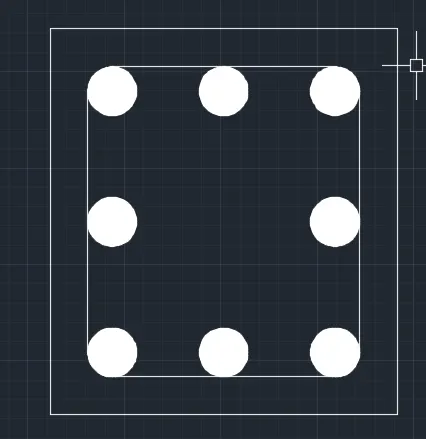
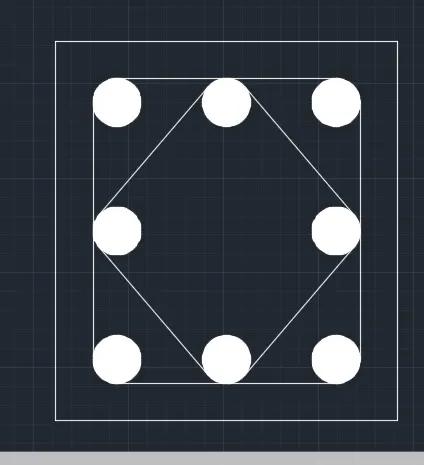
Command: L
LINE
Specify first point:
Specify next point or [Undo]: 21"
Specify next point or [Undo]: 9"
Specify next point or [Close/Undo]: 21"
Specify next point or [Close/Undo]: c
Command: O
OFFSET
Current settings: Erase source=No Layer=Source OFFSETGAPTYPE=0
Specify offset distance or [Through/Erase/Layer] <0'-0.98">: 0.984"
Select object to offset or [Exit/Undo] <Exit>:
Specify point on side to offset or [Exit/Multiple/Undo] <Exit>:
Select object to offset or [Exit/Undo] <Exit>:
Specify point on side to offset or [Exit/Multiple/Undo] <Exit>:
Select object to offset or [Exit/Undo] <Exit>:
Specify point on side to offset or [Exit/Multiple/Undo] <Exit>:
Select object to offset or [Exit/Undo] <Exit>:
Specify point on side to offset or [Exit/Multiple/Undo] <Exit>:
Select object to offset or [Exit/Undo] <Exit>: *Cancel*
Command: F
FILLET
Current settings: Mode = TRIM, Radius = 0'-0.63"
Select first object or [Undo/Polyline/Radius/Trim/Multiple]: R
Specify fillet radius <0'-0.63">: 0.63"
Select first object or [Undo/Polyline/Radius/Trim/Multiple]: M
Select first object or [Undo/Polyline/Radius/Trim/Multiple]:
Select second object or shift-select to apply corner or [Radius]:
Select first object or [Undo/Polyline/Radius/Trim/Multiple]:
Select second object or shift-select to apply corner or [Radius]:
Select first object or [Undo/Polyline/Radius/Trim/Multiple]:
Select second object or shift-select to apply corner or [Radius]:
Select first object or [Undo/Polyline/Radius/Trim/Multiple]:
Select second object or shift-select to apply corner or [Radius]:
Select first object or [Undo/Polyline/Radius/Trim/Multiple]:
Command: C
CIRCLE
Specify center point for circle or [3P/2P/Ttr (tan tan radius)]:
Specify radius of circle or [Diameter]: 0.63"
Command: H
HATCH
Pick internal point or [Select objects/Undo/seTtings]: Selecting everything...
Selecting everything visible...
Analyzing the selected data...
Analyzing internal islands...
Pick internal point or [Select objects/Undo/seTtings]:
Command: MI
MIRROR
Select objects: Specify opposite corner: 2 found
Select objects: Specify first point of mirror line:
Specify second point of mirror line:
Erase source objects? [Yes/No] <No>:
Command: MIRROR
Select objects: Specify opposite corner: 4 found
Select objects: Specify first point of mirror line:
Specify second point of mirror line:
Erase source objects? [Yes/No] <No>:
Command: DIV
DIVIDE
Select object to divide:
Enter the number of segments or [Block]: 5
Command: Specify opposite corner or [Fence/WPolygon/CPolygon]:
Command: CO
COPY 2 found
Current settings: Copy mode = Multiple
Specify base point or [Displacement/mOde] <Displacement>:
Specify second point or [Array] <use first point as displacement>:
Specify second point or [Array/Exit/Undo] <Exit>:
Specify second point or [Array/Exit/Undo] <Exit>:
Specify second point or [Array/Exit/Undo] <Exit>:
Specify second point or [Array/Exit/Undo] <Exit>: *Cancel*
Command: MI
MIRROR 8 found
Specify first point of mirror line:
Specify second point of mirror line:
Erase source objects? [Yes/No] <No>:
Command: L
LINE
Specify first point:
Specify next point or [Undo]:
Specify next point or [Undo]:
Command: LINE
Specify first point:
Specify next point or [Undo]:
Specify next point or [Undo]: *Cancel*
Command:
Command:
Command: _arc
Specify start point of arc or [Center]:
Specify second point of arc or [Center/End]: _e
Specify end point of arc:
Specify center point of arc (hold Ctrl to switch direction) or [Angle/Direction/Radius]: _d
Specify tangent direction for the start point of arc (hold Ctrl to switch direction):
Command: MI
MIRROR 2 found
Specify first point of mirror line:
Specify second point of mirror line:
Erase source objects? [Yes/No] <No>:
Command: Specify opposite corner or [Fence/WPolygon/CPolygon]:
Command: Specify opposite corner or [Fence/WPolygon/CPolygon]:
Command: Specify opposite corner or [Fence/WPolygon/CPolygon]:
Command: Specify opposite corner or [Fence/WPolygon/CPolygon]:
Command: Specify opposite corner or [Fence/WPolygon/CPolygon]:
Command: CO
COPY 5 found
Current settings: Copy mode = Multiple
Specify base point or [Displacement/mOde] <Displacement>:
Specify second point or [Array] <use first point as displacement>:
Specify second point or [Array/Exit/Undo] <Exit>:
Specify second point or [Array/Exit/Undo] <Exit>:
Specify second point or [Array/Exit/Undo] <Exit>: *Cancel*
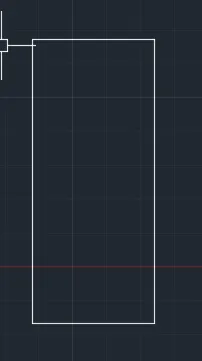
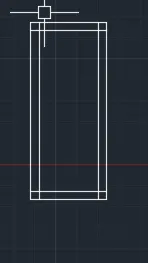
Command: L
LINE
Specify first point:
Specify next point or [Undo]: 3'
Specify next point or [Undo]: *Cancel*
Command: O
OFFSET
Current settings: Erase source=No Layer=Source OFFSETGAPTYPE=0
Specify offset distance or [Through/Erase/Layer] <Through>: 1'
Select object to offset or [Exit/Undo] <Exit>:
Specify point on side to offset or [Exit/Multiple/Undo] <Exit>:
Select object to offset or [Exit/Undo] <Exit>:
Specify point on side to offset or [Exit/Multiple/Undo] <Exit>:
Select object to offset or [Exit/Undo] <Exit>:
Specify point on side to offset or [Exit/Multiple/Undo] <Exit>:
Select object to offset or [Exit/Undo] <Exit>:
Specify point on side to offset or [Exit/Multiple/Undo] <Exit>:
Select object to offset or [Exit/Undo] <Exit>:
Specify point on side to offset or [Exit/Multiple/Undo] <Exit>:
Select object to offset or [Exit/Undo] <Exit>:
Specify point on side to offset or [Exit/Multiple/Undo] <Exit>:
Select object to offset or [Exit/Undo] <Exit>:
Specify point on side to offset or [Exit/Multiple/Undo] <Exit>:
Select object to offset or [Exit/Undo] <Exit>:
Specify point on side to offset or [Exit/Multiple/Undo] <Exit>:
Select object to offset or [Exit/Undo] <Exit>:
Specify point on side to offset or [Exit/Multiple/Undo] <Exit>:
Select object to offset or [Exit/Undo] <Exit>:
Specify point on side to offset or [Exit/Multiple/Undo] <Exit>:
Select object to offset or [Exit/Undo] <Exit>:
Specify point on side to offset or [Exit/Multiple/Undo] <Exit>:
Select object to offset or [Exit/Undo] <Exit>:
Specify point on side to offset or [Exit/Multiple/Undo] <Exit>:
Select object to offset or [Exit/Undo] <Exit>: *Cancel*
Command: L
LINE
Specify first point:
Specify next point or [Undo]:
Specify next point or [Undo]:
Command: LINE
Specify first point:
Specify next point or [Undo]:
Specify next point or [Undo]: *Cancel*
Command: O
OFFSET
Current settings: Erase source=No Layer=Source OFFSETGAPTYPE=0
Specify offset distance or [Through/Erase/Layer] <1'-0.00">:
Select object to offset or [Exit/Undo] <Exit>:
Specify point on side to offset or [Exit/Multiple/Undo] <Exit>:
Select object to offset or [Exit/Undo] <Exit>: *Cancel*
Command: EX
EXTEND
Current settings: Projection=UCS, Edge=None
Select boundary edges ...
Select objects or <select all>:
Select object to extend or shift-select to trim or
[Fence/Crossing/Project/Edge/Undo]: Specify opposite corner: Specify opposite corner:
Select object to extend or shift-select to trim or
[Fence/Crossing/Project/Edge/Undo]: *Cancel*
Command: CO
COPY 47 found
Current settings: Copy mode = Multiple
Specify base point or [Displacement/mOde] <Displacement>:
>>Enter new value for ORTHOMODE <1>:
Resuming COPY command.
Specify base point or [Displacement/mOde] <Displacement>: _m2p First point of mid: Second point of mid:
Specify second point or [Array] <use first point as displacement>: <Ortho off>
>>Enter new value for ORTHOMODE <0>:
Resuming COPY command.
Specify second point or [Array] <use first point as displacement>: _m2p First point of mid: Second point of mid:
Specify second point or [Array/Exit/Undo] <Exit>: *Cancel*
Command: COPY
Select objects: Specify opposite corner: 56 found
Select objects:
Current settings: Copy mode = Multiple
Specify base point or [Displacement/mOde] <Displacement>: _m2p First point of mid: Second point of mid:
Specify second point or [Array] <use first point as displacement>: _m2p First point of mid: Second point of mid:
Specify second point or [Array/Exit/Undo] <Exit>: *Cancel*
Command: CO
COPY
Select objects: Specify opposite corner: 56 found
Select objects:
Current settings: Copy mode = Multiple
Specify base point or [Displacement/mOde] <Displacement>: _m2p First point of mid: Second point of mid:
Specify second point or [Array] <use first point as displacement>: _m2p First point of mid: Second point of mid:
Specify second point or [Array/Exit/Undo] <Exit>: *Cancel*
Command: CO
COPY
Select objects: Specify opposite corner: 32 found
Select objects:
Current settings: Copy mode = Multiple
Specify base point or [Displacement/mOde] <Displacement>: _m2p First point of mid: Second point of mid:
Specify second point or [Array] <use first point as displacement>: _m2p First point of mid: Second point of mid:
Specify second point or [Array/Exit/Undo] <Exit>: *Cancel*
Command: COPY
Select objects: Specify opposite corner: 56 found
Select objects:
Current settings: Copy mode = Multiple
Specify base point or [Displacement/mOde] <Displacement>: _m2p First point of mid: Second point of mid:
Specify second point or [Array] <use first point as displacement>: _m2p First point of mid: Second point of mid:
Specify second point or [Array/Exit/Undo] <Exit>: *Cancel*
Command: T
MTEXT
Current text style: "Standard" Text height: 2" Annotative: No
Specify first corner:
Specify opposite corner or [Height/Justify/Line spacing/Rotation/Style/Width/Columns]:
RESULT :
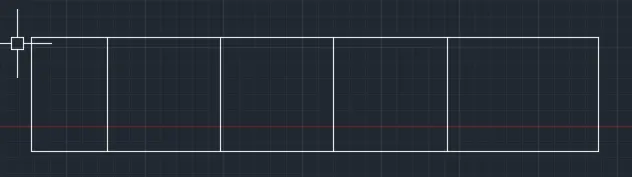
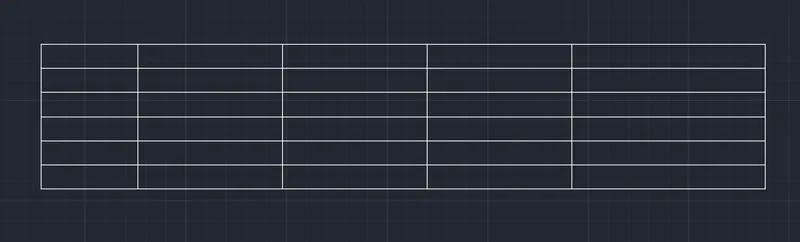
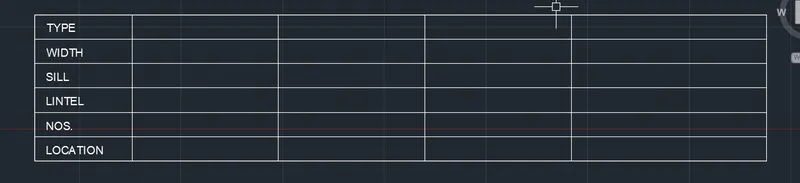
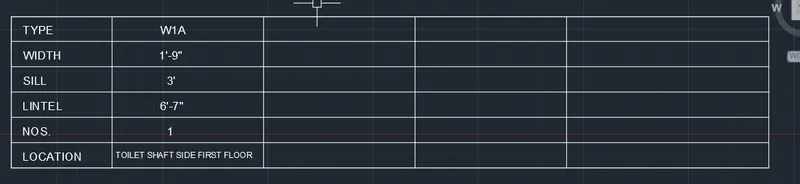
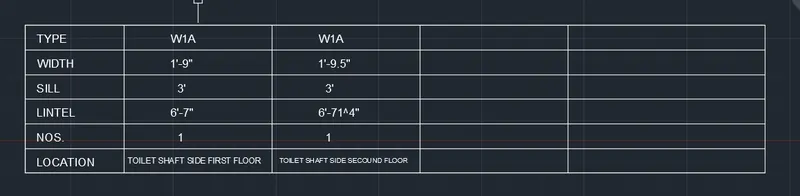
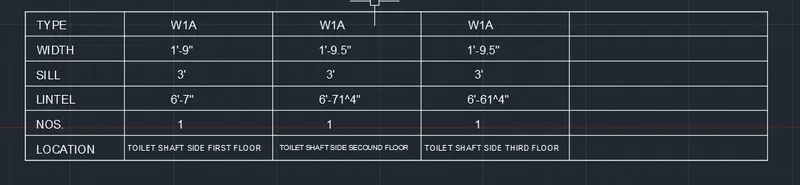
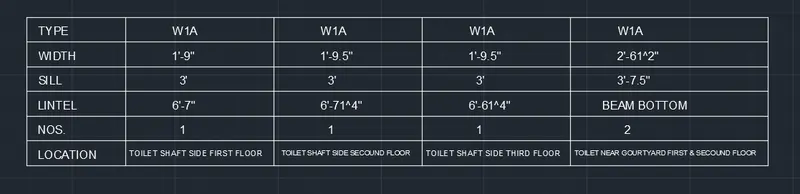
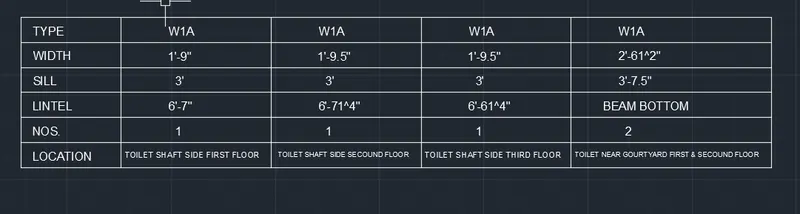
2. Create a window schedule as shown in the figures:
Window Schedule:
ANS :
AIM :
TO CREATE A WINDOW SCHEDULE AS IN THE FIGURES TO USE AUTOCAD TOOL
INTRODUCTION :
The Window schedule is which the details of window in construction can be collected in the table from, that is why we collect the window details in the from table for construction purposes.
COMMANDS ARE USED IN THIS CHALLENGE :
- UNITS COMMAND
- DIMSTYLE COMMAND
- LIMITS COMMAND
- LINE COMMAND
- TRIM COMMAND
- OBJECT SNAP COMMAND
- DONUT COMMAND
- SINGLE LINE TEXT COMMAND
- MTEXT COMMAND
- DIMLINEAR COMMAND
- DIVIDE COMMAND
- OFFSET COMMAND
- EXTEND COMMAND
PROCEDURE :
OPEN AUTOCAD TOOL
In Startup Settings start from scratch select IMPERIAL ( Feet and Inches )
Type un in command box and press enter
chang units type to as your requred
- IN THE COMMAND PROMPT LINE TO CREATE TABLE
- IN THE COMMAND PROMPT TYPT ST ( text style ) > SELET FONT NAME > 1"( Height ) > centre
- IN THE COMMAND PROMPT TYPE TEXT TO TEXT THE GIVEN TEXT IN THE DRAWIN
RESULT :
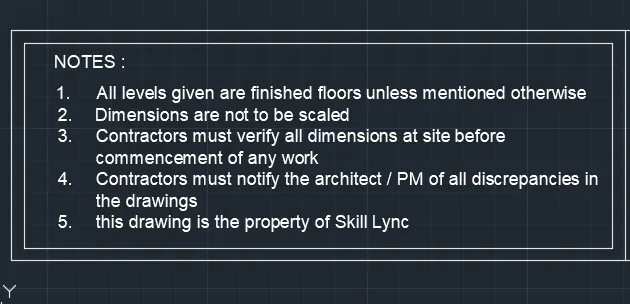
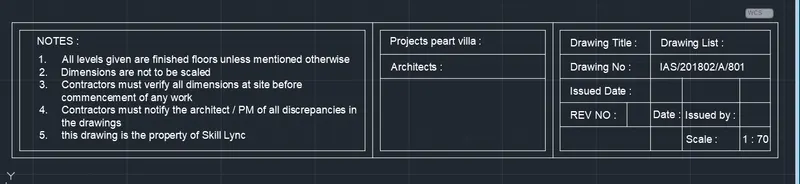
3. Create the drawing template as shown in the figure:< Use the Notes as in the figure>
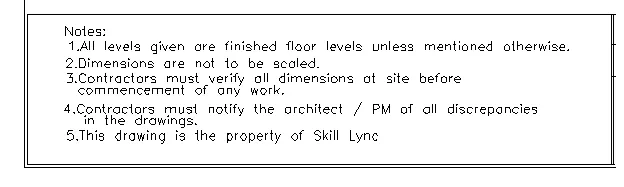

ANS :
AIM :
To Create the drawing template as shown in the figure by use AUTOCAD Tool
INTRODUCTION :
- Drawing template files are drawing that store styles, setting, layers, and layouts in a drawing including title blocks.
- when you create a new drawing based on a drawing template, the new drawing gets a copy of the styles in the template, but it is a one time copy.
COMMANDS ARE USED IN THIS CHALLENGE :
- UNITS COMMAND
- DIMSTYLE COMMAND
- LIMITS COMMAND
- LINE COMMAND
- CIRCLE COMMAND
- TRIM COMMAND
- OBJECT SNAP COMMAND
- DONUT COMMAND
- SINGLE LINE TEXT COMMAND
- MTEXT COMMAND
- DIMLINEAR COMMAND
- DIVIDE COMMAND
- OFFSET COMMAND
PROCEDURE :
OPEN AUTOCAD TOOL
In Startup Settings start from scratch select IMPERIAL ( Feet and Inches )
Type un in command box and press enter
chang units type to as your requred
- IN THE COMMAND PROMPT LINE TO CREATE TABLE
- IN THE COMMAND PROMPT TYPT ST ( text style ) > SELET FONT NAME > 1"( Height ) > centre
- IN THE COMMAND PROMPT TYPE TEXT TO TEXT THE GIVEN TEXT IN THE DRAWIN
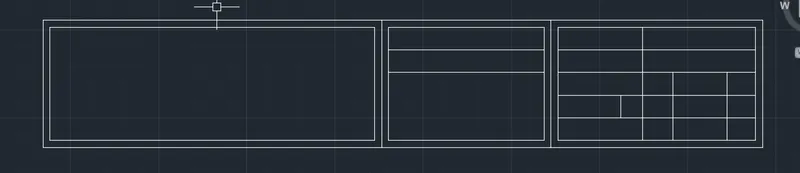
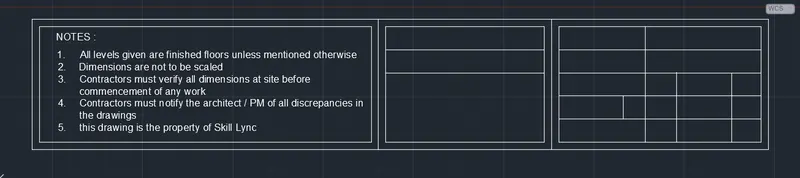
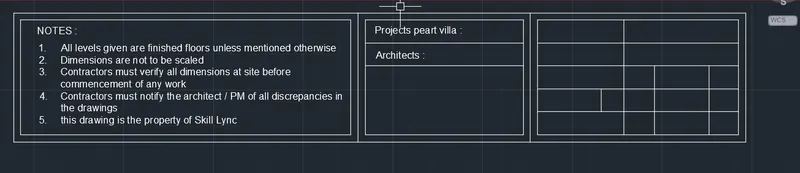
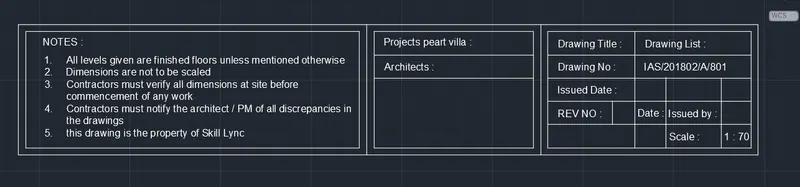
RESULT :
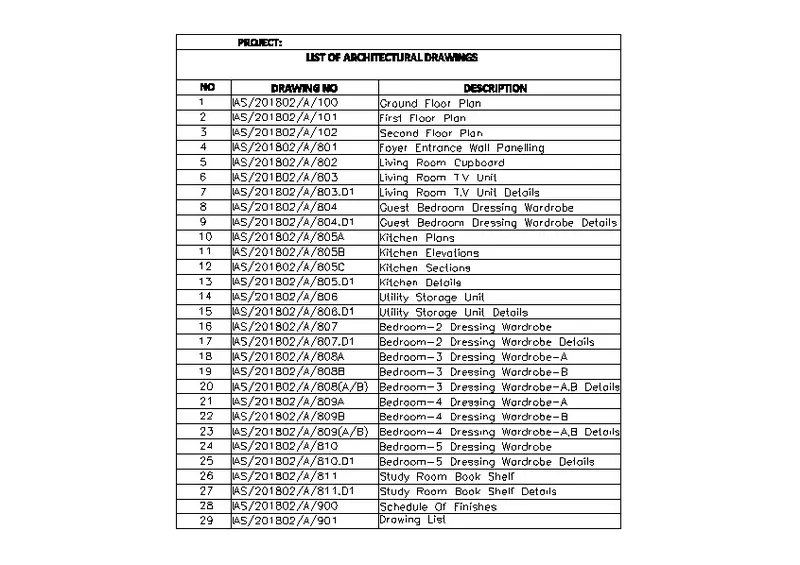
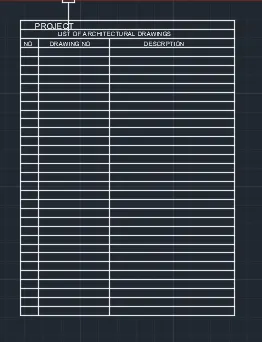
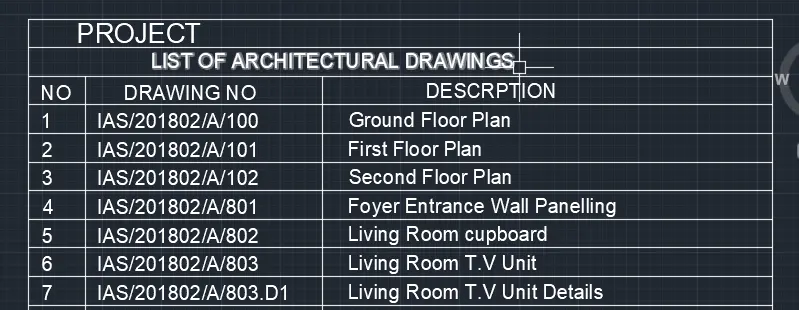
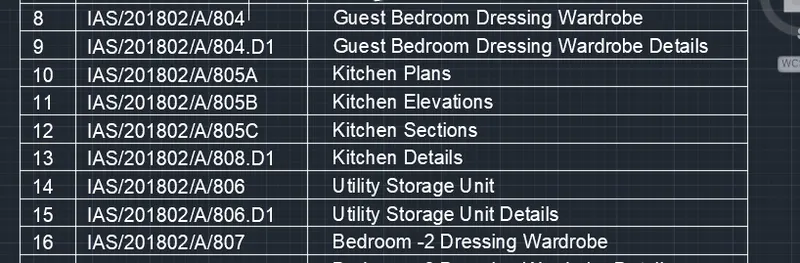
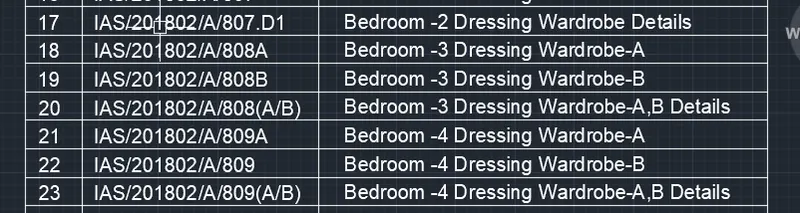
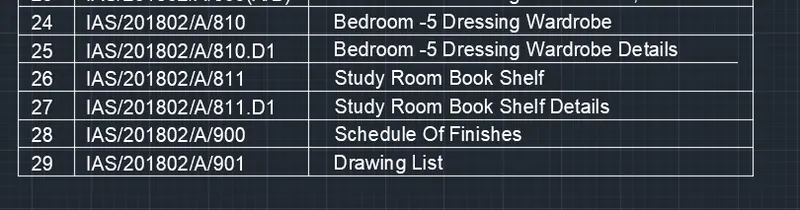
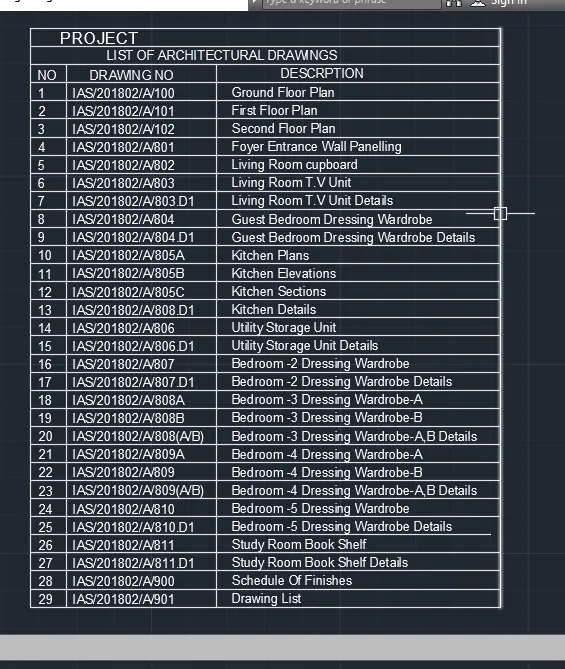
4. Create the list of drawing schedule as shown in the figure:
AIM :
Create the list of drawing schedule as shown in the figure By useing AUTOCAD Tool
INTRODUCTION :
- Drawing template files are drawing that store styles, setting, layers, and layouts in a drawing including title blocks.
- when you create a new drawing based on a drawing template, the new drawing gets a copy of the styles in the template, but it is a one time copy.
COMMANDS ARE USED IN THIS CHALLENGE :
- UNITS COMMAND
- DIMSTYLE COMMAND
- LIMITS COMMAND
- TABLE COMMAND
- SINGLE LINE TEXT COMMAND
- DIMLINEAR COMMAND
PROCEDURE :
OPEN AUTOCAD TOOL
In Startup Settings start from scratch select IMPERIAL ( Feet and Inches )
Type un in command box and press enter
chang units type to as your requred
- IN THE COMMAND PROMPT LINE TO CREATE TABLE
- IN THE COMMAND PROMPT TYPT ST ( text style ) > SELET FONT NAME > 1"( Height ) > centre
- IN THE COMMAND PROMPT TYPE TEXT TO TEXT THE GIVEN TEXT IN THE DRAWIN
Command: T
MTEXT
Current text style: "Standard" Text height: 0.20" Annotative: No
Specify first corner:
Specify opposite corner or [Height/Justify/Line spacing/Rotation/Style/Width/Columns]: H
Specify height <0.20">: 3"
Specify opposite corner or [Height/Justify/Line spacing/Rotation/Style/Width/Columns]:
Command: Specify opposite corner or [Fence/WPolygon/CPolygon]:
Command: T
MTEXT
Current text style: "Standard" Text height: 0.20" Annotative: No
Specify first corner:
Specify opposite corner or [Height/Justify/Line spacing/Rotation/Style/Width/Columns]: H
Specify height <0.20">: 3"
Specify opposite corner or [Height/Justify/Line spacing/Rotation/Style/Width/Columns]:
Command: Specify opposite corner or [Fence/WPolygon/CPolygon]:
RESULT :
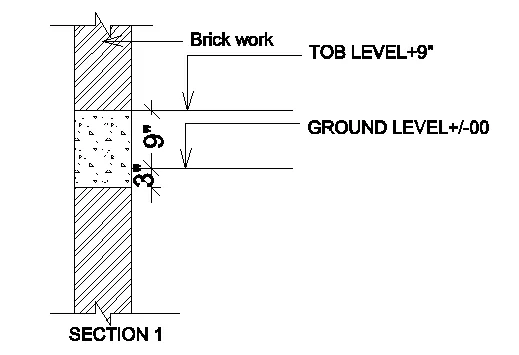
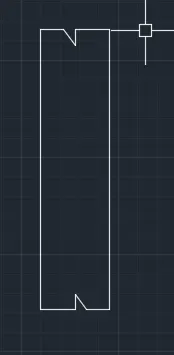
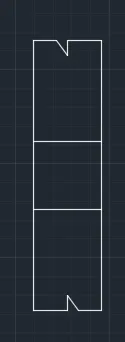
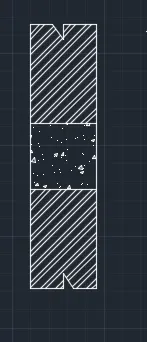
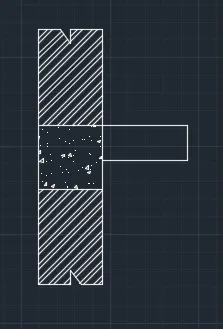
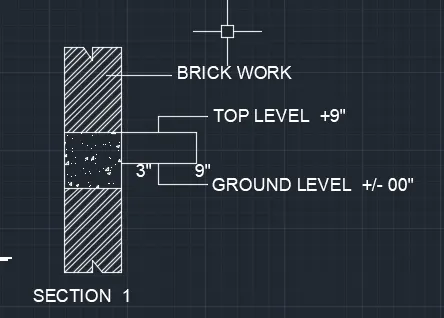
5. Create the Beam detail as shown in the figure and provide text wherever given.
AIM :
To Create the Beam detail as shown in the figure and provide text wherever given.
COMMANDS ARE USED IN THIS CHALLENGE :
- UNITS COMMAND
- DIMSTYLE COMMAND
- LIMITS COMMAND
- LINE COMMAND
- TRIM COMMAND
- OBJECT SNAP COMMAND
- SINGLE LINE TEXT COMMAND
- MTEXT COMMAND
- DIMLINEAR COMMAND
- DIVIDE COMMAND
- OFFSET COMMAND
- EXTEND COMMAND
- MIRROR COMMAND
PROCEDURE :
OPEN AUTOCAD TOOL
In Startup Settings start from scratch select IMPERIAL ( Feet and Inches )
Type un in command box and press enter
chang units type to as your requred
Command: L
LINE
Specify first point:
Specify next point or [Undo]: 3'
Specify next point or [Undo]: 9"
Specify next point or [Close/Undo]: 3'
Specify next point or [Close/Undo]: c
Command: L
LINE
Specify first point:
Specify next point or [Undo]: <Ortho off>
Specify next point or [Undo]: *Cancel*
Command: TR
TRIM
Current settings: Projection=UCS, Edge=None
Select cutting edges ...
Select objects or <select all>:
Select object to trim or shift-select to extend or
[Fence/Crossing/Project/Edge/eRase/Undo]:
Select object to trim or shift-select to extend or
[Fence/Crossing/Project/Edge/eRase/Undo]: *Cancel*
Command: L
LINE
Specify first point:
Specify next point or [Undo]: <Ortho off>
Specify next point or [Undo]: *Cancel*
Command: TR
TRIM
Current settings: Projection=UCS, Edge=None
Select cutting edges ...
Select objects or <select all>:
Select object to trim or shift-select to extend or
[Fence/Crossing/Project/Edge/eRase/Undo]:
Select object to trim or shift-select to extend or
[Fence/Crossing/Project/Edge/eRase/Undo]: *Cancel*
Command: L
LINE
Specify first point:
Specify next point or [Undo]:
Specify next point or [Undo]: *Cancel*
Command: O
OFFSET
Current settings: Erase source=No Layer=Source OFFSETGAPTYPE=0
Specify offset distance or [Through/Erase/Layer] <Through>: 4.5"
Select object to offset or [Exit/Undo] <Exit>:
Specify point on side to offset or [Exit/Multiple/Undo] <Exit>:
Select object to offset or [Exit/Undo] <Exit>:
Select object to offset or [Exit/Undo] <Exit>:
Specify point on side to offset or [Exit/Multiple/Undo] <Exit>:
Select object to offset or [Exit/Undo] <Exit>: *Cancel*
Command: H
HATCH
Pick internal point or [Select objects/Undo/seTtings]: Selecting everything...
Selecting everything visible...
Analyzing the selected data...
Analyzing internal islands...
Pick internal point or [Select objects/Undo/seTtings]: Selecting everything...
Selecting everything visible...
Analyzing the selected data...
Analyzing internal islands...
Pick internal point or [Select objects/Undo/seTtings]:
Command: HATCH
Pick internal point or [Select objects/Undo/seTtings]: Selecting everything...
Selecting everything visible...
Analyzing the selected data...
Analyzing internal islands...
Pick internal point or [Select objects/Undo/seTtings]:
Command: L
LINE
Specify first point:
Specify next point or [Undo]: 1'
Specify next point or [Undo]: 5"
Specify next point or [Close/Undo]: <Ortho on> 1'
Specify next point or [Close/Undo]: *Cancel*
Command: T
MTEXT
Current text style: "Standard" Text height: 8" Annotative: No
Specify first corner:
Specify opposite corner or [Height/Justify/Line spacing/Rotation/Style/Width/Columns]:
Command: Specify opposite corner or [Fence/WPolygon/CPolygon]:
RESULT :