Creation of Column Schedule and Drawing Template using AutoCad
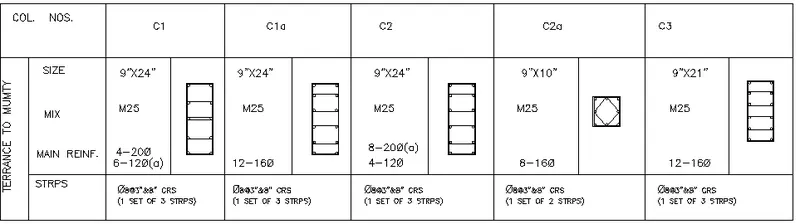
1. Create a column schedule as shown in the figure.
Note: Create a column schedule with the help of lines. Also, insert text with the help of Dtext command or Single Line text.
Hint: Use font name: romans.shx; Height: 8”, Justify: Left
A)A:
1.First open the autocad with imperical units tab.
2.The Enter Dtext command and justify left.
3.And set text to Romans.Shx and height to 8".
4.Then Draw the table and enter the words.
5.Draw the reinforcment details for every column as shown in the figure.
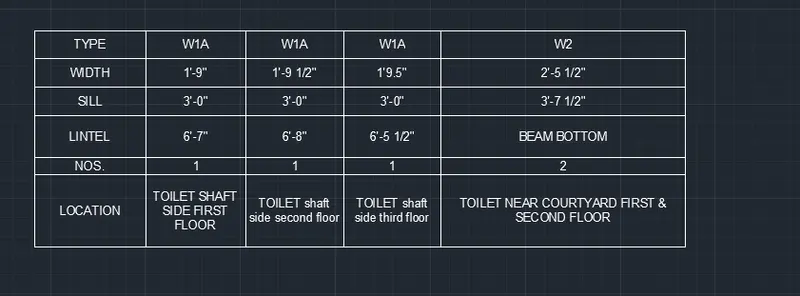
2. Create a window schedule as shown in the figures:
Window Schedule:
A:
1.To draw the window schedule using the autocad first open the new drawing.
2.Then draw the table for required columns and rows.
3.Then type the required schedule in the table as per specifications.
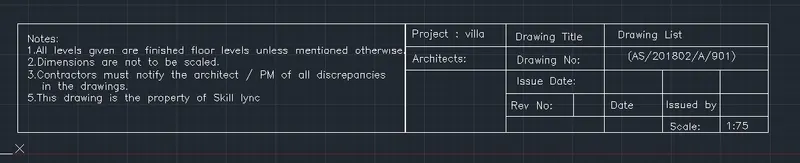
3. Create the drawing template as shown in the figure:< Use the Notes as in the figure>
A:
1.To draw the drawing template uisng autocad open new drawing.
2.First the template is used to specify the important points should be followed during Construction.
3.Draw a table of required rows and columns.
4.Then enter the Template details like notes, Project name , drawing title etc.,
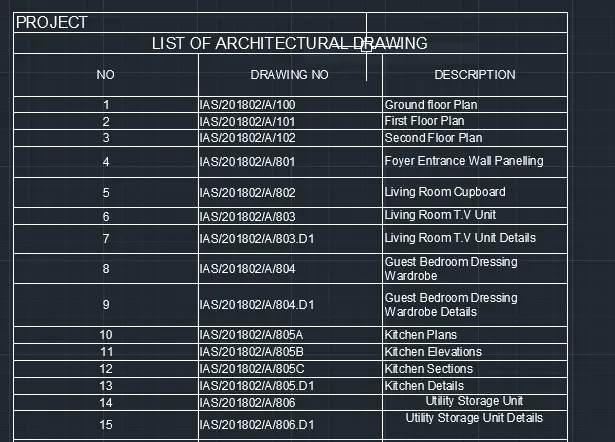
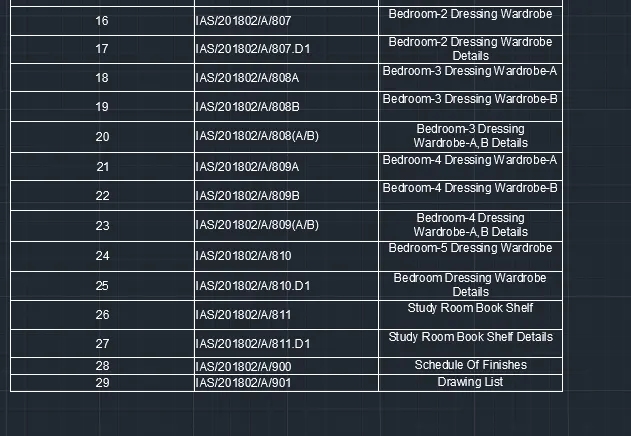
4. Create the list of drawing schedule as shown in the figure:
A:
1. To draw this table of specifications of rooms in the building.
2.Open the drawing tab then enter the table with required rows and columns.
3.Then enter the entities.
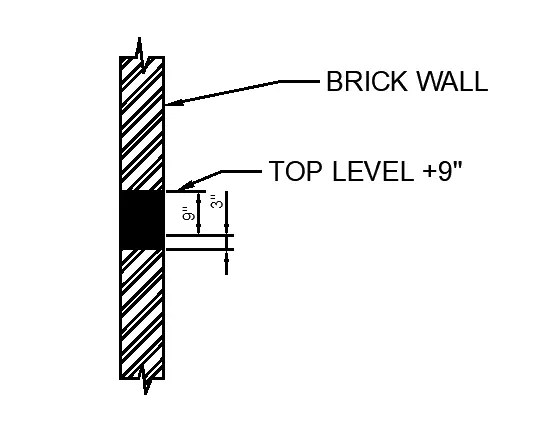
5. Create the Beam detail as shown in the figure and provide text wherever given.
A:
1.To draw the brick wall using autocad open the new file with imperical units.
2.Then draw a line and select the offset of 9" and draw a offset.
3.Then the concrete layer in between the wall is drawn.
4.Then select hatch and select the brick wall hatch and place on the brick wall.
5.Then select the concrete hatch and place on the concrete layer.
6.Then secify the dimensions.