Creation of Column Schedule and Drawing Template using AutoCad
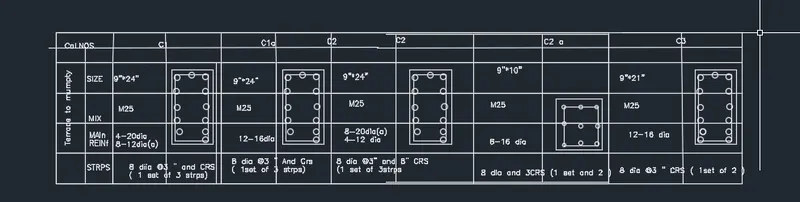
AIM:- To create a column schedule as shown in the figure
INtroduction:-Creating a column schedule with the help of lines.Also insert text with the help of Dtext command orsingle line text
- Using font name: roman.shx ;height 8" and justify left
Procedure:-
- In the command prompt type line to create tables
- In the command prompt type ST(text style) > roman.shx >8" height >left (justify)
- In the command prompttype text to text the given text in the drawing
- In the command prompt type MTEXT >symbols >to get diameter symbol
- Make the column C1 as shown
- Make the column C2 as shown
- MAke the column 3 a shown
- Make the table as shown
- Using the text stye ,fill the table using single line text
- Move the column one by one to their resoective places
- Give the heading clumn schedule using multi line text and underline it
- Using the text stye ,fill the table using single line text
- Move the column one by one to their resoective places
- Give the heading clumn schedule using multi line text and underline it
REsult:-
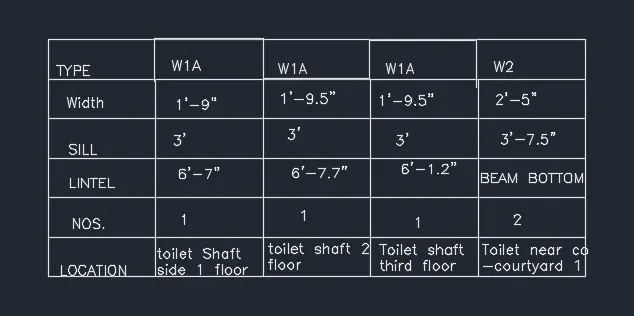
Aim:-To create a window schedule a shown
Introduction:-The table contains width,sill and lintel height ,their numbers and respective location for different types of beams.
Procedure:-
- Make the following table
- Using multiline ,fill the following data with justification middle center mc
- Using multiline ,give the heading Window schedule and underline it
- Using the text stye ,fill the table using single line text
- Move the column one by one to their resoective places
- Give the heading clumn schedule using multi line text and underline it
- Using the text stye ,fill the table using single line text
- Move the column one by one to their resoective places
- Give the heading clumn schedule using multi line text and underline it
Result:-
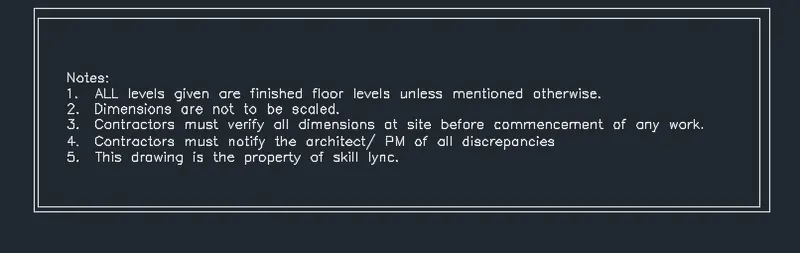
Aim:- Creating a drawing template as shown in the figure
Introduction:-All levels are given are finished floor levls unless mentioned otherwise
- Dimensions are not to be scaled
Procedure:-
- Make the following table
- Using multilinne text type the colum as shown in the figure and place in the first column
- Typpe the column in rest of the cells as shown using muktiline text
- MAk veertical line after REv.no
- Using the text stye ,fill the table using single line text
- Move the column one by one to their resoective places
- Give the heading clumn schedule using multi line text and underline it
- Using the text stye ,fill the table using single line text
Rsult:-

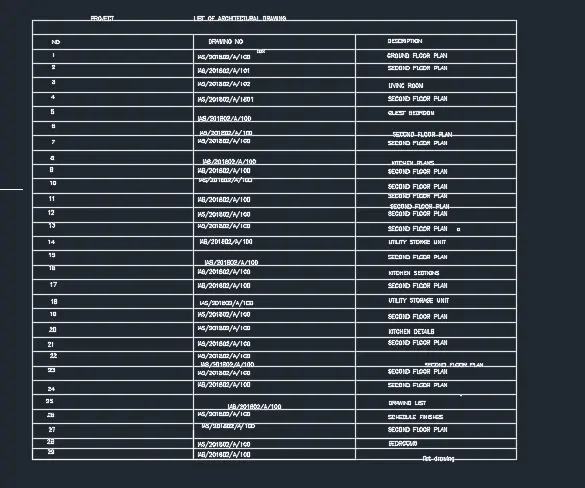
AIM:- Creating a list of drwaing schedule as shown in the figure
Procedure:-OPen the able command
- Make the following table
- Using multilinne text type the colum as shown in the figure and place in the first column
- Typpe the column in rest of the cells as shown using muktiline text
- MAk veertical line after REv.no
- Using the text stye ,fill the table using single line text
- Enter nummbr of rows and clumns set the cell styles andd using any inertion ,
- Insert the table
- Adjust size of rows and columns
- enter the data
- MAke the contents of title and header rows as bold
REsult:-
Aim:- Create a beam detail as show in the figure
Procedure:-MAke two paraalel line 45" long ata distance of6" from ecah other
- Using the breakline command make a breakline at top an bottom
- MAke the horizontal line as hown
- Give the requiredlabelling using leader and multitext
- Give the heading clumn schedule using multi line text and underline it
- Using the text stye ,fill the table using single line text
- Modiy he dimension to match with that in the question
- Give the hatching of brickwork and concrete as shown
REsult:-