Creating various 3D Models like Furniture, Footing, Girder, Column drop with panel and Gable Wall in AutoCad
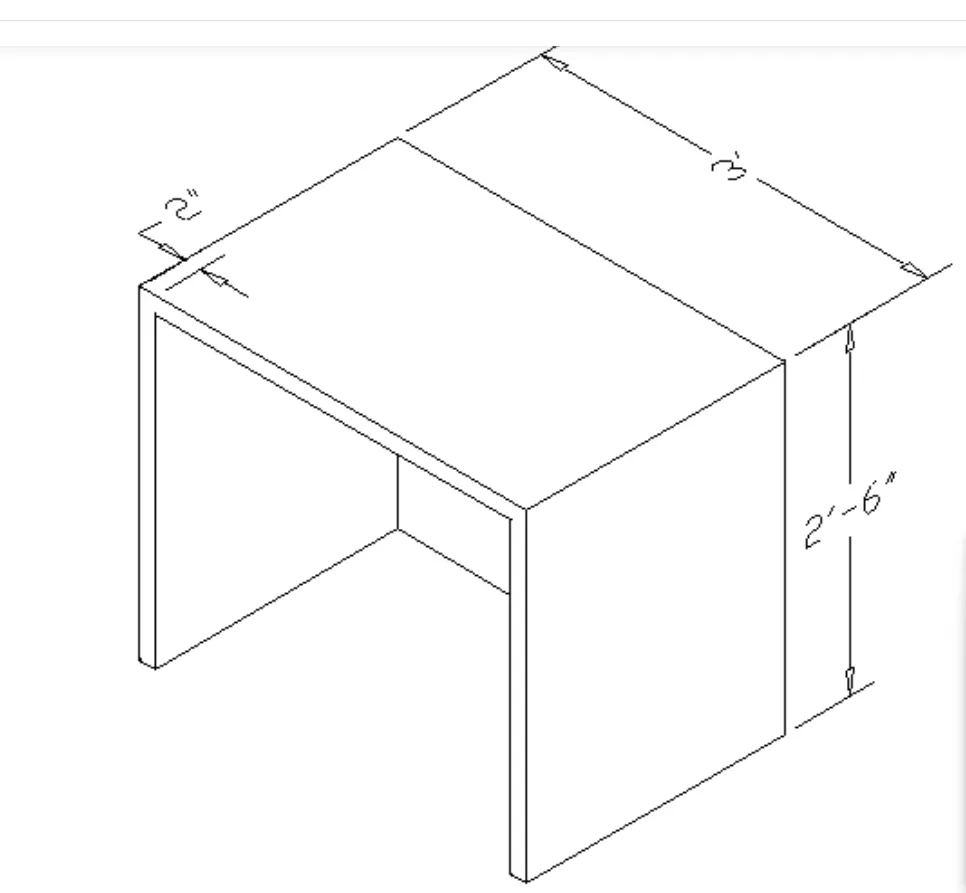
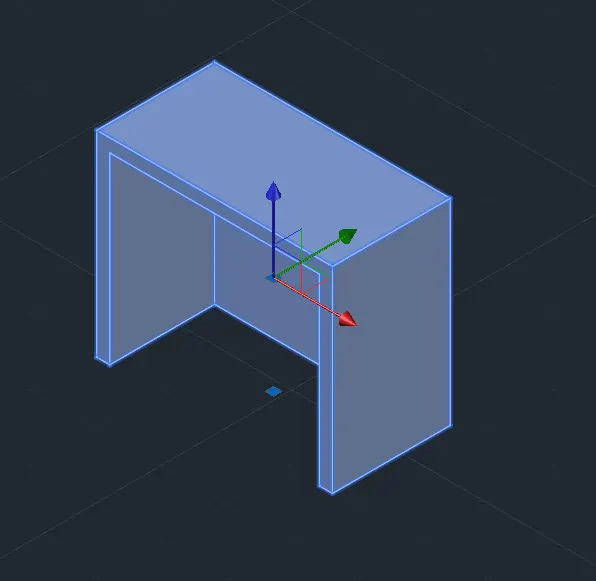
1. Create a 3D Furniture element as shown in the Figure. Assume dimensions which are missing.
generating model.
AutoCAD menu utilities loaded.*Cancel*
Command:
Command:
Command:
Command: UN
UNITS
Command: *Cancel*
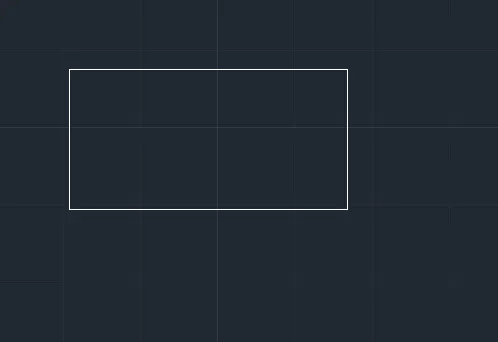
Command: REC
RECTANG
Specify first corner point or [Chamfer/Elevation/Fillet/Thickness/Width]:
Specify other corner point or [Area/Dimensions/Rotation]: d
Specify length for rectangles <0>: 3'
Specify width for rectangles <0>: 1.5'
Specify other corner point or [Area/Dimensions/Rotation]:
Command: *Cancel*
Command: O
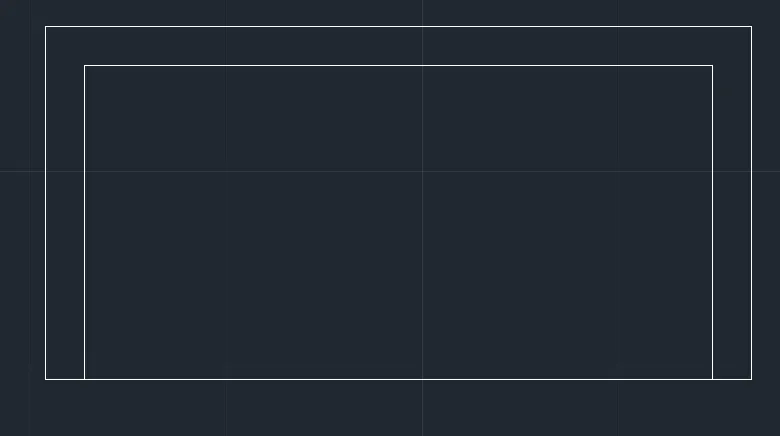
OFFSET
Current settings: Erase source=No Layer=Source OFFSETGAPTYPE=0
Specify offset distance or [Through/Erase/Layer] :
Select object to offset or [Exit/Undo] :
Specify through point or [Exit/Multiple/Undo] : 2"
Select object to offset or [Exit/Undo] : *Cancel*
Command: EXPLODE
Select objects: 1 found
Select objects:
Command: *Cancel*
Command:
Command: _.erase 1 found
Command: EX
EXTEND
Current settings: Projection=UCS, Edge=None, Mode=Quick
Select object to extend or shift-select to trim or
[Boundary edges/Crossing/mOde/Project]:
Select object to extend or shift-select to trim or
[Boundary edges/Crossing/mOde/Project/Undo]:
Specify next fence point or [Undo]:
Specify next fence point or [Undo]:
Select object to extend or shift-select to trim or
[Boundary edges/Crossing/mOde/Project/Undo]:
Select object to extend or shift-select to trim or
[Boundary edges/Crossing/mOde/Project/Undo]:
Specify next fence point or [Undo]:
Specify next fence point or [Undo]:
Select object to extend or shift-select to trim or
[Boundary edges/Crossing/mOde/Project/Undo]: *Cancel*
Command: Regenerating model.
Command: Regenerating model.
Command: Regenerating model.
Command: Regenerating model.
Command: Regenerating model.
Command: REGION
Window Lasso Press Spacebar to cycle options0 found
Select objects: *Cancel*
None found.
Command: BOUNDARY
Pick internal point: Selecting everything...
Selecting everything visible...
Analyzing the selected data...
Analyzing internal islands...
Pick internal point:
1 loop extracted.
1 Region created.
BOUNDARY created 1 region
Command: EXT
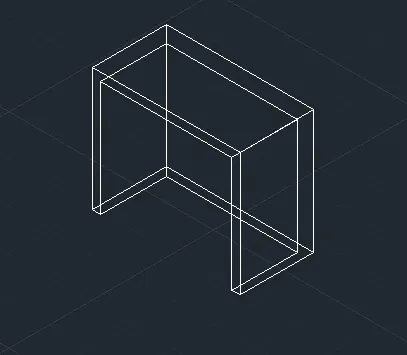
EXTRUDE
Current wire frame density: ISOLINES=4, Closed profiles creation mode = Solid
Select objects to extrude or [MOde]: 1 found
Select objects to extrude or [MOde]:
Specify height of extrusion or [Direction/Path/Taper angle/Expression]: 2'6"
Command: Specify opposite corner or [Fence/WPolygon/CPolygon]:
Command: *Cancel*
Command: EXTRUDE
Current wire frame density: ISOLINES=4, Closed profiles creation mode = Solid
Select objects to extrude or [MOde]: 1 found
Select objects to extrude or [MOde]:
Specify height of extrusion or [Direction/Path/Taper angle/Expression] <2>: 2'4"
Command: Specify opposite corner or [Fence/WPolygon/CPolygon]: *Cancel*
Command: SU
SUBTRACT Select solids, surfaces, and regions to subtract from ..
Select objects: 1 found
Select objects:
Select solids, surfaces, and regions to subtract ..
Select objects: 1 found
Select objects:
Command: *Cancel*
Command: Regenerating model.
_u INTELLIZOOM
Command: Regenerating model.
Command: *Cancel*
Command: *Cancel*
Command: _vscurrent
Enter an option [2dwireframe/Wireframe/Hidden/Realistic/Conceptual/Shaded/shaded with Edges/shades of Gray/SKetchy/X-ray/Other] <2dwireframe>: _s
Command:
Command: *Cancel*
Command:
Command:
Command: _qsave
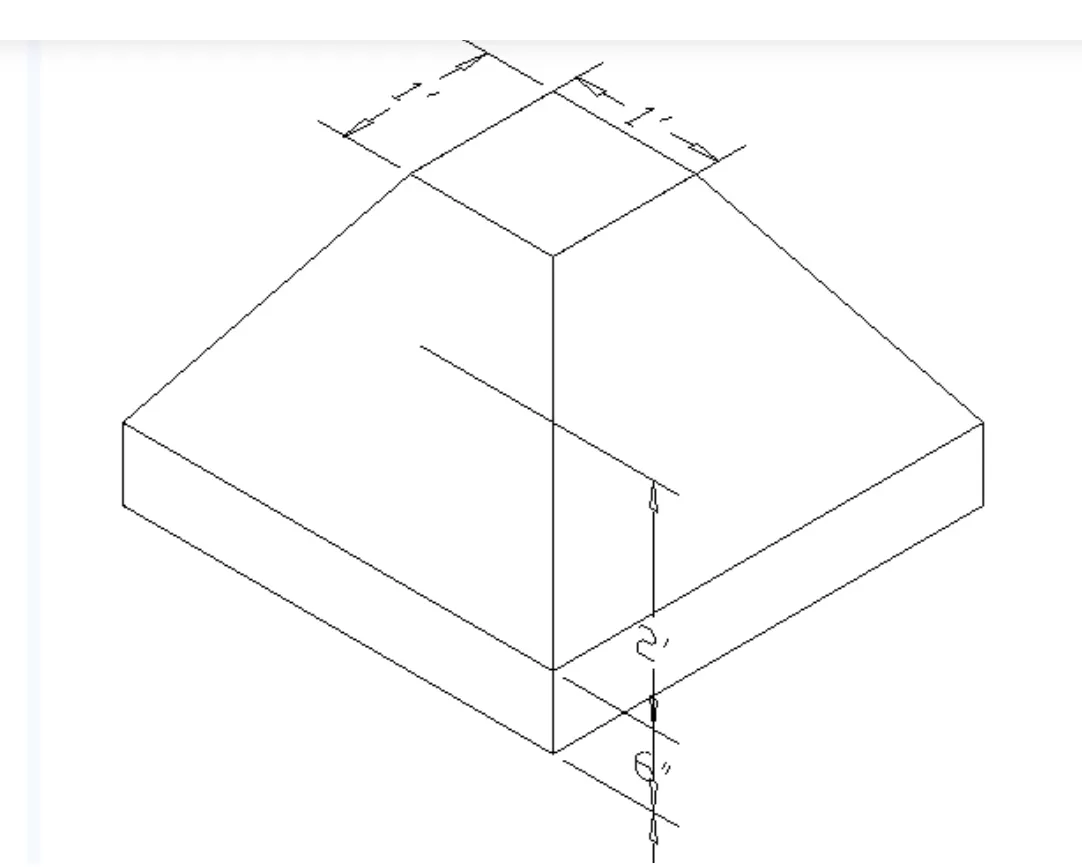
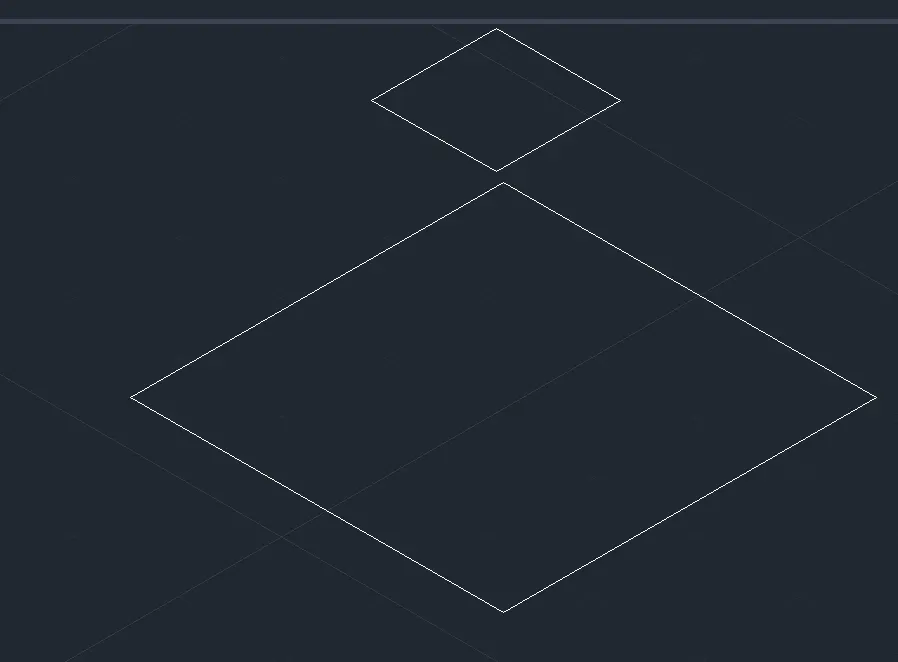
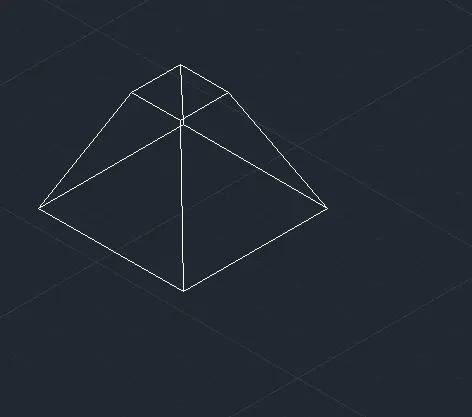
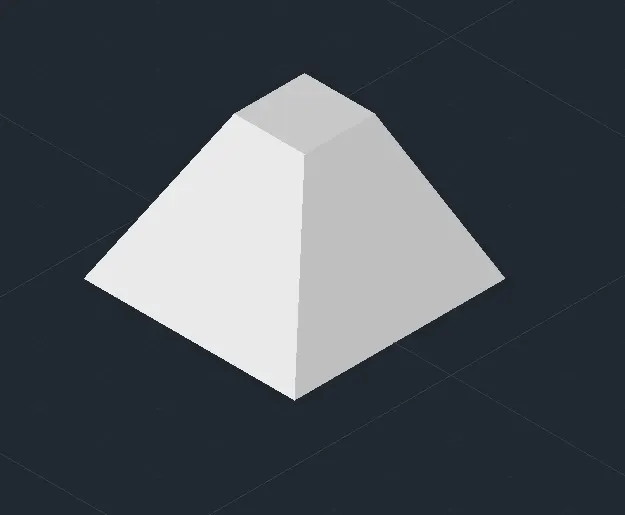
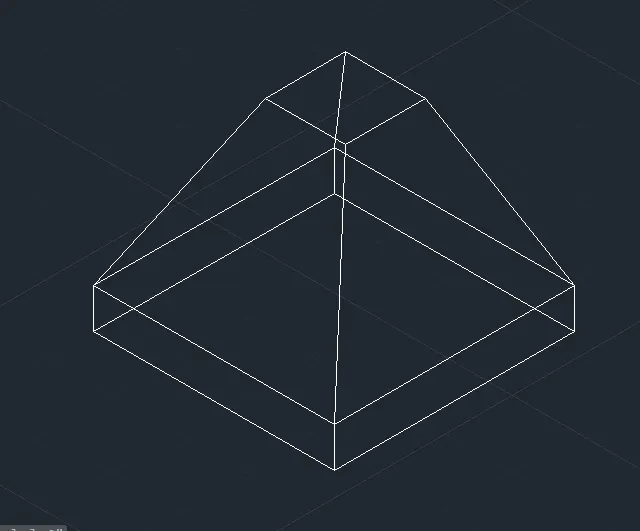
2. Create the 3d Model of an Isolated footing as shown in Figure.
Regenerating model.
AutoCAD menu utilities loaded.
Command:
Command:
Command:
Command: UN
UNITS
Command: *Cancel*
Command: REC
RECTANG
Specify first corner point or [Chamfer/Elevation/Fillet/Thickness/Width]:
Specify other corner point or [Area/Dimensions/Rotation]: d
Specify length for rectangles <0>: 3'
Specify width for rectangles <0>: 3'
Specify other corner point or [Area/Dimensions/Rotation]:
Command: REC
RECTANG
Specify first corner point or [Chamfer/Elevation/Fillet/Thickness/Width]:
Specify other corner point or [Area/Dimensions/Rotation]: d
Specify length for rectangles <3>: 1'
Specify width for rectangles <3>: 1'
Specify other corner point or [Area/Dimensions/Rotation]:
Command: UCSICON
Enter an option [ON/OFF/All/Noorigin/ORigin/Selectable/Properties] : N
Command: Regenerating model.
Command: MOVE
Select objects: 1 found
Select objects:
Specify base point or [Displacement] :
Specify second point or : 2'
Command:
Command:
Command: _loft
Current wire frame density: ISOLINES=4, Closed profiles creation mode = Solid
Select cross sections in lofting order or [POint/Join multiple edges/MOde]: _MO Closed profiles creation mode [SOlid/SUrface] : _SO
Select cross sections in lofting order or [POint/Join multiple edges/MOde]: 1 found
Select cross sections in lofting order or [POint/Join multiple edges/MOde]: 1 found, 2 total
Select cross sections in lofting order or [POint/Join multiple edges/MOde]:
2 cross sections selected
Enter an option [Guides/Path/Cross sections only/Settings] :
Command: Regenerating model.
Command: *Cancel*
Command: *Cancel*
Command: _vscurrent
Enter an option [2dwireframe/Wireframe/Hidden/Realistic/Conceptual/Shaded/shaded with Edges/shades of Gray/SKetchy/X-ray/Other] <2dwireframe>: _s
Command:
Command:
Command: _qsave
Command: *Cancel*
Command: _presspull
Select object or bounded area:
Specify extrusion height or [Multiple]:
Specify extrusion height or [Multiple]:6"
1 extrusion(s) created
Select object or bounded area:
Command: *Cancel*
Command: *Cancel*
Command: _vscurrent
Enter an option [2dwireframe/Wireframe/Hidden/Realistic/Conceptual/Shaded/shaded with Edges/shades of Gray/SKetchy/X-ray/Other] <2dwireframe>: _s
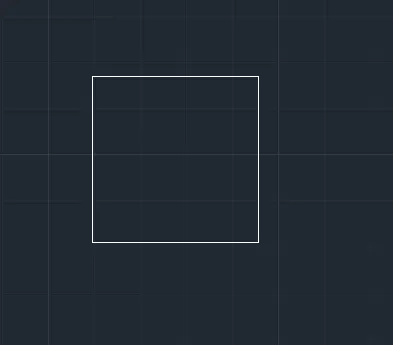
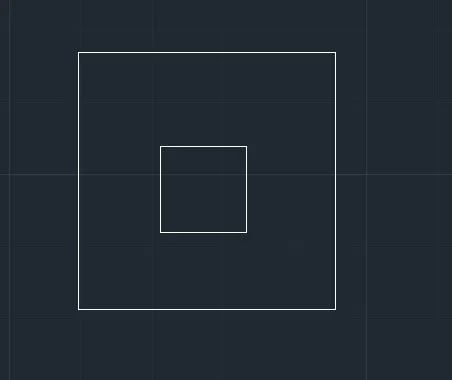
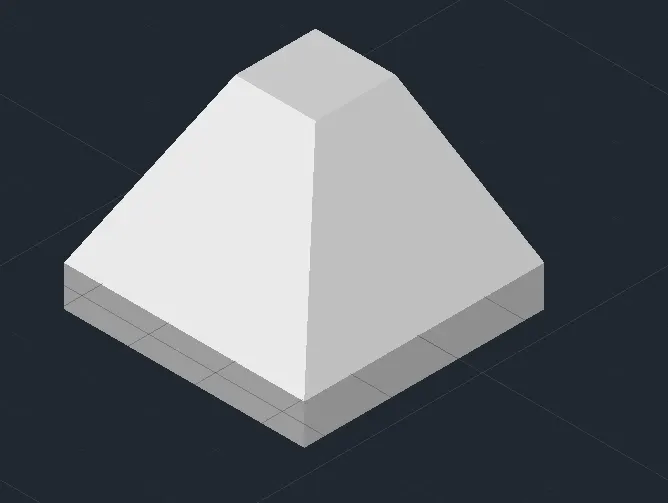
3. Create the 3D view of the AASTHO Type Girder.
nerating model.
AutoCAD menu utilities loaded.
Command:
Command:
Command:
Command: UN
UNITS
Command: *Cancel*
Command: L
LINE
Specify first point:
Specify next point or [Undo]: 1'6"
Specify next point or [Undo]: *Cancel*
Command: O
OFFSET
Current settings: Erase source=No Layer=Source OFFSETGAPTYPE=0
Specify offset distance or [Through/Erase/Layer]
Select object to offset or [Exit/Undo]
Specify through point or [Exit/Multiple/Undo]
Select object to offset or [Exit/Undo]
Command: LEN
LENGTHEN
Select an object to measure or [DElta/Percent/Total/DYnamic]
Enter delta length or [Angle] <0>: 1
Select an object to change or [Undo]:
Select an object to change or [Undo]:
Select an object to change or [Undo]: *Cancel*
Command: L
LINE
Specify first point:
Specify next point or [Undo]:
Specify next point or [Undo]: *Cancel*
Command: L
LINE
Specify first point:
Specify next point or [Undo]:
Specify next point or [Undo]: *Cancel*
Command:
Command: _.erase 1 found
Command: L
LINE
Specify first point: *Cancel*
Command: _u LINE
Command: _u ERASE
Command: *Cancel*
Command: O
OFFSET
Current settings: Erase source=No Layer=Source OFFSETGAPTYPE=0
Specify offset distance or [Through/Erase/Layer]
Select object to offset or [Exit/Undo]
Specify through point or [Exit/Multiple/Undo]
Select object to offset or [Exit/Undo]
Specify through point or [Exit/Multiple/Undo]
Select object to offset or [Exit/Undo]
Command: L
LINE
Specify first point:
Specify next point or [Undo]:
Specify next point or [Undo]: *Cancel*
Command: L
LINE
Specify first point:
Specify next point or [Undo]:
Specify next point or [Undo]: *Cancel*
Command: L
LINE
Specify first point:
Specify next point or [Undo]: *Cancel*
Command: L
LINE
Specify first point:
Specify next point or [Undo]: 1'6"
Specify next point or [Undo]: *Cancel*
Command: O
OFFSET
Current settings: Erase source=No Layer=Source OFFSETGAPTYPE=0
Specify offset distance or [Through/Erase/Layer]
Select object to offset or [Exit/Undo]
Specify through point or [Exit/Multiple/Undo]
Select object to offset or [Exit/Undo]
Specify through point or [Exit/Multiple/Undo]
Select object to offset or [Exit/Undo]
Command: L
LINE
Specify first point:
Specify next point or [Undo]:
Specify next point or [Undo]: *Cancel*
Command: L
LINE
Specify first point:
Specify next point or [Undo]:
Specify next point or [Undo]: *Cancel*
Crossing Lasso Press Spacebar to cycle options
Command: _.erase 2 found
Command: Specify opposite corner or [Fence/WPolygon/CPolygon]:
Command: _.erase 1 found
Command:
Command: _.erase 1 found
Command: L
LINE
Specify first point:
Specify next point or [Undo]:
Specify next point or [Undo]: *Cancel*
Command: LEN
LENGTHEN
Select an object to measure or [DElta/Percent/Total/DYnamic]
Enter delta length or [Angle] <0>: 3
Select an object to change or [Undo]:
Select an object to change or [Undo]:
Select an object to change or [Undo]: *Cancel*
Command: O
OFFSET
Current settings: Erase source=No Layer=Source OFFSETGAPTYPE=0
Specify offset distance or [Through/Erase/Layer]
Select object to offset or [Exit/Undo]
Specify through point or [Exit/Multiple/Undo]
Select object to offset or [Exit/Undo]
Specify through point or [Exit/Multiple/Undo]
Select object to offset or [Exit/Undo]
Command: L
LINE
Specify first point:
Specify next point or [Undo]:
Specify next point or [Undo]: *Cancel*
Command: L
LINE
Specify first point:
Specify next point or [Undo]:
Specify next point or [Undo]:
Specify next point or [Close/Undo]: *Cancel*
Command: L
LINE
Specify first point:
Specify next point or [Undo]:
Specify next point or [Undo]: *Cancel*
Crossing Lasso Press Spacebar to cycle options
Command: _.erase 2 found
Command: REG
REGION
Crossing Lasso Press Spacebar to cycle options14 found
Select objects:
1 loop extracted.
1 Region created.
Command: 3DROTATE
Current positive angle in UCS: ANGDIR=counterclockwise ANGBASE=0
Crossing Lasso Press Spacebar to cycle options1 found
Select objects:
Specify base point: Regenerating model.
Resuming 3DROTATE command.
Specify base point:
Specify rotation angle or [Copy/Reference] <0>:
Automatic save to C:\Users\91637\AppData\Local\Temp\Drawing7_1_30900_5fe18fb1.sv$ ...
Command:
Command: 3DROTATE
Current positive angle in UCS: ANGDIR=counterclockwise ANGBASE=0
Select objects: *Cancel*
Regenerating model.
Command: UCS
Current ucs name: *WORLD*
Specify origin of UCS or [Face/NAmed/OBject/Previous/View/World/X/Y/Z/ZAxis]
Command: *Cancel*
Command: 3DROTATE
Current positive angle in UCS: ANGDIR=counterclockwise ANGBASE=0
Select objects: 1 found
Select objects:
Specify base point:
** ROTATE **
Specify rotation angle or [Base point/Copy/Undo/Reference/eXit]: 90
Regenerating model.
Command: 3DROTATE
Current positive angle in UCS: ANGDIR=counterclockwise ANGBASE=0
Select objects: 1 found
Select objects:
Specify base point:
** ROTATE **
Specify rotation angle or [Base point/Copy/Undo/Reference/eXit]: 90
Regenerating model.
Command: Regenerating model.
Command: Regenerating model.
Command: Regenerating model.
Command: Regenerating model.
Command:
Command:
Command: _extrude
Current wire frame density: ISOLINES=4, Closed profiles creation mode = Solid
Select objects to extrude or [MOde]: _MO Closed profiles creation mode [SOlid/SUrface]
Select objects to extrude or [MOde]: 1 found
Select objects to extrude or [MOde]:
Specify height of extrusion or [Direction/Path/Taper angle/Expression] <-0'-6.00">: *Cancel*
Command: 3DROTATE
Current positive angle in UCS: ANGDIR=counterclockwise ANGBASE=0
Select objects: Specify opposite corner: 1 found
Select objects:
Specify base point:
** ROTATE **
Specify rotation angle or [Base point/Copy/Undo/Reference/eXit]: 90
Regenerating model.
Command: EXT
EXTRUDE
Current wire frame density: ISOLINES=4, Closed profiles creation mode = Solid
Select objects to extrude or [MOde]: 1 found
Select objects to extrude or [MOde]:
Specify height of extrusion or [Direction/Path/Taper angle/Expression] <-0'-6.00">: 10'
Command: *Cancel*
Command: *Cancel*
Command: _vscurrent
Enter an option [2dwireframe/Wireframe/Hidden/Realistic/Conceptual/Shaded/shaded with Edges/shades of Gray/SKetchy/X-ray/Other] <2dwireframe>: _s
Command:
Command:
Command: _qsave
4. Create a 3d Model of a drop column with panel as shown in section and isometric view.
AutoCAD menu utilities loaded.
Command:
Command:
Command:
Command: UN
UNITS
Command: *Cancel*
Command: '_-view Enter an option [?/Delete/Orthographic/Restore/Save/sEttings/Window]: _seiso Regenerating model.
Command: *Cancel*
Command: '_-view Enter an option [?/Delete/Orthographic/Restore/Save/sEttings/Window]: _top Regenerating model.
Command: *Cancel*
Command: L
LINE
Specify first point:
Specify next point or [Undo]:
Specify next point or [Undo]: *Cancel*
Command: O
OFFSET
Current settings: Erase source=No Layer=Source OFFSETGAPTYPE=0
Specify offset distance or [Through/Erase/Layer]
Select object to offset or [Exit/Undo]
Select object to offset or [Exit/Undo]
Specify through point or [Exit/Multiple/Undo]
Select object to offset or [Exit/Undo]
Command:
Command:
** STRETCH **
Specify stretch point or [Base point/Copy/Undo/eXit]:*Cancel*
Command: *Cancel*
Command: LEN
LENGTHEN
Select an object to measure or [DElta/Percent/Total/DYnamic]
Current length: 4'-6.00"
Select an object to measure or [DElta/Percent/Total/DYnamic]
Command:
Command:
** STRETCH **
Specify stretch point or [Base point/Copy/Undo/eXit]:6
Command:
** STRETCH **
Specify stretch point or [Base point/Copy/Undo/eXit]:6
Command: *Cancel*
Command: L
LINE
Specify first point: *Cancel*
Command: O
OFFSET
Current settings: Erase source=No Layer=Source OFFSETGAPTYPE=0
Specify offset distance or [Through/Erase/Layer]
Select object to offset or [Exit/Undo]
Specify through point or [Exit/Multiple/Undo]
Select object to offset or [Exit/Undo]
Command: L
LINE
Specify first point:
Specify next point or [Undo]: 10'
Specify next point or [Undo]: *Cancel*
Command: O
OFFSET
Current settings: Erase source=No Layer=Source OFFSETGAPTYPE=0
Specify offset distance or [Through/Erase/Layer]
Select object to offset or [Exit/Undo]
Specify through point or [Exit/Multiple/Undo]
Select object to offset or [Exit/Undo]
Specify through point or [Exit/Multiple/Undo]
Select object to offset or [Exit/Undo]
Command: L
LINE
Specify first point:
Specify next point or [Undo]:
Specify next point or [Undo]: *Cancel*
Command: L
LINE
Specify first point:
Specify next point or [Undo]:
Specify next point or [Undo]: *Cancel*
Command: L
LINE
Specify first point:
Specify next point or [Undo]:
Specify next point or [Undo]: *Cancel*
Command: LEN
LENGTHEN
Select an object to measure or [DElta/Percent/Total/DYnamic]
Select an object to measure or [DElta/Percent/Total/DYnamic]
Enter delta length or [Angle] <0>: 6
Select an object to change or [Undo]:
Select an object to change or [Undo]:
Select an object to change or [Undo]: *Cancel*
Command: L
LINE
Specify first point:
Specify next point or [Undo]:
Specify next point or [Undo]: *Cancel*
Command: L
LINE
Specify first point:
Specify next point or [Undo]:
Specify next point or [Undo]: *Cancel*
Command:
Command: _.erase 1 found
Command: Specify opposite corner or [Fence/WPolygon/CPolygon]:
Command: _.erase 1 found
Command: Regenerating model.
Command: *Cancel*
Command: REGION
Crossing Lasso Press Spacebar to cycle options9 found
Select objects:
1 loop extracted.
1 Region created.
Crossing Lasso Press Spacebar to cycle options
Command: Specify opposite corner or [Fence/WPolygon/CPolygon]: *Cancel*
Crossing Lasso Press Spacebar to cycle options
Command: Specify opposite corner or [Fence/WPolygon/CPolygon]: *Cancel*
Command: *Cancel*
Command: REG
REGION
Crossing Lasso Press Spacebar to cycle options6 found
Select objects:
1 closed, degenerate or unsupported object rejected.
0 loops extracted.
0 Regions created.
Command: *Cancel*
Command: BO
BOUNDARY
Pick internal point: Selecting everything...
Selecting everything visible...
Analyzing the selected data...
Analyzing internal islands...
Pick internal point:
1 loop extracted.
1 Region created.
BOUNDARY created 1 region
Command: Specify opposite corner or [Fence/WPolygon/CPolygon]:
Command: *Cancel*
Command:
Command: *Cancel*
Command: 3DROTATE
Current positive angle in UCS: ANGDIR=counterclockwise ANGBASE=0
Crossing Lasso Press Spacebar to cycle options6 found
Select objects:
Specify base point:
** ROTATE **
Specify rotation angle or [Base point/Copy/Undo/Reference/eXit]: Regenerating model.
Command:
REC
RECTANG
Specify first corner point or [Chamfer/Elevation/Fillet/Thickness/Width]:
Specify other corner point or [Area/Dimensions/Rotation]: d
Specify length for rectangles <0>: 3'
Specify width for rectangles <0>: 3'
Specify other corner point or [Area/Dimensions/Rotation]:
Command: O
OFFSET
Current settings: Erase source=No Layer=Source OFFSETGAPTYPE=0
Specify offset distance or [Through/Erase/Layer]
Select object to offset or [Exit/Undo]
Specify through point or [Exit/Multiple/Undo]
Select object to offset or [Exit/Undo]
Command: C
CIRCLE
Specify center point for circle or [3P/2P/Ttr (tan tan radius)]:
Specify radius of circle or [Diameter]: 2
Command: _u CIRCLE
Command: C
CIRCLE
Specify center point for circle or [3P/2P/Ttr (tan tan radius)]:
Specify radius of circle or [Diameter]: d
Specify diameter of circle: 6"
Command:
Command:
** STRETCH **
Specify stretch point or [Base point/Copy/Undo/eXit]: 1'
Automatic save to C:\Users\91637\AppData\Local\Temp\Drawing8_1_17713_1da65c1e.sv$ ...
Command:
Command:
** STRETCH **
Specify stretch point or [Base point/Copy/Undo/eXit]: 9
Command:
** STRETCH **
Specify stretch point or [Base point/Copy/Undo/eXit]: 6
Command: *Cancel*
Command: Regenerating model.
Command: Regenerating model.
Command: Regenerating model.
Command: Regenerating model.
Command: Regenerating model.
Command: EXT
EXTRUDE
Current wire frame density: ISOLINES=4, Closed profiles creation mode = Solid
Select objects to extrude or [MOde]: *Cancel*
Command:
Command: _.erase 1 found
Command:
Command:
Command: _presspull
Select object or bounded area:
Specify extrusion height or [Multiple]:
Specify extrusion height or [Multiple]:2
1 extrusion(s) created
Select object or bounded area:
Command: EXTRUDE
Current wire frame density: ISOLINES=4, Closed profiles creation mode = Solid
Select objects to extrude or [MOde]: 1 found
Select objects to extrude or [MOde]:
Specify height of extrusion or [Direction/Path/Taper angle/Expression] <-10'-0.00">: 6'
Command: *Cancel*
Command: *Cancel*
Command: *Cancel*
Command: _vscurrent
Enter an option [2dwireframe/Wireframe/Hidden/Realistic/Conceptual/Shaded/shaded with Edges/shades of Gray/SKetchy/X-ray/Other] <2dwireframe>: _s
Command:
Command: *Cancel*
Command: 3DROTATE
Current positive angle in UCS: ANGDIR=counterclockwise ANGBASE=0
Crossing Lasso Press Spacebar to cycle options0 found
Select objects: *Cancel*
Command: *Cancel*
Command: *Cancel*
Command: _vscurrent
Enter an option [2dwireframe/Wireframe/Hidden/Realistic/Conceptual/Shaded/shaded with Edges/shades of Gray/SKetchy/X-ray/Other]
Command: *Cancel*
Command: 3DROTATE
Current positive angle in UCS: ANGDIR=counterclockwise ANGBASE=0
Crossing Lasso Press Spacebar to cycle options3 found
Select objects:
Specify base point:
** ROTATE **
Specify rotation angle or [Base point/Copy/Undo/Reference/eXit]: Regenerating model.
Command: *Cancel*
Command: *Cancel*
Command: *Cancel*
Command: _vscurrent
Enter an option [2dwireframe/Wireframe/Hidden/Realistic/Conceptual/Shaded/shaded with Edges/shades of Gray/SKetchy/X-ray/Other] <2dwireframe>: _s
Command: *Cancel*
Command:
Command:
Command: *Cancel*
Command:
Command: *Cancel*
Command: *Cancel*
Command: _vscurrent
Enter an option [2dwireframe/Wireframe/Hidden/Realistic/Conceptual/Shaded/shaded with Edges/shades of Gray/SKetchy/X-ray/Other]
Command: Specify opposite corner or [Fence/WPolygon/CPolygon]:
Command: SHADED
Unknown command "SHADED". Press F1 for help.
Command: *Cancel*
Command: SHADEMODE
VSCURRENT
Enter an option [2dwireframe/Wireframe/Hidden/Realistic/Conceptual/Shaded/shaded with Edges/shades of Gray/SKetchy/X-ray/Other] <2dwireframe>: E
5. Create the 3d model of a wall as shown in Figure. Consider wall thickness as 9”.
AutoCAD menu utilities loaded.
Command:
Command:
Command:
Command: UN
UNITS
Command: *Cancel*
Command: REC
RECTANG
Specify first corner point or [Chamfer/Elevation/Fillet/Thickness/Width]:
Specify other corner point or [Area/Dimensions/Rotation]: d
Specify length for rectangles <0>: 10'
Specify width for rectangles <0>: 12'6"
Specify other corner point or [Area/Dimensions/Rotation]:
Command: REC
RECTANG
Specify first corner point or [Chamfer/Elevation/Fillet/Thickness/Width]:
Specify other corner point or [Area/Dimensions/Rotation]: d
Specify length for rectangles <10>: 3'
Specify width for rectangles <12>: 7'
Specify other corner point or [Area/Dimensions/Rotation]:
Command: MOVE
Select objects: 1 found
Select objects:
Specify base point or [Displacement]
Specify second point or
Command: Regenerating model.
Command: EXTRUDE
Current wire frame density: ISOLINES=4, Closed profiles creation mode = Solid
Select objects to extrude or [MOde]: 1 found
Select objects to extrude or [MOde]:
Specify height of extrusion or [Direction/Path/Taper angle/Expression] <6>: 9
Command: *Cancel*
Command: EXT
EXTRUDE
Current wire frame density: ISOLINES=4, Closed profiles creation mode = Solid
Select objects to extrude or [MOde]: 1 found
Select objects to extrude or [MOde]:
Specify height of extrusion or [Direction/Path/Taper angle/Expression] <-0'-9.00">: 9
Command: *Cancel*
Command: SUBTRACT
Select solids, surfaces, and regions to subtract from ..
Select objects: 1 found
Select objects:
Select solids, surfaces, and regions to subtract ..
Select objects: 1 found
Select objects:
Command: *Cancel*
Command: L
LINE
Specify first point:
Specify next point or [Undo]:
Specify next point or [Undo]:
Specify next point or [Close/Undo]: *Cancel*
Command: EX
EXTEND
View is not plan to UCS. Command results may not be obvious.
Current settings: Projection=UCS, Edge=None, Mode=Quick
Select object to extend or shift-select to trim or
[Boundary edges/Crossing/mOde/Project]:
Select object to extend or shift-select to trim or
[Boundary edges/Crossing/mOde/Project/Undo]:
Select object to extend or shift-select to trim or
[Boundary edges/Crossing/mOde/Project/Undo]:
Specify next fence point or [Undo]:
Specify next fence point or [Undo]:
Path does not intersect with the bounding edge.
Select object to extend or shift-select to trim or
[Boundary edges/Crossing/mOde/Project/Undo]: *Cancel*
Command: L
LINE
Specify first point:
Specify next point or [Undo]: 10'
Specify next point or [Undo]:
Specify next point or [Close/Undo]: *Cancel*
Command: SLICE
Select objects to slice: 1 found
Select objects to slice: *Cancel*
Command: *Cancel*
Command: *Cancel*
Command: *Cancel*
Command: Specify opposite corner or [Fence/WPolygon/CPolygon]: *Cancel*
Command: SOLIDEDIT
Solids editing automatic checking: SOLIDCHECK=1
Enter a solids editing option [Face/Edge/Body/Undo/eXit]
Enter a face editing option
[Extrude/Move/Rotate/Offset/Taper/Delete/Copy/coLor/mAterial/Undo/eXit]
Command: *Cancel*
Command: 3point
Unknown command "3POINT". Press F1 for help.
Command: *Cancel*
Command: *Cancel*
Command: L
LINE
Specify first point:
Specify next point or [Undo]:
Specify next point or [Undo]: *Cancel*
Command: SL
SLICE
Select objects to slice: 1 found
Select objects to slice:
Command: *Cancel*
Command: Regenerating model.
Command: L
LINE
Specify first point:
Specify next point or [Undo]:
Specify next point or [Undo]: *Cancel*
Command: Regenerating model.
Command: Regenerating model.
Command: Regenerating model.
Command: EXT
EXTRUDE
Current wire frame density: ISOLINES=4, Closed profiles creation mode = Solid
Select objects to extrude or [MOde]: 1 found
Select objects to extrude or [MOde]:
Specify height of extrusion or [Direction/Path/Taper angle/Expression] <-0'-9.00">: *Cancel*
Command: Regenerating model.
Command: Regenerating model.
Command: Regenerating model.
Command: Regenerating model.
Command: Regenerating model.
Command: Regenerating model.
Command:
Command: _.erase 1 found
Command:
Command: _.erase 1 found
Command:
Command: _.erase 1 found
Command: Specify opposite corner or [Fence/WPolygon/CPolygon]:
Command: _.erase 1 found
Command: TR
TRIM
Current settings: Projection=UCS, Edge=None, Mode=Quick
Select object to trim or shift-select to extend or
[cuTting edges/Crossing/mOde/Project/eRase]:
Select object to trim or shift-select to extend or
[cuTting edges/Crossing/mOde/Project/eRase/Undo]:
Select object to trim or shift-select to extend or
[cuTting edges/Crossing/mOde/Project/eRase/Undo]:
Specify next fence point or [Undo]:
Specify next fence point or [Undo]:
Specify next fence point or [Undo]:
Specify next fence point or [Undo]:
Cannot TRIM this object.
Select object to trim or shift-select to extend or
[cuTting edges/Crossing/mOde/Project/eRase/Undo]:
Select object to trim or shift-select to extend or
[cuTting edges/Crossing/mOde/Project/eRase/Undo]:
Specify next fence point or [Undo]:
Specify next fence point or [Undo]:
Cannot TRIM this object.
Select object to trim or shift-select to extend or
[cuTting edges/Crossing/mOde/Project/eRase/Undo]: *Cancel*
Command: *Cancel*
Command: Specify opposite corner or [Fence/WPolygon/CPolygon]:
Command: *Cancel*
Command: Specify opposite corner or [Fence/WPolygon/CPolygon]:
Command: *Cancel*
Command: *Cancel*
Command: BOUNDARY
Pick internal point: Selecting everything...
Selecting everything visible...
Analyzing the selected data...
Analyzing internal islands...
Pick internal point:
1 loop extracted.
1 Region created.
BOUNDARY created 1 region
Command: *Cancel*
Command:
Command: _.erase 1 found
Command: Regenerating model.
Command: Regenerating model.
Command: Regenerating model.
Command: EXT
EXTRUDE
Current wire frame density: ISOLINES=4, Closed profiles creation mode = Solid
Select objects to extrude or [MOde]: 1 found
Select objects to extrude or [MOde]:
Specify height of extrusion or [Direction/Path/Taper angle/Expression] <-0'-9.00">: 9
Automatic save to C:\Users\91637\AppData\Local\Temp\Drawing9_1_18958_44f69327.sv$ ...
Command:
Command: *Cancel*
Command: 3DROTATE
Current positive angle in UCS: ANGDIR=counterclockwise ANGBASE=0
Crossing Lasso Press Spacebar to cycle options1 found
Select objects:
Specify base point:
** ROTATE **
Specify rotation angle or [Base point/Copy/Undo/Reference/eXit]: Regenerating model.
Command: _u 3DROTATE
Command:
Command: *Cancel*
Command: 3DROTATE
Current positive angle in UCS: ANGDIR=counterclockwise ANGBASE=0
Crossing Lasso Press Spacebar to cycle options1 found
Select objects:
Specify base point:
** ROTATE **
Specify rotation angle or [Base point/Copy/Undo/Reference/eXit]: Regenerating model.
Command: *Cancel*
Command:
Command: _.erase 1 found
Crossing Lasso Press Spacebar to cycle options
Command: Specify opposite corner or [Fence/WPolygon/CPolygon]: _.erase 1 found
Command: *Cancel*
Command: *Cancel*
Command: _vscurrent
Enter an option [2dwireframe/Wireframe/Hidden/Realistic/Conceptual/Shaded/shaded with Edges/shades of Gray/SKetchy/X-ray/Other] <2dwireframe>: _s
Command:
Command:
Command: _qsave