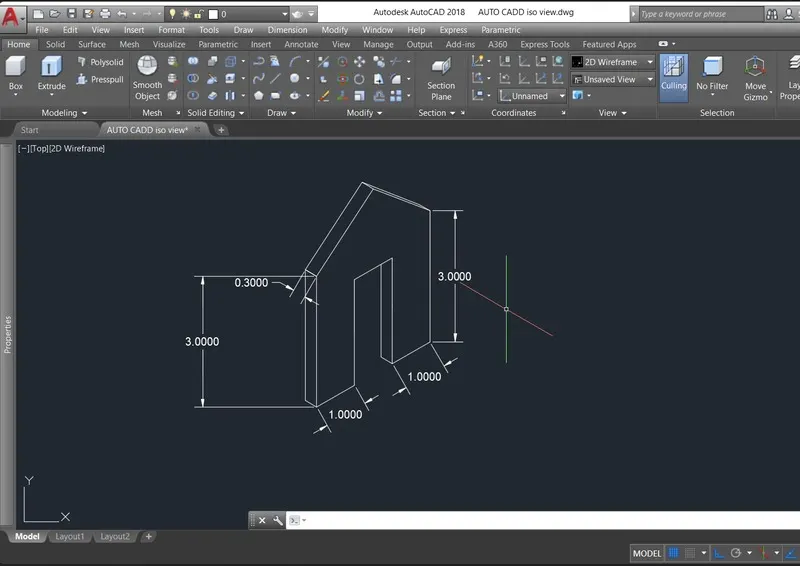
Creating various 3D Models like Furniture, Footing, Girder, Column drop with panel and Gable Wall in AutoCad
AIM:
To create 3d model
comments :
- line
-dli
-ps
-mv
Procedure:
'Specify next point or [Undo]: 3'
Specify next point or [Undo]:
Resuming LINE command.
Specify next point or [Undo]: _u
Specify next point or [Undo]:
Resuming LINE command.
Specify next point or [Undo]:
Resuming LINE command.
Specify next point or [Undo]:
Resuming LINE command.
Specify next point or [Undo]:
Resuming LINE command.
Specify next point or [Undo]: 3'
Specify next point or [Undo]:
Resuming LINE command.
Specify next point or [Undo]:
Resuming LINE command.
Specify next point or [Undo]:
Resuming LINE command.
Specify next point or [Undo]: Cancel
Command:
Command:
Press ESC or ENTER to exit, or right-click to display shortcut-menu.
Command:
Command:
* STRETCH *
Specify stretch point or [Base point/Copy/Undo/eXit]:
Command: Cancel
Command:
Command:
* STRETCH *
Specify stretch point or [Base point/Copy/Undo/eXit]:
Command: Cancel
Crossing Lasso Press Spacebar to cycle options
Command: Cancel
Command:
Press ESC or ENTER to exit, or right-click to display shortcut-menu.
Command:
Command:
* STRETCH *
Specify stretch point or [Base point/Copy/Undo/eXit]:6"
Point or option keyword required.
Specify stretch point or [Base point/Copy/Undo/eXit]:Cancel
Command: Cancel
Command: Cancel
Command:
Command: _.erase 1 found
Command: L
LINE
Specify first point:
Specify next point or [Undo]: 2'6"
Specify next point or [Undo]:
Specify next point or [Close/Undo]: Cancel
Command:
Command: _.erase 1 found
Command:
Press ESC or ENTER to exit, or right-click to display shortcut-menu.
Command: Cancel
Command: L
LINE
Specify first point:
Specify next point or [Undo]:
Specify next point or [Undo]: Cancel
Command: Cancel
Command: Cancel
Command: <Switching to: Layout1>
Restoring cached viewports - Regenerating layout.
Regenerating 10 modified entities.
Command: Cancel
Command: Cancel
Command: <Switching to: Model>
Restoring cached viewports.
Command:
Command:
Command:
Command:
Command:
Press ESC or ENTER to exit, or right-click to display shortcut-menu.
Command: L
LINE
Specify first point:
Specify next point or [Undo]:
Resuming LINE command.
Specify next point or [Undo]:
Resuming LINE command.
Specify next point or [Undo]: 3'
Specify next point or [Undo]: Cancel
Command:
Command:
* STRETCH *
Specify stretch point or [Base point/Copy/Undo/eXit]:
Command: Cancel
Command:
Command:
Command: Cancel
Command:
Command:
* STRETCH *
Specify stretch point or [Base point/Copy/Undo/eXit]:Cancel
Command:
Press ESC or ENTER to exit, or right-click to display shortcut-menu.
Crossing Lasso Press Spacebar to cycle options
Command: Cancel
Command:
Press ESC or ENTER to exit, or right-click to display shortcut-menu.
Command:
Command:
* STRETCH *
Specify stretch point or [Base point/Copy/Undo/eXit]:Cancel
Command: Cancel
Command: Cancel
Command:
Command: _.erase 1 found
Command: OFFSET
Current settings: Erase source=No Layer=Source OFFSETGAPTYPE=0
Specify offset distance or [Through/Erase/Layer] <Through>:
Select object to offset or [Exit/Undo] <Exit>:
Specify through point or [Exit/Multiple/Undo] <Exit>: 2"
Select object to offset or [Exit/Undo] <Exit>: Cancel
Command:
Command: _.erase 1 found
Command:
Command:
* STRETCH *
Specify stretch point or [Base point/Copy/Undo/eXit]:
Command:
* STRETCH *
Specify stretch point or [Base point/Copy/Undo/eXit]:
Command: Cancel
Command:
Window Lasso Press Spacebar to cycle options
Command:
Command:
Command:
Press ESC or ENTER to exit, or right-click to display shortcut-menu.
Command: O
OFFSET
Current settings: Erase source=No Layer=Source OFFSETGAPTYPE=0
Specify offset distance or [Through/Erase/Layer] <Through>:
Select object to offset or [Exit/Undo] <Exit>:
Specify through point or [Exit/Multiple/Undo] <Exit>: 2"
Select object to offset or [Exit/Undo] <Exit>:
Resuming OFFSET command.
Select object to offset or [Exit/Undo] <Exit>:
Resuming OFFSET command.
Select object to offset or [Exit/Undo] <Exit>:
Specify through point or [Exit/Multiple/Undo] <Exit>: 2"
Select object to offset or [Exit/Undo] <Exit>: Cancel
Command:
Command: _.erase 1 found
Command:
Command: OFFSET
Current settings: Erase source=No Layer=Source OFFSETGAPTYPE=0
Specify offset distance or [Through/Erase/Layer] <Through>:
Select object to offset or [Exit/Undo] <Exit>:
Cannot offset that object at current view direction.
Select object to offset or [Exit/Undo] <Exit>:
Cannot offset that object at current view direction.
Select object to offset or [Exit/Undo] <Exit>:
Cannot offset that object at current view direction.
Select object to offset or [Exit/Undo] <Exit>: Cancel
Command: L
LINE
Specify first point:
Resuming LINE command.
Specify first point:
Press ESC or ENTER to exit, or right-click to display shortcut-menu.
Resuming LINE command.
Specify first point: Cancel
Command: L
LINE
Specify first point:
Specify next point or [Undo]:
Specify next point or [Undo]: Cancel
Command:
Window Lasso Press Spacebar to cycle options
Command: Cancel
Command:
Press ESC or ENTER to exit, or right-click to display shortcut-menu.
Command: Specify opposite corner or [Fence/WPolygon/CPolygon]:
Command:
Command: _.erase 1 found
Command:
Command:
Command:
Command:
* STRETCH *
Specify stretch point or [Base point/Copy/Undo/eXit]:
Command: Cancel
Command:
Command:
* STRETCH *
Specify stretch point or [Base point/Copy/Undo/eXit]:
Command: Cancel
Command:
Crossing Lasso Press Spacebar to cycle options
Command: Cancel
Command:
Command: Cancel
Command:
Press ESC or ENTER to exit, or right-click to display shortcut-menu.
Command:
Command: _.erase 1 found
Crossing Lasso Press Spacebar to cycle options
Crossing Lasso Press Spacebar to cycle options
Automatic save to C:\Users\Welcome\AppData\Local\Temp\week 12 p1_1_20851_83e13b77.sv$ ...
Command:
Command: Cancel
Command:
Press ESC or ENTER to exit, or right-click to display shortcut-menu.
Command:
Command:
* STRETCH *
Specify stretch point or [Base point/Copy/Undo/eXit]:
Command: Cancel
Command:
Command: Specify opposite corner or [Fence/WPolygon/CPolygon]:
Crossing Lasso Press Spacebar to cycle options
Command:
* STRETCH *
Specify stretch point or [Base point/Copy/Undo/eXit]:
Command: Cancel
Command:
Command:
Command:
Command:
* STRETCH *
Specify stretch point or [Base point/Copy/Undo/eXit]:
Command: _u Grip Edit
Command:
Command: Cancel
Command: Cancel
Command: <Switching to: Layout1>
Restoring cached viewports - Regenerating layout.
Regenerating 6 modified entities.
Window Lasso Press Spacebar to cycle options
Window Lasso Press Spacebar to cycle options
Command: '_MESHREFINE
Select mesh object or face subobjects to refine: '_MESHREFINE
>>Select mesh object or face subobjects to refine: '_MESHREFINE
>>Select mesh object or face subobjects to refine: '_MESHREFINE
>>Select mesh object or face subobjects to refine: 1 found
>>Select mesh object or face subobjects to refine: Cancel
Resuming MESHREFINE command.
>>Select mesh object or face subobjects to refine: Cancel
Resuming MESHREFINE command.
>>Select mesh object or face subobjects to refine: _MESHSMOOTH
Invalid selection
Expects a point or Window/Last/Crossing/BOX/ALL/Fence/WPolygon/CPolygon/Group/Add/Remove/Multiple/Previous/Undo/AUto/SIngle/SUbobject/Object
Window Lasso Press Spacebar to cycle options0 found
>>Select mesh object or face subobjects to refine: >>Specify opposite corner: 0 found
>>Select mesh object or face subobjects to refine: 1 found
>>Select mesh object or face subobjects to refine: Cancel
Resuming MESHREFINE command.
Select mesh object or face subobjects to refine: 1 found
Select mesh object or face subobjects to refine: Cancel
Command: Cancel
Command: Cancel
Command:
Command: _.erase 1 found
Command: Specify opposite corner or [Fence/WPolygon/CPolygon]:
Crossing Lasso Press Spacebar to cycle options
Command: Cancel
Command: Regenerating model.
ps
PSPACE
Command:
Command: _.erase 1 found
Command: Specify opposite corner or [Fence/WPolygon/CPolygon]: Cancel
Command: _.MSPACE
Command: Regenerating model.
Command: Regenerating model.
Command: ps
PSPACE
Command: Specify opposite corner or [Fence/WPolygon/CPolygon]: Cancel
Command: _.MSPACE
Command: Cancel
Command: PS
PSPACE
Command: Regenerating layout.
Cancel
Command: Cancel
Command: <Switching to: Model>
Restoring cached viewports.
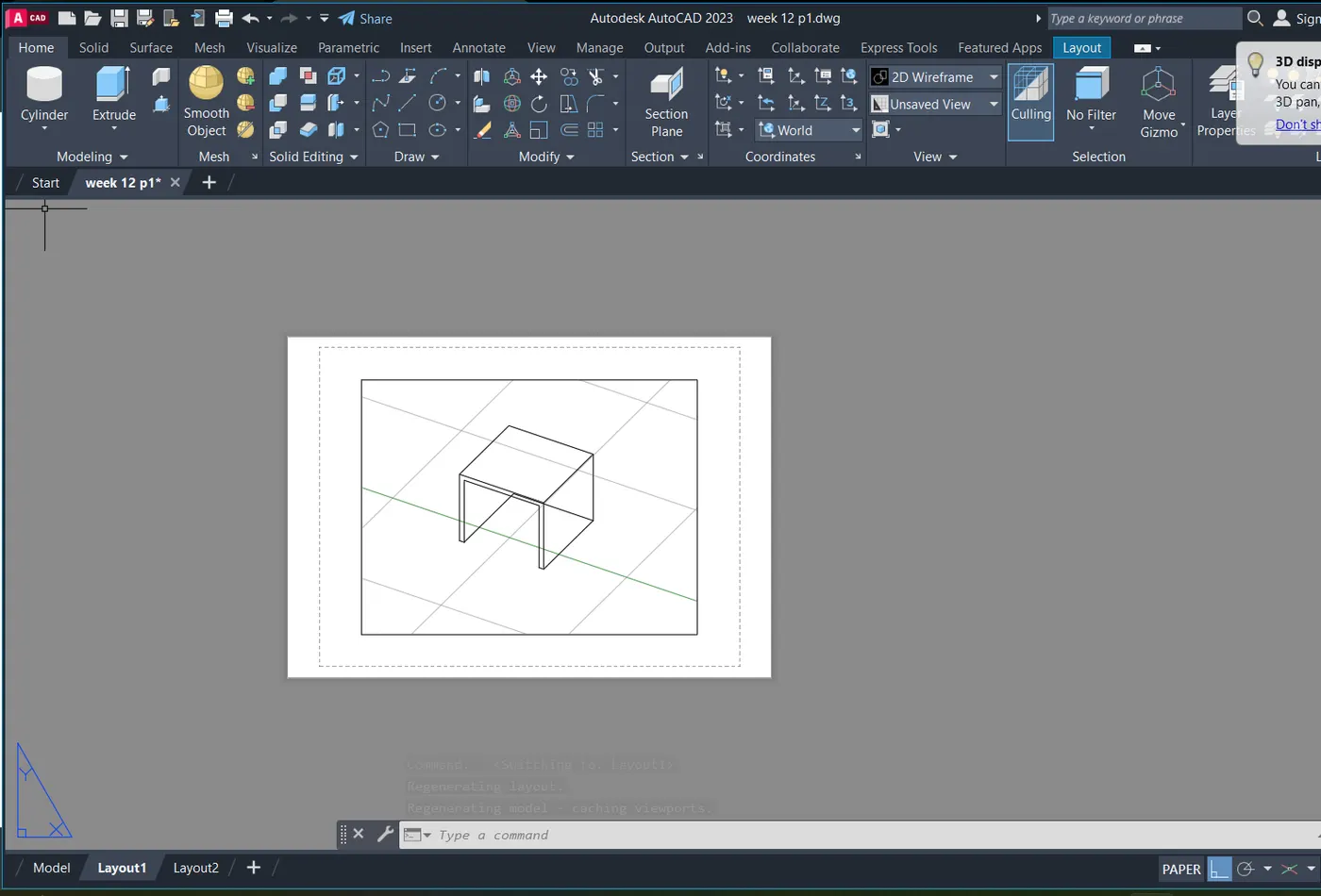
Regenerating model.
AutoCAD menu utilities loaded.
Command:
Command:
Command:
Command:
Command:
Command: _QSave
Command: Regenerating model.
Regenerating model.
Command: L
LINE
Specify first point:
Specify next point or [Undo]: <Ortho on> Cancel
Cancel
Command: UNITS
Command: UNITS
Command: D
DIMSTYLE
Command: L
LINE
Specify first point:
Specify next point or [Undo]: 2'
Specify next point or [Undo]: 6"
Specify next point or [Close/Undo]: 2'
Specify next point or [Close/Undo]:
Specify next point or [Close/Undo]: 2'
Specify next point or [Close/Undo]: 6"
Specify next point or [Close/Undo]:
Specify next point or [Close/Undo]: Cancel
Command: REC
RECTANG
Specify first corner point or [Chamfer/Elevation/Fillet/Thickness/Width]:
Specify other corner point or [Area/Dimensions/Rotation]: 1'
Command:
Command: MOVE
1 found
Specify base point or [Displacement] <Displacement>:
Specify second point or <use first point as displacement>:
Command:
Command: MOVE
1 found
Specify base point or [Displacement] <Displacement>:
Specify second point or <use first point as displacement>: 2'
Command: L
LINE
Specify first point:
Specify next point or [Undo]:
Specify next point or [Undo]: Cancel
Command: L
LINE
Specify first point:
Specify next point or [Undo]:
Specify next point or [Undo]: Cancel
Command:
LINE
Specify first point:
Specify next point or [Undo]:
Specify next point or [Undo]: Cancel
Command: Cancel
Command: Cancel
Command: <Switching to: Layout1>
Regenerating layout.
Regenerating layout.
Regenerating model - caching viewports.
Command: Regenerating layout.
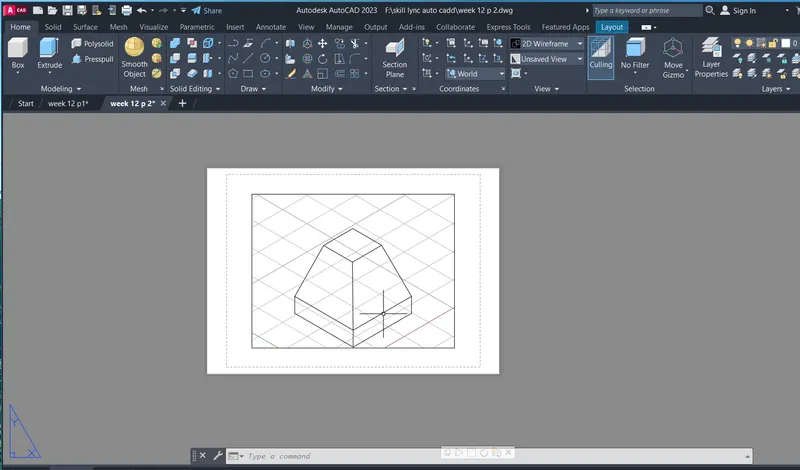
AIM:
To create 3d model
comments :
- line
-dli
-ps
-mv
Procedure:
Regenerating model.
AutoCAD menu utilities loaded.
Command:
Command:
Command:
Command:
Command:
Command:
Command: _QSave
Command: UNITS
Command: D
DIMSTYLE
Command: Regenerating model.
Regenerating model.
Command: REC
RECTANG
Specify first corner point or [Chamfer/Elevation/Fillet/Thickness/Width]:
Specify other corner point or [Area/Dimensions/Rotation]:
Command: Cancel
Command:
Command: _.erase 1 found
Command: L
LINE
Specify first point:
Specify next point or [Undo]: <Ortho on> 10'
Specify next point or [Undo]: 6"
Specify next point or [Close/Undo]: 10'
Specify next point or [Close/Undo]:
Specify next point or [Close/Undo]: 1"
Specify next point or [Close/Undo]: 1'4"
Specify next point or [Close/Undo]: 1"
Specify next point or [Close/Undo]: 6"
Specify next point or [Close/Undo]: Cancel
Command: L
LINE
Specify first point:
Specify next point or [Undo]: 6"
Specify next point or [Undo]: 1'
Specify next point or [Close/Undo]: 1'6"
Specify next point or [Close/Undo]: 3"
Specify next point or [Close/Undo]: 6"
Specify next point or [Close/Undo]: 10'
Specify next point or [Close/Undo]: 1'
Specify next point or [Close/Undo]: 10'
Specify next point or [Close/Undo]: Cancel
Command: L
LINE
Specify first point:
Specify next point or [Undo]: 6"
Specify next point or [Undo]: 3"
Specify next point or [Close/Undo]:
Specify next point or [Close/Undo]: Cancel
Command: Specify opposite corner or [Fence/WPolygon/CPolygon]:
Command:
* STRETCH *
Specify stretch point or [Base point/Copy/Undo/eXit]:
Command: Cancel
Command: Specify opposite corner or [Fence/WPolygon/CPolygon]:
Command: L
LINE
Specify first point:
Specify next point or [Undo]:
Specify next point or [Undo]: Cancel
Command: L
LINE
Specify first point:
Specify next point or [Undo]: Cancel
Command:
Automatic save to C:\Users\Welcome\AppData\Local\Temp\week 12p3_1_13829_16dc703f.sv$ ...
Command:
Command: _.erase 1 found
Command: L
LINE
Specify first point:
Specify next point or [Undo]: 1'6"
Specify next point or [Undo]:
Specify next point or [Close/Undo]: Cancel
Command:
Command: _.erase 1 found
Command:
Command: Cancel
Command:
Command: Cancel
Crossing Lasso Press Spacebar to cycle options
Command: _.erase 3 found
Command:
Command: Cancel
Command:
Command: _.erase 1 found
Command:
Command: _.erase 1 found
Command:
Command: _.erase 1 found
Command:
Command: _.erase 1 found
Command: L
LINE
Specify first point:
Specify next point or [Undo]: 6"
Specify next point or [Undo]: 3"
Specify next point or [Close/Undo]: 10'
Specify next point or [Close/Undo]: 1'
Specify next point or [Close/Undo]: 10'
Specify next point or [Close/Undo]: 3"
Specify next point or [Close/Undo]:
Specify next point or [Close/Undo]: Cancel
Command: L
LINE
Specify first point:
Specify next point or [Undo]:
Specify next point or [Undo]: Cancel
Command: L
LINE
Specify first point:
Specify next point or [Undo]:
Specify next point or [Undo]: Cancel
Command:
Command: _.erase 1 found
Command:
Command: _.erase 1 found
Command:
Command: _.erase 1 found
Command:
Command: _.erase 1 found
Command: L
LINE
Specify first point:
Specify next point or [Undo]: 10'
Specify next point or [Undo]:
Specify next point or [Close/Undo]: Cancel
Command:
Command:
* STRETCH *
Specify stretch point or [Base point/Copy/Undo/eXit]:
Command:
* STRETCH *
Specify stretch point or [Base point/Copy/Undo/eXit]:
Command:
* STRETCH *
Specify stretch point or [Base point/Copy/Undo/eXit]:
Command:
* STRETCH *
Specify stretch point or [Base point/Copy/Undo/eXit]:
Command:
* STRETCH *
Specify stretch point or [Base point/Copy/Undo/eXit]:
Command:
* STRETCH *
Specify stretch point or [Base point/Copy/Undo/eXit]:
Command:
* STRETCH *
Specify stretch point or [Base point/Copy/Undo/eXit]:1"
Command: Cancel
Command:
Command:
* STRETCH *
Specify stretch point or [Base point/Copy/Undo/eXit]:
Command:
* STRETCH *
Specify stretch point or [Base point/Copy/Undo/eXit]:
Command: _u Grip Edit
Command: _u INTELLIZOOM
Command:
Command: Cancel
Command:
Press ESC or ENTER to exit, or right-click to display shortcut-menu.
Regenerating model.
Window Lasso Press Spacebar to cycle options
Command: Cancel
Command:
Press ESC or ENTER to exit, or right-click to display shortcut-menu.
Regenerating model.
Command: Regenerating model.
Command: L
LINE
Specify first point:
Specify next point or [Undo]: 1'6"
Specify next point or [Undo]:
Specify next point or [Close/Undo]: Cancel
Command: L
LINE
Specify first point:
Specify next point or [Undo]:
Specify next point or [Undo]: Cancel
Command: DLI
DIMLINEAR
Specify first extension line origin or <select object>:
Specify second extension line origin:
Specify dimension line location or
[Mtext/Text/Angle/Horizontal/Vertical/Rotated]:
Dimension text = 10'
Command:
DIMLINEAR
Specify first extension line origin or <select object>:
Specify second extension line origin:
Specify dimension line location or
[Mtext/Text/Angle/Horizontal/Vertical/Rotated]:
Dimension text = 1'
Window Lasso Press Spacebar to cycle options
Crossing Lasso Press Spacebar to cycle options
Command: Specify opposite corner or [Fence/WPolygon/CPolygon]:
Command:
* STRETCH *
Specify stretch point or [Base point/Copy/Undo/eXit]:
Command:
* STRETCH *
Specify stretch point or [Base point/Copy/Undo/eXit]:
Command: Cancel
Command:
DIMLINEAR
Specify first extension line origin or <select object>:
Specify second extension line origin:
Specify dimension line location or
[Mtext/Text/Angle/Horizontal/Vertical/Rotated]: Cancel
Command:
Press ESC or ENTER to exit, or right-click to display shortcut-menu.
Regenerating model.
Command: Cancel
Command: DLI
DIMLINEAR
Specify first extension line origin or <select object>:
Specify second extension line origin:
Specify dimension line location or
[Mtext/Text/Angle/Horizontal/Vertical/Rotated]: Cancel
Command:
DIMLINEAR
Specify first extension line origin or <select object>:
Specify second extension line origin:
Specify dimension line location or
[Mtext/Text/Angle/Horizontal/Vertical/Rotated]:
Dimension text = 1'-6"
Command: Regenerating model.
Command: Regenerating model.
Command:
Automatic save to C:\Users\Welcome\AppData\Local\Temp\week 12p3_1_13829_16dc703f.sv$ ...
Command:
Command: Cancel
Command: Cancel
Command: <Switching to: Layout1>
Regenerating layout.
Regenerating layout.
Regenerating model - caching viewports.
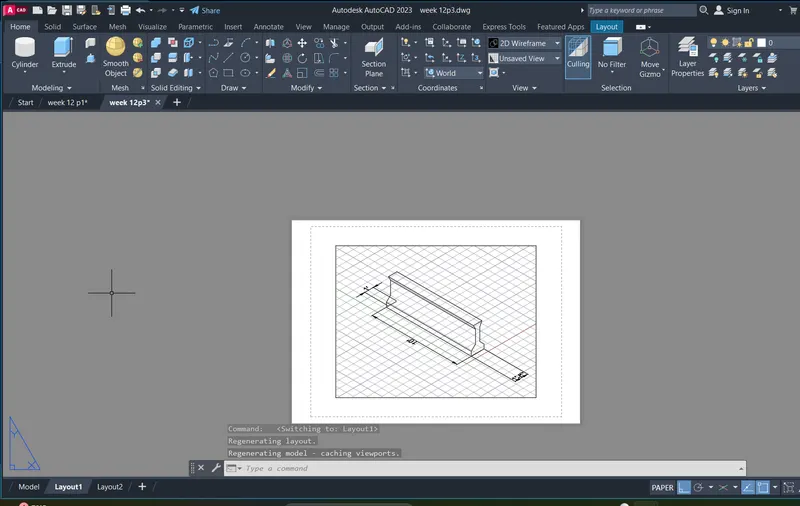
AIM:
To create 3d model
comments :
- line
-dli
-ps
-mv
Procedure:
Regenerating model.
AutoCAD menu utilities loaded.
Command:
Command:
Command:
Command:
Command:
Command: _QSave
Command: Regenerating model.
Command: UNITS
Command: D
DIMSTYLE
Command: L
LINE
Specify first point:
Specify next point or [Undo]: <Ortho on> 10'
Specify next point or [Undo]: 1'6"
Specify next point or [Close/Undo]: 10'
Specify next point or [Close/Undo]:
Specify next point or [Close/Undo]: Cancel
Command: L
LINE
Specify first point:
Specify next point or [Undo]: 1'
Specify next point or [Undo]: 1'
Specify next point or [Close/Undo]: 6"
Specify next point or [Close/Undo]: 6"
Specify next point or [Close/Undo]: 4'6"
Specify next point or [Close/Undo]: 6"
Specify next point or [Close/Undo]: 6"
Specify next point or [Close/Undo]: 1'
Specify next point or [Close/Undo]: 1'
Specify next point or [Close/Undo]: Cancel
Command: L
LINE
Specify first point:
Specify next point or [Undo]:
Specify next point or [Undo]: Cancel
Command:
LINE
Specify first point:
Specify next point or [Undo]:
Specify next point or [Undo]: Cancel
Command:
Command:
Command: _.erase 2 found
Command:
Command: _.erase 1 found
Command:
Command: _.erase 1 found
Command: Regenerating model.
Command: Regenerating model.
Command: L
LINE
Specify first point:
Specify next point or [Undo]: Regenerating model.
Resuming LINE command.
Specify next point or [Undo]: Regenerating model.
Resuming LINE command.
Specify next point or [Undo]: Regenerating model.
Resuming LINE command.
Specify next point or [Undo]: 6"
Specify next point or [Undo]: Cancel
Command: L
LINE
Specify first point:
Specify next point or [Undo]: 6"
Specify next point or [Undo]: Cancel
Command: Regenerating model.
Command: L
LINE
Specify first point:
Specify next point or [Undo]:
Specify next point or [Undo]: Cancel
Command: Regenerating model.
Command: DLI
DIMLINEAR
Specify first extension line origin or <select object>:
Specify second extension line origin:
Specify dimension line location or
[Mtext/Text/Angle/Horizontal/Vertical/Rotated]:
Dimension text = 3'-6"
Command:
DIMLINEAR
Specify first extension line origin or <select object>:
Specify second extension line origin:
Specify dimension line location or
[Mtext/Text/Angle/Horizontal/Vertical/Rotated]:
Dimension text = 4'-6"
Command:
DIMLINEAR
Specify first extension line origin or <select object>:
Specify second extension line origin:
Specify dimension line location or
[Mtext/Text/Angle/Horizontal/Vertical/Rotated]:
Dimension text = 1'-6"
Command:
DIMLINEAR
Specify first extension line origin or <select object>:
Specify second extension line origin:
Specify dimension line location or
[Mtext/Text/Angle/Horizontal/Vertical/Rotated]: Cancel
Command: Specify opposite corner or [Fence/WPolygon/CPolygon]:
Command: Regenerating model.
Command: Cancel
Command: Cancel
Command: <Switching to: Layout1>
Regenerating layout.
Regenerating layout.
Regenerating model - caching viewports.
Command: Cancel
Command: Cancel
Command: <Switching to: Model>
Restoring cached viewports.
Command: Regenerating model.
Command:
Command:
Command: _extrude
Current wire frame density: ISOLINES=4, Closed profiles creation mode = Solid
Select objects to extrude or [MOde]: _MO Closed profiles creation mode [SOlid/SUrface] <Solid>: _SO
Select objects to extrude or [MOde]: 1 found
Select objects to extrude or [MOde]: 1 found, 2 total
Select objects to extrude or [MOde]: 1 found, 3 total
Select objects to extrude or [MOde]: 1 found, 4 total
Select objects to extrude or [MOde]: 1 found, 5 total
Select objects to extrude or [MOde]: 1 found, 6 total
Select objects to extrude or [MOde]: 1 found, 7 total
Select objects to extrude or [MOde]: 1 found, 8 total
Select objects to extrude or [MOde]: 1 found, 9 total
Select objects to extrude or [MOde]: Specify opposite corner: 0 found
Select objects to extrude or [MOde]: 1 found, 10 total
Select objects to extrude or [MOde]: 1 found, 11 total
Select objects to extrude or [MOde]: 1 found, 12 total
Select objects to extrude or [MOde]: 1 found, 13 total
Select objects to extrude or [MOde]:
Specify height of extrusion or [Direction/Path/Taper angle/Expression]: Cancel
Command: Regenerating model.
Command: Regenerating model.
Command: CIRCLE
Specify center point for circle or [3P/2P/Ttr (tan tan radius)]: 9"
Specify radius of circle or [Diameter]: 1'6"
Command: Specify opposite corner or [Fence/WPolygon/CPolygon]:
Command:
Command:
* STRETCH *
Specify stretch point or [Base point/Copy/Undo/eXit]: 9"
Command: Cancel
Command:
Command:
Command: _extrude
Current wire frame density: ISOLINES=4, Closed profiles creation mode = Solid
Select objects to extrude or [MOde]: _MO Closed profiles creation mode [SOlid/SUrface] <Solid>: _SO
Select objects to extrude or [MOde]: 1 found
Select objects to extrude or [MOde]:
Specify height of extrusion or [Direction/Path/Taper angle/Expression]:
Command:
Command:
Command: _revolve
Current wire frame density: ISOLINES=4, Closed profiles creation mode = Solid
Select objects to revolve or [MOde]: _MO Closed profiles creation mode [SOlid/SUrface] <Solid>: _SO
Select objects to revolve or [MOde]: Cancel
Cancel
Command: _revolve
Current wire frame density: ISOLINES=4, Closed profiles creation mode = Solid
Select objects to revolve or [MOde]: _MO Closed profiles creation mode [SOlid/SUrface] <Solid>: _SO
Select objects to revolve or [MOde]: Cancel
Cancel
Command: _box
Specify first corner or [Center]: Cancel
Command:
Command: _cylinder
Specify center point of base or [3P/2P/Ttr/Elliptical]:
Specify base radius or [Diameter]: 9"
Specify height or [2Point/Axis endpoint] <10'-0">:
Automatic save to C:\Users\Welcome\AppData\Local\Temp\week 12 p4_1_30900_c9360e30.sv$ ...
Command:
Command:
Command:
Command:
Command:
Command:
Command:
Command:
Command:
Command:
Command:
Command:
Command:
Command:
Command:
Command:
Command:
Command:
Command:
Command:
Command:
Command:
Command:
Command:
Command:
Command:
Command: Cancel
Command:
Command: REC
RECTANG
Specify first corner point or [Chamfer/Elevation/Fillet/Thickness/Width]:
Specify other corner point or [Area/Dimensions/Rotation]:
Specify other corner point or [Area/Dimensions/Rotation]: _u
Point or option keyword required.
Specify other corner point or [Area/Dimensions/Rotation]: _u
Point or option keyword required.
Specify other corner point or [Area/Dimensions/Rotation]: Cancel
Command:
Command: _cutclip
Select objects: Cancel
Command: REC
RECTANG
Specify first corner point or [Chamfer/Elevation/Fillet/Thickness/Width]:
Specify other corner point or [Area/Dimensions/Rotation]: 4'6"
Command:
Command:
Command:
Command:
Command:
Command:
* STRETCH *
Specify stretch point:2'
Command: Cancel
Command: DLI
DIMLINEAR
Specify first extension line origin or <select object>:
Specify second extension line origin:
Specify dimension line location or
[Mtext/Text/Angle/Horizontal/Vertical/Rotated]:
Dimension text = 2'-8"
Crossing Lasso Press Spacebar to cycle options
Command: _.erase 1 found
Command:
Command: Specify opposite corner or [Fence/WPolygon/CPolygon]:
Command:
Command:
* STRETCH *
Specify stretch point:5"
Command: Cancel
Command: REC
RECTANG
Specify first corner point or [Chamfer/Elevation/Fillet/Thickness/Width]:
Specify other corner point or [Area/Dimensions/Rotation]:
Specify other corner point or [Area/Dimensions/Rotation]:
Command: Cancel
Command:
Command:
Command:
Command: _extrude
Current wire frame density: ISOLINES=4, Closed profiles creation mode = Solid
Select objects to extrude or [MOde]: _MO Closed profiles creation mode [SOlid/SUrface] <Solid>: _SO
Select objects to extrude or [MOde]: 1 found
Select objects to extrude or [MOde]: 1 found, 2 total
Select objects to extrude or [MOde]:
Specify height of extrusion or [Direction/Path/Taper angle/Expression] <10'-0">:
Command: Cancel
Command:
Command: Cancel
Command: Cancel
Command: <Switching to: Layout1>
Restoring cached viewports - Regenerating layout.
Regenerating 21 modified entities.
Command: Specify opposite corner or [Fence/WPolygon/CPolygon]: Cancel
Command: _.MSPACE
Command: Regenerating model.
Command: Cancel
Command: Cancel
Command: _vscurrent
Enter an option [2dwireframe/Wireframe/Hidden/Realistic/Conceptual/Shaded/shaded with Edges/shades of Gray/SKetchy/X-ray/Other] <2dwireframe>: _e
Command: Cancel
Command: Cancel
Command: _visualstyles
Command:
Command:
Command: PS
PSPACE
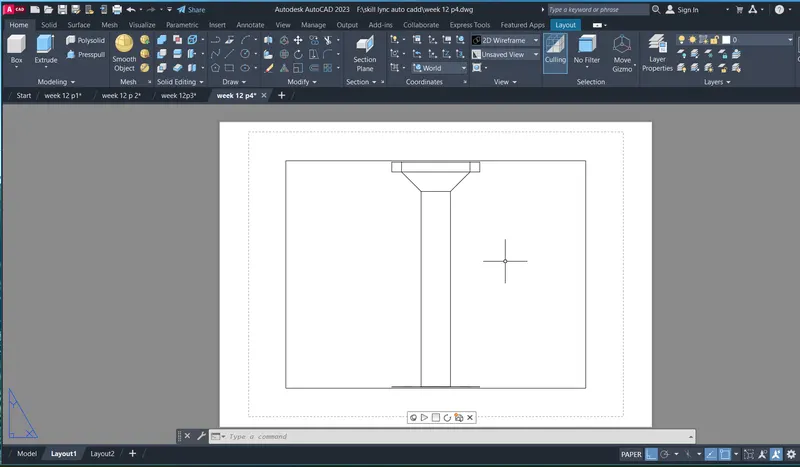
AIM:
To create 3d model
comments :
- line
-dli
-ps
-mv
Procedure:
Command: DS
DSETTINGS
Command: L
LINE
Specify first point:
Specify next point or [Undo]: 0.3
Specify next point or [Undo]: 3
Specify next point or [Close/Undo]: 0.3
Specify next point or [Close/Undo]:
Specify next point or [Close/Undo]: <Isoplane Top> 1
Specify next point or [Close/Undo]: 1
Specify next point or [Close/Undo]: 1
Specify next point or [Close/Undo]: <Isoplane Right> 3
Specify next point or [Close/Undo]: Cancel
Command: L
LINE
Specify first point:
Specify next point or [Undo]: 2.42
Specify next point or [Undo]: 1
Specify next point or [Close/Undo]:
Specify next point or [Close/Undo]: <Isoplane Left> 0.3
Specify next point or [Close/Undo]:
Specify next point or [Close/Undo]: U
Specify next point or [Close/Undo]:
Specify next point or [Close/Undo]: U
Specify next point or [Close/Undo]:
Specify next point or [Close/Undo]: Zero length line created at (19.7462, 14.4124, 0.0000)
Specify next point or [Close/Undo]: U
Specify next point or [Close/Undo]: U
Specify next point or [Close/Undo]:
Specify next point or [Close/Undo]: Cancel
Command: L
LINE
Specify first point:
Specify next point or [Undo]: 4.25
Specify next point or [Undo]: 0.3
Specify next point or [Close/Undo]: <Isoplane Top>
Specify next point or [Close/Undo]:
Specify next point or [Close/Undo]:
Specify next point or [Close/Undo]:
Specify next point or [Close/Undo]: 0.3
Specify next point or [Close/Undo]:
Specify next point or [Close/Undo]: Cancel
Command:
Command: _.erase 1 found
Command:
Command: _.erase 1 found
Command: _dimaligned
Specify first extension line origin or <select object>:
Specify second extension line origin:
Specify dimension line location or
[Mtext/Text/Angle]: <Isoplane Right> <Isoplane Left>
Dimension text = 0.3000
Command: DIMALIGNED
Specify first extension line origin or <select object>:
Select object to dimension:
No object selected.
Select object to dimension:
Specify dimension line location or
[Mtext/Text/Angle]:
Dimension text = 3.0000
Command: DIMALIGNED
Specify first extension line origin or <select object>:
Select object to dimension:
Specify dimension line location or
[Mtext/Text/Angle]:
Dimension text = 3.0000
Command: DIMALIGNED
Specify first extension line origin or <select object>:
Select object to dimension:
Specify dimension line location or
[Mtext/Text/Angle]:
Dimension text = 1.0000
Command: DIMALIGNED
Specify first extension line origin or <select object>:
Select object to dimension:
Specify dimension line location or
[Mtext/Text/Angle]:
Dimension text = 1.0000