Creating a Residence Layout, Seating plan, Toilet and Utility room plan using AutoCad
AIM:
- TO CREATE A RESIDENTIAL LAYOUT OF A BUILDING WITH ACCURATE POSITIONING OF STAIRCASE AND PRECISE PROVISION OF DOORS TO FACILITATE ACCESS INTO DIFFERENT ROOMS AS PER THE MEASUREMENTS GIVEN.
- TO CREATE A SEATING PLAN TO ACCOMMODATE FOUR CHAIRS AND A CIRCULAR TABLE IN SYMMETRY WITH THE POSITIONS OF ALL FOUR CHAIRS.
- PLAN A TOILET AND A WASHBASIN IN ACCORDANCE WITH THE DIMENSIONS OF THE UTILITY ROOMS.
INTRODUCTION:
You can create residential, commercial, institutional, hospital, and many other building layouts in AutoCAD as per the drawing requirements. And it is also very easy to carry out the plan when you know the right commands and know how to use them according to the specific scenarios. In addition, AutoCAD also lets you draw other small entities like seating arrangements, chairs, sofas, kitchen platforms, beds, and other furnishing elements. At the same time, you can also sketch other utilities like toilets, washbasin, kitchen sink, washing machine, and so on as per the building layout. Hence, layouts, seating plan, and toilet utility drawings in accordance with the dimensions given in the question are carried out in this challenge.
PROCEDURE:
Different procedure is carried out for all three drawings as the object of the sketch is also different. A detailed explanation along with the final completed drawing is inserted below.
Figure one: Layout of a two bedroom residential building
- Setup the primary units in AutoCAD as imperial Architectural decimals as mentioned in the question.
- Create the outer boundary of the building with the help of line command according to the out-to-out dimensions of the building.
- Create an offset of 9 inches for the exterior walls and that of 4.5 inches for the interior walls.
- Draw all the rooms as per the dimensions with the help of offset, fillet, and trim commands.
- Make the door opening of the required length and draw the door layouts for the same.
- Make the precise space for staircase after completing all other rooms including parking space.
- Draw a 6 feet line and start taking an offset of 1 foot till all the steps are inserted according to the specifications made in the question.
- Invoke the text command by t -> enter.
- Put up the text of all the rooms created.
- Adjust the text height according to the room space.
- Finish the drawing and run the dimension checks by matching it with the reference drawings.
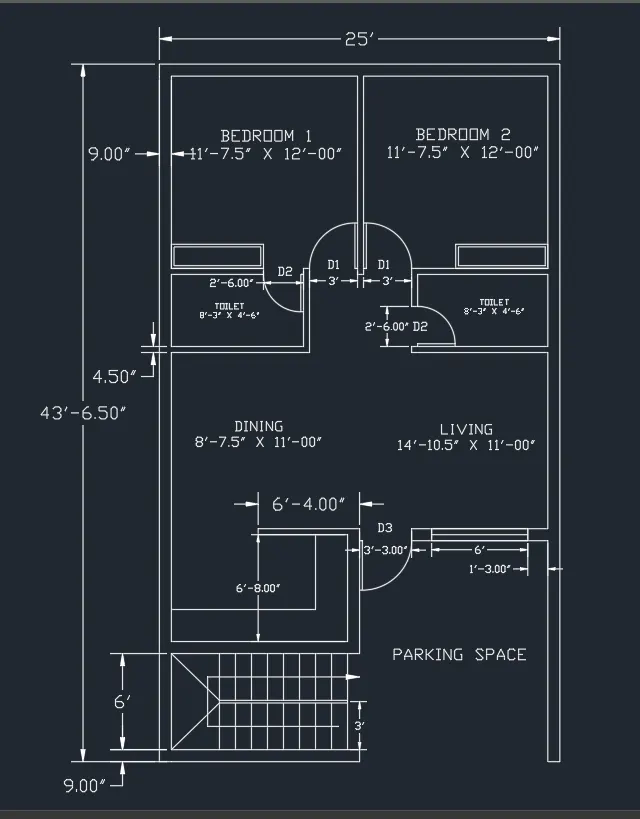
Figure two: Seating plan of four chairs and one rounded table
- Setup the AutoCAD primary units as typical decimal figures as per the drawing requirements.
- Draw two circles with the same center but different radiuses according to the units given in the question.
- Draw the single chair with the help of line, offset, fillet, and arc commands.
- Finishup the chair and match it with the one given in the question.
- Make four copies of the chair to a different coordinate.
- Rotate each copy in all four directions.
- Use construction lines also known as X-lines to locate the sitting positions of all four chairs.
- Invoke move command and place the chairs as per the located positions.
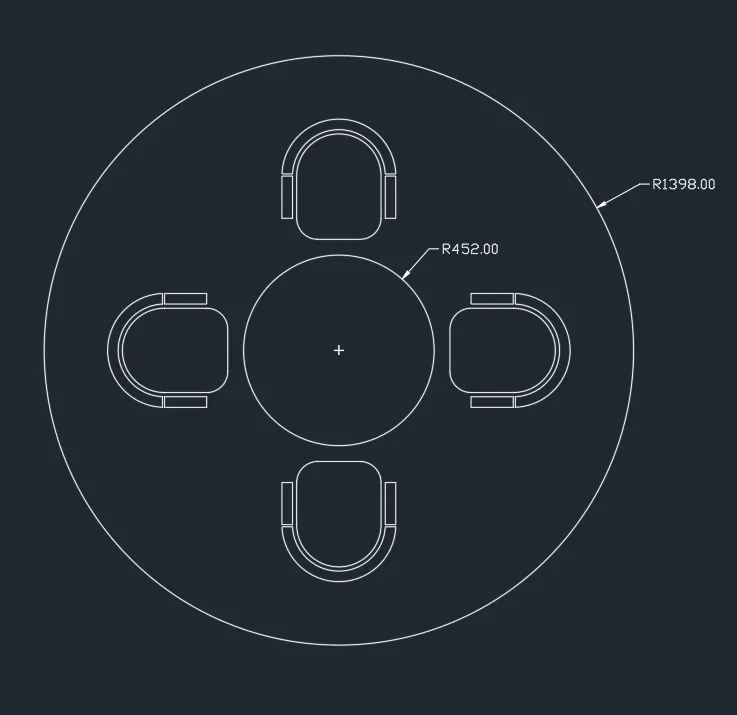
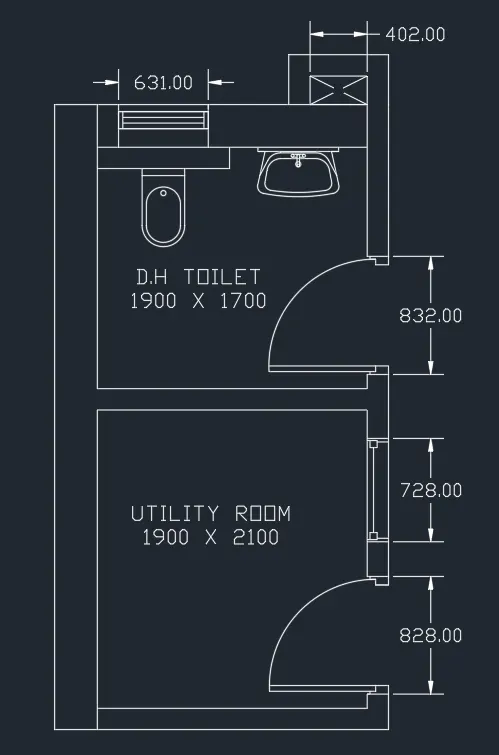
Figure three: Utility layout of toilet and a washbasin within an enclosed room of prespecified dimensions.
- Use the metric AutoCAD sheet with decimal units as specified in the question.
- Create the overall outward and inward layout of the utility rooms as per the drawing requirement and by following the standard layout procedure as followed in the first drawing.
- Draw the toilet vent and a glazing by locating their precise positions.
- Use the construction lines and locate the positions of toilet and the washbasin.
- Use line, offset, Fillet, and arc commands with different radiuses and draw the toilet and washbasin layout.
- After completing the toilet and washbasin, match it with the reference utility plan.
- Run the dimension check and tally the same with the ones given in the question.
- Finish the drawing by adding the text and adjusting it to the utility room plan.
RESULTS AND CONCLUSION:
Thus, using AutoCAD, you can create the Architectural layout according to the specific circumstances at the site and you can also alter the same in future if needed very easily. This is possible because AutoCAD is designed to assist even the minor sketching edits and alterations according to the structural requirements of the building. In addition, you can also place different utilities like, washbasin, washing machine, toilets, and many more of varying sizes according to the space available in a certain utility plan of the structure.