Creating a Residence Layout, Seating plan, Toilet and Utility room plan using AutoCad
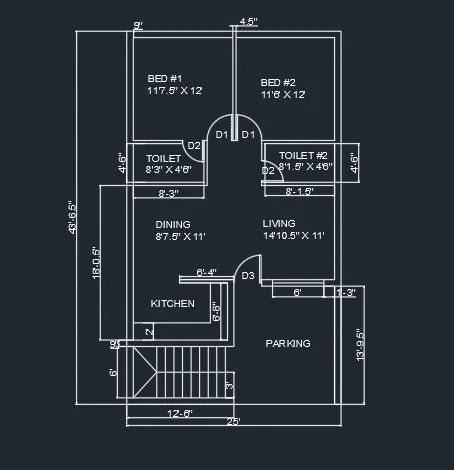
A1 Aim - To sketch the layout of residence plan as shown in figure 1
procedure -1. select a pont and draw a horizontal line of 25'
2. offset it by 9" to show the wall thickness
3. from the starting pt of this line draw a vertical line of 43'6.5" and offset it by 9" to show wall thickness.
4. by using offset, trim and line command all the rooms are draw according to the dimensions.
5. using the dimension and text tools the dimensions and room namins is done as per plan.
final result -
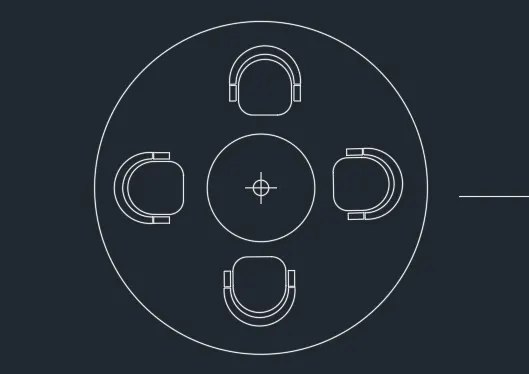
A2 - AIM - To sketch the seating plan of an outdoor canopy
procedure - 1 select a point and draw a circle of radius 452 mm
2. from the same pt draw a circle of radius 1398 mm
3. use the rectangle tool to creat a rectangle and then use the chamfer tool on the edges to give the a curved edge.
4. draw two small rectangles outside the curved edge figure.
5. using the arc tool draw an arc with suitable radius to connect the two points to complete the canopy.
6 copy paste the canopy in the required places.
final result -
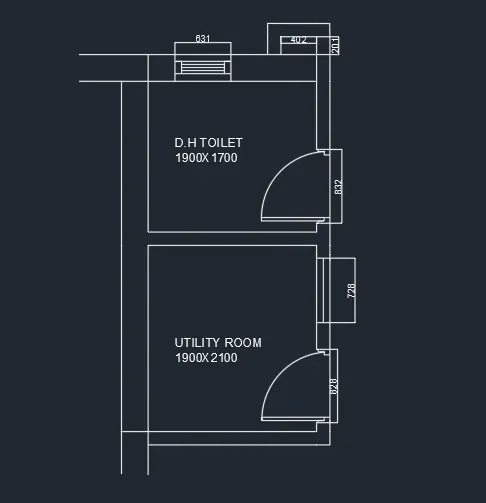
A3 - to sketch figure 3 according to given dimensions.
procedure - 1. set the units and dimension style to decimal
2. select a point and draw a line of 1900 units in X direction.
3. offset it to give it a wall thickness of 150 mm
4. from that line offset a line at a distance of 2100 mm and connect the two horizontal lines.
5. after giving wall thickness give openings of 728 and 828 units respectively.
6. give the symbols for doors and windows.
7. from the wall thickness, offset a line at a distance of 1700 mm and connect the two lines.
8. give wall thickness of 300 units on top side
9. give a door opening of 832 units and mark the symbols for the door and window opening of 631mm.
10. show the dimensions and room name.
final result -