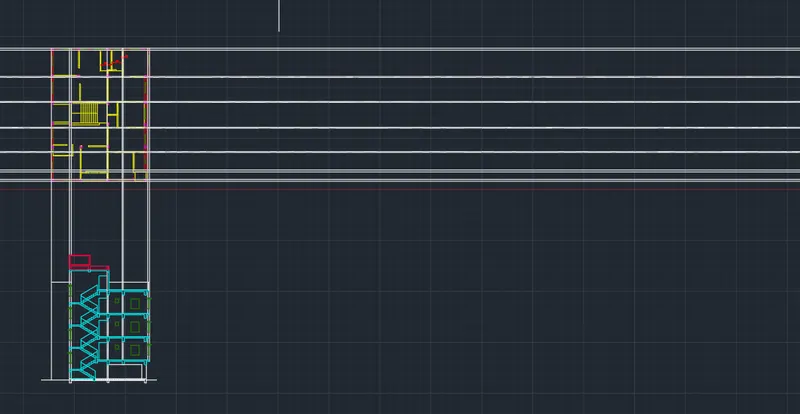
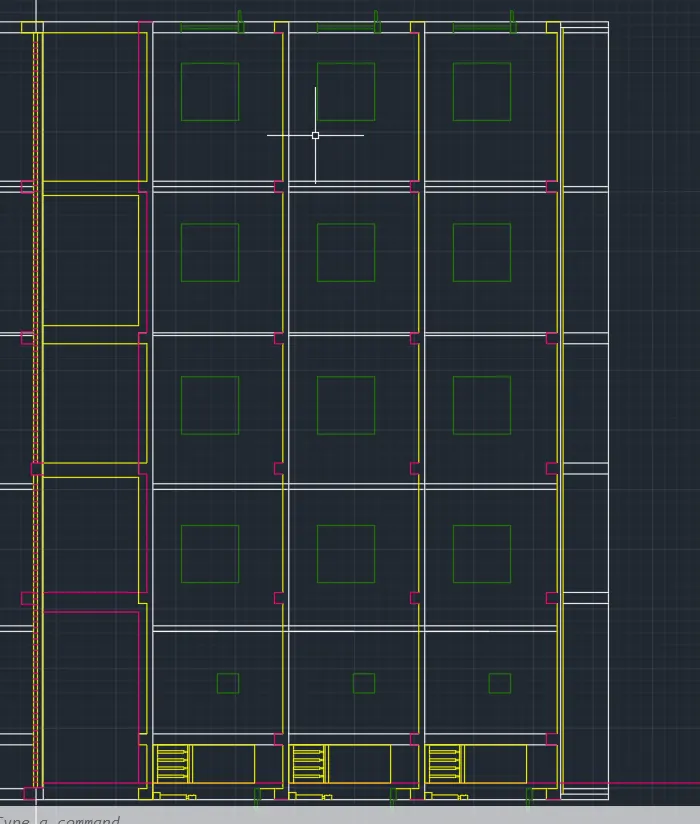
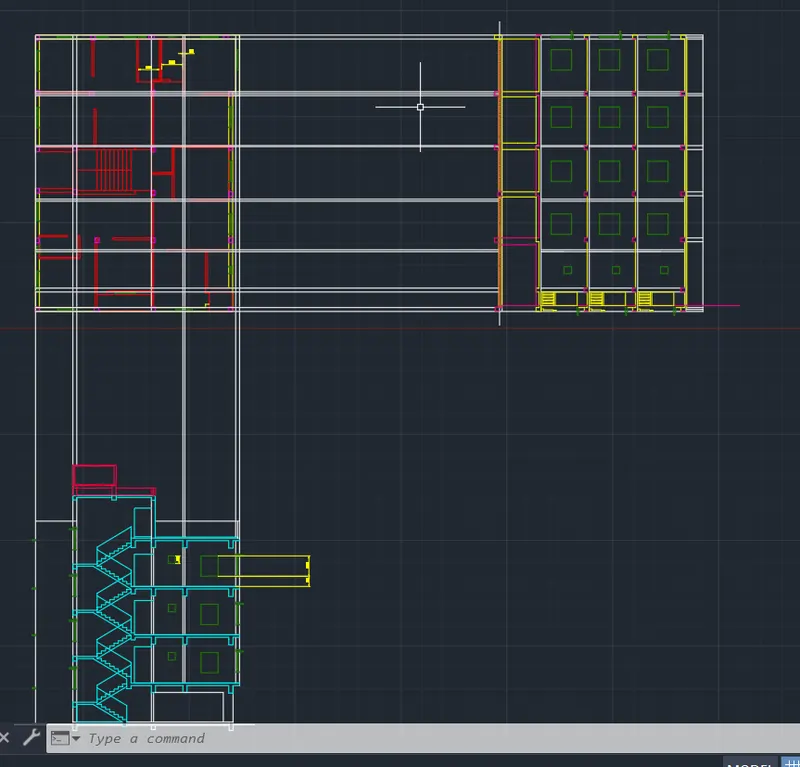
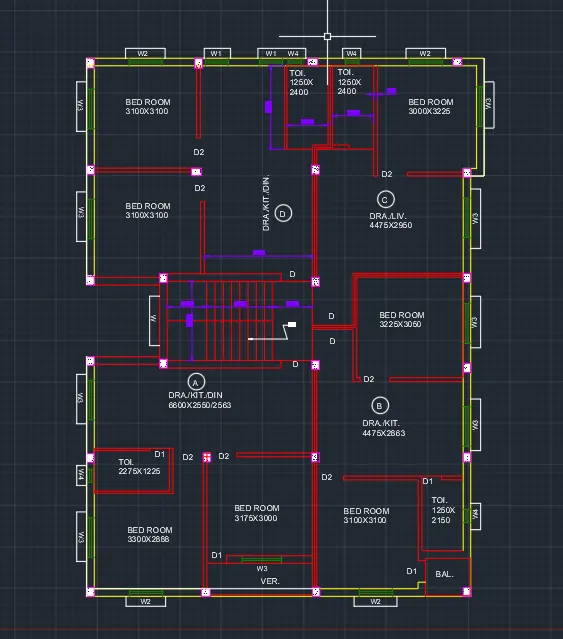
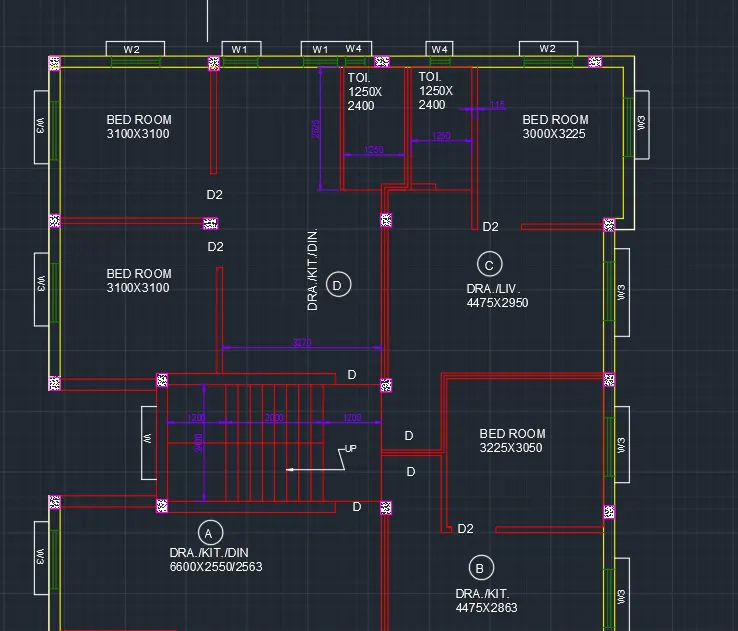
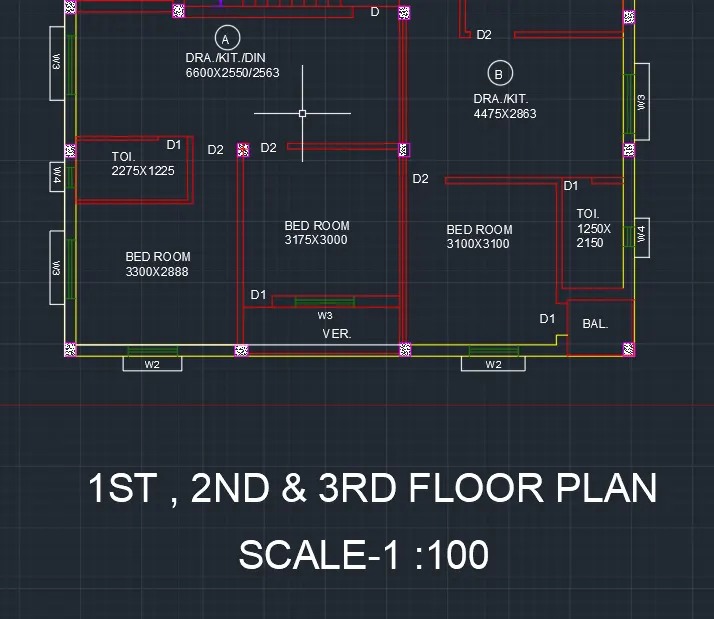
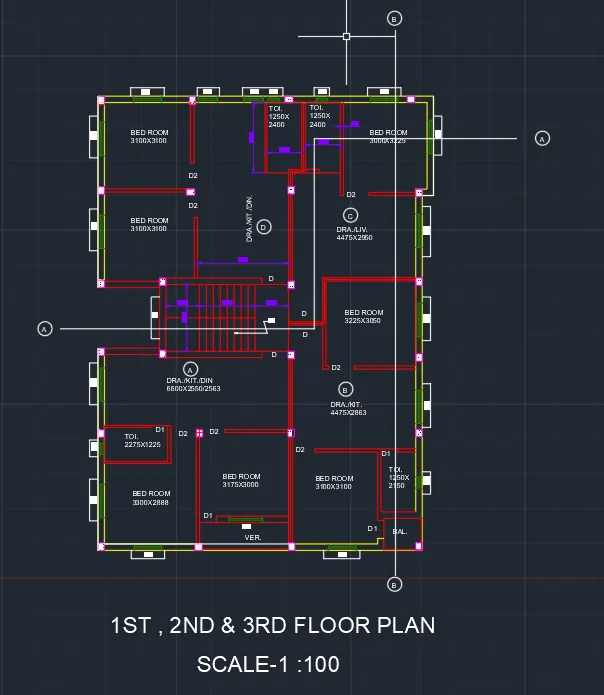
Creating a Layout, Section and Elevation with dimensions using AutoCad
Aim and Introduction:
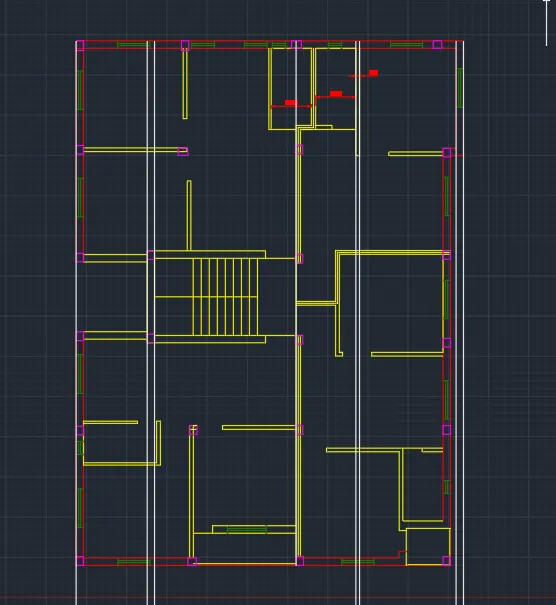
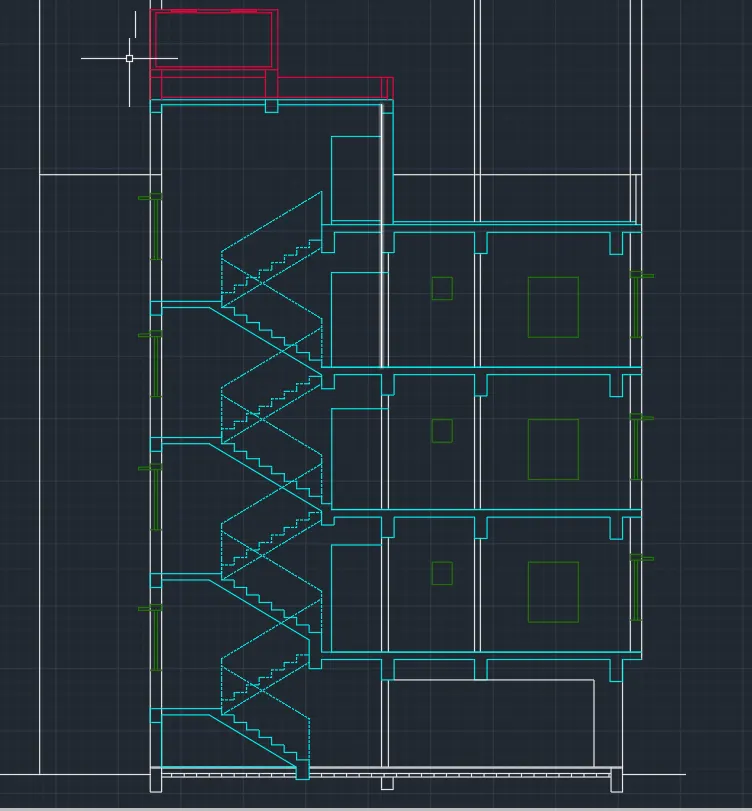
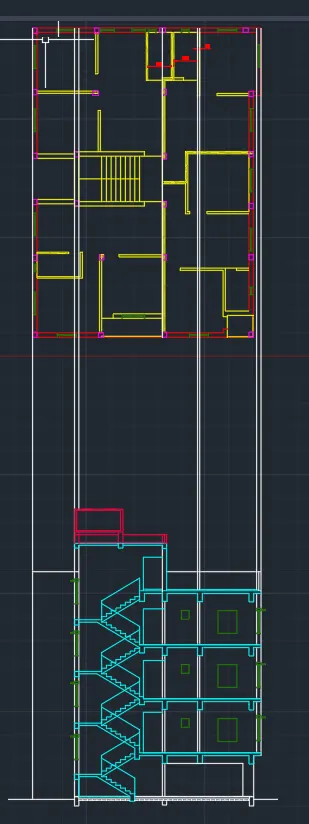
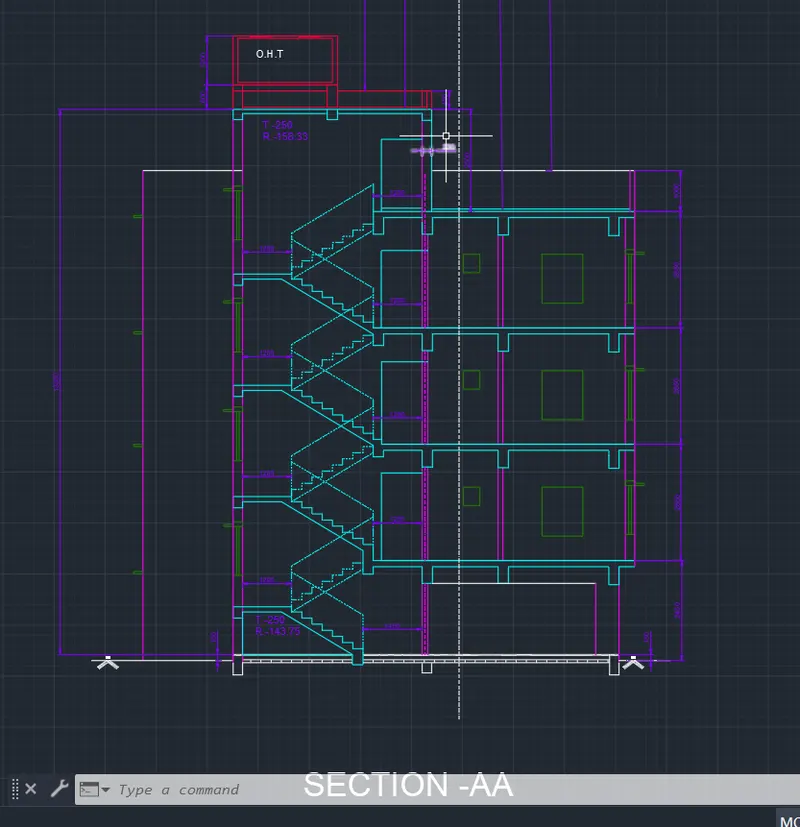
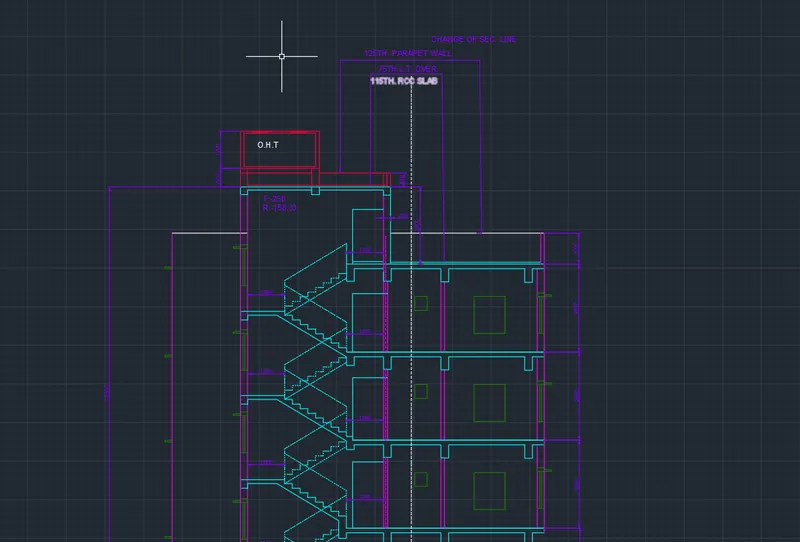
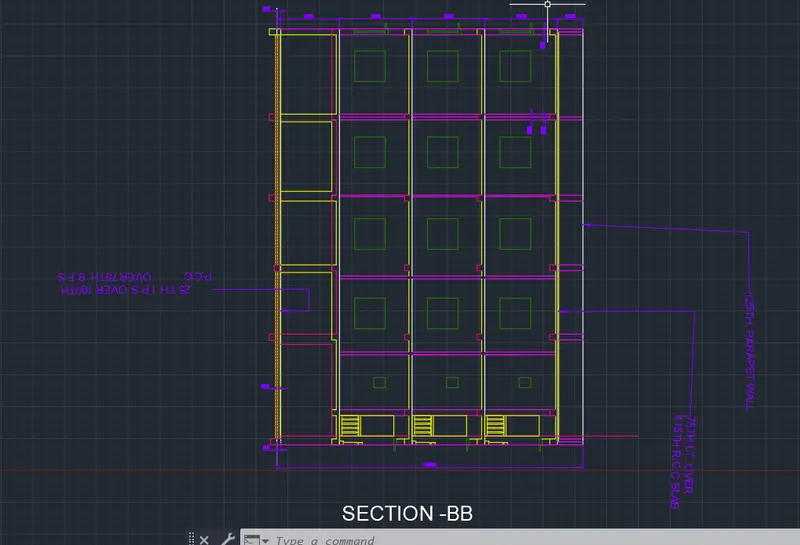
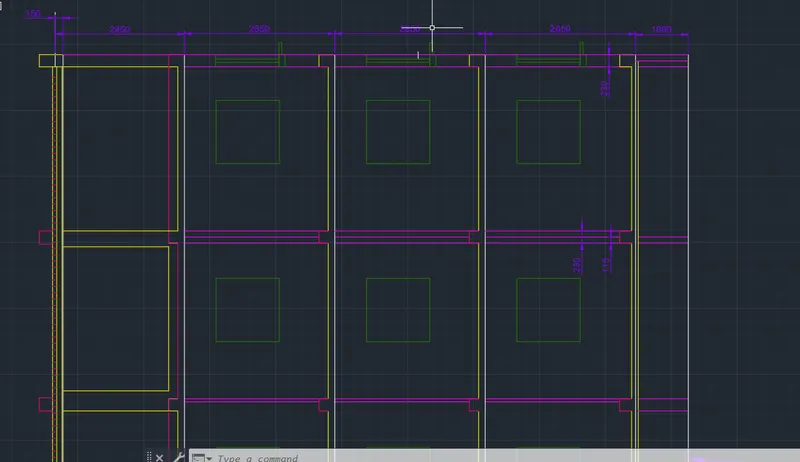
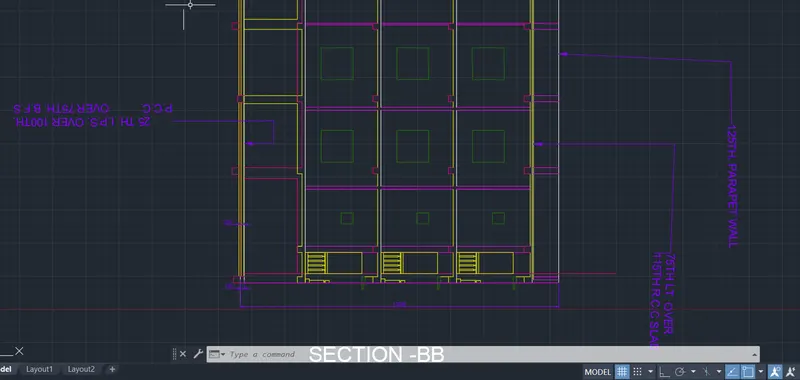
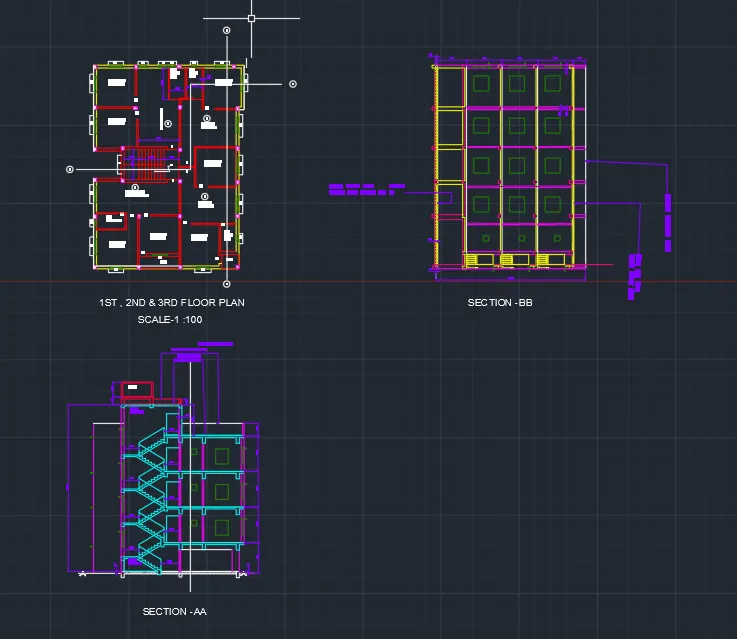
To Draw the PLAN, ELEVATION AND SECTION for the given Residential Multistoreyed Building.
Procedure:
UNITS
Command: LIMMAX
Enter new value for LIMMAX <420,297>: 40000,40000
Command: Z
ZOOM
Specify corner of window, enter a scale factor (nX or nXP), or
[All/Center/Dynamic/Extents/Previous/Scale/Window/Object] <real time>: a
Regenerating model.
Command: Regenerating model.
Regenerating model.
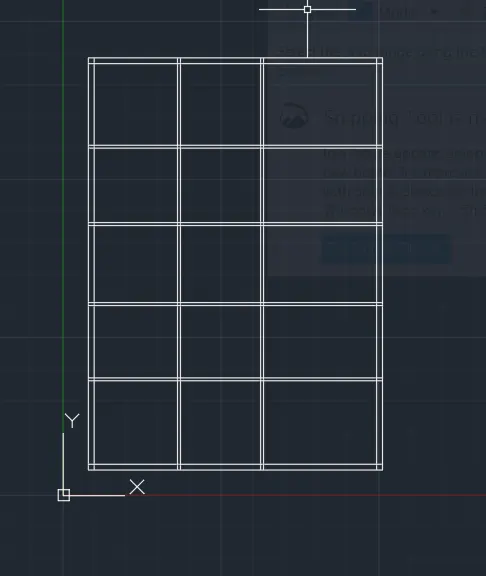
XLINE
Specify a point or [Hor/Ver/Ang/Bisect/Offset]: 1000,1000
Specify through point: <Ortho on>
Specify through point:
Specify through point: *Cancel*
Command: O
OFFSET
Current settings: Erase source=No Layer=Source OFFSETGAPTYPE=0
Specify offset distance or [Through/Erase/Layer] <Through>:
Select object to offset or [Exit/Undo] <Exit>:
Specify through point or [Exit/Multiple/Undo] <Exit>: 230
Select object to offset or [Exit/Undo] <Exit>:
Specify through point or [Exit/Multiple/Undo] <Exit>: 3300
Select object to offset or [Exit/Undo] <Exit>:
Specify through point or [Exit/Multiple/Undo] <Exit>: 115
Select object to offset or [Exit/Undo] <Exit>:
Specify through point or [Exit/Multiple/Undo] <Exit>: 2863
Select object to offset or [Exit/Undo] <Exit>:
Specify through point or [Exit/Multiple/Undo] <Exit>: 115
Select object to offset or [Exit/Undo] <Exit>:
Specify through point or [Exit/Multiple/Undo] <Exit>: 3050
Select object to offset or [Exit/Undo] <Exit>:
Specify through point or [Exit/Multiple/Undo] <Exit>: 115
Select object to offset or [Exit/Undo] <Exit>:
Specify through point or [Exit/Multiple/Undo] <Exit>: 2950
Select object to offset or [Exit/Undo] <Exit>:
Specify through point or [Exit/Multiple/Undo] <Exit>: 115
Select object to offset or [Exit/Undo] <Exit>:
Specify through point or [Exit/Multiple/Undo] <Exit>: 3225
Select object to offset or [Exit/Undo] <Exit>:
Specify through point or [Exit/Multiple/Undo] <Exit>: 230
Select object to offset or [Exit/Undo] <Exit>: *Cancel*
Command: O
OFFSET
Current settings: Erase source=No Layer=Source OFFSETGAPTYPE=0
Specify offset distance or [Through/Erase/Layer] <Through>:
Select object to offset or [Exit/Undo] <Exit>:
Specify through point or [Exit/Multiple/Undo] <Exit>: 230
Select object to offset or [Exit/Undo] <Exit>:
Specify through point or [Exit/Multiple/Undo] <Exit>: 3300
Select object to offset or [Exit/Undo] <Exit>:
Specify through point or [Exit/Multiple/Undo] <Exit>: 115
Select object to offset or [Exit/Undo] <Exit>:
Specify through point or [Exit/Multiple/Undo] <Exit>: 3175
Select object to offset or [Exit/Undo] <Exit>:
Specify through point or [Exit/Multiple/Undo] <Exit>: 115
Select object to offset or [Exit/Undo] <Exit>:
Specify through point or [Exit/Multiple/Undo] <Exit>: 3100
Select object to offset or [Exit/Undo] <Exit>:
Specify through point or [Exit/Multiple/Undo] <Exit>: 115
Select object to offset or [Exit/Undo] <Exit>:
Specify through point or [Exit/Multiple/Undo] <Exit>: *Cancel*
Command: Specify opposite corner or [Fence/WPolygon/CPolygon]:
Command: _.erase 2 found
Command: O
OFFSET
Current settings: Erase source=No Layer=Source OFFSETGAPTYPE=0
Specify offset distance or [Through/Erase/Layer] <Through>:
Select object to offset or [Exit/Undo] <Exit>:
Specify through point or [Exit/Multiple/Undo] <Exit>: 4475
Select object to offset or [Exit/Undo] <Exit>:
Specify through point or [Exit/Multiple/Undo] <Exit>: 230
Select object to offset or [Exit/Undo] <Exit>: *Cancel*
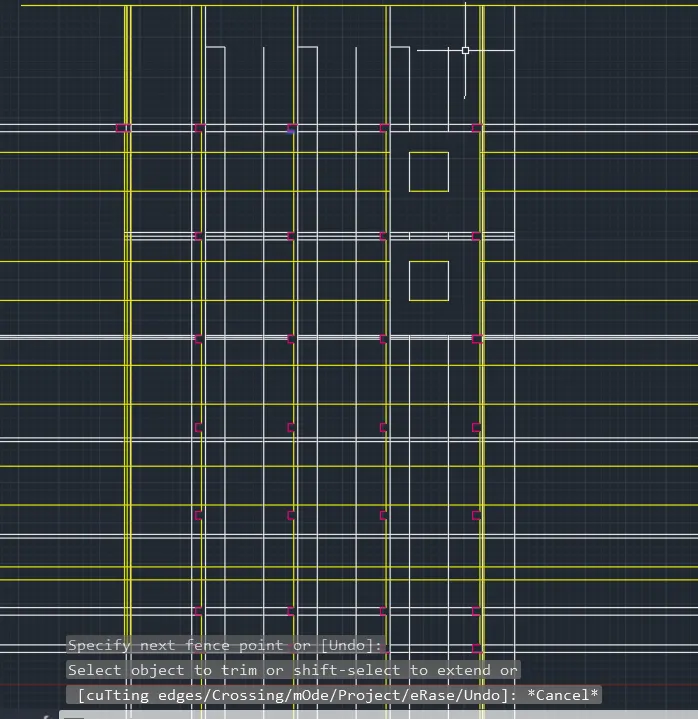
Command: TR
TRIM
Current settings: Projection=UCS, Edge=None, Mode=Quick
Select object to trim or shift-select to extend or
[cuTting edges/Crossing/mOde/Project/eRase]:
Select object to trim or shift-select to extend or
[cuTting edges/Crossing/mOde/Project/eRase/Undo]:
Select object to trim or shift-select to extend or
[cuTting edges/Crossing/mOde/Project/eRase/Undo]:
Specify next fence point or [Undo]:
Specify next fence point or [Undo]:
Select object to trim or shift-select to extend or
[cuTting edges/Crossing/mOde/Project/eRase/Undo]:
Select object to trim or shift-select to extend or
[cuTting edges/Crossing/mOde/Project/eRase/Undo]:
Specify next fence point or [Undo]:
Specify next fence point or [Undo]:
Select object to trim or shift-select to extend or
[cuTting edges/Crossing/mOde/Project/eRase/Undo]: *Cancel*
Command:
Command:
Command: _saveas
Select object to trim or shift-select to extend or
[cuTting edges/Crossing/mOde/Project/eRase/Undo]:
Select object to trim or shift-select to extend or
[cuTting edges/Crossing/mOde/Project/eRase/Undo]:
Specify next fence point or [Undo]:
Specify next fence point or [Undo]:
Select object to trim or shift-select to extend or
[cuTting edges/Crossing/mOde/Project/eRase/Undo]: *Cancel*
Command: L
LINE
Specify first point:
Specify next point or [Undo]:
Specify next point or [Undo]: *Cancel*
Command:
Command: _.erase 1 found
Command: *Cancel*
Command: L
LINE
Specify first point:
Specify next point or [Undo]:
Specify next point or [Undo]: *Cancel*
Command: O
OFFSET
Current settings: Erase source=No Layer=Source OFFSETGAPTYPE=0
Specify offset distance or [Through/Erase/Layer] <Through>:
Select object to offset or [Exit/Undo] <Exit>:
Specify through point or [Exit/Multiple/Undo] <Exit>: 50
Select object to offset or [Exit/Undo] <Exit>: *Cancel*
Command:
Command: _.erase 1 found
Command:
Command:
Command: _QSAVE
Command: REC
RECTANG
Specify first corner point or [Chamfer/Elevation/Fillet/Thickness/Width]:
Specify other corner point or [Area/Dimensions/Rotation]: 230
Command: 250
Unknown command "250". Press F1 for help.
Command: *Cancel*
Command: Specify opposite corner or [Fence/WPolygon/CPolygon]:
Command: _.erase 1 found
Command: REC
RECTANG
Specify first corner point or [Chamfer/Elevation/Fillet/Thickness/Width]:
Specify other corner point or [Area/Dimensions/Rotation]:
Specify other corner point or [Area/Dimensions/Rotation]: 250
Command:
Command:
** STRETCH **
Specify stretch point:20
Command: *Cancel*
Command: DIMLIN
DIMLINEAR
Specify first extension line origin or <select object>:
Specify second extension line origin:
Specify dimension line location or
[Mtext/Text/Angle/Horizontal/Vertical/Rotated]: *Cancel*
Command: DIMLINEAR
Specify first extension line origin or <select object>:
Specify second extension line origin:
Specify dimension line location or
[Mtext/Text/Angle/Horizontal/Vertical/Rotated]: *Cancel*
Command: CP
COPY
Select objects: Specify opposite corner:
Invalid window specification.
Specify opposite corner: Specify opposite corner: 0 found
Select objects: 1 found
Select objects:
Current settings: Copy mode = Multiple
Specify base point or [Displacement/mOde] <Displacement>:
Specify second point or [Array] <use first point as displacement>: <Ortho off>
Specify second point or [Array/Exit/Undo] <Exit>:
Specify second point or [Array/Exit/Undo] <Exit>:
Specify second point or [Array/Exit/Undo] <Exit>: *Cancel*
Command: M
MOVE
Select objects: 1 found
Select objects:
Specify base point or [Displacement] <Displacement>:
Specify second point or <use first point as displacement>:
Command: Specify opposite corner or [Fence/WPolygon/CPolygon]:
Command:
Command: _.erase 1 found
Command: CP
COPY
Select objects: 1 found
Select objects:
Current settings: Copy mode = Multiple
Specify base point or [Displacement/mOde] <Displacement>:
Specify second point or [Array] <use first point as displacement>:
Specify second point or [Array/Exit/Undo] <Exit>: *Cancel*
Command: M
MOVE
Select objects: 1 found
Select objects:
Specify base point or [Displacement] <Displacement>:
Specify second point or <use first point as displacement>:
Command: _u INTELLIZOOM INTELLIZOOM
Command: _u INTELLIZOOM
Command: _u MOVE
Command: CP
COPY
Select objects: 1 found
Select objects:
Current settings: Copy mode = Multiple
Specify base point or [Displacement/mOde] <Displacement>:
Specify second point or [Array] <use first point as displacement>:
Specify second point or [Array/Exit/Undo] <Exit>:
Specify second point or [Array/Exit/Undo] <Exit>: *Cancel*
Command: CP
COPY
Crossing Lasso Press Spacebar to cycle options0 found
Crossing Lasso Press Spacebar to cycle options1 found
Select objects:
Current settings: Copy mode = Multiple
Specify base point or [Displacement/mOde] <Displacement>:
Specify second point or [Array] <use first point as displacement>:
Specify second point or [Array/Exit/Undo] <Exit>: *Cancel*
Command: CP
COPY
Select objects: 1 found
Select objects:
Current settings: Copy mode = Multiple
Specify base point or [Displacement/mOde] <Displacement>:
Specify second point or [Array] <use first point as displacement>:
Specify second point or [Array/Exit/Undo] <Exit>:
Specify second point or [Array/Exit/Undo] <Exit>:
Specify second point or [Array/Exit/Undo] <Exit>: *Cancel*
Command:
Command:
Command:
Command:
Command:
Command:
Command:
Command:
Command:
Command:
Command:
Command:
Command:
Command:
Command:
Command:
Command: *Cancel*
Command:
Command: _.erase 1 found
Command:
Command: _.erase 1 found
Command:
Command:
Command: _QSAVE
Command:
Command:
Command: _QSAVE
Crossing Lasso Press Spacebar to cycle options
Command: *Cancel*
Command: Specify opposite corner or [Fence/WPolygon/CPolygon]:
Command: *Cancel*
Command: CP
COPY
Crossing Lasso Press Spacebar to cycle options1 found
Select objects:
Current settings: Copy mode = Multiple
Specify base point or [Displacement/mOde] <Displacement>:
Specify displacement <0, 0, 0>: *Cancel*
Command: CP
COPY
Crossing Lasso Press Spacebar to cycle options1 found
Select objects:
Current settings: Copy mode = Multiple
Specify base point or [Displacement/mOde] <Displacement>:
Specify second point or [Array] <use first point as displacement>: *Cancel*
Command: CP
COPY
Select objects: 1 found
Select objects:
Current settings: Copy mode = Multiple
Specify base point or [Displacement/mOde] <Displacement>:
Specify second point or [Array] <use first point as displacement>: <Ortho on>
Specify second point or [Array/Exit/Undo] <Exit>: <Ortho off>
Specify second point or [Array/Exit/Undo] <Exit>:
Specify second point or [Array/Exit/Undo] <Exit>:
Specify second point or [Array/Exit/Undo] <Exit>:
Specify second point or [Array/Exit/Undo] <Exit>: *Cancel*
Command: M
MOVE
Select objects: 1 found
Select objects:
Specify base point or [Displacement] <Displacement>:
Specify displacement <0, 0, 0>: *Cancel*
Command: CP
COPY
Select objects: 1 found
Select objects:
Current settings: Copy mode = Multiple
Specify base point or [Displacement/mOde] <Displacement>:
Specify displacement <0, 0, 0>: *Cancel*
Command: CP
COPY
Select objects: 1 found
Select objects:
Current settings: Copy mode = Multiple
Specify base point or [Displacement/mOde] <Displacement>:
Specify second point or [Array] <use first point as displacement>:
Specify second point or [Array/Exit/Undo] <Exit>: *Cancel*
Command:
Command: _.erase 1 found
Command:
Command:
Command: _QSAVE
Command: CP
COPY
Select objects: *Cancel*
Command: *Cancel*
Command: RO
ROTATE
Current positive angle in UCS: ANGDIR=counterclockwise ANGBASE=0
Crossing Lasso Press Spacebar to cycle options1 found
Crossing Lasso Press Spacebar to cycle options1 found (1 duplicate), 1 total
Select objects:
Specify base point:
Specify rotation angle or [Copy/Reference] <0>: 90
Command: CP
COPY
Crossing Lasso Press Spacebar to cycle options1 found
Select objects:
Current settings: Copy mode = Multiple
Specify base point or [Displacement/mOde] <Displacement>:
Specify second point or [Array] <use first point as displacement>:
Specify second point or [Array/Exit/Undo] <Exit>:
Specify second point or [Array/Exit/Undo] <Exit>: *Cancel*
Command: *Cancel*
Command: CP
COPY
Select objects: 1 found
Select objects:
Current settings: Copy mode = Multiple
Specify base point or [Displacement/mOde] <Displacement>:
Specify second point or [Array] <use first point as displacement>:
Specify second point or [Array/Exit/Undo] <Exit>: _u
Command has been completely undone.
Specify second point or [Array] <use first point as displacement>:
Specify second point or [Array/Exit/Undo] <Exit>:
Specify second point or [Array/Exit/Undo] <Exit>: *Cancel*
Command: M
MOVE
Select objects: Specify opposite corner:
Invalid window specification.
Specify opposite corner: Specify opposite corner: 0 found
Select objects:
Command:
Command: *Cancel*
Command: *Cancel*
Command: M
MOVE
Select objects: 1 found
Select objects:
Specify base point or [Displacement] <Displacement>:
Specify second point or <use first point as displacement>:
Command: *Cancel*
Command:
Command:
Command: _QSAVE
Command: CP
COPY
Select objects: 1 found
Select objects:
Current settings: Copy mode = Multiple
Specify base point or [Displacement/mOde] <Displacement>:
Specify second point or [Array] <use first point as displacement>: <Ortho on>
Specify second point or [Array/Exit/Undo] <Exit>: <Ortho off>
Specify second point or [Array/Exit/Undo] <Exit>:
Specify second point or [Array/Exit/Undo] <Exit>:
Specify second point or [Array/Exit/Undo] <Exit>: *Cancel*
Command: M
MOVE
Select objects: Specify opposite corner: 0 found
Select objects: 1 found
Select objects:
Specify base point or [Displacement] <Displacement>:
Specify second point or <use first point as displacement>:
Command:
Command:
Command: _QSAVE
Command: '_.-LAYER
Current layer: "columns"
Enter an option [?/Make/Set/New/Rename/ON/OFF/Color/Ltype/LWeight/TRansparency/MATerial/Plot/Freeze/Thaw/LOck/Unlock/stAte/Description/rEconcile/Xref]: _ON
Enter name list of layer(s) to turn on: =0
Enter an option [?/Make/Set/New/Rename/ON/OFF/Color/Ltype/LWeight/TRansparency/MATerial/Plot/Freeze/Thaw/LOck/Unlock/stAte/Description/rEconcile/Xref]:
Command:
Command: '_.-LAYER
Current layer: "columns"
Enter an option [?/Make/Set/New/Rename/ON/OFF/Color/Ltype/LWeight/TRansparency/MATerial/Plot/Freeze/Thaw/LOck/Unlock/stAte/Description/rEconcile/Xref]: _ON
Enter name list of layer(s) to turn on: =Defpoints
Enter an option [?/Make/Set/New/Rename/ON/OFF/Color/Ltype/LWeight/TRansparency/MATerial/Plot/Freeze/Thaw/LOck/Unlock/stAte/Description/rEconcile/Xref]:
Command: '_.-LAYER
Current layer: "columns"
Enter an option [?/Make/Set/New/Rename/ON/OFF/Color/Ltype/LWeight/TRansparency/MATerial/Plot/Freeze/Thaw/LOck/Unlock/stAte/Description/rEconcile/Xref]: _ON
Enter name list of layer(s) to turn on: =Windows
Enter an option [?/Make/Set/New/Rename/ON/OFF/Color/Ltype/LWeight/TRansparency/MATerial/Plot/Freeze/Thaw/LOck/Unlock/stAte/Description/rEconcile/Xref]:
Command: L
LINE
Specify first point:
Specify next point or [Undo]: 910
Specify next point or [Undo]:
Specify next point or [Close/Undo]: *Cancel*
Command: TR
TRIM
Current settings: Projection=UCS, Edge=None, Mode=Quick
Select object to trim or shift-select to extend or
[cuTting edges/Crossing/mOde/Project/eRase]:
Select object to trim or shift-select to extend or
[cuTting edges/Crossing/mOde/Project/eRase/Undo]:
Select object to trim or shift-select to extend or
[cuTting edges/Crossing/mOde/Project/eRase/Undo]:
Specify next fence point or [Undo]:
Specify next fence point or [Undo]:
Select object to trim or shift-select to extend or
[cuTting edges/Crossing/mOde/Project/eRase/Undo]:
Select object to trim or shift-select to extend or
[cuTting edges/Crossing/mOde/Project/eRase/Undo]: *Cancel*
Command: L
LINE
Specify first point:
Specify next point or [Undo]: 600
Specify next point or [Undo]:
Specify next point or [Close/Undo]: *Cancel*
Command: TR
TRIM
Current settings: Projection=UCS, Edge=None, Mode=Quick
Select object to trim or shift-select to extend or
[cuTting edges/Crossing/mOde/Project/eRase]:
Select object to trim or shift-select to extend or
[cuTting edges/Crossing/mOde/Project/eRase/Undo]:
Select object to trim or shift-select to extend or
[cuTting edges/Crossing/mOde/Project/eRase/Undo]:
Specify next fence point or [Undo]:
Specify next fence point or [Undo]:
Select object to trim or shift-select to extend or
[cuTting edges/Crossing/mOde/Project/eRase/Undo]:
Select object to trim or shift-select to extend or
[cuTting edges/Crossing/mOde/Project/eRase/Undo]:
Select object to trim or shift-select to extend or
[cuTting edges/Crossing/mOde/Project/eRase/Undo]:
Select object to trim or shift-select to extend or
[cuTting edges/Crossing/mOde/Project/eRase/Undo]:
Specify next fence point or [Undo]:
Specify next fence point or [Undo]:
Select object to trim or shift-select to extend or
[cuTting edges/Crossing/mOde/Project/eRase/Undo]:
Select object to trim or shift-select to extend or
[cuTting edges/Crossing/mOde/Project/eRase/Undo]:
Specify next fence point or [Undo]:
Specify next fence point or [Undo]:
Select object to trim or shift-select to extend or
[cuTting edges/Crossing/mOde/Project/eRase/Undo]:
Select object to trim or shift-select to extend or
[cuTting edges/Crossing/mOde/Project/eRase/Undo]:
Select object to trim or shift-select to extend or
[cuTting edges/Crossing/mOde/Project/eRase/Undo]: *Cancel*
Command: L
LINE
Specify first point:
Specify next point or [Undo]: 910
Specify next point or [Undo]:
Specify next point or [Close/Undo]: *Cancel*
Command: L
LINE
Specify first point:
Specify next point or [Undo]: 600
Specify next point or [Undo]:
Specify next point or [Close/Undo]: *Cancel*
Command: L
LINE
Specify first point:
Specify next point or [Undo]: 600
Specify next point or [Undo]:
Specify next point or [Close/Undo]: *Cancel*
Command: TR
TRIM
Current settings: Projection=UCS, Edge=None, Mode=Quick
Select object to trim or shift-select to extend or
[cuTting edges/Crossing/mOde/Project/eRase]:
Select object to trim or shift-select to extend or
[cuTting edges/Crossing/mOde/Project/eRase/Undo]:
Select object to trim or shift-select to extend or
[cuTting edges/Crossing/mOde/Project/eRase/Undo]:
Select object to trim or shift-select to extend or
[cuTting edges/Crossing/mOde/Project/eRase/Undo]:
Specify next fence point or [Undo]:
Specify next fence point or [Undo]:
Select object to trim or shift-select to extend or
[cuTting edges/Crossing/mOde/Project/eRase/Undo]:
Select object to trim or shift-select to extend or
[cuTting edges/Crossing/mOde/Project/eRase/Undo]:
Specify next fence point or [Undo]:
Specify next fence point or [Undo]:
Select object to trim or shift-select to extend or
[cuTting edges/Crossing/mOde/Project/eRase/Undo]:
Select object to trim or shift-select to extend or
[cuTting edges/Crossing/mOde/Project/eRase/Undo]:
Specify next fence point or [Undo]:
Specify next fence point or [Undo]:
Select object to trim or shift-select to extend or
[cuTting edges/Crossing/mOde/Project/eRase/Undo]:
Select object to trim or shift-select to extend or
[cuTting edges/Crossing/mOde/Project/eRase/Undo]:
Select object to trim or shift-select to extend or
[cuTting edges/Crossing/mOde/Project/eRase/Undo]:
Specify next fence point or [Undo]:
Specify next fence point or [Undo]:
Select object to trim or shift-select to extend or
[cuTting edges/Crossing/mOde/Project/eRase/Undo]:
Select object to trim or shift-select to extend or
[cuTting edges/Crossing/mOde/Project/eRase/Undo]:
Specify next fence point or [Undo]:
Specify next fence point or [Undo]:
Select object to trim or shift-select to extend or
[cuTting edges/Crossing/mOde/Project/eRase/Undo]: *Cancel*
Command: L
LINE
Specify first point:
Specify next point or [Undo]:
Specify next point or [Undo]: *Cancel*
Command: TR
TRIM
Current settings: Projection=UCS, Edge=None, Mode=Quick
Select object to trim or shift-select to extend or
[cuTting edges/Crossing/mOde/Project/eRase]:
Select object to trim or shift-select to extend or
[cuTting edges/Crossing/mOde/Project/eRase/Undo]:
Select object to trim or shift-select to extend or
[cuTting edges/Crossing/mOde/Project/eRase/Undo]:
Specify next fence point or [Undo]:
Specify next fence point or [Undo]:
Select object to trim or shift-select to extend or
[cuTting edges/Crossing/mOde/Project/eRase/Undo]: *Cancel*
Command:
Command: '_.-LAYER
Current layer: "Internal walls"
Enter an option [?/Make/Set/New/Rename/ON/OFF/Color/Ltype/LWeight/TRansparency/MATerial/Plot/Freeze/Thaw/LOck/Unlock/stAte/Description/rEconcile/Xref]: _OFF
Enter name list of layer(s) to turn off or <select objects>: =Internal walls
Really want layer "Internal walls" (the CURRENT layer) off? <N> _Yes
Enter an option [?/Make/Set/New/Rename/ON/OFF/Color/Ltype/LWeight/TRansparency/MATerial/Plot/Freeze/Thaw/LOck/Unlock/stAte/Description/rEconcile/Xref]:
Command:
Command: '_.-LAYER
Current layer: "Internal walls"
Enter an option [?/Make/Set/New/Rename/ON/OFF/Color/Ltype/LWeight/TRansparency/MATerial/Plot/Freeze/Thaw/LOck/Unlock/stAte/Description/rEconcile/Xref]: _OFF
Enter name list of layer(s) to turn off or <select objects>: =Defpoints
Enter an option [?/Make/Set/New/Rename/ON/OFF/Color/Ltype/LWeight/TRansparency/MATerial/Plot/Freeze/Thaw/LOck/Unlock/stAte/Description/rEconcile/Xref]:
Command: _.erase 3 found
Command:
Command:
Command: _QSAVE
Command: O
OFFSET
Current settings: Erase source=No Layer=Source OFFSETGAPTYPE=0
Specify offset distance or [Through/Erase/Layer] <Through>: *Cancel*
Command: J
JOIN
Select source object or multiple objects to join at once: 1 found
Select objects to join: 1 found, 2 total
Select objects to join:
2 lines joined into 1 line
Command: O
OFFSET
Current settings: Erase source=No Layer=Source OFFSETGAPTYPE=0
Specify offset distance or [Through/Erase/Layer] <Through>:
Select object to offset or [Exit/Undo] <Exit>:
Specify through point or [Exit/Multiple/Undo] <Exit>: 150
Select object to offset or [Exit/Undo] <Exit>: *Cancel*
Command: L
LINE
Specify first point:
Specify next point or [Undo]: <Ortho off>
Specify next point or [Undo]:
Specify next point or [Close/Undo]:
Specify next point or [Close/Undo]:
Specify next point or [Close/Undo]: *Cancel*
Command: TR
TRIM
Current settings: Projection=UCS, Edge=None, Mode=Quick
Select object to trim or shift-select to extend or
[cuTting edges/Crossing/mOde/Project/eRase]:
Select object to trim or shift-select to extend or
[cuTting edges/Crossing/mOde/Project/eRase/Undo]:
Select object to trim or shift-select to extend or
[cuTting edges/Crossing/mOde/Project/eRase/Undo]:
Select object to trim or shift-select to extend or
[cuTting edges/Crossing/mOde/Project/eRase/Undo]: *Cancel*
Command: CP
COPY
Crossing Lasso Press Spacebar to cycle options13 found
Select objects:
Current settings: Copy mode = Multiple
Specify base point or [Displacement/mOde] <Displacement>:
Specify second point or [Array] <use first point as displacement>:
Specify second point or [Array/Exit/Undo] <Exit>:
Specify second point or [Array/Exit/Undo] <Exit>:
Specify second point or [Array/Exit/Undo] <Exit>: *Cancel*
Crossing Lasso Press Spacebar to cycle options
Command: _.erase 13 found
Command: L
LINE
Specify first point:
Specify next point or [Undo]: <Ortho on> 800
Specify next point or [Undo]: *Cancel*
Command:
Command: *Cancel*
Command: TR
TRIM
Current settings: Projection=UCS, Edge=None, Mode=Quick
Select object to trim or shift-select to extend or
[cuTting edges/Crossing/mOde/Project/eRase]:
Select object to trim or shift-select to extend or
[cuTting edges/Crossing/mOde/Project/eRase/Undo]:
Select object to trim or shift-select to extend or
[cuTting edges/Crossing/mOde/Project/eRase/Undo]: *Cancel*
Command: EX
EXTEND
Current settings: Projection=UCS, Edge=None, Mode=Quick
Select object to extend or shift-select to trim or
[Boundary edges/Crossing/mOde/Project]:
Select object to extend or shift-select to trim or
[Boundary edges/Crossing/mOde/Project/Undo]:
Select object to extend or shift-select to trim or
[Boundary edges/Crossing/mOde/Project/Undo]:
Select object to extend or shift-select to trim or
[Boundary edges/Crossing/mOde/Project/Undo]: *Cancel*
Command: *Cancel*
Command: TR
TRIM
Current settings: Projection=UCS, Edge=None, Mode=Quick
Select object to trim or shift-select to extend or
[cuTting edges/Crossing/mOde/Project/eRase]:
Select object to trim or shift-select to extend or
[cuTting edges/Crossing/mOde/Project/eRase/Undo]:
Select object to trim or shift-select to extend or
[cuTting edges/Crossing/mOde/Project/eRase/Undo]: *Cancel*
Command:
Command: *Cancel*
Command:
Command:
Command: _QSAVE
Command: L
LINE
Specify first point:
Specify next point or [Undo]: 250
Specify next point or [Undo]: 250
Specify next point or [Close/Undo]: 250
Specify next point or [Close/Undo]: *Cancel*
Command: L
LINE
Specify first point:
Specify next point or [Undo]: 250
Specify next point or [Undo]: 250
Specify next point or [Close/Undo]: 250
Specify next point or [Close/Undo]: *Cancel*
Command: L
LINE
Specify first point:
Specify next point or [Undo]: 250
Specify next point or [Undo]: 250
Specify next point or [Close/Undo]: 250
Specify next point or [Close/Undo]: *Cancel*
Command: L
LINE
Specify first point:
Specify next point or [Undo]: 250
Specify next point or [Undo]: 250
Specify next point or [Close/Undo]: 250
Specify next point or [Close/Undo]: *Cancel*
Command: L
LINE
Specify first point:
Specify next point or [Undo]: 250
Specify next point or [Undo]: 250
Specify next point or [Close/Undo]: 250
Specify next point or [Close/Undo]: *Cancel*
Command: EX
EXTEND
Current settings: Projection=UCS, Edge=None, Mode=Quick
Select object to extend or shift-select to trim or
[Boundary edges/Crossing/mOde/Project]:
Select object to extend or shift-select to trim or
[Boundary edges/Crossing/mOde/Project/Undo]:
Select object to extend or shift-select to trim or
[Boundary edges/Crossing/mOde/Project/Undo]:
Select object to extend or shift-select to trim or
[Boundary edges/Crossing/mOde/Project/Undo]:
Select object to extend or shift-select to trim or
[Boundary edges/Crossing/mOde/Project/Undo]: *Cancel*
Command: TR
TRIM
Current settings: Projection=UCS, Edge=None, Mode=Quick
Select object to trim or shift-select to extend or
[cuTting edges/Crossing/mOde/Project/eRase]:
Select object to trim or shift-select to extend or
[cuTting edges/Crossing/mOde/Project/eRase/Undo]:
Select object to trim or shift-select to extend or
[cuTting edges/Crossing/mOde/Project/eRase/Undo]:
Specify next fence point or [Undo]:
Specify next fence point or [Undo]:
Select object to trim or shift-select to extend or
[cuTting edges/Crossing/mOde/Project/eRase/Undo]:
Select object to trim or shift-select to extend or
[cuTting edges/Crossing/mOde/Project/eRase/Undo]:
Specify next fence point or [Undo]:
Specify next fence point or [Undo]:
Select object to trim or shift-select to extend or
[cuTting edges/Crossing/mOde/Project/eRase/Undo]:
Select object to trim or shift-select to extend or
[cuTting edges/Crossing/mOde/Project/eRase/Undo]:
Specify next fence point or [Undo]:
Specify next fence point or [Undo]:
Select object to trim or shift-select to extend or
[cuTting edges/Crossing/mOde/Project/eRase/Undo]:
Select object to trim or shift-select to extend or
[cuTting edges/Crossing/mOde/Project/eRase/Undo]:
Select object to trim or shift-select to extend or
[cuTting edges/Crossing/mOde/Project/eRase/Undo]: *Cancel*
Command: EX
EXTEND
Current settings: Projection=UCS, Edge=None, Mode=Quick
Select object to extend or shift-select to trim or
[Boundary edges/Crossing/mOde/Project]:
Select object to extend or shift-select to trim or
[Boundary edges/Crossing/mOde/Project/Undo]:
No edge in that direction.
Select object to extend or shift-select to trim or
[Boundary edges/Crossing/mOde/Project/Undo]:
Select object to extend or shift-select to trim or
[Boundary edges/Crossing/mOde/Project/Undo]:
Specify next fence point or [Undo]:
Specify next fence point or [Undo]:
Specify next fence point or [Undo]:
Specify next fence point or [Undo]:
Select object to extend or shift-select to trim or
[Boundary edges/Crossing/mOde/Project/Undo]:
Select object to extend or shift-select to trim or
[Boundary edges/Crossing/mOde/Project/Undo]: *Cancel*
Command: L
LINE
Specify first point:
Specify next point or [Undo]: 800
Specify next point or [Undo]: *Cancel*
Command:
Command: *Cancel*
Command:
Command:
Command: _QSAVE
Command: TR
TRIM
Current settings: Projection=UCS, Edge=None, Mode=Quick
Select object to trim or shift-select to extend or
[cuTting edges/Crossing/mOde/Project/eRase]:
Select object to trim or shift-select to extend or
[cuTting edges/Crossing/mOde/Project/eRase/Undo]:
Select object to trim or shift-select to extend or
[cuTting edges/Crossing/mOde/Project/eRase/Undo]:
Specify next fence point or [Undo]:
Specify next fence point or [Undo]:
Select object to trim or shift-select to extend or
[cuTting edges/Crossing/mOde/Project/eRase/Undo]: *Cancel*
Command: ARRAY
Select objects: *Cancel*
Command: *Cancel*
Command: L
LINE
Specify first point:
Specify next point or [Undo]: 200
Specify next point or [Undo]:
Specify next point or [Close/Undo]: *Cancel*
Command: TR
TRIM
Current settings: Projection=UCS, Edge=None, Mode=Quick
Select object to trim or shift-select to extend or
[cuTting edges/Crossing/mOde/Project/eRase]:
Select object to trim or shift-select to extend or
[cuTting edges/Crossing/mOde/Project/eRase/Undo]:
Select object to trim or shift-select to extend or
[cuTting edges/Crossing/mOde/Project/eRase/Undo]:
Specify next fence point or [Undo]:
Specify next fence point or [Undo]:
Select object to trim or shift-select to extend or
[cuTting edges/Crossing/mOde/Project/eRase/Undo]:
Select object to trim or shift-select to extend or
[cuTting edges/Crossing/mOde/Project/eRase/Undo]: *Cancel*
Command: ARRAY
Select objects: 1 found
Select objects:
Enter array type [Rectangular/PAth/POlar] <Path>: PA
Type = Path Associative = Yes
Select path curve:
Select grip to edit array or [ASsociative/Method/Base point/Tangent direction/Items/Rows/Levels/Align items/Z direction/eXit]<eXit>:
Select grip to edit array or [ASsociative/Method/Base point/Tangent direction/Items/Rows/Levels/Align items/Z direction/eXit]<eXit>:
Select grip to edit array or [ASsociative/Method/Base point/Tangent direction/Items/Rows/Levels/Align items/Z direction/eXit]<eXit>:
Command: ARRAY
Select objects: *Cancel*
Command: L
LINE
Specify first point:
Specify next point or [Undo]: 200
Specify next point or [Undo]:
Specify next point or [Close/Undo]: *Cancel*
Command: TR
TRIM
Current settings: Projection=UCS, Edge=None, Mode=Quick
Select object to trim or shift-select to extend or
[cuTting edges/Crossing/mOde/Project/eRase]:
Select object to trim or shift-select to extend or
[cuTting edges/Crossing/mOde/Project/eRase/Undo]:
Select object to trim or shift-select to extend or
[cuTting edges/Crossing/mOde/Project/eRase/Undo]:
Select object to trim or shift-select to extend or
[cuTting edges/Crossing/mOde/Project/eRase/Undo]: *Cancel*
Command: EX
EXTEND
Current settings: Projection=UCS, Edge=None, Mode=Quick
Select object to extend or shift-select to trim or
[Boundary edges/Crossing/mOde/Project]:
Select object to extend or shift-select to trim or
[Boundary edges/Crossing/mOde/Project/Undo]:
Select object to extend or shift-select to trim or
[Boundary edges/Crossing/mOde/Project/Undo]: *Cancel*
Command: ARRAY
Select objects: 1 found
Select objects:
Enter array type [Rectangular/PAth/POlar] <Path>: PA
Type = Path Associative = Yes
Select path curve:
Select grip to edit array or [ASsociative/Method/Base point/Tangent direction/Items/Rows/Levels/Align items/Z direction/eXit]<eXit>:
Select grip to edit array or [ASsociative/Method/Base point/Tangent direction/Items/Rows/Levels/Align items/Z direction/eXit]<eXit>:
Select grip to edit array or [ASsociative/Method/Base point/Tangent direction/Items/Rows/Levels/Align items/Z direction/eXit]<eXit>:
Command:
Command:
Command: _QSAVE
Command: _dimlinear
Specify first extension line origin or <select object>:
Specify second extension line origin:
Specify dimension line location or
[Mtext/Text/Angle/Horizontal/Vertical/Rotated]:
Dimension text = 2450
Command:
Command:
Command: _dimcontinue
Specify second extension line origin or [Select/Undo] <Select>: *Cancel*
Command: DIMCONTINUE
Specify second extension line origin or [Select/Undo] <Select>: *Cancel*
Command:
Command:
Command: _dimlinear
Specify first extension line origin or <select object>:
Specify second extension line origin:
Specify dimension line location or
[Mtext/Text/Angle/Horizontal/Vertical/Rotated]:
Dimension text = 2850
Command: DIMLINEAR
Specify first extension line origin or <select object>:
Specify second extension line origin:
Specify dimension line location or
[Mtext/Text/Angle/Horizontal/Vertical/Rotated]:
Dimension text = 2850
Command: DIMLINEAR
Specify first extension line origin or <select object>:
Specify second extension line origin:
Specify dimension line location or
[Mtext/Text/Angle/Horizontal/Vertical/Rotated]: *Cancel*
Command: DIMLINEAR
Specify first extension line origin or <select object>:
Specify second extension line origin:
Specify dimension line location or
[Mtext/Text/Angle/Horizontal/Vertical/Rotated]:
Dimension text = 2850
Command: DIMLINEAR
Specify first extension line origin or <select object>:
Specify second extension line origin:
Specify dimension line location or
[Mtext/Text/Angle/Horizontal/Vertical/Rotated]:
Dimension text = 1000
Command: DIMLINEAR
Specify first extension line origin or <select object>:
Specify second extension line origin:
Specify dimension line location or
[Mtext/Text/Angle/Horizontal/Vertical/Rotated]:
Dimension text = 230
Command: DIMLINEAR
Specify first extension line origin or <select object>:
Specify second extension line origin:
Specify dimension line location or
[Mtext/Text/Angle/Horizontal/Vertical/Rotated]:
Dimension text = 230
Command: DIMLINEAR
Specify first extension line origin or <select object>:
Specify second extension line origin:
Specify dimension line location or
[Mtext/Text/Angle/Horizontal/Vertical/Rotated]: *Cancel*
Command: DIMLINEAR
Specify first extension line origin or <select object>:
Specify second extension line origin:
Specify dimension line location or
[Mtext/Text/Angle/Horizontal/Vertical/Rotated]:
Dimension text = 115
Command: DIMLINEAR
Specify first extension line origin or <select object>:
Specify second extension line origin:
Specify dimension line location or
[Mtext/Text/Angle/Horizontal/Vertical/Rotated]:
Dimension text = 12000
Command: DIMLINEAR
Specify first extension line origin or <select object>:
Specify second extension line origin:
Specify dimension line location or
[Mtext/Text/Angle/Horizontal/Vertical/Rotated]:
Dimension text = 200
Command: DIMLINEAR
Specify first extension line origin or <select object>:
Specify second extension line origin:
Specify dimension line location or
[Mtext/Text/Angle/Horizontal/Vertical/Rotated]:
Dimension text = 150
Command: DIMLINEAR
Specify first extension line origin or <select object>:
Specify second extension line origin:
Specify dimension line location or
[Mtext/Text/Angle/Horizontal/Vertical/Rotated]:
Dimension text = 150
Command:
Command:
Command: _QSAVE
Command:
Command: Specify opposite corner or [Fence/WPolygon/CPolygon]:
Command:
Command:
Command: _mleader
Specify leader arrowhead location or [leader Landing first/Content first/Options] <Options>: L
Specify leader landing location or [leader arrowHead first/Content first/Options] <Options>:
Specify leader arrowhead location:
Command: Specify opposite corner or [Fence/WPolygon/CPolygon]:
Command: _.erase 1 found
Command:
Command:
Command: _mleader
Specify leader landing location or [leader arrowHead first/Content first/Options] <Options>:
Specify leader arrowhead location:
Command:
Command: _.erase 1 found
Command: MLEADER
Specify leader landing location or [leader arrowHead first/Content first/Options] <Options>: O
Enter an option [Leader type/leader lAnding/Content type/Maxpoints/First angle/Second angle/eXit options] <eXit options>: A
Use landing [Yes/No] <Yes>: N
Enter an option [Leader type/leader lAnding/Content type/Maxpoints/First angle/Second angle/eXit options] <leader lAnding>: M
Enter the maximum points for leader line <2>: 3
Enter an option [Leader type/leader lAnding/Content type/Maxpoints/First angle/Second angle/eXit options] <Maxpoints>: M
Enter the maximum points for leader line <3>: 3
Enter an option [Leader type/leader lAnding/Content type/Maxpoints/First angle/Second angle/eXit options] <Maxpoints>: X
Specify leader landing location or [leader arrowHead first/Content first/Options] <Options>: H
Specify leader arrowhead location or [leader Landing first/Content first/Options] <leader Landing first>:
Specify next point:
Specify leader landing location:
Command:
Command: *Cancel*
Command:
Command:
Command: _mleaderstyle
Command:
Command:
Command: _mleaderstyle
Command:
Command:
Command: _QSAVE
Current settings: Copy mode = Multiple
Specify base point or [Displacement/mOde] <Displacement>:
Specify second point or [Array] <use first point as displacement>:
Specify second point or [Array/Exit/Undo] <Exit>:
Specify second point or [Array/Exit/Undo] <Exit>:
Specify second point or [Array/Exit/Undo] <Exit>:
Specify second point or [Array/Exit/Undo] <Exit>:
Specify second point or [Array/Exit/Undo] <Exit>:
Specify second point or [Array/Exit/Undo] <Exit>:
Specify second point or [Array/Exit/Undo] <Exit>: *Cancel*
Command:
Command:
Command:
Command: _textedit
Current settings: Edit mode = Multiple
Select an annotation object or [Undo/Mode]:
Select an annotation object or [Undo/Mode]:
Select an annotation object or [Undo/Mode]:
Select an annotation object or [Undo/Mode]:
Select an annotation object or [Undo/Mode]:
Select an annotation object or [Undo/Mode]:
Select an annotation object or [Undo/Mode]: *Cancel*
Command: CP
COPY
Select objects: 1 found
Select objects:
Current settings: Copy mode = Multiple
Specify base point or [Displacement/mOde] <Displacement>:
Specify second point or [Array] <use first point as displacement>:
Specify second point or [Array/Exit/Undo] <Exit>:
Specify second point or [Array/Exit/Undo] <Exit>:
Specify second point or [Array/Exit/Undo] <Exit>:
Specify second point or [Array/Exit/Undo] <Exit>:
Specify second point or [Array/Exit/Undo] <Exit>:
Specify second point or [Array/Exit/Undo] <Exit>: *Cancel*
Command:
Command:
Command:
Command: _textedit
Current settings: Edit mode = Multiple
Select an annotation object or [Undo/Mode]:
Select an annotation object or [Undo/Mode]: *Cancel*
Automatic save to C:\Users\SAIKRI~1\AppData\Local\Temp\7.1_1_23276_cb8e308e.sv$ ...
Command:
Command:
Command: Specify opposite corner or [Fence/WPolygon/CPolygon]:
Command:
Command:
Command:
Command: _textedit
Current settings: Edit mode = Multiple
Select an annotation object or [Undo/Mode]:
Select an annotation object or [Undo/Mode]:
Select an annotation object or [Undo/Mode]:
Select an annotation object or [Undo/Mode]: *Cancel*
Command: L
LINE
Specify first point: *Cancel*
Command: CP
COPY
Select objects: 1 found
Select objects: 1 found, 2 total
Select objects: 1 found, 3 total
Select objects: 1 found, 4 total
Select objects:
Current settings: Copy mode = Multiple
Specify base point or [Displacement/mOde] <Displacement>:
Specify second point or [Array] <use first point as displacement>:
Specify second point or [Array/Exit/Undo] <Exit>: *Cancel*
Command:
Command:
Command:
Command:
Command: _textedit
Current settings: Edit mode = Multiple
Select an annotation object or [Undo/Mode]: *Cancel*
Command: CP
COPY
Select objects: 1 found
Select objects:
Current settings: Copy mode = Multiple
Specify base point or [Displacement/mOde] <Displacement>:
Specify second point or [Array] <use first point as displacement>:
Specify second point or [Array/Exit/Undo] <Exit>:
Specify second point or [Array/Exit/Undo] <Exit>:
Specify second point or [Array/Exit/Undo] <Exit>: *Cancel*
Command: Specify opposite corner or [Fence/WPolygon/CPolygon]:
Command:
Command:
Command: _textedit
Current settings: Edit mode = Multiple
Select an annotation object or [Undo/Mode]: L
Select an annotation object or [Undo/Mode]: *Cancel*
Command:
Command: '_.-LAYER
Current layer: "0"
Enter an option [?/Make/Set/New/Rename/ON/OFF/Color/Ltype/LWeight/TRansparency/MATerial/Plot/Freeze/Thaw/LOck/Unlock/stAte/Description/rEconcile/Xref]: _COLOR
New color [Truecolor/COlorbook] : 10
Enter name list of layer(s) for color 10 <0>: =Internal walls
Enter an option [?/Make/Set/New/Rename/ON/OFF/Color/Ltype/LWeight/TRansparency/MATerial/Plot/Freeze/Thaw/LOck/Unlock/stAte/Description/rEconcile/Xref]:
Command: *Cancel*
Command: L
LINE
Specify first point:
Specify next point or [Undo]:
Specify next point or [Undo]: *Cancel*
Command: Specify opposite corner or [Fence/WPolygon/CPolygon]:
Command:
Command:
Command: _textedit
Current settings: Edit mode = Multiple
Select an annotation object or [Undo/Mode]:
Select an annotation object or [Undo/Mode]:
Select an annotation object or [Undo/Mode]: *Cancel*
Command: C
CIRCLE
Specify center point for circle or [3P/2P/Ttr (tan tan radius)]:
Specify radius of circle or [Diameter]: 250
Command: CP
COPY
Select objects: 1 found
Select objects:
Current settings: Copy mode = Multiple
Specify base point or [Displacement/mOde] <Displacement>:
Specify second point or [Array] <use first point as displacement>:
Specify second point or [Array/Exit/Undo] <Exit>: *Cancel*
Command:
Command:
Command:
Command:
Command:
Command:
Command:
Command: Specify opposite corner or [Fence/WPolygon/CPolygon]:
Command:
Command:
Command:
Command:
Command: Specify opposite corner or [Fence/WPolygon/CPolygon]:
Crossing Lasso Press Spacebar to cycle options
Window Lasso Press Spacebar to cycle options
Crossing Lasso Press Spacebar to cycle options
Command:
Command:
Crossing Lasso Press Spacebar to cycle options
Crossing Lasso Press Spacebar to cycle options
Command:
Command: Specify opposite corner or [Fence/WPolygon/CPolygon]:
Command:
Command:
Command:
Crossing Lasso Press Spacebar to cycle options
Command:
Command:
Command: Specify opposite corner or [Fence/WPolygon/CPolygon]:
Command:
Command:
Crossing Lasso Press Spacebar to cycle options
Crossing Lasso Press Spacebar to cycle options
Crossing Lasso Press Spacebar to cycle options
Command:
Command:
Crossing Lasso Press Spacebar to cycle options
Command:
Crossing Lasso Press Spacebar to cycle options
Command:
Command: Specify opposite corner or [Fence/WPolygon/CPolygon]:
Command:
Command: Specify opposite corner or [Fence/WPolygon/CPolygon]:
Command: Specify opposite corner or [Fence/WPolygon/CPolygon]:
Command: Specify opposite corner or [Fence/WPolygon/CPolygon]:
Crossing Lasso Press Spacebar to cycle options
Crossing Lasso Press Spacebar to cycle options
Crossing Lasso Press Spacebar to cycle options
Crossing Lasso Press Spacebar to cycle options
Command:
Command:
Command: Specify opposite corner or [Fence/WPolygon/CPolygon]:
Command:
Crossing Lasso Press Spacebar to cycle options
Command:
Command: Specify opposite corner or [Fence/WPolygon/CPolygon]:
Crossing Lasso Press Spacebar to cycle options
Command: Specify opposite corner or [Fence/WPolygon/CPolygon]:
Command: Specify opposite corner or [Fence/WPolygon/CPolygon]:
Command: Specify opposite corner or [Fence/WPolygon/CPolygon]:
Command:
Command: *Cancel*
Command:
Command:
Command: _QSAVE
Command:
Command: *Cancel*
Command:
Command: '_.-LAYER
Current layer: "0"
Enter an option [?/Make/Set/New/Rename/ON/OFF/Color/Ltype/LWeight/TRansparency/MATerial/Plot/Freeze/Thaw/LOck/Unlock/stAte/Description/rEconcile/Xref]: _OFF
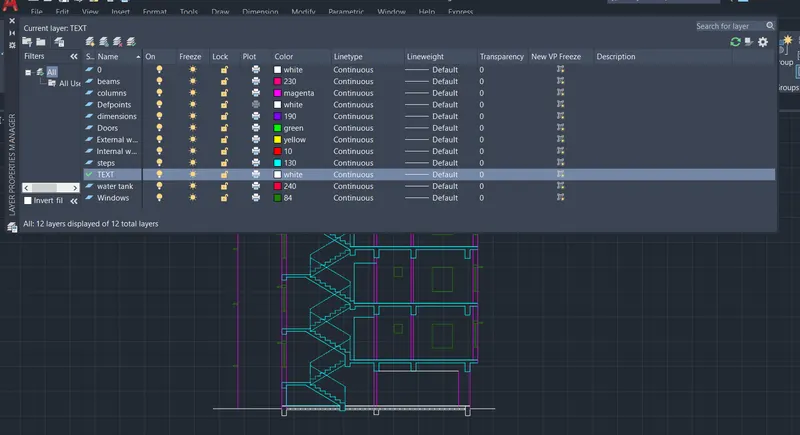
Enter name list of layer(s) to turn off or <select objects>: =TEXT
Enter an option [?/Make/Set/New/Rename/ON/OFF/Color/Ltype/LWeight/TRansparency/MATerial/Plot/Freeze/Thaw/LOck/Unlock/stAte/Description/rEconcile/Xref]:
Command:
Command: '_.-LAYER
Current layer: "0"
Enter an option [?/Make/Set/New/Rename/ON/OFF/Color/Ltype/LWeight/TRansparency/MATerial/Plot/Freeze/Thaw/LOck/Unlock/stAte/Description/rEconcile/Xref]: _ON
Enter name list of layer(s) to turn on: =TEXT
Enter an option [?/Make/Set/New/Rename/ON/OFF/Color/Ltype/LWeight/TRansparency/MATerial/Plot/Freeze/Thaw/LOck/Unlock/stAte/Description/rEconcile/Xref]:
Command:
Command: *Cancel*
Command:
Command: '_.-LAYER
Current layer: "0"
Enter an option [?/Make/Set/New/Rename/ON/OFF/Color/Ltype/LWeight/TRansparency/MATerial/Plot/Freeze/Thaw/LOck/Unlock/stAte/Description/rEconcile/Xref]: _OFF
Enter name list of layer(s) to turn off or <select objects>: =TEXT
Enter an option [?/Make/Set/New/Rename/ON/OFF/Color/Ltype/LWeight/TRansparency/MATerial/Plot/Freeze/Thaw/LOck/Unlock/stAte/Description/rEconcile/Xref]:
Command:
Command:
Command:
Command: *Cancel*
Command:
Command: '_.-LAYER
Current layer: "TEXT"
Enter an option [?/Make/Set/New/Rename/ON/OFF/Color/Ltype/LWeight/TRansparency/MATerial/Plot/Freeze/Thaw/LOck/Unlock/stAte/Description/rEconcile/Xref]: _ON
Enter name list of layer(s) to turn on: =TEXT
Enter an option [?/Make/Set/New/Rename/ON/OFF/Color/Ltype/LWeight/TRansparency/MATerial/Plot/Freeze/Thaw/LOck/Unlock/stAte/Description/rEconcile/Xref]:
Command: *Cancel*
Command:
Command:
Command: _QSAVE
Command: LEADER
Specify leader start point:
Specify next point: <Ortho on> *Cancel*
Command: LE
QLEADER
Specify first leader point, or [Settings] <Settings>:
Specify next point: <Ortho on>
Specify next point:
Specify text width <0>:
Enter first line of annotation text <Mtext>:
Command:
Command:
Command: _dimlinear
Specify first extension line origin or <select object>:
Specify second extension line origin:
Specify dimension line location or
[Mtext/Text/Angle/Horizontal/Vertical/Rotated]:
Dimension text = 2400
Command:
Command:
Command: _dimlinear
Specify first extension line origin or <select object>:
Specify second extension line origin:
Specify dimension line location or
[Mtext/Text/Angle/Horizontal/Vertical/Rotated]:
Dimension text = 1200
Command:
Command:
Command: _dimlinear
Specify first extension line origin or <select object>:
Specify second extension line origin:
Specify dimension line location or
[Mtext/Text/Angle/Horizontal/Vertical/Rotated]:
Dimension text = 2000
Command:
Command:
Command: _dimlinear
Specify first extension line origin or <select object>:
Specify second extension line origin:
Specify dimension line location or
[Mtext/Text/Angle/Horizontal/Vertical/Rotated]:
Dimension text = 1200
Command:
Command:
Command: _dimlinear
Specify first extension line origin or <select object>:
Specify second extension line origin:
Specify dimension line location or
[Mtext/Text/Angle/Horizontal/Vertical/Rotated]: *Cancel*
Command:
Command:
Command: _dimlinear
Specify first extension line origin or <select object>:
Specify second extension line origin:
Specify dimension line location or
[Mtext/Text/Angle/Horizontal/Vertical/Rotated]:
Dimension text = 3270
Command:
Command:
Command: _dimlinear
Specify first extension line origin or <select object>:
Specify second extension line origin:
Specify dimension line location or
[Mtext/Text/Angle/Horizontal/Vertical/Rotated]:
Dimension text = 2525
Command: CP
COPY
Crossing Lasso Press Spacebar to cycle options1 found
Select objects: 1 found, 2 total
Select objects:
Current settings: Copy mode = Multiple
Specify base point or [Displacement/mOde] <Displacement>:
Specify second point or [Array] <use first point as displacement>: <Ortho off>
Specify second point or [Array/Exit/Undo] <Exit>:
Specify second point or [Array/Exit/Undo] <Exit>:
Specify second point or [Array/Exit/Undo] <Exit>: *Cancel*
Command:
Command: A
ARC
Specify start point of arc or [Center]: *Cancel*
Command: *Cancel*
Command:
Command:
Command:
Command: _textedit
Current settings: Edit mode = Multiple
Select an annotation object or [Undo/Mode]:
Select an annotation object or [Undo/Mode]:
Select an annotation object or [Undo/Mode]:
Select an annotation object or [Undo/Mode]: *Cancel*
Command:
Command:
Command: _QSAVE
Command: O
OFFSET
Current settings: Erase source=No Layer=Source OFFSETGAPTYPE=0
Specify offset distance or [Through/Erase/Layer] <Through>:
Select object to offset or [Exit/Undo] <Exit>:
Specify through point or [Exit/Multiple/Undo] <Exit>: 20
Select object to offset or [Exit/Undo] <Exit>:
Specify through point or [Exit/Multiple/Undo] <Exit>: 20
Select object to offset or [Exit/Undo] <Exit>:
Specify through point or [Exit/Multiple/Undo] <Exit>: 20
Select object to offset or [Exit/Undo] <Exit>: *Cancel*
Command: EX
EXTEND
Current settings: Projection=UCS, Edge=None, Mode=Quick
Select object to extend or shift-select to trim or
[Boundary edges/Crossing/mOde/Project]:
Select object to extend or shift-select to trim or
[Boundary edges/Crossing/mOde/Project/Undo]:
Select object to extend or shift-select to trim or
[Boundary edges/Crossing/mOde/Project/Undo]: *Cancel*
Command: TR
TRIM
Current settings: Projection=UCS, Edge=None, Mode=Quick
Select object to trim or shift-select to extend or
[cuTting edges/Crossing/mOde/Project/eRase]:
Select object to trim or shift-select to extend or
[cuTting edges/Crossing/mOde/Project/eRase/Undo]:
Select object to trim or shift-select to extend or
[cuTting edges/Crossing/mOde/Project/eRase/Undo]:
Specify next fence point or [Undo]:
Specify next fence point or [Undo]:
Select object to trim or shift-select to extend or
[cuTting edges/Crossing/mOde/Project/eRase/Undo]: *Cancel*
Command: MI
MIRROR
Crossing Lasso Press Spacebar to cycle options4 found
Select objects:
Specify first point of mirror line:
Specify second point of mirror line: <Ortho on>
Erase source objects? [Yes/No] <No>: N
Command: TEXT
Current text style: "Standard" Text height: 180 Annotative: No Justify: Left
Specify start point of text or [Justify/Style]:
Specify height <180>:
Specify rotation angle of text <0>: 0
Command: CP
COPY
Crossing Lasso Press Spacebar to cycle options8 found
Select objects: 1 found, 9 total
Select objects:
Current settings: Copy mode = Multiple
Specify base point or [Displacement/mOde] <Displacement>:
Specify second point or [Array] <use first point as displacement>:
Specify second point or [Array/Exit/Undo] <Exit>: *Cancel*
Command:
Command:
Command: _QSAVE
Command:
Command: *Cancel*
Command: SC
SCALE
Select objects: 1 found
Select objects: Specify opposite corner: 1 found (1 duplicate), 1 total
Select objects: Specify opposite corner: 0 found
Select objects: 1 found (1 duplicate), 1 total
Select objects: Specify opposite corner: 0 found
Crossing Lasso Press Spacebar to cycle options1 found (1 duplicate), 1 total
Select objects: Specify opposite corner: 0 found
Crossing Lasso Press Spacebar to cycle options1 found (1 duplicate), 1 total
Select objects:
Specify base point: *Cancel*
Command: *Cancel*
Command:
Command:
Command:
Command: _scale 1 found
Specify base point:
Specify scale factor or [Copy/Reference]:
Dimension disassociated.
Command:
Command: _.erase 1 found
Command:
Command:
Command: _mleader
Specify leader arrowhead location or [leader Landing first/Content first/Options] <Options>:
Specify next point:
Specify next point:
Specify next point:
Command: Specify opposite corner or [Fence/WPolygon/CPolygon]:
Command: _.erase 1 found
Command:
Command:
Command: _mleaderstyle
Command:
Command:
Command: _mleader
Specify leader arrowhead location or [leader Landing first/Content first/Options] <Options>:
Specify next point:
Specify next point:
Specify next point:
Command:
Command: _.erase 1 found
Command:
Command:
Command: _mleaderstyle
Command:
Command:
Command: _mleader
Specify leader arrowhead location or [leader Landing first/Content first/Options] <Options>:
Specify leader landing location:
Command:
Command: *Cancel*
Command: *Cancel*
Command:
Command:
Command: _mleader
Specify leader arrowhead location or [leader Landing first/Content first/Options] <Options>: *Cancel*
Command:
Command: _mleader
Specify leader arrowhead location or [leader Landing first/Content first/Options] <Options>: *Cancel*
Command:
Command:
Command: _mleaderstyle
Command:
Command: _.erase 1 found
Command:
Command:
Command: _mleader
Specify leader arrowhead location or [leader Landing first/Content first/Options] <Options>:
Specify next point:
Specify leader landing location:
Command:
Command:
Command: _mleaderstyle
Command: Specify opposite corner or [Fence/WPolygon/CPolygon]:
Command: _.erase 1 found
Command:
Command:
Command: _mleader
Specify leader arrowhead location or [leader Landing first/Content first/Options] <Options>:
Specify next point:
Specify leader landing location:
Command: Specify opposite corner or [Fence/WPolygon/CPolygon]:
Command: _.erase 1 found
Command:
Command:
Command: _mleaderstyle
Command:
Command:
Command: _mleader
Specify leader arrowhead location or [leader Landing first/Content first/Options] <Options>:
Specify next point:
Specify leader landing location:
Command:
Command: *Cancel*
Command:
Command:
Command: _mleaderstyle
Command:
Command:
Command: *Cancel*
Command: RO
ROTATE
Current positive angle in UCS: ANGDIR=counterclockwise ANGBASE=0
Select objects: 1 found
Select objects: *Cancel*
Command:
Command:
Command: _mleader
Specify leader arrowhead location or [leader Landing first/Content first/Options] <Options>:
Specify next point:
Specify leader landing location:
Command:
Command:
Command: _mleaderstyle
Command: Specify opposite corner or [Fence/WPolygon/CPolygon]:
Command:
Command:
** STRETCH **
Specify stretch point or [Base point/Copy/Undo/eXit]:
Command:
Command:
** STRETCH **
Specify stretch point or [Base point/Copy/Undo/eXit]*Cancel*
Command:
** STRETCH **
Specify stretch point or [Base point/Copy/Undo/eXit] <Ortho off>
Command:
** STRETCH **
Specify stretch point or [Base point/Copy/Undo/eXit]
Command: Specify opposite corner or [Fence/WPolygon/CPolygon]:
Command:
Command:
Command: *Cancel*
Command: Specify opposite corner or [Fence/WPolygon/CPolygon]:
Command: _.erase 1 found
Command:
Command:
Command: _mleader
Specify leader arrowhead location or [leader Landing first/Content first/Options] <Options>:
Specify next point:
Specify leader landing location:
Automatic save to C:\Users\SAIKRI~1\AppData\Local\Temp\7.1_1_29003_d42371e4.sv$ ...
Command:
Command:
Command:
** STRETCH **
Specify stretch point or [Base point/Copy/Undo/eXit]
Command:
** STRETCH **
Specify stretch point or [Base point/Copy/Undo/eXit]
Command:
** STRETCH **
Specify stretch point or [Base point/Copy/Undo/eXit]:
Command: *Cancel*
Command:
Command:
Command: _QSAVE
Command:
Command:
Command: _mleader
Specify leader arrowhead location or [leader Landing first/Content first/Options] <Options>:
Specify next point:
Specify leader landing location:
Command:
Command:
** STRETCH **
Specify stretch point or [Base point/Copy/Undo/eXit]
Command:
** STRETCH **
Specify stretch point or [Base point/Copy/Undo/eXit]:
Command:
** STRETCH **
Specify stretch point or [Base point/Copy/Undo/eXit]:
Command: Specify opposite corner or [Fence/WPolygon/CPolygon]:
Command: Specify opposite corner or [Fence/WPolygon/CPolygon]:
Command:
** STRETCH **
Specify stretch point or [Base point/Copy/Undo/eXit]
Command:
Command:
Command: _mleaderstyle
Command:
Command:
** STRETCH **
Specify stretch point or [Base point/Copy/Undo/eXit] <Ortho on>
Command:
Command: Specify opposite corner or [Fence/WPolygon/CPolygon]:
Command:
Command: *Cancel*
Command:
Command: _.erase 1 found
Command:
Command:
Command: _mleader
Specify leader arrowhead location or [leader Landing first/Content first/Options] <Options>:
Specify next point:
Specify leader landing location:
Command:
Command: _.erase 1 found
Command:
Command:
Command: _mleader
Specify leader arrowhead location or [leader Landing first/Content first/Options] <Options>:
Specify next point:
Specify leader landing location:
Command:
Command: _.erase 1 found
Command:
Command:
Command: _mleaderstyle
Command:
Command:
Command: _mleader
Specify leader arrowhead location or [leader Landing first/Content first/Options] <Options>:
Specify next point or [End] <End>:
Specify next point or [End] <End>:
Specify next point or [End] <End>:
Specify next point or [End] <End>:
Command:
Command:
Command:
** STRETCH **
Specify stretch point or [Base point/Copy/Undo/eXit]
Command: Specify opposite corner or [Fence/WPolygon/CPolygon]:
Command:
** STRETCH **
Specify stretch point or [Base point/Copy/Undo/eXit]
Command:
Command:
Command:
** STRETCH **
Specify stretch point or [Base point/Copy/Undo/eXit]:
Command:
Command:
Command:
** STRETCH **
Specify stretch point or [Base point/Copy/Undo/eXit]: <Ortho off>
Command: *Cancel*
Command: RO
ROTATE
Current positive angle in UCS: ANGDIR=counterclockwise ANGBASE=0
Select objects: 1 found
Select objects:
Specify base point:
Specify rotation angle or [Copy/Reference] <180>: *Cancel*
Command:
Command:
Command: Specify opposite corner or [Fence/WPolygon/CPolygon]:
Command:
Command:
Command:
Command:
** STRETCH **
Specify stretch point or [Base point/Copy/Undo/eXit]:
Command:
** STRETCH **
Specify stretch point or [Base point/Copy/Undo/eXit]
Command:
Command:
** STRETCH **
Specify stretch point or [Base point/Copy/Undo/eXit]
Command: *Cancel*
Command:
Command:
Command: _QSAVE
Command:
Command:
Command: _QSAVE
Command: O
OFFSET
Current settings: Erase source=No Layer=Source OFFSETGAPTYPE=0
Specify offset distance or [Through/Erase/Layer] <Through>:
Select object to offset or [Exit/Undo] <Exit>:
Specify through point or [Exit/Multiple/Undo] <Exit>: 20
Select object to offset or [Exit/Undo] <Exit>:
Specify through point or [Exit/Multiple/Undo] <Exit>: 20
Select object to offset or [Exit/Undo] <Exit>:
Specify through point or [Exit/Multiple/Undo] <Exit>: 20
Select object to offset or [Exit/Undo] <Exit>: *Cancel*
Command: EX
EXTEND
Current settings: Projection=UCS, Edge=None, Mode=Quick
Select object to extend or shift-select to trim or
[Boundary edges/Crossing/mOde/Project]:
Select object to extend or shift-select to trim or
[Boundary edges/Crossing/mOde/Project/Undo]:
Select object to extend or shift-select to trim or
[Boundary edges/Crossing/mOde/Project/Undo]: *Cancel*
Command: TR
TRIM
Current settings: Projection=UCS, Edge=None, Mode=Quick
Select object to trim or shift-select to extend or
[cuTting edges/Crossing/mOde/Project/eRase]:
Select object to trim or shift-select to extend or
[cuTting edges/Crossing/mOde/Project/eRase/Undo]:
Select object to trim or shift-select to extend or
[cuTting edges/Crossing/mOde/Project/eRase/Undo]:
Specify next fence point or [Undo]:
Specify next fence point or [Undo]:
Select object to trim or shift-select to extend or
[cuTting edges/Crossing/mOde/Project/eRase/Undo]: *Cancel*
Command: MI
MIRROR
Crossing Lasso Press Spacebar to cycle options4 found
Select objects:
Specify first point of mirror line:
Specify second point of mirror line: <Ortho on>
Erase source objects? [Yes/No] <No>: N
Command: TEXT
Current text style: "Standard" Text height: 180 Annotative: No Justify: Left
Specify start point of text or [Justify/Style]:
Specify height <180>:
Specify rotation angle of text <0>: 0
Command: CP
COPY
Crossing Lasso Press Spacebar to cycle options8 found
Select objects: 1 found, 9 total
Select objects:
Current settings: Copy mode = Multiple
Specify base point or [Displacement/mOde] <Displacement>:
Specify second point or [Array] <use first point as displacement>:
Specify second point or [Array/Exit/Undo] <Exit>: *Cancel*
Command:
Command:
Command: _QSAVE
Command:
Command: *Cancel*
Command: SC
SCALE
Select objects: 1 found
Select objects: Specify opposite corner: 1 found (1 duplicate), 1 total
Select objects: Specify opposite corner: 0 found
Select objects: 1 found (1 duplicate), 1 total
Select objects: Specify opposite corner: 0 found
Crossing Lasso Press Spacebar to cycle options1 found (1 duplicate), 1 total
Select objects: Specify opposite corner: 0 found
Crossing Lasso Press Spacebar to cycle options1 found (1 duplicate), 1 total
Select objects:
Specify base point: *Cancel*
Command: *Cancel*
Command:
Command:
Command:
Command: _scale 1 found
Specify base point:
Specify scale factor or [Copy/Reference]:
Dimension disassociated.
Command:
Command: _.erase 1 found
Command:
Command:
Command: _mleader
Specify leader arrowhead location or [leader Landing first/Content first/Options] <Options>:
Specify next point:
Specify next point:
Specify next point:
Command: Specify opposite corner or [Fence/WPolygon/CPolygon]:
Command: _.erase 1 found
Command:
Command:
Command: _mleaderstyle
Command:
Command:
Command: _mleader
Specify leader arrowhead location or [leader Landing first/Content first/Options] <Options>:
Specify next point:
Specify next point:
Specify next point:
Command:
Command: _.erase 1 found
Command:
Command:
Command: _mleaderstyle
Command:
Command:
Command: _mleader
Specify leader arrowhead location or [leader Landing first/Content first/Options] <Options>:
Specify leader landing location:
Command:
Command: *Cancel*
Command: *Cancel*
Command:
Command:
Command: _mleader
Specify leader arrowhead location or [leader Landing first/Content first/Options] <Options>: *Cancel*
Command:
Command: _mleader
Specify leader arrowhead location or [leader Landing first/Content first/Options] <Options>: *Cancel*
Command:
Command:
Command: _mleaderstyle
Command:
Command: _.erase 1 found
Command:
Command:
Command: _mleader
Specify leader arrowhead location or [leader Landing first/Content first/Options] <Options>:
Specify next point:
Specify leader landing location:
Command:
Command:
Command: _mleaderstyle
Command: Specify opposite corner or [Fence/WPolygon/CPolygon]:
Command: _.erase 1 found
Command:
Command:
Command: _mleader
Specify leader arrowhead location or [leader Landing first/Content first/Options] <Options>:
Specify next point:
Specify leader landing location:
Command: Specify opposite corner or [Fence/WPolygon/CPolygon]:
Command: _.erase 1 found
Command:
Command:
Command: _mleaderstyle
Command:
Command:
Command: _mleader
Specify leader arrowhead location or [leader Landing first/Content first/Options] <Options>:
Specify next point:
Specify leader landing location:
Command:
Command: *Cancel*
Command:
Command:
Command: _mleaderstyle
Command:
Command:
Command: *Cancel*
Command: RO
ROTATE
Current positive angle in UCS: ANGDIR=counterclockwise ANGBASE=0
Select objects: 1 found
Select objects: *Cancel*
Command:
Command:
Command: _mleader
Specify leader arrowhead location or [leader Landing first/Content first/Options] <Options>:
Specify next point:
Specify leader landing location:
Command:
Command:
Command: _mleaderstyle
Command: Specify opposite corner or [Fence/WPolygon/CPolygon]:
Command:
Command:
** STRETCH **
Specify stretch point or [Base point/Copy/Undo/eXit]:
Command:
Command:
** STRETCH **
Specify stretch point or [Base point/Copy/Undo/eXit]*Cancel*
Command:
** STRETCH **
Specify stretch point or [Base point/Copy/Undo/eXit] <Ortho off>
Command:
** STRETCH **
Specify stretch point or [Base point/Copy/Undo/eXit]
Command: Specify opposite corner or [Fence/WPolygon/CPolygon]:
Command:
Command:
Command: *Cancel*
Command: Specify opposite corner or [Fence/WPolygon/CPolygon]:
Command: _.erase 1 found
Command:
Command:
Command: _mleader
Specify leader arrowhead location or [leader Landing first/Content first/Options] <Options>:
Specify next point:
Specify leader landing location:
Automatic save to C:\Users\SAIKRI~1\AppData\Local\Temp\7.1_1_29003_d42371e4.sv$ ...
Command:
Command:
Command:
** STRETCH **
Specify stretch point or [Base point/Copy/Undo/eXit]
Command:
** STRETCH **
Specify stretch point or [Base point/Copy/Undo/eXit]
Command:
** STRETCH **
Specify stretch point or [Base point/Copy/Undo/eXit]:
Command: *Cancel*
Command:
Command:
Command: _QSAVE
Command:
Command:
Command: _mleader
Specify leader arrowhead location or [leader Landing first/Content first/Options] <Options>:
Specify next point:
Specify leader landing location:
Command:
Command:
** STRETCH **
Specify stretch point or [Base point/Copy/Undo/eXit]
Command:
** STRETCH **
Specify stretch point or [Base point/Copy/Undo/eXit]:
Command:
** STRETCH **
Specify stretch point or [Base point/Copy/Undo/eXit]:
Command: Specify opposite corner or [Fence/WPolygon/CPolygon]:
Command: Specify opposite corner or [Fence/WPolygon/CPolygon]:
Command:
** STRETCH **
Specify stretch point or [Base point/Copy/Undo/eXit]
Command:
Command:
Command: _mleaderstyle
Command:
Command:
** STRETCH **
Specify stretch point or [Base point/Copy/Undo/eXit] <Ortho on>
Command:
Command: Specify opposite corner or [Fence/WPolygon/CPolygon]:
Command:
Command: *Cancel*
Command:
Command: _.erase 1 found
Command:
Command:
Command: _mleader
Specify leader arrowhead location or [leader Landing first/Content first/Options] <Options>:
Specify next point:
Specify leader landing location:
Command:
Command: _.erase 1 found
Command:
Command:
Command: _mleader
Specify leader arrowhead location or [leader Landing first/Content first/Options] <Options>:
Specify next point:
Specify leader landing location:
Command:
Command: _.erase 1 found
Command:
Command:
Command: _mleaderstyle
Command:
Command:
Command: _mleader
Specify leader arrowhead location or [leader Landing first/Content first/Options] <Options>:
Specify next point or [End] <End>:
Specify next point or [End] <End>:
Specify next point or [End] <End>:
Specify next point or [End] <End>:
Command:
Command:
Command:
** STRETCH **
Specify stretch point or [Base point/Copy/Undo/eXit]
Command: Specify opposite corner or [Fence/WPolygon/CPolygon]:
Command:
** STRETCH **
Specify stretch point or [Base point/Copy/Undo/eXit]
Command:
Command:
Command:
** STRETCH **
Specify stretch point or [Base point/Copy/Undo/eXit]:
Command:
Command:
Command:
** STRETCH **
Specify stretch point or [Base point/Copy/Undo/eXit]: <Ortho off>
Command: *Cancel*
Command: RO
ROTATE
Current positive angle in UCS: ANGDIR=counterclockwise ANGBASE=0
Select objects: 1 found
Select objects:
Specify base point:
Specify rotation angle or [Copy/Reference] <180>: *Cancel*
Command:
Command:
Command: Specify opposite corner or [Fence/WPolygon/CPolygon]:
Command:
Command:
Command:
Command:
** STRETCH **
Specify stretch point or [Base point/Copy/Undo/eXit]:
Command:
** STRETCH **
Specify stretch point or [Base point/Copy/Undo/eXit]
Command:
Command:
** STRETCH **
Specify stretch point or [Base point/Copy/Undo/eXit]
Command: *Cancel*
Command:
Command:
Command: _QSAVE
Command:
Command:
Command: _QSAVE
Result: