AutoCAD_Sketching and Editing images_Week 3
Drawing-1:
Aim and Introduction:
To draw the diagram as per the given dimensions by using the appropriate commands
Procedure:
COMMANDLINE
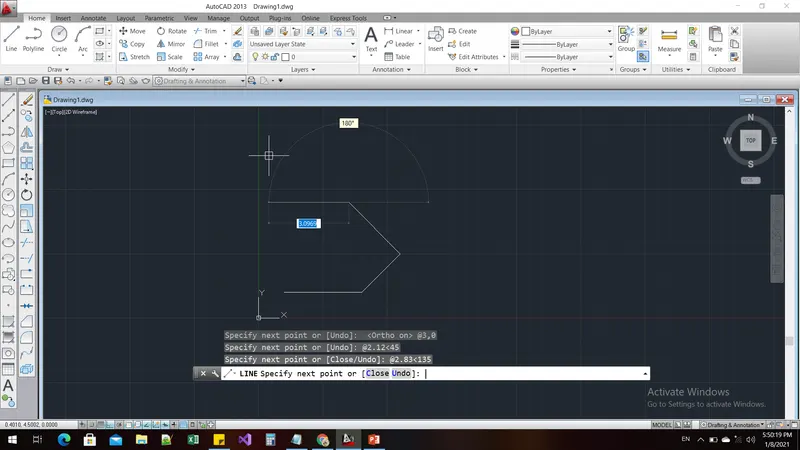
Command: l
LINE
Specify first point: 1,1
Specify next point or [Undo]: @3,0
Specify next point or [Undo]: @2.12<45
Specify next point or [Close/Undo]: @2.83<135
Specify next point or [Close/Undo]: @-2,0
Specify next point or [Close/Undo]: c
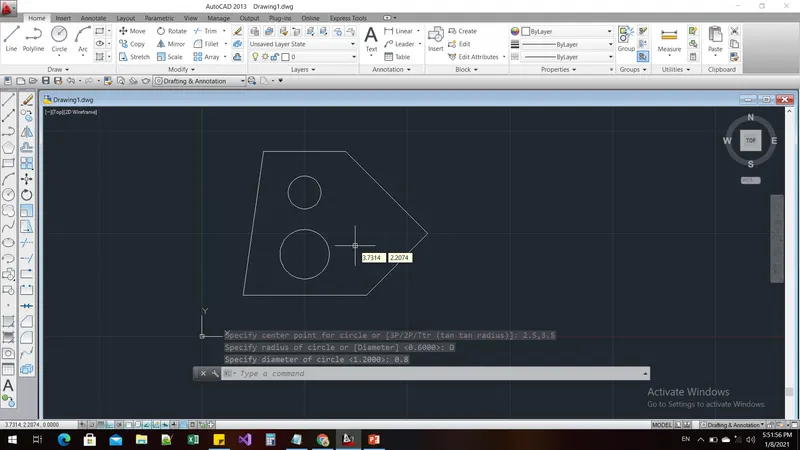
Command: c
CIRCLE
Specify center point for circle or [3P/2P/Ttr (tan tan radius)]: 2.5,2
Specify radius of circle or [Diameter]: D
Specify diameter of circle: 1.2
Command: c
CIRCLE
Specify center point for circle or [3P/2P/Ttr (tan tan radius)]: 2.5,3.5
Specify radius of circle or [Diameter] <0.6000>: D
Specify diameter of circle <1.2000>: 0.8
Result:
Drawing-2:
Aim and Introduction:
To draw the diagram as per the given dimensions by using the appropriate commands
Procedure:
Command: OS
OSNAP
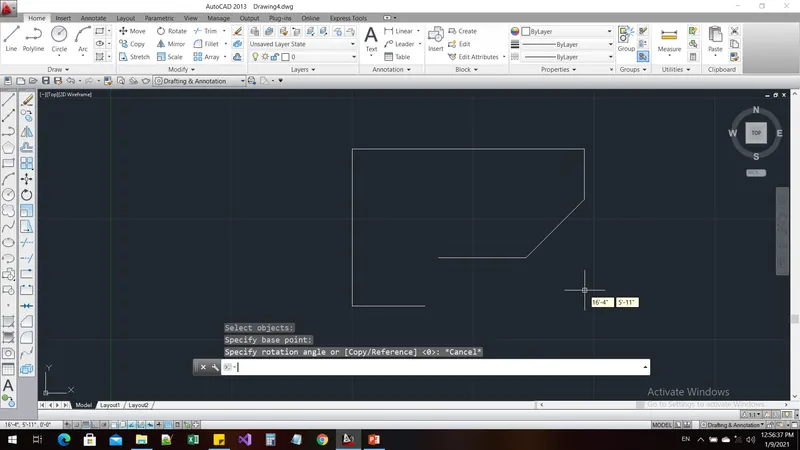
Command: l
LINE
Specify first point:
Specify next point or [Undo]: *Cancel*
Command: l
LINE
Specify first point: *Cancel*
Command: *Cancel*
Command: os
OSNAP
Command: l
LINE
Specify first point:
Specify next point or [Undo]:
Specify next point or [Undo]:
Specify next point or [Close/Undo]: *Cancel*
Command: l
LINE
Specify first point:
Specify next point or [Undo]: *Cancel*
Command: l
LINE
Specify first point:
Specify next point or [Undo]:
Specify next point or [Undo]:
Specify next point or [Close/Undo]: _u
Specify next point or [Undo]: *Cancel*
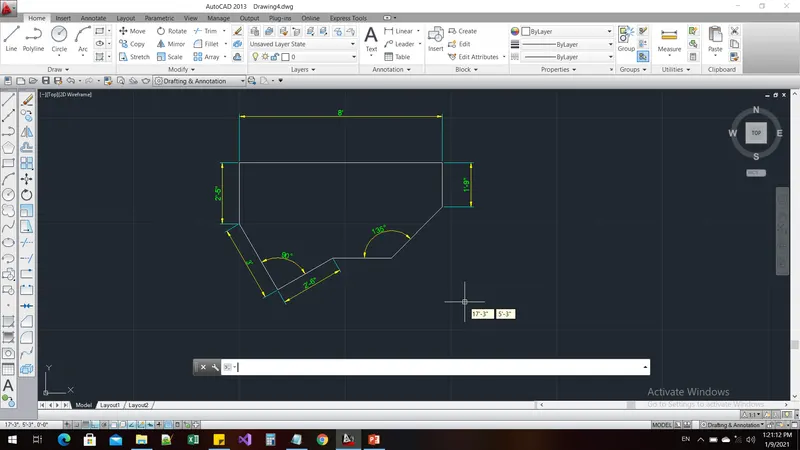
Command: DIMLIN
DIMLINEAR
Specify first extension line origin or <select object>:
Specify second extension line origin:
Specify dimension line location or
[Mtext/Text/Angle/Horizontal/Vertical/Rotated]:
Dimension text = 96
Command: DIMSTYLE
Command: L
LINE
Specify first point: *Cancel*
Command: *Cancel*
Command: DIMLIN
DIMLINEAR
Specify first extension line origin or <select object>:
Specify second extension line origin:
Specify dimension line location or
[Mtext/Text/Angle/Horizontal/Vertical/Rotated]:
Dimension text = 1'-9"
Command: DIMLINEAR
Specify first extension line origin or <select object>:
Specify second extension line origin:
Specify dimension line location or
[Mtext/Text/Angle/Horizontal/Vertical/Rotated]:
Dimension text = 2'-5"
Command: DIMALI
DIMALIGNED
Specify first extension line origin or <select object>:
Specify second extension line origin:
Specify dimension line location or
[Mtext/Text/Angle]:
Dimension text = 3'
Command: DIMALIGNED
Specify first extension line origin or <select object>:
Specify second extension line origin:
Specify dimension line location or
[Mtext/Text/Angle]:
Dimension text = 2'-6"
Command: DIMANGULAR
Select arc, circle, line, or <specify vertex>:
Select second line:
Specify dimension arc line location or [Mtext/Text/Angle/Quadrant]:
Dimension text = 90
Command: DIMANGULAR
Select arc, circle, line, or <specify vertex>:
Select second line:
Specify dimension arc line location or [Mtext/Text/Angle/Quadrant]:
Dimension text = 135
Command: DIMSTYLE
Result:
Drawing-3:
Aim and Introduction:
To draw the diagram as per the given dimensions by using the appropriate commands
Procedure:
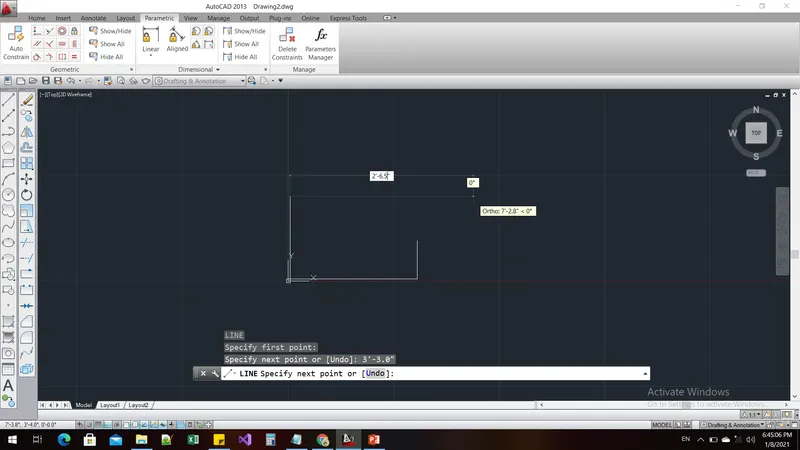
Command: l
LINE
Specify first point: 1,1
Specify next point or [Undo]: *Cancel*
5'-0.1"
Specify next point or [Undo]: 1'-6.0"
Specify next point or [Close/Undo]: *Cancel*
Command: l
LINE
Specify first point:
Specify next point or [Undo]: 3'-3.0"
Specify next point or [Undo]: 2'-6.5"
Specify next point or [Close/Undo]:
Specify next point or [Close/Undo]: *Cancel*
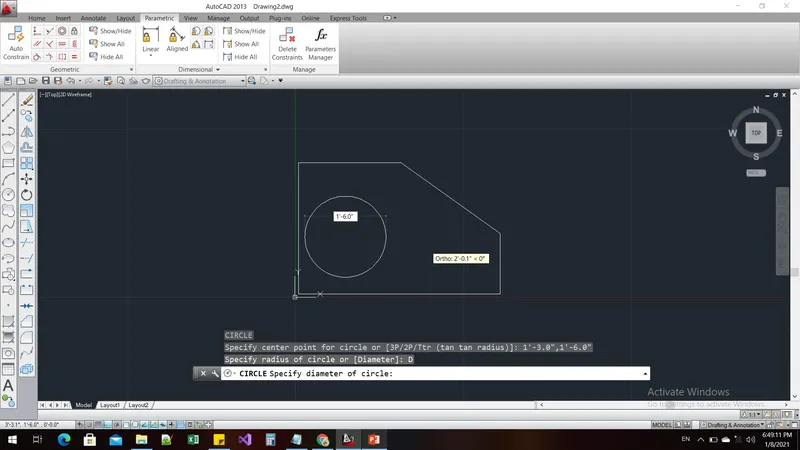
Command: c
CIRCLE
Specify center point for circle or [3P/2P/Ttr (tan tan radius)]: 2'-3",2'-6"
Specify radius of circle or [Diameter]: *Cancel*
Command: l
LINE
Specify first point:
Specify next point or [Undo]: *Cancel*
Command: c
CIRCLE
Specify center point for circle or [3P/2P/Ttr (tan tan radius)]: *Cancel*
Command: *Cancel*
Command: c
CIRCLE
Specify center point for circle or [3P/2P/Ttr (tan tan radius)]: 1'-3.0",1'-6.0"
Specify radius of circle or [Diameter]: D
Specify diameter of circle: 1'-6.0"
Command: DIMSTY
DIMSTYLE
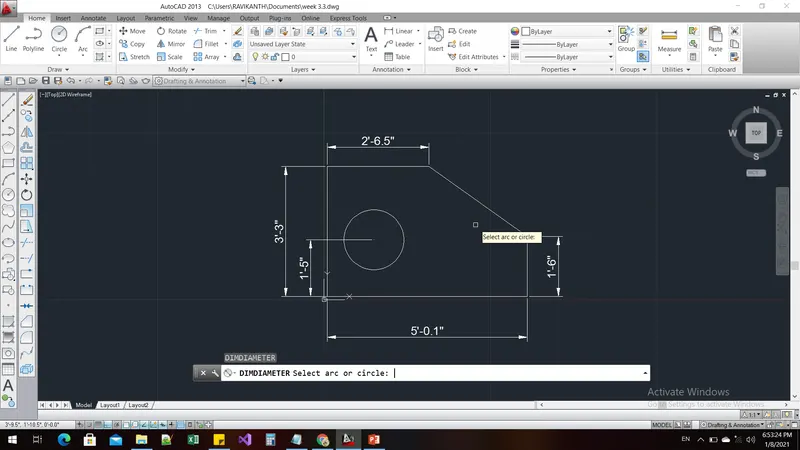
Command: DIMLIN
DIMLINEAR
Specify first extension line origin or <select object>:
Specify second extension line origin:
Specify dimension line location or
[Mtext/Text/Angle/Horizontal/Vertical/Rotated]:
Dimension text = 5'-0.1"
Command: DIMLIN
DIMLINEAR
Specify first extension line origin or <select object>:
Specify second extension line origin:
Specify dimension line location or
[Mtext/Text/Angle/Horizontal/Vertical/Rotated]:
Dimension text = 3'-3"
Command: DIMLINEAR
Specify first extension line origin or <select object>:
Specify second extension line origin:
Specify dimension line location or
[Mtext/Text/Angle/Horizontal/Vertical/Rotated]:
Dimension text = 1'-6"
Command: DIMLINEAR
Specify first extension line origin or <select object>:
Specify second extension line origin:
Specify dimension line location or
[Mtext/Text/Angle/Horizontal/Vertical/Rotated]:
Dimension text = 2'-6.5"
Command: DIMLIN
DIMLINEAR
Specify first extension line origin or <select object>: *Cancel*
Command: *Cancel*
Command: OS
OSNAP
Command: DIMLIN
DIMLINEAR
Specify first extension line origin or <select object>:
Specify second extension line origin:
Specify dimension line location or
[Mtext/Text/Angle/Horizontal/Vertical/Rotated]:
Dimension text = 1'-5"
Command: DIMDIA
DIMDIAMETER
Select arc or circle:
Dimension text = 1'-6"
Result:
Drawing-4:
Aim and Introduction:
To draw the diagram as per the given dimensions by using the appropriate commands
Procedure:
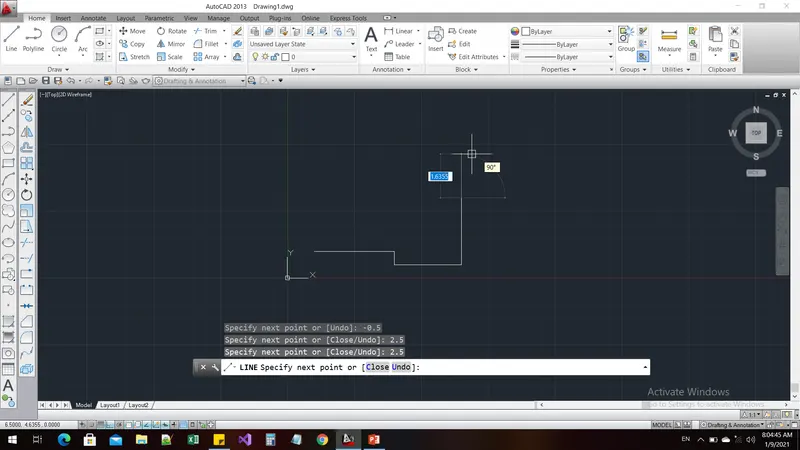
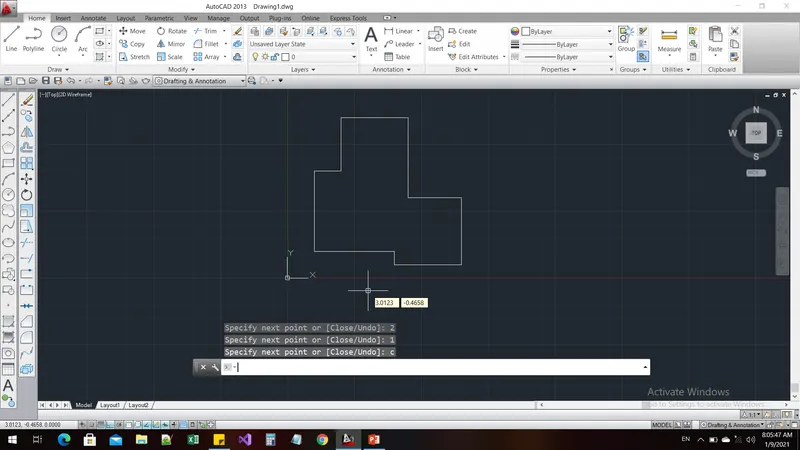
Command: l
LINE
Specify first point: 1,1
Specify next point or [Undo]: 3
Specify next point or [Undo]: -0.5
Specify next point or [Close/Undo]: 2.5
Specify next point or [Close/Undo]: 2.5
Specify next point or [Close/Undo]: 2
Specify next point or [Close/Undo]: 3
Specify next point or [Close/Undo]: 2.5
Specify next point or [Close/Undo]: 2
Specify next point or [Close/Undo]: 1
Specify next point or [Close/Undo]: c
Command: l
LINE
Specify first point: 1,1
Specify next point or [Undo]: 3
Specify next point or [Undo]: -0.5
Specify next point or [Close/Undo]: 2.5
Specify next point or [Close/Undo]: 2.5
Specify next point or [Close/Undo]: 2
Specify next point or [Close/Undo]: 3
Specify next point or [Close/Undo]: 2.5
Specify next point or [Close/Undo]: 2
Specify next point or [Close/Undo]: 1
Specify next point or [Close/Undo]: c
Command: DIMLIN
DIMLINEAR
Specify first extension line origin or <select object>:
Specify second extension line origin:
Specify dimension line location or
[Mtext/Text/Angle/Horizontal/Vertical/Rotated]:
Dimension text = 3.0000
Command: DIMLIN
DIMLINEAR
Specify first extension line origin or <select object>:
Specify second extension line origin:
Specify dimension line location or
[Mtext/Text/Angle/Horizontal/Vertical/Rotated]:
Dimension text = 2.5000
Command: DIMLINEAR
Specify first extension line origin or <select object>: *Cancel*
Command: *Cancel*
Command: DIMLIN
DIMLINEAR
Specify first extension line origin or <select object>:
Specify second extension line origin:
Specify dimension line location or
[Mtext/Text/Angle/Horizontal/Vertical/Rotated]:
Dimension text = 2.5000
Command: DIMLINEAR
Specify first extension line origin or <select object>:
Specify second extension line origin:
Specify dimension line location or
[Mtext/Text/Angle/Horizontal/Vertical/Rotated]:
Dimension text = 2.0000
Command: DIMLINEAR
Specify first extension line origin or <select object>:
Specify second extension line origin:
Specify dimension line location or
[Mtext/Text/Angle/Horizontal/Vertical/Rotated]:
Dimension text = 2.5000
Command: DIMLINEAR
Specify first extension line origin or <select object>:
Specify second extension line origin:
Specify dimension line location or
[Mtext/Text/Angle/Horizontal/Vertical/Rotated]:
Dimension text = 3.0000
Command: DIMLINEAR
Specify first extension line origin or <select object>:
Specify second extension line origin:
Specify dimension line location or
[Mtext/Text/Angle/Horizontal/Vertical/Rotated]: _u
Invalid point input.
Specify dimension line location or
[Mtext/Text/Angle/Horizontal/Vertical/Rotated]: _u
Invalid point input.
Specify dimension line location or
[Mtext/Text/Angle/Horizontal/Vertical/Rotated]: *Cancel*
Command: DIMLINEAR
Specify first extension line origin or <select object>:
Specify second extension line origin:
Specify dimension line location or
[Mtext/Text/Angle/Horizontal/Vertical/Rotated]:
Dimension text = 5.0000
Result:
Drawing-5:
Aim and Introduction:
To draw the diagram as per the given dimensions by using the appropriate commands
Procedure:
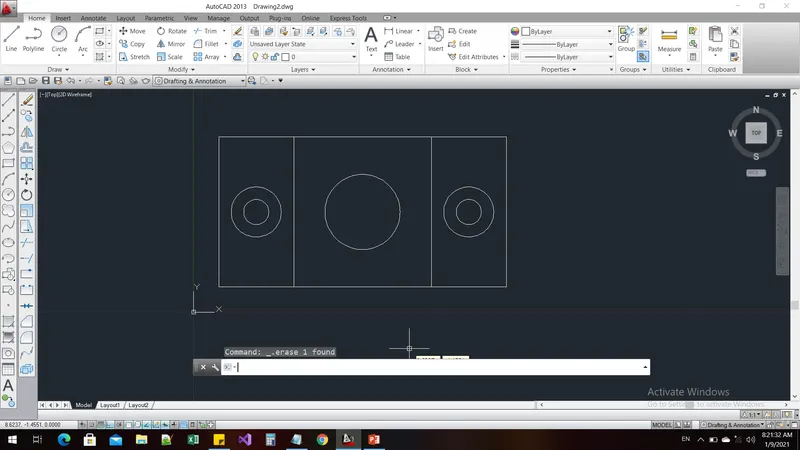
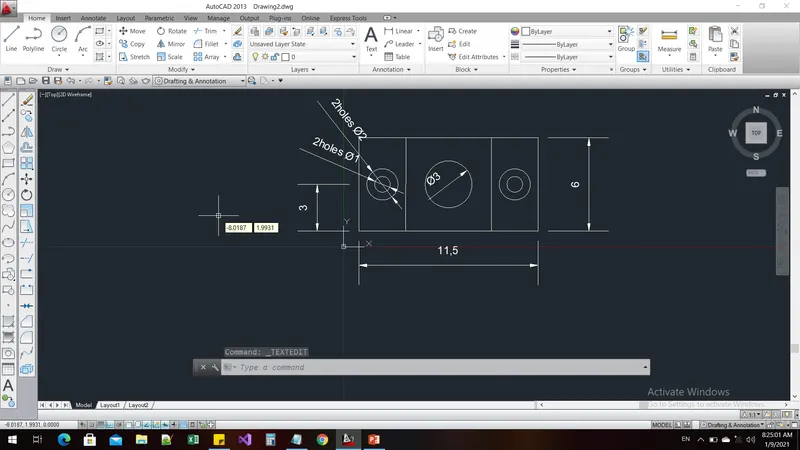
Command: l
LINE
Specify first point: 1,1
Specify next point or [Undo]: 11.5
Specify next point or [Undo]: 6
Specify next point or [Close/Undo]: 11.5
Specify next point or [Close/Undo]: c
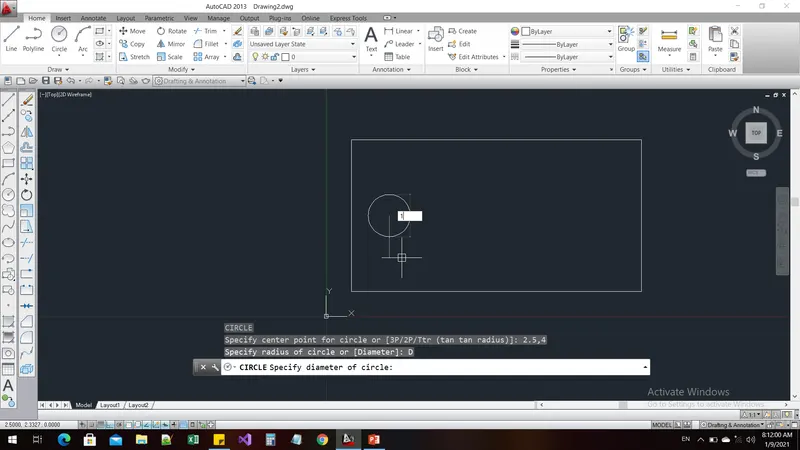
Command: C
CIRCLE
Specify center point for circle or [3P/2P/Ttr (tan tan radius)]: 2.5,4
Specify radius of circle or [Diameter]: D
Specify diameter of circle: 1
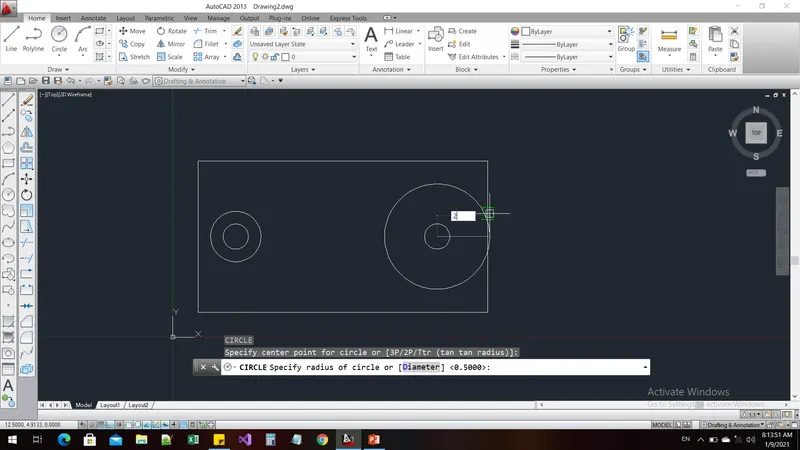
Command: c
CIRCLE
Specify center point for circle or [3P/2P/Ttr (tan tan radius)]:
Specify radius of circle or [Diameter] <0.5000>: D
Specify diameter of circle <1.0000>: 2
Command: c
LINE
Specify first point: 6.75,1
Specify next point or [Undo]:
Specify next point or [Undo]: *Cancel*
Command: l
LINE
Specify first point: 4,1
Specify next point or [Undo]:
Specify next point or [Undo]: *Cancel*
Command: l
LINE
Specify first point: 9.5,1
Specify next point or [Undo]: *Cancel*
Command: COPY
Select objects: 1 found
Select objects: 1 found, 2 total
Select objects:
Current settings: Copy mode = Multiple
Specify base point or [Displacement/mOde] :
Specify second point or [Array] : 8.5
Specify second point or [Array/Exit/Undo] : *Cancel*
Command: C
CIRCLE
Specify center point for circle or [3P/2P/Ttr (tan tan radius)]:
Specify radius of circle or [Diameter] <1.0000>: D
Specify diameter of circle <2.0000>: 3
Command: *Cancel*
Command: DIMLIN
DIMLINEAR
Specify first extension line origin or <select object>:
Specify second extension line origin:
Specify dimension line location or
[Mtext/Text/Angle/Horizontal/Vertical/Rotated]:
Dimension text = 11.5
Command: DIMSTYLE
Command: DIMLINEAR
Specify first extension line origin or <select object>:
Specify second extension line origin:
Specify dimension line location or
[Mtext/Text/Angle/Horizontal/Vertical/Rotated]:
Dimension text = 6
Command: DIMLINEAR
Specify first extension line origin or <select object>:
Specify second extension line origin:
Specify dimension line location or
[Mtext/Text/Angle/Horizontal/Vertical/Rotated]: *Cancel*
Command: DIMLIN
DIMLINEAR
Specify first extension line origin or <select object>:
Specify second extension line origin:
Specify dimension line location or
[Mtext/Text/Angle/Horizontal/Vertical/Rotated]:
Dimension text = 3
Command: DIMDIA
DIMDIAMETER
Select arc or circle:
Dimension text = 1
Specify dimension line location or [Mtext/Text/Angle]:
Command: DIMDIAMETER
Select arc or circle:
Dimension text = 2
Specify dimension line location or [Mtext/Text/Angle]:
Command: DIMDIAMETER
Select arc or circle:
Dimension text = 3
Specify dimension line location or [Mtext/Text/Angle]:
Command:
Command:
Command:
Command: _TEXTEDIT
Command:
Command:
Command:
Command: _TEXTEDIT
Command:
Command:
Command:
Command: _TEXTEDIT
Result:
Drawing-6:
Aim and Introduction:
To draw the diagram as per the given dimensions by using the appropriate commands
Procedure:
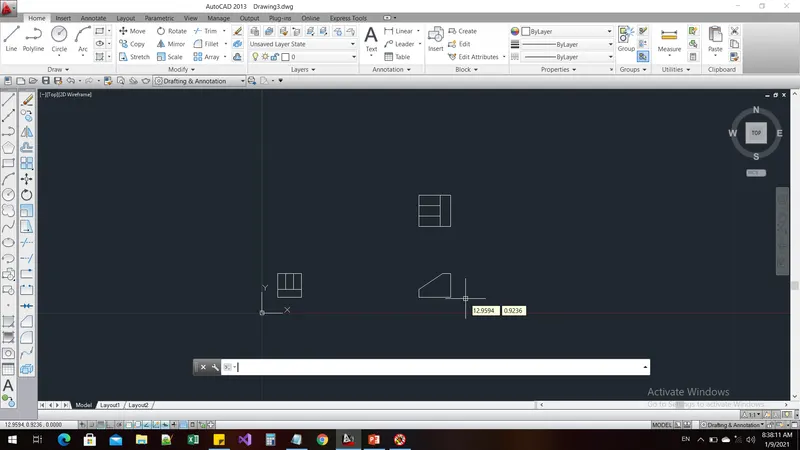
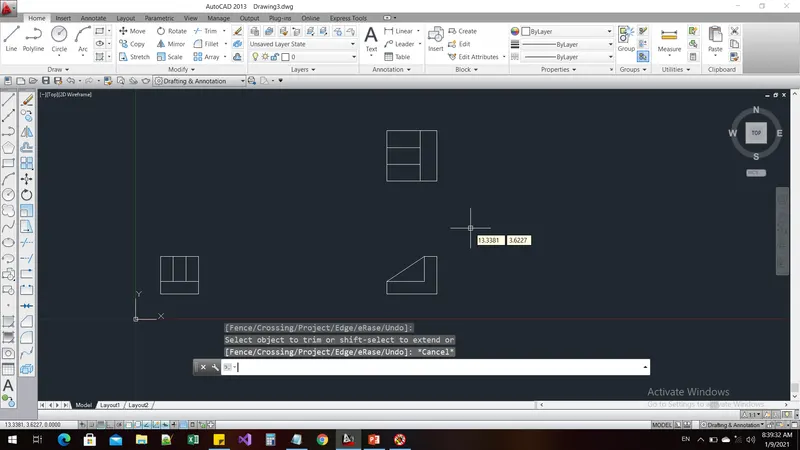
Command: REC
RECTANG
Specify first corner point or [Chamfer/Elevation/Fillet/Thickness/Width]: 10,10
Specify other corner point or [Area/Dimensions/Rotation]: @1.5,1.5
Command: L
LINE
Specify first point: 11.5,10.5
Specify next point or [Undo]: <Ortho on>
Specify next point or [Undo]: *Cancel*
Command: l
LINE
Specify first point: 10.5,10.5
Specify next point or [Undo]: 1
Specify next point or [Undo]: *Cancel*
Command: Specify opposite corner or [Fence/WPolygon/CPolygon]:
Command: *Cancel*
Command: l
LINE
Specify first point: 11,10.5
Specify next point or [Undo]: 1
Specify next point or [Undo]: *Cancel*
Command: REC
RECTANG
Specify first corner point or [Chamfer/Elevation/Fillet/Thickness/Width]: *Cancel*
Command: *Cancel*
Command: COPY
Select objects: Specify opposite corner: 4 found
Select objects:
Current settings: Copy mode = Multiple
Specify base point or [Displacement/mOde] <Displacement>:
Specify second point or [Array] <use first point as displacement>: <Ortho off>
Specify second point or [Array/Exit/Undo] <Exit>: *Cancel*
Command: ro
ROTATE
Current positive angle in UCS: ANGDIR=counterclockwise ANGBASE=0
Select objects: Specify opposite corner: 4 found
Select objects:
Specify base point:
Specify rotation angle or [Copy/Reference] <0>: 90
Command: M
MOVE
Select objects: Specify opposite corner: 4 found
Select objects:
Specify base point or [Displacement] <Displacement>:
Specify second point or <use first point as displacement>:
Command: SC
SCALE
Select objects: 1 found
Select objects:
Specify base point:
Specify scale factor or [Copy/Reference]: 1.333
Command: *Cancel*
Command: _u SCALE
Command: SC
SCALE
Select objects: Specify opposite corner: 4 found
Select objects:
Specify base point:
Specify scale factor or [Copy/Reference]: 1.33
Command: l
LINE
Specify first point: 15,10
Specify next point or [Undo]: <Ortho on> -2
Specify next point or [Undo]: 1.5
Specify next point or [Close/Undo]: 0.5
Specify next point or [Close/Undo]: *Cancel*
Command: l
LINE
Specify first point:
Specify next point or [Undo]: 0.5
Specify next point or [Undo]: *Cancel*
Command: l
LINE
Specify first point:
Specify next point or [Undo]: <Ortho off>
Specify next point or [Undo]: *Cancel*
Command: l
LINE
Specify first point:
Specify next point or [Undo]: 1
Specify next point or [Undo]: _u
Specify next point or [Undo]: <Ortho on> 1.5
Specify next point or [Undo]: 1
Specify next point or [Close/Undo]: *Cancel*
Command: DIMLIN
DIMLINEAR
Specify first extension line origin or <select object>:
Specify second extension line origin:
Specify dimension line location or
[Mtext/Text/Angle/Horizontal/Vertical/Rotated]:
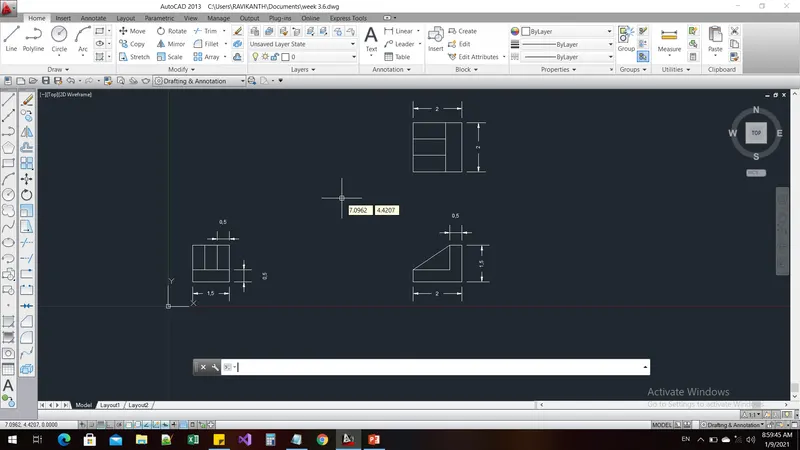
Dimension text = 1.5000
Command: DIMLINEAR
Specify first extension line origin or <select object>:
Specify second extension line origin:
Specify dimension line location or
[Mtext/Text/Angle/Horizontal/Vertical/Rotated]:
Dimension text = 1.5000
Command: DIMLINEAR
Specify first extension line origin or <select object>:
Specify second extension line origin:
Specify dimension line location or
[Mtext/Text/Angle/Horizontal/Vertical/Rotated]:
Dimension text = 0.5000
Command: DIMLINEAR
Specify first extension line origin or <select object>:
Specify second extension line origin:
Specify dimension line location or
[Mtext/Text/Angle/Horizontal/Vertical/Rotated]: *Cancel*
Command: DIMLINEAR
Specify first extension line origin or <select object>:
Specify second extension line origin:
Specify dimension line location or
[Mtext/Text/Angle/Horizontal/Vertical/Rotated]:
Dimension text = 1.9950
Command: *Cancel*
Command: DIMLINEAR
Specify first extension line origin or <select object>:
Specify second extension line origin:
Specify dimension line location or
[Mtext/Text/Angle/Horizontal/Vertical/Rotated]:
Dimension text = 1.5000
Command: DIMLINEAR
Specify first extension line origin or <select object>:
Specify second extension line origin:
Specify dimension line location or
[Mtext/Text/Angle/Horizontal/Vertical/Rotated]:
Dimension text = 0.5000
Command: DIMSTY
DIMSTYLE
Result:
Drawing-7:
Aim and Introduction:
To draw the diagram as per the given dimensions by using the appropriate commands
Procedure:
Command: REC
RECTANG
Specify first corner point or [Chamfer/Elevation/Fillet/Thickness/Width]: 1,1
Specify other corner point or [Area/Dimensions/Rotation]: @1.5,1.5
Command: l
LINE
Specify first point: 1,1.5
Specify next point or [Undo]: <Ortho on> 1.5
Specify next point or [Undo]: *Cancel*
Command: l
LINE
Specify first point: 1.5,1.5
Specify next point or [Undo]: 1
Specify next point or [Undo]: *Cancel*
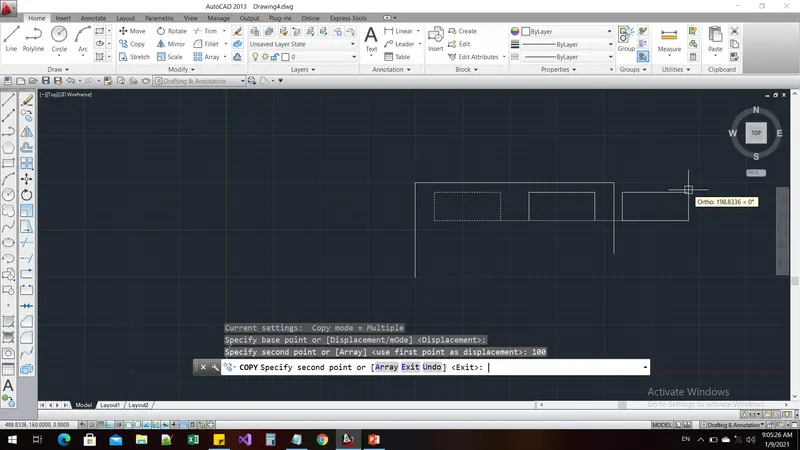
Command: COPY
Select objects: 1 found
Select objects:
Current settings: Copy mode = Multiple
Specify base point or [Displacement/mOde] <Displacement>:
Specify second point or [Array] <use first point as displacement>: 0.5
Specify second point or [Array/Exit/Undo] <Exit>: *Cancel*
Command: COPY
Select objects: Specify opposite corner: 4 found
Select objects:
Current settings: Copy mode = Multiple
Specify base point or [Displacement/mOde] <Displacement>:
Specify second point or [Array] <use first point as displacement>: <Ortho off> @5,5
Specify second point or [Array/Exit/Undo] <Exit>: @3,3
Specify second point or [Array/Exit/Undo] <Exit>: *Cancel*
Command: Specify opposite corner or [Fence/WPolygon/CPolygon]:
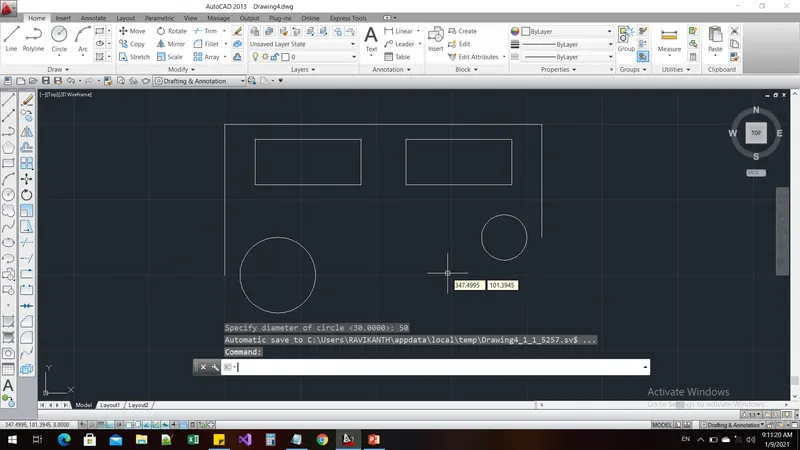
Command: _.erase 4 found
Command: RO
ROTATE
Current positive angle in UCS: ANGDIR=counterclockwise ANGBASE=0
Select objects: Specify opposite corner: 4 found
Select objects:
Specify base point:
Specify rotation angle or [Copy/Reference] <0>: *Cancel*
Command: COPY
Select objects: Specify opposite corner: 4 found
Select objects:
Current settings: Copy mode = Multiple
Specify base point or [Displacement/mOde] <Displacement>:
Specify second point or [Array] <use first point as displacement>: @5,5
Specify second point or [Array/Exit/Undo] <Exit>: *Cancel*
Command: *Cancel*
Command: *Cancel*
Command: copy
Select objects: Specify opposite corner: *Cancel*
0 found
Select objects: *Cancel*
Command: Specify opposite corner or [Fence/WPolygon/CPolygon]:
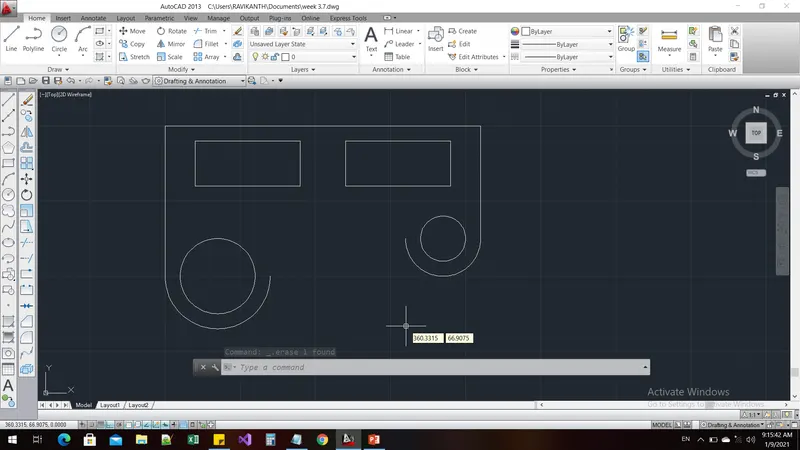
Command: _.erase 4 found
Command: RO
ROTATE
Current positive angle in UCS: ANGDIR=counterclockwise ANGBASE=0
Select objects: Specify opposite corner: 4 found
Select objects:
Specify base point:
Specify rotation angle or [Copy/Reference] <0>: 180
Command: Specify opposite corner or [Fence/WPolygon/CPolygon]:
Command: RO
ROTATE
Current positive angle in UCS: ANGDIR=counterclockwise ANGBASE=0
4 found
Specify base point:
Specify rotation angle or [Copy/Reference] <180>: 90
Command: RO
ROTATE
Current positive angle in UCS: ANGDIR=counterclockwise ANGBASE=0
Select objects: Specify opposite corner: 4 found
Select objects:
Specify base point:
Specify rotation angle or [Copy/Reference] <90>: 180
Command: SC
SCALE
Select objects: Specify opposite corner: 4 found
Select objects:
Specify base point:
Specify scale factor or [Copy/Reference]: 1.333
Command: Specify opposite corner or [Fence/WPolygon/CPolygon]:
Command: l
LINE
Specify first point:
Specify next point or [Undo]: <Ortho on> 2
Specify next point or [Undo]: 1.5
Specify next point or [Close/Undo]: 0.5
Specify next point or [Close/Undo]: *Cancel*
Command: l
LINE
Specify first point:
Specify next point or [Undo]: 0.5
Specify next point or [Undo]: <Ortho off>
Specify next point or [Close/Undo]: *Cancel*
Command: SC
SCALE
Select objects: 1 found
Select objects: 1 found, 2 total
Select objects:
Specify base point:
Specify scale factor or [Copy/Reference]: *Cancel*
Command: MO
PROPERTIES
Command: *Cancel*
Command: *Cancel*
Command: *Cancel*
Command: *Cancel*
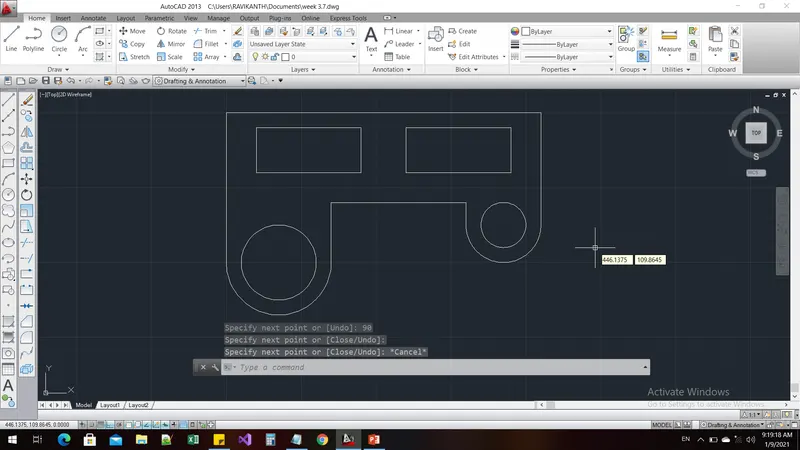
Command: MOVE
Select objects: 1 found
Select objects: 1 found, 2 total
Select objects:
Specify base point or [Displacement] <Displacement>:
Specify second point or <use first point as displacement>:
Command: COPY
Select objects: Specify opposite corner: 0 found
Select objects: 1 found
Select objects: 1 found, 2 total
Select objects:
Current settings: Copy mode = Multiple
Specify base point or [Displacement/mOde] <Displacement>:
Specify second point or [Array] <use first point as displacement>:
Specify second point or [Array/Exit/Undo] <Exit>: *Cancel*
Command: TR
TRIM
Current settings: Projection=UCS, Edge=None
Select cutting edges ...
Select objects or <select all>:
Select object to trim or shift-select to extend or
[Fence/Crossing/Project/Edge/eRase/Undo]:
Select object to trim or shift-select to extend or
[Fence/Crossing/Project/Edge/eRase/Undo]:
Select object to trim or shift-select to extend or
[Fence/Crossing/Project/Edge/eRase/Undo]: *Cancel*
Command: DIMLIN
DIMLINEAR
Specify first extension line origin or <select object>:
Specify second extension line origin:
Non-associative dimension created.
Specify dimension line location or
[Mtext/Text/Angle/Horizontal/Vertical/Rotated]:
Dimension text = 210
Command: dimtext
Unknown command "DIMTEXT". Press F1 for help.
Command: *Cancel*
Command: DIMSTYLE
Command: DIMSTYile
Unknown command "DIMSTYILE". Press F1 for help.
Command: *Cancel*
Command: DIMSTYLE
Command: DIMLINEAR
Specify first extension line origin or <select object>:
Specify second extension line origin:
Specify dimension line location or
[Mtext/Text/Angle/Horizontal/Vertical/Rotated]: *Cancel*
Command: DIMLINEAR
Specify first extension line origin or <select object>:
Specify second extension line origin:
Specify dimension line location or
[Mtext/Text/Angle/Horizontal/Vertical/Rotated]:
Dimension text = 20
Command: DIMLINEAR
Specify first extension line origin or <select object>:
Specify second extension line origin:
Specify dimension line location or
[Mtext/Text/Angle/Horizontal/Vertical/Rotated]:
Dimension text = 70
Command: DIMLINEAR
Specify first extension line origin or <select object>:
Specify second extension line origin:
Specify dimension line location or
[Mtext/Text/Angle/Horizontal/Vertical/Rotated]:
Dimension text = 30
Command: DIMLINEAR
Specify first extension line origin or <select object>:
Specify second extension line origin:
Specify dimension line location or
[Mtext/Text/Angle/Horizontal/Vertical/Rotated]:
Dimension text = 70
Command: DIMLINEAR
Specify first extension line origin or <select object>:
Specify second extension line origin:
Specify dimension line location or
[Mtext/Text/Angle/Horizontal/Vertical/Rotated]:
Dimension text = 20
Command: DIMLINEAR
Specify first extension line origin or <select object>:
Specify second extension line origin:
Specify dimension line location or
[Mtext/Text/Angle/Horizontal/Vertical/Rotated]:
Dimension text = 10
Command: DIMLINEAR
Specify first extension line origin or <select object>:
Specify second extension line origin:
Non-associative dimension created.
Specify dimension line location or
[Mtext/Text/Angle/Horizontal/Vertical/Rotated]:
Dimension text = 30
Command: DIMLINEAR
Specify first extension line origin or <select object>:
Specify second extension line origin:
Specify dimension line location or
[Mtext/Text/Angle/Horizontal/Vertical/Rotated]:
Dimension text = 20
Command: DIMRAD
DIMRADIUS
Select arc or circle:
Dimension text = 15
Specify dimension line location or [Mtext/Text/Angle]:
Command: DIMRADIUS
Select arc or circle:
Dimension text = 15
Specify dimension line location or [Mtext/Text/Angle]:
Command: DIMRADIUS
Select arc or circle:
Dimension text = 25
Specify dimension line location or [Mtext/Text/Angle]:
Command: DIMRADIUS
Select arc or circle:
Dimension text = 35
Specify dimension line location or [Mtext/Text/Angle]:
Command: DIMRADIUS
Select arc or circle:
Dimension text = 20
Specify dimension line location or [Mtext/Text/Angle]:
Command: DIMRADIUS
Select arc or circle:
Dimension text = 6
Specify dimension line location or [Mtext/Text/Angle]:
Command: dimdia
DIMDIAMETER
Select arc or circle:
Dimension text = 50
Specify dimension line location or [Mtext/Text/Angle]:
Command: DIMDIAMETER
Select arc or circle:
Dimension text = 30
Specify dimension line location or [Mtext/Text/Angle]:
Command: DIMLINEAR
Specify first extension line origin or <select object>:
Specify second extension line origin:
Specify dimension line location or
[Mtext/Text/Angle/Horizontal/Vertical/Rotated]: *Cancel*
Command: os
OSNAP
Command: DIMLIN
DIMLINEAR
Specify first extension line origin or <select object>:
Specify second extension line origin:
Specify dimension line location or
[Mtext/Text/Angle/Horizontal/Vertical/Rotated]: *Cancel*
Command: DIMLINEAR
Specify first extension line origin or <select object>:
Specify second extension line origin:
Non-associative dimension created.
Specify dimension line location or
[Mtext/Text/Angle/Horizontal/Vertical/Rotated]: *Cancel*
Command: DIMLINEAR
Specify first extension line origin or <select object>:
Specify second extension line origin:
Specify dimension line location or
[Mtext/Text/Angle/Horizontal/Vertical/Rotated]: *Cancel*
Command: DIMLINEAR
Specify first extension line origin or <select object>:
Specify second extension line origin:
Specify dimension line location or
[Mtext/Text/Angle/Horizontal/Vertical/Rotated]:
Dimension text = 100
Command: DIMLINEAR
Specify first extension line origin or <select object>:
Specify second extension line origin:
Specify dimension line location or
[Mtext/Text/Angle/Horizontal/Vertical/Rotated]:
Dimension text = 75
Result:
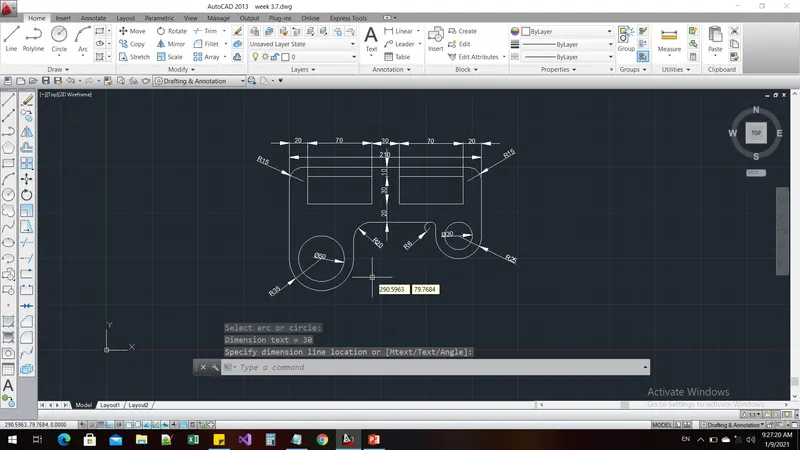
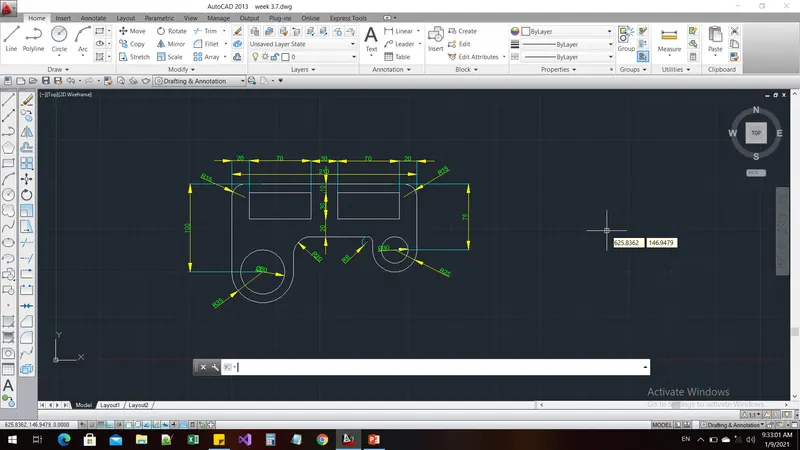
Drawing-8:
Aim and Introduction:
To draw the diagram as per the given dimensions by using the appropriate commands
Procedure:
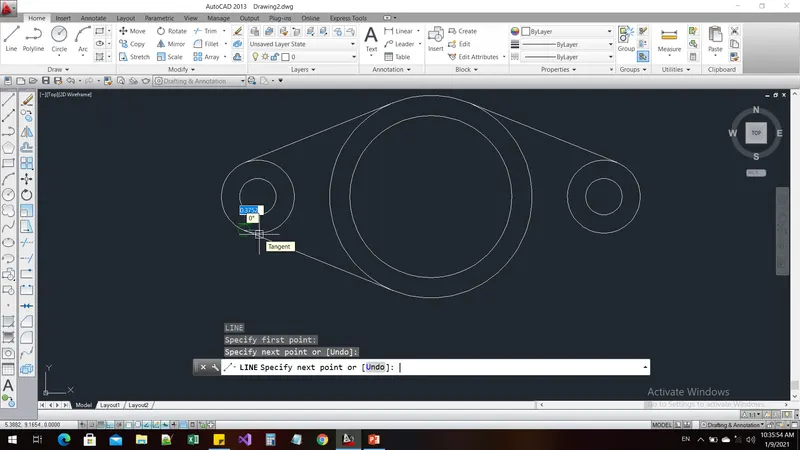
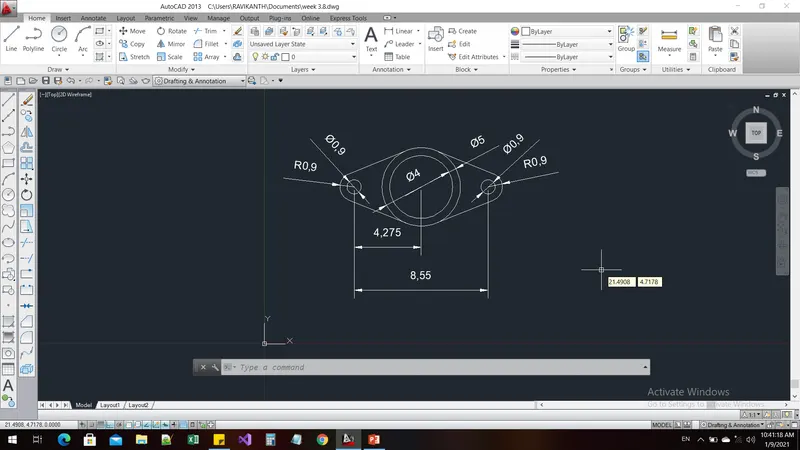
Command: c
CIRCLE
Specify center point for circle or [3P/2P/Ttr (tan tan radius)]: 10,10
Specify radius of circle or [Diameter]: d
Specify diameter of circle: 4
Command: c
CIRCLE
Specify center point for circle or [3P/2P/Ttr (tan tan radius)]: 10,10
Specify radius of circle or [Diameter] <2.0000>: d
Specify diameter of circle <4.0000>: 5
Command: COPY
Select objects: 1 found
Select objects:
Current settings: Copy mode = Multiple
Specify base point or [Displacement/mOde] <Displacement>: cen
of cen
Point or option keyword required.
Specify base point or [Displacement/mOde] <Displacement>: *Cancel*
Command: *Cancel*
Command: OS
OSNAP
Command: copy
Select objects: 1 found
Select objects:
Current settings: Copy mode = Multiple
Specify base point or [Displacement/mOde] <Displacement>:
Specify second point or [Array] <use first point as displacement>: <Ortho on> 4.275
Specify second point or [Array/Exit/Undo] <Exit>: 4.275
Specify second point or [Array/Exit/Undo] <Exit>: *Cancel*
Command: SC
SCALE
Select objects: 1 found
Select objects:
Specify base point:
Specify scale factor or [Copy/Reference]: 0.225
Command: SC
SCALE
Select objects: 1 found
Select objects:
Specify base point:
Specify scale factor or [Copy/Reference]: 0.225
Command: c
CIRCLE
Specify center point for circle or [3P/2P/Ttr (tan tan radius)]:
Specify radius of circle or [Diameter] <2.5000>: 0.9
Command: COPY
Select objects: 1 found
Select objects:
Current settings: Copy mode = Multiple
Specify base point or [Displacement/mOde] <Displacement>:
Specify second point or [Array] <use first point as displacement>:
Specify second point or [Array/Exit/Undo] <Exit>: *Cancel*
Command: os
OSNAP
Command: L
LINE
Specify first point:
Specify next point or [Undo]:
Specify next point or [Undo]: *Cancel*
Command: l
LINE
Specify first point:
Specify next point or [Undo]:
Specify next point or [Undo]: *Cancel*
Command: l
LINE
Specify first point:
Specify next point or [Undo]:
Specify next point or [Undo]: *Cancel*
Command: l
LINE
Specify first point:
Specify next point or [Undo]:
Specify next point or [Undo]: *Cancel*
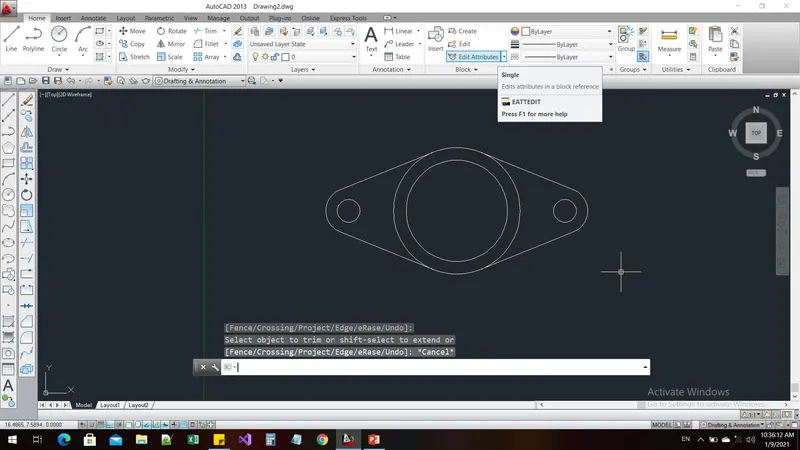
Command: tr
TRIM
Current settings: Projection=UCS, Edge=None
Select cutting edges ...
Select objects or <select all>:
Select object to trim or shift-select to extend or
[Fence/Crossing/Project/Edge/eRase/Undo]:
Select object to trim or shift-select to extend or
[Fence/Crossing/Project/Edge/eRase/Undo]:
Select object to trim or shift-select to extend or
[Fence/Crossing/Project/Edge/eRase/Undo]: *Cancel*
Command: DIMRAD
DIMRADIUS
Select arc or circle:
Dimension text = 0.9
Specify dimension line location or [Mtext/Text/Angle]:
Command: DIMSTYLE
Command: DIMRADIUS
Select arc or circle:
Dimension text = 0.9
Specify dimension line location or [Mtext/Text/Angle]:
Command: *Cancel*
Command: DIMDIA
DIMDIAMETER
Select arc or circle:
Dimension text = 4
Specify dimension line location or [Mtext/Text/Angle]:
Command: DIMDIAMETER
Select arc or circle:
Dimension text = 5
Specify dimension line location or [Mtext/Text/Angle]:
Command: DIMDIAMETER
Select arc or circle:
Dimension text = 0.9
Specify dimension line location or [Mtext/Text/Angle]:
Command: DIMDIAMETER
Select arc or circle:
Object selected is not a circle or arc.
Select arc or circle:
Dimension text = 0.9
Specify dimension line location or [Mtext/Text/Angle]:
Result:
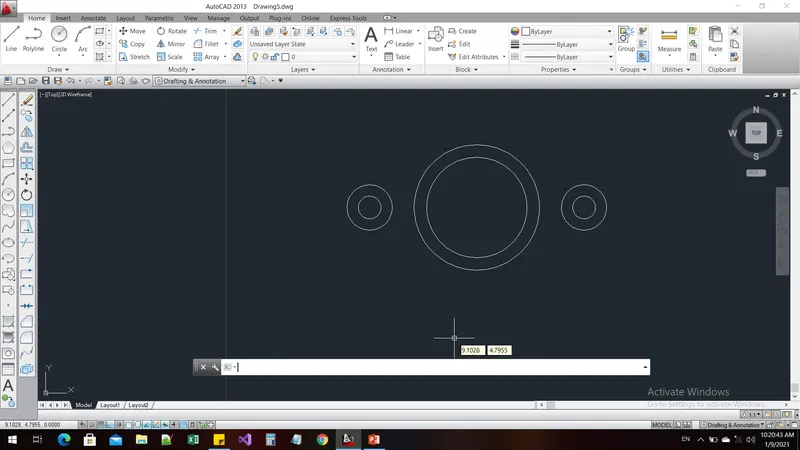
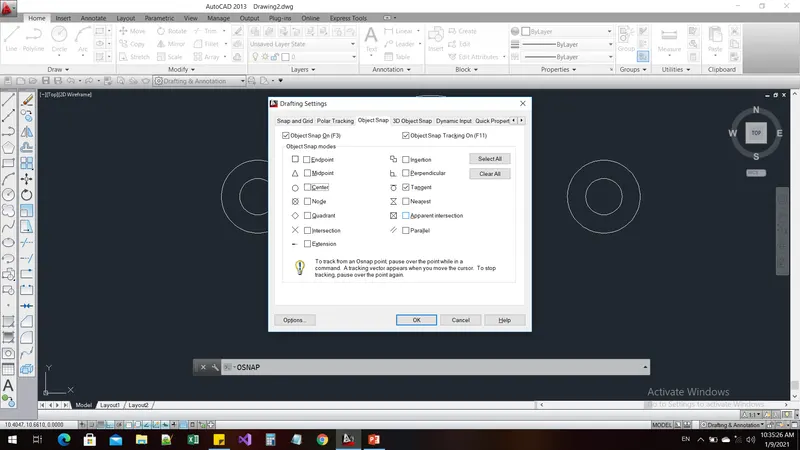
Drawing-9:
Aim and Introduction:
To draw the diagram as per the given dimensions by using the appropriate commands
Procedure:
Command: units
Command: c
CIRCLE
Specify center point for circle or [3P/2P/Ttr (tan tan radius)]: 200,200
Specify radius of circle or [Diameter]: 8'-0"
Command: c
CIRCLE
Specify center point for circle or [3P/2P/Ttr (tan tan radius)]: *Cancel*
Command: l
LINE
Specify first point:
Specify next point or [Undo]: <Ortho on> 32'-6"
Specify next point or [Undo]: *Cancel*
Command: C
CIRCLE
Specify center point for circle or [3P/2P/Ttr (tan tan radius)]:
Specify radius of circle or [Diameter] <8'-0">: 9'-0"
Command: c
CIRCLE
Specify center point for circle or [3P/2P/Ttr (tan tan radius)]: *Cancel*
Command:
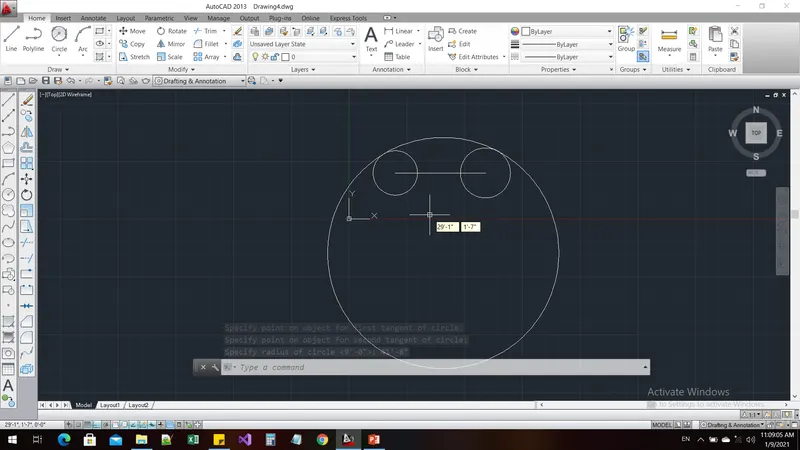
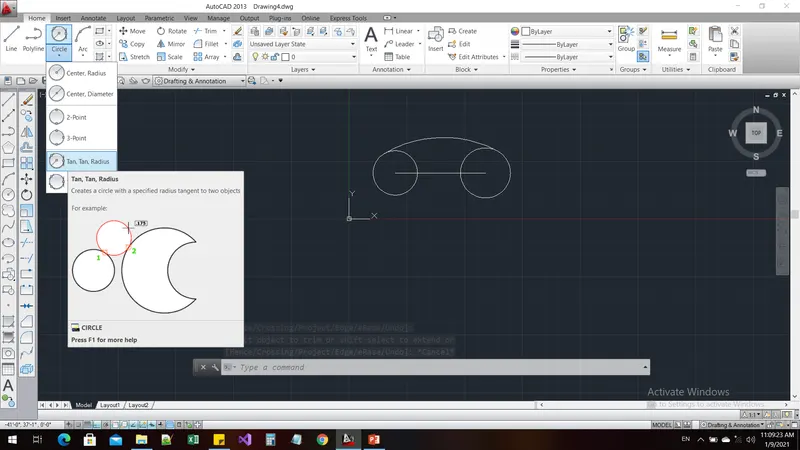
Command: _circle
Specify center point for circle or [3P/2P/Ttr (tan tan radius)]: _ttr
Specify point on object for first tangent of circle:
Specify point on object for second tangent of circle:
Specify radius of circle <9'-0">: 41'-8"
Command: TR
TRIM
Current settings: Projection=UCS, Edge=None
Select cutting edges ...
Select objects or <select all>:
Select object to trim or shift-select to extend or
[Fence/Crossing/Project/Edge/eRase/Undo]:
Select object to trim or shift-select to extend or
[Fence/Crossing/Project/Edge/eRase/Undo]: *Cancel*
Command:
Command:
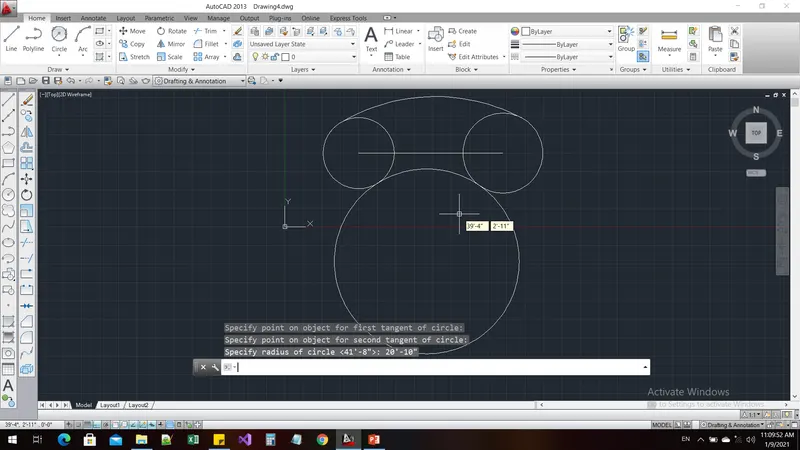
Command: _circle
Specify center point for circle or [3P/2P/Ttr (tan tan radius)]: _ttr
Specify point on object for first tangent of circle:
Specify point on object for second tangent of circle:
Specify radius of circle <41'-8">: 20'-10"
Command: TR
TRIM
Current settings: Projection=UCS, Edge=None
Select cutting edges ...
Select objects or <select all>:
Select object to trim or shift-select to extend or
[Fence/Crossing/Project/Edge/eRase/Undo]:
Select object to trim or shift-select to extend or
[Fence/Crossing/Project/Edge/eRase/Undo]:
Select object to trim or shift-select to extend or
[Fence/Crossing/Project/Edge/eRase/Undo]:
Select object to trim or shift-select to extend or
[Fence/Crossing/Project/Edge/eRase/Undo]:
Select object to trim or shift-select to extend or
[Fence/Crossing/Project/Edge/eRase/Undo]:
Select object to trim or shift-select to extend or
[Fence/Crossing/Project/Edge/eRase/Undo]: *Cancel*
Command:
Command: _.erase 1 found
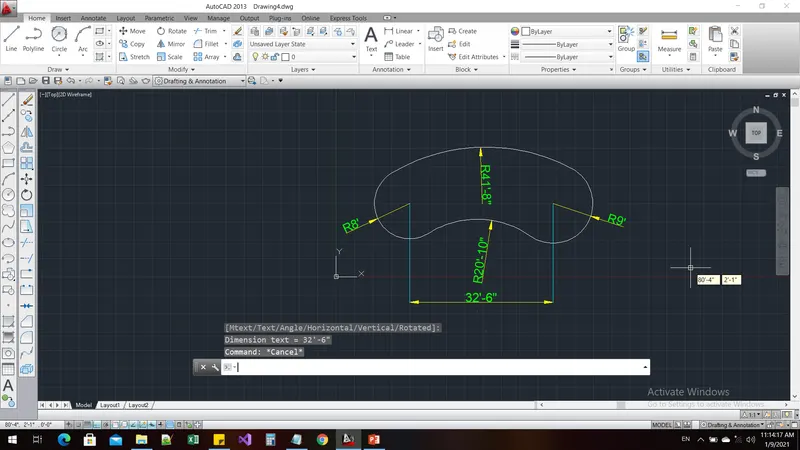
Command: DIMRAD
DIMRADIUS
Select arc or circle:
Dimension text = 500
Specify dimension line location or [Mtext/Text/Angle]:
Command: *Cancel*
Command: DIMSTY
DIMSTYLE
Command: DIMRAD
DIMRADIUS
Select arc or circle:
Dimension text = 41'-8"
Specify dimension line location or [Mtext/Text/Angle]:
Command: DIMRADIUS
Select arc or circle:
Dimension text = 20'-10"
Specify dimension line location or [Mtext/Text/Angle]:
Command: DIMRADIUS
Select arc or circle:
Dimension text = 9'
Specify dimension line location or [Mtext/Text/Angle]:
Command: DIMRADIUS
Select arc or circle:
Dimension text = 8'
Specify dimension line location or [Mtext/Text/Angle]:
Command: DIMLIN
DIMLINEAR
Specify first extension line origin or <select object>:
Specify second extension line origin:
Non-associative dimension created.
Specify dimension line location or
[Mtext/Text/Angle/Horizontal/Vertical/Rotated]:
Dimension text = 32'-6"
Result:
Drawing-10:
Aim and Introduction:
To draw the diagram as per the given dimensions by using the appropriate commands
Procedure:
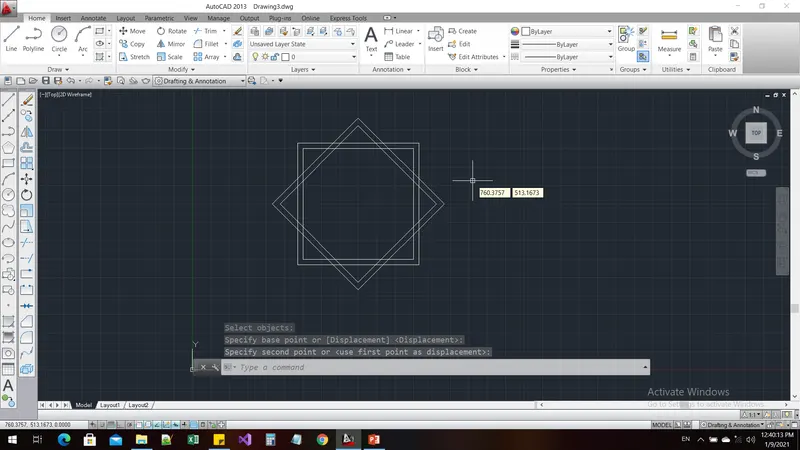
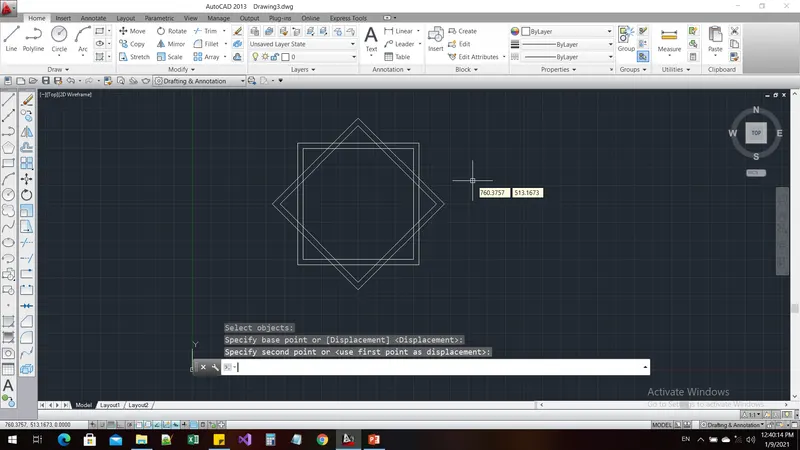
Command: REC
RECTANG
Specify first corner point or [Chamfer/Elevation/Fillet/Thickness/Width]: 300,300
Specify other corner point or [Area/Dimensions/Rotation]: @300,300
Command: OFFSET
Current settings: Erase source=No Layer=Source OFFSETGAPTYPE=0
Specify offset distance or [Through/Erase/Layer] <Through>:
Select object to offset or [Exit/Undo] <Exit>:
Select object to offset or [Exit/Undo] <Exit>:
Specify through point or [Exit/Multiple/Undo] <Exit>: 2
Select object to offset or [Exit/Undo] <Exit>: *Cancel*
Command:
Command: _.erase 1 found
Command: OFFSET
Current settings: Erase source=No Layer=Source OFFSETGAPTYPE=0
Specify offset distance or [Through/Erase/Layer] <Through>:
Select object to offset or [Exit/Undo] <Exit>:
Specify through point or [Exit/Multiple/Undo] <Exit>: 15
Select object to offset or [Exit/Undo] <Exit>: *Cancel*
Command: COPY
Select objects: Specify opposite corner: 2 found
Select objects:
Current settings: Copy mode = Multiple
Specify base point or [Displacement/mOde] <Displacement>:
Specify second point or [Array] <use first point as displacement>:
Specify second point or [Array/Exit/Undo] <Exit>: *Cancel*
Command: ROTATE
Current positive angle in UCS: ANGDIR=counterclockwise ANGBASE=0
Select objects: Specify opposite corner: 2 found
Select objects:
Specify base point:
Specify rotation angle or [Copy/Reference] <0>: 45
Command: M
MOVE
Select objects: Specify opposite corner: 2 found
Select objects:
Specify base point or [Displacement] <Displacement>:
Specify second point or <use first point as displacement>:
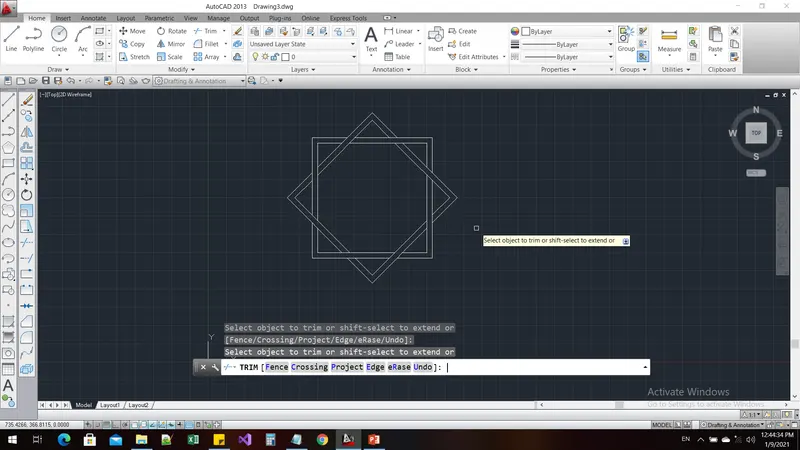
Command: TR
TRIM
Current settings: Projection=UCS, Edge=None
Select cutting edges ...
Select objects or <select all>:
Select object to trim or shift-select to extend or
[Fence/Crossing/Project/Edge/eRase/Undo]:
Select object to trim or shift-select to extend or
[Fence/Crossing/Project/Edge/eRase/Undo]:
Select object to trim or shift-select to extend or
[Fence/Crossing/Project/Edge/eRase/Undo]:
Select object to trim or shift-select to extend or
[Fence/Crossing/Project/Edge/eRase/Undo]:
Select object to trim or shift-select to extend or
[Fence/Crossing/Project/Edge/eRase/Undo]:
Select object to trim or shift-select to extend or
[Fence/Crossing/Project/Edge/eRase/Undo]:
Select object to trim or shift-select to extend or
[Fence/Crossing/Project/Edge/eRase/Undo]:
Select object to trim or shift-select to extend or
[Fence/Crossing/Project/Edge/eRase/Undo]:
Select object to trim or shift-select to extend or
[Fence/Crossing/Project/Edge/eRase/Undo]:
Select object to trim or shift-select to extend or
[Fence/Crossing/Project/Edge/eRase/Undo]:
Select object to trim or shift-select to extend or
[Fence/Crossing/Project/Edge/eRase/Undo]:
Select object to trim or shift-select to extend or
[Fence/Crossing/Project/Edge/eRase/Undo]:
Select object to trim or shift-select to extend or
[Fence/Crossing/Project/Edge/eRase/Undo]:
Select object to trim or shift-select to extend or
[Fence/Crossing/Project/Edge/eRase/Undo]:
Select object to trim or shift-select to extend or
[Fence/Crossing/Project/Edge/eRase/Undo]:
Select object to trim or shift-select to extend or
[Fence/Crossing/Project/Edge/eRase/Undo]:
Result:
Drawing-11:
Aim and Introduction:
To draw the diagram as per the given dimensions by using the appropriate commands
Procedure:
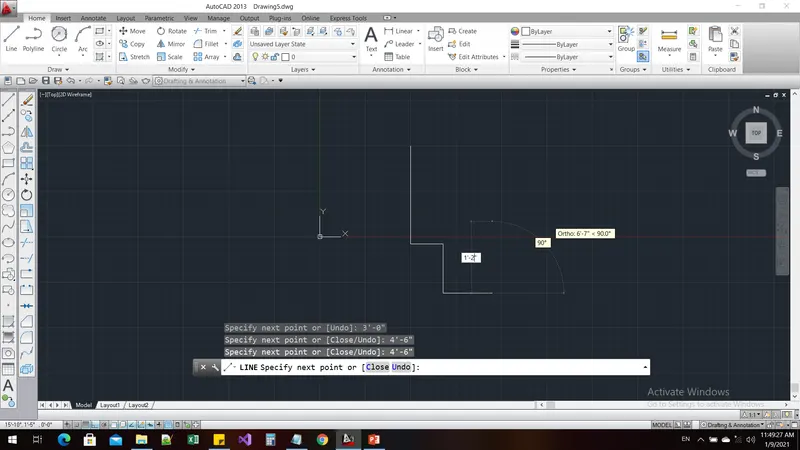
Command: units
Command: l
LINE
Specify first point: <Ortho on> 200,200
Specify next point or [Undo]: 9'
Specify next point or [Undo]: 3'
Specify next point or [Close/Undo]: 4'-6"
Specify next point or [Close/Undo]: 4'-6"
Specify next point or [Close/Undo]: 1'-2"
Specify next point or [Close/Undo]: 5'-4"
Specify next point or [Close/Undo]: 1'-2"
Specify next point or [Close/Undo]: 4'-6"
Specify next point or [Close/Undo]: 4'-6"
Specify next point or [Close/Undo]: 3'
Specify next point or [Close/Undo]: 9'
Specify next point or [Close/Undo]: c
Command: L
LINE
Specify first point:
Specify next point or [Undo]: 6'-9"
Specify next point or [Undo]: *Cancel*
Command: REC
RECTANG
Specify first corner point or [Chamfer/Elevation/Fillet/Thickness/Width]: *Cancel*
Command: os
OSNAP
Command: REC
RECTANG
Specify first corner point or [Chamfer/Elevation/Fillet/Thickness/Width]:
Specify other corner point or [Area/Dimensions/Rotation]: @3',-3'
Command: m
MOVE
Select objects: 1 found
Select objects:
Specify base point or [Displacement] <Displacement>:
Specify second point or <use first point as displacement>:
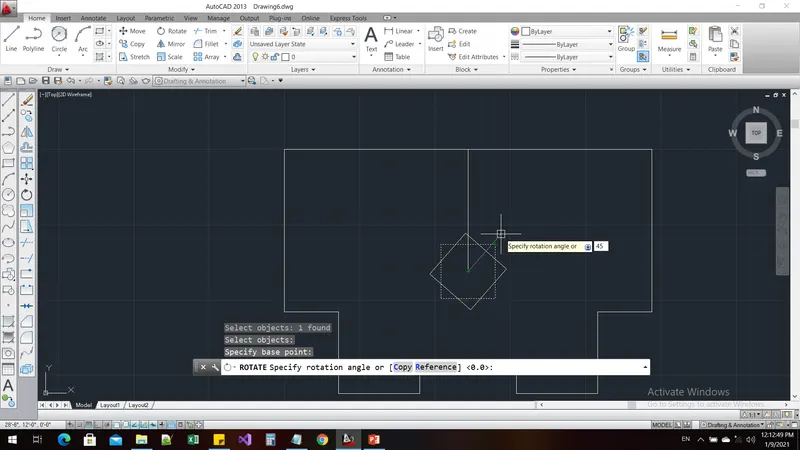
Command: RO
ROTATE
Current positive angle in UCS: ANGDIR=counterclockwise ANGBASE=0
Select objects: 1 found
Select objects:
Specify base point:
Specify rotation angle or [Copy/Reference] <0>: <Ortho off> 45
Command: l
LINE
Specify first point:
Specify next point or [Undo]: <Ortho on> 3'-7"
Specify next point or [Undo]: <Ortho off> 120
Specify next point or [Close/Undo]: *Cancel*
Command: l
LINE
Specify first point:
Specify next point or [Undo]: 60
Specify next point or [Undo]: *Cancel*
Command: l
LINE
Specify first point:
Specify next point or [Undo]: <Ortho on> 2'-8"
Specify next point or [Undo]: *Cancel*
Command: l;
Unknown command "L;". Press F1 for help.
Command: *Cancel*
Command: l
LINE
Specify first point:
Specify next point or [Undo]: <Ortho off> 45
Specify next point or [Undo]: *Cancel*
Command: l
LINE
Specify first point:
Specify next point or [Undo]: 135
Specify next point or [Undo]: *Cancel*
Command: TR
TRIM
Current settings: Projection=UCS, Edge=None
Select cutting edges ...
Select objects or <select all>:
Select object to trim or shift-select to extend or
[Fence/Crossing/Project/Edge/eRase/Undo]:
Select object to trim or shift-select to extend or
[Fence/Crossing/Project/Edge/eRase/Undo]:
Select object to trim or shift-select to extend or
[Fence/Crossing/Project/Edge/eRase/Undo]:
Select object to trim or shift-select to extend or
[Fence/Crossing/Project/Edge/eRase/Undo]:
Select object to trim or shift-select to extend or
[Fence/Crossing/Project/Edge/eRase/Undo]: *Cancel*
Command: M
MOVE
Select objects: 1 found
Select objects: 1 found, 2 total
Select objects: 1 found, 3 total
Select objects:
Specify base point or [Displacement] <Displacement>:
Specify second point or <use first point as displacement>: <Ortho on>
Command: m
MOVE
Select objects: 1 found
Select objects: 1 found, 2 total
Select objects: Specify opposite corner: 1 found, 3 total
Select objects:
Specify base point or [Displacement] <Displacement>:
Specify second point or <use first point as displacement>:
Command: *Cancel*
Command: TR
TRIM
Current settings: Projection=UCS, Edge=None
Select cutting edges ...
Select objects or <select all>:
Select object to trim or shift-select to extend or
[Fence/Crossing/Project/Edge/eRase/Undo]:
Select object to trim or shift-select to extend or
[Fence/Crossing/Project/Edge/eRase/Undo]: *Cancel*
Command:
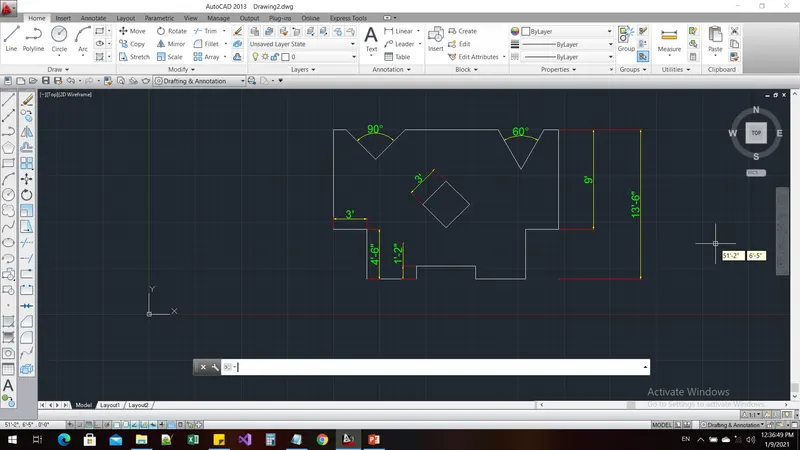
Command: DIMANG
DIMANGULAR
Select arc, circle, line, or <specify vertex>:
Select second line:
Specify dimension arc line location or [Mtext/Text/Angle/Quadrant]:
Dimension text = 60
Command: DIMANGULAR
Select arc, circle, line, or <specify vertex>:
Select second line:
Specify dimension arc line location or [Mtext/Text/Angle/Quadrant]:
Dimension text = 90
Command: DIMLIN
DIMLINEAR
Specify first extension line origin or <select object>:
Specify second extension line origin:
Specify dimension line location or
[Mtext/Text/Angle/Horizontal/Vertical/Rotated]: *Cancel*
Command: DIMSTYLE
Command: DIMLIN
DIMLINEAR
Specify first extension line origin or <select object>:
Specify second extension line origin:
Specify dimension line location or
[Mtext/Text/Angle/Horizontal/Vertical/Rotated]:
Dimension text = 9'
Command: DIMLINEAR
Specify first extension line origin or <select object>:
Specify second extension line origin:
Non-associative dimension created.
Specify dimension line location or
[Mtext/Text/Angle/Horizontal/Vertical/Rotated]:
Dimension text = 13'-6"
Command: DIMLINEAR
Specify first extension line origin or <select object>:
Specify second extension line origin:
Specify dimension line location or
[Mtext/Text/Angle/Horizontal/Vertical/Rotated]:
Dimension text = 3'
Command: DIMLINEAR
Specify first extension line origin or <select object>:
Specify second extension line origin:
Specify dimension line location or
[Mtext/Text/Angle/Horizontal/Vertical/Rotated]:
Dimension text = 4'-6"
Command: DIMLINEAR
Specify first extension line origin or <select object>:
Specify second extension line origin:
Specify dimension line location or
[Mtext/Text/Angle/Horizontal/Vertical/Rotated]:
Dimension text = 1'-2"
Command: DIMLINEAR
Specify first extension line origin or <select object>:
Specify second extension line origin:
Specify dimension line location or
[Mtext/Text/Angle/Horizontal/Vertical/Rotated]: <Ortho off> *Cancel*
Command: DIMANGULAR
Select arc, circle, line, or <specify vertex>:
Select second line: *Cancel*
Result: