Creating a Layout, Section and Elevation with dimensions using AutoCad
TASK 1:
AIM:
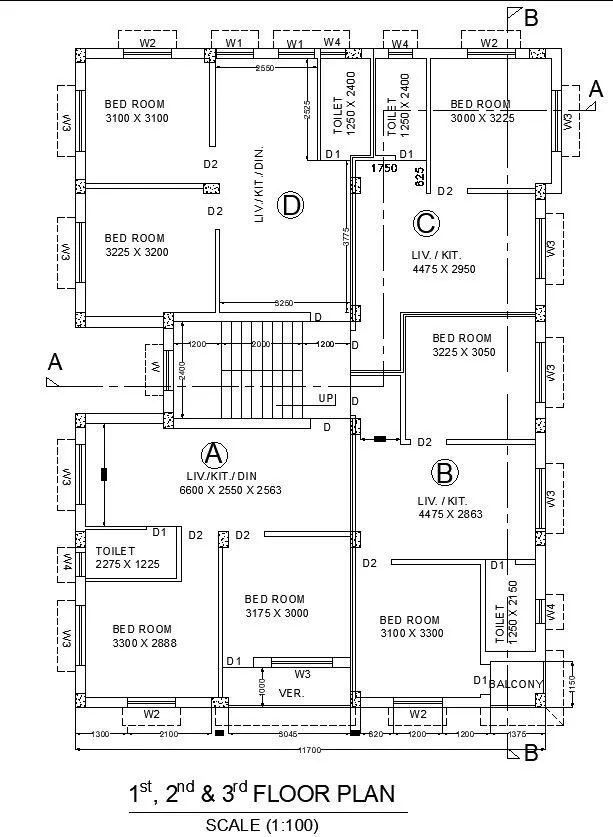
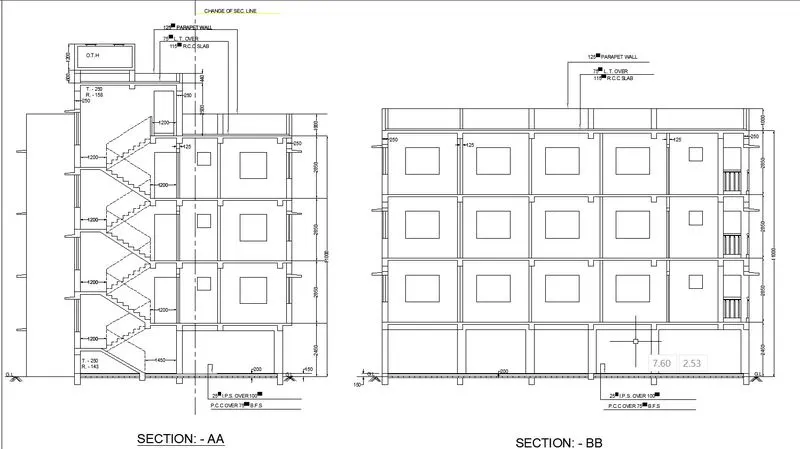
To create the Plan and Sections as shown in the Figures. Use proper dimension techniques and dimension styles to document the project. Assume the sizes of the doors and windows as per construction standards. Refer to sections for stair details if required.
PROCEDURE:
- Go to START MENU, select AutoCAD 2023
- Click on START DRAWING .DWG File
- In the Command line type in: STARTUP [ENTER]
- Enter new value of startup: 1
- Go to Application Menu and select New
- Next select the 'Decimal' unit system from the 'Advanced Setup' option.
- Set the limits by entering LIMITS in the Command tab. The lower-left corner is specified as 0,0, and the upper-right corner is specified as 100,100.
Commands used:
- Line command,
- Circle command,
- Dimlinear command,
- Text command,
- Offset,
- Trim,
- Extend,
- Hatch...
Thus the Challenge is Completed.