Creating 3D Isometric view of various structural elements in AutoCAD
1. Create a 3D Isometric View of the building with plan and elevation given.
ANS:
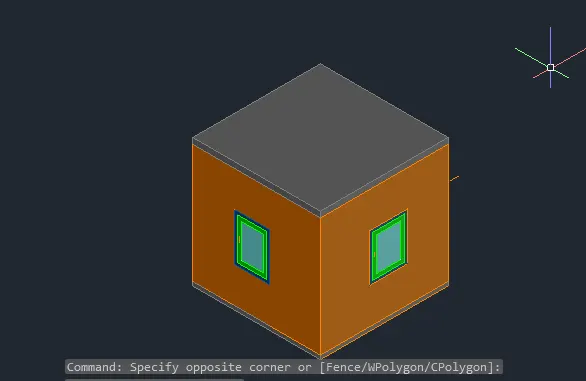
AIM: To Create a 3D Isometric View of the building with plan and elevation given.
Introduction: In AutoCAD the 3D models are drawn with 3D modelling.The 3d model shows the x,y and z axis of the through this we can visualise the model in all views and directions.
Procedure:
1.First we have to open AutoCAD software.
2.Then we have to set the AutoCAD from drafting and designing to 3D modelling.
3.Then we have to set the units to engineering units.
4.Then we have to draw the plan and elevation on the xy plane.
5.Then set the ucs to 3D that shows z axis.
6.Then we have to draw the isometric view of the plan.
7.The sizes of the walls is 10 ft and thickness is of 9inch.
8.Then the windows is of 3'X4'.
9.The elevation the flooring of 4inch and wall of 10 ft and slab of 6inch.
7.Then we have to show the windows in the elevations.
8.Then differentiate them with colours.
Result: We got the required sizes of walls and windows in 3D.
2. Create the 3D View of the Building Façade as given in the plan and elevation. Also, see the detail of the window.
ANS:
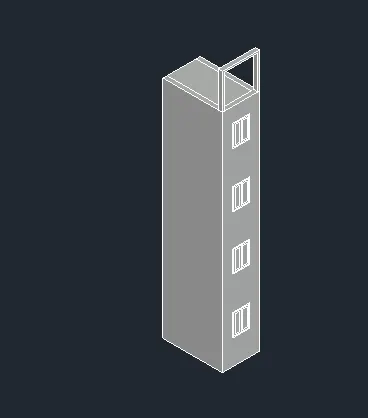
Aim: To Create the 3D View of the Building Façade as given in the plan and elevation. Also, see the detail of the window.
Introduction: In AutoCAD the 3D models are drawn with 3D modelling.The 3d model shows the x,y and z axis of the through this we can visualise the model in all views and directions.
Procedure:
1.First we have to open AutoCAD software.
2.Then we have to set the AutoCAD from drafting and designing to 3D modelling.
3.Then we have to set the units to engineering units.
4.Then we have to draw the plan and elevation on the xy plane.
5.Then set the ucs to 3D that shows z axis.
6.Then we have to draw the isometric view of the plan.
7.We have to draw the height of wall to sill of 4'6".
8.Then draw the window of 4'ft height and 3' width.
9.Then from that we have to draw the window of 4'X3'.
10.Then we have to draw the windows of required sizes and heights.
11.Then at the top 4inch thich and 9inch width strip drawn over the top.
Result : Then we got the required building facade 3d view with sizes given.
3. Create the ismoteric 3d view of a stair with railing as shown in the plan and elevation. Assume the size of the balustrades and the hand rails.
ANS:
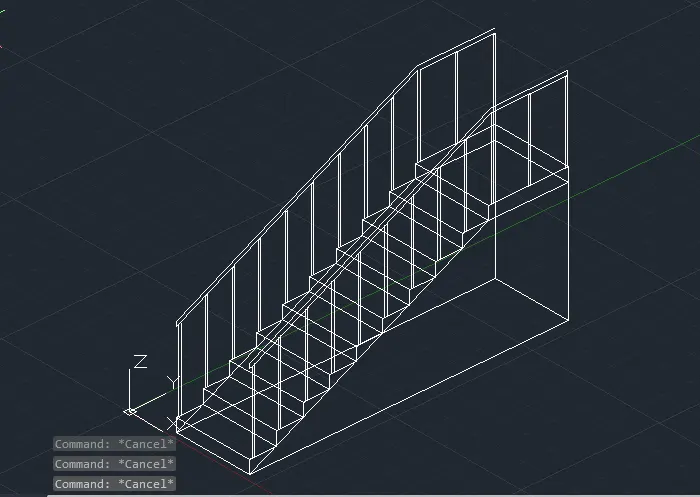
Aim: To Create the ismoteric 3d view of a stair with railing as shown in the plan and elevation. Assume the size of the balustrades and the hand rails.
Introduction: In AutoCAD the 3D models are drawn with 3D modelling.The 3d model shows the x,y and z axis of the through this we can visualise the model in all views and directions.
Procedure:
1.First we have to open AutoCAD software.
2.Then we have to set the AutoCAD from drafting and designing to 3D modelling.
3.Then we have to set the units to engineering units.
4.Then we have to draw the plan and elevation on the xy plane.
5.Then set the ucs to 3D that shows z axis.
6.Then we have to draw the isometric view of the plan.
7.We have to draw the steps of 6inch height and 12inch width.
8.We have to draw 9 steps of same sizes.
9.The we have draw the landing of 3' wide.
10.Then we have to draw the railing of 3'2" height railing.
Result: We got the 3D stairs and rails with given sizes.
4. Create the 3D view of a Wall with spread footing . Create the Door opening only. Assume the size of the parpaet and the coping. See the plans and elevation for the details. Also, create a rendered view of the model with materials as of your choice.
ANS:
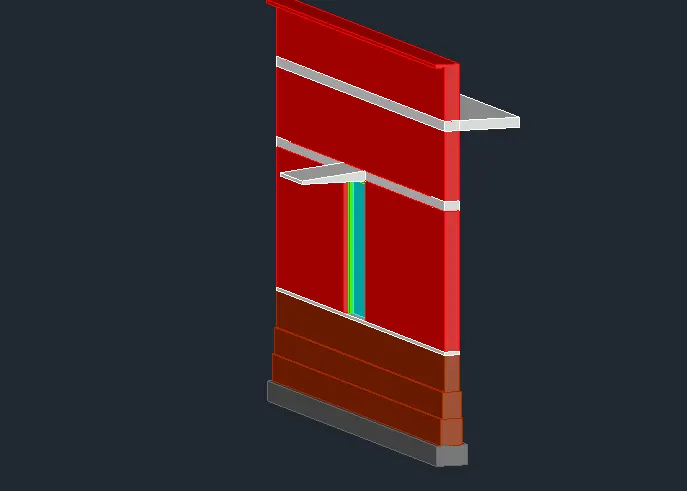
Aim: To Create the 3D view of a Wall with spread footing . Create the Door opening only. Assume the size of the parpaet and the coping. See the plans and elevation for the details. Also, create a rendered view of the model with materials as of your choice.
Introduction: In AutoCAD the 3D models are drawn with 3D modelling.The 3d model shows the x,y and z axis of the through this we can visualise the model in all views and directions.
Procedure:
1.First we have to open AutoCAD software.
2.Then we have to set the AutoCAD from drafting and designing to 3D modelling.
3.Then we have to set the units to engineering units.
4.Then we have to draw the plan and elevation on the xy plane.
5.Then set the ucs to 3D that shows z axis.
6.Then we have to draw the isometric view of the plan.
7.The CC bed of 500X 300mm size.
8.The footings of 350X400mm ,300X400mm and 230X600mm.
9. Then flooring of 50mm thick.
10.Then draw the walls of height 2100 height.
11.In between the door of 900X2100mm have to be drawn.
12.Then the lintel slab of 150mm thick and lintel slope of 100 and 50mm slope thick.
13.Then draw the remaining wall.
14.Then slab thickness of 150mm.
15.the draw the parapet wall of 800mm height.
Result: We drawn the 3D wall with spread footing.