Bode plot and Step response
Aim: Determine the Stability of a System with the help of the Frequency analysis technique "Bode Plot" in MATLAB.
OBJECTIVES:
1. a.) List all the MATLAB commands related to transfer function, pole-zero-gain, and step response.
b.) Apply all the commands for the following transfer functions in MATLAB-
- For the motor load transfer function is-
`G = K_m/(T_s+1)`
where, Km">KmKm =1.25
T = 0.1
`G(s) = ((1 + 0.02s)(1 + 0.025s))/(s^3 (1 + 0.005s)(1 + 0.001s)`
2. For the unity feedback system shown in the figure below-
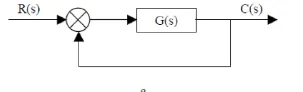
`G(s) = (30(S^2 - 5s +3))/((s + 1)(s + 2) (s + 4)(s + 5 ))`
3. Explain the MATLAB model ‘scdspeedctrl’. Comment on results for non-tuned PID gain values.3
4 . Answer the following-
a.) What is the importance of a bode plot for control system design?
b.) Using MATLAB, make a bode plot of the following transfer functions. Determine the phase and gain margin, gain and phase crossover frequency, and comment on each case's stability.
- `G(s) = 1/((1+s)(1 + 2s)`
- `H(s) = 1/(s(1 + s)(1+2s)`
- `K(s) = 10/(s(1+0.5s)(1+0.01s)`
- `J(s) = (75(1+0.2s))/(s^2(s+16s+100)`
OBJECTIVE 1 -
a.) List all the MATLAB commands related to transfer function, pole-zero-gain, and step response.
| Function | Command |
| tf | Create a transfer function in polynomial form. |
| pole | Creat poles of the dynamic system |
| zero | Zero and gain of single input single output dynamic system. |
| pzmap | Creat a pole-zero plot of the continuous or discrete-time dynamic system model. |
| zpk | Create a transfer function in zero-pole-gain form. |
| Step | Step response plot the dynamic system |
| Feedback | Return a model object sys for the negative feedback interconnection of model objects |
| bode | Bode plot of frequency response or magnitude and phase data |
| ss | State-space Model. |
b.) Apply all the commands for the following transfer functions in MATLAB-
For the motor load transfer function is-
`G = K_m/(T_s+1)`
where, Km">KmKm =1.25
T = 0.1
`G(s) = ((1 + 0.02s)(1 + 0.025s))/(s^3 (1 + 0.005s)(1 + 0.001s)`
clear all
close all
clc

km = 1.25;
T = 0.1;
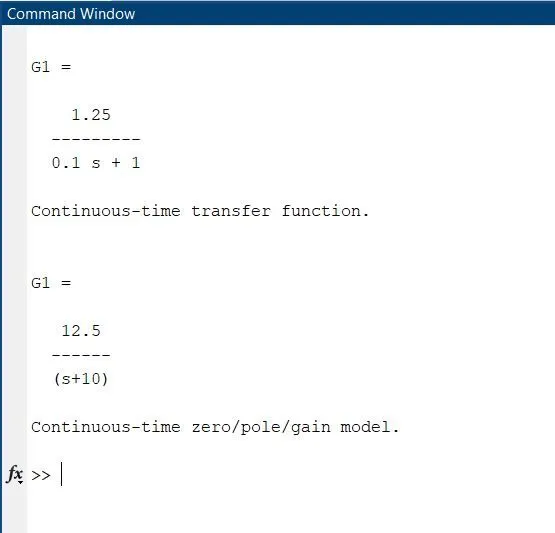
G1 = tf([km],[T,1])
zero (G1);
pole(G1);
G1 = zpk([],-10,12.5)
step(G1)
Command Window
Step response plot
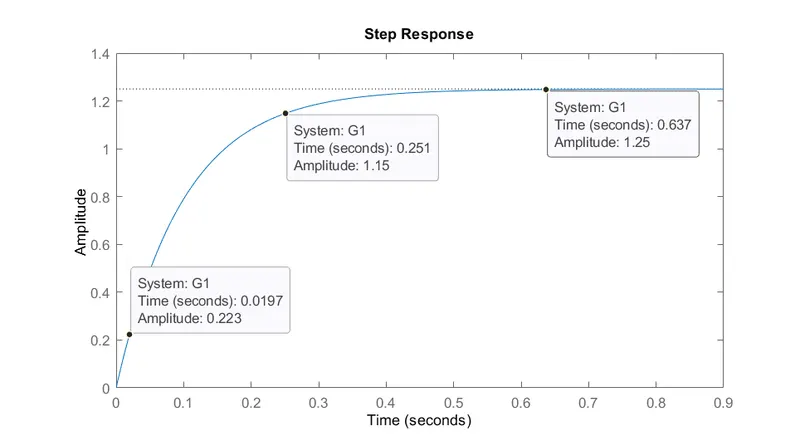
1. b(2)
`G(s) = ((1 +s)+(1+0.025s))/(s^3(1 + 0.005s)(1+0.001s)`
`G(s) = (1 + 0.02s + 0.02s+(0.02s**0.025s))/((s^3 +0.005s^4)(1+0.001s))`
`G(s) = (1 + 0.0s + 0.0005s^2)/(s^3 + 0.005s^4 + 0.001s^4 + 5e-06s^5)`
`G(s) = (0.0005s^2 + 0.045s +1 )/(5e - 06s^5 + 0.0064s^4 +s`
MATLAB script for transfer function
clear all
close all
clc

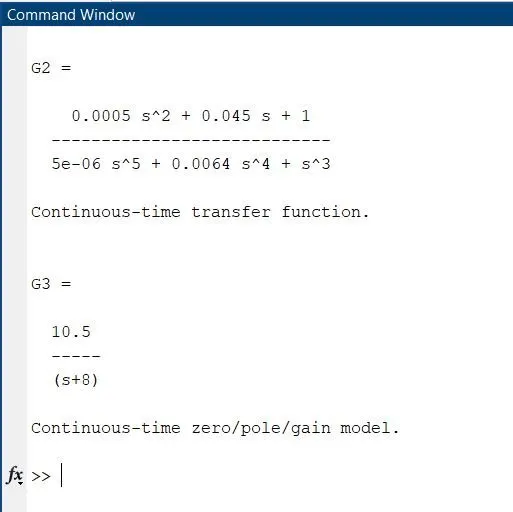
G2 = tf([0.0005 0.045 1],[0.000005 0.0064 1 0 0 0])
G3 = zpk ([], -8, 10.5)
figure(1)
step(G2, G3);
figure(2)
pzmap(G2)
Command window
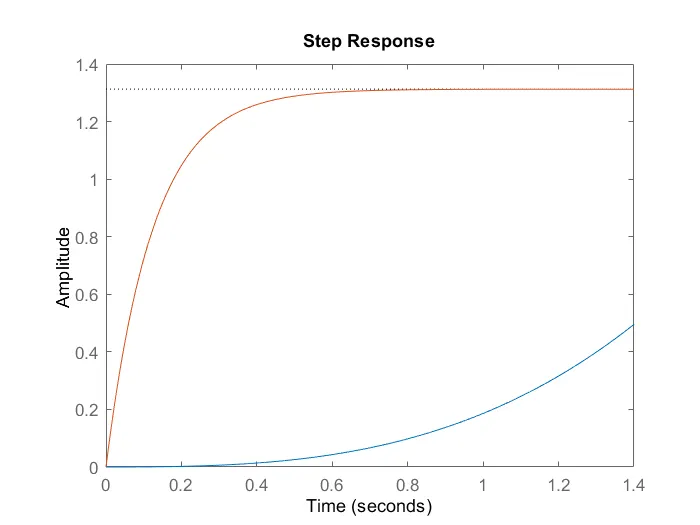
Step Response plot:
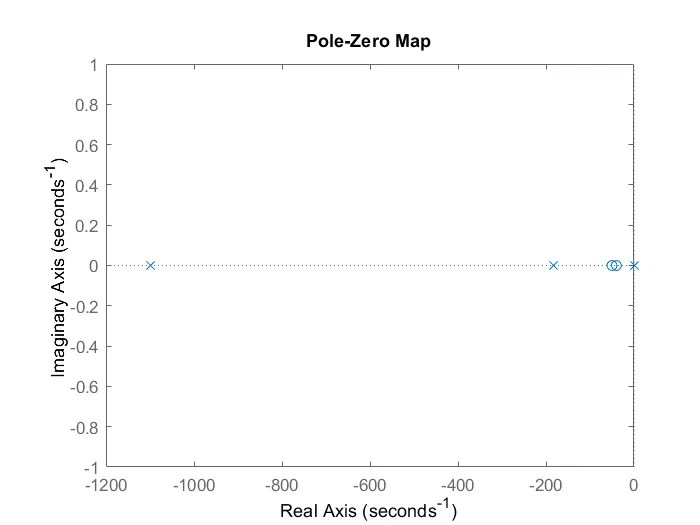
Pole - zero map
Objective 2 - For the unity feedback system shown in the figure below-
`G(s) = (30(S^2 - 5s +3))/((s + 1)(s + 2) (s + 4)(s + 5 ))`
Giver equation
`G(s) = (30(s^2 - 5s + 3))/((s+1)(s+2)(s+4)(s+5)`
Numerator
`30(s^2 -5s +3) = 30s^2 - 150s + 90`
Denominator
|.
`(s +1)(s+2) = s^2 +(2+)s+2`
=`(s^2 +3s +2)`
||.
`(s^2 +3s+2)(s+4) = s^3 + 4s^2 +3s^2 +12s +2s+8`
`= s^3+7s^2 +14s +8`
|||. `(s^2 +7s^2 +14s +8)(s + 5)=s^4 +5s^3 +7s^3 +35s^2 +14s^2 +70s +8s`
= `s^4 + 12s^3 +49s^2 +78s +40`
= `(30s^2 -150s +90)/(s^4 +12s^3 +49s^2 +78s +40)`
The coefficients of S are taken in the descending Power of S and it is used in tf command in Matlab.
clear all
close all
clc

% step responce
G = tf([30 -150 90],[1 12 49 78 40])
figure (1)
step (G)

% unity feedback system
G = tf([30 -150 90],[1 12 49 78 40]);
H = feedback(G,1);
figure (2)
step (H)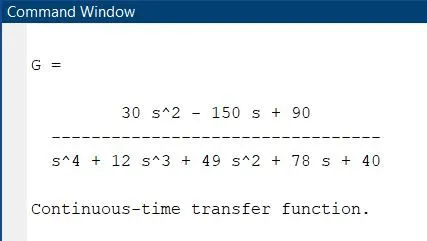
Figure 1
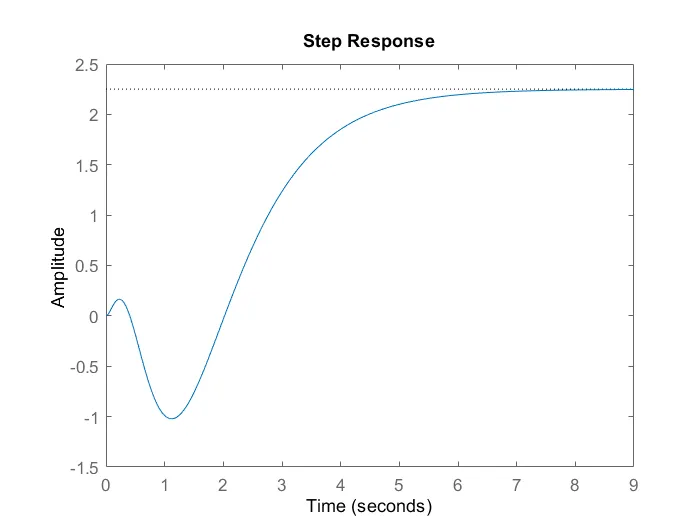
- The Peak response reaches a maximum of around 2.25 amplitude.
- From the above graph, it is clear that the plot reaches the settling time of 5.85 sec (approx). After the settling time, the response tries to follow the unit step. There will be no shoot-out or sudden decrease after the settling time.
- The Rise time is the time required to reach 90% of amplitude from 10% amplitude. Here in this plot, we can observe that the rise time is 2.42 sec.
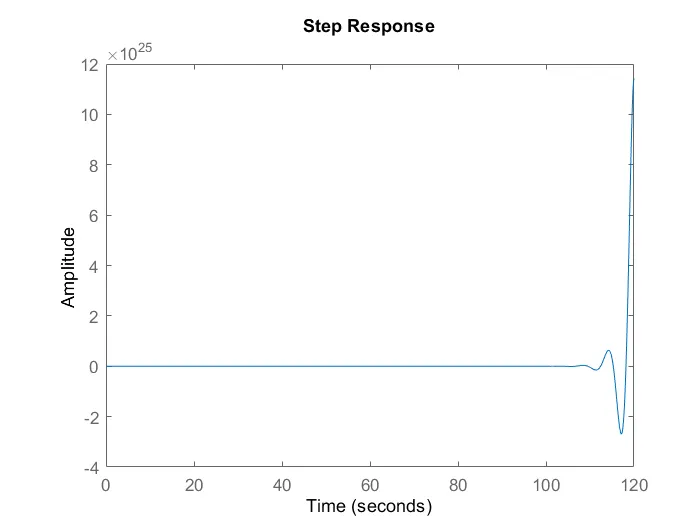
- With the feedback, the system was unstable, and it is difficult to find the characteristic points.
- Using pid tune command in Matlab we can optimize the system to be more stable.
OBJECTIVE - 3 Explain the MATLAB model ‘scdspeedctrl’. Comment on results for non-tuned PID gain values.
- This model represents an engine speed control setup with a feedback loop
- Represents all the processes of how the engine produces torque i.e. as the throttle is pressed, air flows in --> spark ignition --> combustion takes place --> power stroke produces torque --> subtracted from load torque to get net torque --> converted to engine speed
SIMULINK MODEL
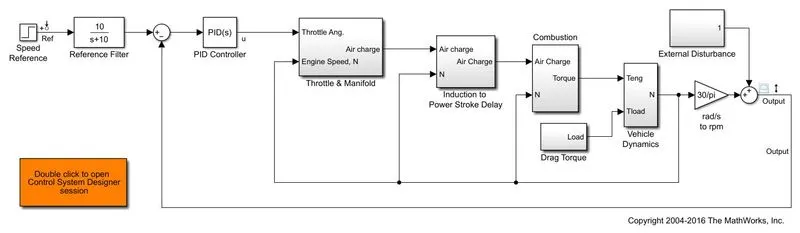
- In the above-given Engine Speed control model, all the blocks are connected in series.
- The major blocks are speed reference, PID Controller, Throtttle&manifold, Power stroke, Combustion, Drag torque, Vehicle Dynamics, and finally output.
- A Feedback loop is also present in the system which measures the output speed and gives feedback again to the PID controller.
- In the model, an additional scope is attached to the input reference speed in order to view the input speed.
- THROTTLE AND MANIFOLD SUBSYSTEM:
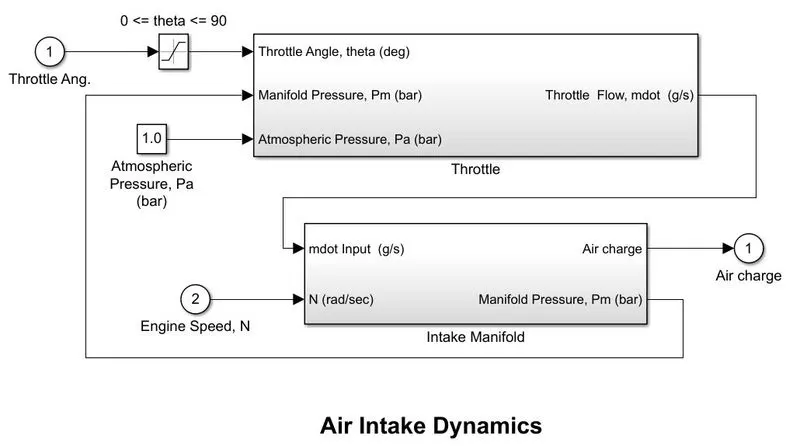
- The throttle block takes three inputs which include throttle flow(throttle angle), a manifold pressure from the intake manifold, and an atmospheric pressure of 1 bar.
- Inside the throttle block, it performs a series of calculations to find the output throttle flow, and this value is sent to the engine intake manifold along with the engine speed to obtain the air charge which is given to the power stroke block and manifold pressure which is feedback to the throttle block.
- The power stroke delay block takes the air charge and the speed (final output) as feedback to provide a certain delay to the input.
2. INDUCTION TO POWER STROKE DELAY AND COMBUSTION SUBSYSTEM:
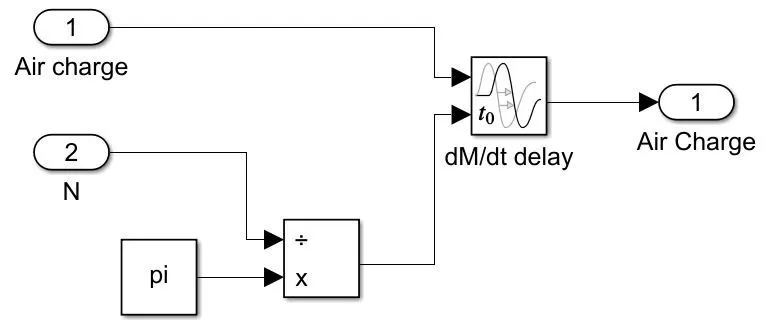
- The power stroke delay block takes the air charge and the speed (final output) as feedback to provide a certain delay to the input.
3. COMBUSTION
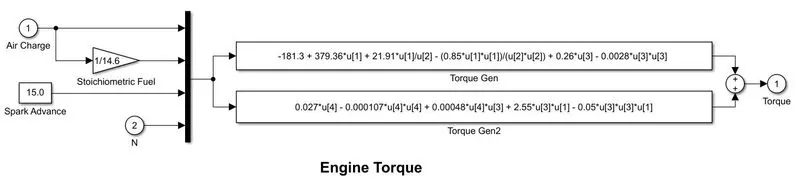
- The air charge value is converted into the fuel terms with the use of stoichiometric fuel constant along with the feedback used to find the engine torque.
4. VEHICLE DYNAMIC SUBSYSTEM
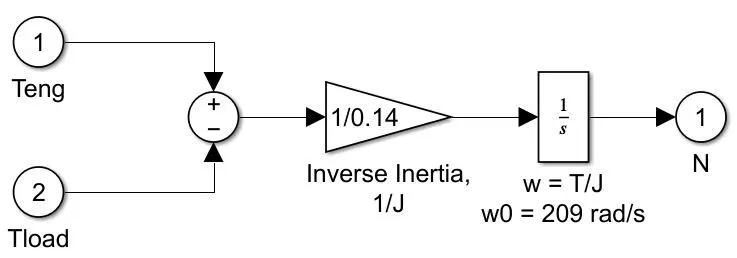
- From the engine torque, the load torque is subtracted and this value is divide by the inertia and is feed to the integrator block.
- The integration is done in order to find the value of engine speed.
- The output speed and this calculated speed is given as input to the PID controller.
- The PID controller controls the speed of the engine with the help of the reference speed given as input in the form of a step function.
PID Non-Tuned response
- The speed control model is opened and using the default values the model is simulated.
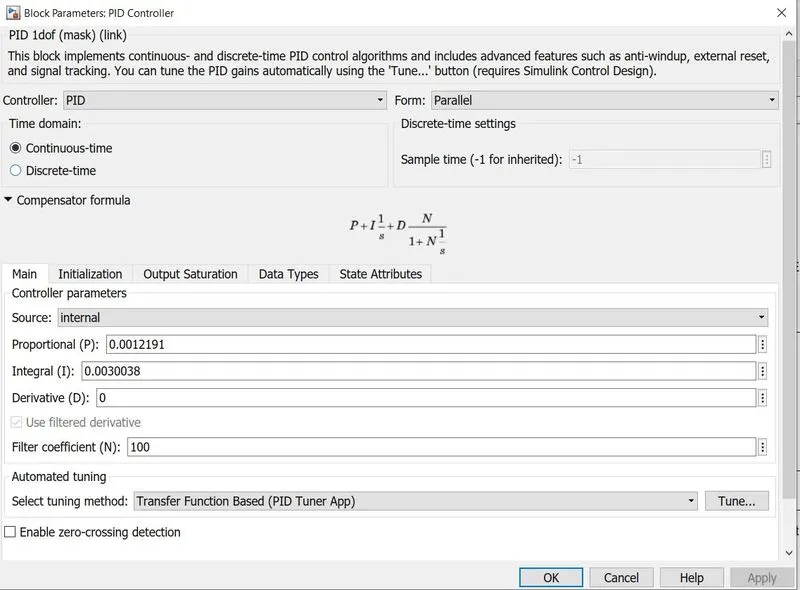
- These are the default values in the PID controller for this model.
RESULT
The below image is the output of the input reference speed.
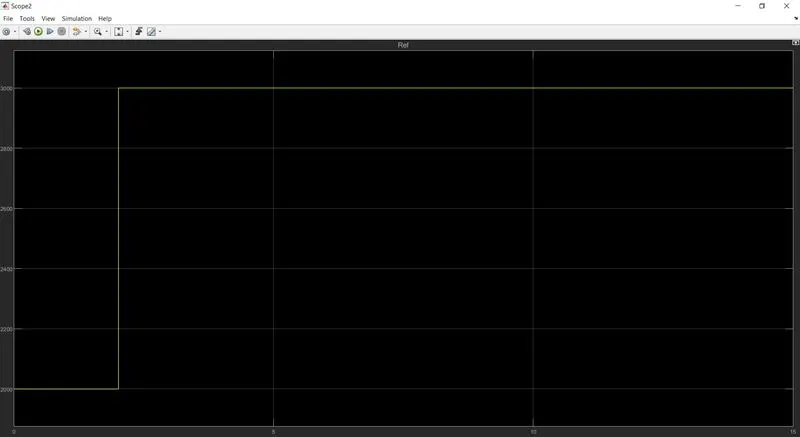
Without Tuning
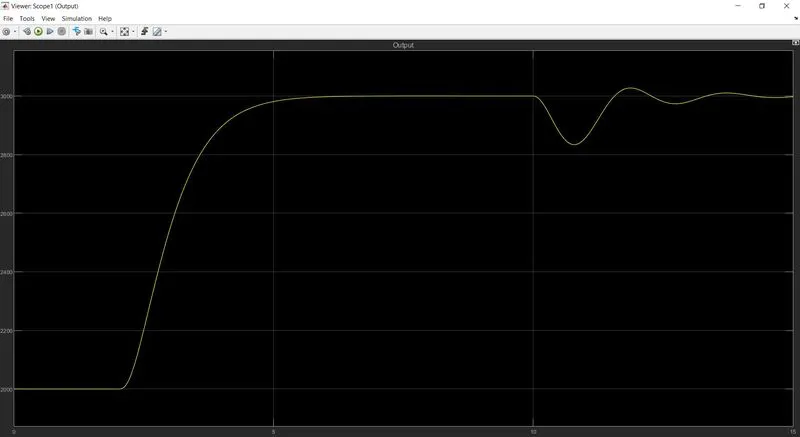
- The rise time is high which indicates that the response time to react according to the input response is high.
- From the above-mentioned figure, it shows clearly that at 2sec the response suddenly reaches 3000 but the actual output response almost takes 5 sec to reach 3000.
- For better operating behavior and to react quickly and efficiently according to the input speed we need to tune the PID controller by changing the values of P, I, and D.
After tuning
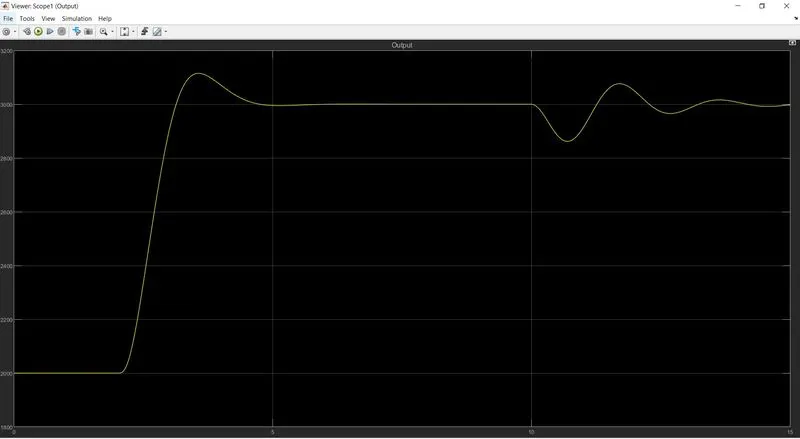
- After tuning the response time decreases rapidly and it almost tries to cope up with the input reference speed.
- In this way, the PID controller is tuned optimally to satisfy the needs.
- Even though a slight overshoot occurs, here we focus more on response time so we accept it.
- For the further best response time and minimizing overshoot fine-tune is required.
OBJECTIVE - 4
Answer the following-
a.) What is the importance of a bode plot for control system design?
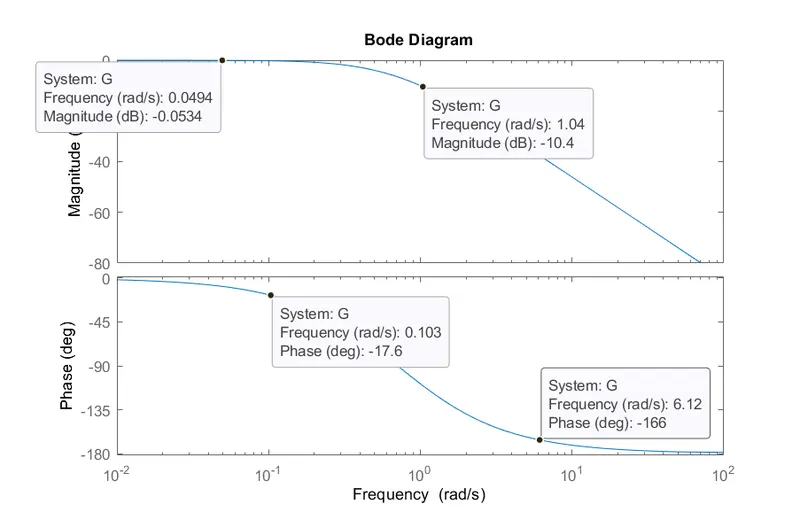
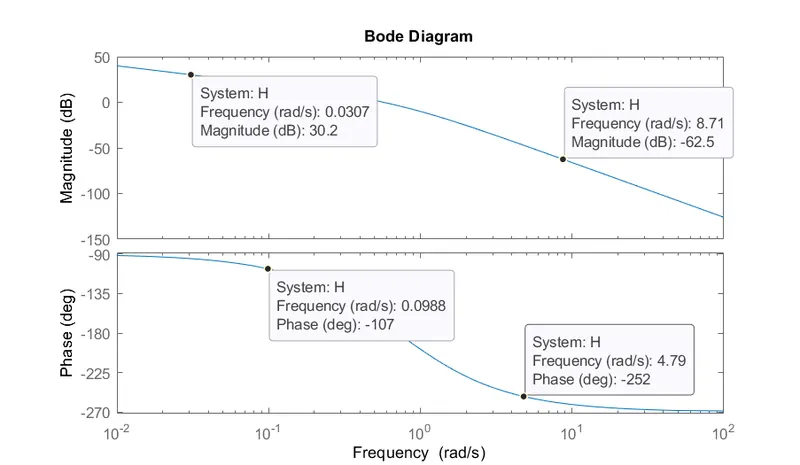
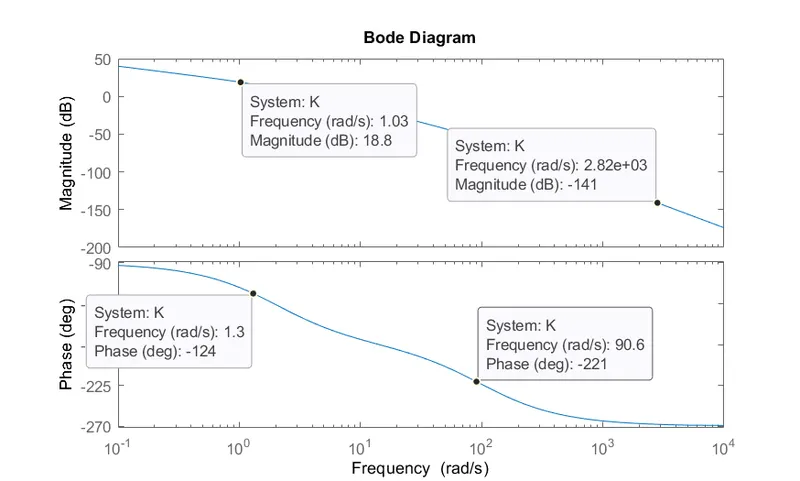
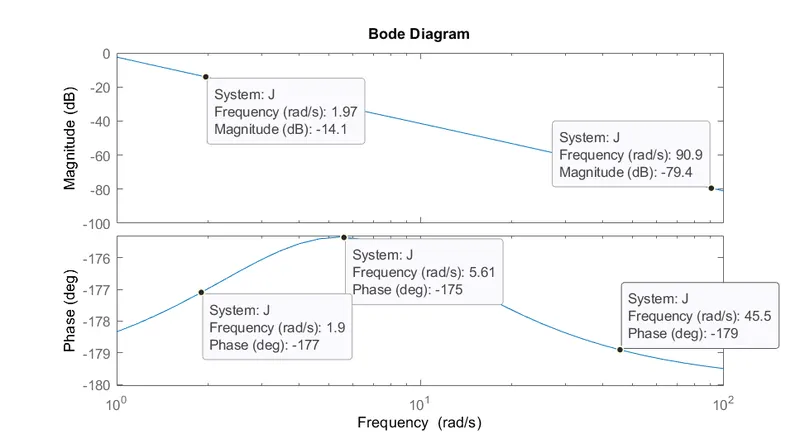
b.) Using MATLAB, make a bode plot of the following transfer functions. Determine the phase and gain margin, gain and phase crossover frequency, and comment on each case's stability.
- `G(s) = 1/((1+s)(1 + 2s)`
- `H(s) = 1/(s(1 + s)(1+2s)`
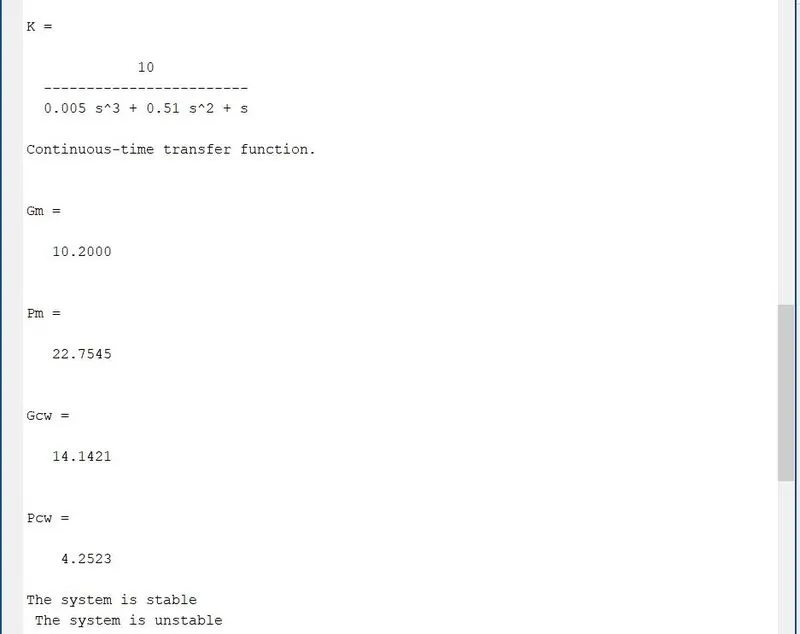
- `K(s) = 10/(s(1+0.5s)(1+0.01s)`
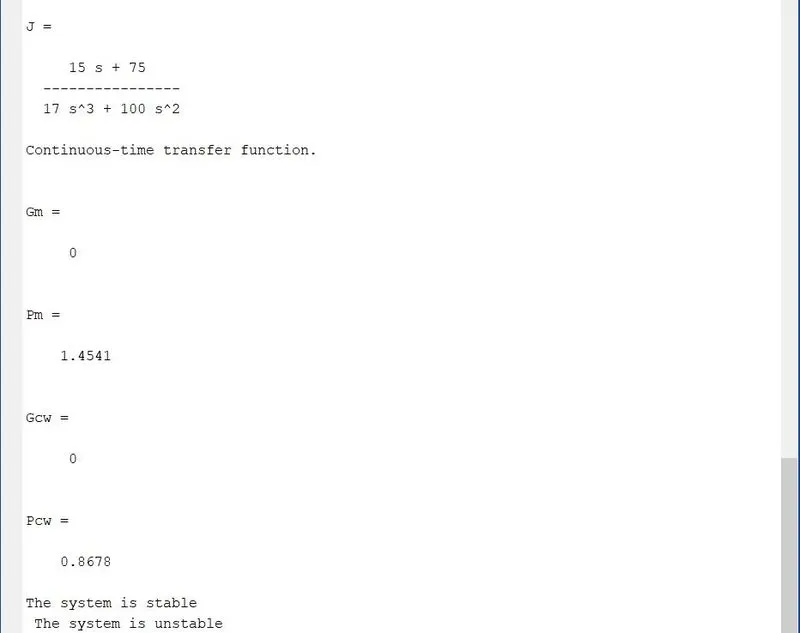
- `J(s) = (75(1+0.2s))/(s^2(s+16s+100)`
a.) What is the importance of a bode plot for control system design?
Frequency response analysis of control systems can be carried after either analytically or graphically. The various graphical techniques available for frequency analysis are
- Bode plot
- Root locus
- Polar plot
- M and N circles
- Nichols Chart
Bode Plot:
Bode plots are usually drawn for the open-loop systems. From the open-loop plot, the performance and stability of the closed-loop system are estimated. Frequency response plots are used to determine the frequency domain, to study the stability of the systems, and adjust the gain of the system to satisfy the desired specifications. In control engineering, a bode plot is the frequency response of a system represented using two sub-plots-Magnitude plot(expressing the magnitude in decibels) and the Phase plot(expressing the phase shift in degrees.).
Determine the stability of the system using Bode plot parameters:
The stability of a control system is defined as the ability of any system to provide a bounded output when a bounded input is applied to it. More specifically we can say that stability allows the system to reach the steady-state and remain in that state for that particular input even after variation in the parameters of the system.
The stability of the system using a bode plot can be expressed in terms of gain margin and phase margin.
Gain Margin:
Greater will be the gain margin greater will be the stability of the system. It refers to the amount of gain, which can be increased or decreased without making the system unstable. It is usually expressed n db.
Phase Margin:
Greater will be the phase margin greater will be the stability of the system. It refers to the phase which can be increased or decreased without making the system unstable. It usually expressed in degree.
Bode Stability Criterion:
The stability conditions are given below
- For a Stable System: Both the margins should be positive or the phase margin should be greater than the gain margin for the system to be stable.
- For Marginal Stable System: Both the gain and phase margins should be zero or the phase margin should be equal to the gain margin then the system is said to be marginally stable.
- For Unstable System: If either of the phase margin or gain margin is negative or the phase margin is less than the gain margin then the system is unstable.
Advantages of a Bode Plot:
- It is based on the asymptotic approximation, which provides a simple method to plot the logarithmic magnitude curve.
- The multiplication of various magnitude that appears in the transfer function can be treated as an addition, while division can be treated as subtraction as we are using a logarithmic scale.
- With the help of this plot, we can directly comment on the stability of the system without doing any calculations.
- Bode plots provide relative stability in terms of gain margin and phase margin.
- It also covers from low frequency to high-frequency range.
b.) Using MATLAB, make a bode plot of the following transfer functions. Determine the phase and gain margin, gain and phase crossover frequency, and comment on each case's stability.
- `G(s) = 1/((1+s)(1 + 2s)`
- `H(s) = 1/(s(1 + s)(1+2s)`
- `K(s) = 10/(s(1+0.5s)(1+0.01s)`
- `J(s) = (75(1+0.2s))/(s^2(s+16s+100)`
clear all
close all
clc

figure (1)
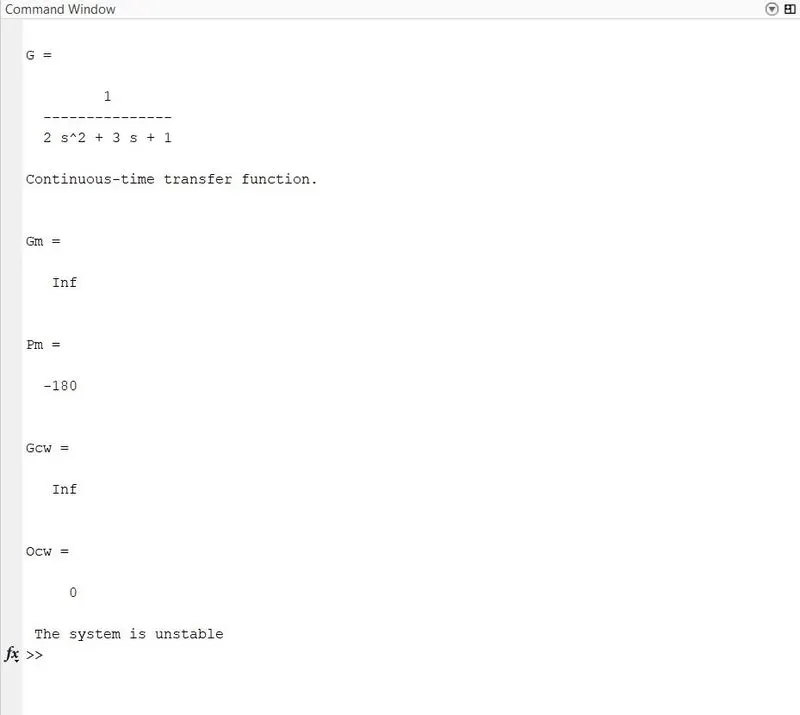
G = tf([1],[2 3 1 ])
bode(G)
[Gm,Pm,Gcw,Pcw] = margin(G)
if (Gm && Pm>0) || (Pm>Gm)
    disp ('The system is stable ')
end

if (Gm && Pm == 0) || (Pm == Gm)
    disp (' The system is marginally stable')
end

if (Pm < 0) || (Pm > Gm)
    disp(' The system is unstable')
end

figure(2)
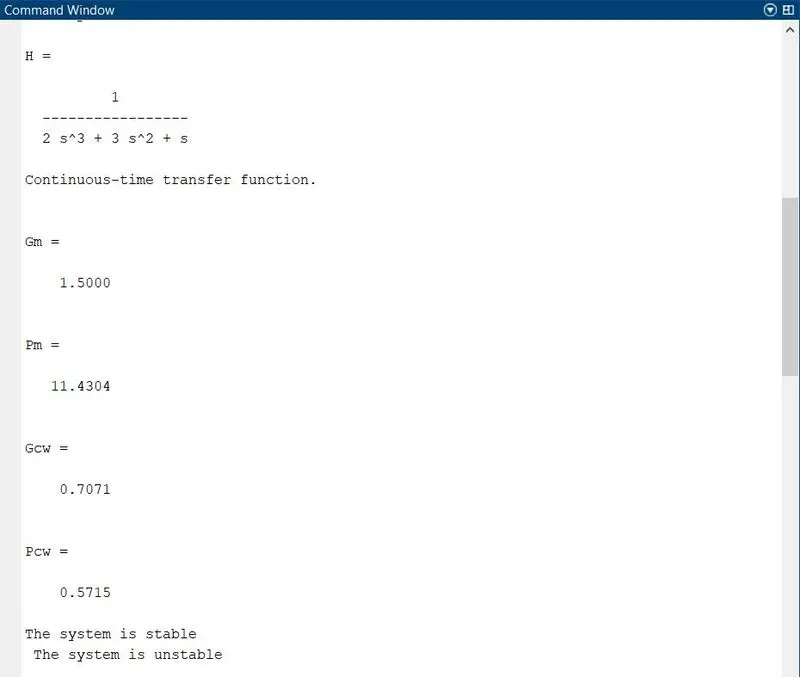
H = tf([1],[2 3 1 0])
bode(H)
[Gm,Pm,Gcw,Pcw] = margin(H)
if (Gm && Pm>0) || (Pm>Gm)
    disp ('The system is stable ')
end

if (Gm && Pm == 0) || (Pm == Gm)
    disp (' The system is marginally stable')
end

if (Pm < 0) || (Pm > Gm)
    disp(' The system is unstable')
end

figure(3)
K = tf([10],[0.005 0.51 1 0])
bode(K)
[Gm,Pm,Gcw,Pcw] = margin(K)
if (Gm && Pm>0) || (Pm>Gm)
    disp ('The system is stable ')
end

if (Gm && Pm == 0) || (Pm == Gm)
    disp (' The system is marginally stable')
end

if (Pm < 0) || (Pm > Gm)
    disp(' The system is unstable')
end

figure(4)
J = tf([15 75],[17 100 0 0])
bode(J)
[Gm,Pm,Gcw,Pcw] = margin(J)
if (Gm && Pm>0) || (Pm>Gm)
    disp ('The system is stable ')
end

if (Gm && Pm == 0) || (Pm == Gm)
    disp (' The system is marginally stable')
end

if (Pm < 0) || (Pm > Gm)
    disp(' The system is unstable')
end
Explantion:
- We rewrite the transfer function in Matlab script by using the command tf([numerator],[denominator]) and name it as "G"
- To plot Bode for a particular transfer function, we simply type bode(G) and in () bracket name the transfer function of which we desire to plot bode.
- Gain magnitude(Gm), Phase magnitude (Pm), Gain crossover frequency(Gcw), Phase crossover frequency(Pcw) is determined at transfer function margin(G).
- Later we input "if" condition to display whether the system transfer function is stable or unstable.
- A similar script goes for the remaining 3 transfer function only if the condition may vary according to the transfer function.
RESULTS
Command window
GRAPHS