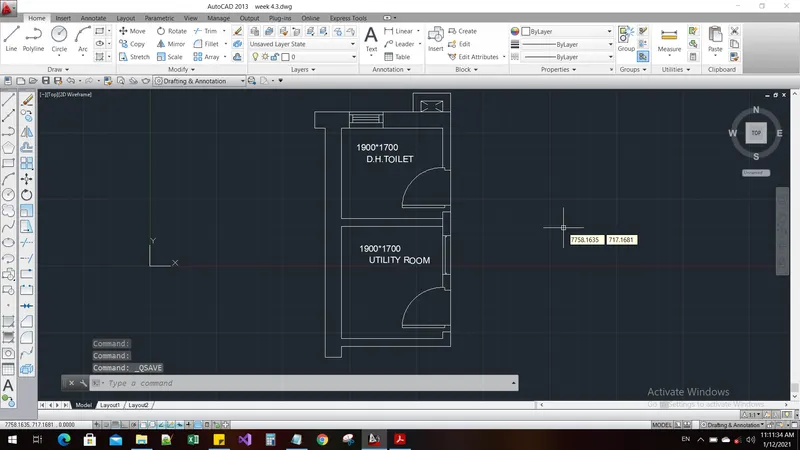
AutoCAD_Residence Floor Plan, Seating Plan, Toilet and Utility room Plan_Week 4
Aim and introduction :
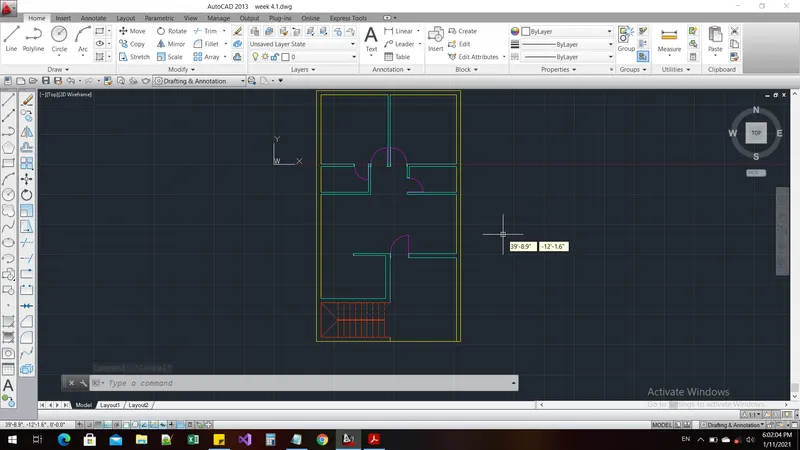
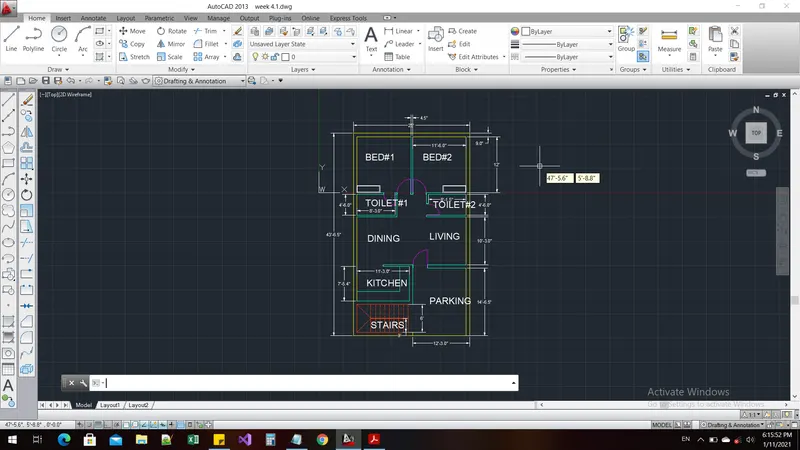
To prepare an AUTOCAD Drawing for the given house plan
Procedure:
Command: LIMMAX
Enter new value for LIMMAX <1'-0.0",0'-9.0">: 50'-0",50
Command: *Cancel*
Command: *Cancel*
Command: UNITS
Command: LIMMAx
Enter new value for LIMMAX <50'-0",4'-2">: 50'-0",50"
Command: z
ZOOM
Specify corner of window, enter a scale factor (nX or nXP), or
[All/Center/Dynamic/Extents/Previous/Scale/Window/Object] <real time>: a
Regenerating model.
Command: LIMITS
Reset Model space limits:
Specify lower left corner or [ON/OFF] <0'-0",0'-0">: 0'-0",0'-0"
Specify upper right corner <50'-0",4'-2">: 50'
Invalid limits.
Reset Model space limits:
Specify lower left corner or [ON/OFF] <0'-0",0'-0">: 50'
Specify upper right corner <50'-0",4'-2">:
Command:
LIMITS
Reset Model space limits:
Specify lower left corner or [ON/OFF] <0'-0",0'-0">:
Specify upper right corner <50'-0",4'-2">:
Command: z
ZOOM
Specify corner of window, enter a scale factor (nX or nXP), or
[All/Center/Dynamic/Extents/Previous/Scale/Window/Object] <real time>: a
Regenerating model.
Command: XLINE
Specify a point or [Hor/Ver/Ang/Bisect/Offset]:
Specify through point: <Ortho on>
Specify through point:
Specify through point: *Cancel*
Command: M
MOVE
Select objects: 1 found
Select objects:
Specify base point or [Displacement] <Displacement>:
Specify second point or <use first point as displacement>:
Command: OFFSET
Current settings: Erase source=No Layer=Source OFFSETGAPTYPE=0
Specify offset distance or [Through/Erase/Layer] <Through>:
Select object to offset or [Exit/Undo] <Exit>:
Specify through point or [Exit/Multiple/Undo] <Exit>: 43'-6.5"
Select object to offset or [Exit/Undo] <Exit>: offset
*Invalid selection*
Expects a point or Exit
Select object to offset or [Exit/Undo] <Exit>:
Specify through point or [Exit/Multiple/Undo] <Exit>: 25'-0.0"
Select object to offset or [Exit/Undo] <Exit>: *Cancel*
Command: OFFSET
Current settings: Erase source=No Layer=Source OFFSETGAPTYPE=0
Specify offset distance or [Through/Erase/Layer] <Through>:
Select object to offset or [Exit/Undo] <Exit>:
Specify through point or [Exit/Multiple/Undo] <Exit>: 43'-6.5"
Select object to offset or [Exit/Undo] <Exit>: offset
*Invalid selection*
Expects a point or Exit
Select object to offset or [Exit/Undo] <Exit>:
Specify through point or [Exit/Multiple/Undo] <Exit>: 25'-0.0"
Select object to offset or [Exit/Undo] <Exit>: *Cancel*
Command: TR
TRIM
Current settings: Projection=UCS, Edge=None
Select cutting edges ...
Select objects or <select all>:
Select object to trim or shift-select to extend or
[Fence/Crossing/Project/Edge/eRase/Undo]: Specify opposite corner:
Select object to trim or shift-select to extend or
[Fence/Crossing/Project/Edge/eRase/Undo]: Specify opposite corner:
Select object to trim or shift-select to extend or
[Fence/Crossing/Project/Edge/eRase/Undo]: Specify opposite corner:
Select object to trim or shift-select to extend or
[Fence/Crossing/Project/Edge/eRase/Undo]: Specify opposite corner:
Select object to trim or shift-select to extend or
[Fence/Crossing/Project/Edge/eRase/Undo]: Specify opposite corner:
Select object to trim or shift-select to extend or
[Fence/Crossing/Project/Edge/eRase/Undo]: Specify opposite corner:
Select object to trim or shift-select to extend or
[Fence/Crossing/Project/Edge/eRase/Undo]: *Cancel*
Command: o
OFFSET
Current settings: Erase source=No Layer=Source OFFSETGAPTYPE=0
Specify offset distance or [Through/Erase/Layer] <Through>:
Select object to offset or [Exit/Undo] <Exit>:
Specify through point or [Exit/Multiple/Undo] <Exit>: 0'-9"
Select object to offset or [Exit/Undo] <Exit>:
Specify through point or [Exit/Multiple/Undo] <Exit>: 6'-0"
Select object to offset or [Exit/Undo] <Exit>:
Specify through point or [Exit/Multiple/Undo] <Exit>: 0'-9"
Select object to offset or [Exit/Undo] <Exit>:
Specify through point or [Exit/Multiple/Undo] <Exit>: 18'-0.5"
Select object to offset or [Exit/Undo] <Exit>:
Specify through point or [Exit/Multiple/Undo] <Exit>: 0'-4.5"
Select object to offset or [Exit/Undo] <Exit>:
Specify through point or [Exit/Multiple/Undo] <Exit>: 4'-6"
Select object to offset or [Exit/Undo] <Exit>:
Specify through point or [Exit/Multiple/Undo] <Exit>: 4.5"
Select object to offset or [Exit/Undo] <Exit>:
Specify through point or [Exit/Multiple/Undo] <Exit>: 12'-0"
Select object to offset or [Exit/Undo] <Exit>:
Specify through point or [Exit/Multiple/Undo] <Exit>: 9.0"
Select object to offset or [Exit/Undo] <Exit>:
Specify through point or [Exit/Multiple/Undo] <Exit>: 9.0"
Select object to offset or [Exit/Undo] <Exit>: *Cancel*
Command: TR
TRIM
Current settings: Projection=UCS, Edge=None
Select cutting edges ...
Select objects or <select all>:
Select object to trim or shift-select to extend or
[Fence/Crossing/Project/Edge/eRase/Undo]: Specify opposite corner:
Select object to trim or shift-select to extend or
[Fence/Crossing/Project/Edge/eRase/Undo]: Specify opposite corner:
Select object to trim or shift-select to extend or
[Fence/Crossing/Project/Edge/eRase/Undo]: Specify opposite corner:
Select object to trim or shift-select to extend or
[Fence/Crossing/Project/Edge/eRase/Undo]: Specify opposite corner:
Select object to trim or shift-select to extend or
[Fence/Crossing/Project/Edge/eRase/Undo]: Specify opposite corner:
Select object to trim or shift-select to extend or
[Fence/Crossing/Project/Edge/eRase/Undo]: Specify opposite corner:
Select object to trim or shift-select to extend or
[Fence/Crossing/Project/Edge/eRase/Undo]: Specify opposite corner:
Select object to trim or shift-select to extend or
[Fence/Crossing/Project/Edge/eRase/Undo]:
Select object to trim or shift-select to extend or
[Fence/Crossing/Project/Edge/eRase/Undo]:
Select object to trim or shift-select to extend or
[Fence/Crossing/Project/Edge/eRase/Undo]:
Select object to trim or shift-select to extend or
[Fence/Crossing/Project/Edge/eRase/Undo]:
Select object to trim or shift-select to extend or
[Fence/Crossing/Project/Edge/eRase/Undo]: Specify opposite corner:
Select object to trim or shift-select to extend or
[Fence/Crossing/Project/Edge/eRase/Undo]: Specify opposite corner:
Select object to trim or shift-select to extend or
[Fence/Crossing/Project/Edge/eRase/Undo]: Specify opposite corner:
Select object to trim or shift-select to extend or
[Fence/Crossing/Project/Edge/eRase/Undo]: Specify opposite corner:
Select object to trim or shift-select to extend or
[Fence/Crossing/Project/Edge/eRase/Undo]: *Cancel*
Automatic save to C:\Users\RAVIKANTH\appdata\local\temp\week 4.1_1_1_9566.sv$ ...
Command:
Command: *Cancel*
Command: OFFSET
Current settings: Erase source=No Layer=Source OFFSETGAPTYPE=0
Specify offset distance or [Through/Erase/Layer] <Through>:
Select object to offset or [Exit/Undo] <Exit>:
Specify through point or [Exit/Multiple/Undo] <Exit>: *Cancel*
Command: TR
TRIM
Current settings: Projection=UCS, Edge=None
Select cutting edges ...
Select objects or <select all>:
Select object to trim or shift-select to extend or
[Fence/Crossing/Project/Edge/eRase/Undo]: Specify opposite corner:
Select object to trim or shift-select to extend or
[Fence/Crossing/Project/Edge/eRase/Undo]: Specify opposite corner:
Select object to trim or shift-select to extend or
[Fence/Crossing/Project/Edge/eRase/Undo]: Specify opposite corner:
No objects crossed by crossing window.
Select object to trim or shift-select to extend or
[Fence/Crossing/Project/Edge/eRase/Undo]: Specify opposite corner:
Select object to trim or shift-select to extend or
[Fence/Crossing/Project/Edge/eRase/Undo]: Specify opposite corner:
Select object to trim or shift-select to extend or
[Fence/Crossing/Project/Edge/eRase/Undo]: Specify opposite corner:
Select object to trim or shift-select to extend or
[Fence/Crossing/Project/Edge/eRase/Undo]: Specify opposite corner:
Select object to trim or shift-select to extend or
[Fence/Crossing/Project/Edge/eRase/Undo]: Specify opposite corner:
Select object to trim or shift-select to extend or
[Fence/Crossing/Project/Edge/eRase/Undo]: Specify opposite corner:
Select object to trim or shift-select to extend or
[Fence/Crossing/Project/Edge/eRase/Undo]: *Cancel*
Command: *Cancel*
Command: OFFSET
Current settings: Erase source=No Layer=Source OFFSETGAPTYPE=0
Specify offset distance or [Through/Erase/Layer] <Through>:
Select object to offset or [Exit/Undo] <Exit>:
Specify through point or [Exit/Multiple/Undo] <Exit>: 11'-7.5"
Select object to offset or [Exit/Undo] <Exit>:
Specify through point or [Exit/Multiple/Undo] <Exit>: 4.5"
Command: EX
EXTEND
Current settings: Projection=UCS, Edge=None
Select boundary edges ...
Select objects or <select all>:
Select object to extend or shift-select to trim or
[Fence/Crossing/Project/Edge/Undo]:
Select object to extend or shift-select to trim or
[Fence/Crossing/Project/Edge/Undo]:
Select object to extend or shift-select to trim or
[Fence/Crossing/Project/Edge/Undo]: *Cancel*
Command: OFFSET
Current settings: Erase source=No Layer=Source OFFSETGAPTYPE=0
Specify offset distance or [Through/Erase/Layer] <Through>:
Select object to offset or [Exit/Undo] <Exit>:
Specify through point or [Exit/Multiple/Undo] <Exit>: 3'-0"
Select object to offset or [Exit/Undo] <Exit>: *Cancel*
Command: *Cancel*
Command: TR
TRIM
Current settings: Projection=UCS, Edge=None
Select cutting edges ...
Select objects or <select all>:
Select object to trim or shift-select to extend or
[Fence/Crossing/Project/Edge/eRase/Undo]: Specify opposite corner:
Select object to trim or shift-select to extend or
[Fence/Crossing/Project/Edge/eRase/Undo]:
Select object to trim or shift-select to extend or
[Fence/Crossing/Project/Edge/eRase/Undo]: *Cancel*
Command: *Cancel*
Command: EX
EXTEND
Current settings: Projection=UCS, Edge=None
Select boundary edges ...
Select objects or <select all>:
Select object to extend or shift-select to trim or
[Fence/Crossing/Project/Edge/Undo]:
Select object to extend or shift-select to trim or
[Fence/Crossing/Project/Edge/Undo]: *Cancel*
Command: TR
TRIM
Current settings: Projection=UCS, Edge=None
Select cutting edges ...
Select objects or <select all>:
Select object to trim or shift-select to extend or
[Fence/Crossing/Project/Edge/eRase/Undo]: Specify opposite corner: *Cancel*
Command: *Cancel*
Command: OFFSET
Current settings: Erase source=No Layer=Source OFFSETGAPTYPE=0
Specify offset distance or [Through/Erase/Layer] <Through>:
Select object to offset or [Exit/Undo] <Exit>:
Specify through point or [Exit/Multiple/Undo] <Exit>: 1'-0"
Select object to offset or [Exit/Undo] <Exit>: *Cancel*
Select object to offset or [Exit/Undo] <Exit>: *Cancel*
Command: *Cancel*
Command: *Cancel*
Command: EX
EXTEND
Current settings: Projection=UCS, Edge=None
Select boundary edges ...
Select objects or <select all>: 1 found
Select objects: 1 found, 2 total
Select objects:
Select object to extend or shift-select to trim or
[Fence/Crossing/Project/Edge/Undo]: Specify opposite corner:
Object does not intersect an edge.
Select object to extend or shift-select to trim or
[Fence/Crossing/Project/Edge/Undo]: Specify opposite corner:
Object does not intersect an edge.
Object does not intersect an edge.
Object does not intersect an edge.
Select object to extend or shift-select to trim or
[Fence/Crossing/Project/Edge/Undo]:
Command: EX
EXTEND
Current settings: Projection=UCS, Edge=None
Select boundary edges ...
Select objects or <select all>: Specify opposite corner: 4 found
Select objects: *Cancel*
Command: EX
EXTEND
Current settings: Projection=UCS, Edge=None
Select boundary edges ...
Select objects or <select all>: Specify opposite corner: 2 found
Select objects:
Select object to extend or shift-select to trim or
[Fence/Crossing/Project/Edge/Undo]:
Command: *Cancel*
Command: EX
EXTEND
Current settings: Projection=UCS, Edge=None
Select boundary edges ...
Select objects or <select all>: 1 found
Select objects: 1 found, 2 total
Select objects:
Select object to extend or shift-select to trim or
[Fence/Crossing/Project/Edge/Undo]:
Command: EX
EXTEND
Current settings: Projection=UCS, Edge=None
Select boundary edges ...
Select objects or <select all>:
Select object to extend or shift-select to trim or
[Fence/Crossing/Project/Edge/Undo]:
Select object to extend or shift-select to trim or
[Fence/Crossing/Project/Edge/Undo]:
Select object to extend or shift-select to trim or
[Fence/Crossing/Project/Edge/Undo]:
Select object to extend or shift-select to trim or
[Fence/Crossing/Project/Edge/Undo]:
Select object to extend or shift-select to trim or
[Fence/Crossing/Project/Edge/Undo]:
Select object to extend or shift-select to trim or
[Fence/Crossing/Project/Edge/Undo]:
Select object to extend or shift-select to trim or
[Fence/Crossing/Project/Edge/Undo]:
Select object to extend or shift-select to trim or
[Fence/Crossing/Project/Edge/Undo]:
Select object to extend or shift-select to trim or
[Fence/Crossing/Project/Edge/Undo]: *Cancel*
Command: TR
TRIM
Current settings: Projection=UCS, Edge=None
Select cutting edges ...
Select objects or <select all>:
Select object to trim or shift-select to extend or
[Fence/Crossing/Project/Edge/eRase/Undo]: Specify opposite corner:
Select object to trim or shift-select to extend or
[Fence/Crossing/Project/Edge/eRase/Undo]: Specify opposite corner: *Cancel*
Command: EX
EXTEND
Current settings: Projection=UCS, Edge=None
Select boundary edges ...
Select objects or <select all>:
Select object to extend or shift-select to trim or
[Fence/Crossing/Project/Edge/Undo]:
Select object to extend or shift-select to trim or
[Fence/Crossing/Project/Edge/Undo]:
Select object to extend or shift-select to trim or
[Fence/Crossing/Project/Edge/Undo]: *Cancel*
Command: TR
TRIM
Current settings: Projection=UCS, Edge=None
Select cutting edges ...
Select objects or <select all>:
Select object to trim or shift-select to extend or
[Fence/Crossing/Project/Edge/eRase/Undo]: Specify opposite corner:
Select object to trim or shift-select to extend or
[Fence/Crossing/Project/Edge/eRase/Undo]: Specify opposite corner:
Select object to trim or shift-select to extend or
[Fence/Crossing/Project/Edge/eRase/Undo]: Specify opposite corner:
Select object to trim or shift-select to extend or
[Fence/Crossing/Project/Edge/eRase/Undo]: Specify opposite corner:
Select object to trim or shift-select to extend or
[Fence/Crossing/Project/Edge/eRase/Undo]:
Select object to trim or shift-select to extend or
[Fence/Crossing/Project/Edge/eRase/Undo]:
Select object to trim or shift-select to extend or
[Fence/Crossing/Project/Edge/eRase/Undo]: *Cancel*
Command: *Cancel*
Command: OFFSET
Current settings: Erase source=No Layer=Source OFFSETGAPTYPE=0
Specify offset distance or [Through/Erase/Layer] <Through>:
Select object to offset or [Exit/Undo] <Exit>:
Specify through point or [Exit/Multiple/Undo] <Exit>: 2'-6.0"
Select object to offset or [Exit/Undo] <Exit>:
Specify through point or [Exit/Multiple/Undo] <Exit>: 2'-6.0"
Command:
Command: _QSAVE
Command: TR
TRIM
Current settings: Projection=UCS, Edge=None
Select cutting edges ...
Select objects or <select all>:
Select object to trim or shift-select to extend or
[Fence/Crossing/Project/Edge/eRase/Undo]:
Select object to trim or shift-select to extend or
[Fence/Crossing/Project/Edge/eRase/Undo]: Specify opposite corner:
Select object to trim or shift-select to extend or
[Fence/Crossing/Project/Edge/eRase/Undo]: Specify opposite corner:
Select object to trim or shift-select to extend or
[Fence/Crossing/Project/Edge/eRase/Undo]: Specify opposite corner:
Select object to trim or shift-select to extend or
[Fence/Crossing/Project/Edge/eRase/Undo]:
Select object to trim or shift-select to extend or
[Fence/Crossing/Project/Edge/eRase/Undo]:
Select object to trim or shift-select to extend or
[Fence/Crossing/Project/Edge/eRase/Undo]:
Select object to trim or shift-select to extend or
[Fence/Crossing/Project/Edge/eRase/Undo]: *Cancel*
Command: *Cancel*
Command:
Command: _.erase 1 found
Command:
Command: _.erase 1 found
Command: OFFSET
Current settings: Erase source=No Layer=Source OFFSETGAPTYPE=0
Specify offset distance or [Through/Erase/Layer] <Through>:
Select object to offset or [Exit/Undo] <Exit>:
Specify through point or [Exit/Multiple/Undo] <Exit>: 3'-3.0"
Select object to offset or [Exit/Undo] <Exit>:
Specify through point or [Exit/Multiple/Undo] <Exit>: 6'-4"
Select object to offset or [Exit/Undo] <Exit>: *Cancel*
Command: *Cancel*
Command: TR
TRIM
Current settings: Projection=UCS, Edge=None
Select cutting edges ...
Select objects or <select all>:
Select object to trim or shift-select to extend or
[Fence/Crossing/Project/Edge/eRase/Undo]: Specify opposite corner:
Select object to trim or shift-select to extend or
[Fence/Crossing/Project/Edge/eRase/Undo]: Specify opposite corner:
Select object to trim or shift-select to extend or
[Fence/Crossing/Project/Edge/eRase/Undo]: Specify opposite corner:
Select object to trim or shift-select to extend or
[Fence/Crossing/Project/Edge/eRase/Undo]:
Select object to trim or shift-select to extend or
[Fence/Crossing/Project/Edge/eRase/Undo]:
Select object to trim or shift-select to extend or
Command:
Command: _QSAVE
Command: EX
EXTEND
Current settings: Projection=UCS, Edge=None
Select boundary edges ...
Select objects or <select all>:
Select object to extend or shift-select to trim or
[Fence/Crossing/Project/Edge/Undo]:
Select object to extend or shift-select to trim or
[Fence/Crossing/Project/Edge/Undo]:
Select object to extend or shift-select to trim or
[Fence/Crossing/Project/Edge/Undo]: *Cancel*
Command: OFFSET
Current settings: Erase source=No Layer=Source OFFSETGAPTYPE=0
Specify offset distance or [Through/Erase/Layer] <Through>:
Select object to offset or [Exit/Undo] <Exit>:
Specify through point or [Exit/Multiple/Undo] <Exit>: 3'-0"
Select object to offset or [Exit/Undo] <Exit>: *Cancel*
Command: *Cancel*
Command: TR
TRIM
Current settings: Projection=UCS, Edge=None
Select cutting edges ...
Select objects or <select all>:
Select object to trim or shift-select to extend or
[Fence/Crossing/Project/Edge/eRase/Undo]: Specify opposite corner:
Select object to trim or shift-select to extend or
[Fence/Crossing/Project/Edge/eRase/Undo]:
Select object to trim or shift-select to extend or
[Fence/Crossing/Project/Edge/eRase/Undo]: *Cancel*
Command: *Cancel*
Command: EX
EXTEND
Current settings: Projection=UCS, Edge=None
Select boundary edges ...
Select objects or <select all>:
Select object to extend or shift-select to trim or
[Fence/Crossing/Project/Edge/Undo]:
Select object to extend or shift-select to trim or
[Fence/Crossing/Project/Edge/Undo]: *Cancel*
Command: TR
TRIM
Current settings: Projection=UCS, Edge=None
Select cutting edges ...
Select objects or <select all>:
Select object to trim or shift-select to extend or
[Fence/Crossing/Project/Edge/eRase/Undo]: Specify opposite corner: *Cancel*
Command: *Cancel*
Command: OFFSET
Current settings: Erase source=No Layer=Source OFFSETGAPTYPE=0
Specify offset distance or [Through/Erase/Layer] <Through>:
Select object to offset or [Exit/Undo] <Exit>:
Specify through point or [Exit/Multiple/Undo] <Exit>: 1'-0"
Select object to offset or [Exit/Undo] <Exit>: *Cancel*
Command: TR
TRIM
Current settings: Projection=UCS, Edge=None
Select cutting edges ...
Select objects or <select all>:
Select object to trim or shift-select to extend or
[Fence/Crossing/Project/Edge/eRase/Undo]:
Select object to trim or shift-select to extend or
[Fence/Crossing/Project/Edge/eRase/Undo]:
Select object to trim or shift-select to extend or
[Fence/Crossing/Project/Edge/eRase/Undo]:
Select object to trim or shift-select to extend or
[Fence/Crossing/Project/Edge/eRase/Undo]:
Select object to trim or shift-select to extend or
[Fence/Crossing/Project/Edge/eRase/Undo]: *Cancel*
Command: O
OFFSET
Current settings: Erase source=No Layer=Source OFFSETGAPTYPE=0
Specify offset distance or [Through/Erase/Layer] <Through>:
Select object to offset or [Exit/Undo] <Exit>:
Specify through point or [Exit/Multiple/Undo] <Exit>: 1
Select object to offset or [Exit/Undo] <Exit>: *Cancel*
Command:
Command: _.erase 1 found
Command: O
OFFSET
Current settings: Erase source=No Layer=Source OFFSETGAPTYPE=0
Specify offset distance or [Through/Erase/Layer] <Through>:
Select object to offset or [Exit/Undo] <Exit>:
Select object to offset or [Exit/Undo] <Exit>:
Specify through point or [Exit/Multiple/Undo] <Exit>: 12
Select object to offset or [Exit/Undo] <Exit>:
Specify through point or [Exit/Multiple/Undo] <Exit>: 12
Select object to offset or [Exit/Undo] <Exit>:
Specify through point or [Exit/Multiple/Undo] <Exit>: 12
Select object to offset or [Exit/Undo] <Exit>:
Specify through point or [Exit/Multiple/Undo] <Exit>: 12
Select object to offset or [Exit/Undo] <Exit>:
Specify through point or [Exit/Multiple/Undo] <Exit>: 12
Select object to offset or [Exit/Undo] <Exit>:
Specify through point or [Exit/Multiple/Undo] <Exit>: 12
Select object to offset or [Exit/Undo] <Exit>:
Specify through point or [Exit/Multiple/Undo] <Exit>: 12
Select object to offset or [Exit/Undo] <Exit>:
Specify through point or [Exit/Multiple/Undo] <Exit>: 12
Select object to offset or [Exit/Undo] <Exit>:
Specify through point or [Exit/Multiple/Undo] <Exit>: 0.5
Select object to offset or [Exit/Undo] <Exit>:
Specify through point or [Exit/Multiple/Undo] <Exit>: 0.5
Select object to offset or [Exit/Undo] <Exit>: *Cancel*
Command: *Cancel*
Command: *Cancel*
Command: TR
TRIM
Current settings: Projection=UCS, Edge=None
Select cutting edges ...
Select objects or <select all>:
Select object to trim or shift-select to extend or
[Fence/Crossing/Project/Edge/eRase/Undo]: Specify opposite corner:
Select object to trim or shift-select to extend or
[Fence/Crossing/Project/Edge/eRase/Undo]: Specify opposite corner:
Select object to trim or shift-select to extend or
[Fence/Crossing/Project/Edge/eRase/Undo]:
Select object to trim or shift-select to extend or
[Fence/Crossing/Project/Edge/eRase/Undo]:
Select object to trim or shift-select to extend or
[Fence/Crossing/Project/Edge/eRase/Undo]:
Select object to trim or shift-select to extend or
[Fence/Crossing/Project/Edge/eRase/Undo]:
Select object to trim or shift-select to extend or
[Fence/Crossing/Project/Edge/eRase/Undo]: Specify opposite corner:
Select object to trim or shift-select to extend or
[Fence/Crossing/Project/Edge/eRase/Undo]:
Select object to trim or shift-select to extend or
[Fence/Crossing/Project/Edge/eRase/Undo]:
Select object to trim or shift-select to extend or
[Fence/Crossing/Project/Edge/eRase/Undo]:
Select object to trim or shift-select to extend or
[Fence/Crossing/Project/Edge/eRase/Undo]:
Select object to trim or shift-select to extend or
[Fence/Crossing/Project/Edge/eRase/Undo]:
Select object to trim or shift-select to extend or
[Fence/Crossing/Project/Edge/eRase/Undo]:
Select object to trim or shift-select to extend or
[Fence/Crossing/Project/Edge/eRase/Undo]:
Select object to trim or shift-select to extend or
[Fence/Crossing/Project/Edge/eRase/Undo]:
Select object to trim or shift-select to extend or
[Fence/Crossing/Project/Edge/eRase/Undo]:
Select object to trim or shift-select to extend or
[Fence/Crossing/Project/Edge/eRase/Undo]:
Select object to trim or shift-select to extend or
[Fence/Crossing/Project/Edge/eRase/Undo]:
Select object to trim or shift-select to extend or
[Fence/Crossing/Project/Edge/eRase/Undo]:
Select object to trim or shift-select to extend or
[Fence/Crossing/Project/Edge/eRase/Undo]:
Select object to trim or shift-select to extend or
[Fence/Crossing/Project/Edge/eRase/Undo]: Specify opposite corner:
Select object to trim or shift-select to extend or
[Fence/Crossing/Project/Edge/eRase/Undo]: *Cancel*
Command: l
LINE
Specify first point: *Cancel*
Command: *Cancel*
Command: OFFSET
Current settings: Erase source=No Layer=Source OFFSETGAPTYPE=0
Specify offset distance or [Through/Erase/Layer] <Through>:
Select object to offset or [Exit/Undo] <Exit>:
Specify through point or [Exit/Multiple/Undo] <Exit>: 1
Select object to offset or [Exit/Undo] <Exit>:
Specify through point or [Exit/Multiple/Undo] <Exit>: 1
Select object to offset or [Exit/Undo] <Exit>:
Specify through point or [Exit/Multiple/Undo] <Exit>: 1
Select object to offset or [Exit/Undo] <Exit>:
Specify through point or [Exit/Multiple/Undo] <Exit>: 1
Select object to offset or [Exit/Undo] <Exit>:
Specify through point or [Exit/Multiple/Undo] <Exit>: 1
Select object to offset or [Exit/Undo] <Exit>:
Specify through point or [Exit/Multiple/Undo] <Exit>: 1
Select object to offset or [Exit/Undo] <Exit>:
Specify through point or [Exit/Multiple/Undo] <Exit>: 1
Select object to offset or [Exit/Undo] <Exit>:
Specify through point or [Exit/Multiple/Undo] <Exit>: 1
Select object to offset or [Exit/Undo] <Exit>: *Cancel*
Command: *Cancel*
Command: *Cancel*
Command: l
LINE
Specify first point: <Ortho on>
Specify next point or [Undo]: 6'-8.0"
Specify next point or [Undo]: *Cancel*
Command: *Cancel*
Command: C
CIRCLE
Specify center point for circle or [3P/2P/Ttr (tan tan radius)]:
Specify radius of circle or [Diameter]:
Command: *Cancel*
Command: EX
EXTEND
Current settings: Projection=UCS, Edge=None
Select boundary edges ...
Select objects or <select all>:
Select object to extend or shift-select to trim or
[Fence/Crossing/Project/Edge/Undo]:
Select object to extend or shift-select to trim or
[Fence/Crossing/Project/Edge/Undo]: *Cancel*
Command:
Command: *Cancel*
Command: c
CIRCLE
Specify center point for circle or [3P/2P/Ttr (tan tan radius)]: *Cancel*
Command: *Cancel*
Command:
Command: _.erase 1 found
Command: OS
OSNAP
Command: C
CIRCLE
Specify center point for circle or [3P/2P/Ttr (tan tan radius)]:
Specify radius of circle or [Diameter] <2'-10.0">:
Command: C
CIRCLE
Specify center point for circle or [3P/2P/Ttr (tan tan radius)]:
Specify radius of circle or [Diameter] <2'-9.9">:
Command: *Cancel*
Command: *Cancel*
Command: TR
TRIM
Current settings: Projection=UCS, Edge=None
Select cutting edges ...
Select objects or <select all>:
Select object to trim or shift-select to extend or
[Fence/Crossing/Project/Edge/eRase/Undo]: Specify opposite corner:
Select object to trim or shift-select to extend or
[Fence/Crossing/Project/Edge/eRase/Undo]: Specify opposite corner:
Select object to trim or shift-select to extend or
[Fence/Crossing/Project/Edge/eRase/Undo]:
Select object to trim or shift-select to extend or
[Fence/Crossing/Project/Edge/eRase/Undo]:
Select object to trim or shift-select to extend or
[Fence/Crossing/Project/Edge/eRase/Undo]:
Select object to trim or shift-select to extend or
[Fence/Crossing/Project/Edge/eRase/Undo]:
Select object to trim or shift-select to extend or
[Fence/Crossing/Project/Edge/eRase/Undo]:
Select object to trim or shift-select to extend or
[Fence/Crossing/Project/Edge/eRase/Undo]: Specify opposite corner:
No objects crossed by crossing window.
Select object to trim or shift-select to extend or
[Fence/Crossing/Project/Edge/eRase/Undo]: Specify opposite corner:
Select object to trim or shift-select to extend or
[Fence/Crossing/Project/Edge/eRase/Undo]:
Select object to trim or shift-select to extend or
[Fence/Crossing/Project/Edge/eRase/Undo]:
Select object to trim or shift-select to extend or
[Fence/Crossing/Project/Edge/eRase/Undo]:
Select object to trim or shift-select to extend or
[Fence/Crossing/Project/Edge/eRase/Undo]:
Select object to trim or shift-select to extend or
[Fence/Crossing/Project/Edge/eRase/Undo]: *Cancel*
Command:
Command: _.erase 1 found
Command:
Command: _.erase 1 found
Command: EX
EXTEND
Current settings: Projection=UCS, Edge=None
Select boundary edges ...
Select objects or <select all>:
Select object to extend or shift-select to trim or
[Fence/Crossing/Project/Edge/Undo]:
Select object to extend or shift-select to trim or
[Fence/Crossing/Project/Edge/Undo]: *Cancel*
Command: TR
TRIM
Current settings: Projection=UCS, Edge=None
Select cutting edges ...
Select objects or <select all>:
Select object to trim or shift-select to extend or
[Fence/Crossing/Project/Edge/eRase/Undo]: Specify opposite corner:
Select object to trim or shift-select to extend or
[Fence/Crossing/Project/Edge/eRase/Undo]: Specify opposite corner:
Select object to trim or shift-select to extend or
[Fence/Crossing/Project/Edge/eRase/Undo]:
Select object to trim or shift-select to extend or
[Fence/Crossing/Project/Edge/eRase/Undo]:
Object does not intersect an edge.
Select object to trim or shift-select to extend or
[Fence/Crossing/Project/Edge/eRase/Undo]:
Object does not intersect an edge.
Select object to trim or shift-select to extend or
[Fence/Crossing/Project/Edge/eRase/Undo]:
Object does not intersect an edge.
Select object to trim or shift-select to extend or
[Fence/Crossing/Project/Edge/eRase/Undo]:
Select object to trim or shift-select to extend or
[Fence/Crossing/Project/Edge/eRase/Undo]:
Select object to trim or shift-select to extend or
[Fence/Crossing/Project/Edge/eRase/Undo]: *Cancel*
Command: C
CIRCLE
Specify center point for circle or [3P/2P/Ttr (tan tan radius)]:
Specify radius of circle or [Diameter] <3'-2.0">:
Command: *Cancel*
Command: *Cancel*
Command: TR
TRIM
Current settings: Projection=UCS, Edge=None
Select cutting edges ...
Select objects or <select all>:
Select object to trim or shift-select to extend or
[Fence/Crossing/Project/Edge/eRase/Undo]: *Cancel*
Command: *Cancel*
Command: EX
EXTEND
Current settings: Projection=UCS, Edge=None
Select boundary edges ...
Select objects or <select all>:
Select object to extend or shift-select to trim or
[Fence/Crossing/Project/Edge/Undo]:
Select object to extend or shift-select to trim or
[Fence/Crossing/Project/Edge/Undo]: *Cancel*
Command: *Cancel*
Command: TR
TRIM
Current settings: Projection=UCS, Edge=None
Select cutting edges ...
Select objects or <select all>:
Select object to trim or shift-select to extend or
[Fence/Crossing/Project/Edge/eRase/Undo]:
Select object to trim or shift-select to extend or
[Fence/Crossing/Project/Edge/eRase/Undo]:
Select object to trim or shift-select to extend or
[Fence/Crossing/Project/Edge/eRase/Undo]: Specify opposite corner:
Select object to trim or shift-select to extend or
[Fence/Crossing/Project/Edge/eRase/Undo]:
Select object to trim or shift-select to extend or
[Fence/Crossing/Project/Edge/eRase/Undo]:
Select object to trim or shift-select to extend or
[Fence/Crossing/Project/Edge/eRase/Undo]:
Select object to trim or shift-select to extend or
[Fence/Crossing/Project/Edge/eRase/Undo]:
Select object to trim or shift-select to extend or
[Fence/Crossing/Project/Edge/eRase/Undo]:
Select object to trim or shift-select to extend or
[Fence/Crossing/Project/Edge/eRase/Undo]:
Select object to trim or shift-select to extend or
[Fence/Crossing/Project/Edge/eRase/Undo]: Specify opposite corner:
Select object to trim or shift-select to extend or
[Fence/Crossing/Project/Edge/eRase/Undo]: Specify opposite corner:
Select object to trim or shift-select to extend or
[Fence/Crossing/Project/Edge/eRase/Undo]:
Select object to trim or shift-select to extend or
[Fence/Crossing/Project/Edge/eRase/Undo]:
Select object to trim or shift-select to extend or
[Fence/Crossing/Project/Edge/eRase/Undo]:
Select object to trim or shift-select to extend or
[Fence/Crossing/Project/Edge/eRase/Undo]: Specify opposite corner:
Select object to trim or shift-select to extend or
[Fence/Crossing/Project/Edge/eRase/Undo]: Specify opposite corner:
Select object to trim or shift-select to extend or
Command:
Command: _QSAVE
Command: _LINETYPE
Command: Specify opposite corner or [Fence/WPolygon/CPolygon]:
Command: Specify opposite corner or [Fence/WPolygon/CPolygon]: *Cancel*
Command: *Cancel*
Command: BREAK
Select object:
Specify second break point or [First point]:
Command: *Cancel*
Command: l
LINE
Specify first point:
Specify next point or [Undo]:
Specify next point or [Undo]: *Cancel*
Command: *Cancel*
Command: *Cancel*
Command:
Command: Specify opposite corner or [Fence/WPolygon/CPolygon]: *Cancel*
Command: *Cancel*
Command: *Cancel*
Command: J
JOIN
Select source object or multiple objects to join at once: 1 found
Select objects to join: Specify opposite corner: 1 found, 2 total
Select objects to join:
2 lines joined into 1 line
Command:
Command:
Command: _LINETYPE
Command: Specify opposite corner or [Fence/WPolygon/CPolygon]:
Command: *Cancel*
Command:
Command: *Cancel*
Command: LT
LINETYPE
Command: Specify opposite corner or [Fence/WPolygon/CPolygon]:
Command: LT
LINETYPE Regenerating model.
Command:
Command: Specify opposite corner or [Fence/WPolygon/CPolygon]:
Command: LT
LINETYPE Regenerating model.
Command:
Automatic save to C:\Users\RAVIKANTH\appdata\local\temp\week 4.1_1_1_2489.sv$ ...
Command:
Command: Specify opposite corner or [Fence/WPolygon/CPolygon]:
Command:
Command:
Command: *Cancel*
Command: Specify opposite corner or [Fence/WPolygon/CPolygon]:
Command: *Cancel*
Command: DIMLINEAR
Specify first extension line origin or <select object>:
Specify second extension line origin:
Specify dimension line location or
[Mtext/Text/Angle/Horizontal/Vertical/Rotated]:
Dimension text = 14'-6.5"
Command: DIMLINEAR
Specify first extension line origin or <select object>:
Specify second extension line origin:
Specify dimension line location or
[Mtext/Text/Angle/Horizontal/Vertical/Rotated]:
Dimension text = 10'-3.0"
Command: DIMLINEAR
Specify first extension line origin or <select object>:
Specify second extension line origin:
Specify dimension line location or
[Mtext/Text/Angle/Horizontal/Vertical/Rotated]: *Cancel*
Command: DIMLINEAR
Specify first extension line origin or <select object>:
Specify second extension line origin:
Specify dimension line location or
[Mtext/Text/Angle/Horizontal/Vertical/Rotated]:
Dimension text = 11'-3.0"
Command: DIMLINEAR
Specify first extension line origin or <select object>:
Specify second extension line origin:
Specify dimension line location or
[Mtext/Text/Angle/Horizontal/Vertical/Rotated]:
Dimension text = 7'-5.4"
Command: DIMLINEAR
Specify first extension line origin or <select object>:
Specify second extension line origin:
Specify dimension line location or
[Mtext/Text/Angle/Horizontal/Vertical/Rotated]:
Dimension text = 4'-6.0"
Command: DIMLINEAR
Specify first extension line origin or <select object>:
Specify second extension line origin:
Specify dimension line location or
[Mtext/Text/Angle/Horizontal/Vertical/Rotated]:
Dimension text = 8'-1.5"
Command: DIMLINEAR
Specify first extension line origin or <select object>:
Specify second extension line origin:
Specify dimension line location or
[Mtext/Text/Angle/Horizontal/Vertical/Rotated]:
Dimension text = 8'-3.0"
Command: DIMLINEAR
Specify first extension line origin or <select object>:
Specify second extension line origin:
Specify dimension line location or
[Mtext/Text/Angle/Horizontal/Vertical/Rotated]:
Dimension text = 4'-6.0"
Command: DIMLINEAR
Specify first extension line origin or <select object>:
Specify second extension line origin:
Specify dimension line location or
[Mtext/Text/Angle/Horizontal/Vertical/Rotated]:
Dimension text = 4.5"
Command: DIMLINEAR
Specify first extension line origin or <select object>:
Specify second extension line origin:
Specify dimension line location or
[Mtext/Text/Angle/Horizontal/Vertical/Rotated]:
Dimension text = 9.0"
Command: DIMLINEAR
Specify first extension line origin or <select object>:
Specify second extension line origin:
Specify dimension line location or
[Mtext/Text/Angle/Horizontal/Vertical/Rotated]:
Dimension text = 12'-3.0"
Command: DIMLINEAR
Specify first extension line origin or <select object>:
Specify second extension line origin:
Specify dimension line location or
[Mtext/Text/Angle/Horizontal/Vertical/Rotated]:
Dimension text = 6'
Command: DIMLINEAR
Specify first extension line origin or <select object>:
Specify second extension line origin:
Specify dimension line location or
[Mtext/Text/Angle/Horizontal/Vertical/Rotated]:
Dimension text = 3'
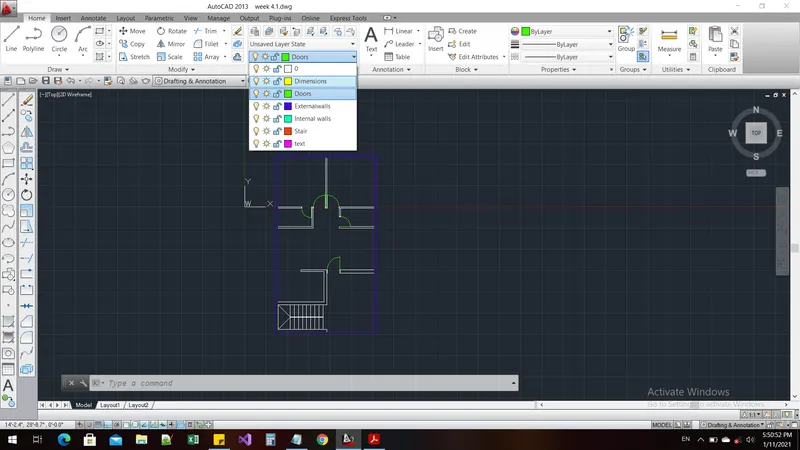
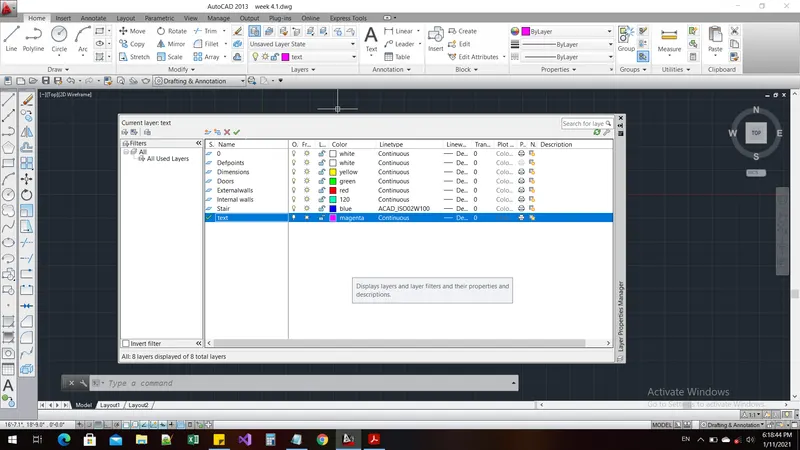
Command: '_.-LAYER
Current layer: "0"
Enter an option [?/Make/Set/New/Rename/ON/OFF/Color/Ltype/LWeight/TRansparency/MATerial/Plot/Freeze/Thaw/LOck/Unlock/stAte/Description/rEconcile]: _COLOR
New color [Truecolor/COlorbook] : 130
Enter name list of layer(s) for color 130 <0>: =Dimensions
Enter an option [?/Make/Set/New/Rename/ON/OFF/Color/Ltype/LWeight/TRansparency/MATerial/Plot/Freeze/Thaw/LOck/Unlock/stAte/Description/rEconcile]:
Command: *Cancel*
Command: '_.-LAYER
Current layer: "0"
Enter an option [?/Make/Set/New/Rename/ON/OFF/Color/Ltype/LWeight/TRansparency/MATerial/Plot/Freeze/Thaw/LOck/Unlock/stAte/Description/rEconcile]: _COLOR
New color [Truecolor/COlorbook] : 2
Enter name list of layer(s) for color 2 (yellow) <0>: =Dimensions
Enter an option [?/Make/Set/New/Rename/ON/OFF/Color/Ltype/LWeight/TRansparency/MATerial/Plot/Freeze/Thaw/LOck/Unlock/stAte/Description/rEconcile]:
Command: '_.-LAYER
Current layer: "0"
Enter an option [?/Make/Set/New/Rename/ON/OFF/Color/Ltype/LWeight/TRansparency/MATerial/Plot/Freeze/Thaw/LOck/Unlock/stAte/Description/rEconcile]: _COLOR
New color [Truecolor/COlorbook] : 3
Enter name list of layer(s) for color 3 (green) <0>: =Doors
Enter an option [?/Make/Set/New/Rename/ON/OFF/Color/Ltype/LWeight/TRansparency/MATerial/Plot/Freeze/Thaw/LOck/Unlock/stAte/Description/rEconcile]:
Command: '_.-LAYER
Current layer: "0"
Enter an option [?/Make/Set/New/Rename/ON/OFF/Color/Ltype/LWeight/TRansparency/MATerial/Plot/Freeze/Thaw/LOck/Unlock/stAte/Description/rEconcile]: _COLOR
New color [Truecolor/COlorbook] : 1
Enter name list of layer(s) for color 1 (red) <0>: =Externalwalls
Enter an option [?/Make/Set/New/Rename/ON/OFF/Color/Ltype/LWeight/TRansparency/MATerial/Plot/Freeze/Thaw/LOck/Unlock/stAte/Description/rEconcile]:
Command: '_.-LAYER
Current layer: "0"
Enter an option [?/Make/Set/New/Rename/ON/OFF/Color/Ltype/LWeight/TRansparency/MATerial/Plot/Freeze/Thaw/LOck/Unlock/stAte/Description/rEconcile]: _COLOR
New color [Truecolor/COlorbook] : 5
Enter name list of layer(s) for color 5 (blue) <0>: =Stair
Enter an option [?/Make/Set/New/Rename/ON/OFF/Color/Ltype/LWeight/TRansparency/MATerial/Plot/Freeze/Thaw/LOck/Unlock/stAte/Description/rEconcile]:
Command: TEXT
Current text style: "Standard" Text height: 1'-5.3" Annotative: No
Specify start point of text or [Justify/Style]:
Specify height <1'-5.3">:
Specify rotation angle of text <270>: <Ortho on>
Command: Specify opposite corner or [Fence/WPolygon/CPolygon]:
Command:
Command: _rotate
Current positive angle in UCS: ANGDIR=counterclockwise ANGBASE=0
1 found
Specify base point:
Specify rotation angle or [Copy/Reference] <270>:
Command:
Command:
Command: _rotate
Current positive angle in UCS: ANGDIR=counterclockwise ANGBASE=0
1 found
Command:
Command: _ddedit
Select an annotation object or [Undo]:
Select an annotation object or [Undo]: *Cancel*
Command: L
LINE
Specify first point:
Specify next point or [Undo]: <Ortho on>
Specify next point or [Undo]:
Specify next point or [Close/Undo]:
Specify next point or [Close/Undo]: *Cancel*
Command:
Command:
Command: _QSAVE
Command: POLYLINE
Unknown command "POLYLINE". Press F1 for help.
Command: PLINE
Specify start point:
Current line-width is 0'-0.0"
Specify next point or [Arc/Halfwidth/Length/Undo/Width]: H
Specify starting half-width <0'-0.0">:
Specify ending half-width <0'-0.0">: 0.5
Specify next point or [Arc/Halfwidth/Length/Undo/Width]:
Specify next point or [Arc/Close/Halfwidth/Length/Undo/Width]:
Specify next point or [Arc/Close/Halfwidth/Length/Undo/Width]:
Specify next point or [Arc/Close/Halfwidth/Length/Undo/Width]: *Cancel*
Command: Specify opposite corner or [Fence/WPolygon/CPolygon]:
Command: _.erase 1 found
Command: PL
PLINE
Specify start point:
Current line-width is 0'-1.0"
Specify next point or [Arc/Halfwidth/Length/Undo/Width]: H
Specify starting half-width <0'-0.5">: 0.5
Specify ending half-width <0'-0.5">:
Specify next point or [Arc/Halfwidth/Length/Undo/Width]:
Specify next point or [Arc/Close/Halfwidth/Length/Undo/Width]: *Cancel*
Result:
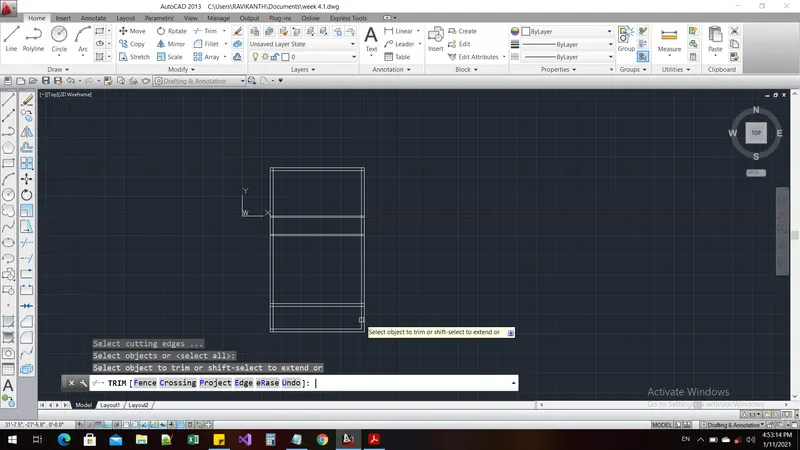
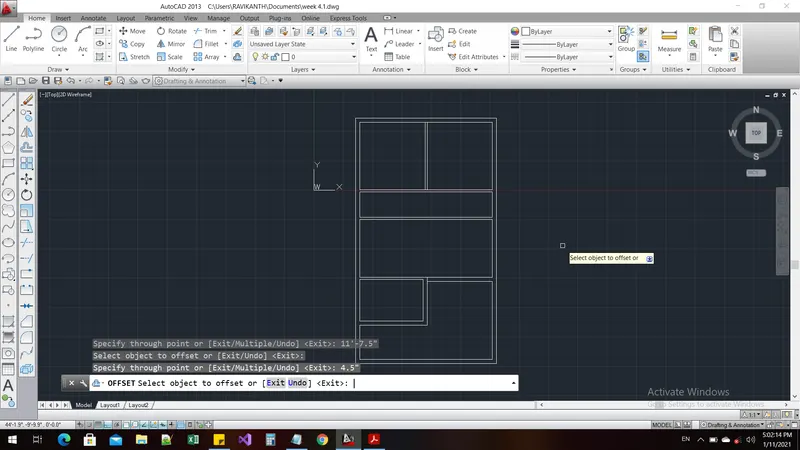
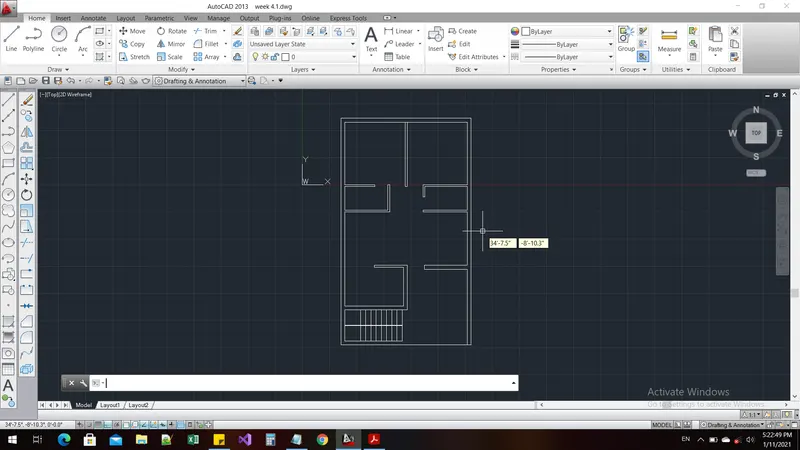
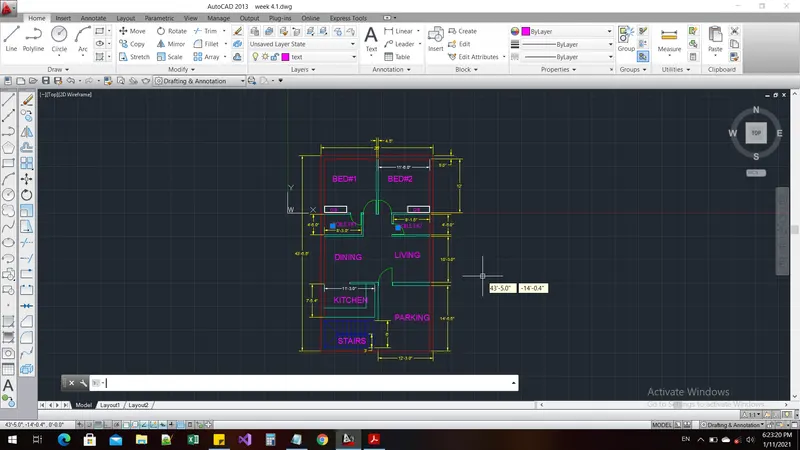
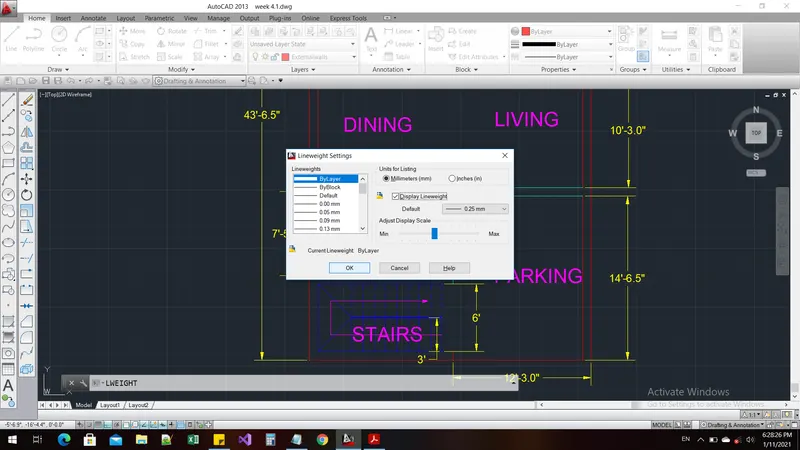
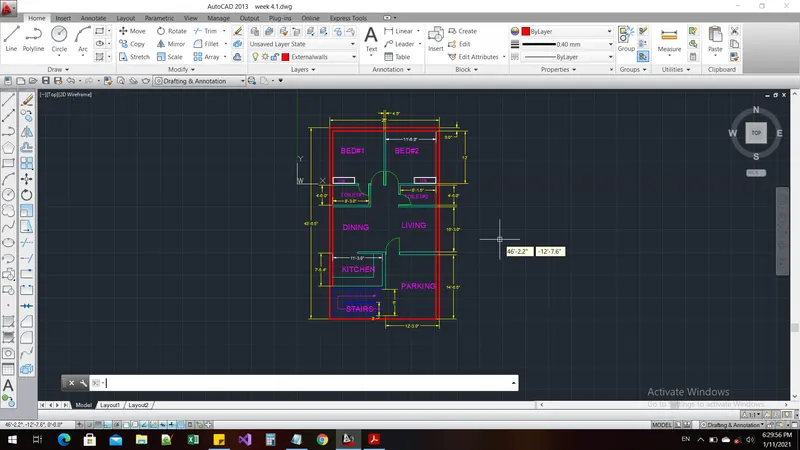
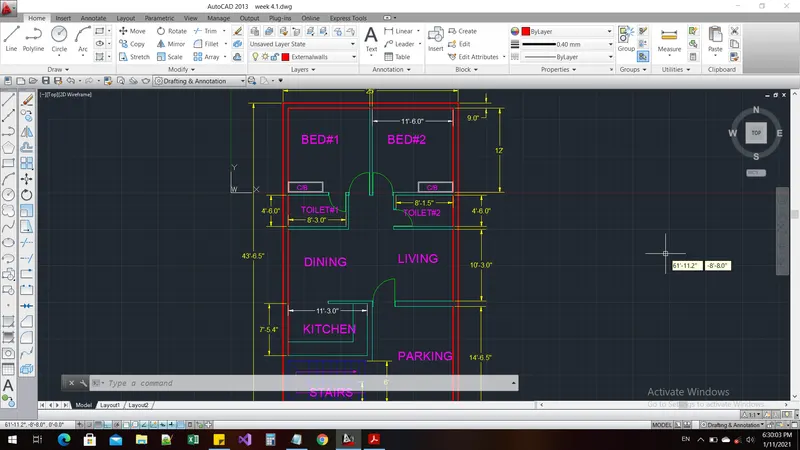
Aim and Introduction:
To Prepare the Outdoor seating table in AUTOCAD by using different commands.
Procedure:
Command: LIMMAX
Enter new value for LIMMAX <200.0000,200.0000>: 2000,2000
Command: z
ZOOM
Specify corner of window, enter a scale factor (nX or nXP), or
[All/Center/Dynamic/Extents/Previous/Scale/Window/Object] <real time>: a
Regenerating model.
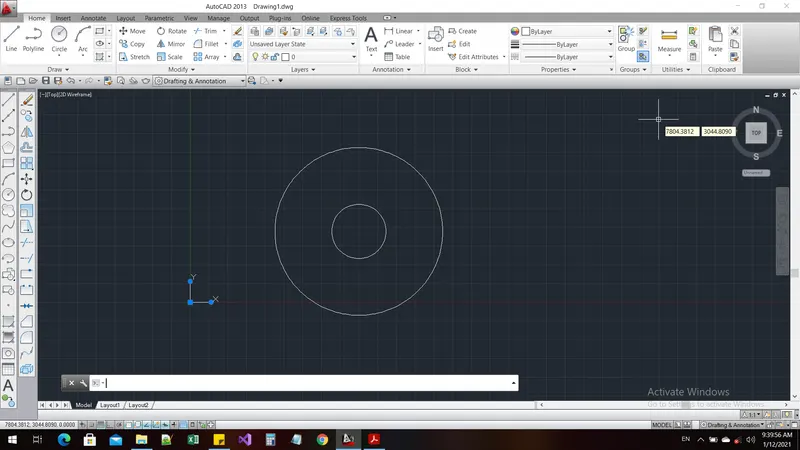
Command: c
CIRCLE
Specify center point for circle or [3P/2P/Ttr (tan tan radius)]: 1000,1000
Specify radius of circle or [Diameter]: 1398
Command: c
CIRCLE
Specify center point for circle or [3P/2P/Ttr (tan tan radius)]:
Specify radius of circle or [Diameter] <1398.0000>: 452
Command: Specify opposite corner or [Fence/WPolygon/CPolygon]:
Command:
** MOVE AND ALIGN **
Specify origin point or align to face, surface, or mesh:
Command:
Command:
Command: _line
Specify first point:
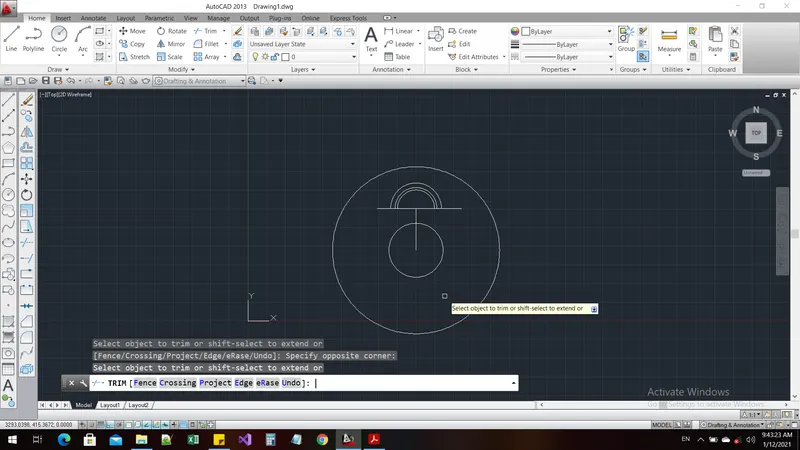
Specify next point or [Undo]: <Ortho on> 700
Specify next point or [Undo]: *Cancel*
Command: c
CIRCLE
Specify center point for circle or [3P/2P/Ttr (tan tan radius)]:
Specify radius of circle or [Diameter] <452.0000>: 350
Command: OFFSET
Current settings: Erase source=No Layer=Source OFFSETGAPTYPE=0
Specify offset distance or [Through/Erase/Layer] <Through>:
Select object to offset or [Exit/Undo] <Exit>:
Specify through point or [Exit/Multiple/Undo] <Exit>: 75
Select object to offset or [Exit/Undo] <Exit>:
Specify through point or [Exit/Multiple/Undo] <Exit>: 40
Select object to offset or [Exit/Undo] <Exit>: *Cancel*
Command: l
LINE
Specify first point:
Specify next point or [Undo]:
Specify next point or [Undo]:
Specify next point or [Close/Undo]:
Specify next point or [Close/Undo]: *Cancel*
Command: TR
TRIM
Current settings: Projection=UCS, Edge=None
Select cutting edges ...
Select objects or <select all>:
Select object to trim or shift-select to extend or
[Fence/Crossing/Project/Edge/eRase/Undo]: Specify opposite corner:
Select object to trim or shift-select to extend or
[Fence/Crossing/Project/Edge/eRase/Undo]: Specify opposite corner:
Select object to trim or shift-select to extend or
[Fence/Crossing/Project/Edge/eRase/Undo]: Specify opposite corner:
Select object to trim or shift-select to extend or
[Fence/Crossing/Project/Edge/eRase/Undo]: Specify opposite corner:
Select object to trim or shift-select to extend or
[Fence/Crossing/Project/Edge/eRase/Undo]: *Cancel*
Command: REC
RECTANG
Specify first corner point or [Chamfer/Elevation/Fillet/Thickness/Width]: *Cancel*
Command: *Cancel*
Command: l
LINE
Specify first point:
Specify next point or [Undo]: 20
Specify next point or [Undo]:
Specify next point or [Close/Undo]:
Specify next point or [Close/Undo]: *Cancel*
Command: REC
RECTANG
Specify first corner point or [Chamfer/Elevation/Fillet/Thickness/Width]:
Specify other corner point or [Area/Dimensions/Rotation]: 150
Command: l
LINE
Specify first point:
Specify next point or [Undo]: 50
Specify next point or [Undo]:
Specify next point or [Close/Undo]:
Specify next point or [Close/Undo]: *Cancel*
Command: OFFSET
Current settings: Erase source=No Layer=Source OFFSETGAPTYPE=0
Specify offset distance or [Through/Erase/Layer] <Through>:
Select object to offset or [Exit/Undo] <Exit>:
Specify through point or [Exit/Multiple/Undo] <Exit>: *Cancel*
Command: *Cancel*
Command: *Cancel*
Command: l
LINE
Specify first point:
Specify next point or [Undo]:
Specify next point or [Undo]: *Cancel*
Command: COPY
Select objects: 1 found
Select objects:
Current settings: Copy mode = Multiple
Specify base point or [Displacement/mOde] <Displacement>:
Specify second point or [Array] <use first point as displacement>:
Specify second point or [Array/Exit/Undo] <Exit>: *Cancel*
Command: COPY
Select objects: 1 found
Select objects:
Current settings: Copy mode = Multiple
Specify base point or [Displacement/mOde] <Displacement>:
Specify second point or [Array] <use first point as displacement>:
Specify second point or [Array/Exit/Undo] <Exit>: *Cancel*
Command: *Cancel*
Command: OFFSET
Current settings: Erase source=No Layer=Source OFFSETGAPTYPE=0
Specify offset distance or [Through/Erase/Layer] <Through>:
Select object to offset or [Exit/Undo] <Exit>:
Specify through point or [Exit/Multiple/Undo] <Exit>: 100
Select object to offset or [Exit/Undo] <Exit>: *Cancel*
Command:
Command: _.erase 1 found
Command: FILLET
Current settings: Mode = TRIM, Radius = 0.0000
Select first object or [Undo/Polyline/Radius/Trim/Multiple]:
Select second object or shift-select to apply corner or [Radius]:
Command: FILLET
Current settings: Mode = TRIM, Radius = 0.0000
Select first object or [Undo/Polyline/Radius/Trim/Multiple]:
Select second object or shift-select to apply corner or [Radius]:
Command: *Cancel*
Command: EX
EXTEND
Current settings: Projection=UCS, Edge=None
Select boundary edges ...
Select objects or <select all>:
Select object to extend or shift-select to trim or
[Fence/Crossing/Project/Edge/Undo]:
Select object to extend or shift-select to trim or
[Fence/Crossing/Project/Edge/Undo]: *Cancel*
Command: _u EXTEND
Command: Specify opposite corner or [Fence/WPolygon/CPolygon]:
Command: *Cancel*
Command:
Command: _.erase 1 found
Command:
Command: _.erase 1 found
Command: l
LINE
Specify first point: *Cancel*
Command: *Cancel*
Command: l
LINE
Specify first point:
Specify next point or [Undo]:
Specify next point or [Undo]: *Cancel*
Command: LINE
Specify first point:
Specify next point or [Undo]:
Specify next point or [Undo]: *Cancel*
Command: FILLET
Current settings: Mode = TRIM, Radius = 0.0000
Select first object or [Undo/Polyline/Radius/Trim/Multiple]: R
Specify fillet radius <0.0000>: 10
Select first object or [Undo/Polyline/Radius/Trim/Multiple]:
Select second object or shift-select to apply corner or [Radius]:
Command: _u FILLET
Command: FILLET
Current settings: Mode = TRIM, Radius = 0.0000
Select first object or [Undo/Polyline/Radius/Trim/Multiple]: R
Specify fillet radius <0.0000>: 70
Select first object or [Undo/Polyline/Radius/Trim/Multiple]:
Select second object or shift-select to apply corner or [Radius]:
Command: FILLET
Current settings: Mode = TRIM, Radius = 70.0000
Select first object or [Undo/Polyline/Radius/Trim/Multiple]:
Select second object or shift-select to apply corner or [Radius]:
Command: *Cancel*
Command: *Cancel*
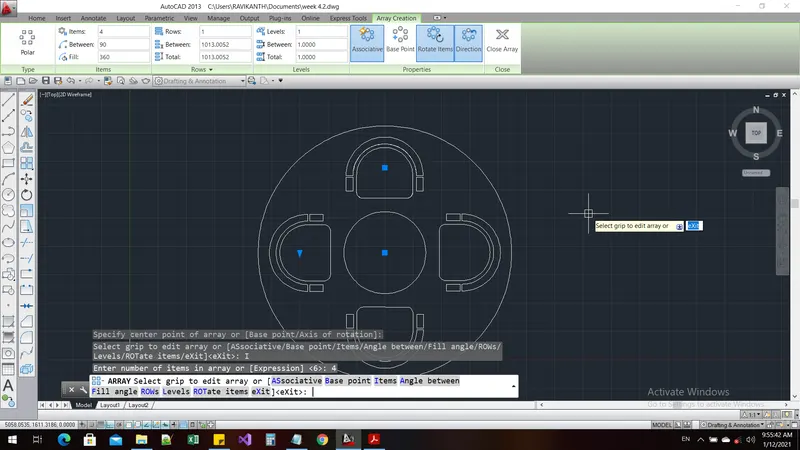
Command: ARRAY
Select objects: Specify opposite corner: 13 found
Select objects:
Enter array type [Rectangular/PAth/POlar] <Polar>: PO
Type = Polar Associative = Yes
Specify center point of array or [Base point/Axis of rotation]:
Select grip to edit array or [ASsociative/Base point/Items/Angle between/Fill angle/ROWs/Levels/ROTate items/eXit]<eXit>: I
Enter number of items in array or [Expression] <6>: 4
Select grip to edit array or [ASsociative/Base point/Items/Angle between/Fill angle/ROWs/Levels/ROTate items/eXit]<eXit>:
Command:
Command:
Command: _QSAVE
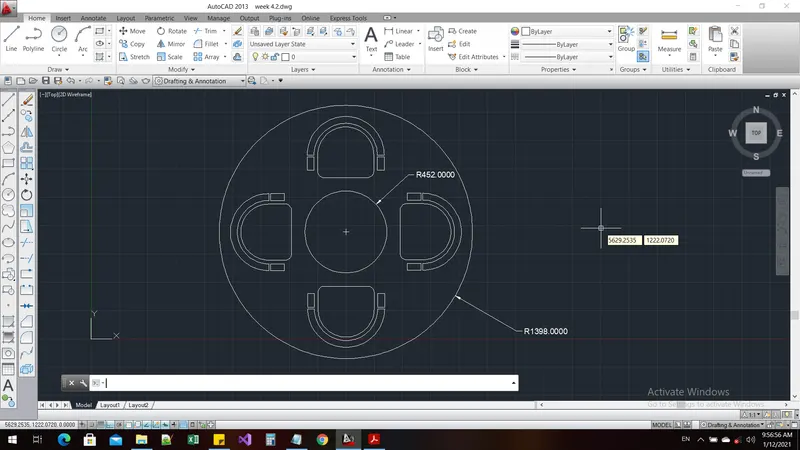
Command: DIMRAD
DIMRADIUS
Select arc or circle:
Dimension text = 452.0000
Specify dimension line location or [Mtext/Text/Angle]:
Command: DIMRADIUS
Select arc or circle:
Dimension text = 1398.0000
Result:
Aim and Introduction:
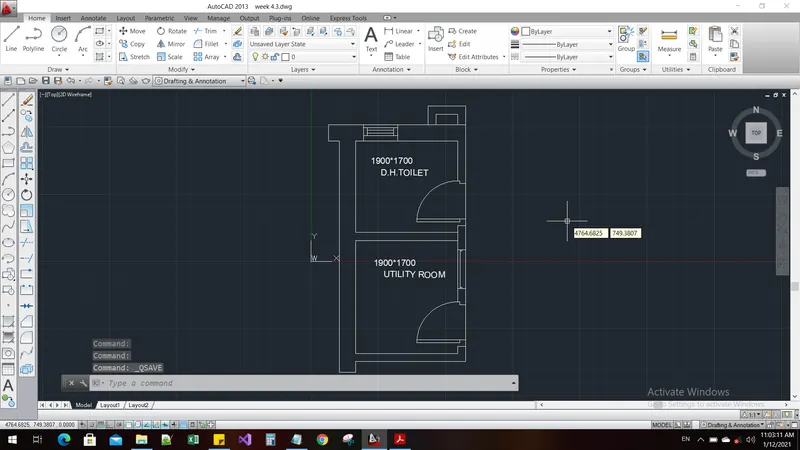
To prepare a part of the housing plan in the AUTOCAD by using different commands.
Procedure:
Command: XLINE
Specify a point or [Hor/Ver/Ang/Bisect/Offset]:
Specify through point: <Ortho on>
Specify through point:
Specify through point: *Cancel*
Command: *Cancel*
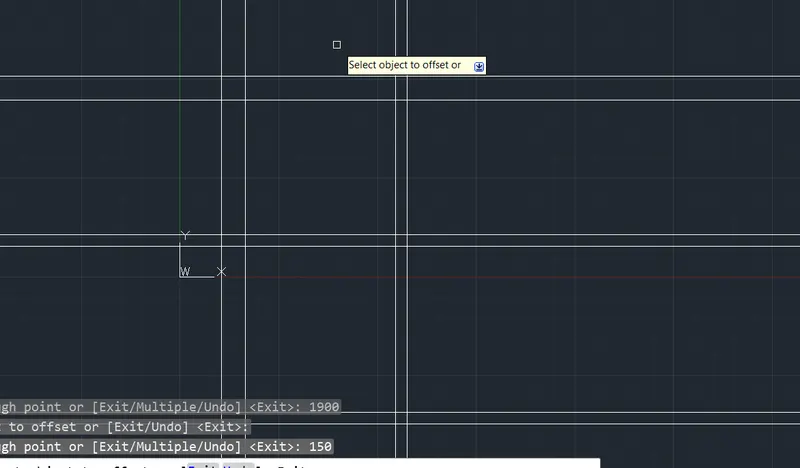
Command: OFFSET
Current settings: Erase source=No Layer=Source OFFSETGAPTYPE=0
Specify offset distance or [Through/Erase/Layer] <Through>:
Select object to offset or [Exit/Undo] <Exit>:
Specify through point or [Exit/Multiple/Undo] <Exit>: 150
Select object to offset or [Exit/Undo] <Exit>:
Select object to offset or [Exit/Undo] <Exit>:
Specify through point or [Exit/Multiple/Undo] <Exit>: 2100
Select object to offset or [Exit/Undo] <Exit>:
Specify through point or [Exit/Multiple/Undo] <Exit>: 1700
Select object to offset or [Exit/Undo] <Exit>: *Cancel*
Command: *Cancel*
Command: LIMMAX
Enter new value for LIMMAX <500.0000,500.0000>: 2500,2500
Command: z
ZOOM
Specify corner of window, enter a scale factor (nX or nXP), or
[All/Center/Dynamic/Extents/Previous/Scale/Window/Object] <real time>: a
Regenerating model.
Command: offset
Current settings: Erase source=No Layer=Source OFFSETGAPTYPE=0
Specify offset distance or [Through/Erase/Layer] <Through>:
Select object to offset or [Exit/Undo] <Exit>:
Specify through point or [Exit/Multiple/Undo] <Exit>: 300
Select object to offset or [Exit/Undo] <Exit>:
Specify through point or [Exit/Multiple/Undo] <Exit>: 150
Select object to offset or [Exit/Undo] <Exit>:
Specify through point or [Exit/Multiple/Undo] <Exit>: 300
Select object to offset or [Exit/Undo] <Exit>:
Specify through point or [Exit/Multiple/Undo] <Exit>: 1900
Select object to offset or [Exit/Undo] <Exit>:
Specify through point or [Exit/Multiple/Undo] <Exit>: 150
Select object to offset or [Exit/Undo] <Exit>: *Cancel*
Command: *Cancel*
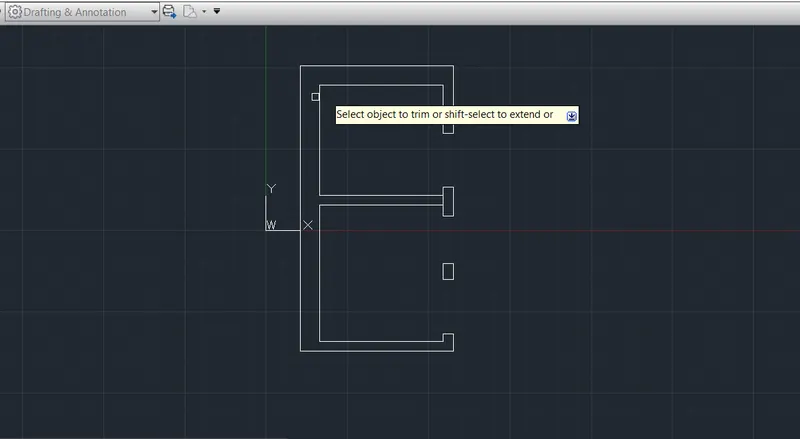
Command: TR
TRIM
Current settings: Projection=UCS, Edge=None
Select cutting edges ...
Select objects or <select all>:
Select object to trim or shift-select to extend or
[Fence/Crossing/Project/Edge/eRase/Undo]: Specify opposite corner:
Select object to trim or shift-select to extend or
[Fence/Crossing/Project/Edge/eRase/Undo]: Specify opposite corner:
Select object to trim or shift-select to extend or
[Fence/Crossing/Project/Edge/eRase/Undo]: Specify opposite corner:
Select object to trim or shift-select to extend or
[Fence/Crossing/Project/Edge/eRase/Undo]: Specify opposite corner:
Select object to trim or shift-select to extend or
[Fence/Crossing/Project/Edge/eRase/Undo]: *Cancel*
Command: l
LINE
Specify first point:
Specify next point or [Undo]: 125
Specify next point or [Undo]:
Specify next point or [Close/Undo]: *Cancel*
Command: OFFSET
Current settings: Erase source=No Layer=Source OFFSETGAPTYPE=0
Specify offset distance or [Through/Erase/Layer] <Through>:
Select object to offset or [Exit/Undo] <Exit>:
Specify through point or [Exit/Multiple/Undo] <Exit>: 828
Select object to offset or [Exit/Undo] <Exit>:
Specify through point or [Exit/Multiple/Undo] <Exit>: 250
Select object to offset or [Exit/Undo] <Exit>:
Specify through point or [Exit/Multiple/Undo] <Exit>: 728
Select object to offset or [Exit/Undo] <Exit>: *Cancel*
Command: *Cancel*
Command: l
LINE
Specify first point:
Specify next point or [Undo]: 125
Specify next point or [Undo]:
Specify next point or [Close/Undo]: *Cancel*
Command:
Command: _.erase 1 found
Command:
Command: _.erase 1 found
Command: OFFSET
Current settings: Erase source=No Layer=Source OFFSETGAPTYPE=0
Specify offset distance or [Through/Erase/Layer] <Through>:
Select object to offset or [Exit/Undo] <Exit>:
Specify through point or [Exit/Multiple/Undo] <Exit>: 832
Select object to offset or [Exit/Undo] <Exit>: *Cancel*
Command: EX
EXTEND
Current settings: Projection=UCS, Edge=None
Select boundary edges ...
Select objects or <select all>:
Select object to extend or shift-select to trim or
[Fence/Crossing/Project/Edge/Undo]:
Select object to extend or shift-select to trim or
[Fence/Crossing/Project/Edge/Undo]:
Select object to extend or shift-select to trim or
[Fence/Crossing/Project/Edge/Undo]:
Select object to extend or shift-select to trim or
[Fence/Crossing/Project/Edge/Undo]:
Select object to extend or shift-select to trim or
[Fence/Crossing/Project/Edge/Undo]:
Select object to extend or shift-select to trim or
[Fence/Crossing/Project/Edge/Undo]: Specify opposite corner:
No objects crossed by crossing window.
Select object to extend or shift-select to trim or
[Fence/Crossing/Project/Edge/Undo]:
Select object to extend or shift-select to trim or
[Fence/Crossing/Project/Edge/Undo]: *Cancel*
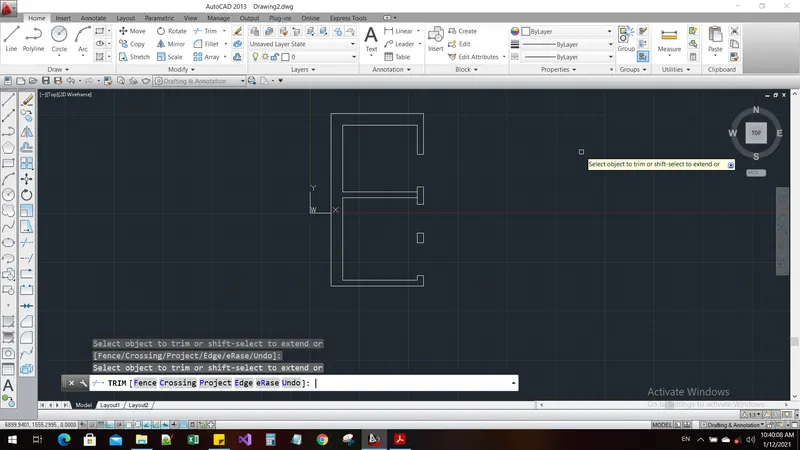
Command: TR
TRIM
Current settings: Projection=UCS, Edge=None
Select cutting edges ...
Select objects or <select all>:
Select object to trim or shift-select to extend or
[Fence/Crossing/Project/Edge/eRase/Undo]: Specify opposite corner:
Select object to trim or shift-select to extend or
[Fence/Crossing/Project/Edge/eRase/Undo]: Specify opposite corner:
Select object to trim or shift-select to extend or
[Fence/Crossing/Project/Edge/eRase/Undo]: Specify opposite corner:
Select object to trim or shift-select to extend or
[Fence/Crossing/Project/Edge/eRase/Undo]: Specify opposite corner:
Select object to trim or shift-select to extend or
[Fence/Crossing/Project/Edge/eRase/Undo]: Specify opposite corner:
Select object to trim or shift-select to extend or
[Fence/Crossing/Project/Edge/eRase/Undo]: Specify opposite corner:
Select object to trim or shift-select to extend or
[Fence/Crossing/Project/Edge/eRase/Undo]: Specify opposite corner:
Select object to trim or shift-select to extend or
[Fence/Crossing/Project/Edge/eRase/Undo]:
Select object to trim or shift-select to extend or
[Fence/Crossing/Project/Edge/eRase/Undo]: Specify opposite corner:
Select object to trim or shift-select to extend or
[Fence/Crossing/Project/Edge/eRase/Undo]:
Select object to trim or shift-select to extend or
[Fence/Crossing/Project/Edge/eRase/Undo]:
Select object to trim or shift-select to extend or
[Fence/Crossing/Project/Edge/eRase/Undo]:
Select object to trim or shift-select to extend or
[Fence/Crossing/Project/Edge/eRase/Undo]:
Select object to trim or shift-select to extend or
[Fence/Crossing/Project/Edge/eRase/Undo]:
Select object to trim or shift-select to extend or
[Fence/Crossing/Project/Edge/eRase/Undo]:
Select object to trim or shift-select to extend or
[Fence/Crossing/Project/Edge/eRase/Undo]: *Cancel*
Automatic save to C:\Users\RAVIKANTH\appdata\local\temp\Drawing2_1_1_8688.sv$ ...
Command:
Command: l
LINE
Specify first point:
Specify next point or [Undo]: 351
Specify next point or [Undo]: 702
Specify next point or [Close/Undo]:
Specify next point or [Close/Undo]:
Specify next point or [Close/Undo]:
Specify next point or [Close/Undo]: *Cancel*
Command: *Cancel*
Command: Specify opposite corner or [Fence/WPolygon/CPolygon]:
Command: _.erase 3 found
Command: l
LINE
Specify first point:
Specify next point or [Undo]:
Specify next point or [Undo]: *Cancel*
Command: Specify opposite corner or [Fence/WPolygon/CPolygon]:
Command: _.erase 1 found
Command: l
LINE
Specify first point:
Specify next point or [Undo]:
Specify next point or [Undo]: *Cancel*
Command: TR
TRIM
Current settings: Projection=UCS, Edge=None
Select cutting edges ...
Select objects or <select all>:
Select object to trim or shift-select to extend or
[Fence/Crossing/Project/Edge/eRase/Undo]:
Select object to trim or shift-select to extend or
[Fence/Crossing/Project/Edge/eRase/Undo]:
Select object to trim or shift-select to extend or
[Fence/Crossing/Project/Edge/eRase/Undo]: *Cancel*
Command: *Cancel*
Command: OFFSET
Current settings: Erase source=No Layer=Source OFFSETGAPTYPE=0
Specify offset distance or [Through/Erase/Layer] <Through>:
Select object to offset or [Exit/Undo] <Exit>:
Specify through point or [Exit/Multiple/Undo] <Exit>: 150
Select object to offset or [Exit/Undo] <Exit>:
Specify through point or [Exit/Multiple/Undo] <Exit>: 150
Select object to offset or [Exit/Undo] <Exit>:
Specify through point or [Exit/Multiple/Undo] <Exit>: 150
Select object to offset or [Exit/Undo] <Exit>:
Specify through point or [Exit/Multiple/Undo] <Exit>: 150
Select object to offset or [Exit/Undo] <Exit>:
Specify through point or [Exit/Multiple/Undo] <Exit>: 631
Select object to offset or [Exit/Undo] <Exit>: *Cancel*
Command: *Cancel*
Command: EX
EXTEND
Current settings: Projection=UCS, Edge=None
Select boundary edges ...
Select objects or <select all>: 1 found
Select objects: *Cancel*
Command: EX
EXTEND
Current settings: Projection=UCS, Edge=None
Select boundary edges ...
Select objects or <select all>:
Select object to extend or shift-select to trim or
[Fence/Crossing/Project/Edge/Undo]:
Select object to extend or shift-select to trim or
[Fence/Crossing/Project/Edge/Undo]:
Select object to extend or shift-select to trim or
[Fence/Crossing/Project/Edge/Undo]: *Cancel*
Command: TR
TRIM
Current settings: Projection=UCS, Edge=None
Select cutting edges ...
Select objects or <select all>:
Select object to trim or shift-select to extend or
[Fence/Crossing/Project/Edge/eRase/Undo]: Specify opposite corner:
Select object to trim or shift-select to extend or
[Fence/Crossing/Project/Edge/eRase/Undo]: Specify opposite corner:
No objects crossed by crossing window.
Select object to trim or shift-select to extend or
[Fence/Crossing/Project/Edge/eRase/Undo]: Specify opposite corner:
Select object to trim or shift-select to extend or
[Fence/Crossing/Project/Edge/eRase/Undo]: Specify opposite corner:
Select object to trim or shift-select to extend or
[Fence/Crossing/Project/Edge/eRase/Undo]: Specify opposite corner:
Select object to trim or shift-select to extend or
[Fence/Crossing/Project/Edge/eRase/Undo]: Specify opposite corner:
No objects crossed by crossing window.
Select object to trim or shift-select to extend or
[Fence/Crossing/Project/Edge/eRase/Undo]: Specify opposite corner:
Select object to trim or shift-select to extend or
[Fence/Crossing/Project/Edge/eRase/Undo]: Specify opposite corner:
Select object to trim or shift-select to extend or
[Fence/Crossing/Project/Edge/eRase/Undo]: *Cancel*
Command: *Cancel*
Command: l
LINE
Specify first point:
Specify next point or [Undo]: 200
Specify next point or [Undo]: 300
Specify next point or [Close/Undo]: 150
Specify next point or [Close/Undo]: *Cancel*
Command:
Command:
Command:
Command: _properties
Command: Specify opposite corner or [Fence/WPolygon/CPolygon]: *Cancel*
Command: *Cancel*
Command:
Command: _.erase 1 found
Command: L
LINE
Specify first point:
Specify next point or [Undo]: 200
Specify next point or [Undo]: *Cancel*
Command: l
LINE
Specify first point:
Specify next point or [Undo]: 200
Specify next point or [Undo]: 300
Specify next point or [Close/Undo]: 200
Specify next point or [Close/Undo]: *Cancel*
Command: TR
TRIM
Current settings: Projection=UCS, Edge=None
Select cutting edges ...
Select objects or <select all>:
Select object to trim or shift-select to extend or
[Fence/Crossing/Project/Edge/eRase/Undo]:
Select object to trim or shift-select to extend or
[Fence/Crossing/Project/Edge/eRase/Undo]:
Select object to trim or shift-select to extend or
[Fence/Crossing/Project/Edge/eRase/Undo]: *Cancel*
Command: l
LINE
Specify first point:
Specify next point or [Undo]: 75
Specify next point or [Undo]:
Specify next point or [Close/Undo]: *Cancel*
Command: C
CIRCLE
Specify center point for circle or [3P/2P/Ttr (tan tan radius)]:
Specify radius of circle or [Diameter]: *Cancel*
Command: C
CIRCLE
Specify center point for circle or [3P/2P/Ttr (tan tan radius)]:
Specify radius of circle or [Diameter]:
Command: *Cancel*
Command: TR
TRIM
Current settings: Projection=UCS, Edge=None
Select cutting edges ...
Select objects or <select all>:
Select object to trim or shift-select to extend or
[Fence/Crossing/Project/Edge/eRase/Undo]:
Select object to trim or shift-select to extend or
[Fence/Crossing/Project/Edge/eRase/Undo]:
Select object to trim or shift-select to extend or
[Fence/Crossing/Project/Edge/eRase/Undo]:
Select object to trim or shift-select to extend or
[Fence/Crossing/Project/Edge/eRase/Undo]:
Select object to trim or shift-select to extend or
[Fence/Crossing/Project/Edge/eRase/Undo]:
Select object to trim or shift-select to extend or
[Fence/Crossing/Project/Edge/eRase/Undo]:
Select object to trim or shift-select to extend or
[Fence/Crossing/Project/Edge/eRase/Undo]:
Select object to trim or shift-select to extend or
[Fence/Crossing/Project/Edge/eRase/Undo]:
Select object to trim or shift-select to extend or
[Fence/Crossing/Project/Edge/eRase/Undo]: *Cancel*
Command: *Cancel*
Command: l
LINE
Specify first point:
Specify next point or [Undo]: 50
Specify next point or [Undo]:
Specify next point or [Close/Undo]:
Specify next point or [Close/Undo]: *Cancel*
Command: l
LINE
Specify first point:
Specify next point or [Undo]:
Specify next point or [Undo]: *Cancel*
Command: OFFSET
Current settings: Erase source=No Layer=Source OFFSETGAPTYPE=0
Specify offset distance or [Through/Erase/Layer] <Through>:
Select object to offset or [Exit/Undo] <Exit>:
Select object to offset or [Exit/Undo] <Exit>:
Specify through point or [Exit/Multiple/Undo] <Exit>: 50
Select object to offset or [Exit/Undo] <Exit>: *Cancel*
Command: TR
TRIM
Current settings: Projection=UCS, Edge=None
Select cutting edges ...
Select objects or <select all>:
Select object to trim or shift-select to extend or
[Fence/Crossing/Project/Edge/eRase/Undo]:
Select object to trim or shift-select to extend or
[Fence/Crossing/Project/Edge/eRase/Undo]:
Select object to trim or shift-select to extend or
[Fence/Crossing/Project/Edge/eRase/Undo]:
Select object to trim or shift-select to extend or
[Fence/Crossing/Project/Edge/eRase/Undo]:
Select object to trim or shift-select to extend or
[Fence/Crossing/Project/Edge/eRase/Undo]: *Cancel*
Command: TEXT
Current text style: "Standard" Text height: 2.5000 Annotative: No
Specify start point of text or [Justify/Style]:
Specify height <2.5000>:
Command: _ddedit
Select an annotation object or [Undo]: *Cancel*
Command: *Cancel*
Command: REC
RECTANG
Specify first corner point or [Chamfer/Elevation/Fillet/Thickness/Width]:
Specify other corner point or [Area/Dimensions/Rotation]: *Cancel*
Command: REC
RECTANG
Specify first corner point or [Chamfer/Elevation/Fillet/Thickness/Width]:
Specify other corner point or [Area/Dimensions/Rotation]: @150,150
Command: OS
OSNAP
Command: M
MOVE
Select objects: 1 found
Select objects:
Specify base point or [Displacement] <Displacement>:
Specify second point or <use first point as displacement>:
Command: TR
TRIM
Current settings: Projection=UCS, Edge=None
Select cutting edges ...
Select objects or <select all>:
Select object to trim or shift-select to extend or
[Fence/Crossing/Project/Edge/eRase/Undo]: Specify opposite corner:
Select object to trim or shift-select to extend or
[Fence/Crossing/Project/Edge/eRase/Undo]:
Select object to trim or shift-select to extend or
[Fence/Crossing/Project/Edge/eRase/Undo]:
Select object to trim or shift-select to extend or
[Fence/Crossing/Project/Edge/eRase/Undo]:
Select object to trim or shift-select to extend or
[Fence/Crossing/Project/Edge/eRase/Undo]: Specify opposite corner:
No objects crossed by crossing window.
Select object to trim or shift-select to extend or
[Fence/Crossing/Project/Edge/eRase/Undo]: Specify opposite corner:
Select object to trim or shift-select to extend or
[Fence/Crossing/Project/Edge/eRase/Undo]: Specify opposite corner:
Select object to trim or shift-select to extend or
[Fence/Crossing/Project/Edge/eRase/Undo]:
Select object to trim or shift-select to extend or
[Fence/Crossing/Project/Edge/eRase/Undo]:
Select object to trim or shift-select to extend or
[Fence/Crossing/Project/Edge/eRase/Undo]: *Cancel*
Result: