AutoCAD_Drafting images by Coordinate System Methods_Week 1
Aim: To create the geometries from P1 to P2 using all the coordinates system methods and P3,P4,P5,P7,P8,P9,P10 by any one coordinate system method.Also, to draw the profile and the trusses using any coordinate system methods.
Commands Used: Line tool and circle tool.
Note: Use the Imperial Template and the Decimal Units to draft the features. Dimensions are there for
references.
Procedure:
Step 1: Open a new AutoCad sheet in Imperial Template.
Step 2: Give Command- UNITS- set to decimal-precision upto two decimals-OK.
Step 3: Give sheet Limits - (0,0) and (12,9).
Step 4: z-enter and a enter for Zoom- All.
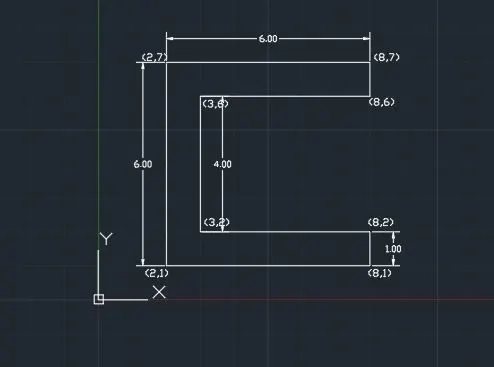
To draw P-1 using cartesian coordinate system:
1. Command- Line-Enter.
2. Enter the starting point coordinates from the origin i.e (2,1).
3. Now, enter the next end point coordinates with respect to origin i.e.,(8,1).
4.Now, continue to draw the line by entering next point i.e., (8,2),(3,2),(3,6),(8,6),(8,7),(2,7), and 'C' enter to close.
5. Using Mtext command mention the co-ordinates and mention the units/length by annotate.
To draw P-1 using absolute coordinate system:
1. Command- Line-Enter.
2. Enter the starting point coordinates from the origin i.e (2,1).
3. Now, enter the next end point coordinates with respect to origin i.e.,(8,1).
4.Now, continue to draw the line by entering next point i.e., (8,2),(3,2),(3,6),(8,6),(8,7),(2,7), and 'C' enter to close.
5. Using Mtext command mention the co-ordinates and mention the units/length by annotate.
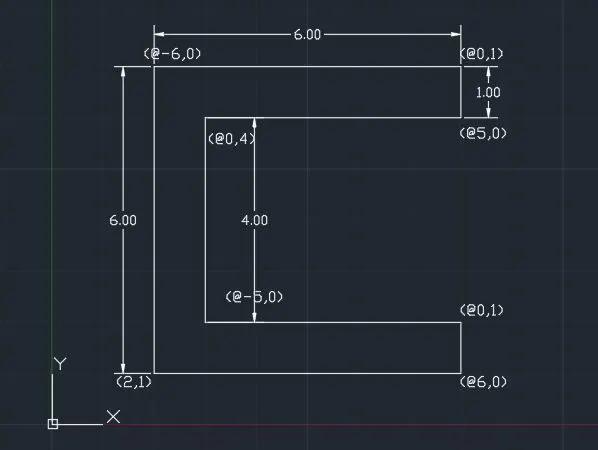
To draw P-1 using relative coordinate system:
1. Command- Line-Enter.
2. Enter the starting point coordinates from the origin i.e (2,1).
3. Now, enter the next end point coordinates with respect to previous coordinate i.e.,(@6,0).
4.Now, continue to draw the line by entering next point i.e., (@0,1),(@-5,0),(@0,4),(@5,0),(@0,1),(@-6,0), and 'C' enter.
5. Using Mtext command mention the co-ordinates and mention the units/length by annotate.
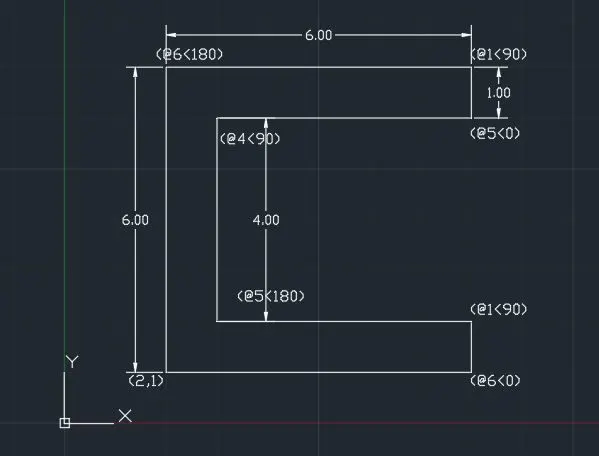
To draw P-1 using Polar coordinate system:
1. Command- Line-Enter.
2. Enter the starting point coordinates from the origin i.e (2,1).
3. Now, enter the next end point coordinates with respect to previous coordinate i.e.,(@6<0).
4.Now, continue to draw the line by entering next point i.e., (@1<90),(@5<180),(@4<90),(@5<0),(@1<90),(@6<180), and 'C' enter.
5. Using Mtext command mention the co-ordinates and mention the units/length by annotate.
To draw P-2 using cartesian coordinate system:
1. Command- Line-Enter.
2. Enter the starting point coordinates from the origin i.e (2,1).
3. Now, enter the next end point coordinates with respect to origin i.e.,(5,1).
4.Now, continue to draw the line by entering next point i.e.,(5,5),(6,5), (6,1),(9,1),(7,8),(4,8) and 'C' enter to close.
5. Using Mtext command mention the co-ordinates and mention the units/length by annotate.
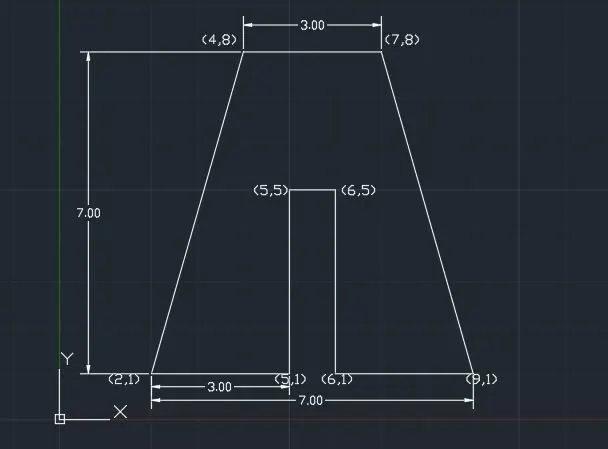
To draw P-2 using absolute coordinate system:
1. Command- Line-Enter.
2. Enter the starting point coordinates from the origin i.e (2,1).
3. Now, enter the next end point coordinates with respect to origin i.e.,(5,1).
4.Now, continue to draw the line by entering next point i.e.,(5,5),(6,5), (6,1),(9,1),(7,8),(4,8) and 'C' enter to close.
5. Using Mtext command mention the co-ordinates and mention the units/length by annotate.
To draw P-2 using relative coordinate system:
1. Command- Line-Enter.
2. Enter the starting point coordinates from the origin i.e (2,1).
3. Now, enter the next end point coordinates with respect to previous coordinate i.e.,(@3,0).
4.Now, continue to draw the line by entering next point i.e., (@0,4),(@1,0),(@0,-4),(@3,0),(@-2,7),(@-3,0), and 'C' enter.
5. Using Mtext command mention the co-ordinates and mention the units/length by annotate.
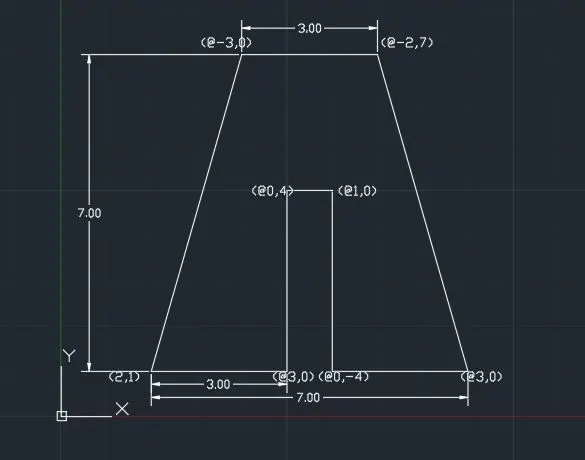
To draw P-2 using Polar coordinate system:
1. Command- Line-Enter.
2. Enter the starting point coordinates from the origin i.e (2,1).
3. Now, enter the next end point coordinates with respect to previous coordinate i.e.,(@3<0).
4.Now, continue to draw the line by entering next point i.e., (@4<90),(@1<0),(@4<270),(@3<0),(@7<106),(@3<180), and 'C' enter.
5. Using Mtext command mention the co-ordinates and mention the units/length by annotate.
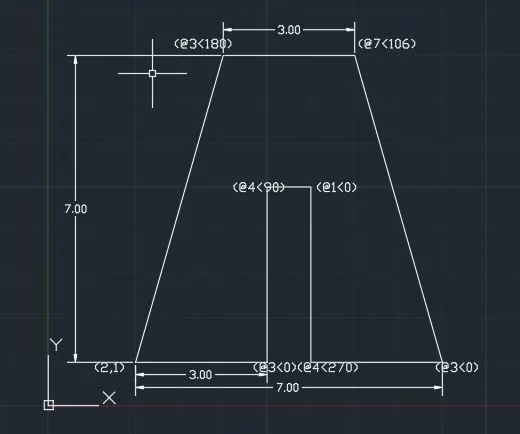
To draw P-4 using relative coordinate system:
1. Command- Line-Enter.
2. Enter the starting point coordinates from the origin i.e (2,1).
3. Now, enter the next end point coordinates with respect to previous coordinate i.e.,(@1,0).
4.Now, continue to draw the line by entering next point i.e., (@0,4),(@2,-2),(@2,2),(@0,-4),(@1,0),(@0,7),(@-1,0),(@-2,-3),(@-2,3),(@-1,0) and 'C' enter.
5. Using Mtext command mention the co-ordinates and mention the units/length by annotate.
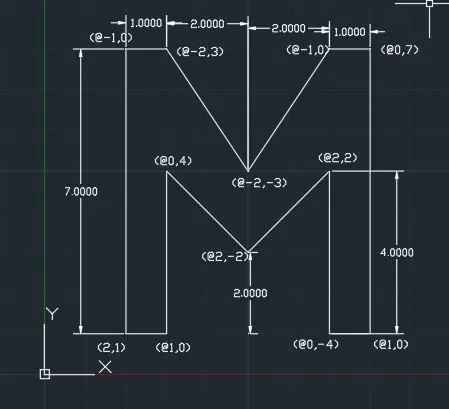
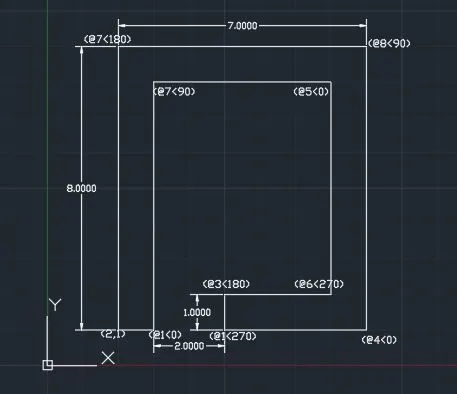
To draw P-5 using Polar coordinate system:
1. Command- Line-Enter.
2. Enter the starting point coordinates from the origin i.e (2,1).
3. Now, enter the next end point coordinates with respect to previous coordinate i.e.,(@1<0).
4.Now, continue to draw the line by entering next point i.e., (@7<90),(@5<0),(@6<270),(@3<180),(@1<270),(@4<0), (@8<90),(@7<180) and 'C' enter.
5. Using Mtext command mention the co-ordinates and mention the units/length by annotate.
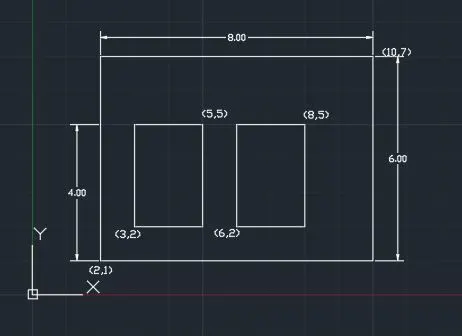
To draw P-7 using absolute coordinate system:
1. Command- rectangle-Enter.
2. Enter the starting point coordinates from the origin i.e (2,1).
3. Now, enter the next end point coordinates with respect to origin i.e.,(10,7).
4.Now, to draw the inner rectangle at co-ordinates i.e.,(3,2),(5,5) and (6,2),(8,5),(7,8).
5. Using Mtext command mention the co-ordinates and mention the units/length by annotate.
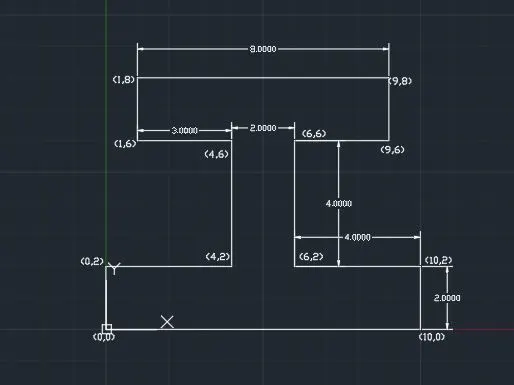
To draw P-8 using absolute coordinate system:
1. Command- line-Enter.
2. Enter the starting point coordinates from the origin i.e (0,0).
3. Now, enter the next end point coordinates with respect to origin i.e.,(10,0).
4.Now,continue to draw the line at co-ordinates i.e.,(10,2),(6,2) ,(6,6),(9,6),(9,8),(1,8),(1,6),(4,6),(4,2),(0,2) and close enter.
5. Using Mtext command mention the co-ordinates and mention the units/length by annotate.
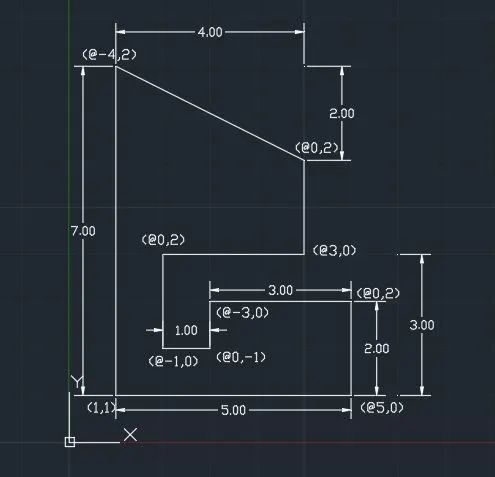
To draw P-9 using relative coordinate system:
1. Command- Line-Enter.
2. Enter the starting point coordinates from the origin i.e (1,1).
3. Now, enter the next end point coordinates with respect to previous coordinate i.e.,(@5,0).
4.Now, continue to draw the line by entering next point i.e., (@0,2),(@-3,0),(@0,-1),(@-1,0),(@0,2),(@3,0),(@0,2),(@-4,2) and 'C' enter.
5. Using Mtext command mention the co-ordinates and mention the units/length by annotate.
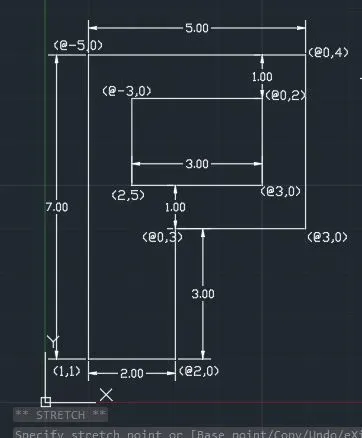
To draw P-10 using relative coordinate system:
1. Command- Line-Enter.
2. Enter the starting point coordinates from the origin i.e (1,1).
3. Now, enter the next end point coordinates with respect to previous coordinate i.e.,(@2,0).
4.Now, continue to draw the line by entering next point i.e., (@0,3),(@3,0),(@0,4),(@-5,0) and close enter. Now, to draw the inner rectangle using line command enter the start point (2,5),and continue with respect to previous point(@3,0),(@0,2),(@-3,0), and 'C' enter.
5. Using Mtext command mention the co-ordinates and mention the units/length by annotate.
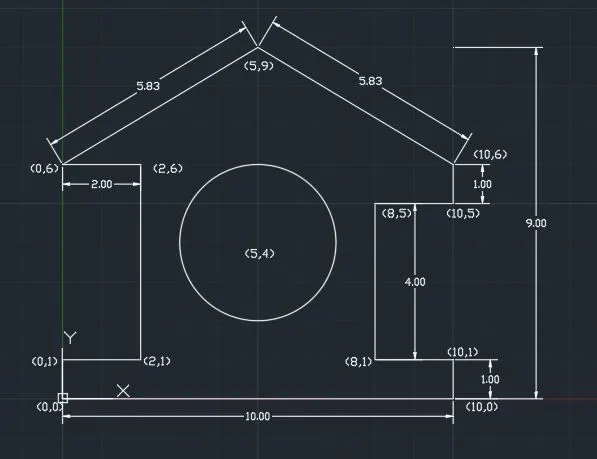
To draw the profile-wood using absolute coordinate system:
1. Command- line-Enter.
2. Enter the starting point coordinates from the origin i.e (0,0).
3. Now, enter the next end point coordinates with respect to origin i.e.,(10,0).
4.Now,continue to draw the line at co-ordinates i.e.,(10,1),(8,1) ,(8,5),(10,5),(10,6),(5,9),(0,6),(2,6),(2,1),(0,1) and close enter. Using 2-point draw a circle (3,4) and (7,4).
5. Using Mtext command mention the co-ordinates and mention the units/length by annotate.
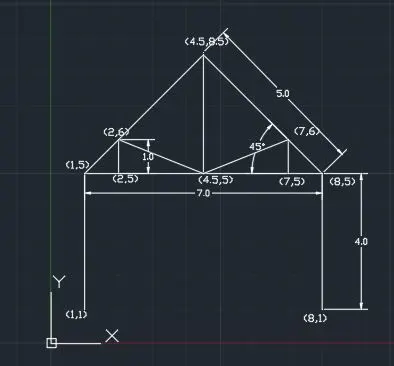
To draw the Queen Post Truss using absolute coordinate system:
1. Command- line-Enter.
2. Enter the starting point coordinates from the origin i.e (1,1).
3. Now, enter the next end point coordinates with respect to origin i.e.,(1,5).
4.Now,continue to draw the line at co-ordinates i.e.,(2,5),(2,6) ,(4.5,5),(4.5,8.5),(2,6),(1,5) and close. Line enter (2,5),(4.5,5) and close. Line enter (4.5,5),(7,6), (7,5) and close enter. Line enter(4.5,5), (7,5) close. Line enter (4.5,8.5),(7,6),(8,5) close.Line enter (8,1) close. Line enter(7,5) close enter.
5. Using Mtext command mention the co-ordinates and mention the units/length by annotate.
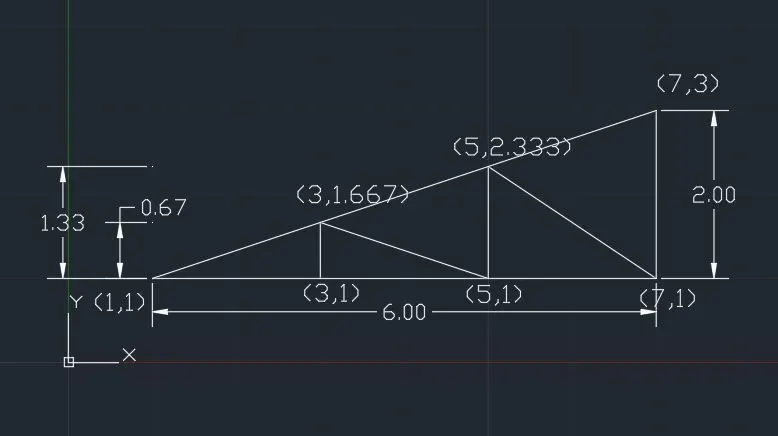
To draw the Mono Pitch Truss using absolute coordinate system:
1. Command- line-Enter.
2. Enter the starting point coordinates from the origin i.e (1,1).
3. Now, enter the next end point coordinates with respect to origin i.e.,(3,1).
4.Now,continue to draw the line at co-ordinates i.e.,(3,1.667),(5,1) ,(5,2.333),(7,1),(7,3),(5,2.333), (3,1.667)and close. Line enter (3,1),(5,1),(7,1) and close.
5. Using Mtext command mention the co-ordinates and mention the units/length by annotate.