AutoCAD_Creating Column Schedule and Drawing Template_Week 5
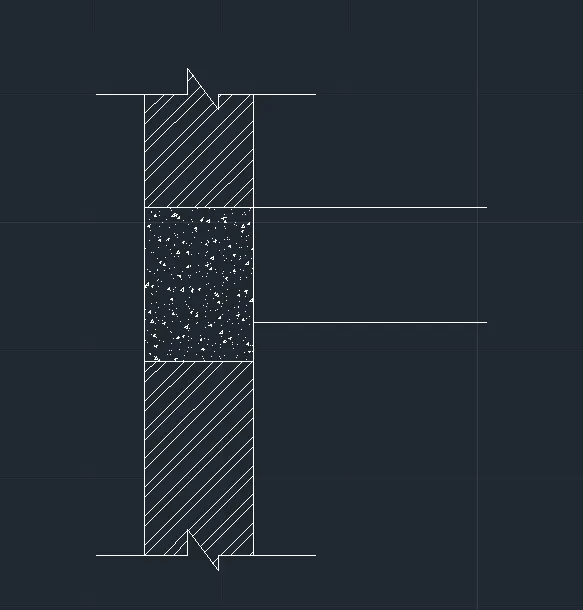
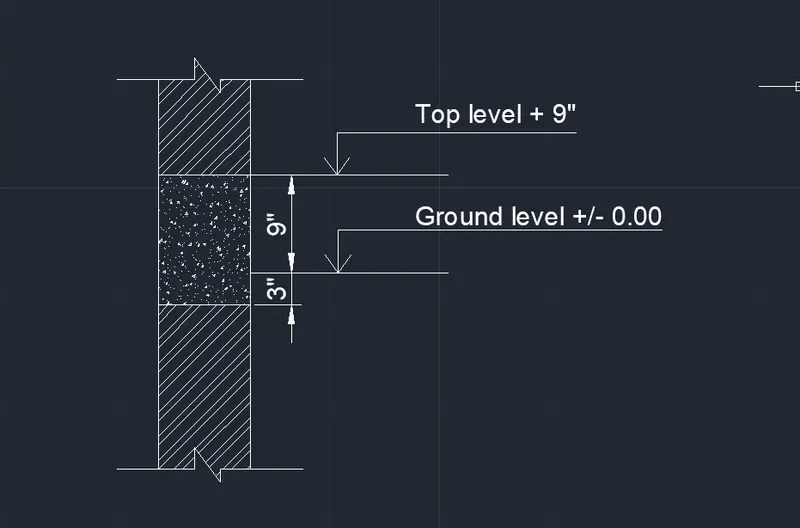
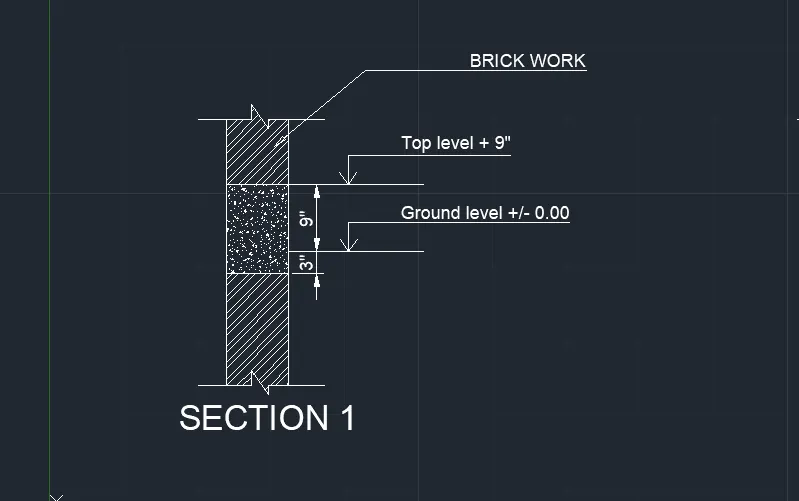
Drawing 1:
Aim and Introduction:
To Draw the Details of the Drawing reports using AUTOCAD
Procedure:
Command: LIMMAX
Enter new value for LIMMAX <1'-0.0",0'-9.0">: 100'-0",100'-0"
Command: Z
ZOOM
Specify corner of window, enter a scale factor (nX or nXP), or
[All/Center/Dynamic/Extents/Previous/Scale/Window/Object] <real time>: A
Regenerating model.
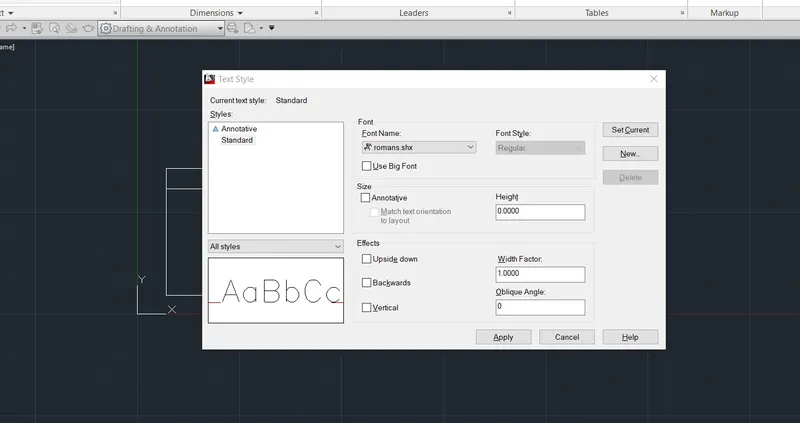
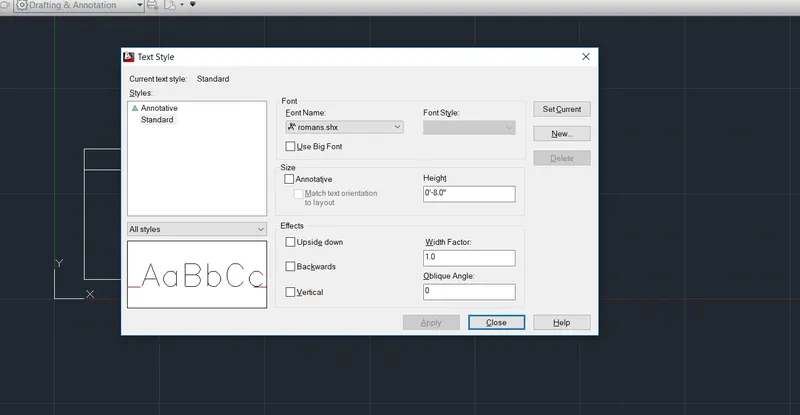
Command: ST
STYLE
Command: TEXT
Current text style: "Standard" Text height: 0'-8.0" Annotative: No
Specify start point of text or [Justify/Style]: 10'-0",10'-0"
Specify rotation angle of text <0>: 0
Command: Specify opposite corner or [Fence/WPolygon/CPolygon]:
Command: TEXT
Current text style: "Standard" Text height: 0'-8.0" Annotative: No
Specify start point of text or [Justify/Style]:
Specify rotation angle of text <0>: 0
Command:
Command:
Command:
Command: _move 1 found
Specify base point or [Displacement] <Displacement>:
Specify second point or <use first point as displacement>:
Command: DIMLIN
DIMLINEAR
Specify first extension line origin or <select object>:
Specify second extension line origin:
Non-associative dimension created.
Specify dimension line location or
[Mtext/Text/Angle/Horizontal/Vertical/Rotated]: *Cancel*
Command: *Cancel*
Command: *Cancel*
Command: DIMSTYLE
Command: DIMLIN
DIMLINEAR
Specify first extension line origin or <select object>:
Specify second extension line origin: <Ortho on>
Non-associative dimension created.
Specify dimension line location or
[Mtext/Text/Angle/Horizontal/Vertical/Rotated]:
Dimension text = 4'-11.8"
Command: Specify opposite corner or [Fence/WPolygon/CPolygon]:
Command:
Command: _.erase 1 found
Command: L
LINE
Specify first point:
Specify next point or [Undo]: 12'-0"
Specify next point or [Undo]: 38'-0.0"
Specify next point or [Close/Undo]: 12'-0"
Specify next point or [Close/Undo]: C
Command:
Command:
Command: _SAVEAS
Command: O
OFFSET
Current settings: Erase source=No Layer=Source OFFSETGAPTYPE=0
Specify offset distance or [Through/Erase/Layer] <Through>:
Select object to offset or [Exit/Undo] <Exit>:
Specify through point or [Exit/Multiple/Undo] <Exit>: 6'-0"
Select object to offset or [Exit/Undo] <Exit>:
Specify through point or [Exit/Multiple/Undo] <Exit>: 8'-0"
Select object to offset or [Exit/Undo] <Exit>:
Specify through point or [Exit/Multiple/Undo] <Exit>: 8'-0"
Select object to offset or [Exit/Undo] <Exit>:
Specify through point or [Exit/Multiple/Undo] <Exit>: *Cancel*
Command: o
OFFSET
Current settings: Erase source=No Layer=Source OFFSETGAPTYPE=0
Specify offset distance or [Through/Erase/Layer] <Through>:
Select object to offset or [Exit/Undo] <Exit>:
Specify through point or [Exit/Multiple/Undo] <Exit>: 8'-0"
Select object to offset or [Exit/Undo] <Exit>:
Specify through point or [Exit/Multiple/Undo] <Exit>: 0'-10"
Select object to offset or [Exit/Undo] <Exit>:
Specify through point or [Exit/Multiple/Undo] <Exit>:
Select object to offset or [Exit/Undo] <Exit>: *Cancel*
Command:
Command: _.erase 1 found
Command: m
MOVE
Select objects: Specify opposite corner: 0 found
Select objects: 1 found
Select objects:
Specify base point or [Displacement] <Displacement>:
Specify second point or <use first point as displacement>: <Ortho off>
Command: o
OFFSET
Current settings: Erase source=No Layer=Source OFFSETGAPTYPE=0
Specify offset distance or [Through/Erase/Layer] <Through>:
Select object to offset or [Exit/Undo] <Exit>:
Specify through point or [Exit/Multiple/Undo] <Exit>: 2'-0"
Select object to offset or [Exit/Undo] <Exit>:
Specify through point or [Exit/Multiple/Undo] <Exit>: 4'-0"
Select object to offset or [Exit/Undo] <Exit>: tr
*Invalid selection*
Expects a point or Exit
Select object to offset or [Exit/Undo] <Exit>:
Command: *Cancel*
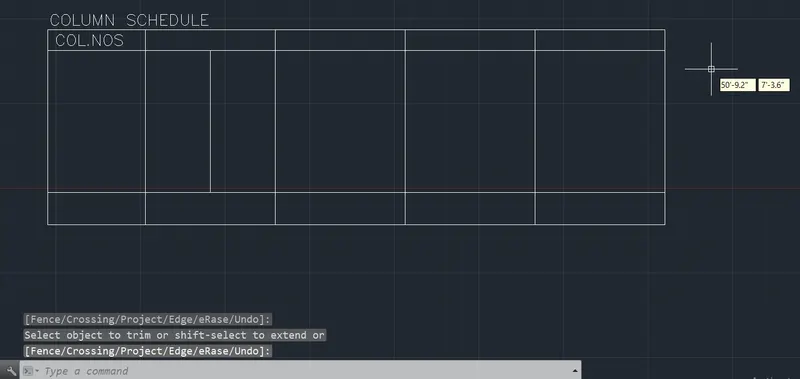
Command: TR
TRIM
Current settings: Projection=UCS, Edge=None
Select cutting edges ...
Select objects or <select all>:
Select object to trim or shift-select to extend or
[Fence/Crossing/Project/Edge/eRase/Undo]:
Select object to trim or shift-select to extend or
[Fence/Crossing/Project/Edge/eRase/Undo]:
Select object to trim or shift-select to extend or
[Fence/Crossing/Project/Edge/eRase/Undo]:
Command: of
Unknown command "OF". Press F1 for help.
Command: OFFSET
Current settings: Erase source=No Layer=Source OFFSETGAPTYPE=0
Specify offset distance or [Through/Erase/Layer] <Through>: T
Select object to offset or [Exit/Undo] <Exit>:
Specify through point or [Exit/Multiple/Undo] <Exit>: 8'-0"
Select object to offset or [Exit/Undo] <Exit>:
Select object to offset or [Exit/Undo] <Exit>:
Specify through point or [Exit/Multiple/Undo] <Exit>: 8'-0"
Select object to offset or [Exit/Undo] <Exit>:
Specify through point or [Exit/Multiple/Undo] <Exit>: 8'-0"
Select object to offset or [Exit/Undo] <Exit>:
Specify through point or [Exit/Multiple/Undo] <Exit>: 3'-0"
Select object to offset or [Exit/Undo] <Exit>: *Cancel*
Command: *Cancel*
Command: TR
TRIM
Current settings: Projection=UCS, Edge=None
Select cutting edges ...
Select objects or <select all>:
Select object to trim or shift-select to extend or
[Fence/Crossing/Project/Edge/eRase/Undo]:
Select object to trim or shift-select to extend or
[Fence/Crossing/Project/Edge/eRase/Undo]:
Select object to trim or shift-select to extend or
[Fence/Crossing/Project/Edge/eRase/Undo]:
Select object to trim or shift-select to extend or
[Fence/Crossing/Project/Edge/eRase/Undo]: *Cancel*
Command: *Cancel*
Command:
Command: *Cancel*
Command: TR
TRIM
Current settings: Projection=UCS, Edge=None
Select cutting edges ...
Select objects or <select all>:
Select object to trim or shift-select to extend or
[Fence/Crossing/Project/Edge/eRase/Undo]:
Select object to trim or shift-select to extend or
[Fence/Crossing/Project/Edge/eRase/Undo]: *Cancel*
Command: *Cancel*
Command:
Command: _.erase 1 found
Command:
Command:
Command: _QSAVE
Command:
Command:
Command:
Command: _copy 1 found
Current settings: Copy mode = Multiple
Specify base point or [Displacement/mOde] <Displacement>:
Specify second point or [Array] <use first point as displacement>:
Specify second point or [Array/Exit/Undo] <Exit>: *Cancel*
Command: <Ortho on>
Command:
Command:
Command:
Command: _copy 1 found
Current settings: Copy mode = Multiple
Specify base point or [Displacement/mOde] <Displacement>:
Specify second point or [Array] <use first point as displacement>:
Specify second point or [Array/Exit/Undo] <Exit>:
Specify second point or [Array/Exit/Undo] <Exit>:
Specify second point or [Array/Exit/Undo] <Exit>:
Specify second point or [Array/Exit/Undo] <Exit>:
Specify second point or [Array/Exit/Undo] <Exit>:
Specify second point or [Array/Exit/Undo] <Exit>:
Specify second point or [Array/Exit/Undo] <Exit>:
Specify second point or [Array/Exit/Undo] <Exit>: *Cancel*
Command: Specify opposite corner or [Fence/WPolygon/CPolygon]: *Cancel*
Command:
Command:
Command:
Command: _ddedit
Select an annotation object or [Undo]:
Command:
Command:
Command:
Command: _ddedit
Select an annotation object or [Undo]:
Command:
Command:
Command:
Command: _ddedit
Select an annotation object or [Undo]:
Command:
Command: *Cancel*
Command:
Command:
Command:
Command:
Command: _copy 2 found
Current settings: Copy mode = Multiple
Specify base point or [Displacement/mOde] <Displacement>: *Cancel*
Command: *Cancel*
Command: TEXTEDIT
Select an annotation object:
Command:
Command:
Command:
Command: _copy 1 found
Current settings: Copy mode = Multiple
Specify base point or [Displacement/mOde] <Displacement>:
Specify second point or [Array] <use first point as displacement>:
Specify second point or [Array/Exit/Undo] <Exit>:
Specify second point or [Array/Exit/Undo] <Exit>:
Specify second point or [Array/Exit/Undo] <Exit>: *Cancel*
Command:
Command: _.erase 1 found
Command: Specify opposite corner or [Fence/WPolygon/CPolygon]:
Command:
Command: _.erase 1 found
Command:
Command: _.erase 1 found
Command:
Command:
Command:
Command: _move 1 found
Specify base point or [Displacement] <Displacement>:
Specify second point or <use first point as displacement>:
Command:
Command:
Command: _move
Select objects: 1 found
Select objects:
Specify base point or [Displacement] <Displacement>:
Specify second point or <use first point as displacement>:
Command:
Command:
Command: _move
Select objects: Specify opposite corner: 0 found
Select objects: 1 found
Select objects:
Specify base point or [Displacement] <Displacement>:
Specify second point or <use first point as displacement>:
Command: Specify opposite corner or [Fence/WPolygon/CPolygon]: *Cancel*
Command:
Command: _move
Select objects: 1 found
Select objects:
Specify base point or [Displacement] <Displacement>:
Specify second point or <use first point as displacement>:
Command:
Command:
Command:
Command: _ddedit
Select an annotation object or [Undo]:
Command: CHA
CHAMFER
(TRIM mode) Current chamfer Dist1 = 0'-0.0", Dist2 = 0'-0.0"
Select first line or [Undo/Polyline/Distance/Angle/Trim/mEthod/Multiple]: T
Enter Trim mode option [Trim/No trim] <Trim>: N
Select first line or [Undo/Polyline/Distance/Angle/Trim/mEthod/Multiple]: M
Select first line or [Undo/Polyline/Distance/Angle/Trim/mEthod/Multiple]:
Select second line or shift-select to apply corner or [Distance/Angle/Method]: D
Specify first chamfer distance <0'-0.0">: 0'-2"
Specify second chamfer distance <0'-2.0">: Specify second point:
Select second line or shift-select to apply corner or [Distance/Angle/Method]:
Select second line or shift-select to apply corner or [Distance/Angle/Method]:
Select first line or [Undo/Polyline/Distance/Angle/Trim/mEthod/Multiple]:
Select second line or shift-select to apply corner or [Distance/Angle/Method]:
Select second line or shift-select to apply corner or [Distance/Angle/Method]:
Select first line or [Undo/Polyline/Distance/Angle/Trim/mEthod/Multiple]:
Select second line or shift-select to apply corner or [Distance/Angle/Method]:
Select first line or [Undo/Polyline/Distance/Angle/Trim/mEthod/Multiple]:
Select second line or shift-select to apply corner or [Distance/Angle/Method]:
Select second line or shift-select to apply corner or [Distance/Angle/Method]:
Select second line or shift-select to apply corner or [Distance/Angle/Method]:
Select first line or [Undo/Polyline/Distance/Angle/Trim/mEthod/Multiple]: *Cancel*
ommand: C
CIRCLE
Specify center point for circle or [3P/2P/Ttr (tan tan radius)]:
Specify radius of circle or [Diameter]:
Command:
Command: _.erase 1 found
Command: C
CIRCLE
Specify center point for circle or [3P/2P/Ttr (tan tan radius)]:
Specify radius of circle or [Diameter] <0'-3.0">:
Command: *Cancel*
Command: COPY
Select objects: 1 found
Select objects:
Current settings: Copy mode = Multiple
Specify base point or [Displacement/mOde] <Displacement>:
Specify second point or [Array] <use first point as displacement>:
Specify second point or [Array/Exit/Undo] <Exit>:
Specify second point or [Array/Exit/Undo] <Exit>: *Cancel*
Command: *Cancel*
Command:
Command: _.erase 1 found
Command: COPY
Select objects: Specify opposite corner: 1 found
Select objects:
Current settings: Copy mode = Multiple
Specify base point or [Displacement/mOde] <Displacement>:
Specify second point or [Array] <use first point as displacement>:
Specify second point or [Array/Exit/Undo] <Exit>: *Cancel*
Command: *Cancel*
Command: COPY
Select objects: 1 found
Select objects: 1 found, 2 total
Select objects: 1 found, 3 total
Select objects:
Current settings: Copy mode = Multiple
Specify base point or [Displacement/mOde] <Displacement>:
Specify second point or [Array] <use first point as displacement>:
Specify second point or [Array/Exit/Undo] <Exit>: *Cancel*
Command: *Cancel*
Command:
Command:
Command: _QSAVE
Command: COPY
Select objects: 1 found
Select objects:
Current settings: Copy mode = Multiple
Specify base point or [Displacement/mOde] <Displacement>:
Specify second point or [Array] <use first point as displacement>: <Ortho off>
Specify second point or [Array/Exit/Undo] <Exit>:
Specify second point or [Array/Exit/Undo] <Exit>: *Cancel*
Command: COPY
Select objects: 1 found
Select objects: 1 found, 2 total
Select objects:
Current settings: Copy mode = Multiple
Specify base point or [Displacement/mOde] <Displacement>:
Specify second point or [Array] <use first point as displacement>: *Cancel*
Command: COPY
Select objects: 1 found
Select objects: 1 found, 2 total
Select objects:
Current settings: Copy mode = Multiple
Specify base point or [Displacement/mOde] <Displacement>:
Specify second point or [Array] <use first point as displacement>:
Specify second point or [Array/Exit/Undo] <Exit>: *Cancel*
Command: RO
ROTATE
Current positive angle in UCS: ANGDIR=counterclockwise ANGBASE=0
Select objects:
Command: RO
ROTATE
Current positive angle in UCS: ANGDIR=counterclockwise ANGBASE=0
Select objects: 1 found
Select objects: 1 found, 2 total
Select objects:
Specify base point:
Specify rotation angle or [Copy/Reference] <180>: *Cancel*
Command: RO
ROTATE
Current positive angle in UCS: ANGDIR=counterclockwise ANGBASE=0
Select objects: 1 found
Select objects: 1 found, 2 total
Select objects:
Specify base point:
Specify rotation angle or [Copy/Reference] <180>:
Command: MI
MIRROR
Select objects: 1 found
Select objects: 1 found, 2 total
Select objects: *Cancel*
Command: *Cancel*
Command: M
MOVE
Select objects: 1 found
Select objects: Specify opposite corner: 0 found
Select objects: 1 found, 2 total
Select objects:
Specify base point or [Displacement] <Displacement>:
Specify second point or <use first point as displacement>:
Command: *Cancel*
Command: M
MOVE
Select objects: Specify opposite corner: 0 found
Select objects: 1 found
Select objects: 1 found, 2 total
Select objects:
Specify base point or [Displacement] <Displacement>:
Specify second point or <use first point as displacement>:
Command: M
MOVE
Select objects: 1 found
Select objects: 1 found, 2 total
Select objects:
Specify base point or [Displacement] <Displacement>:
Specify second point or <use first point as displacement>:
Command: MI
MIRROR
Select objects: 1 found
Select objects: 1 found, 2 total
Select objects:
Specify first point of mirror line: Specify second point of mirror line:
Erase source objects? [Yes/No] <N>: MI
Yes or No, please.
Erase source objects? [Yes/No] <N>: N
Command: MI
MIRROR
Select objects: 1 found
Select objects: 1 found, 2 total
Select objects:
Specify first point of mirror line: Specify second point of mirror line: <Ortho on> *Cancel*
Command: MI
MIRROR
Select objects: 1 found
Select objects: 1 found, 2 total
Select objects:
Specify first point of mirror line: Specify second point of mirror line:
Erase source objects? [Yes/No] <N>: N
Command:
Command:
Command: _QSAVE
Command: COPY
Select objects: Specify opposite corner: 20 found
Select objects:
Current settings: Copy mode = Multiple
Specify base point or [Displacement/mOde] <Displacement>:
Specify second point or [Array] <use first point as displacement>:
Specify second point or [Array/Exit/Undo] <Exit>: *Cancel*
Command: Specify opposite corner or [Fence/WPolygon/CPolygon]:
Command: _.erase 20 found
Command: COPY
Select objects: Specify opposite corner: 16 found
Select objects:
Current settings: Copy mode = Multiple
Specify base point or [Displacement/mOde] <Displacement>:
Specify second point or [Array] <use first point as displacement>:
Specify second point or [Array/Exit/Undo] <Exit>: *Cancel*
Command: Specify opposite corner or [Fence/WPolygon/CPolygon]:
Command: _.erase 16 found
Command: COPY
Select objects: Specify opposite corner: 20 found
Select objects:
Current settings: Copy mode = Multiple
Specify base point or [Displacement/mOde] <Displacement>:
Specify second point or [Array] <use first point as displacement>: <Ortho off>
Specify second point or [Array/Exit/Undo] <Exit>: *Cancel*
Command: Specify opposite corner or [Fence/WPolygon/CPolygon]:
Command: _.erase 20 found
Command:
Command:
Command: _QSAVE
Command:
Command:
Command:
Command: _ddedit
Select an annotation object or [Undo]:
Select an annotation object or [Undo]:
Select an annotation object or [Undo]:
Command:
Command: _QSAVE
Command:
Command:
Command:
Command: _ddedit
Select an annotation object or [Undo]:
Select an annotation object or [Undo]: *Cancel*
Command: m
MOVE
Select objects: 1 found
Select objects:
Specify base point or [Displacement] <Displacement>:
Specify second point or <use first point as displacement>:
Command:
Command: _.erase 1 found
Command: Specify opposite corner or [Fence/WPolygon/CPolygon]:
Command:
Command: _.erase 1 found
Command:
Command:
Command:
Command: _ddedit
Select an annotation object or [Undo]:
Select an annotation object or [Undo]: copy
*Invalid selection*
Expects a point or Last/Undo]:
Select an annotation object or [Undo]:
Select an annotation object or [Undo]: *Cancel*
Command: *Cancel*
Command: COPY
Select objects: 1 found
Select objects:
Current settings: Copy mode = Multiple
Specify base point or [Displacement/mOde] <Displacement>:
Specify second point or [Array] <use first point as displacement>:
Specify second point or [Array/Exit/Undo] <Exit>:
Specify second point or [Array/Exit/Undo] <Exit>:
Specify second point or [Array/Exit/Undo] <Exit>: *Cancel*
Command:
Command: _.erase 1 found
Command: Specify opposite corner or [Fence/WPolygon/CPolygon]:
Command:
Command:
Command:
Command: _ddedit
Command:
Command: _QSAVE
Command:
Command:
Command:
Command: _ddedit
Select an annotation object or [Undo]:
Select an annotation object or [Undo]:
Select an annotation object or [Undo]:
Select an annotation object or [Undo]: l
Select an annotation object or [Undo]: *Cancel*
Command: l
LINE
Specify first point:
Specify next point or [Undo]:
Specify next point or [Undo]: *Cancel*
Command: l
LINE
Specify first point:
Specify next point or [Undo]:
Specify next point or [Undo]: *Cancel*
Command: l
LINE
Specify first point:
Specify next point or [Undo]:
Specify next point or [Undo]: <Ortho on> *Cancel*
Command:
Command: _.erase 1 found
Command:
Command: *Cancel*
Command: l
LINE
Specify first point:
Specify next point or [Undo]:
Specify next point or [Undo]: *Cancel*
Command: LINE
Specify first point:
Specify next point or [Undo]:
Specify next point or [Undo]: *Cancel*
Command: l
LINE
Specify first point:
Specify next point or [Undo]:
Specify next point or [Undo]: *Cancel*
Command: l
LINE
Specify first point:
Specify next point or [Undo]:
Specify next point or [Undo]: *Cancel*
Command: l
LINE
Specify first point:
Specify next point or [Undo]:
Specify next point or [Undo]:
Command: l
LINE
Specify first point:
Specify next point or [Undo]:
Specify next point or [Undo]: *Cancel*
Command: TR
TRIM
Current settings: Projection=UCS, Edge=None
Select cutting edges ...
Select objects or <select all>:
Select object to trim or shift-select to extend or
[Fence/Crossing/Project/Edge/eRase/Undo]: Specify opposite corner:
Select object to trim or shift-select to extend or
[Fence/Crossing/Project/Edge/eRase/Undo]: Specify opposite corner:
Select object to trim or shift-select to extend or
[Fence/Crossing/Project/Edge/eRase/Undo]: Specify opposite corner:
Select object to trim or shift-select to extend or
[Fence/Crossing/Project/Edge/eRase/Undo]: Specify opposite corner:
Select object to trim or shift-select to extend or
[Fence/Crossing/Project/Edge/eRase/Undo]: Specify opposite corner:
Select object to trim or shift-select to extend or
[Fence/Crossing/Project/Edge/eRase/Undo]: Specify opposite corner:
Select object to trim or shift-select to extend or
[Fence/Crossing/Project/Edge/eRase/Undo]: Specify opposite corner:
Select object to trim or shift-select to extend or
[Fence/Crossing/Project/Edge/eRase/Undo]: *Cancel*
Command: *Cancel*
Command:
Command:
Command: _QSAVE
Command: L
LINE
Specify first point:
Specify next point or [Undo]:
Specify next point or [Undo]: _u
Specify next point or [Undo]:
Specify next point or [Undo]: *Cancel*
Command: l
LINE
Specify first point:
Specify next point or [Undo]:
Specify next point or [Undo]: *Cancel*
Command: TR
TRIM
Current settings: Projection=UCS, Edge=None
Select cutting edges ...
Select objects or <select all>:
Select object to trim or shift-select to extend or
[Fence/Crossing/Project/Edge/eRase/Undo]:
Select object to trim or shift-select to extend or
[Fence/Crossing/Project/Edge/eRase/Undo]: Specify opposite corner:
Select object to trim or shift-select to extend or
[Fence/Crossing/Project/Edge/eRase/Undo]: *Cancel*
Command: *Cancel*
Command: COPY'
Unknown command "COPY'". Press F1 for help.
Command: *Cancel*
Command: COPY
Select objects: 1 found
Select objects: 1 found, 2 total
Select objects:
Current settings: Copy mode = Multiple
Specify base point or [Displacement/mOde] <Displacement>:
Specify second point or [Array] <use first point as displacement>:
Specify second point or [Array/Exit/Undo] <Exit>:
Specify second point or [Array/Exit/Undo] <Exit>:
Specify second point or [Array/Exit/Undo] <Exit>: *Cancel*
Command:
Command:
Command: _QSAVE
Command: m
MOVE
Select objects: 1 found
Select objects:
Specify base point or [Displacement] <Displacement>:
Specify second point or <use first point as displacement>:
Command: *Cancel*
Command:
Command:
Command: _QSAVE
Command: Specify opposite corner or [Fence/WPolygon/CPolygon]:
Command: *Cancel*
Command: SPELL
Command: TXT2MTXT
Select text objects, or [Options]<Options>:
Select objects: *Cancel*
Conversion failed.
Command: '_dimstyle
Command: '_style
Command: TEXTEDITOR
TEXTEDITOR = 0 (read only)
Command: *Cancel*
Command: TEXTEDITOR
TEXTEDITOR = 0 (read only)
Command:
Command:
Command: _tablestyle
Command:
Command:
Command: _mleaderstyle
Command: '_dimstyle
Command: l
LINE
Specify first point:
Specify next point or [Undo]:
Specify next point or [Undo]: *Cancel*
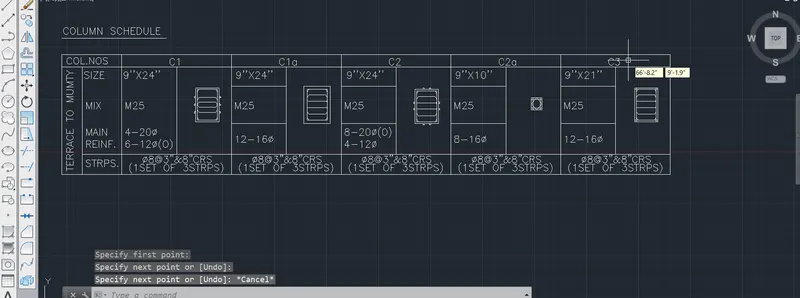
Result:
Drawing 2:
Aim and Introduction:
To Draw the Details of the Drawing reports using AUTOCAD
Procedure:
Specify first point or [Array/Exit/Undo] <Exit>:
Specify next point or [Array/Exit/Undo] <Exit>:
Specify next point or [Array/Exit/Undo] <Exit>:
Specify next point or [Array/Exit/Undo] <Exit>: *Cancel*
Command: *Cancel*
Command: CO
COPY
Select objects: 1 found
Select objects:
Current settings: Copy mode = Multiple
Specify base point or [Displacement/mOde] <Displacement>:
Specify second point or [Array] <use first point as displacement>:
Specify second point or [Array/Exit/Undo] <Exit>:
Specify second point or [Array/Exit/Undo] <Exit>:
Specify second point or [Array/Exit/Undo] <Exit>:
Specify second point or [Array/Exit/Undo] <Exit>:
Specify second point or [Array/Exit/Undo] <Exit>: *Cancel*
Command:
Command:
Command: _SAVEAS
Command:
Command:
Command:
Command: _ddedit
Select an annotation object or [Undo]:
Command: Specify opposite corner or [Fence/WPolygon/CPolygon]:
Command:
Command:
Command: _ddedit
Select an annotation object or [Undo]:
Command:
Command:
Command:
Command: _ddedit
Select an annotation object or [Undo]:
Command:
DDEDIT
Select an annotation object or [Undo]:
Select an annotation object or [Undo]:
Select an annotation object or [Undo]:
Command:
Command:
Command:
Command: _ddedit
Select an annotation object or [Undo]:
Command:
Command:
Command:
Command: _ddedit
Select an annotation object or [Undo]:
Command:
Command:
Command:
Command: _ddedit
Select an annotation object or [Undo]:
Select an annotation object or [Undo]:
Select an annotation object or [Undo]:
Select an annotation object or [Undo]: *Cancel*
Command: *Cancel*
Command: TEXT
Current text style: "Standard" Text height: 0'-3.5" Annotative: No
Specify start point of text or [Justify/Style]:
Specify rotation angle of text <0>:
Command: _u TEXT
Command: TEXT
Current text style: "Standard" Text height: 0'-3.5" Annotative: No
Specify start point of text or [Justify/Style]:
Command: *Cancel*
Command: TEXT
Current text style: "Standard" Text height: 0'-3.5" Annotative: No
Specify start point of text or [Justify/Style]:
Specify rotation angle of text <0>: 0
Command: Specify opposite corner or [Fence/WPolygon/CPolygon]:
Command: *Cancel*
Command: Specify opposite corner or [Fence/WPolygon/CPolygon]:
Command: *Cancel*
Command:
Command:
Command:
Command: _move 1 found
Specify base point or [Displacement] <Displacement>:
Specify second point or <use first point as displacement>:
Command:
Command:
Command:
Command: _move 1 found
Specify base point or [Displacement] <Displacement>:
Specify second point or <use first point as displacement>:
Command:
Command:
Command: _move
Select objects: 1 found
Select objects:
Specify base point or [Displacement] <Displacement>:
Specify second point or <use first point as displacement>:
Command:
Command:
Command:
Command: _move 1 found
Specify base point or [Displacement] <Displacement>:
Specify second point or <use first point as displacement>:
Command:
Command:
Command: _move
Select objects: Specify opposite corner: 0 found
Select objects: 1 found
Select objects:
Specify base point or [Displacement] <Displacement>:
Specify second point or <use first point as displacement>:
Command:
Command:
Command: _move
Select objects: 1 found
Select objects:
Specify base point or [Displacement] <Displacement>:
Specify second point or <use first point as displacement>:
Command:
Command:
Command: _move
Select objects: 1 found
Select objects:
Specify base point or [Displacement] <Displacement>:
Specify second point or <use first point as displacement>:
Command: *Cancel*
Command:
Command:
Command: _QSAVE
Command: Specify opposite corner or [Fence/WPolygon/CPolygon]:
Command:
Command: _.erase 1 found
Command: Specify opposite corner or [Fence/WPolygon/CPolygon]:
Command: Specify opposite corner or [Fence/WPolygon/CPolygon]:
Command: _.erase 1 found
Command: Specify opposite corner or [Fence/WPolygon/CPolygon]:
Command:
Command: _.erase 1 found
Command:
Command: _.erase 1 found
Command:
Command: _.erase 1 found
Command:
Command: _.erase 1 found
Command:
Command: _.erase 1 found
Command:
Command: _.erase 1 found
Command:
Command: _.erase 1 found
Command:
Command: _.erase 1 found
Command:
Command: _.erase 1 found
Command:
Command: _.erase 1 found
Command: COPY
Select objects: 1 found
Select objects:
Current settings: Copy mode = Multiple
Specify base point or [Displacement/mOde] <Displacement>:
Specify second point or [Array] <use first point as displacement>:
Specify second point or [Array/Exit/Undo] <Exit>: <Ortho on>
Specify second point or [Array/Exit/Undo] <Exit>:
Specify second point or [Array/Exit/Undo] <Exit>: *Cancel*
Command: COPY
Select objects: 1 found
Select objects:
Current settings: Copy mode = Multiple
Specify base point or [Displacement/mOde] <Displacement>:
Specify second point or [Array] <use first point as displacement>:
Specify second point or [Array/Exit/Undo] <Exit>:
Specify second point or [Array/Exit/Undo] <Exit>:
Specify second point or [Array/Exit/Undo] <Exit>: *Cancel*
Command: COPY
Select objects: 1 found
Select objects:
Current settings: Copy mode = Multiple
Specify base point or [Displacement/mOde] <Displacement>:
Specify second point or [Array] <use first point as displacement>:
Specify second point or [Array/Exit/Undo] <Exit>:
Specify second point or [Array/Exit/Undo] <Exit>:
Specify second point or [Array/Exit/Undo] <Exit>: *Cancel*
Command: COPY
Select objects: 1 found
Select objects:
Current settings: Copy mode = Multiple
Specify base point or [Displacement/mOde] <Displacement>:
Specify second point or [Array] <use first point as displacement>:
Specify second point or [Array/Exit/Undo] <Exit>:
Specify second point or [Array/Exit/Undo] <Exit>:
Specify second point or [Array/Exit/Undo] <Exit>: *Cancel*
Command: M
MOVE
Select objects: 1 found
Select objects: 1 found, 2 total
Select objects:
Specify base point or [Displacement] <Displacement>:
Specify second point or <use first point as displacement>: <Grid off> <Ortho off>
Command: COPY
Select objects: 1 found
Select objects: Specify opposite corner:
Invalid window specification.
Specify opposite corner: Specify opposite corner: 0 found
Select objects: 1 found, 2 total
Select objects:
Current settings: Copy mode = Multiple
Specify base point or [Displacement/mOde] <Displacement>:
Specify second point or [Array] <use first point as displacement>:
Specify second point or [Array/Exit/Undo] <Exit>:
Specify second point or [Array/Exit/Undo] <Exit>:
Specify second point or [Array/Exit/Undo] <Exit>: *Cancel*
Command:
Command: _.erase 1 found
Command:
Command:
Command: _QSAVE
Command:
Command:
Command:
Command: _ddedit
Select an annotation object or [Undo]:
Command:
Command:
Command:
Command: _ddedit
Select an annotation object or [Undo]:
Command:
Command:
Command:
Command: _ddedit
Select an annotation object or [Undo]:
Command:
Command:
Command:
Command: _ddedit
Select an annotation object or [Undo]:
Command:
Command:
Command:
Command: _ddedit
Select an annotation object or [Undo]:
Command:
Command:
Command:
Command: _ddedit
Select an annotation object or [Undo]: *Cancel*
Command: *Cancel*
Command:
Command:
Command:
Command: _ddedit
Select an annotation object or [Undo]:
Select an annotation object or [Undo]:
Command:
Command:
Command:
Command: _ddedit
Select an annotation object or [Undo]:
Command:
Command:
Command:
Command: _ddedit
Select an annotation object or [Undo]:
Command:
Command:
Command:
Command: _ddedit
Select an annotation object or [Undo]:
Command:
Command:
Command:
Command: _ddedit
Select an annotation object or [Undo]:
Select an annotation object or [Undo]:
Select an annotation object or [Undo]: \
*Invalid selection*
Expects a point or Last/Undo]:
Select an annotation object or [Undo]:
Select an annotation object or [Undo]:
Command:
Command:
Command: _QSAVE
Command:
Command:
** STRETCH **
Specify stretch point or [Base point/Copy/Undo/eXit]:
Command: EX
EXTEND
Current settings: Projection=UCS, Edge=None
Select boundary edges ... 1 found
Select object to extend or shift-select to trim or
[Fence/Crossing/Project/Edge/Undo]:
Command: *Cancel*
Command: *Cancel*
Command: EX
EXTEND
Current settings: Projection=UCS, Edge=None
Select boundary edges ...
Select objects or <select all>:
Select object to extend or shift-select to trim or
[Fence/Crossing/Project/Edge/Undo]:
Select object to extend or shift-select to trim or
[Fence/Crossing/Project/Edge/Undo]:
Select object to extend or shift-select to trim or
[Fence/Crossing/Project/Edge/Undo]:
Select object to extend or shift-select to trim or
[Fence/Crossing/Project/Edge/Undo]:
Select object to extend or shift-select to trim or
[Fence/Crossing/Project/Edge/Undo]:
Select object to extend or shift-select to trim or
[Fence/Crossing/Project/Edge/Undo]:
Select object to extend or shift-select to trim or
[Fence/Crossing/Project/Edge/Undo]:
Select object to extend or shift-select to trim or
[Fence/Crossing/Project/Edge/Undo]: *Cancel*
Command: *Cancel*
Command: M
MOVE
Select objects: 1 found
Select objects:
Specify base point or [Displacement] <Displacement>:
Specify second point or <use first point as displacement>:
Command: M
MOVE
Select objects: 1 found
Select objects:
Specify base point or [Displacement] <Displacement>:
Specify second point or <use first point as displacement>:
Command: M
MOVE
Select objects: 1 found
Select objects:
Specify base point or [Displacement] <Displacement>:
Specify second point or <use first point as displacement>:
Command: M
MOVE
Select objects: 1 found
Select objects:
Specify base point or [Displacement] <Displacement>:
Specify second point or <use first point as displacement>:
Command:
Command:
Command: _QSAVE
Command: TEXT
Current text style: "Standard" Text height: 0'-3.5" Annotative: No
Specify start point of text or [Justify/Style]:
Command: M
MOVE
Select objects: 1 found
Select objects:
Specify base point or [Displacement] <Displacement>:
Specify second point or <use first point as displacement>:
Command:
Command:
Command:
Command: _ddedit
Select an annotation object or [Undo]:
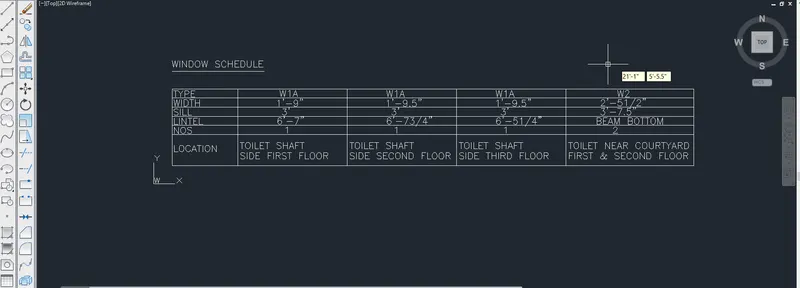
Result:
Drawing 3:
Aim and Introduction:
To Draw the Details of the Drawing reports using AUTOCAD
Procedure:
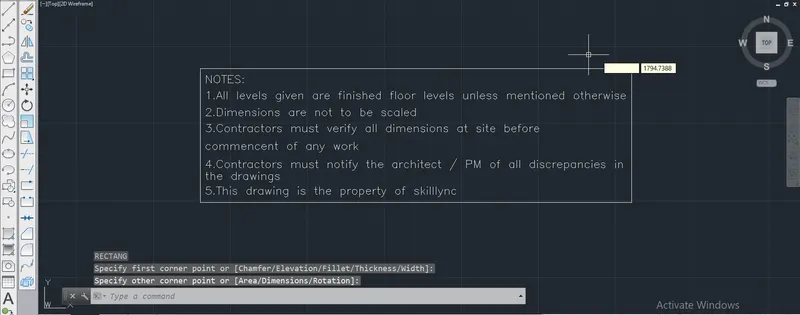
Command: REC
RECTANG
Specify first corner point or [Chamfer/Elevation/Fillet/Thickness/Width]:
Specify other corner point or [Area/Dimensions/Rotation]:
Command: REC
RECTANG
Specify first corner point or [Chamfer/Elevation/Fillet/Thickness/Width]:
Specify other corner point or [Area/Dimensions/Rotation]:
Command: COPY
Select objects: *Cancel*
Command: *Cancel*
Command: COPY
Select objects: 1 found
Select objects:
Current settings: Copy mode = Multiple
Specify base point or [Displacement/mOde] <Displacement>:
Specify second point or [Array] <use first point as displacement>:
Specify second point or [Array/Exit/Undo] <Exit>: *Cancel*
Command: REC
RECTANG
Specify first corner point or [Chamfer/Elevation/Fillet/Thickness/Width]:
Specify other corner point or [Area/Dimensions/Rotation]:
Command:
Command: _.erase 1 found
Command: OFFSET
Current settings: Erase source=No Layer=Source OFFSETGAPTYPE=0
Specify offset distance or [Through/Erase/Layer] <Through>:
Select object to offset or [Exit/Undo] <Exit>:
Specify through point or [Exit/Multiple/Undo] <Exit>: 5
Select object to offset or [Exit/Undo] <Exit>:
Specify through point or [Exit/Multiple/Undo] <Exit>: *Cancel*
Command: REC
RECTANG
Specify first corner point or [Chamfer/Elevation/Fillet/Thickness/Width]:
Specify other corner point or [Area/Dimensions/Rotation]:
Command: m
MOVE
Select objects: 1 found
Select objects:
Specify base point or [Displacement] <Displacement>:
Specify second point or <use first point as displacement>:
Command: REC
RECTANG
Specify first corner point or [Chamfer/Elevation/Fillet/Thickness/Width]:
Specify other corner point or [Area/Dimensions/Rotation]:
Command: l
LINE
Specify first point:
Specify next point or [Undo]:
Specify next point or [Undo]: *Cancel*
Command: o
OFFSET
Current settings: Erase source=No Layer=Source OFFSETGAPTYPE=0
Specify offset distance or [Through/Erase/Layer] <Through>:
Select object to offset or [Exit/Undo] <Exit>:
Specify through point or [Exit/Multiple/Undo] <Exit>: *Cancel*
Command: Specify opposite corner or [Fence/WPolygon/CPolygon]:
Command: _.erase 1 found
Command: l
LINE
Specify first point:
Specify next point or [Undo]: 15
Specify next point or [Undo]:
Specify next point or [Close/Undo]: *Cancel*
Command: o
OFFSET
Current settings: Erase source=No Layer=Source OFFSETGAPTYPE=0
Specify offset distance or [Through/Erase/Layer] <Through>:
Select object to offset or [Exit/Undo] <Exit>:
Specify through point or [Exit/Multiple/Undo] <Exit>: 15
Select object to offset or [Exit/Undo] <Exit>: *Cancel*
Command:
Command: _.erase 1 found
Command:
Command: *Cancel*
Command: EX
EXTEND
Current settings: Projection=UCS, Edge=None
Select boundary edges ...
Select objects or <select all>:
Select object to extend or shift-select to trim or
[Fence/Crossing/Project/Edge/Undo]:
Select object to extend or shift-select to trim or
[Fence/Crossing/Project/Edge/Undo]:
Select object to extend or shift-select to trim or
[Fence/Crossing/Project/Edge/Undo]:
Select object to extend or shift-select to trim or
[Fence/Crossing/Project/Edge/Undo]:
Select object to extend or shift-select to trim or
[Fence/Crossing/Project/Edge/Undo]: *Cancel*
Command: o
OFFSET
Current settings: Erase source=No Layer=Source OFFSETGAPTYPE=0
Specify offset distance or [Through/Erase/Layer] <Through>:
Select object to offset or [Exit/Undo] <Exit>:
Specify through point or [Exit/Multiple/Undo] <Exit>: 15
Select object to offset or [Exit/Undo] <Exit>:
Specify through point or [Exit/Multiple/Undo] <Exit>: 15
Select object to offset or [Exit/Undo] <Exit>: *Cancel*
Command: TR
TRIM
Current settings: Projection=UCS, Edge=None
Select cutting edges ...
Select objects or <select all>:
Select object to trim or shift-select to extend or
[Fence/Crossing/Project/Edge/eRase/Undo]: Specify opposite corner:
Select object to trim or shift-select to extend or
[Fence/Crossing/Project/Edge/eRase/Undo]:
Select object to trim or shift-select to extend or
[Fence/Crossing/Project/Edge/eRase/Undo]:
Select object to trim or shift-select to extend or
[Fence/Crossing/Project/Edge/eRase/Undo]: Specify opposite corner:
Select object to trim or shift-select to extend or
[Fence/Crossing/Project/Edge/eRase/Undo]: Specify opposite corner:
Select object to trim or shift-select to extend or
[Fence/Crossing/Project/Edge/eRase/Undo]:
Select object to trim or shift-select to extend or
[Fence/Crossing/Project/Edge/eRase/Undo]:
Select object to trim or shift-select to extend or
[Fence/Crossing/Project/Edge/eRase/Undo]: *Cancel*
Command: l
LINE
Specify first point: *Cancel*
Command: *Cancel*
Command:
Command:
** STRETCH **
Specify stretch point:
Command: EX
EXTEND
Current settings: Projection=UCS, Edge=None
Select boundary edges ... 1 found
Select object to extend or shift-select to trim or
[Fence/Crossing/Project/Edge/Undo]:
Command:
Command: *Cancel*
Command: *Cancel*
Command: EX
EXTEND
Current settings: Projection=UCS, Edge=None
Select boundary edges ...
Select objects or <select all>:
Select object to extend or shift-select to trim or
[Fence/Crossing/Project/Edge/Undo]:
Select object to extend or shift-select to trim or
[Fence/Crossing/Project/Edge/Undo]:
Select object to extend or shift-select to trim or
[Fence/Crossing/Project/Edge/Undo]:
Select object to extend or shift-select to trim or
[Fence/Crossing/Project/Edge/Undo]:
Select object to extend or shift-select to trim or
[Fence/Crossing/Project/Edge/Undo]: *Cancel*
Command:
Command:
Command: *Cancel*
Command: l
LINE
Specify first point:
Specify next point or [Undo]: *Cancel*
Command: *Cancel*
Command: *Cancel*
Command: TEXT
Current text style: "Standard" Text height: 5.0000 Annotative: No
Specify start point of text or [Justify/Style]:
Command: *Cancel*
Command: TEXT
Current text style: "Standard" Text height: 5.0000 Annotative: No
Specify start point of text or [Justify/Style]:
Specify rotation angle of text <0>:
Command:
Command: _.erase 1 found
Command: *Cancel*
Command: *Cancel*
Command: TEXT
Current text style: "Standard" Text height: 5.0000 Annotative: No
Specify start point of text or [Justify/Style]:
Specify rotation angle of text <273>: 0
Command:
Command:
Command: _QSAVE
Command: m
MOVE
Select objects: Specify opposite corner: 0 found
Select objects: 1 found
Select objects:
Specify base point or [Displacement] <Displacement>:
Specify second point or <use first point as displacement>:
Command: *Cancel*
Command: l
LINE
Specify first point:
Specify next point or [Undo]: 55
Specify next point or [Undo]:
Specify next point or [Close/Undo]: *Cancel*
Command: *Cancel*
Command: *Cancel*
Command: text
Current text style: "Standard" Text height: 5.0000 Annotative: No
Specify start point of text or [Justify/Style]:
Command: m
MOVE
Select objects: 1 found
Select objects:
Specify base point or [Displacement] <Displacement>:
Specify second point or <use first point as displacement>: <Ortho off>
Command: o
OFFSET
Current settings: Erase source=No Layer=Source OFFSETGAPTYPE=0
Specify offset distance or [Through/Erase/Layer] <Through>:
Select object to offset or [Exit/Undo] <Exit>:
Specify through point or [Exit/Multiple/Undo] <Exit>:
Select object to offset or [Exit/Undo] <Exit>:
Specify through point or [Exit/Multiple/Undo] <Exit>:
Select object to offset or [Exit/Undo] <Exit>: *Cancel*
Command: *Cancel*
Command: COPY
Select objects: 1 found
Select objects:
Current settings: Copy mode = Multiple
Specify base point or [Displacement/mOde] <Displacement>:
Specify second point or [Array] <use first point as displacement>:
Specify second point or [Array/Exit/Undo] <Exit>: *Cancel*
Command:
Command:
Command:
Command: _ddedit
Select an annotation object or [Undo]:
Command: TR
TRIM
Current settings: Projection=UCS, Edge=None
Select cutting edges ...
Select objects or <select all>:
Select object to trim or shift-select to extend or
[Fence/Crossing/Project/Edge/eRase/Undo]: Specify opposite corner:
Select object to trim or shift-select to extend or
[Fence/Crossing/Project/Edge/eRase/Undo]: Specify opposite corner:
Select object to trim or shift-select to extend or
[Fence/Crossing/Project/Edge/eRase/Undo]: *Cancel*
Command: TR
TRIM
Current settings: Projection=UCS, Edge=None
Select cutting edges ...
Select objects or <select all>:
Select object to trim or shift-select to extend or
[Fence/Crossing/Project/Edge/eRase/Undo]:
Select object to trim or shift-select to extend or
[Fence/Crossing/Project/Edge/eRase/Undo]: Specify opposite corner:
Select object to trim or shift-select to extend or
[Fence/Crossing/Project/Edge/eRase/Undo]:
Select object to trim or shift-select to extend or
[Fence/Crossing/Project/Edge/eRase/Undo]:
Select object to trim or shift-select to extend or
[Fence/Crossing/Project/Edge/eRase/Undo]: *Cancel*
Command: COPY
Select objects:
Command:
Command: *Cancel*
Command: *Cancel*
Command: COPY
Select objects: 1 found
Select objects:
Current settings: Copy mode = Multiple
Specify base point or [Displacement/mOde] <Displacement>:
Specify second point or [Array] <use first point as displacement>:
Specify second point or [Array/Exit/Undo] <Exit>:
Specify second point or [Array/Exit/Undo] <Exit>:
Specify second point or [Array/Exit/Undo] <Exit>:
Specify second point or [Array/Exit/Undo] <Exit>:
Specify second point or [Array/Exit/Undo] <Exit>:
Specify second point or [Array/Exit/Undo] <Exit>:
Specify second point or [Array/Exit/Undo] <Exit>:
Specify second point or [Array/Exit/Undo] <Exit>:
Specify second point or [Array/Exit/Undo] <Exit>: *Cancel*
Command: *Cancel*
Command:
Command:
Command:
Command: _ddedit
Select an annotation object or [Undo]:
Command: Specify opposite corner or [Fence/WPolygon/CPolygon]:
Command:
Command:
Command: _ddedit
Select an annotation object or [Undo]:
Command:
Command:
Command:
Command: _ddedit
Select an annotation object or [Undo]:
Command:
Command:
Command:
Command: _ddedit
Select an annotation object or [Undo]:
Select an annotation object or [Undo]:
Command: *Cancel*
Command:
Command:
Command:
Command: _ddedit
Select an annotation object or [Undo]:
Command:
Command:
Command:
Command: _ddedit
Select an annotation object or [Undo]:
Command:
Command:
Command:
Command: _ddedit
Select an annotation object or [Undo]:
Select an annotation object or [Undo]:
Command:
Command:
Command:
Command: _ddedit
Select an annotation object or [Undo]:
Command:
Command: _QSAVE
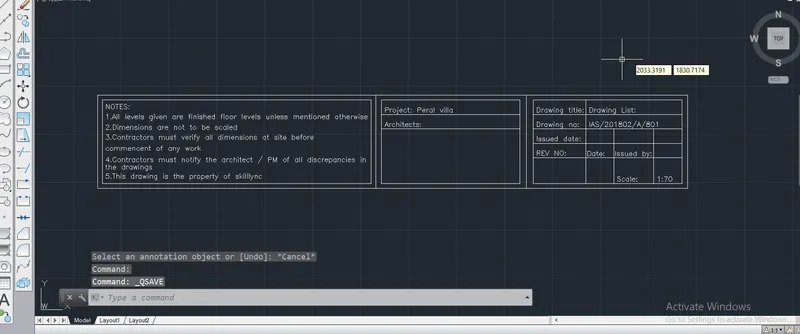
Result:
Drawing 4:
Aim and Introduction:
To Draw the Details of the Drawing reports using AUTOCAD
Procedure:
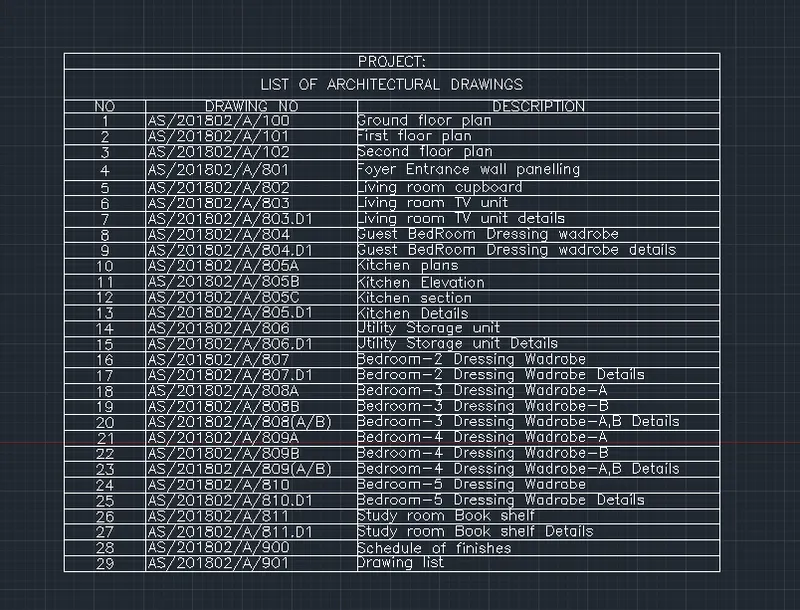
Command: TABLE
Specify the insertion point:
Command:
Command: Specify opposite corner:
Command:
Command:
Command: Specify opposite corner:
Command:
Command: Specify opposite corner or [Fence/WPolygon/CPolygon]:
Command: Specify opposite corner or [Fence/WPolygon/CPolygon]:
Command: _.erase 1 found
Command: Specify opposite corner:
Command:
Command:
Command:
Command: Specify opposite corner:
Command:
Result:
Drawing 5:
Aim and Introduction:
To Draw the Details of the Drawing reports using AUTOCAD
Procedure:
Command: L
LINE
Specify first point:
Specify next point or [Undo]:
Specify next point or [Undo]: *Cancel*
Command: Specify opposite corner or [Fence/WPolygon/CPolygon]:
Command: _.erase 1 found
Command: L
LINE
Specify first point:
Specify next point or [Undo]:
Specify next point or [Undo]: *Cancel*
Command: H
HATCH
Pick internal point or [Select objects/seTtings]: Selecting everything...
Selecting everything visible...
Analyzing the selected data...
Analyzing internal islands...
Pick internal point or [Select objects/seTtings]: *Cancel*
Command: *Cancel*
Command: Specify opposite corner or [Fence/WPolygon/CPolygon]:
Command: _.erase 1 found
Hatch boundary associativity removed.
Command:
Command:
Command: _QSAVE
Command: H
HATCH
Pick internal point or [Select objects/seTtings]: T
Pick internal point or [Select objects/seTtings]: S
Select objects or [picK internal point/seTtings]:Specify opposite corner: 0 found
Select objects or [picK internal point/seTtings]:K
Pick internal point or [Select objects/seTtings]: Selecting everything...
Selecting everything visible...
Analyzing the selected data...
Analyzing internal islands...
Pick internal point or [Select objects/seTtings]: *Cancel*
Command: H
HATCH
Pick internal point or [Select objects/seTtings]: T
Pick internal point or [Select objects/seTtings]: *Cancel*
Command: Specify opposite corner or [Fence/WPolygon/CPolygon]:
Command:
Command: _.erase 1 found
Hatch boundary associativity removed.
Command: *Cancel*
Command: h
HATCH
Pick internal point or [Select objects/seTtings]: S
Select objects or [picK internal point/seTtings]:K
Pick internal point or [Select objects/seTtings]: Selecting everything...
Selecting everything visible...
Analyzing the selected data...
Analyzing internal islands...
Pick internal point or [Select objects/seTtings]: Selecting everything...
Selecting everything visible...
Analyzing the selected data...
Analyzing internal islands...
Pick internal point or [Select objects/seTtings]: *Cancel*
Command:
Command: _.erase 1 found
Hatch boundary associativity removed.
Command: h
HATCH
Pick internal point or [Select objects/seTtings]: T
Pick internal point or [Select objects/seTtings]: S
Select objects or [picK internal point/seTtings]:K
Pick internal point or [Select objects/seTtings]: Selecting everything...
Selecting everything visible...
Analyzing the selected data...
Analyzing internal islands...
Pick internal point or [Select objects/seTtings]: Selecting everything...
Selecting everything visible...
Analyzing the selected data...
Analyzing internal islands...
Pick internal point or [Select objects/seTtings]: *Cancel*
Command: H
HATCH
Pick internal point or [Select objects/seTtings]: T
Pick internal point or [Select objects/seTtings]: Selecting everything...
Selecting everything visible...
Analyzing the selected data...
Analyzing internal islands...
Pick internal point or [Select objects/seTtings]: S
Select objects or [picK internal point/seTtings]:K
Pick internal point or [Select objects/seTtings]: Selecting everything...
Selecting everything visible...
Analyzing the selected data...
This area has already been specified.
Pick internal point or [Select objects/seTtings]: Selecting everything...
Selecting everything visible...
Analyzing the selected data...
This area has already been specified.
Pick internal point or [Select objects/seTtings]: Selecting everything...
Selecting everything visible...
Analyzing the selected data...
This area has already been specified.
Pick internal point or [Select objects/seTtings]: S
Select objects or [picK internal point/seTtings]:*Cancel*
Command: H
HATCH
Pick internal point or [Select objects/seTtings]: S
Select objects or [picK internal point/seTtings]:K
Pick internal point or [Select objects/seTtings]: Selecting everything...
Selecting everything visible...
Analyzing the selected data...
Analyzing internal islands...
Pick internal point or [Select objects/seTtings]: *Cancel*
Command: *Cancel*
Command: Specify opposite corner or [Fence/WPolygon/CPolygon]:
Command: Specify opposite corner or [Fence/WPolygon/CPolygon]:
Command: Specify opposite corner or [Fence/WPolygon/CPolygon]:
Command: h
HATCH
Pick internal point or [Select objects/seTtings]: T
Pick internal point or [Select objects/seTtings]: S
Select objects or [picK internal point/seTtings]:K
Pick internal point or [Select objects/seTtings]: Selecting everything...
Selecting everything visible...
Analyzing the selected data...
Analyzing internal islands...
Pick internal point or [Select objects/seTtings]: T
Pick internal point or [Select objects/seTtings]: S
Select objects or [picK internal point/seTtings]:K
Pick internal point or [Select objects/seTtings]: Selecting everything...
Selecting everything visible...
Analyzing the selected data...
This area has already been specified.
Pick internal point or [Select objects/seTtings]: *Cancel*
Command:
Command: _.erase 1 found
Hatch boundary associativity removed.
Command: h
HATCH
Pick internal point or [Select objects/seTtings]: S
Select objects or [picK internal point/seTtings]:K
Pick internal point or [Select objects/seTtings]: Selecting everything...
Selecting everything visible...
Analyzing the selected data...
Analyzing internal islands...
Pick internal point or [Select objects/seTtings]: *Cancel*
Command: *Cancel*
Command: h
HATCH
Pick internal point or [Select objects/seTtings]: T
Pick internal point or [Select objects/seTtings]: S
Select objects or [picK internal point/seTtings]:K
Pick internal point or [Select objects/seTtings]: Selecting everything...
Selecting everything visible...
Analyzing the selected data...
Analyzing internal islands...
Pick internal point or [Select objects/seTtings]: T
Pick internal point or [Select objects/seTtings]: *Cancel*
Command:
Command: _.erase 1 found
Hatch boundary associativity removed.
Command: Specify opposite corner or [Fence/WPolygon/CPolygon]:
Command: Specify opposite corner or [Fence/WPolygon/CPolygon]:
Command: *Cancel*
Command: Specify opposite corner or [Fence/WPolygon/CPolygon]:
Command: Specify opposite corner or [Fence/WPolygon/CPolygon]:
Command: Specify opposite corner or [Fence/WPolygon/CPolygon]:
Command: Specify opposite corner or [Fence/WPolygon/CPolygon]:
Command: _.erase 1 found
Hatch boundary associativity removed.
Command: Specify opposite corner or [Fence/WPolygon/CPolygon]:
Command: Specify opposite corner or [Fence/WPolygon/CPolygon]:
Command: _.erase 2 found
Hatch boundary associativity removed.
Hatch boundary associativity removed.
Command: Specify opposite corner or [Fence/WPolygon/CPolygon]:
Command: h
HATCH
Pick internal point or [Select objects/seTtings]: S
Select objects or [picK internal point/seTtings]:K
Pick internal point or [Select objects/seTtings]: Selecting everything...
Selecting everything visible...
Analyzing the selected data...
Analyzing internal islands...
Pick internal point or [Select objects/seTtings]: *Cancel*
Command:
Command:
Command: _SAVEAS
Command:
Command:
Command: _QSAVE
Command: DIMLIN
DIMLINEAR
Specify first extension line origin or <select object>:
Specify second extension line origin:
Specify dimension line location or
[Mtext/Text/Angle/Horizontal/Vertical/Rotated]: *Cancel*
Command: *Cancel*
Command: *Cancel*
Command: DIMSTY
DIMSTYLE
Command: DIMLIN
DIMLINEAR
Specify first extension line origin or <select object>:
Specify second extension line origin:
Specify dimension line location or
[Mtext/Text/Angle/Horizontal/Vertical/Rotated]: *Cancel*
Command: DIMLIN
DIMLINEAR
Specify first extension line origin or <select object>:
Specify second extension line origin:
Specify dimension line location or
[Mtext/Text/Angle/Horizontal/Vertical/Rotated]:
Dimension text = 3"
Command: DIMLIN
DIMLINEAR
Specify first extension line origin or <select object>:
Specify second extension line origin:
Specify dimension line location or
[Mtext/Text/Angle/Horizontal/Vertical/Rotated]:
Dimension text = 9"
Command: LEADER
Specify leader start point:
Specify next point:
Specify next point or [Annotation/Format/Undo] <Annotation>:
Specify next point or [Annotation/Format/Undo] <Annotation>:
Enter first line of annotation text or <options>: le
Enter next line of annotation text: *Cancel*
Command: *Cancel*
Command: LEADER
Specify leader start point:
Specify next point:
Specify next point or [Annotation/Format/Undo] <Annotation>:
Specify next point or [Annotation/Format/Undo] <Annotation>:
Specify next point or [Annotation/Format/Undo] <Annotation>:
Specify next point or [Annotation/Format/Undo] <Annotation>:
Specify next point or [Annotation/Format/Undo] <Annotation>:
Specify next point or [Annotation/Format/Undo] <Annotation>:
Enter first line of annotation text or <options>: ground
Enter next line of annotation text: Ground
Enter next line of annotation text:
Command:
LEADER
Specify leader start point:
Specify next point:
Specify next point or [Annotation/Format/Undo] <Annotation>:
Specify next point or [Annotation/Format/Undo] <Annotation>:
Specify next point or [Annotation/Format/Undo] <Annotation>:
Specify next point or [Annotation/Format/Undo] <Annotation>:
Specify next point or [Annotation/Format/Undo] <Annotation>:
Specify next point or [Annotation/Format/Undo] <Annotation>:
Specify next point or [Annotation/Format/Undo] <Annotation>:
Specify next point or [Annotation/Format/Undo] <Annotation>: *Cancel*
Command: *Cancel*
Command: Specify opposite corner or [Fence/WPolygon/CPolygon]:
Command: _.erase 2 found
Command: LEADER
Specify leader start point:
Specify next point:
Specify next point or [Annotation/Format/Undo] <Annotation>:
Specify next point or [Annotation/Format/Undo] <Annotation>: F
Enter leader format option [Spline/STraight/Arrow/None] <Exit>: N
Specify next point or [Annotation/Format/Undo] <Annotation>:
Specify next point or [Annotation/Format/Undo] <Annotation>:
Specify next point or [Annotation/Format/Undo] <Annotation>:
Specify next point or [Annotation/Format/Undo] <Annotation>:
Enter first line of annotation text or <options>:
Enter an annotation option [Tolerance/Copy/Block/None/Mtext] <Mtext>: M
Command: COPY
Select objects: 1 found
Select objects:
Current settings: Copy mode = Multiple
Specify base point or [Displacement/mOde] <Displacement>: *Cancel*
Command: COPY
Select objects:
Command: Specify opposite corner or [Fence/WPolygon/CPolygon]:
Command: Specify opposite corner or [Fence/WPolygon/CPolygon]:
Command:
** STRETCH **
Specify stretch point or [Base point/Copy/Undo/eXit]:
Dimension disassociated.
Command: _u Grip Edit
Command:
Command:
Command:
Command: _copy 2 found
Current settings: Copy mode = Multiple
Specify base point or [Displacement/mOde] <Displacement>:
Specify second point or [Array] <use first point as displacement>:
Specify second point or [Array/Exit/Undo] <Exit>: *Cancel*
Dimension disassociated.
Command:
Command: *Cancel*
Command:
Command:
Command:
Command: _mtedit
Command: *Cancel*
Command: LEADER
Specify leader start point:
Command: *Cancel*
Command: *Cancel*
Command: *Cancel*
Command: QLEADER
Specify first leader point, or [Settings] <Settings>: S
Specify first leader point, or [Settings] <Settings>:
Specify next point:
Command: *Cancel*
Command: *Cancel*
Command: l
LINE
Specify first point:
Specify next point or [Undo]: <Ortho off> 2.0"
Specify next point or [Undo]: *Cancel*
Command: mi
MIRROR
Select objects: 1 found
Select objects:
Specify first point of mirror line: Specify second point of mirror line:
Erase source objects? [Yes/No] <N>: n
Command: *Cancel*
Command: *Cancel*
Command: COPY
Select objects: 1 found
Select objects: 1 found, 2 total
Select objects:
Current settings: Copy mode = Multiple
Specify base point or [Displacement/mOde] <Displacement>:
Specify second point or [Array] <use first point as displacement>:
Specify second point or [Array/Exit/Undo] <Exit>: *Cancel*
Result: