Assignment 5-RADIOSS Interfaces & Study of Effect of Notches Challenge
Create the mesh for bumper assembly with a mesh size of 6mm.
1. First we are going to import the model. The profile we are going to use is OptiStruct.
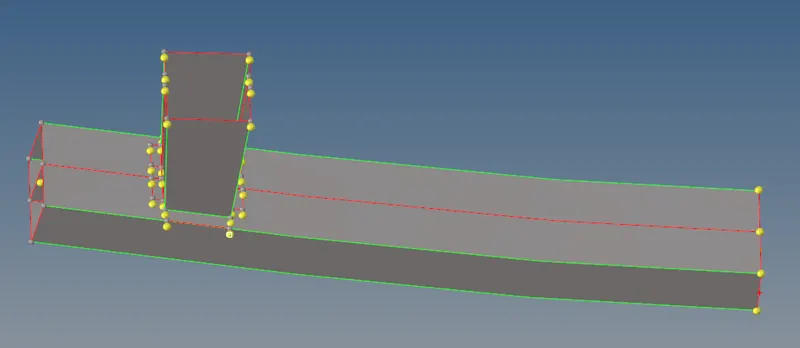
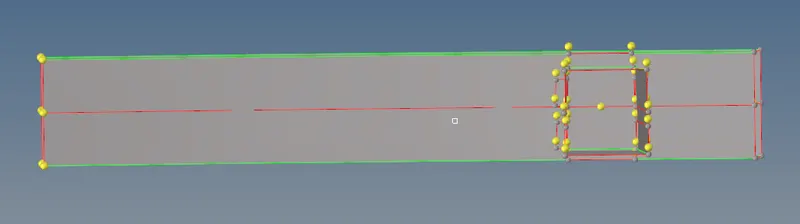
2. Now we are going to do the geometry clean-up in the mid surface of the bumper.
Before:-
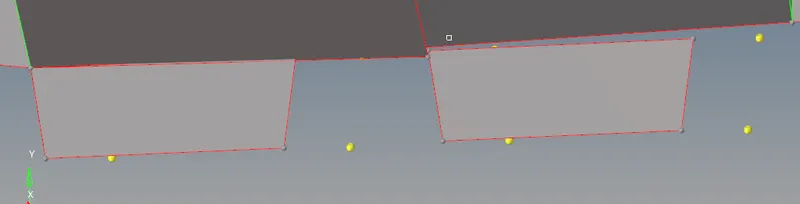
Now to fix this error we need to use the Toggle command. To use this command, we need to use the Quick Access command (shortcut-F11). In this tab, we need to use the Toggle edges option as shown. This command will basically join the lines together. 
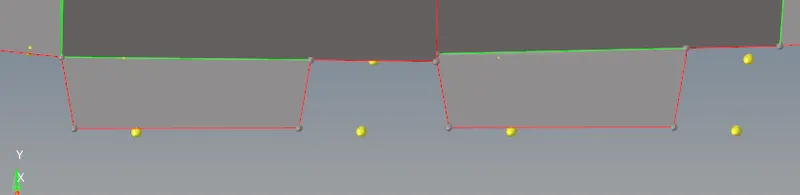
There is a free edge in the model.
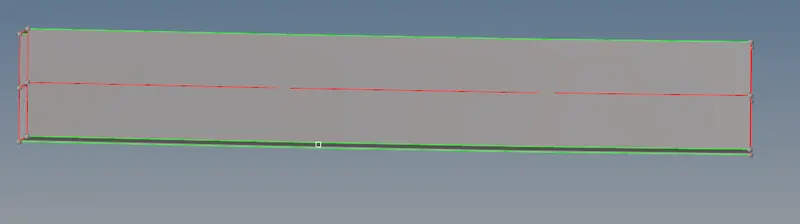
To remove that we will go to surface edit (Shift+F9) and we are going to use extend option and we are going to extend the free edge to the surface.

After:-
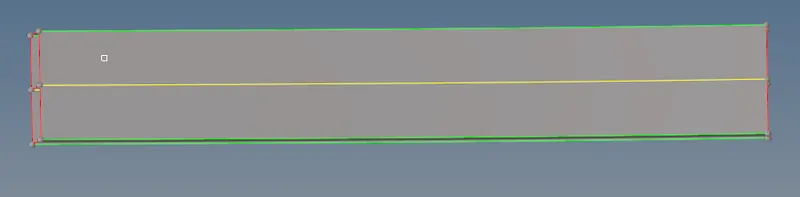
3. After the geometry clean up we are going to start the meshing.
For meshing, we have to go 2D--> automesh

We need to give the Average element length as 6.0mm as mentioned. 
4. After the meshing the component will look like this
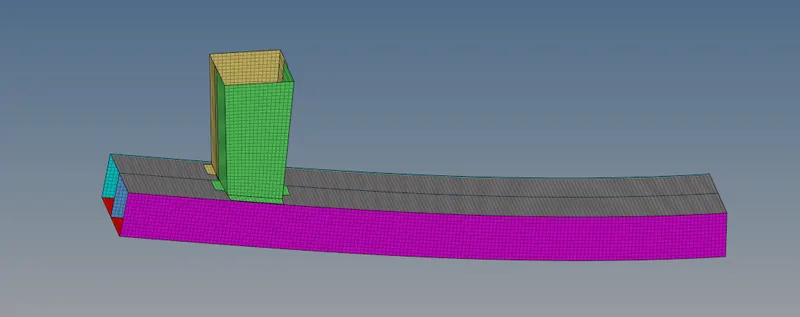
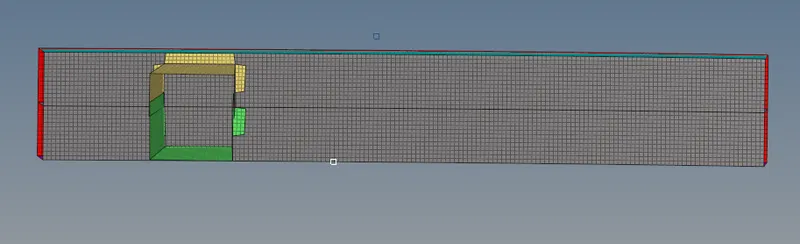
Objective
Compare the result of all cases of the crash tube. Plot RWALL forces, contact forces, internal energy, and Create TH/PART for all parts and compare results for all cases. Compare how the result changes with the notches in the model.
Introduction
Interface/Contact Modeling
When two components meet, we have to define that how they are going to interact with each other. In the RADIOSS when we give any type of interface we have to define slave and master nodes. Apart from the TYPE2 in every type of contact, the slave nodes are going to be penetrated in the master segment. The master segment can be parts components, elements, contact surface, node surface sets, and slave entities can be parts components and node sets. There are some contact type:-
Type 7
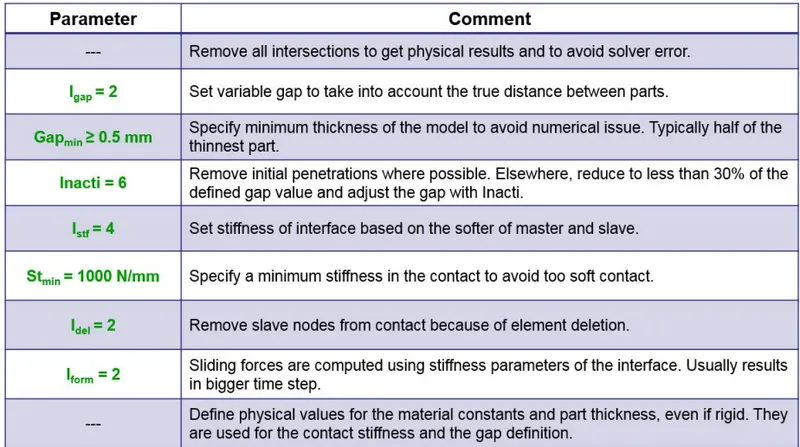
This is a Nodes to the Surface contact type. This type of contact uses the penalty method with variable stiffness. In this, we define the gap between the master and slave segments. This gap can be constant or variable. There are some resistive forces are applied so that the slave nodes do not go into the contact gap. It is a physically corrected representation of the contact. It gives us high accuracy for self contact and buckling. This is the best option for the shell to shell or solid to solid contact.
Type 11
Type 11 contact is the edge-to-edge contact. When we have locking cases, Type 11 with Type 7 contact solves the problem of locking. For defining Type 11 contact we have to select master and slave lines. It works the same as Type 7 in terms of penalty formulation, gap definition, and search area.
Recommended values of type 7 and type 11 contact are:-
Procedure
Case-1. Run the crash tube model as it is.
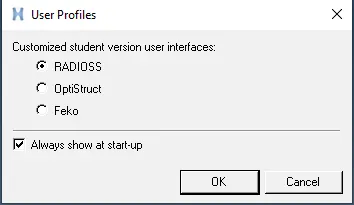
1. We are going to choose the profile to be Radioss.
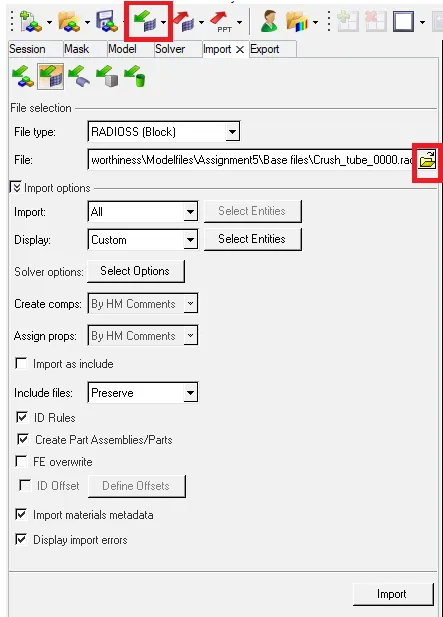
2. Now we are going to import the model.
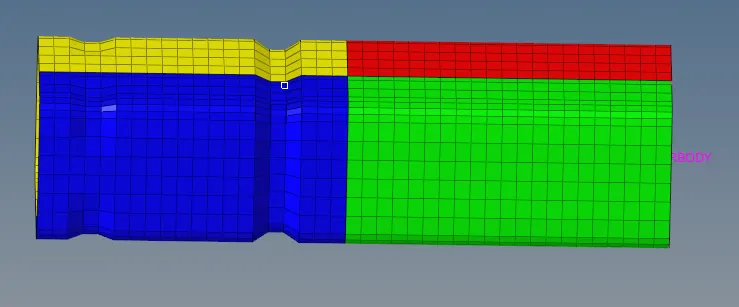
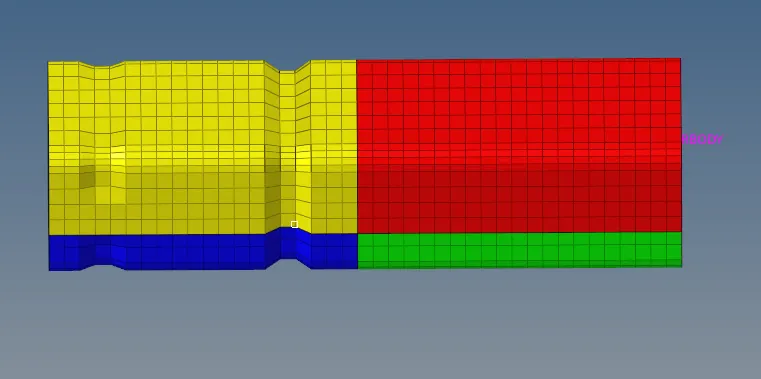
3. Now we are going to check the unit of the model. For that, we will go to the BEGIN_CARD.
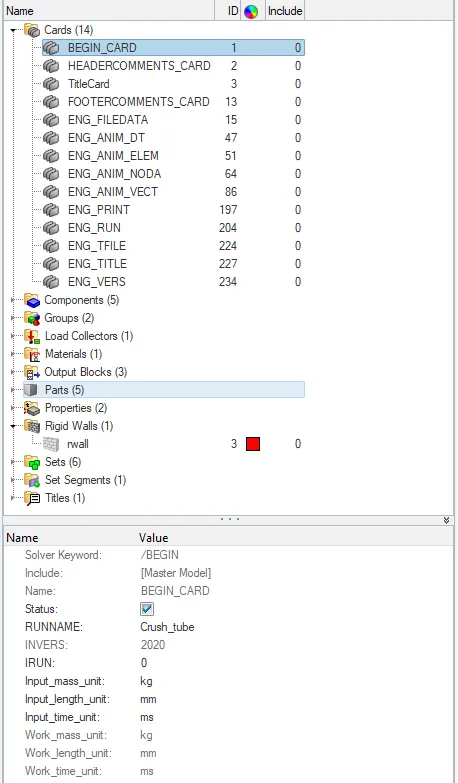
So the unit of the system is in kg, mm, ms.
4. Now we are going to run the simulation. To run the simulation we will go to the Analysis-->Radioss


5. To check the simulation we have done is correct or not we are going to check the energy error and mass error. If it is in the accepted range then we can say that our simulation is correct.
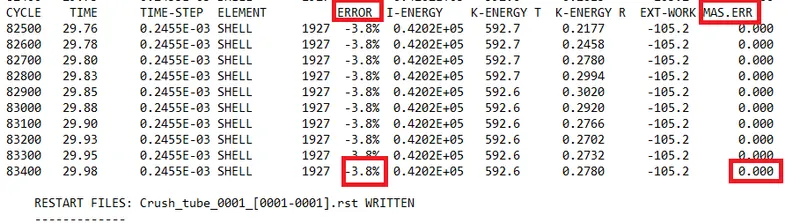
The energy error is between -15% to 5% and the mass error is 0. That is very less so we can see that the simulation we have done is right.
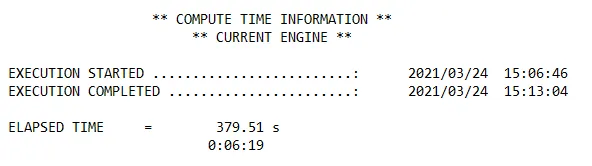
The total running time of the simulation was 379 seconds.
6. Now we are going to analyze the simulation and we are going to plot the required graph.
Output
Von Mises Gif
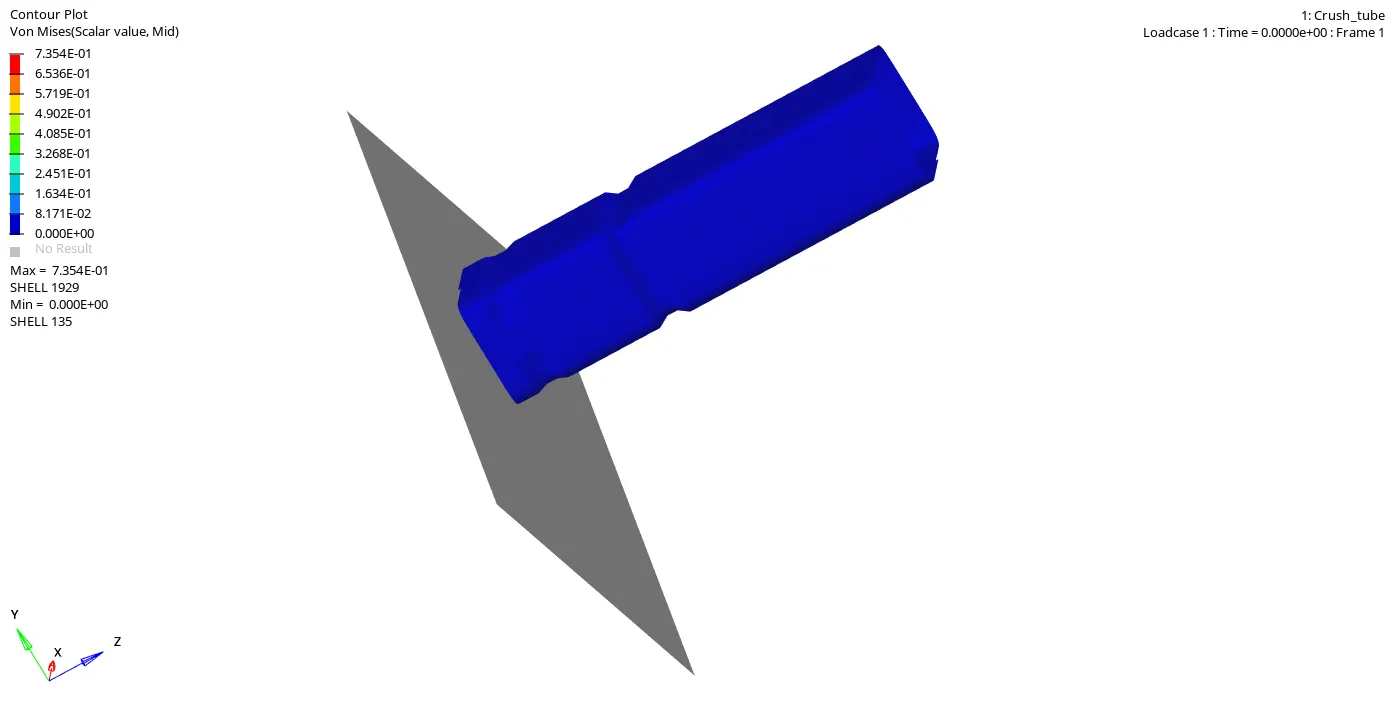
Von Mises stress is a value used to determine if a given material will yield or fracture. It is mostly used for ductile materials, such as metals. The von Mises yield criterion states that if the von Mises stress of a material under load is equal or greater than the yield limit of the same material under simple tension then the material will yield.
From the simulation, we can see that with respect to time, as the elements are hitting the rigid wall they deformed. So first the element which is in the front of the tube get impact and they deformed and with time, the elements which are impacting the wall getting deformed.
Energies
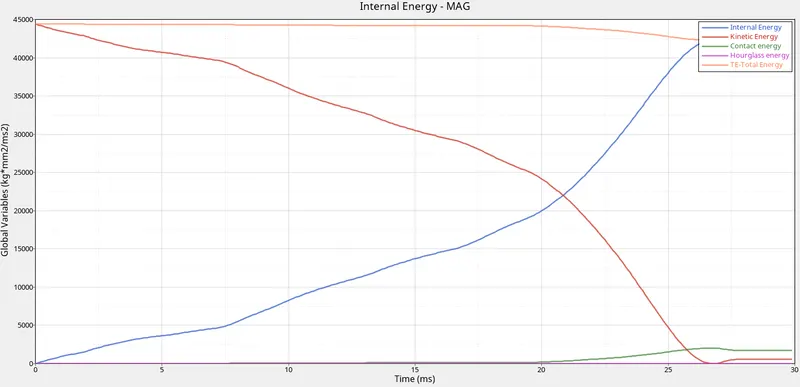
From the above graph, we can see that with the time, when the tube gets impact on the wall the velocity of the tube decreases, and because of that the kinetic energy also decreases. The internal energy of the model gets increases with time.
The total energy is the sum of the kinetic energy and the internal energy. So because of some contact energy, the total energy is decreasing at the end of the simulation.
Contact Energy is the energy due to contact between two elements. So when the deformation occurs elements start to get in contact with each other so due to contact between elements we get the contact energy. We are getting very low contact energy in the simulation.
We have taken the shell element to be QEPH so we get hourglass energy to be zero.
Internal Energy
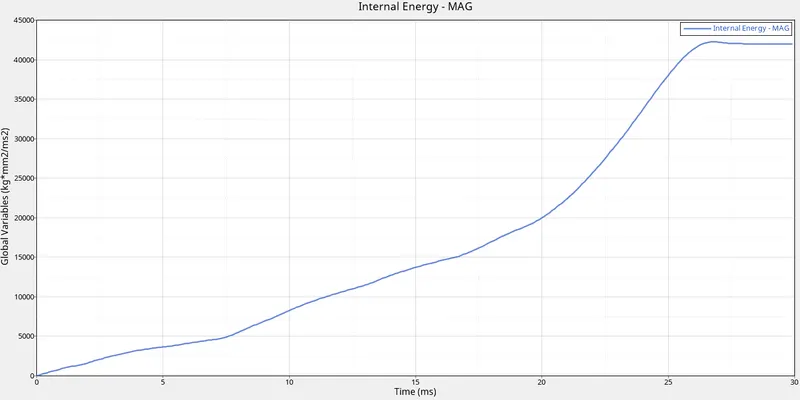
When the kinetic energy of the model decreases, it stored in the system as internal energy. So when the kinetic energy of the model decreases, the internal energy of the system starts increasing and in the end gets almost constant because at that time the velocity of the tube gets very low so the kinetic energy was almost constant at that time.
RWALL Forces
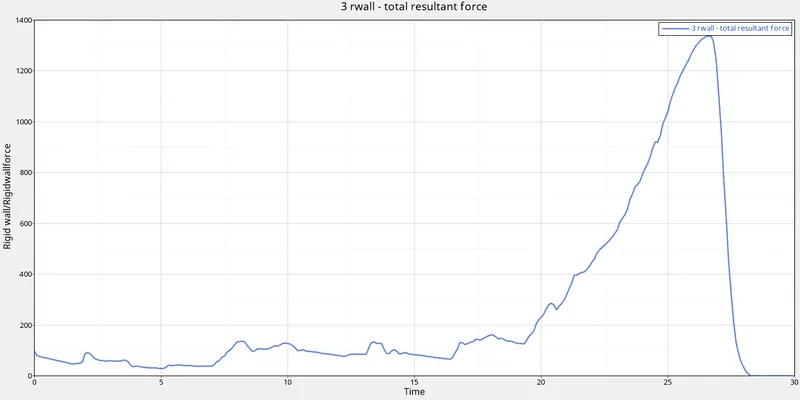
Rigid wall forces are the forces that are acting on the rigid wall by the other object.
In this case, the tube has velocity, so when the tube impacts the rigid wall, it applies forces on the wall. These forces are the rigid wall forces with respect to time these forces are increasing and after 25 ms it increases rapidly and in the end, it goes to zero.
Contact Forces
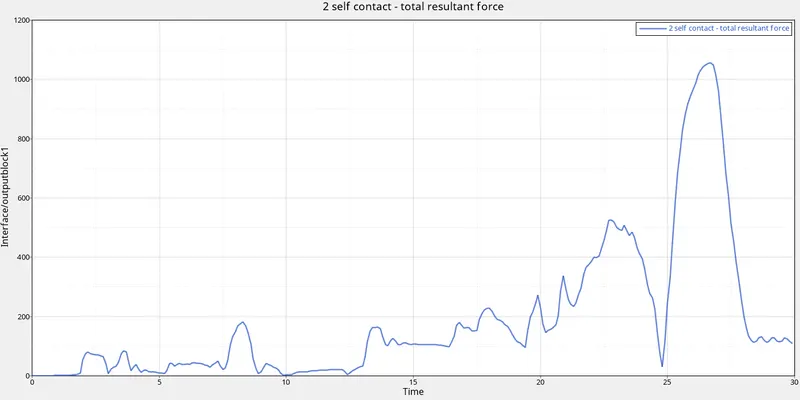
Contact force is the energy due to contact between two elements. So when the deformation occurs elements start to get in contact with each other so due to contact between elements we get the contact force.
In the starting, the contact force was zero. So when elements start to deformed we get the contact force. We get the contact force to be maximum at 27 ms because at that time the contact between elements was very high after that it reduced.
Case-2. Change the Inacti=6 and run.
After importing the model in this case we are going to change Inacti value to be 6 and run the simulation.
Inacti
When we are creating any kind of interface we have to select slave and master node. Then we have to check that initially, they are no penetration in between them. So if there is any penetration we have to take action for the initial penetration. We have to remove the penetration.
To remove the penetration the recommended value is Inacti = 6. So solver reduced and scaled the gap. So when we reduced the gap, the initial penetration problem gets resolved.
So in order to that, we will go to the Groups--> Self contact
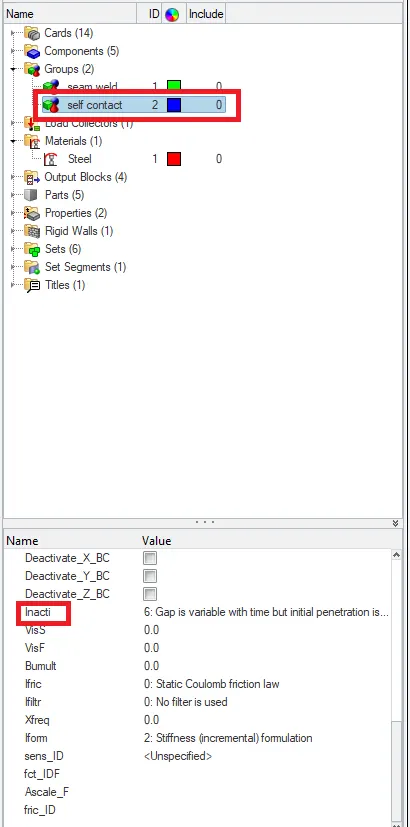
After changing the value of Inacti. We are going to run the simulation. To run the simulation we will go to the Analysis-->Radioss

To check the simulation we have done is correct or not we are going to check the energy error and mass error. If it is in the accepted range then we can say that our simulation is correct.
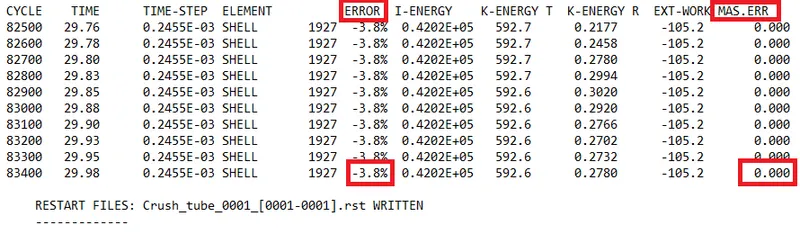
The energy error is between -15% to 5% and the mass error is 0. That is very less so we can see that the simulation we have done is right.
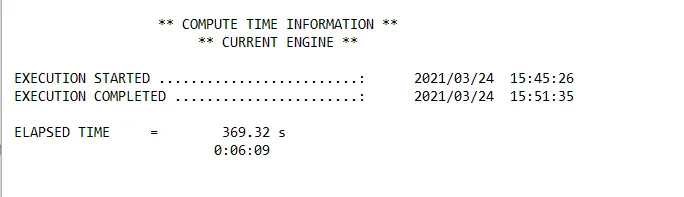
The total running time of the simulation was 369 seconds.
Now we are going to analyze the simulation and we are going to plot the required graph.
Output
Von Mises Gif
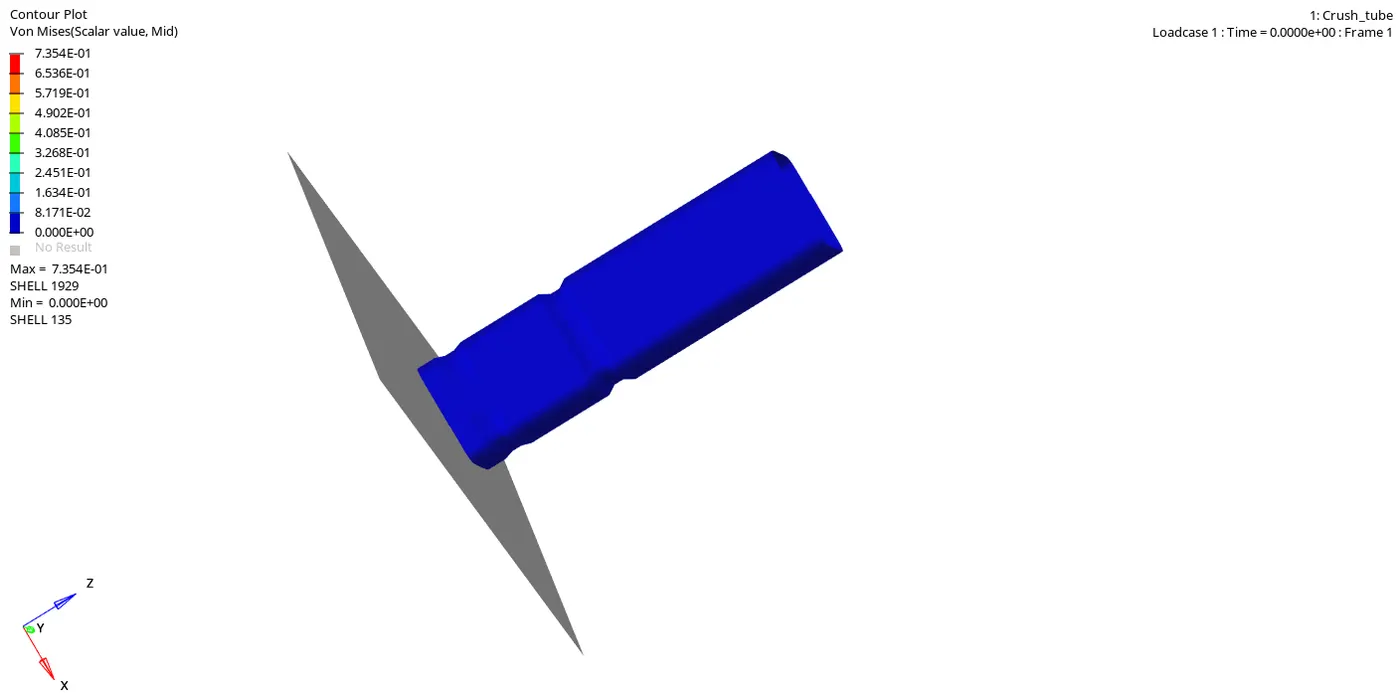
From the simulation, we can see that with respect to time, as the elements are hitting the rigid wall they deformed. So first the element which is in the front of the tube get impact and they deformed and with time, the elements which are impacting the wall getting deformed.
Energies
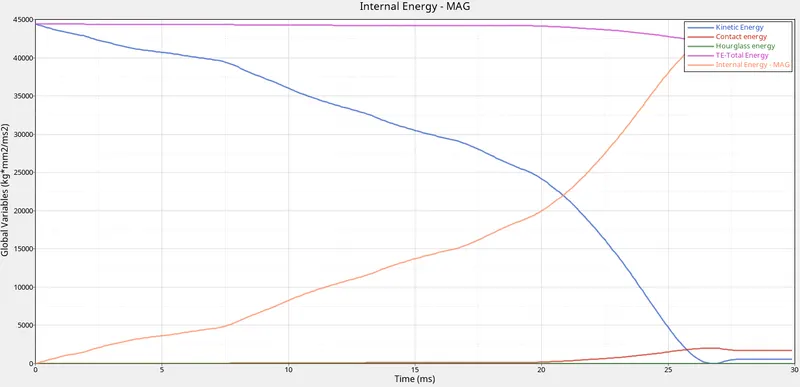
From the above graph, we can see that with the time, when the tube gets impact on the wall the velocity of the tube decreases, and because of that the kinetic energy also decreases. The internal energy of the model gets increases with time.
The total energy is the sum of the kinetic energy and the internal energy. So because of some contact energy, the total energy is decreasing at the end of the simulation.
Contact Energy is the energy due to contact between two elements. So when the deformation occurs elements start to get in contact with each other so due to contact between elements we get the contact energy. We are getting very low contact energy in the simulation.
We have taken the shell element to be QEPH so we get hourglass energy to be zero.
Internal Energy
When the kinetic energy of the model decreases, it stored in the system as internal energy. So when the kinetic energy of the model decreases, the internal energy of the system starts increasing and in the end gets almost constant because at that time the velocity of the tube gets very low so the kinetic energy was almost constant at that time.
RWALL Forces
Rigid wall forces are the forces that are acting on the rigid wall by the other object.
In this case, the tube has velocity, so when the tube impacts the rigid wall, it applies forces on the wall. These forces are the rigid wall forces with respect to time these forces are increasing and after 25 ms it increases rapidly and in the end, it goes to zero.
Contact Forces
Contact force is the energy due to contact between two elements. So when the deformation occurs elements start to get in contact with each other so due to contact between elements we get the contact force.
In the starting, the contact force was zero. So when elements start to deformed we get the contact force. We get the contact force to be maximum at 27 ms because at that time the contact between elements was very high after that it reduced.
Case-3. Create the type 11 contact and run.
After importing the model in this case we are going to create type 11 contact and run the simulation.
To create the type 11 contact
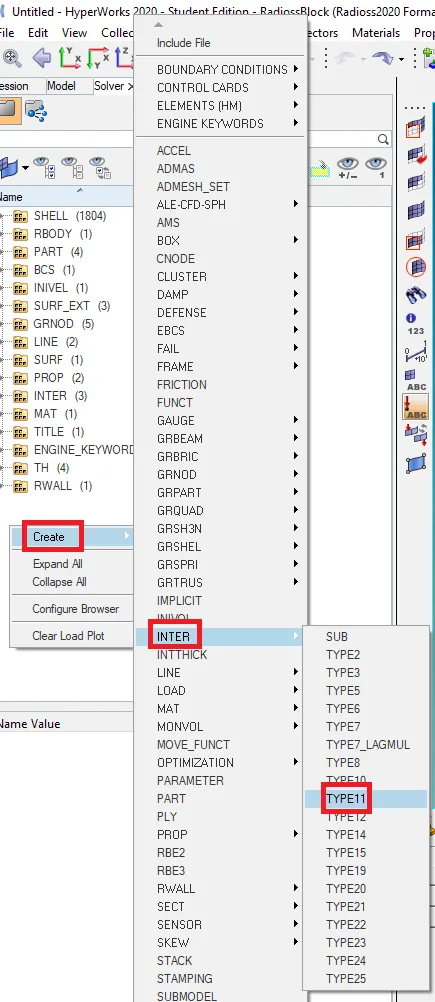
Now we are going to give the recommended value to the contact.
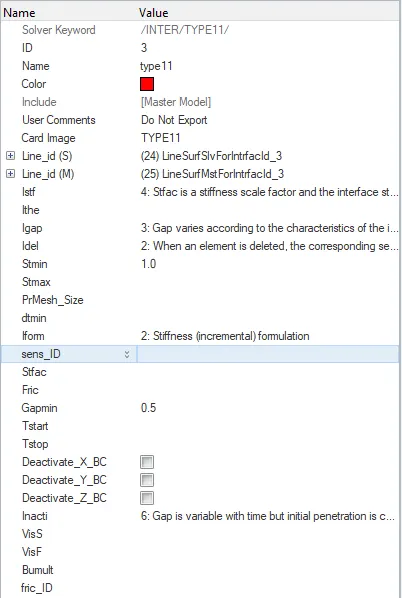
After creating the type 11 contact. We are going to run the simulation. To run the simulation we will go to the Analysis-->Radioss

To check the simulation we have done is correct or not we are going to check the energy error and mass error. If it is in the accepted range then we can say that our simulation is correct.
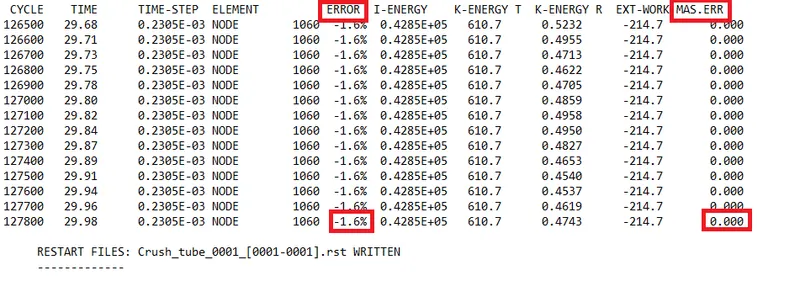
The energy error is between -15% to 5% and the mass error is 0. That is very less so we can see that the simulation we have done is right.
The total running time of the simulation was 99 seconds.
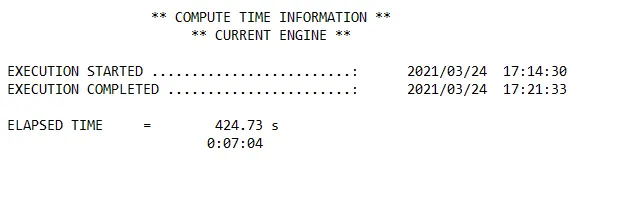
Now we are going to analyze the simulation and we are going to plot the required graph.
Output
Von Mises Gif
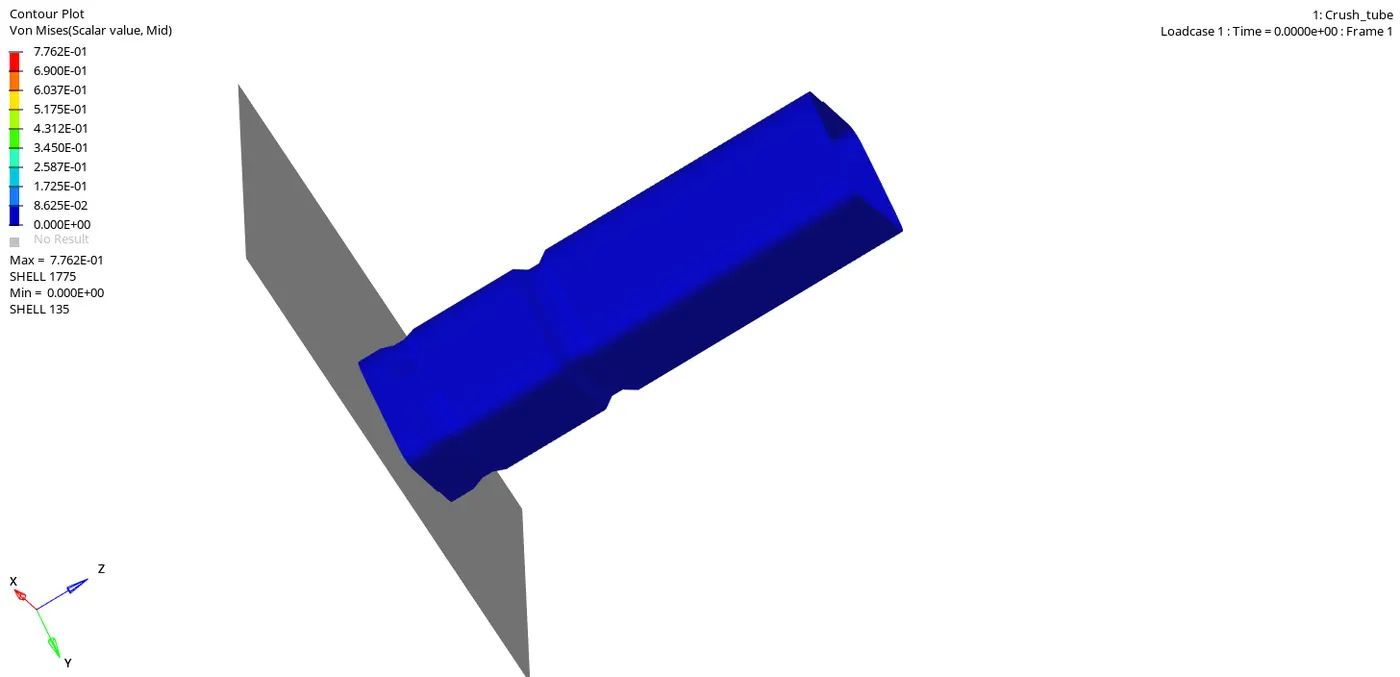
From the simulation, we can see that with respect to time, as the elements are hitting the rigid wall they deformed. So first the element which is in the front of the tube get impact and they deformed and with time, the elements which are impacting the wall getting deformed.
Energies
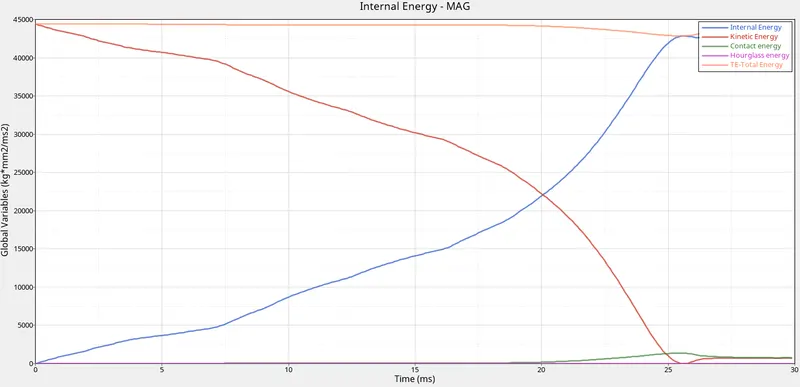
From the above graph, we can see that with the time, when the tube gets impact on the wall the velocity of the tube decreases, and because of that the kinetic energy also decreases. The internal energy of the model gets increases with time.
The total energy is the sum of the kinetic energy and the internal energy. So because of some contact energy, the total energy is decreasing at the end of the simulation.
Contact Energy is the energy due to contact between two elements. So when the deformation occurs elements start to get in contact with each other so due to contact between elements we get the contact energy. We are getting very low contact energy in the simulation.
We have taken the shell element to be QEPH so we get hourglass energy to be zero.
Internal Energy
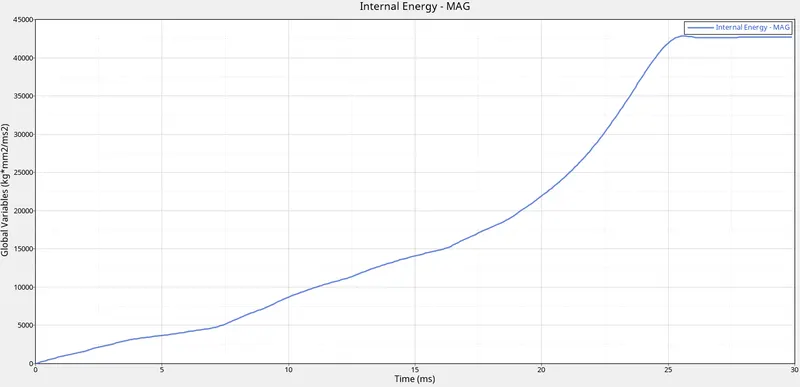
When the kinetic energy of the model decreases, it stored in the system as internal energy. So when the kinetic energy of the model decreases, the internal energy of the system starts increasing and in the end gets almost constant because at that time the velocity of the tube gets very low so the kinetic energy was almost constant at that time.
RWALL Forces
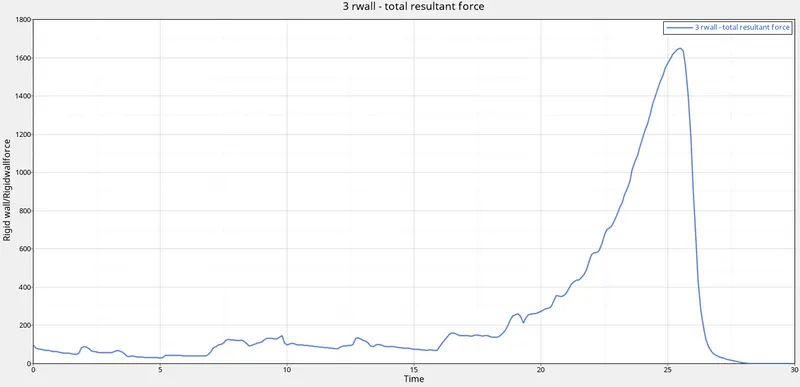
Rigid wall forces are the forces that are acting on the rigid wall by the other object.
In this case, the tube has velocity, so when the tube impacts the rigid wall, it applies forces on the wall. These forces are the rigid wall forces with respect to time these forces are increasing and after 25 ms it increases rapidly and in the end, it goes to zero.
Contact Forces
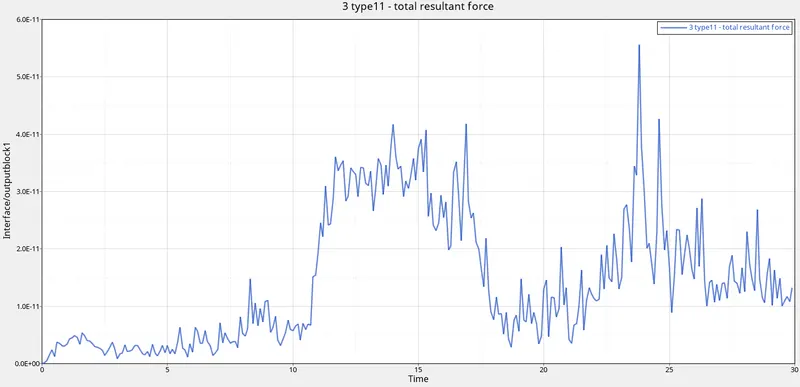
Contact force is the energy due to contact between two elements. So when the deformation occurs elements start to get in contact with each other so due to contact between elements we get the contact force.
In the starting, the contact force was zero. So when elements start to deformed we get the contact force. Contact forces increase high just after 10 ms then after some time it decreases and again it increases for 2 ms and then again it decreases.
Case-4. Remove both notches and remove boundary condition on rigid body node then run
After importing the model in this case we are going to remove the notches and remove the boundary condition of the rigid body and then we are going to run the simulation.
Model:-
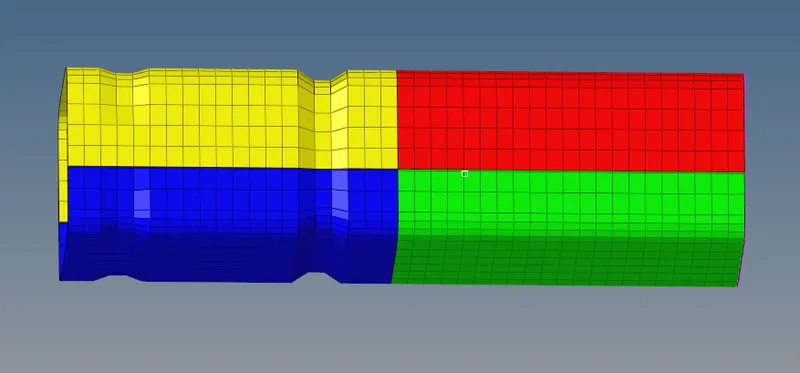
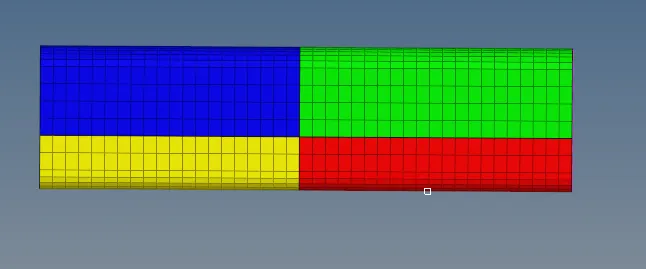
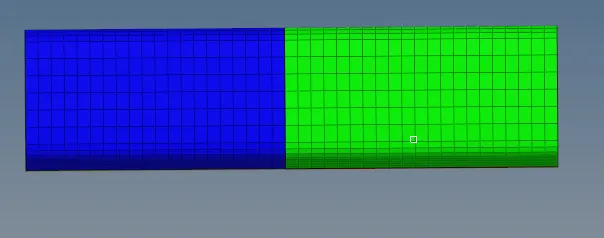
To remove the notches we will go to the Geom--> node edit (F7)

By this, we are going to make the nodes that are in the notch to be aligned to the flat surfaces. After aligning the nodes the crash tube will be like this:-
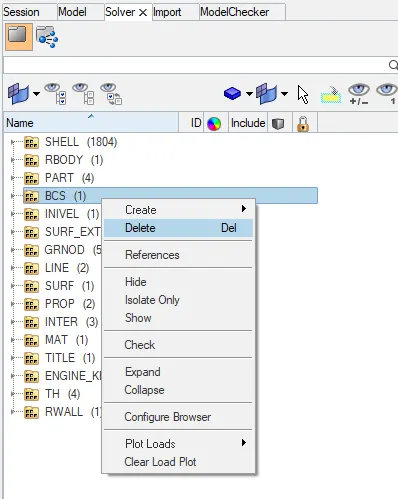
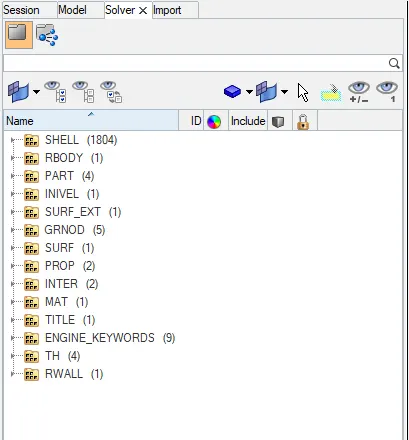
Now we are going to delete the boundary condition of the rigid body. To delete that we will go to the solver and from there we will delete the boundary condition.
After removing the notches and deleting the boundary condition we are going to run the simulation.
To run the simulation we will go to the Analysis-->Radioss

To check the simulation we have done is correct or not we are going to check the energy error and mass error. If it is in the accepted range then we can say that our simulation is correct.
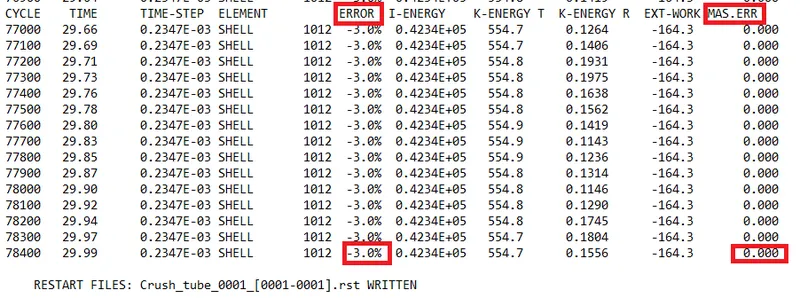
The energy error is between -15% to 5% and the mass error is 0. That is very less so we can see that the simulation we have done is right.
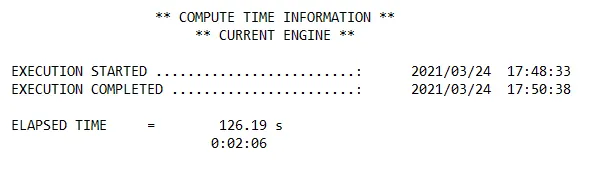
The total running time of the simulation was 126 seconds.
Now we are going to analyze the simulation and we are going to plot the required graph.
Output
Von Mises Gif
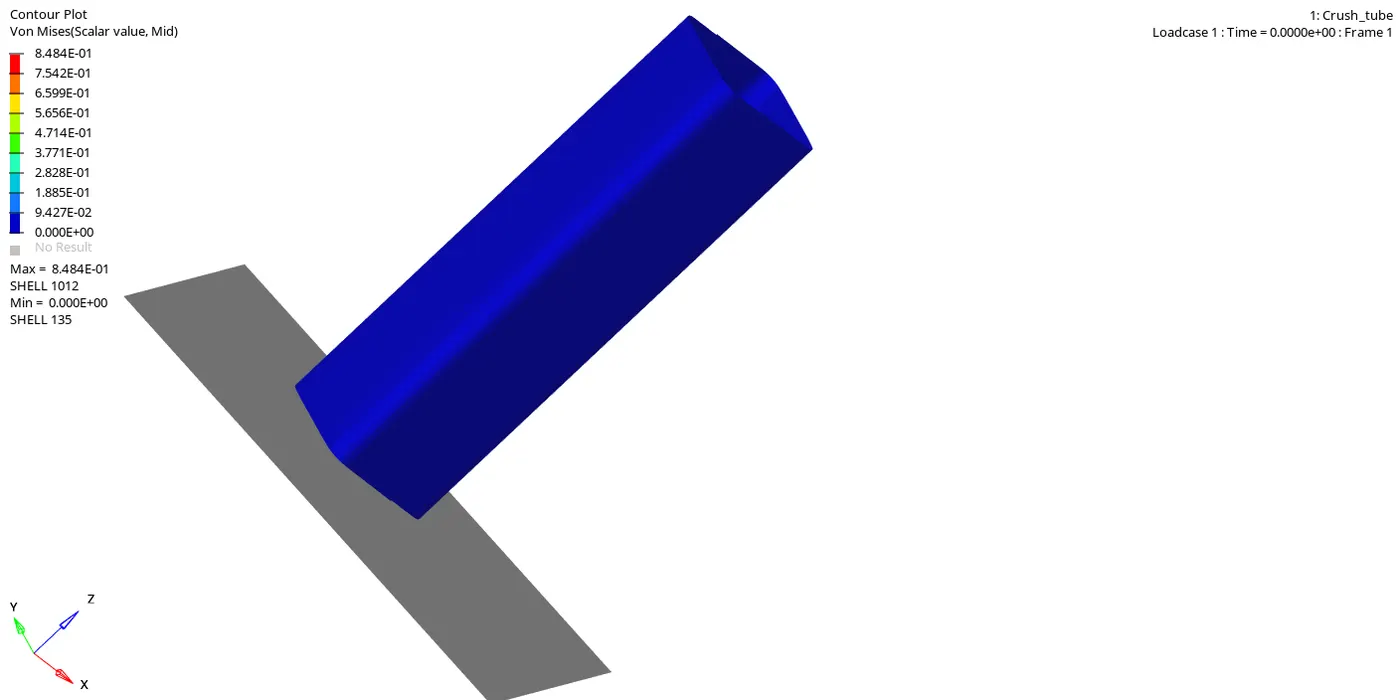
From the simulation, we can see that with respect to time, as the elements are hitting the rigid wall they deformed. So first the element which is in the front of the tube get impact and they deformed and with time, the elements which are impacting the wall getting deformed.
Energies
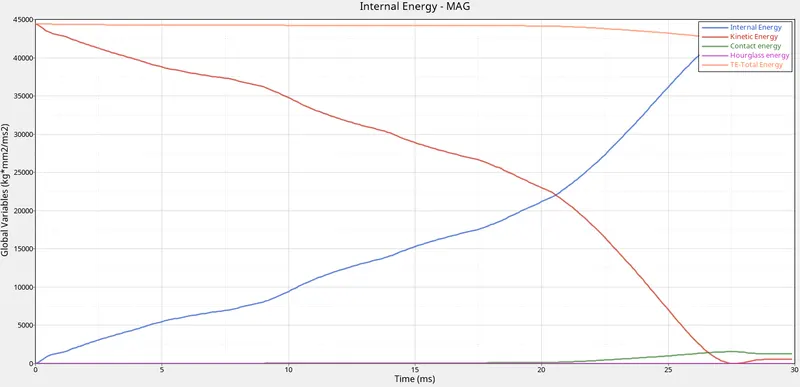
From the above graph, we can see that with the time, when the tube gets impact on the wall the velocity of the tube decreases, and because of that the kinetic energy also decreases. The internal energy of the model gets increases with time.
The total energy is the sum of the kinetic energy and the internal energy. So because of some contact energy, the total energy is decreasing at the end of the simulation.
Contact Energy is the energy due to contact between two elements. So when the deformation occurs elements start to get in contact with each other so due to contact between elements we get the contact energy. We are getting very low contact energy in the simulation.
We have taken the shell element to be QEPH so we get hourglass energy to be zero.
Internal Energy
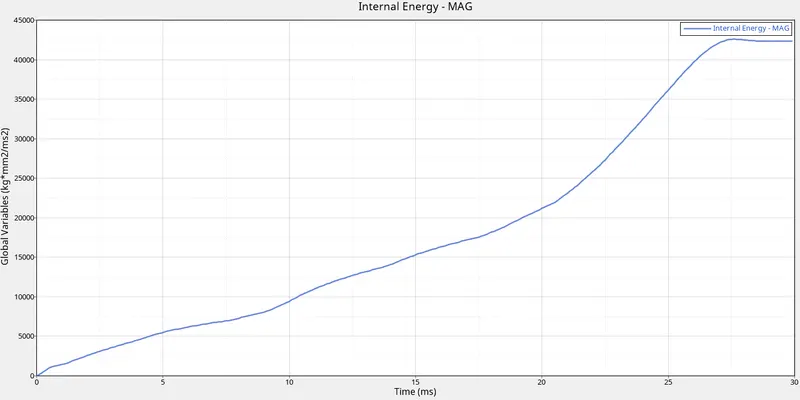
When the kinetic energy of the model decreases, it stored in the system as internal energy. So when the kinetic energy of the model decreases, the internal energy of the system starts increasing and in the end gets almost constant because at that time the velocity of the tube gets very low so the kinetic energy was almost constant at that time.
RWALL Forces
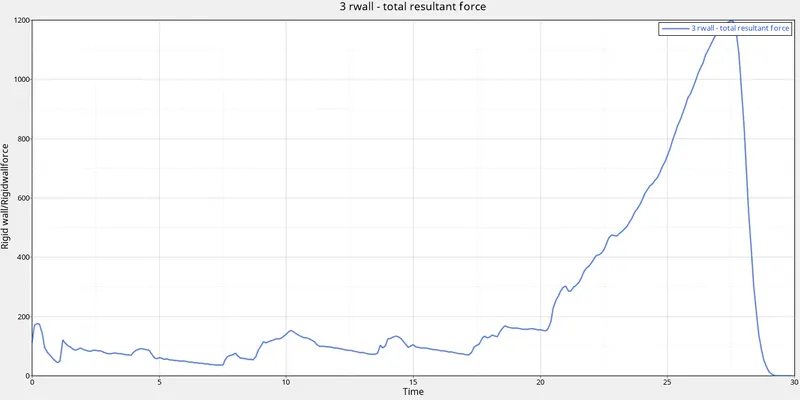
Rigid wall forces are the forces that are acting on the rigid wall by the other object.
In this case, the tube has velocity, so when the tube impacts the rigid wall, it applies forces on the wall. These forces are the rigid wall forces with respect to time these forces are increasing and after 25 ms it increases rapidly and in the end, it goes to zero.
Contact Forces
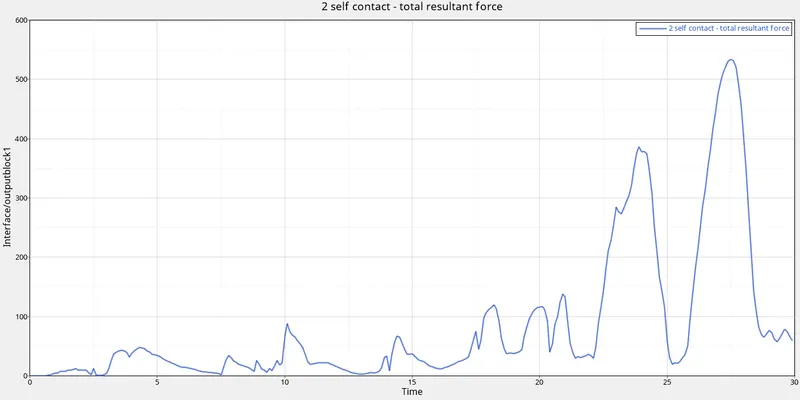
Contact force is the energy due to contact between two elements. So when the deformation occurs elements start to get in contact with each other so due to contact between elements we get the contact force.
In the starting, the contact force was zero. So when elements start to deformed we get the contact force. Contact force increases at 22 ms and then it decreases and just after that, it goes to the maximum and then again it decreases.
Case-5. Create a new notch in the middle, select the whole section and run.
In this case, we are going to create a notch at the middle of the crash tube with the node edit tool and after that, we are going to remove all other notches, and then we are going to run the simulation.
Model:-
To remove the notches and create the new one we are going to use the align option in the node edit tool. For that we will go to the Geom--> node edit (F7)
After the changes in the geometry:-
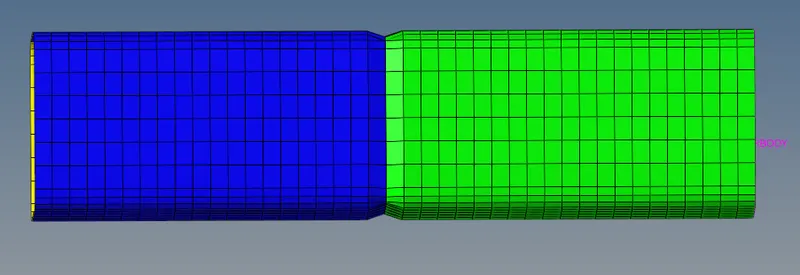
After changing the required changes in the geometry we are going to run the simulation.
To run the simulation we will go to the Analysis-->Radioss

To check the simulation we have done is correct or not we are going to check the energy error and mass error. If it is in the accepted range then we can say that our simulation is correct.
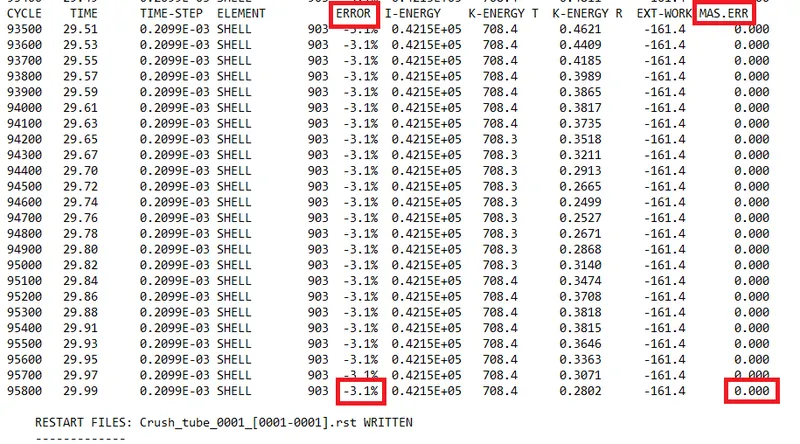
The energy error is between -15% to 5% and the mass error is 0. That is very less so we can see that the simulation we have done is right.
The total running time of the simulation was 164 seconds.
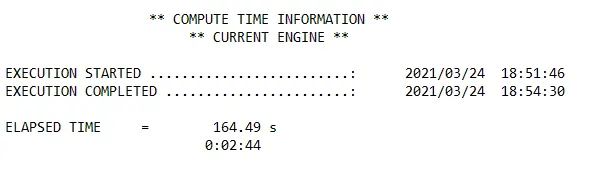
Now we are going to analyze the simulation and we are going to plot the required graph.
Output
Von Mises Gif
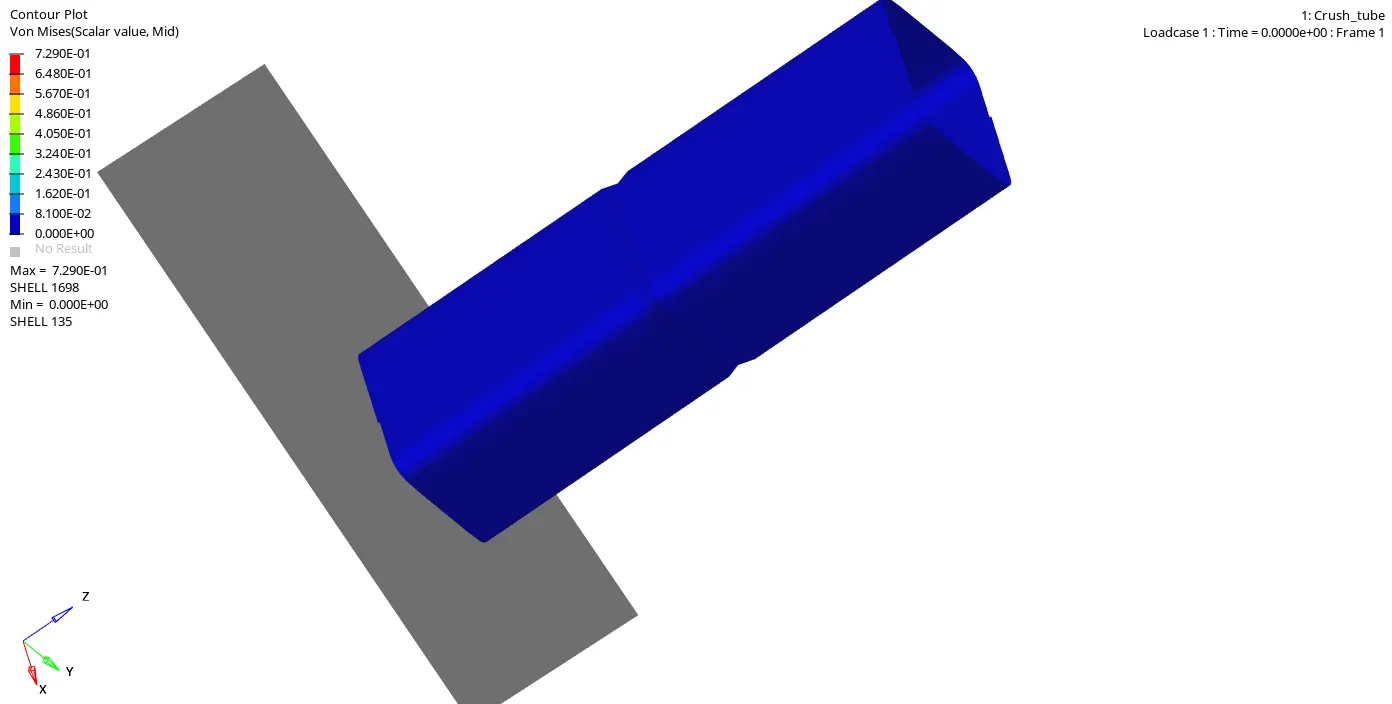
From the simulation, we can see that with respect to time, as the elements are hitting the rigid wall they deformed. So first the element which is in the front of the tube get impact and they deformed and with time, the elements which are impacting the wall getting deformed.
Energies
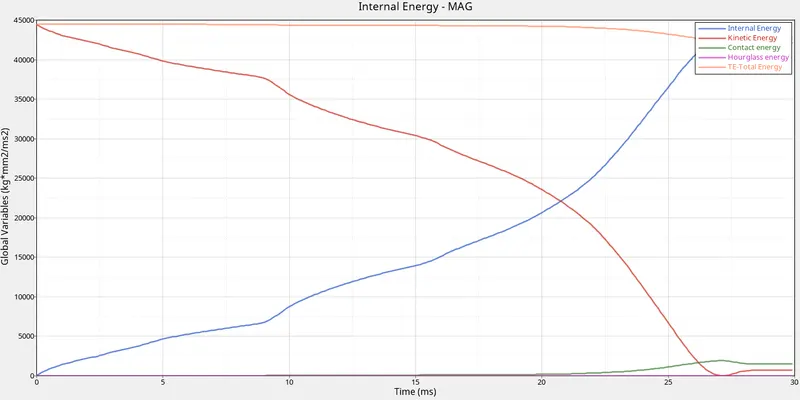
From the above graph, we can see that with the time, when the tube gets impact on the wall the velocity of the tube decreases, and because of that the kinetic energy also decreases. The internal energy of the model gets increases with time.
The total energy is the sum of the kinetic energy and the internal energy. So because of some contact energy, the total energy is decreasing at the end of the simulation.
Contact Energy is the energy due to contact between two elements. So when the deformation occurs elements start to get in contact with each other so due to contact between elements we get the contact energy. We are getting very low contact energy in the simulation.
We have taken the shell element to be QEPH so we get hourglass energy to be zero.
Internal Energy
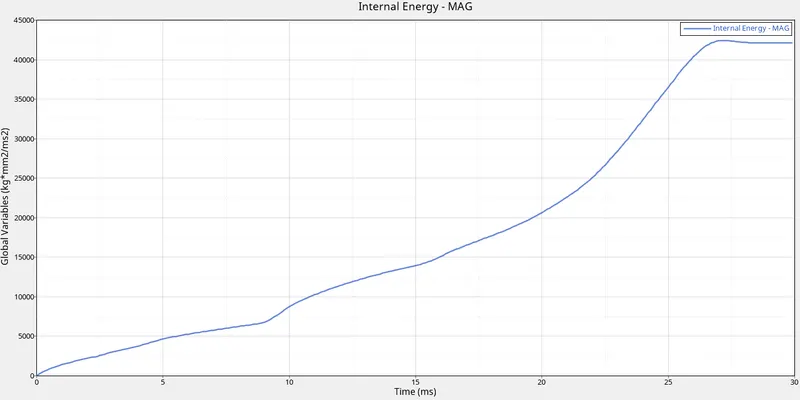
When the kinetic energy of the model decreases, it stored in the system as internal energy. So when the kinetic energy of the model decreases, the internal energy of the system starts increasing and in the end gets almost constant because at that time the velocity of the tube gets very low so the kinetic energy was almost constant at that time.
RWALL Forces
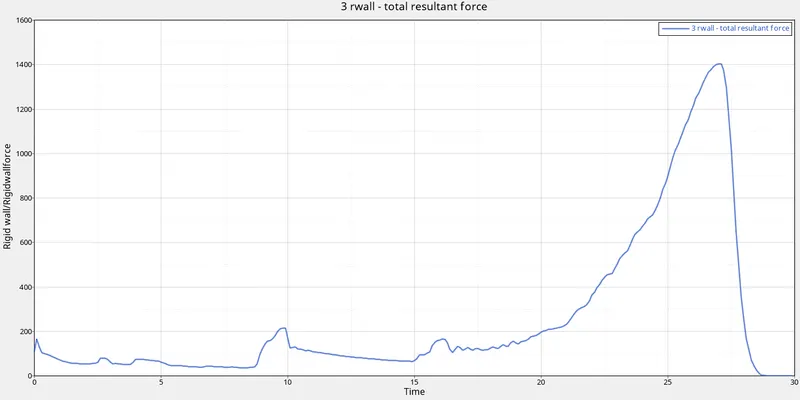
Rigid wall forces are the forces that are acting on the rigid wall by the other object.
In this case, the tube has velocity, so when the tube impacts the rigid wall, it applies forces on the wall. These forces are the rigid wall forces with respect to time these forces are increasing and after 25 ms it increases rapidly and in the end, it goes to zero.
Contact Forces
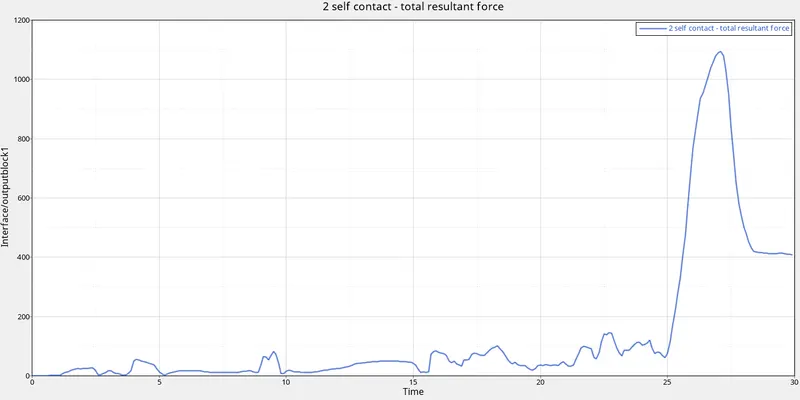
Contact force is the energy due to contact between two elements. So when the deformation occurs elements start to get in contact with each other so due to contact between elements we get the contact force.
In the starting, the contact force was zero. So when elements start to deformed we get the contact force. We get the contact force to be maximum at 27 ms because at that time the contact between elements was very high after that it reduced.
Case-6. Create a new notch with nodes only from opposing 2 faces and run.
In this case, we are going to create a notch at the middle of the crash tube which is in the opposing face of the tube with the node edit tool and after that, we are going to remove all other notches, and then we are going to run the simulation.
Model:-
To remove the notches and create the new one which is in the opposing face of the tube, we are going to use the align option in the node edit tool. For that we will go to the Geom--> node edit (F7)
After the changes in the geometry:-
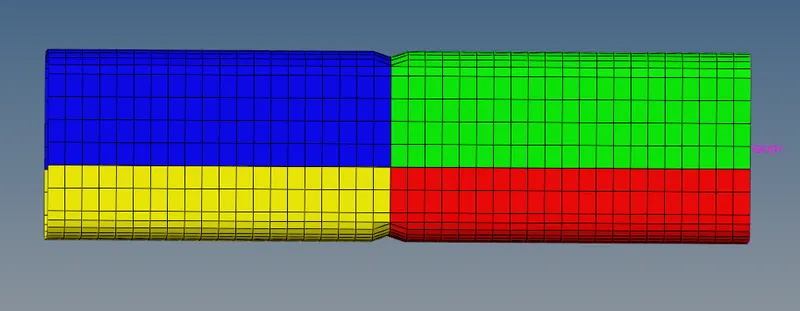
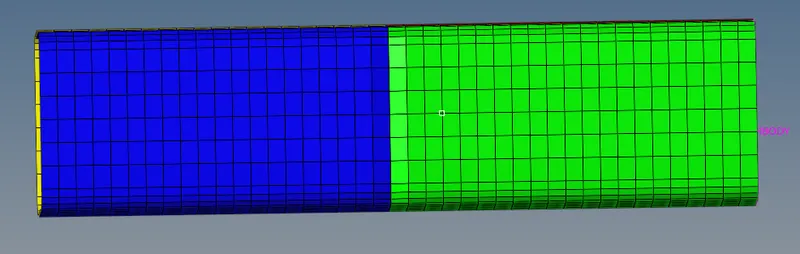
After changing the required changes in the geometry we are going to run the simulation.
To run the simulation we will go to the Analysis-->Radioss

To check the simulation we have done is correct or not we are going to check the energy error and mass error. If it is in the accepted range then we can say that our simulation is correct.
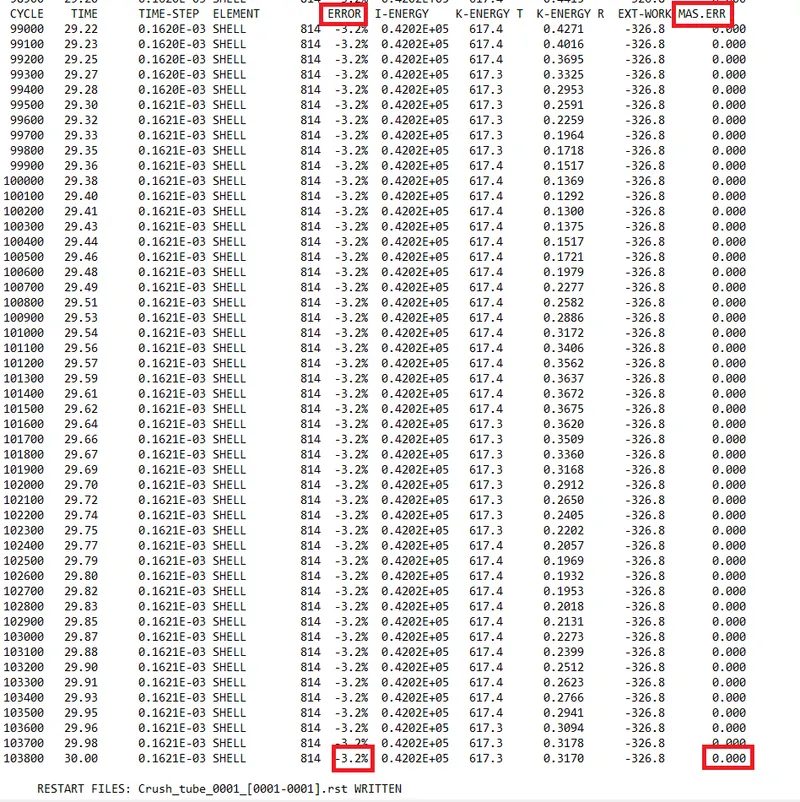
The energy error is between -15% to 5% and the mass error is 0. That is very less so we can see that the simulation we have done is right.
The total running time of the simulation was 182 seconds.
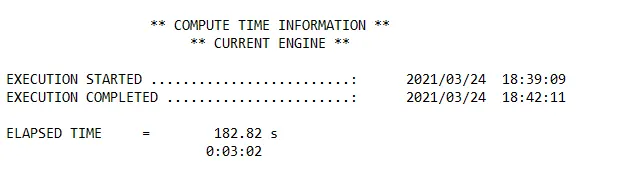
Now we are going to analyze the simulation and we are going to plot the required graph.
Output
Von Mises Gif
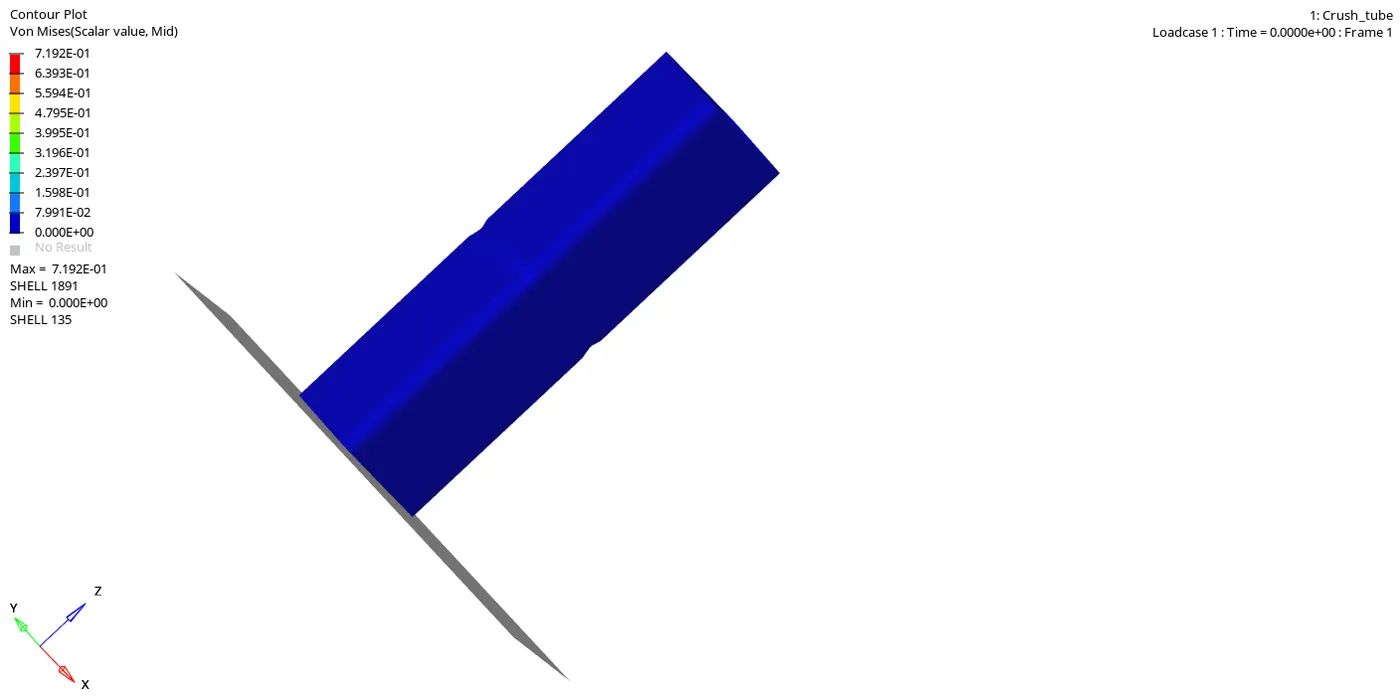
From the simulation, we can see that with respect to time, as the elements are hitting the rigid wall they deformed. So first the element which is in the front of the tube get impact and they deformed and with time, the elements which are impacting the wall getting deformed.
Energies
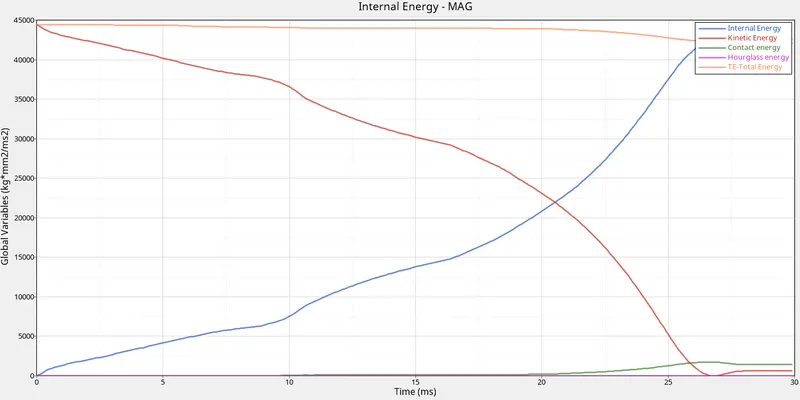
From the above graph, we can see that with the time, when the tube gets impact on the wall the velocity of the tube decreases, and because of that the kinetic energy also decreases. The internal energy of the model gets increases with time.
The total energy is the sum of the kinetic energy and the internal energy. So because of some contact energy, the total energy is decreasing at the end of the simulation.
Contact Energy is the energy due to contact between two elements. So when the deformation occurs elements start to get in contact with each other so due to contact between elements we get the contact energy. We are getting very low contact energy in the simulation.
We have taken the shell element to be QEPH so we get hourglass energy to be zero.
Internal Energy
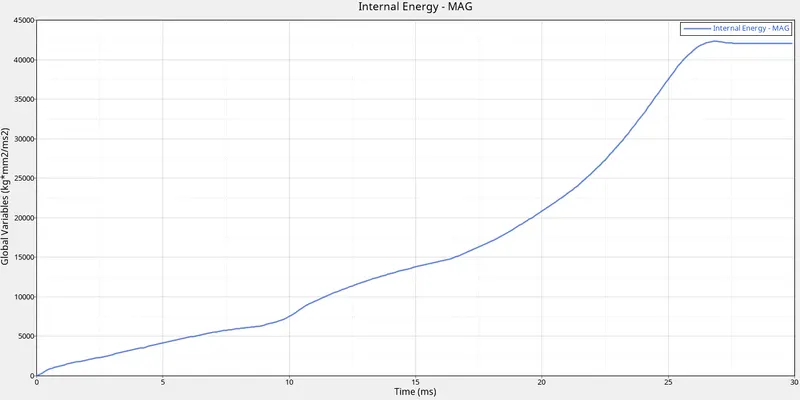
When the kinetic energy of the model decreases, it stored in the system as internal energy. So when the kinetic energy of the model decreases, the internal energy of the system starts increasing and in the end gets almost constant because at that time the velocity of the tube gets very low so the kinetic energy was almost constant at that time.
RWALL Forces
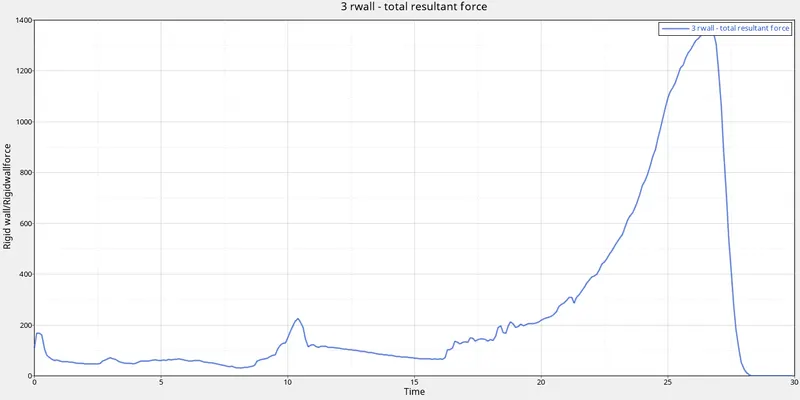
Rigid wall forces are the forces that are acting on the rigid wall by the other object.
In this case, the tube has velocity, so when the tube impacts the rigid wall, it applies forces on the wall. These forces are the rigid wall forces with respect to time these forces are increasing and after 25 ms it increases rapidly and in the end, it goes to zero.
Contact Forces
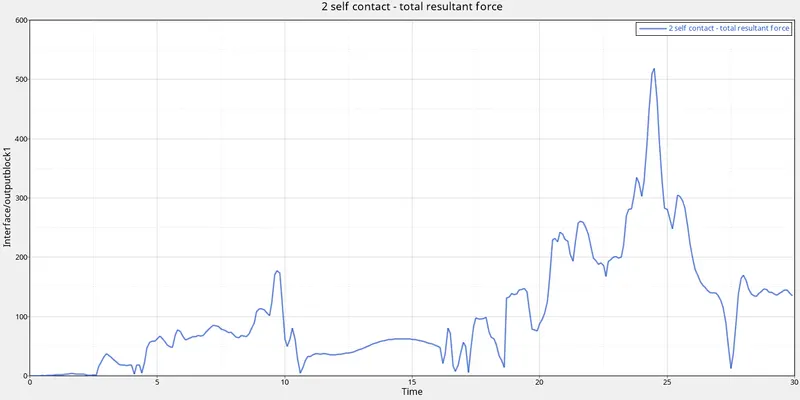
Contact force is the energy due to contact between two elements. So when the deformation occurs elements start to get in contact with each other so due to contact between elements we get the contact force.
In the starting, the contact force was zero. So when elements start to deformed we get the contact force. We get the contact force to be maximum at 24 ms because at that time the contact between elements was very high after that it reduced.
Comparision
Now we are going to compare all 6 cases.
| case | No. of cycles | Energy error | Mass error | Simulation time |
| case-1 | 83400 | -3.8 | 0.0 | 379 |
| case-2 | 83400 | -3.8 | 0.0 | 369 |
| case-3 | 127800 | -1.6 | 0.0 | 99 |
| case-4 | 78400 | -3.0 | 0.0 | 126 |
| case-5 | 95800 | -3.1 | 0.0 | 164 |
| case-6 | 103800 | -3.2 | 0.0 | 182 |
So from the above table, we can see that when we have taken type 11 contact the simulation time was very less and we get very low energy error as compared to other cases. No. of cycles increases in this case.
When we compare case-1 (with notch) and case-4 (without notch) we can see that simulation time got very less in case-4. The energy error is also getting decreased. We can see from the above graphs that the rigid wall forces are also decreased in the case-4. Contact forces decreased in the case-4 it almost gets half when there are no notches in the tube.
Learning Outcome:-
Learn about different type of the interface/contact.
Learn the effect of notches on the simulation.
Learn about contact energy, hourglass energy.
Learn about rigid wall forces, contact forces.