Assignment 5-RADIOSS Interfaces & Study of Effect of Notches Challenge
RADIOSS Interfaces & Study of Effect of Notches Challenge
OBJECTIVE
- Create the mesh for bumper assembly,mesh size should be 6mm.
- Run the crash tube model as it is.
- Change the Inacti=6 and run.
- Create the type 11 contact and run.
- Remove both notches and remove boundary condition on rigid body node then run.
- Create a new notch in the middle ,select the whole section and run.
- Create a new notch with nodes only from opposing 2 faces and run.
PROCEDURE
Create the mesh for bumper assembly,mesh size should be 6mm.
- First import the model then delete all free nodes in the model to do so go to geom-temp node- select the all nodes
- Now check for any geometry errors if any correct them
- Now go to the 2D - automesh - select surface and set element size to 6 - click on mesh
- Perform element remesh where required according to the mesh quality
- Now we have smoothen the mesh to do so goto the 2D - smooth - select mesh and give iterations and click on smooth
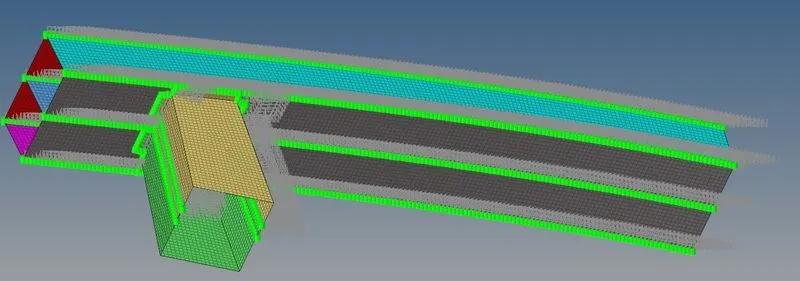
- Now after performing meshing operation we have to connect individual parts to each other
- It can be done by connectors
- Create spot weld to each parts in assemebly
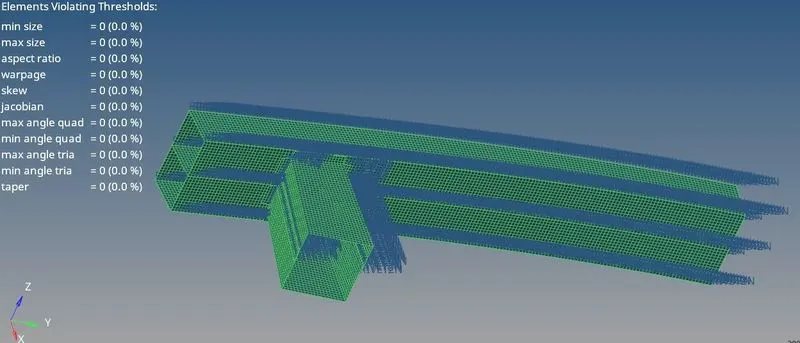
- Now we have to check the quality of mesh so go to the 2D-quality index- Set min length -2 and max length - 8 and keep all other parameters as it is - this will show us no of failed elements in model
- In this case there are zero no of failed elements
Run the crash tube model as it is.
- First import the file Crush_tube_0000.rad into solver
- To check which type of contact are used in this file go to model -Groups - Seam weld
- To get time history of parts in output file go to the solver - create TH - select parts
- Now go to analysis - Radioos - This will give us out files from radioos
- Now go to Crush_tube_0001.out.From here we will get the energy and mass error
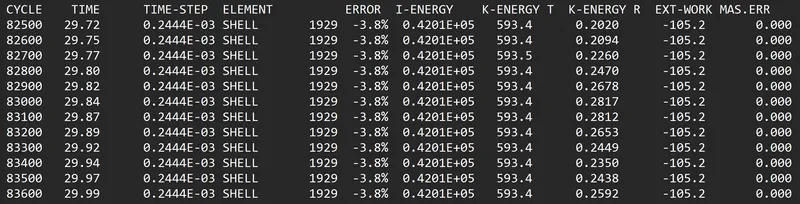
- So in this case energy error is -3.8% and mass error is 0
- Energy error is below 5% so it is an acceptable value
- Now to run simulation go to the Hyperview-Import h3d file - apply - Contour -Select von misses stress select averaging method as simple - apply and run simulation
- Same way select contact forces instead of von misses stress and run the simulation
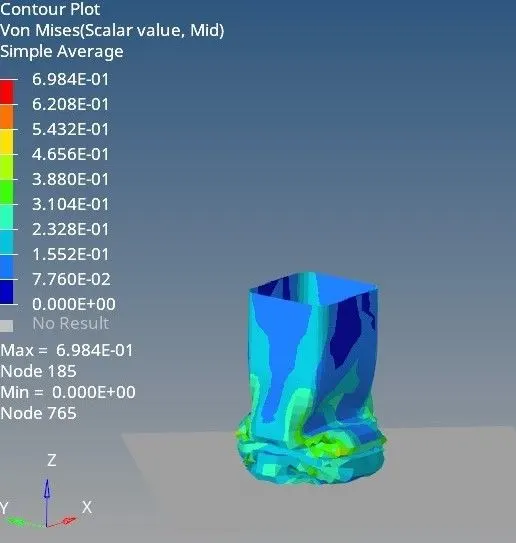
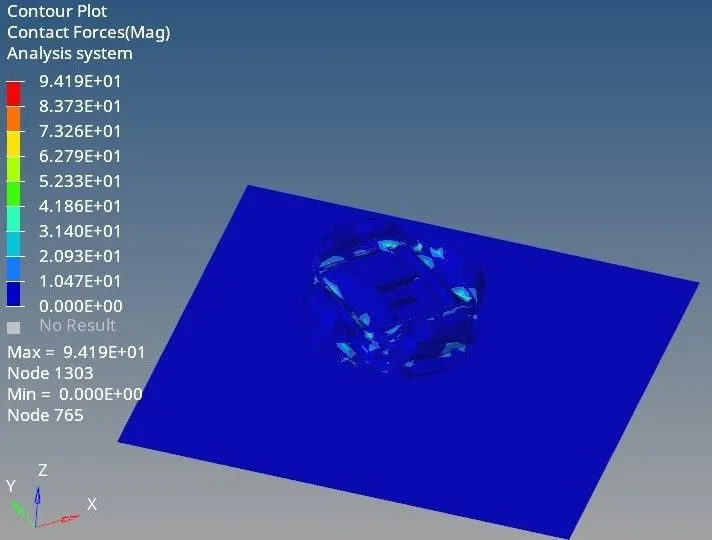
- From above fig it can be seen that max von misses stress is 0.698 KN/mm^2 and max contact force is 94.19KN
- Now we have to plot RWALL forces contact forces internal energy and time history graphs
- Go to the hypergraph 2D select T01 file from radioos output and plot required graphs
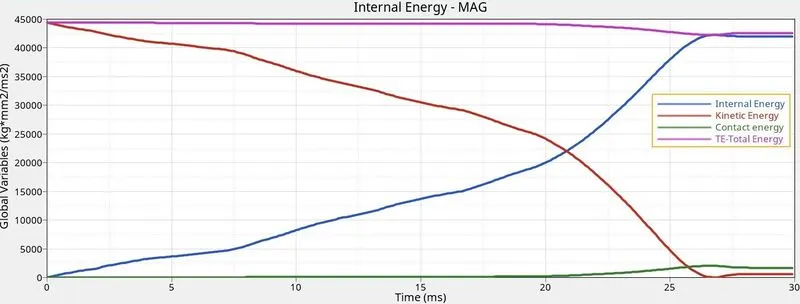
- It can be seen that at the start of simulation kinetic energy was high and internal energy was zero .As the forces increases this kinetic energy gets converted into internal energy
- Contact energy is zero till 20ms but after that it started increasing because contact between each other elements got started
- Max kinetic energy - 45000J
- Max internal energy - 42000J
- Contact energy at the end of the cycle - 2000
- Total energy - 43000
- Energy error - 2000J
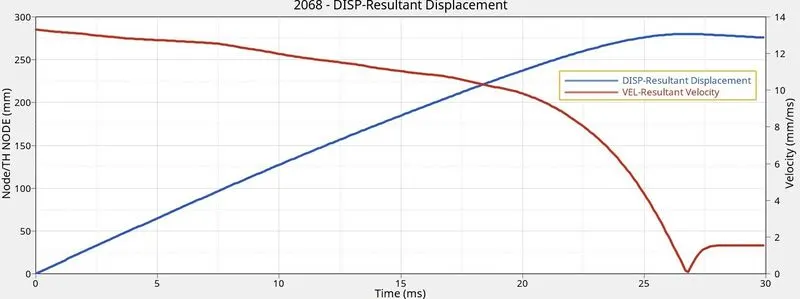
- Above graph is obtained as we have given time history block in T01 file
- In above graph it can be seen that at start velocity is high and node displacement is zero .When force is applied with some velocity node displacement increase and velocity starts reducing because stiffness of elements started increasing
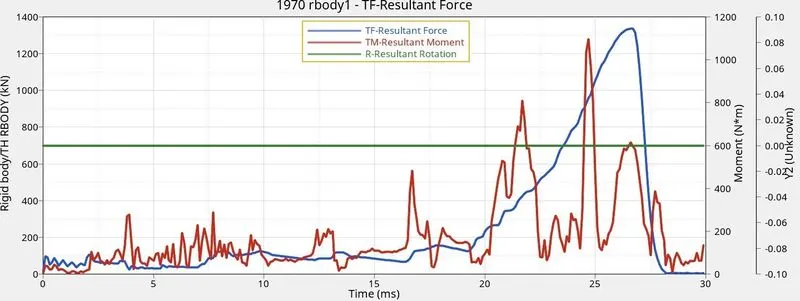
Change the Inacti=6 and run.
- First import the file Crush_tube_0000.rad into hypercrash
- Go to contact interface - select selg contact - Change Inacti = 6 -Save .Due to this master surface will not try harder in intial stage to push the solve node out of the gap .This will make our process little smoother and stable
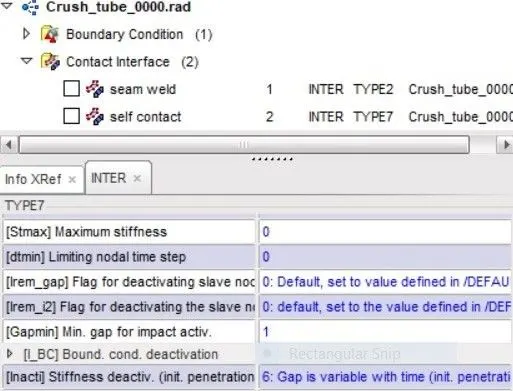
- Now export the rad file from Hypercrash and use same file as an input to the hypermesh solver
- To get time history parts in output file go to the solver create TH select parts
- Now go to analysis - Radioos .This will give us out files from radioos
- Now go to file Crush_tube_0001.out from here we will get the energy and mass error
- So in this case energy error is -3.8% and mass error is 0
- Energy error is below 5% so it is an acceptable value
- Now to run simulation go to the Hyperview-Import h3d file - apply - Contour -Select von misses stress select averaging method as simple - apply and run simulation
- Same way select contact forces instead of von misses stress and run the simulation
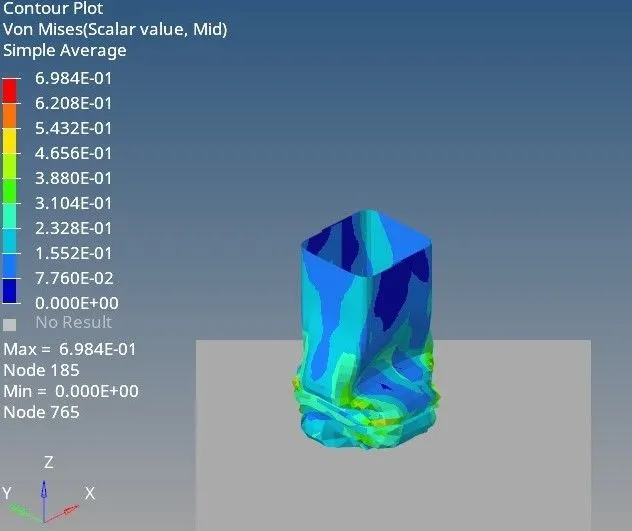
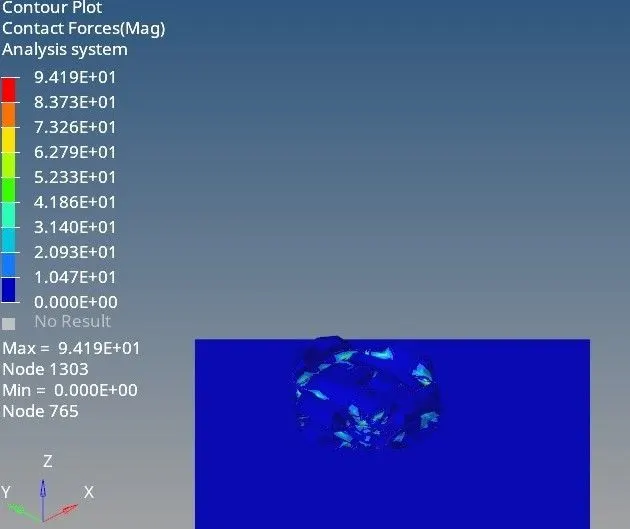
- From above fig it can be seen that max von misses stress is 0.698 KN/mm^2 and max contact force is 94.19KN
- So it can be seen that there is no difference in von misses stress and contact forces as compared to case 2
- Now we have plot RWALL forces contact forces internal energy and time history graphs
- So go to the hypergraph 2D select T01 file from radioos output and plot required graphs
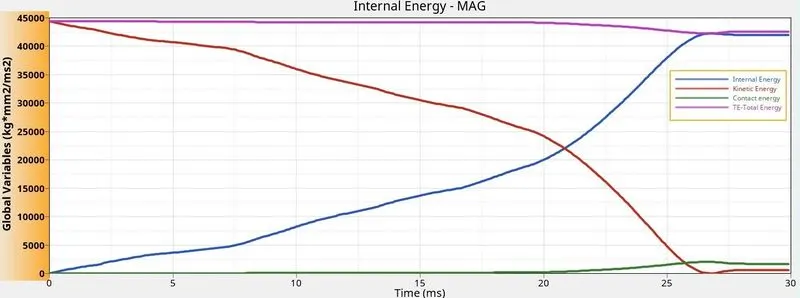
- It can be seen that at the start of simulation kinetic energy was high and internal energy was zero .As the forces increases this kinetic energy gets converted into internal energy
- Contact energy is zero till 20ms but after that it started increasing because contact between each other elements got started
- Max kinetic energy - 45000J
- Max internal energy - 42000J
- Contact energy at the end of the cycle - 2000
- Total energy - 43000
- Energy error - 2000J
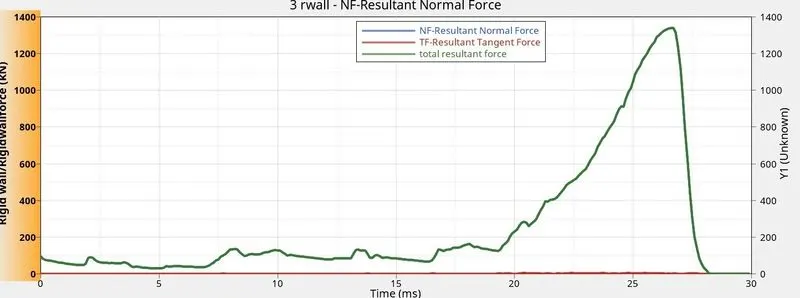
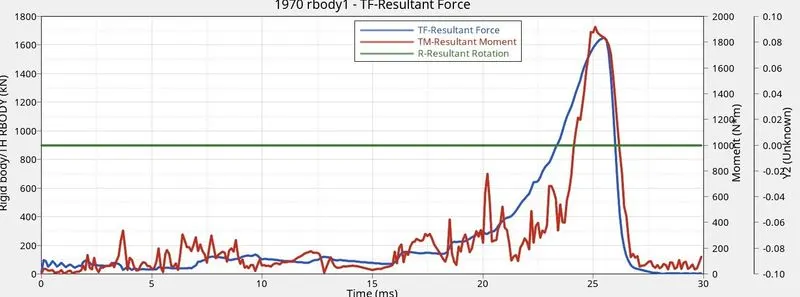
- It can be seen that rigid wall forces starts increasing after 16ms it is beacuse elements stopped absorbing the forces after a limit and started acting like a single block thus started transmitting the forces to rigid wall
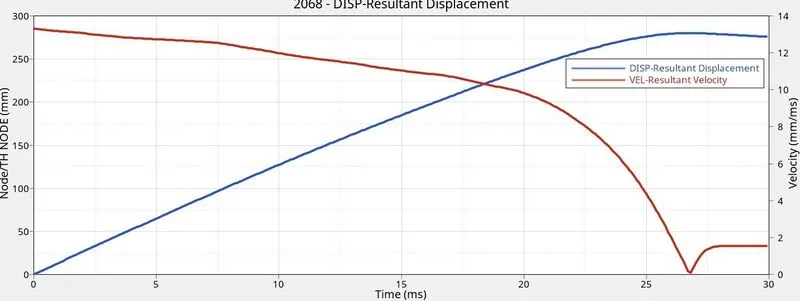
- Above graph is obtained as we have given time history block in T01 file
- In above graph it can be seen that at start velocity is high and node displacement is zero .When force is applied with some velocity node displacement increase and velocity starts reducing because stiffness of elements started increasing
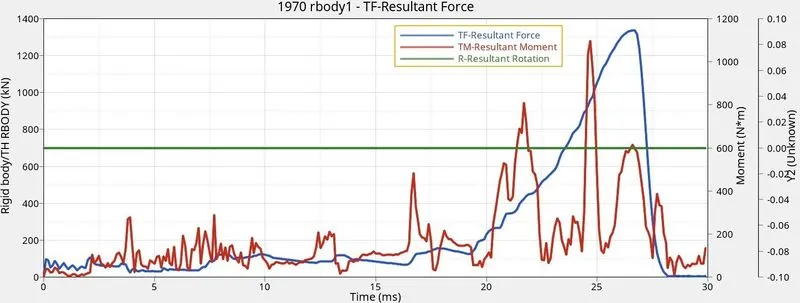
Create the type 11 contact and run.
- First import the file Crush_tube_0000.rad into hyper crash
- Now go to contact interface - create new - select type 11 set recommend parameters - save it
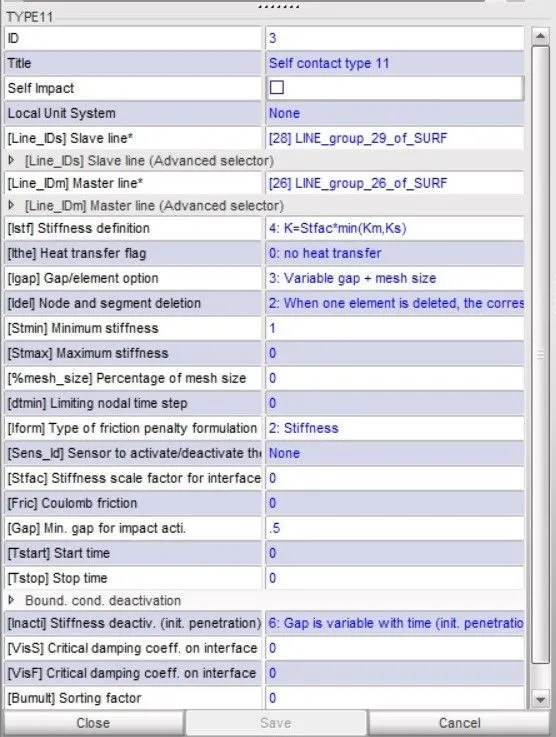
- Now export the rad file from hypercrash and use same file as an input to the hypermesh solver
- To get time history of parts in outpur file go to the solver- create TH select parts
- Now go to analysis - Radioos .This will give us out files from radioos
- Now go to the File Crush_tube_0001.out from here we will get the energy and mass error
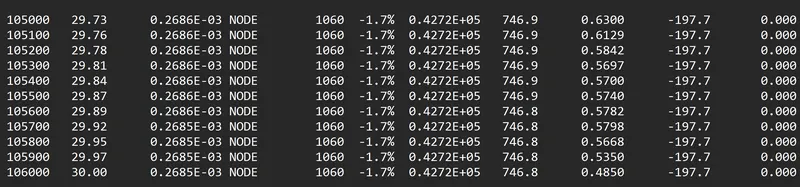
- In this case energy error is -1.7%and mass error is 0
- Energy error is below 5% so it an acceptable value
- Now to run simulation go to hyperview- import h3d file - apply conntour- select von misses stress select averaging method as simple - apply and run simulation
- Same way select contact forces instead of von misses and run the simulation
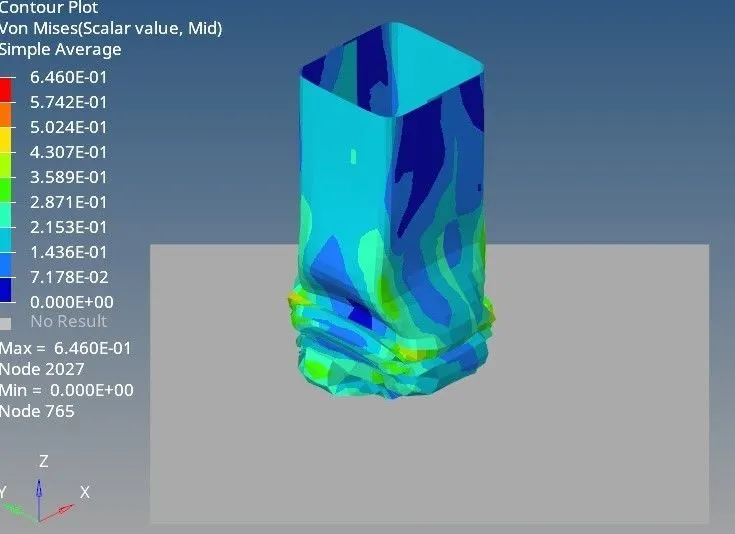
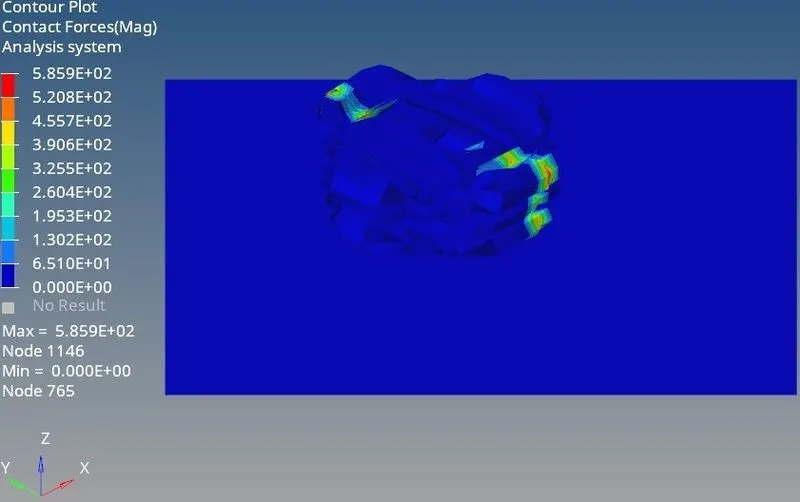
- Max von misses stress is 0.646KN/mm^2 and max contact force is 585.9KN
- So it can be seen that there is slight reduction in von misses stress and but contact forces have been increased drastically this we have added type 11 contact interface in this which means now there will be node to surface as well as edge to edge contact between elements thus solver will be more accurate to calculate the element force transmission
- Now we have to plot RWALL force contact force internal energy and time history graphs
- So go to hypergraph 2D T01 file from radioos output and plot graphs
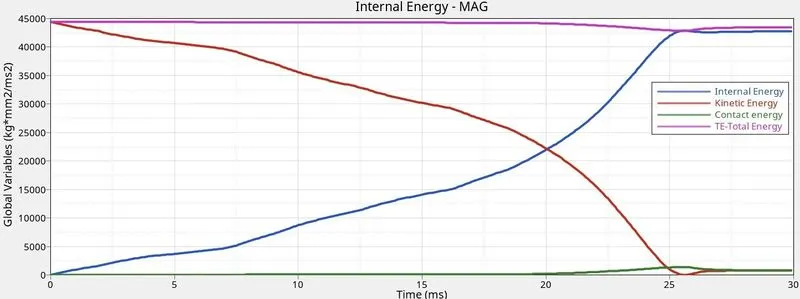
- It can be seen that at the start of simulation kinetic energy was high and internal energy was zero .As the forces increases this kinetic energy gets converted into internal energy
- Contact energy is zero till 20ms but after that it started increasing because contact between each other elements got started
- Max kinetic energy - 45000J
- Max internal energy - 42000J
- Contact energy at the end of the cycle - 1000
- Total energy - 43700
- Energy error - 1000J
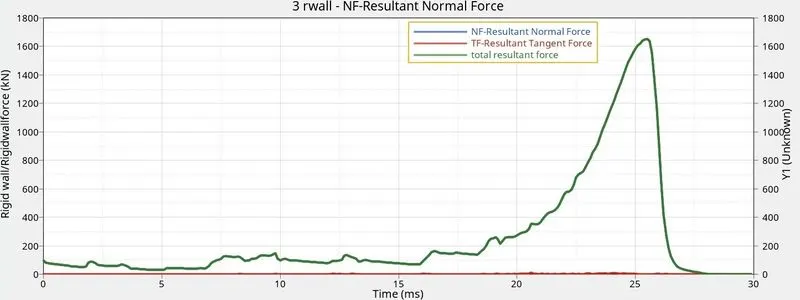
- It can be seen that rigid wall forces starts increasing after 16ms it is beacuse elements stopped absorbing the forces after a limit and started acting like a single block thus started transmitting the forces to rigid wall
- Rise of rigid wall forces at the end of cycle is little higher than earlier cases
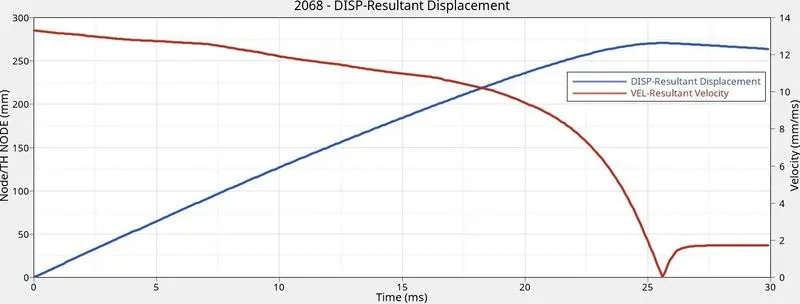
- Above graph is obtained as we have given time history block in T01 file
- In above graph it can be seen that at start velocity is high and node displacement is zero .When force is applied with some velocity node displacement increase and velocity starts reducing because stiffness of elements started increasing
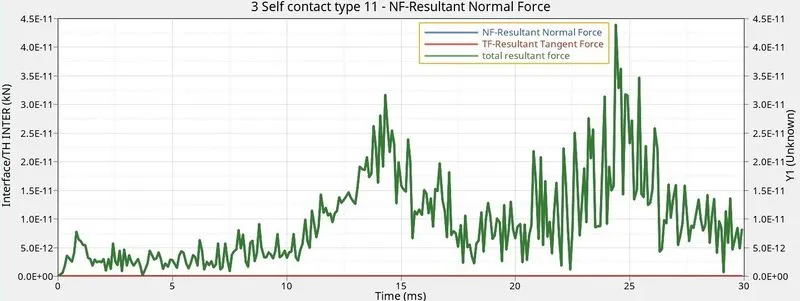
Remove both notches and remove boundary condition on rigid body node then run.
- First import the file Crush_tube_0000.rad into hypercrash
- Now go to boundary condition - edit rigid body - Unclick all conditions .Thus we will remove all boundary conditions of rigid body
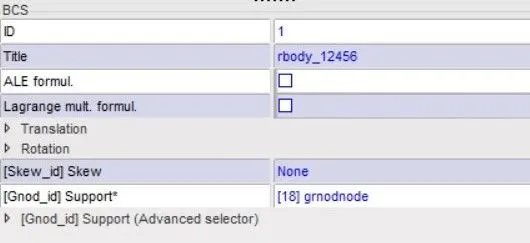
- Now export the rad file from hyper crash and use same file as an input to the hypermesh solver
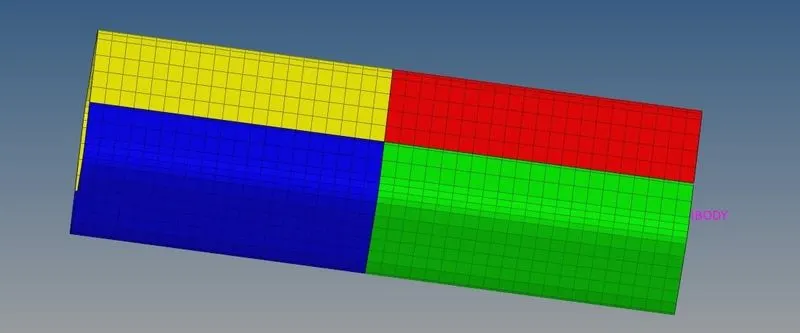
- Hypermesh remove all notches in model by using node alignment
- To get time history of parts in outpur file go to the solver- create TH select parts
- Now go to analysis - Radioos .This will give us out files from radioos
- Now go to the File Crush_tube_0001.out from here we will get the energy and mass error
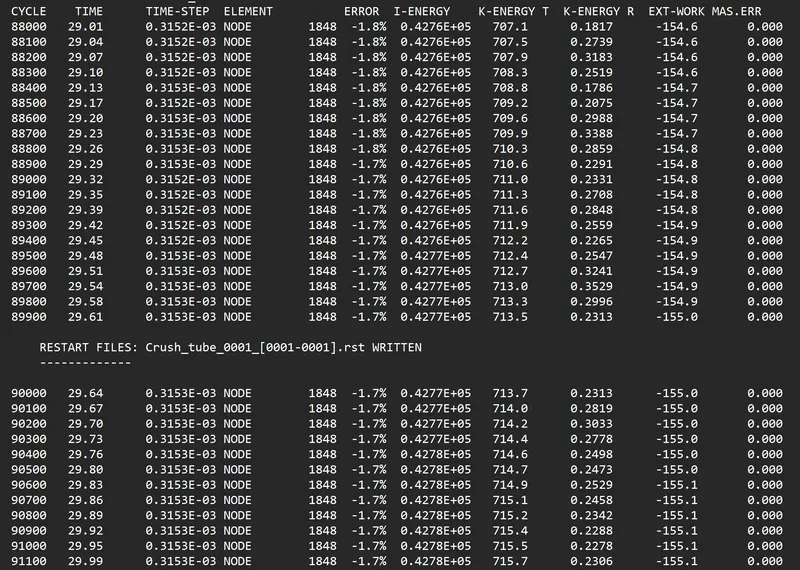
- In this case energy error is -1.7%and mass error is 0
- Energy error is below 5% so it an acceptable value
- Now to run simulation go to hyperview- import h3d file - apply conntour- select von misses stress select averaging method as simple - apply and run simulation
- Same way select contact forces instead of von misses and run the simulation
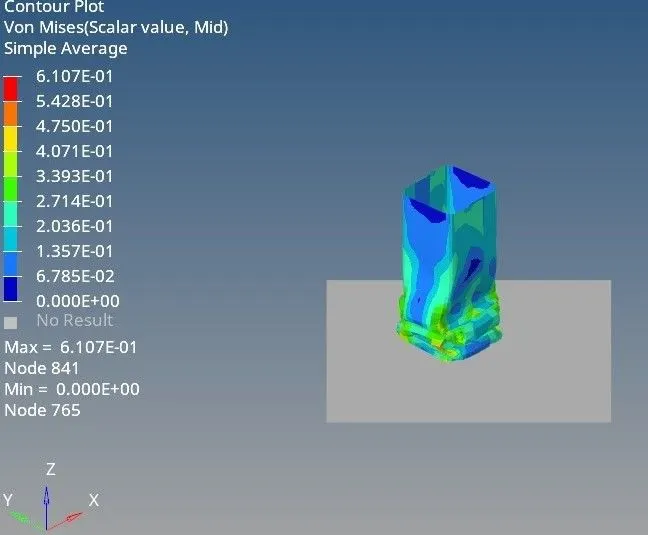
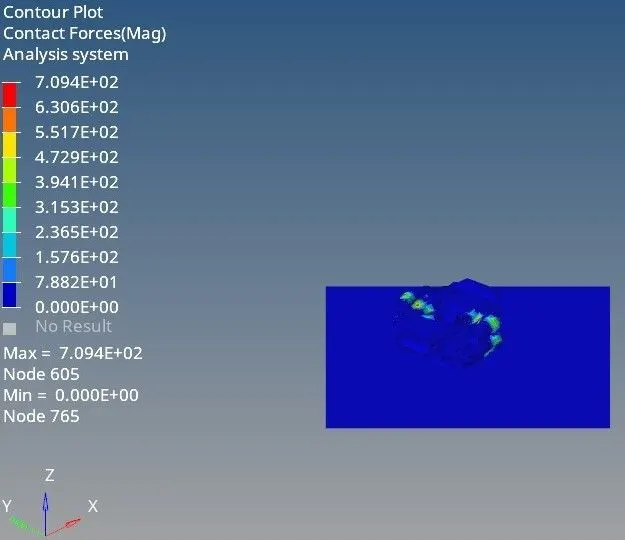
- Max von misses stress is 0.6107KN/mm^2 and max contact force is 709.4KN
- So it can be seen that there is slight reduction in von misses stress than case 4 and contact forces have been increased than case 4 this is because we have removed the notch in model
- Now we have to plot RWALL force contact force internal energy and time history graphs
- So go to hypergraph 2D T01 file from radioos output and plot graphs
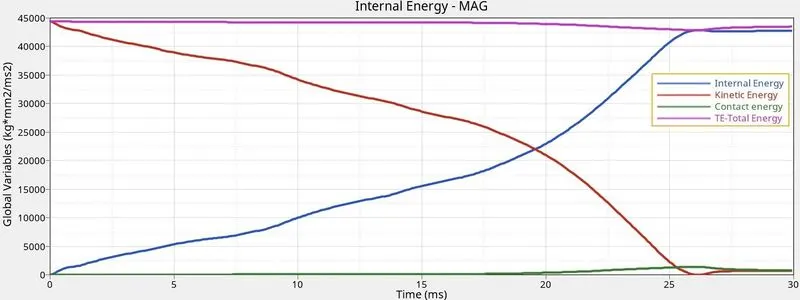
- It can be seen that at the start of simulation kinetic energy was high and internal energy was zero .As the forces increases this kinetic energy gets converted into internal energy
- Contact energy is zero till 20ms but after that it started increasing because contact between each other elements got started.Contact energy at the end of the cycle is reduced bit
- Max kinetic energy - 45000J
- Max internal energy - 42500J
- Contact energy at the end of the cycle - 1000
- Total energy - 43700
- Energy error - 1000J
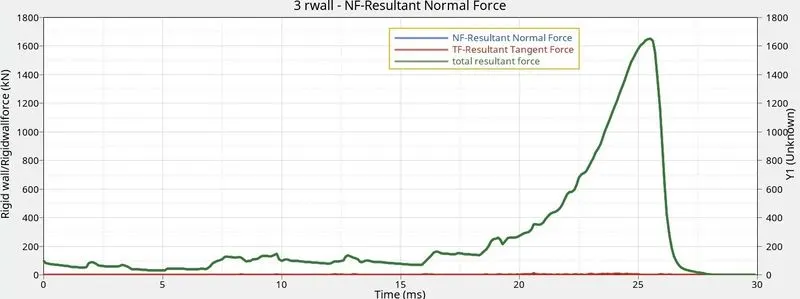
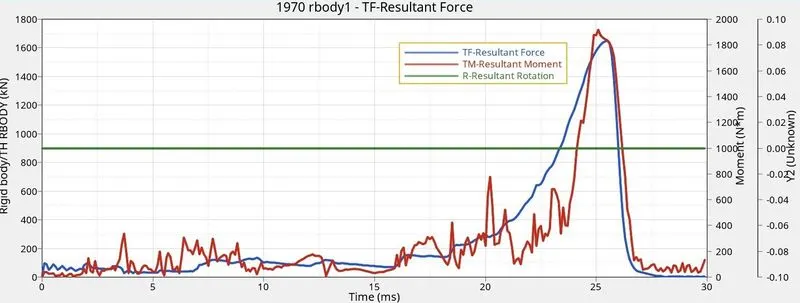
- It can be seen that rigid wall forces starts increasing after 16ms it is beacuse elements stopped absorbing the forces after a limit and started acting like a single block thus started transmitting the forces to rigid wall
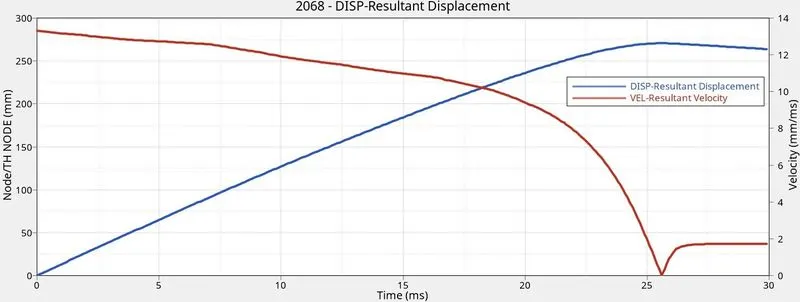
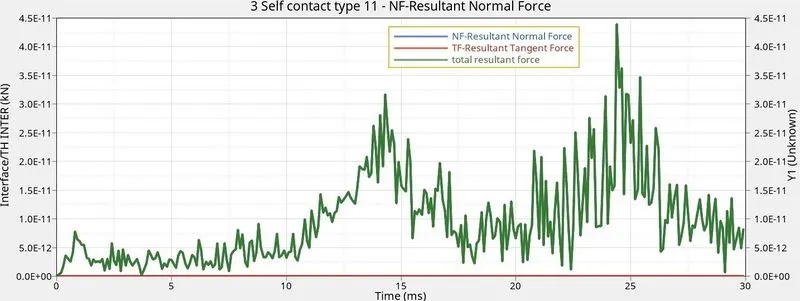
- Above graph is obtained as we have given time history block in T01 file
- In above graph it can be seen that at start velocity is high and node displacement is zero .When force is applied with some velocity node displacement increase and velocity starts reducing because stiffness of elements started increasing
Create a new notch in the middle ,select the whole section and run.
- First import the file Crush_tube_0000.rad into hypercrash
- Now go to contact interface - create new - select type 11 - set recommended parameters - save it
- Now export the rad file from hypercrash and use same files as a input to the hypermesh solver
- In hypermesh remove all notches in model by using node alignment
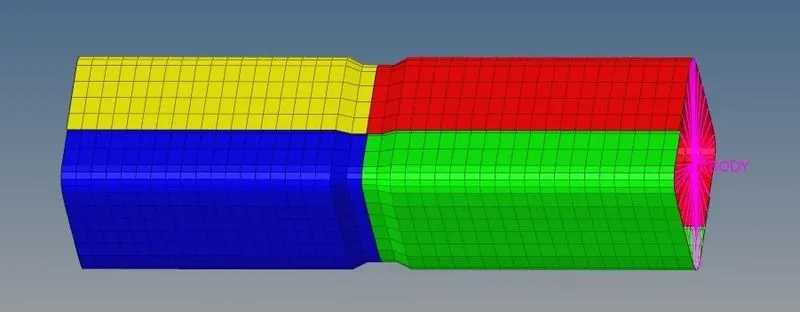
- Create a single notch in middle by element offset method
- To get time history of parts in outpur file go to the solver- create TH select parts
- Now go to analysis - Radioos .This will give us out files from radioos
- Now go to the File Crush_tube_0001.out from here we will get the energy and mass error
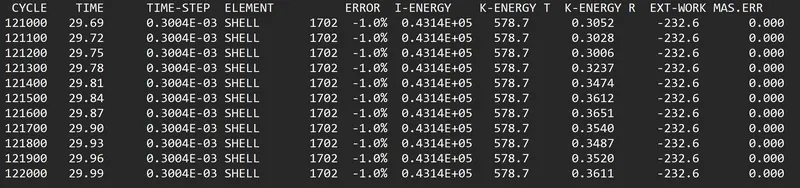
- In this case energy error is -1%and mass error is 0
- Energy error is below 5% so it an acceptable value
- Now to run simulation go to hyperview- import h3d file - apply conntour- select von misses stress select averaging method as simple - apply and run simulation
- Same way select contact forces instead of von misses and run the simulation
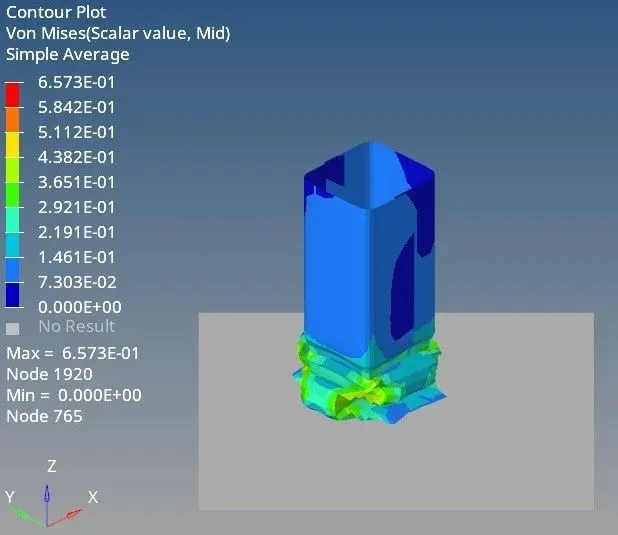
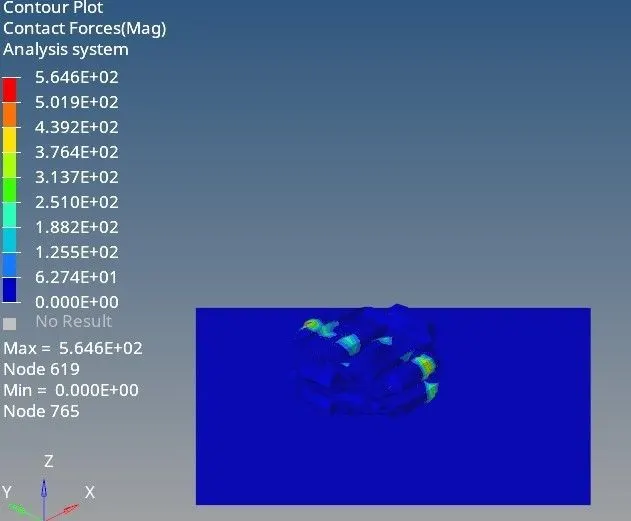
- Max von misses stress is 0.657KN/mm^2 and max contact force is 564.6KN
- So it can be seen that there is slight reduction in von misses stress than case 5 and contact forces have been increased than case 5 this is because we have removed the notch in model
- Now we have to plot RWALL force contact force internal energy and time history graphs
- So go to hypergraph 2D T01 file from radioos output and plot graphs
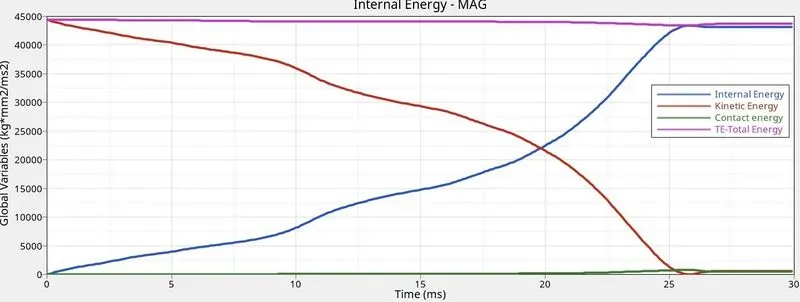
- It can be seen that at the start of simulation kinetic energy was high and internal energy was zero .As the forces increases this kinetic energy gets converted into internal energy
- Contact energy is zero till 20ms but after that it started increasing because contact between each other elements got started.Contact energy at the end of the cycle is reduced bit
- Max kinetic energy - 45000J
- Max internal energy - 42500J
- Contact energy at the end of the cycle - 1000
- Total energy - 44300
- Energy error - 700J
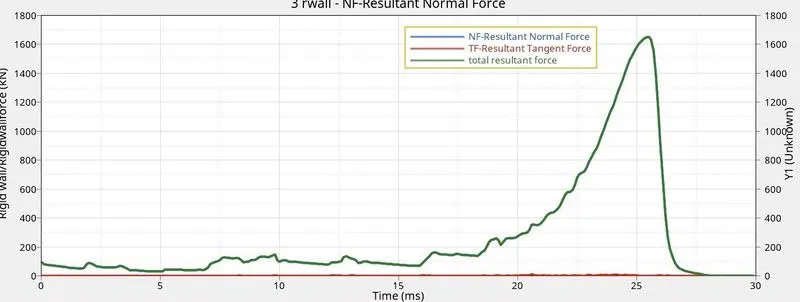
- It can be seen that rigid wall forces starts increasing after 16ms it is beacuse elements stopped absorbing the forces after a limit and started acting like a single block thus started transmitting the forces to rigid wall
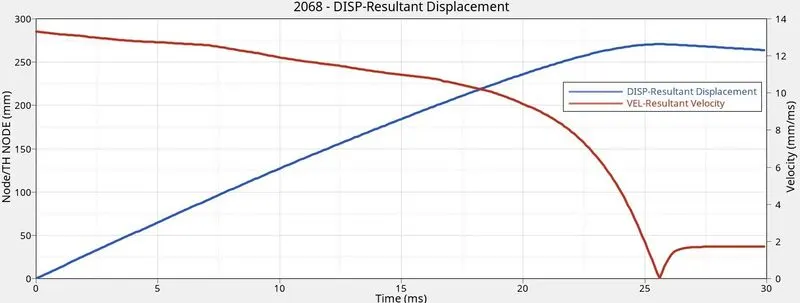
- Above graph is obtained as we have given time history block in T01 file
- In above graph it can be seen that at start velocity is high and node displacement is zero .When force is applied with some velocity node displacement increase and velocity starts reducing because stiffness of elements started increasing
Create a new notch with nodes only from opposing 2 faces and run.
- First import the file Crush_tube_0000.rad into hypercrash
- Now go to contact interface - create new - select type 11 - set recommended parameters - save it
- Now export the rad file from hypercrash and use same files as a input to the hypermesh solver
- In hypermesh remove all notches in model by using node alignment
- Create a single notch in middle on opposing faces by element offset method
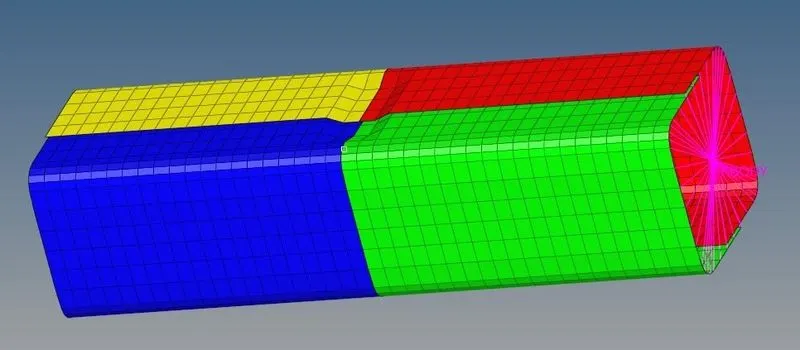
- To get time history of parts in outpur file go to the solver- create TH select parts
- Now go to analysis - Radioos .This will give us out files from radioos
- Now go to the File Crush_tube_0001.out from here we will get the energy and mass error
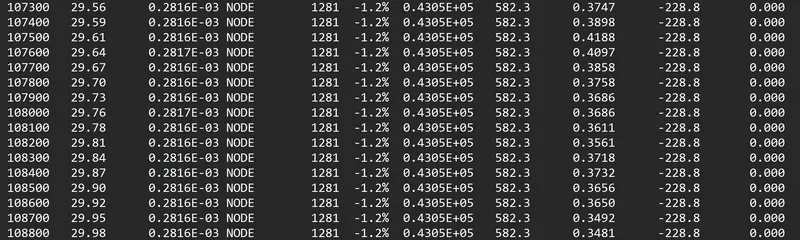
- In this case energy error is -1.2%and mass error is 0
- Energy error is below 5% so it an acceptable value
- Now to run simulation go to hyperview- import h3d file - apply conntour- select von misses stress select averaging method as simple - apply and run simulation
- Same way select contact forces instead of von misses and run the simulation
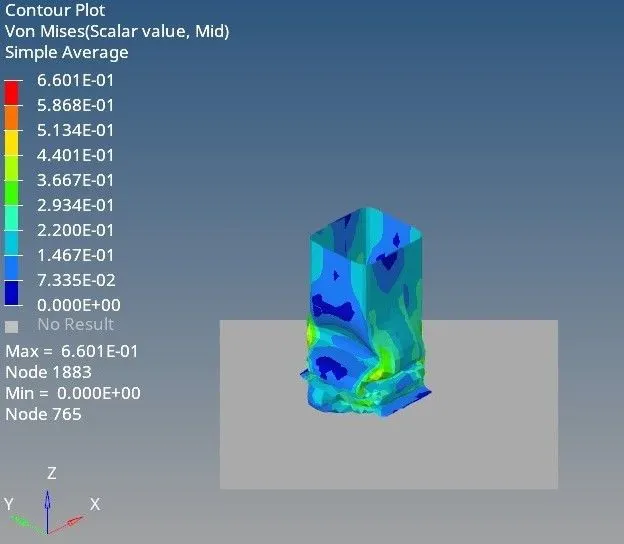
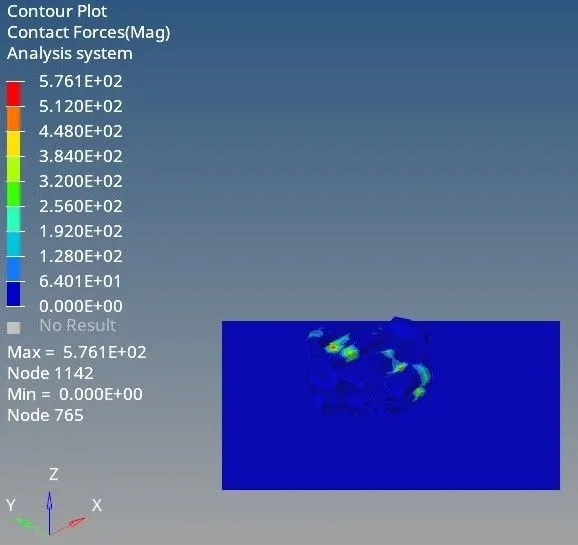
- Max von misses stress is 0.660KN/mm^2 and max contact force is 576.1KN
- So it can be seen that there is slight reduction in von misses stress than case 6 through there is little bit increase in both terms as we have added the notch on opposite faces in model
- Now we have to plot RWALL force contact force internal energy and time history graphs
- So go to hypergraph 2D T01 file from radioos output and plot graphs
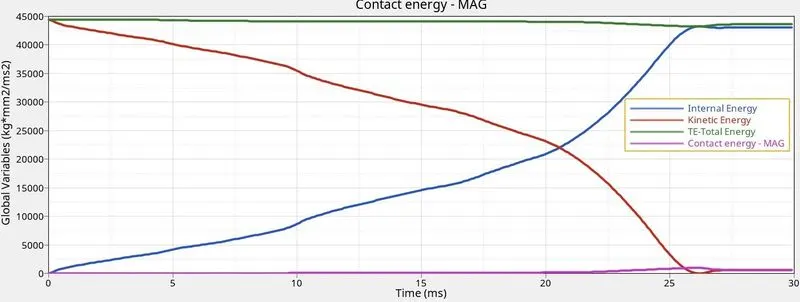
- It can be seen that at the start of simulation kinetic energy was high and internal energy was zero .As the forces increases this kinetic energy gets converted into internal energy
- Contact energy is zero till 20ms but after that it started increasing because contact between each other elements got started.Contact energy at the end of the cycle is reduced bit
- Max kinetic energy - 45000J
- Max internal energy - 42500J
- Contact energy at the end of the cycle - 1000
- Total energy - 44200
- Energy error - 750J
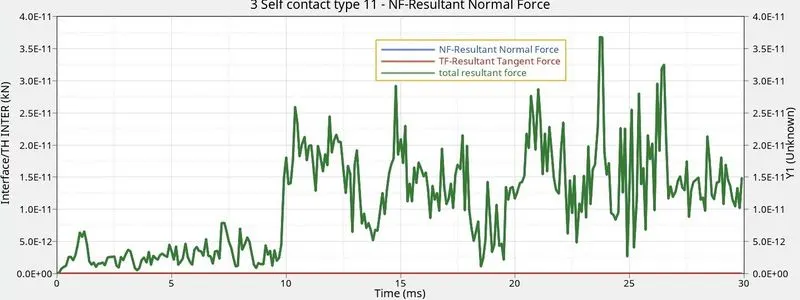
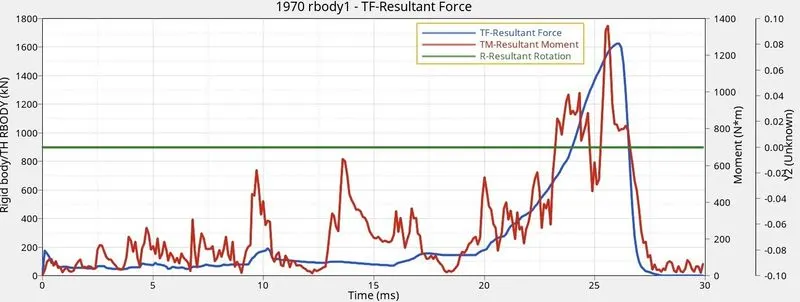
- It can be seen that rigid wall forces starts increasing after 16ms it is beacuse elements stopped absorbing the forces after a limit and started acting like a single block thus started transmitting the forces to rigid wall
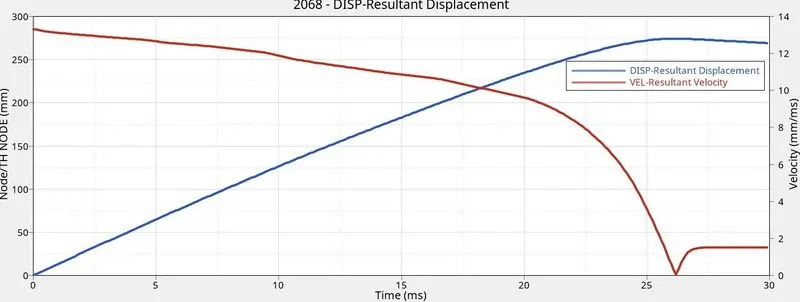
- Above graph is obtained as we have given time history block in T01 file
- In above graph it can be seen that at start velocity is high and node displacement is zero .When force is applied with some velocity node displacement increase and velocity starts reducing because stiffness of elements started increasing
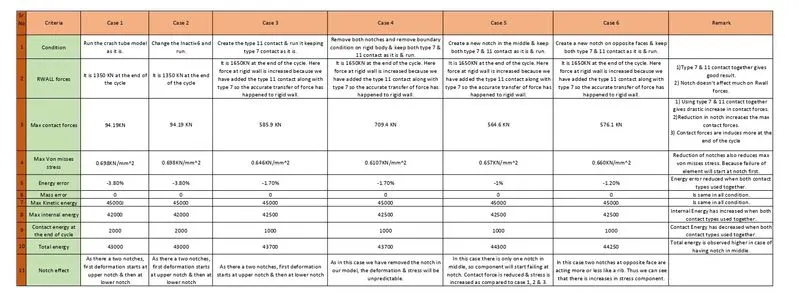
RESULT AND COMPARSION