Assignment 3-2D Element Formulation Challenge
AIM :-
case - 1 Run the base simulation for the given crash beam file without any modifications to elemental proprties and take run time as 55ms. At end of the simulation check energy error and mass error and determine whether results would be acceptable or not , if acceptable plot rigid wall forces, internal energy , hourglass energy,contact energy,total energy.
case - 2 Run the base simulation for the given crash beam file by changing elemental proprties to recommended proprties and take run time as 55ms. At end of the simulation check energy error and mass error and determine whether results would be acceptable or not , if acceptable plot rigid wall forces, internal energy , hourglass energy,contact energy,total energy.
compare the results obtained by two cases and Comment whether there is any change in the results and why there is any change in the result.
Recommended properties:
| Parameters | Comment | |
|
Ishell =24 |
QEPH 4 nodes shells are best combination of cost and accuracy. | |
|
Ismstr=2 |
Full geometric nonlinearities (default)with possible small strain formulation activation in RADIOSS Engine. | |
|
Ish3n=2 |
Standard 3 noded shell (C0)with modification for large rotation(default) |
|
| N=5 | Number of integration points set to 5 for accuracy bending. | |
|
Ithick=1 |
Thickness change is taken into account for accuracy. |
|
|
Iplas=1 |
Iterative plasticity for good accuracy. |
PROCEDURE :-
- Import the file into hyprmesh using import solver deck option.
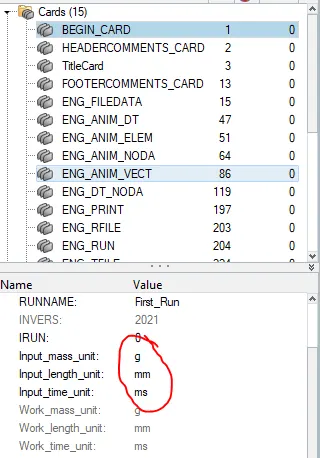
- before going to simulation check units , go to - cards- begin_card
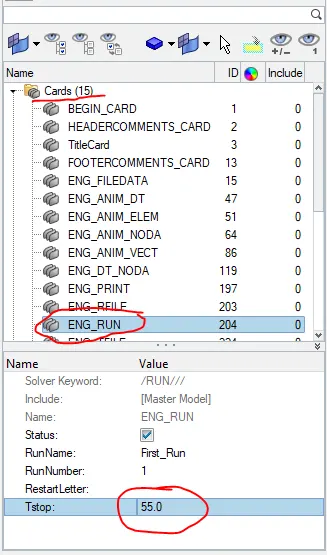
- change total run time to 55ms, go to - cards - eng_run - Tstop
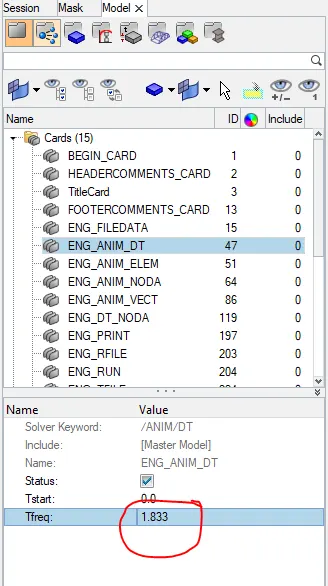
- freequency = total run time/ no.of animation steps
= 55/30
= 1.83
case -1 Run the base simulation without any modifications to elemental proprties.
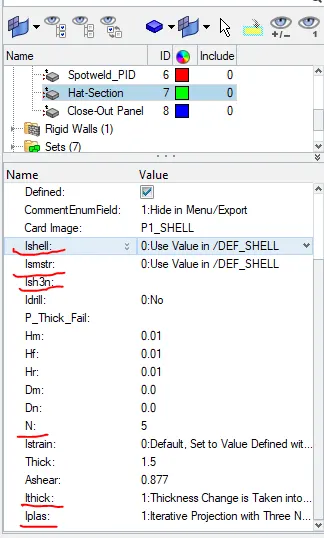
- After setting run time, freequency and property card , go for simulation.
- go to - analysis - radioos.
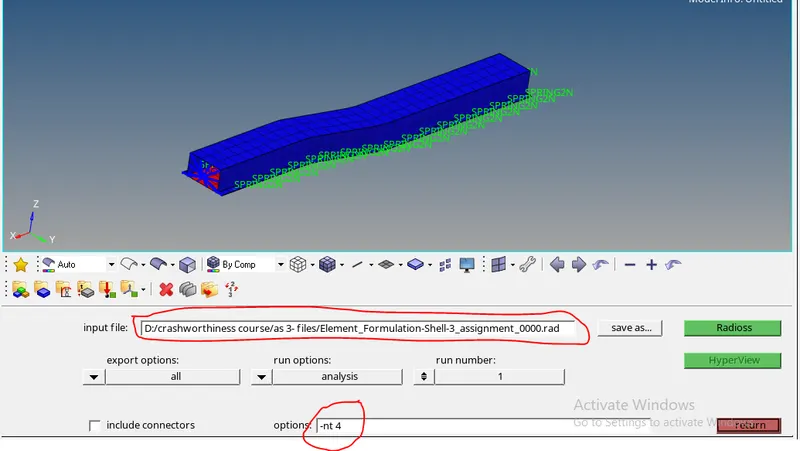
- from the above pic , save the input file in a proper location because after completing simulation radioos will generate lot of fils.
- -nt 4 means runs 4 cpus at a time to solve the problem , it will helps to reduce the simulation time
- after setting all parameters ,click on radioos
- now radioos will generate , output files ,animation files , time history files ,restart files
- no.of generated animation files are equal to no.of animation steps taken.
ENERGY ERRORS :-
- the error must be negative and decreasing
- for closer accurate resuts error is 0%
- max. limit is -15%
To check the errors open first_run_0001.out file in note pad.
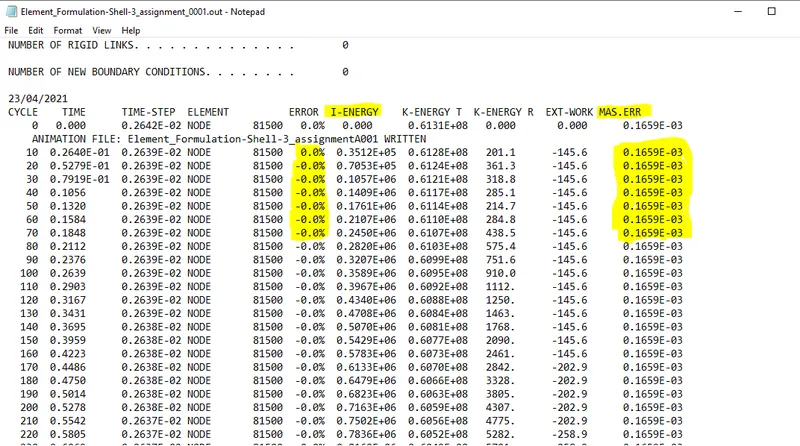
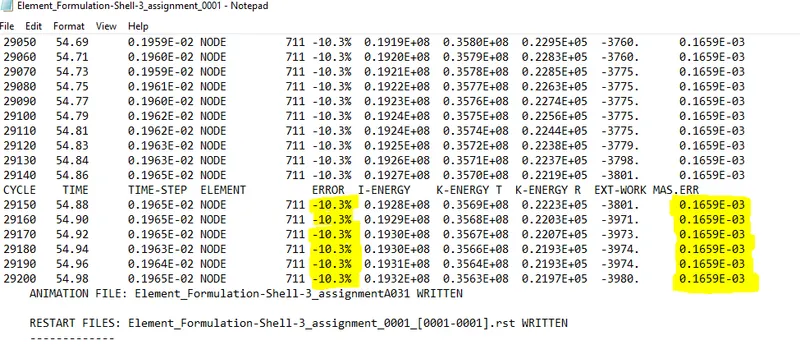
- from the above pic , all errors are neghative and values between 0% to -10.3% so these errors are acceptable.
- mass error is const through out the simulation
To plot graphs , switch to HYPER GRAPH2D
- upload the time history file (runname T01)
- in X type , select time
- in Y type , select global variables
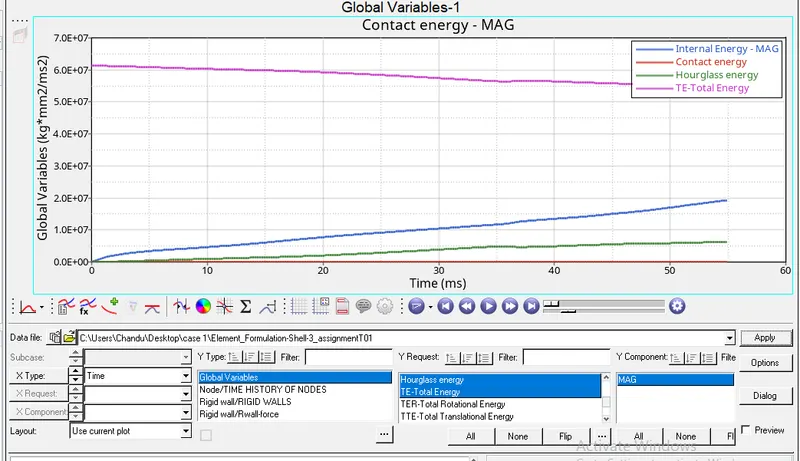
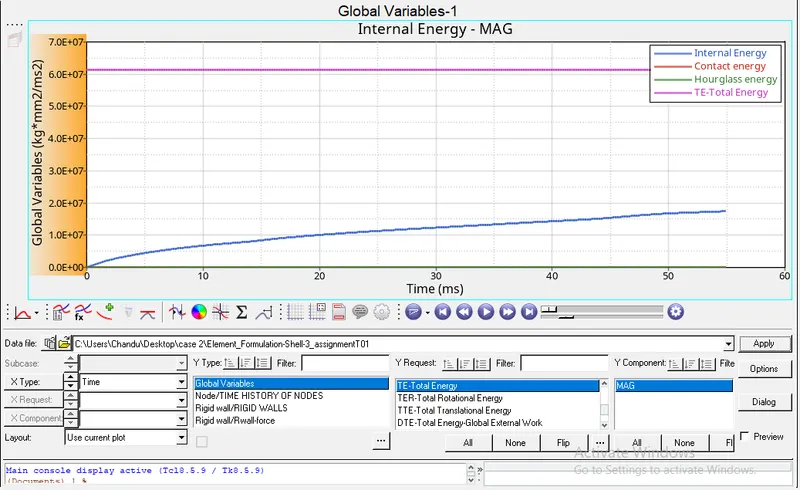
- in Y request, select internal energy , hourglass energy,contact energy,total energy.
- in Y component, select MAG then click on apply
- to create new graph , go to - file - new plot
- in Y type , select rigid wall forces
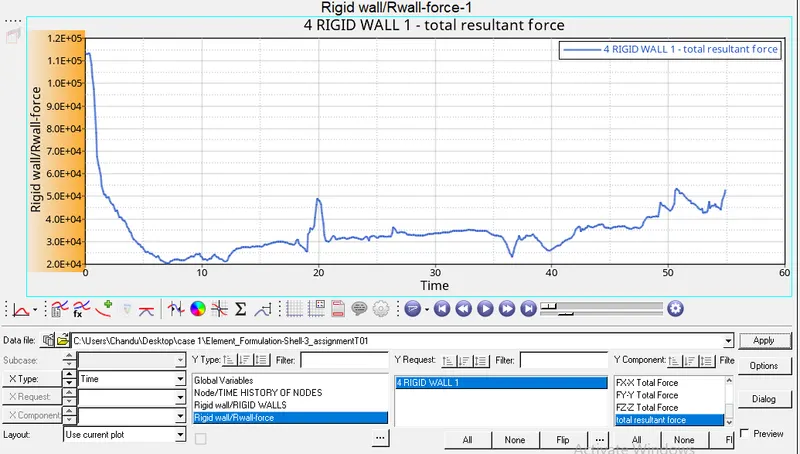
- in Y request, select 4 rigid wall 1
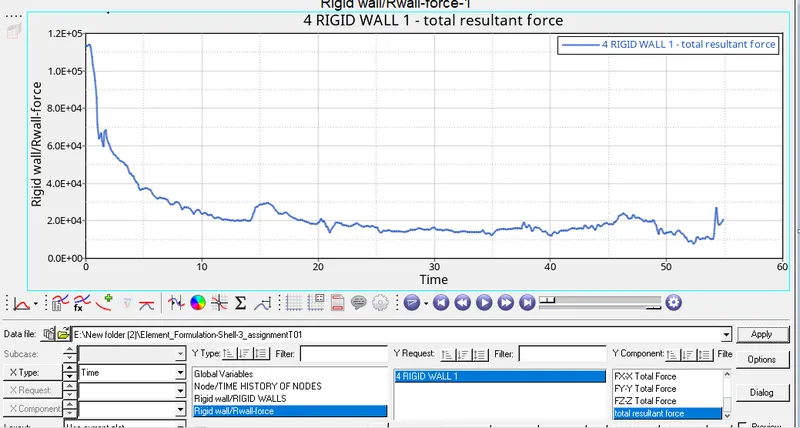
- in Y component, select total resultant force then click on apply
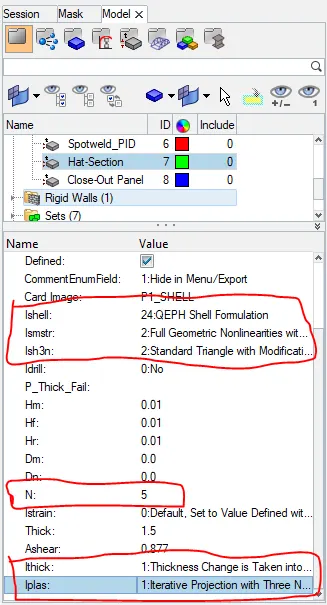
case - 2 Run the base simulation by changing elemental proprties to recommended proprties
|
Ishell =24 |
|
Ismstr=2 |
|
Ish3n=2 |
| N=5 |
|
Ithick=1 |
|
Iplas=1 |
- in this model there are 2 shell element property cards are there, change the elemental proprties to recommended proprties for 2 property cards
- for simulation follow the above mentioned procedure for case 1
ENERGY ERRORS :-
- the error must be negative and decreasing
- for closer accurate resuts error is 0%
- max. limit is -15%
To check the errors open first_run_0001.out file in note pad.
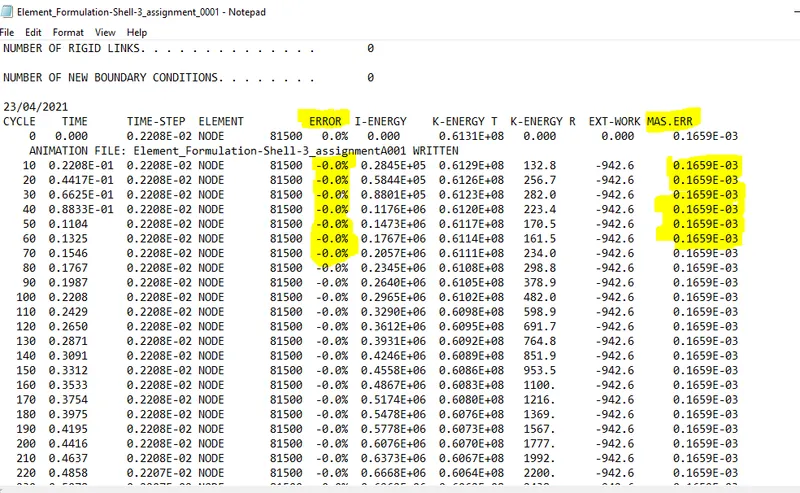
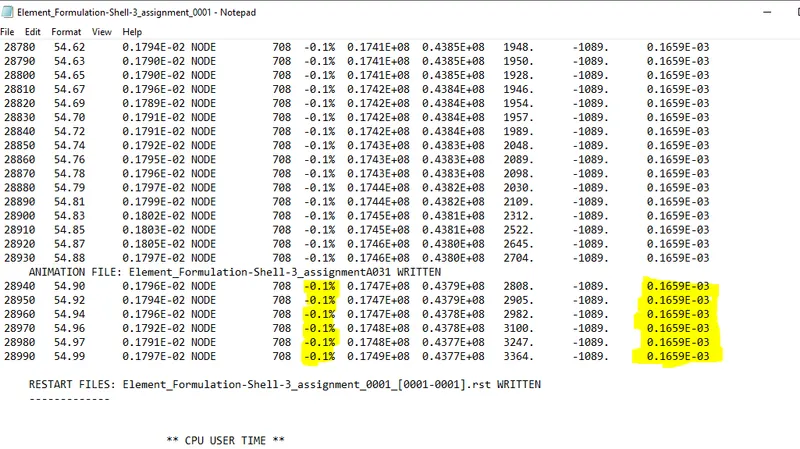
- from the above pic , all errors are neghative and values between 0% to -0.1% so these errors are acceptable.
- mass error is const through out the simulation
- To plot graphs follow the above mentioned procedure for case 1
RESULTS :-
perform simulation on crash beam in both cases , in one case without any modifications to elemental proprties and in another case changing elemental proprties to recommended proprties by comparing obtained results in both cases we can say that
- total energy is constant in case-2 but in case -1 total energy is reducing by increasing simulation time which leads to in accurate results
- internal energy is almost equal in both cases but in case 1 internal energy is a little more compare to case 2.
- hourglass and contact is energy is zero in case -2
- contact is energy is zero , but hourgass energy is present in case 1
- initially high velocity forces acting on crash beam that is why it showing high values for resultant force in begining then decreasing and fluctuating the forces but in case 1 at some times it becomes zero which is not recommended.
- energy error in case -2 is very low or almost const , compare to case 1
- no.of cycles are less in in case -2 , compare to case 1
hourglass
it is a weird mode of deformation that occurs in under integrated shell elements where no stresses are produced. it reduces the accuracy and true response of the structure. this leads to inaccurate strain and displacement results with unrealistic deformations. in case 1 hourglass energy is present because in this we taken Ishell value as DEF_SHELL .to avoid hourglass in case 2 we taken Ishell value as 24 ( QEPH- reduced integration element). from global variables graph in case 2 , we can say that hour glass is zero in case 2 .
the method of reducing hourglass in QEPH shells is called physical stabilization method and it also called as stiffness method . in this shell elements controls the hourglass from the material leve.
we have another method called perturbation method to controll the hourglass , but in this value as 1,2,3,4 ( Q4- reduced integration element)