Advanced Sheet Metal Design Using NX Cad Challenge_1_Casing Design
Casing design
To create 3d model of casing using NX sheet metal.
This casing has been designed using NX sheet metal and the details of the designing the casing is provided with the help of flowchart and breif explanation.
Flowchart
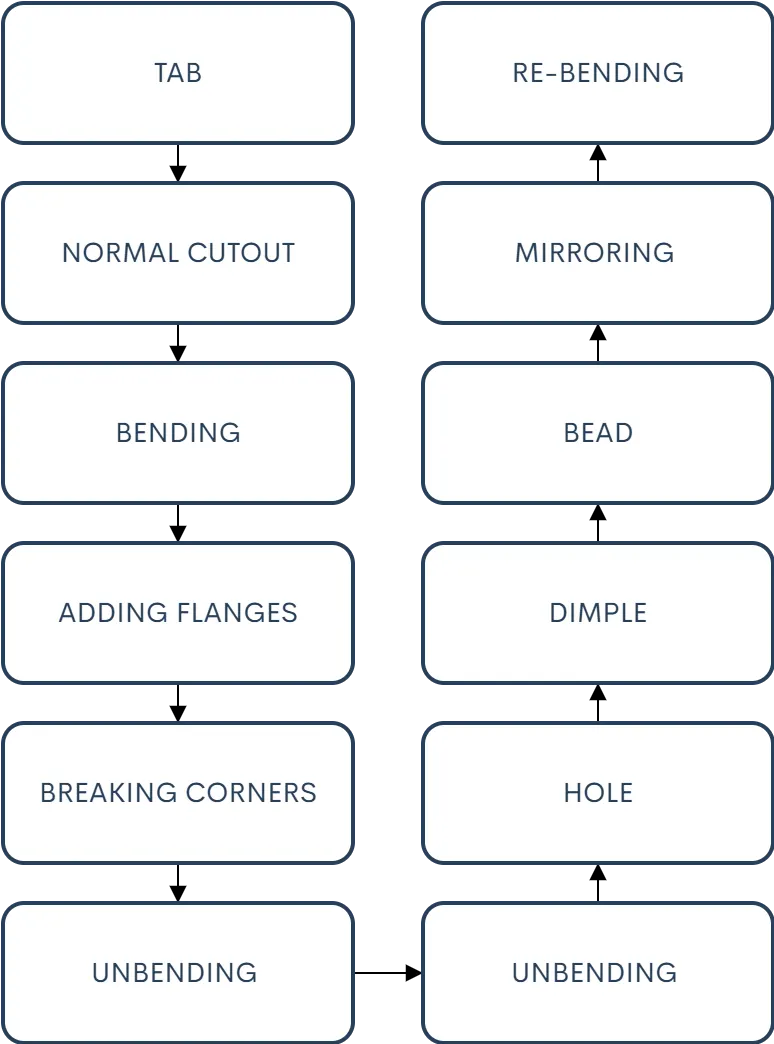
DESCRIPTION
TAB-is used to create a sheet metal extrusion from the drawn sketch
NORAML CUTOUT- Is used to creaye a cutout on the sheet meatal part using a sketch of desired shape
BENDING-Is used to add the bend to the sheet metal part at a desired potion using a line sketch
ADDING FLANGES at the end of the shetal part to give the bend with the material
BREAKING CORNERS to eliminate the sharp edges
UNBENDING to see the shape of the sheet metal and to add other features
HOLE is used to add the normal holes or the threaded holes
DIMPLE is used to add the impression of the desired shape with the help of the sketch
RE-BENDING is used once all the operations are finished to acquire the final product
CONCLUSION
Required 3d model of the casing has been achived.