2R Robotic Arm Simulation using MATLAB
Aim:
- To simulate the forward kinematics of a 2R Robotic Arm using MATLAB
Objective:
- To write the code in MATLAB to simulate the forward kinematics of a 2R Robotic Arm
- Create an animation file of the plot
Description:
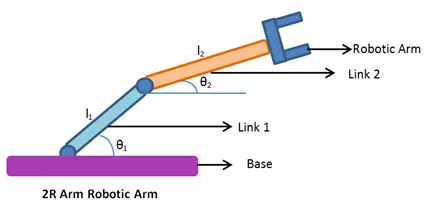
Forward kinematics is the use of kinematic equations to control the position of the end-effector, or as indicated in the figure above, the Robotic Arm.
As evident in the figure, a 2R Robotic Arm has two movable joints and two simple linkages, namely, link 1 and link 2.
This is a typical part of everyday robotics, where the desired position of end-effector is dependent on the two linkages, which each rotate in a 2D-plane and have a single degree of freedom.
Code:
%inputs
L1 = 1; %length of link 1
L2 = 0.5; %length of link 2
theta1 = linspace(-90,90,20); %angle that the first link makes with x-axis
theta2 = linspace(-90,90,20); %angle that the second link makes with x-axis

num = 1;
for i = 1:length(theta1) %this for loop will run the number of times as the number of elements in theta 1
THETA1 = theta1(i); %continuous changing value of 'theta1' will be stored in the new variable 'THETA1'
for j = 1:length(theta2) %this for loop will run the number of times as the number of elements in theta 2
THETA2 = theta2(j); %continuous changing value of 'theta2' will be stored in the new variable 'THETA2'
x0 = 0; %initial position of link 1
y0 = 0;
x1 = L1*cosd(THETA1); %end position of link 1 AND initial position of link 2
y1 = L1*sind(THETA1);
x2 = x1 + L2*cosd(THETA2); %end position of link 2
y2 = y1 + L2*sind(THETA2);

%Plotting the two lines together
plot([x0 x1],[y0 y1],[x1 x2],[y1 y2],'linewidth',2)
axis([-0.5 1.5 -1.5 1.5]) %range of x and y axes
pause(0.02)
M(num) = getframe(gcf);
num = num + 1;
end
end

movie(M)
VideoFile = VideoWriter('forward_kinematics_of_robotic_arm.avi','Uncompressed AVI');
open(VideoFile)
writeVideo(VideoFile,M)
close(VideoFile)
Final output can be viewed through the link below:
https://drive.google.com/file/d/1TN3Cf0f5U57fUmwlXzR8tdey1Y2eGjfn/view?usp=sharing
Conclusion:
I personally think this has been a useful project to learn about basic MATLAB coding. It allows us to work on a relevant project where we all know about the physics that goes behind the mechanism, but we learn about the language needed for a machine to understand and simulate our requirements.