Mechanical · Course

FEA using SOLIDWORKS

A 4-week Solidworks course that trains engineers in the fundamentals of FEA analysis. Develop critical skills and work on industry-oriented Solidworks simulations. Understand the different domains of Solidworks use including structural analysis and linear/non-analysis.

Duration
4 weeks
Content
4 hours
Projects
1
Mode
Online
Overview

What you'll
be able to do.

  • The course is designed for everyone who is interested in doing FEA simulations and needs a fundamental understanding and hands-on experience on solvers .
  • The course will teach about FEA and different types of FEA analysis.
  • The course covers basic concepts of structural analysis.
  • The course will introduce the students to the various FEA simulation types in SolidWorks.
  • The course will teach Linear/Nonlinear Analysis.
Tools you'll use
SOLIDWORKS
Curriculum

10 modules,
built with industry.

  1. 01FEA using SOLIDWORKS10 modules
    1. Introduction to FEA W01
      • What is FEA?
      • Different types of Analysis Methods
        1. Analytical Method
        2. Experimental Method
        3. Numerical Method
      • FEA explanation with cantilever beam
      • Stress-Strain plot
      • General steps followed in FEA
      • Mesh elements
        1. H-refinement
        2. P-refinement
      • Summary
    2. Introduction to Types of FEA analysisW02
      • Structural Analysis
      • Static Analysis
      • Dynamic Analysis
      • Difference between Static and Dynamic Analysis
      • Linear and Nonlinear Analysis
    3. Introduction to SOLIDWORKS Simulation EnvironmentW03
      • Important SOLIDWORKS modelling features
        • SOLIDWORKS Sketch
        • SOLIDWORKS Features
      • Introduction to SOLIDWORKS Simulation
      • Performing a Simple Cantilever Load Analysis
    4. Performing Basic FEA Analysis using SOLIDWORKS SimulationW04
      • Static Linear Analysis
      • Static Nonlinear Analysis
      • Dynamic Linear and Nonlinear Analysis
    5. 1D/2D and 3D FEA AnalysisW05
      • Situations where 1D, 2D and 3D simulations are used
      • Performing 1D simulation in SOLIDWORKS
      • Performing 2D simulation in SOLIDWORKS
      • Performing 3D simulation in SOLIDWORKS
    6. Parametric/Design StudyW06
      • What is a parametric study and why is it used?
      • Advantages of performing a parametric study
      • How to access parametric study in SOLIDWORKS?
      • Performing a parametric study on a wine bottle
    7. Buckling AnalysisW07
      • What is buckling?
      • Difference between bending and buckling
      • Relationship between buckling shape and types of fixtures
      • Performing a buckling analysis in SOLIDWORKS
    8. Fatigue AnalysisW08
      • What is a Fatigue Analysis?
      • Applications of Fatigue Analysis
      • Application of SN Curve in Fatigue Analysis
      • Endurance Limit
      • Stress Analysis of S-hook
      • Fatigue Analysis of S-hook
        • Constant Amplitude Fatigue Study
        • Variable Amplitude Fatigue Study
        • Harmonic (Fatigue of Sinusoidal Loading)
        • Random Vibration (Fatigue of Random Vibration)
    9. Drop TestW09
      • What is a drop test?
      • How do you access drop tests in SOLIDWORKS?
      • Performing a drop test of a PCB board
      • Discussion of results
    10. Frequency AnalysisW10
      • Reason for Performing a Frequency Analysis
      • Natural Frequency and Resonance
      • Mode Shapes
        Types of Solvers in SOLIDWORKS Frequency Analysis
      • Frequency Analysis of Support Brackets
      • Discussion of Results
Industry projects

1 projects
you'll ship.

Our projects are designed by experts in the industry to reflect industry standards. By working through our projects, Learners will gain a practical understanding of what they will take on at a larger-scale in the industry. In total, there are 1 Projects that are available in this program.

Buckling Analysis

Buckling Analysis

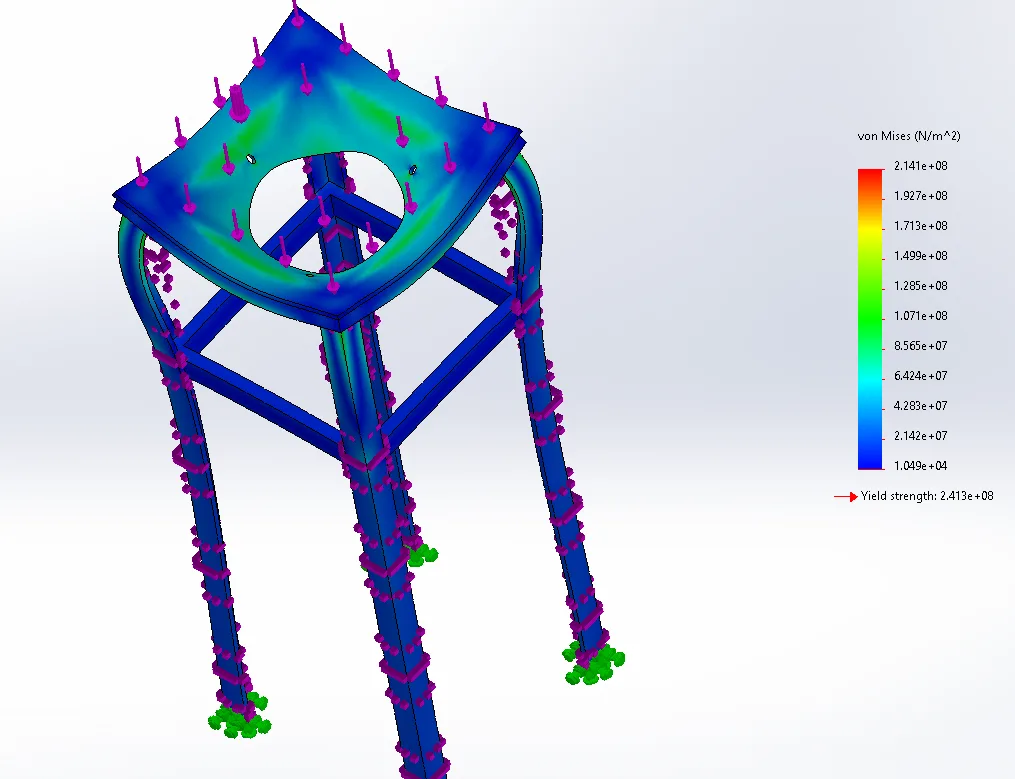
In this project, the students will be asked to perform buckling analysis on a cyclonic separator table.
Fee

One fee.
Everything included.

Become job ready with our comprehensive industry focused curriculum for freshers & early career professionals

Premium
₹40,000
Inclusive of all charges
  • 1 Year Access
  • Personalized Page
  • Live Individual & Group Sessions
  • Personalized & Hands-On
  • Job-Oriented Industry Relevant Curriculum
Check eligibility →
FAQ

Questions,
answered.

What is unique about the finite element course?

The FEA using Solidworks course is a versatile course that will add value to your resume. It combines academics with hands-on knowledge to give you the best education for the qualification of an FEA engineer.

How will the FEA using Solidworks course help me do my Master’s or PhD?

The course strengthens your portfolio, which will help you secure grants and scholarships to further your studies.

How can I interact with Skill Lync's technical team?

The technical support team is available, and you can access them via WhatsApp or email. You may call them using video or audio conference calls.

What are the software skills a student will learn during the course?

Solidworks is the software skill taught to students during the FEA course. It is a cost-effective and time-saving software. Organizations engaged in mechanical, electrical, and civil engineering use it for CAE analysis.  

What skills should I have to enroll in the course?

The course is open to mechanical, automotive, and aerospace engineers. Undergraduates in the fourth semester of an engineering course can apply for the course too.    

Next step

Not sure it's
the right fit?

A counsellor will walk you through the syllabus, projects and fee options — and tell you honestly if another course suits you better.

Get the syllabus + a call back

We'll email the full syllabus and call within one working day.

By submitting you agree to our Terms and Privacy Policy.

Call usEnquire

Talk to a career counsellor

Free 20-minute call. We'll map the right course to where you want to work.

By submitting you agree to our Terms and Privacy Policy.