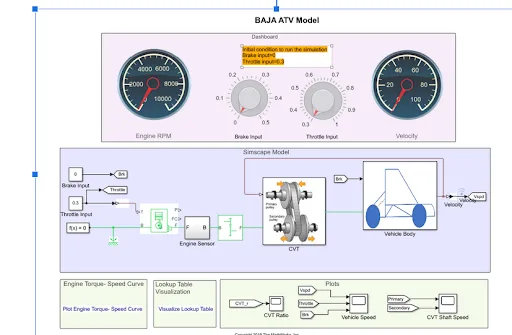
Simulation of All-Terrain Vehicle
Learners are required to carry out a system-level simulation of an all-terrain vehicle using Simulink, Simscape, and Simscape Driveline. At the end of the project, learners should …
Learn about the fundamentals of Simulink and Simscape needed to model, simulate, and study complex physical systems.
Simulink is a graphical programming environment based on MATLAB that is used to model, simulate, and study dynamic systems. It takes a block diagram approach to modeling and simulations and can be used to model and control systems in the fields of mechanical and electrical engineering. In the Simulink environment is Simscape, which is used for physical modeling. By using this software, engineers can simulate the behavior of basic to complex models. It is extensively used in the industry for developing virtual prototypes of systems - making it a much sought-after software skill.
By taking this course, learners will
As complex systems have numerous parts interacting with each other, they are difficult to model. Mathematical models can be used to model these complex systems, and provide an understanding of how they function. By using Simscape, engineers can develop physical models, model control systems, and test performance at the system level. It is important for learners to understand complex system modeling using Simulink, and physical system modeling using Simscape.
This week will cover
Simscape is used to develop models that represent physical systems in the Simulink environment. It also lets users assess system-level performance. When setting up a model for simulation on Simulink, there are specific configurations to be followed. It is important for learners to understand how to model and configure simulations using Simscape.
This week will cover
Simulink and MATLAB are closely integrated as Simulink models can be developed, solved, and interacted with by using MATLAB scripts. These script files have a series of statements with commands and functions that can be carried out at runtime. Simulink models can also access the MATLAB Base Workspace and Model Workspace to identify required parameters. It is important for learners to understand how MATLAB and Simulink are interfaced.
This week will cover
Stateflow is used to elaborate on how MATLAB and Simulink respond to events, time-based variables, and input signals. It is a graphical programming platform based on finite state machines that can be used by engineers to design control logic. It is important for learners to understand the use of Stateflow in engineering applications.
This week will cover
Our projects are designed by experts in the industry to reflect industry standards. By working through our projects, Learners will gain a practical understanding of what they will take on at a larger-scale in the industry. In total, there are 1 Projects that are available in this program.
Learners are required to carry out a system-level simulation of an all-terrain vehicle using Simulink, Simscape, and Simscape Driveline. At the end of the project, learners should …
Become job ready with our comprehensive industry focused curriculum for freshers & early career professionals
Students and graduates of mechanical engineering and related streams of engineering can take up this course. If you are interested in designing Physical Modeling, you can pursue this course.
Yes, this course is a 100% online course.
This course is a 12-week course with Simulink classes covering all the basic to advanced level concepts.
Yes, after completion, you will be given a course completion certificate. The top 5% of the scorers will be given a merit certificate alongside the course completion certificate.
Yes, you can clear your queries with email and forum support. If you have opted for the Pro or Premium course, you will additionally receive individual video support and group video support.
Skill-Lync is among India’s leading EdTech platforms dedicated to transforming engineering education. We equip young engineers with the latest skill sets and cutting-edge tools in new-age technologies.
The brainchild of two engineers from Chennai, Skill-Lync, is on a mission to bridge the skill gap between aspiring professionals and the industry’s demands through job-oriented courses.
A counsellor will walk you through the syllabus, projects and fee options — and tell you honestly if another course suits you better.