Wiring harness design in CATIA V5 - 3D modeling Week 7 Challenge
WIRING HARNESS FLATTEN :
A wiring harness is a group of wires, cables, and connectors that transmit electrical power or signals. To "flatten" a wiring harness means to lay it out in a flat, organized manner, rather than having it bunched up or twisted. This can make it easier to install, inspect, and troubleshoot.
in this challenge, week 4 wiring harness bundle is taken as an example and flatten is created using it.
where in this two types of protection is used,
black colour indicates the cot tubes
green colour indicates the pvc tapes.
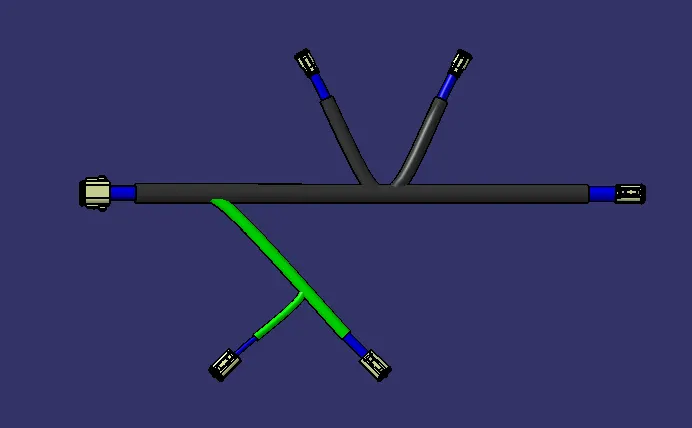
PROCEDURE TO CREATE AN ENGINE HARNESS WIRING FLATTEN :
- create a new product file and name it as wiring harness flatten.
- define harness flatten paramters as required and click okay.
- then extract the electrical geometrical bundle product file.
- after extracting the product file, flatten the wiring harness using flatten command
- and set to desired face or xy plane as default and click all the bundle connections, click okay.
- now the wiring harnessflatten is created
- aligned the flatten object as required using the rotate and roll comand.
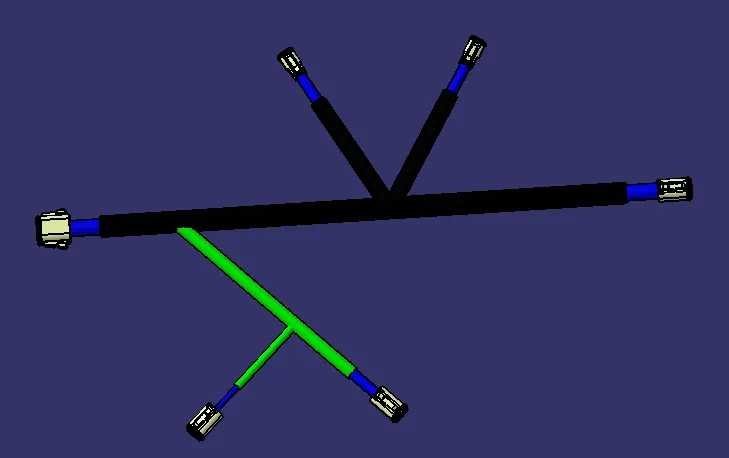
PROCEDURE TO CREATE AN WIRING HARNESS FLATTEN DRAWING :
- make sure flatten parameters are set as requied in the drawing
- the bundle must be in single line
- the protecting covering must be in double line
- connectors and supports must be in 3d object
- and after placing it in the drawing sheet, make sure that in properties the wire frame properties is selected.
- then assign the required dimensions and bill of material table in the drawing sheet.
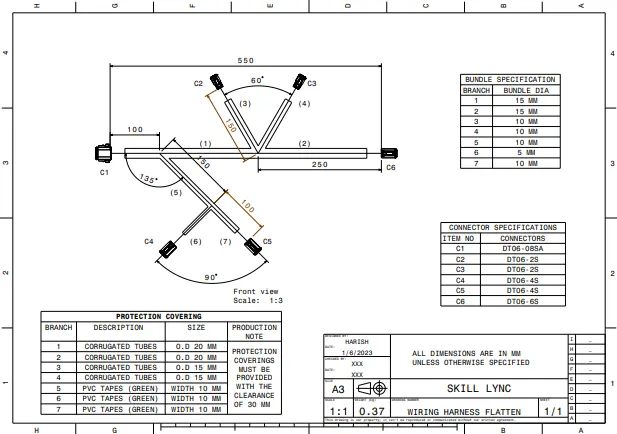
CONCLUSION :
thus wiring harness flatten and drawing sheet has been created with the required parameters and the assembly of week 4 challenge.