Wiring harness design in CATIA V5 - 3D modeling Week 4 Challenge
Q1. Route the following harness layout in Electrical workbench. Make assumption for harness bundle diameters. Use Following connectors as shown in layout diagram.
Add protective covering on all branches connected to DT06-2S & DT06-4S connectors. Keep end extremity at 30mm (from connectors end).
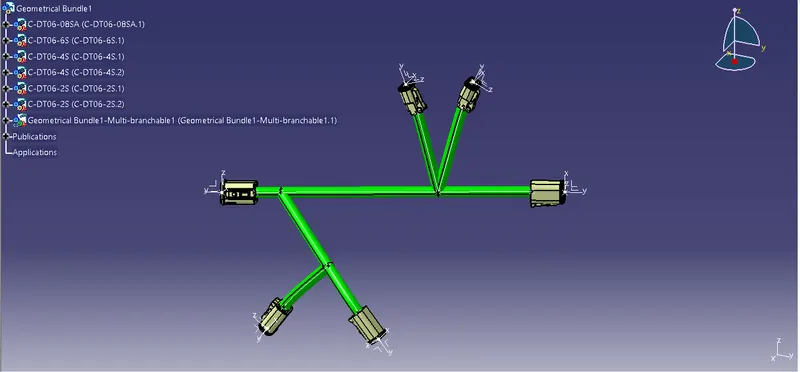
A) The harness layout for above given connectors is shown below. First we need to define every connector as an electrical component.After defining it, create a product file and gathered all connectors. And place them according to the given positions,distance in the question.
The most important point is we need to connectors only the bundle connenction point not connector connection point.
After placing all connectors at correct position and correct distance, click on the 'geomentrical bundle' and select the product , it will convert into electric geomentical bundle. After doing this, click on the 'Multi_branchable_Document' it will come like this;
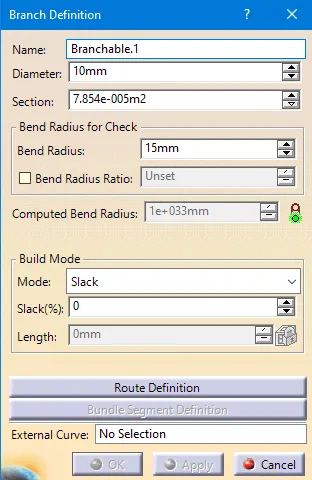
Here we should click on the Route deifinition, when we click on that we get;
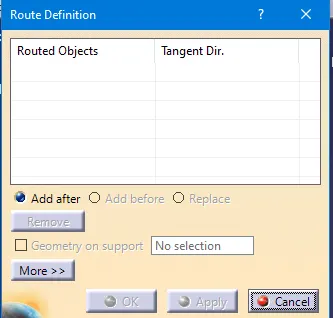
Then we can select the required points to form the bundle. Here we have options like 'add after','add before',replace' like this select the required one at that time. when we select the points click ok option then we get the bundle with setted diameter. From the below picture all bundles is formed like this only