Week - 9 - Reflecting the geometry
AIM: Reflecting the geometry using tcl/tk script
OBJECTIVE: The objective of this challenge is:
1. To create a macro that will reflect given multicomponent FE part with ease.
2. It should be independent of deck
3. Only inputs allowed are, original CAD component, reflected CAD component and original FE component.
PROBLEM STATEMENT: For large models, it is very difficult and time consuming to mesh each component separately. So to overcome this difficulty, we create a macro that will reflect given FE part with ease. It ask the user to enter the component name and select the original CAD component, reflected CAD component and original FE component and then reflect the original FE on reflected component.This macro is independent of deck.
PROCEDURE:
1. To perform the given task, open any code editor ( here we use Notepad++) and type a code as follows:
# Code to reflect the geometry:
proc optistruct {c t} {
set opti [hm_getsolver]
if {$opti == "optistruct"} {
set n $c
set m $t
*createmark comps 1 $n
if {[hm_entityinfo exist comps $n]!=0} {
puts [tk_messageBox -message "The component already exists" -icon warning -type ok -title Message]
} else {
*createentity comps cardimage=Part includeid=0 name=$n;
*createmark comps 1 $n
set compid [hm_getmark comps 1]
*setvalue comps id=$compid;
}
}
}
proc radioss {c t} {
set radi [hm_getsolver]
if {$radi == "radioss"} {
set n $c
set m $t
*createmark comps 1 $n
if {[hm_entityinfo exist comps $n]!=0} {
puts [tk_messageBox -message "The component already exists" -icon warning -type ok -title Message]
} else {
*createentity comps cardimage=Part includeid=0 name=$n;
*createmark comps 1 $n
set compid [hm_getmark comps 1]
*setvalue comps id=$compid;
}
}
}
proc Reflect {} {
#Inputs
*clearmarkall 1; *clearmarkall 2;
set name [hm_getstring Component_Name "Enter name of reflect component followed by _"]
*createmarkpanel comps 1 "Select the component containing original geometry to be reflected"
set o_geom [hm_getmark comp 1]
*createmarkpanel comps 1 "Select the component containing target geometry"
set t_geom [hm_getmark comp 1]
*createmarkpanel comps 1 "Select the FE components you want to reflect"
set o_fea [hm_getmark comps 1]
#Component Operations
set profile [hm_info templatetype]
foreach i $o_fea {
set t [hm_getthickness comps $i]
set old_n [hm_entityinfo name comps $i]
set n $name$t
$profile $n $t
*createmark elements 1 $old_n
*copymark elements 1 $n
*displaycollectorwithfilter components "off" "$old_n" 1 0
}
*createmark comps 2 "displayed"
*autocolorwithmark components 2
#Creating Centroids
*clearmarkall 1; *clearmarkall 2;
*createmark surfaces 1 "by collector" $o_geom
set o_cog [hm_getcentroid surfaces 1]
*createnode [lindex $o_cog 0] [lindex $o_cog 1] [lindex $o_cog 2] 0
*createmark node 2 -1
set o_node [hm_getmark node 2]
*createmark surfaces 1 "by collector" $t_geom
set t_cog [hm_getcentroid surfaces 1]
*createnode [lindex $t_cog 0] [lindex $t_cog 1] [lindex $t_cog 2] 0
*createmark node 2 -1
set t_node [hm_getmark node 2]
#Creating intercepts needed to define reflect plane
set intercepts [hm_getdistance nodes $o_node $t_node 0];
*clearmarkall 1;
*createnodesbetweennodes $o_node $t_node 1;
*createmark nodes 1 -1
set m_node [hm_getmark nodes 1];
set m_node_info [hm_nodevalue $m_node];
#Reflecting the components
*clearmarkall 1;
*createmark elements 1 "displayed"
*createplane 1 [lindex $intercepts 1] [lindex $intercepts 2] [lindex $intercepts 3] [lindex $m_node_info 0 0] [lindex $m_node_info 0 1] [lindex $m_node_info 0 2]
*reflectmarkwithoption elements 1 1 0;
#Equivalence
*clearmarkall 1; *clearmarkall 2;
*createmark components 1 "displayed"
*equivalence components 1 0.01 1 0 0
}
Reflect;
2. After writing the code save the file.
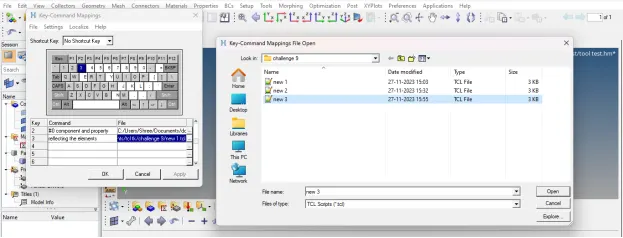
3. Then open any model in hypermesh and run this file in hypermesh using shortcut key assign to it.
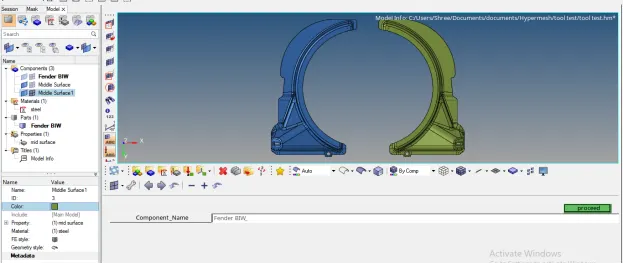
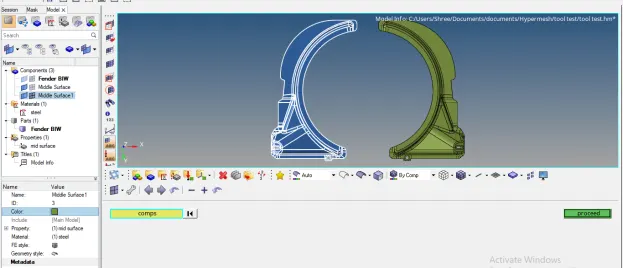
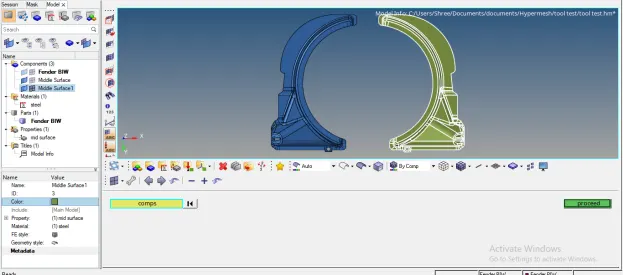
4. After running this code in hypermesh, following result will appear:
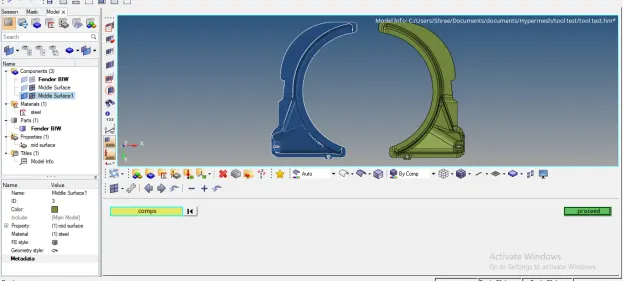
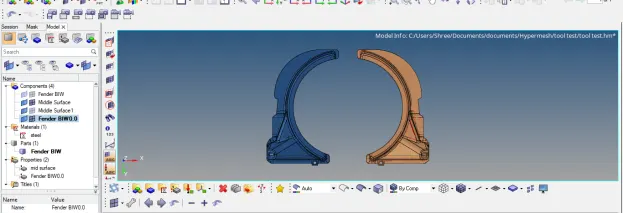
TCL COMMAND EXPLANATION:
1. hm_getsolver: Returns the name or ID of the solver as provided by the template *codename( ) command. If no name is provided, or no template is loaded, "none" is returned
Input value
An optional argument that specifies the type of value to return
ID - return the template ID
name - return the template name (default)
2. *createentity: Create a new entity with specified data. Data names only are allowed to be set. If the data name “name” is specified when creating an entity enabled for the name pool, the command uses the provided name to define the solver name.
There are also a few limitations to this command:
· Attributes are not supported.
· STATUS is not supported.
3. hm_entityinfo: Returns various information on entities
4. hm_getmark: Returns the entity IDs of the passed entity type on the specified mark
5. hm_getstring: This command returns a string value by providing the user with a HyperMesh panel
6. *setvalue: Updates an existing entity/entities with new/modified data. Data names, attributes, and metadata are allowed to be modified, assuming the proper card image is also assigned. If the specified data name is “name” and the entity type is enabled for the name pool, the provided name is used to update the solver name
7. hm_getthickness: Returns the thickness of the specified component, element or property.
8. *copymark: Copies entities from one collector to another
9. *displaycollectorwithfilter: Changes the active state of a collector using the menu filter
10. hm_getcentroid: Returns the geometric centroid for selected entities
11. hm_getdistance: Returns the distance between two nodes/points relative to a local coordinate system. This returns four values indicating the total distance and the three component values between the input nodes/points, relative to a local coordinate system. If the system is rectangular, the component values returned are x, y, and z. If the system is cylindrical, the component values returned are r, t, and z. If the system is spherical, the component values returned are r, t, and p
12. *createnodesbetweennodes: Creates a user-specified number of nodes between two nodes
13. *createplane: Defines a plane for use in a subsequent command
14. *reflectmarkwithoption: Reflects a selection of entities about a plane with an option to specify how to handle bar elements
15. *createmarkpanel: Provides a panel to add entities to a mark
16. *equivalence: Equivalences or finds duplicate nodes of selected components, elements or nodes within a tolerance
CONCLUSION: After executing proper tcl/tk code, we are able to create a macro that will reflect given multicomponent FE part with ease. The macro is independent of deck and only inputs allowed are, original CAD component, reflected CAD component and original FE components.