Week 8 - Simulation of a backward facing step in OpenFOAM
*AIM:-
-Simulation of a backword facing step in the openfoam software
*Objective:-
-In this simulation we produce mesh using openFoam software and show the post-processing result just like change in velocity and pressure gradient using paraview.
-In this case we use an incompressible-laminar-viscous flow.
-Simulate same flow by changing the gradient factor to 0.2
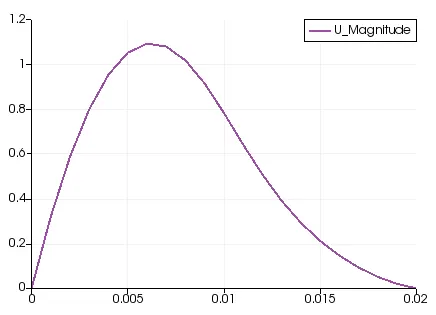
-Measure and compare the velocity profile at 0.085m from the inlet of geometry for both case studies.
*Assumption:-
-The fluid flow is newtonian fluid.
-The flow is incompressible and laminar.
-The kinematic viscosity is taken at air at 20 , v=1.516 m^2/s
-Zero frictional losses along the domain.
-The backward facing step is to be analyzed in 2 dimensions( x & y) and we will assign negligible value to the z-direction and its respective boundaries will be kept empty.
*Introdution:-
-The study of fluid motion across various geometries is one of the major aspects of a CFD engineer.Due to different types of flow different flow field produce(velocity field, pressure field).
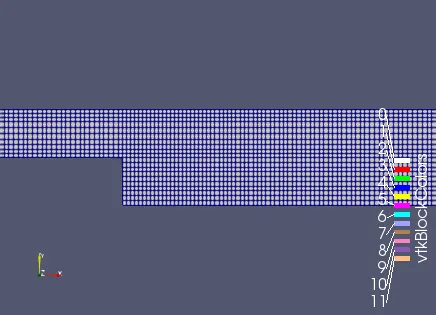
-The backward facing problem is one of the best problem in the computational fluid dynamic.The geometry of backward facing step problem is shown in figure.
-Here we consider no slip bundary condition on every wall under the domain.
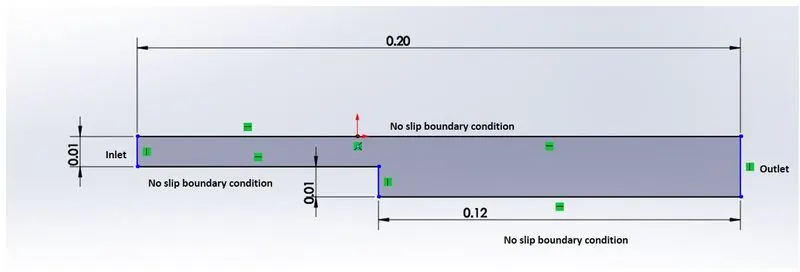
-We use openFoam software and first creating non-grading mesh and then graded mesh, to obesrve the effect of the grading factor on our final result.
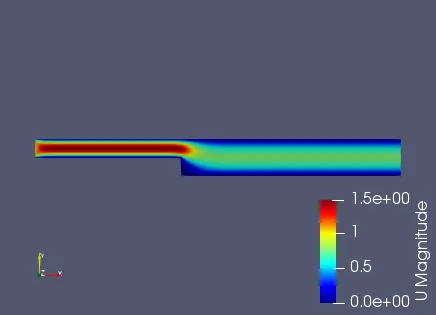
-For the result we need to create the velocity contour and plots of velocity near the step domain, for each grading factor to observe their effects.
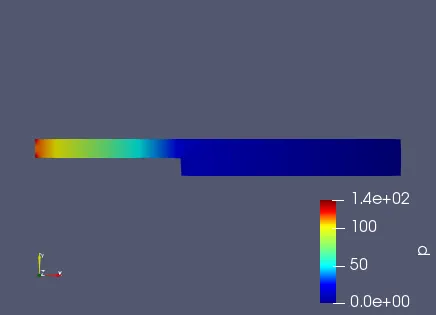
-Assume constant velocity inlet and constant zero gauge pressure outlet as a initial conditions.
-The above figure has to be discretized in to the set of blocks and combined together to create rigid domain.so now we discretize domain in to 5 parts.
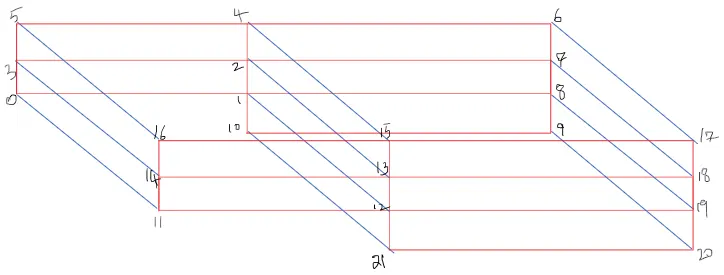
*Mesh specification:-
1) Number of cells along the x direction (In whole domain) = 200
2) Number of cells along the y direction(In the first region,Before the step) = 20;
3) Number of cells along the y direction(In the second region,After the step) = 40;
*Procedure for numerical setup and simulation:-
-First of all our simulation is incompressible-laminar-viscous flow, So we google and search "which solver use for incompresible laminar flow in openfoam"
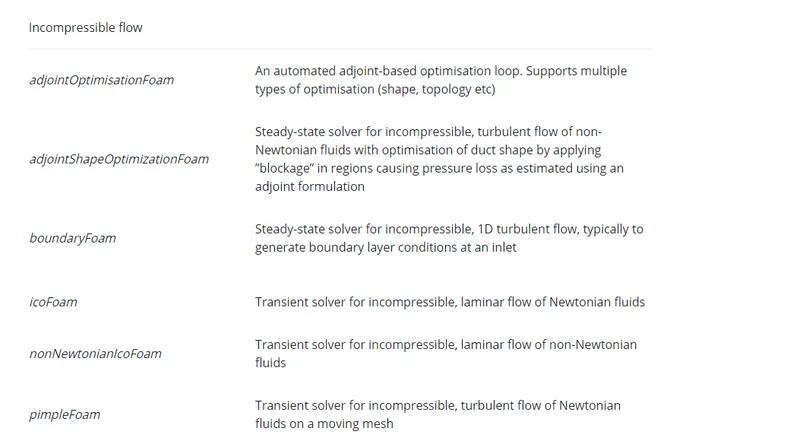
-Here we seen that this condition is satisfied for the icoFoam solver, so we use this solver for our simulation.
-After that open terminal in the linux operating system.
-Then open the tutorial file, For that we use 'tut' shortcut key.
-Inside the tutorial directory type "ls" for the seen the directory and files inside that directory.
-Then type "cd incompressible/" for go to inside the incompressible directory.
-Again type "ls" and seen the directory and files inside that directory.Here we seen that icoFoam also available as directory.
-Type ''cd icoFoam/" and then use "ls" command, Here we seen that cavity files is available.
-We copy this file and run folder, Because every simulations are run in to only run folder.
-For that use this command:-
"cp -r cavity/ $FOAM_RUN/das
Here, cp= Copy any file or folder
-r= Entire directory
cavity= name of file
$FOAM_RUN= paste inside the openFoam run folder.
das= New name provide of the file
-After that go to the run directory using this command:- "cd $FOAM_RUN" , we seen that our das file present there.
-In this directory we changes setting depends on our requirements.
1) blockmeshDict:- It has the geometric and mesh charasteristics of the domain.
2) transportproperties:- It has information of transport quantity. In our case transport object is air and transport property is kinematic viscocity.
3) controlDict:- It has control of time.It use for start time and end time of the simulation.
4) fvschemes:- It has set the numerical schemes for the term such as derivatives in equations there are calculate the simulation.
5) fvsolutions:- It governs the equations, solver and numerical algorithm.
-After that run the simuation using the "./Allrun" command.
-Then use paraview software for seen the post-processing result. (Shortcut key:-"paraFoam")
1) blockmeshDict:-
/*--------------------------------*- C++ -*----------------------------------*\
  =========                 |
  \\      /  F ield         | OpenFOAM: The Open Source CFD Toolbox
   \\    /   O peration     | Website:  https://openfoam.org
    \\  /    A nd           | Version:  8
     \\/     M anipulation  |
\*---------------------------------------------------------------------------*/
FoamFile
{
    version     2.0;
    format      ascii;
    class       dictionary;
    object      blockMeshDict;
}
// * * * * * * * * * * * * * * * * * * * * * * * * * * * * * * * * * * * * * //

convertToMeters 1;

vertices
(
    (0 0 0)  //0
    (0.08 0 0)  //1
    (0.08 0.005 0)  //2
    (0 0.005 0)  //3
    (0.08 0.01 0)   //4
    (0 0.01 0)    //5
    (0.2 0.01 0)  //6
    (0.2 0.005 0)   //7
    (0.2 0 0)    //8
    (0.2 -0.01 0)  //9
    (0.08 -0.01 0)  //10

    (0 0 0.0001)  //11
    (0.08 0 0.0001)  //12
    (0.08 0.005 0.0001)  //13
    (0 0.005 0.0001)  //14
    (0.08 0.01 0.0001)  //15
    (0 0.01 0.0001)  //16
    (0.2 0.01 0.0001)  //17
    (0.2 0.005 0.0001)  //18
    (0.2 0 0.0001)   //19
    (0.2 -0.01 0.0001)  //20
    (0.08 -0.01 0.0001)  //21
);


blocks
(
    hex (0 1 2 3 11 12 13 14) (80 5 1) simpleGrading (1 1 1)
    hex (3 2 4 5 14 13 15 16) (80 5 1) simpleGrading (1 1 1)
    hex (2 7 6 4 13 18 17 15) (120 5 1) simpleGrading (1 1 1)
    hex (1 8 7 2 12 19 18 13) (120 5 1) simpleGrading (1 1 1)
    hex (10 9 8 1 21 20 19 12) (120 10 1) simpleGrading (1 1 1)
);

edges
(
);

boundary
(
    inlet
    {
        type patch;
        faces
        (
            (0 11 14 3)
            (3 14 16 5)
        );
    }


    outlet
    {
        type patch;
        faces
        (
            (18 7 6 17)
            (19 8 7 18)
            (20 9 8 19)
        );
    }


    fixedWalls
    {
        type wall;
        faces
        (
            (15 17 6 4)
            (16 15 4 5)
            (0 1 12 11)
            (10 9 20 21)
            (1 10 21 12)
        );
    }
    frontAndBack
    {
        type empty;
        faces
        (
            (0 3 2 1)
            (3 5 4 2)
            (2 4 6 7)
            (1 2 7 8)
            (10 1 8 9)
            (11 12 13 14)
            (14 13 15 16)
            (13 18 17 15)
            (12 19 18 13)
            (21 20 19 12)


        );
    }
);

mergePatchPairs
(
);

// ************************************************************************* //
2) transportproperties:-
/*--------------------------------*- C++ -*----------------------------------*\
  =========                 |
  \\      /  F ield         | OpenFOAM: The Open Source CFD Toolbox
   \\    /   O peration     | Website:  https://openfoam.org
    \\  /    A nd           | Version:  8
     \\/     M anipulation  |
\*---------------------------------------------------------------------------*/
FoamFile
{
    version     2.0;
    format      ascii;
    class       dictionary;
    location    "constant";
    object      transportProperties;
}
// * * * * * * * * * * * * * * * * * * * * * * * * * * * * * * * * * * * * * //

nu              [0 2 -1 0 0 0 0] 0.01;


// ************************************************************************* //
3) controlDict:-
/*--------------------------------*- C++ -*----------------------------------*\
  =========                 |
  \\      /  F ield         | OpenFOAM: The Open Source CFD Toolbox
   \\    /   O peration     | Website:  https://openfoam.org
    \\  /    A nd           | Version:  8
     \\/     M anipulation  |
\*---------------------------------------------------------------------------*/
FoamFile
{
    version     2.0;
    format      ascii;
    class       dictionary;
    location    "system";
    object      controlDict;
}
// * * * * * * * * * * * * * * * * * * * * * * * * * * * * * * * * * * * * * //

application     icoFoam;

startFrom       startTime;

startTime       0;

stopAt          endTime;

endTime         0.5;

deltaT          0.001;

writeControl    timeStep;

writeInterval   100;

purgeWrite      0;

writeFormat     ascii;

writePrecision  6;

writeCompression off;

timeFormat      general;

timePrecision   6;

runTimeModifiable true;


// ************************************************************************* //
4) fvschemes:-
/*--------------------------------*- C++ -*----------------------------------*\
  =========                 |
  \\      /  F ield         | OpenFOAM: The Open Source CFD Toolbox
   \\    /   O peration     | Website:  https://openfoam.org
    \\  /    A nd           | Version:  8
     \\/     M anipulation  |
\*---------------------------------------------------------------------------*/
FoamFile
{
    version     2.0;
    format      ascii;
    class       dictionary;
    location    "system";
    object      fvSchemes;
}
// * * * * * * * * * * * * * * * * * * * * * * * * * * * * * * * * * * * * * //

ddtSchemes
{
    default         Euler;
}

gradSchemes
{
    default         Gauss linear;
    grad(p)         Gauss linear;
}

divSchemes
{
    default         none;
    div(phi,U)      Gauss linear;
}

laplacianSchemes
{
    default         Gauss linear orthogonal;
}

interpolationSchemes
{
    default         linear;
}

snGradSchemes
{
    default         orthogonal;
}


// ************************************************************************* //
5) Pressure:-
/*--------------------------------*- C++ -*----------------------------------*\
  =========                 |
  \\      /  F ield         | OpenFOAM: The Open Source CFD Toolbox
   \\    /   O peration     | Website:  https://openfoam.org
    \\  /    A nd           | Version:  8
     \\/     M anipulation  |
\*---------------------------------------------------------------------------*/
FoamFile
{
    version     2.0;
    format      ascii;
    class       volScalarField;
    object      p;
}
// * * * * * * * * * * * * * * * * * * * * * * * * * * * * * * * * * * * * * //

dimensions      [0 2 -2 0 0 0 0];

internalField   uniform 0;

boundaryField
{
    inlet
    {
        type            zeroGradient;
    }

    outlet
    {
        type            fixedValue;
        value           uniform 0;
    }


    fixedWalls
    {
        type            zeroGradient;
    }

    frontAndBack
    {
        type            empty;
    }
}

// ************************************************************************* //
6) Velocity:-
/*--------------------------------*- C++ -*----------------------------------*\
  =========                 |
  \\      /  F ield         | OpenFOAM: The Open Source CFD Toolbox
   \\    /   O peration     | Website:  https://openfoam.org
    \\  /    A nd           | Version:  8
     \\/     M anipulation  |
\*---------------------------------------------------------------------------*/
FoamFile
{
    version     2.0;
    format      ascii;
    class       volVectorField;
    object      U;
}
// * * * * * * * * * * * * * * * * * * * * * * * * * * * * * * * * * * * * * //

dimensions      [0 1 -1 0 0 0 0];

internalField   uniform (0 0 0);

boundaryField
{
    inlet
    {
        type            fixedValue;
        value           uniform (1 0 0);
    }

    outlet
    {
        type            zeroGradient;
    }

    fixedWalls
    {
        type            noSlip;
    }

    frontAndBack
    {
        type            empty;
    }
}

// ************************************************************************* //
*Post-processing:-
-Before the simulation we know about the simulation is good or not, For that we use this two commands:-
i) checkMeah :- For mesh generation is good or not
ii) blockMesh:- For geometry is good or not
-Then open paraview software using the "paraFoam" Shortkey.
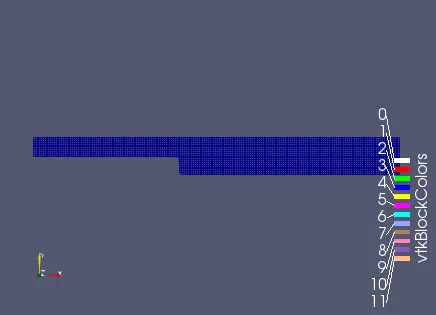
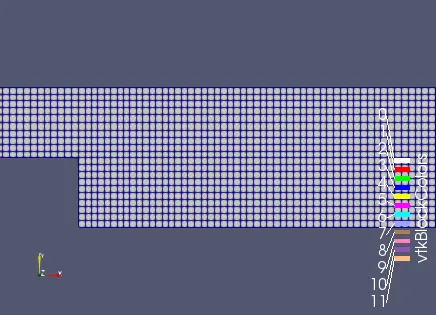
-We first of all seen the result of meshes using opction "surface with faces'
-Then create pressure and velocity profile.
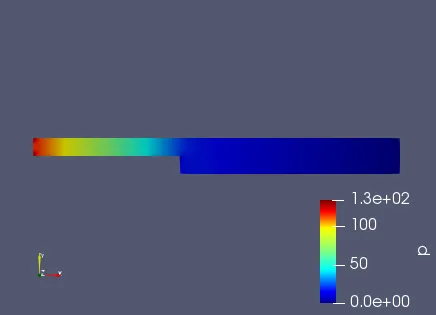
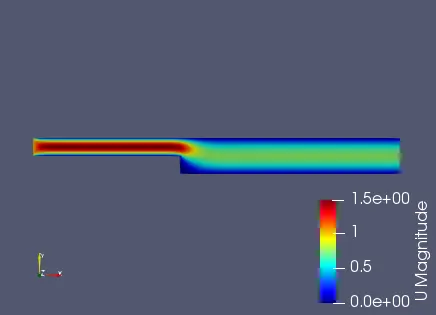
1) grading factor:- 1
-In this case we take a grading factor is 1 in all the x,y and z directions.
2) Pressure:-
3) Velocity:-
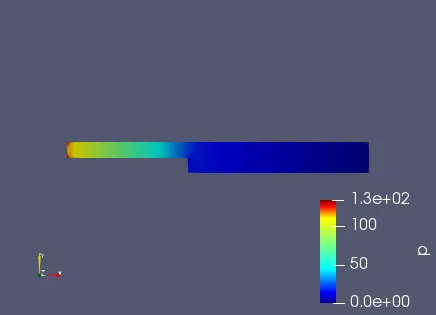
2) grading factor:- 0.8
blocks
(
    hex (0 1 2 3 11 12 13 14) (80 5 1) simpleGrading (1 1.2 1)
    hex (3 2 4 5 14 13 15 16) (80 5 1) simpleGrading (1 0.8 1)
    hex (2 7 6 4 13 18 17 15) (120 5 1) simpleGrading (1.2 0.8 1)
    hex (1 8 7 2 12 19 18 13) (120 5 1) simpleGrading (1.2 1.2 1)
    hex (10 9 8 1 21 20 19 12) (120 10 1) simpleGrading (1.2 1 1)
);
i) Pressure:-
ii) Velocity:-
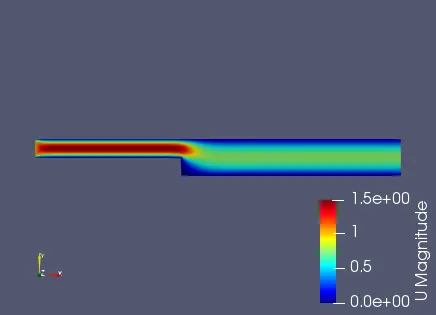
3) Grading factor:- 0.5
blocks
(
    hex (0 1 2 3 11 12 13 14) (80 5 1) simpleGrading (1 1.8 1)
    hex (3 2 4 5 14 13 15 16) (80 5 1) simpleGrading (1 0.2 1)
    hex (2 7 6 4 13 18 17 15) (120 5 1) simpleGrading (1.8 0.2 1)
    hex (1 8 7 2 12 19 18 13) (120 5 1) simpleGrading (1.8 1.8 1)
    hex (10 9 8 1 21 20 19 12) (120 10 1) simpleGrading (1.8 1 1)
);
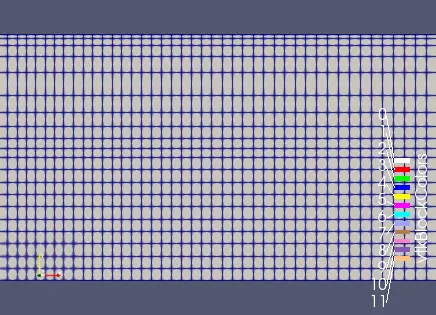
i) Pressure:-
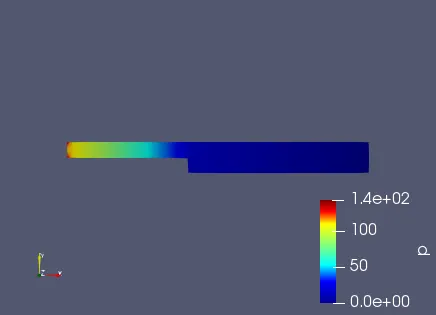
ii) Velocity:-
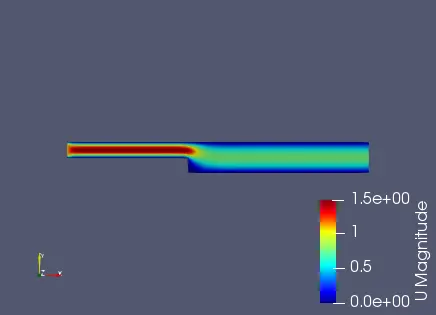
4) Grading factor:- 0.5
-Mesh grading is given as a factor of 0.5 or 1.5, which same but changes as per orientation of the domain. i.e. position of starting and ending cell.
*Graded mesh:-
-Graded mesh can be visualize in the paraview interface and we can see that more of finer mesh provided at the step wall, Because it is location at which more of physics must get captured.
-At the top and bottom wall boundary layer formation is captured.
blocks
(
    hex (0 1 2 3 11 12 13 14) (80 5 1) simpleGrading (1 1.5 1)
    hex (3 2 4 5 14 13 15 16) (80 5 1) simpleGrading (1 0.5 1)
    hex (2 7 6 4 13 18 17 15) (120 5 1) simpleGrading (1.5 0.5 1)
    hex (1 8 7 2 12 19 18 13) (120 5 1) simpleGrading (1.5 1.5 1)
    hex (10 9 8 1 21 20 19 12) (120 10 1) simpleGrading (1.5 1 1)
);
i) pressure:-
ii) Velocity:-
* Velocity profile at 0.085 m from the inlet of the geometry for every case studies:-
1)Grading factor: 1:-
2) Grading factor:0.8:-
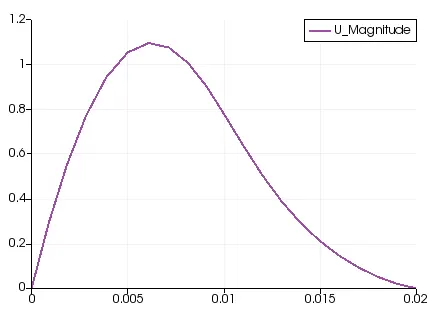
3) Grading factor: 0.2:-
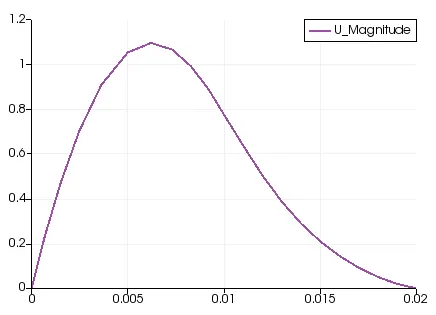
4) Grading factor:0.5:-
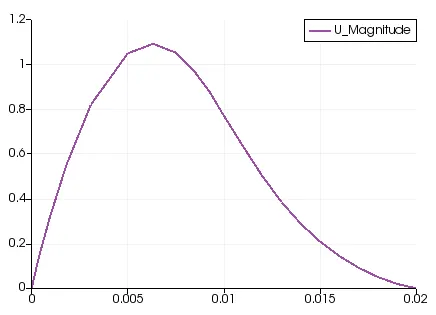
* Conclusion:-
-Initially backward facing step was analyzed using simple grading of 1 and with grading of 0.2. By which an observation was resulted that, using mesh grading factor 0.2, the control volume are made smaller to approximate more accurate physics at the step height and boundary walls.