Week 8 - Simulation of a backward facing step in OpenFOAM
Simulation of a backward facing step in OpenFOAM:
Boundary conditions:
The domain specifiactions are provided in the below figure.
Procedure:
First open the terminal by using right click --> Open Terminal.
Now we are going to solve our problem using tutorials present in openFoam. Type 'tut' to open OpenFOAM tutorial directory.
Use command 'ls' to identify what kind of tutorials present inside this directory.
Since we have to simulate an incompressible laminar flow we select the incompressible directory by using 'cd incompressible' and then use 'ls' to explore the folders under incompressible directory.
icoFoam is the solver in openFoam which uses transient solver for incompressible, laminar flow of Newtonian fluids.
Select icoFoam using 'cd icoFoam' and use 'ls' to list the folders in it.
Inside cavity directory we will again see a cavity folder.Use the command 'cd cavity' .We should copy the cavity folder using 'cp -r cavity' command and paste it in openFoam run folder by typing 'cp -r cavity $FOAM_RUN/cavity_test.
And then open the run folder using 'cd $FOAM_RUN'
Inside the cavity folder we have 4 scripts.
We can edit the 'blockMeshDict' to create domain and provide required specification for blockmesh.
Use 'gedit blockMeshDict' to open it
blockMeshDict:
Grading factor 0.2
/*--------------------------------*- C++ -*----------------------------------*\
  =========                 |
  \\      /  F ield         | OpenFOAM: The Open Source CFD Toolbox
   \\    /   O peration     | Website:  https://openfoam.org
    \\  /    A nd           | Version:  9
     \\/     M anipulation  |
\*---------------------------------------------------------------------------*/
FoamFile
{
    format      ascii;
    class       dictionary;
    object      blockMeshDict;
}
// * * * * * * * * * * * * * * * * * * * * * * * * * * * * * * * * * * * * * //

convertToMeters 0.01;

vertices
(
    (0 0 0)//vertex 0
    (8 0 0)//vertex 1
    (8 0.5 0)//vertex 2
    (0 0.5 0)//vertex 3
    (8 1 0)//vertex 4
    (0 1 0)//vertex 5
    (20 1 0)//vertex 6
    (20 0.5 0)//vertex 7
    (20 0 0)//vertex 8
    (20 -1 0)//vertex 9
    (8 -1 0)//vertex 10
    (0 0 1)//vertex 11
    (8 0 1)//vertex 12
    (8 0.5 1)//vertex 13
    (0 0.5 1)//vertex 14
    (8 1 1)//vertex 15
    (0 1 1)//vertex 16
    (20 1 1)//vertex 17
    (20 0.5 1)//vertex 18
    (20 0 1)//vertex 19
    (20 -1 1)//vertex 20
    (8 -1 1)//vertex 21
);

blocks
(
    hex (0 1 2 3 11 12 13 14) (50 5 1) simpleGrading (1 5 1)
    hex (3 2 4 5 14 13 15 16) (50 5 1) simpleGrading (1 0.2 1)
    hex (2 7 6 4 13 18 17 15) (150 5 1) simpleGrading (5 0.2 1)
    hex (1 8 7 2 12 19 18 13) (150 5 1) simpleGrading (5 5 1)
    hex (10 9 8 1 21 20 19 12) (150 20 1) simpleGrading (5 10 1)
);

edges
(
);

boundary
(
    inlet
    {
        type patch;
        faces
        (
            (0 11 14 3)
            (3 14 16 5)
        );
    }
    outlet
    {
        type patch;
        faces
        (
            (9 8 19 20)
            (8 7 18 19)
            (7 6 17 18)

        );
    }
    walls
    {
        type wall;
        faces
        (
            (4 5 16 15)
            (6 4 15 17)
            (0 1 12 11)
            (10 9 20 21)
            (10 21 12 1)
        );
    }
);

mergePatchPairs
(
);

// ************************************************************************* //
The blockMeshDict file is edited as shown above.
We define the blocks,faces(boundaries)
and vertices in the blockMeshDict for meshing purposes.
Grading factor:
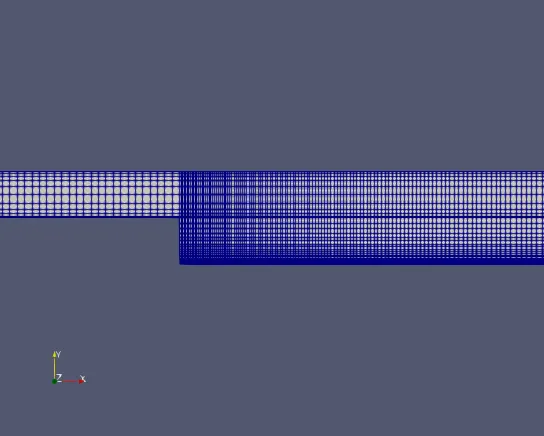
The expansion ratios enables the mesh to be graded, or refined, in specified directions. the ratio is the width of the end cell along one iedge of the block to the width of the start cell along the same edge.
GF = (size of end cell)/ (size of starting cell)
After editing the blockMeshDict save it and close it.
controlDict:
We should edit the 'contolDict' file to provide the start time,end time and also the deltaT value.
deltaT is choosen such that CFL is within 1.
/*--------------------------------*- C++ -*----------------------------------*\
  =========                 |
  \\      /  F ield         | OpenFOAM: The Open Source CFD Toolbox
   \\    /   O peration     | Website:  https://openfoam.org
    \\  /    A nd           | Version:  9
     \\/     M anipulation  |
\*---------------------------------------------------------------------------*/
FoamFile
{
    format      ascii;
    class       dictionary;
    location    "system";
    object      controlDict;
}
// * * * * * * * * * * * * * * * * * * * * * * * * * * * * * * * * * * * * * //

application     icoFoam;

startFrom       startTime;

startTime       0;

stopAt          endTime;

endTime         20;

deltaT          1e-2;

writeControl    timeStep;

writeInterval   20;

purgeWrite      0;

writeFormat     ascii;

writePrecision  6;

writeCompression off;

timeFormat      general;

timePrecision   6;

runTimeModifiable true;


// ************************************************************************* //
'controlDict' file is edited as shown above.
Now we have to give the initial values for pressure and velocity. Navigate to the '0' directory which stands for intial values.
We have to set the initial boundary condition for velocity and pressure at each faces also update the name of the boundary as per in the 'blockMeshDict' file.
Initial velocity:
/*--------------------------------*- C++ -*----------------------------------*\
  =========                 |
  \\      /  F ield         | OpenFOAM: The Open Source CFD Toolbox
   \\    /   O peration     | Website:  https://openfoam.org
    \\  /    A nd           | Version:  9
     \\/     M anipulation  |
\*---------------------------------------------------------------------------*/
FoamFile
{
    format      ascii;
    class       volVectorField;
    object      U;
}
// * * * * * * * * * * * * * * * * * * * * * * * * * * * * * * * * * * * * * //

dimensions      [0 1 -1 0 0 0 0];

internalField   uniform (0 0 0);

boundaryField
{
    inlet
    {
        type            fixedValue;
        value           uniform (0.02 0 0);
    }

    outlet
    {
        type            zeroGradient;
    }

    walls
    {
        type            noSlip;
    }
}

// ************************************************************************* //
Initial pressure:
/*--------------------------------*- C++ -*----------------------------------*\
  =========                 |
  \\      /  F ield         | OpenFOAM: The Open Source CFD Toolbox
   \\    /   O peration     | Website:  https://openfoam.org
    \\  /    A nd           | Version:  9
     \\/     M anipulation  |
\*---------------------------------------------------------------------------*/
FoamFile
{
    format      ascii;
    class       volScalarField;
    object      p;
}
// * * * * * * * * * * * * * * * * * * * * * * * * * * * * * * * * * * * * * //

dimensions      [0 2 -2 0 0 0 0];

internalField   uniform 0;

boundaryField
{
     inlet
    {
        type            zeroGradient;

    }

    outlet
    {
        type            fixedValue;
        value           uniform 0;
    }

    walls
    {
        type            zeroGradient;
    }
}

// ************************************************************************* //
After this we can us ethe 'blockMesh' command to start the meshing.
/*--------------------------------*- C++ -*----------------------------------*\
  =========                 |
  \\      /  F ield         | OpenFOAM: The Open Source CFD Toolbox
   \\    /   O peration     | Website:  https://openfoam.org
    \\  /    A nd           | Version:  9
     \\/     M anipulation  |
\*---------------------------------------------------------------------------*/
FoamFile
{
    format      ascii;
    class       dictionary;
    location    "constant";
    object      transportProperties;
}
// * * * * * * * * * * * * * * * * * * * * * * * * * * * * * * * * * * * * * //

nu              [0 2 -1 0 0 0 0] 1e-5;


// ************************************************************************* //
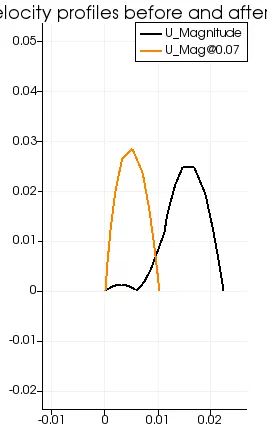
Plot:
Mesh:
Grading factor 1;
The same procedure is followed for the grading factor 1.
/*--------------------------------*- C++ -*----------------------------------*\
  =========                 |
  \\      /  F ield         | OpenFOAM: The Open Source CFD Toolbox
   \\    /   O peration     | Website:  https://openfoam.org
    \\  /    A nd           | Version:  9
     \\/     M anipulation  |
\*---------------------------------------------------------------------------*/
FoamFile
{
    format      ascii;
    class       dictionary;
    object      blockMeshDict;
}
// * * * * * * * * * * * * * * * * * * * * * * * * * * * * * * * * * * * * * //

convertToMeters 0.01;

vertices
(
    (0 0 0)//vertex 0
    (8 0 0)//vertex 1
    (8 0.5 0)//vertex 2
    (0 0.5 0)//vertex 3
    (8 1 0)//vertex 4
    (0 1 0)//vertex 5
    (20 1 0)//vertex 6
    (20 0.5 0)//vertex 7
    (20 0 0)//vertex 8
    (20 -1 0)//vertex 9
    (8 -1 0)//vertex 10
    (0 0 1)//vertex 11
    (8 0 1)//vertex 12
    (8 0.5 1)//vertex 13
    (0 0.5 1)//vertex 14
    (8 1 1)//vertex 15
    (0 1 1)//vertex 16
    (20 1 1)//vertex 17
    (20 0.5 1)//vertex 18
    (20 0 1)//vertex 19
    (20 -1 1)//vertex 20
    (8 -1 1)//vertex 21
);

blocks
(
    hex (0 1 2 3 11 12 13 14) (50 5 1) simpleGrading (1 1 1)
    hex (3 2 4 5 14 13 15 16) (50 5 1) simpleGrading (1 1 1)
    hex (2 7 6 4 13 18 17 15) (150 5 1) simpleGrading (1 1 1)
    hex (1 8 7 2 12 19 18 13) (150 5 1) simpleGrading (1 1 1)
    hex (10 9 8 1 21 20 19 12) (150 20 1) simpleGrading (1 1 1)
);

edges
(
);

boundary
(
    inlet
    {
        type patch;
        faces
        (
            (0 11 14 3)
            (3 14 16 5)
        );
    }
    outlet
    {
        type patch;
        faces
        (
            (9 8 19 20)
            (8 7 18 19)
            (7 6 17 18)

        );
    }
    walls
    {
        type wall;
        faces
        (
            (4 5 16 15)
            (6 4 15 17)
            (0 1 12 11)
            (10 9 20 21)
            (10 21 12 1)
        );
    }
);

mergePatchPairs
(
);

// ************************************************************************* //
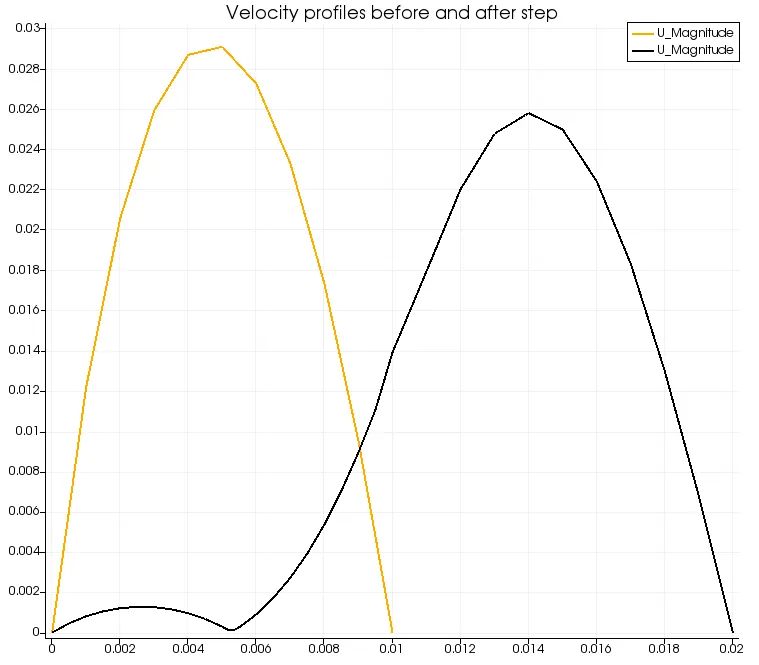
Plot:
Mesh:
Result:
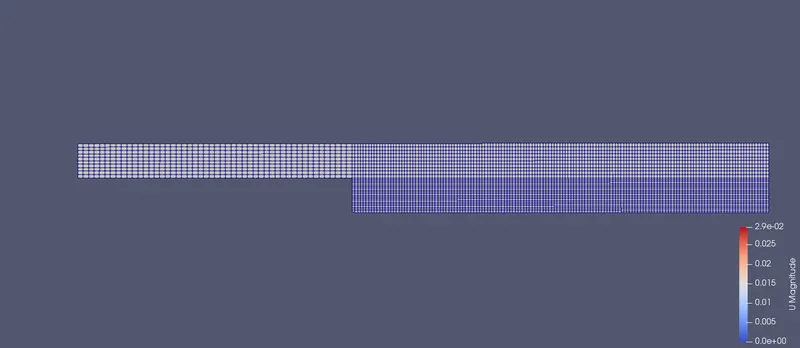
If we compared the plots of both gf 0.2 and without grading factor, the velocity plot for without grading factor is much smoother. But that does not mean it is correct. Finer the mesh in the are of maximum change in velocity,pressure or other property of fluid, more accurate and detailed are the results. That is why grading factors can be useful to ditribute finer mesh to areas where maximum change in physics happen to capture accurate results.