Week 8 - Simulation of a backward facing step in OpenFOAM
AIM: To simulate incompressible laminar viscous flow through the backward-facing step geometry.
Introduction: In this challenge, the flow-through backward-facing step has been simulated using icoFOAM solver which is performed in OpenFOAM software. As a result, if the simulation, velocity, pressure profile for different mesh grading factors can be achieved. The dimensions of a given backward-facing step are below. And simulate the flow with different grading factors.
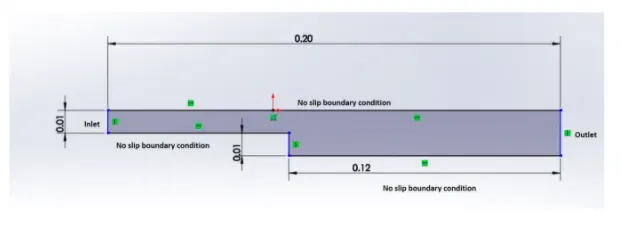
Nature of flow: Incompressible flow
Block Mesh specification:
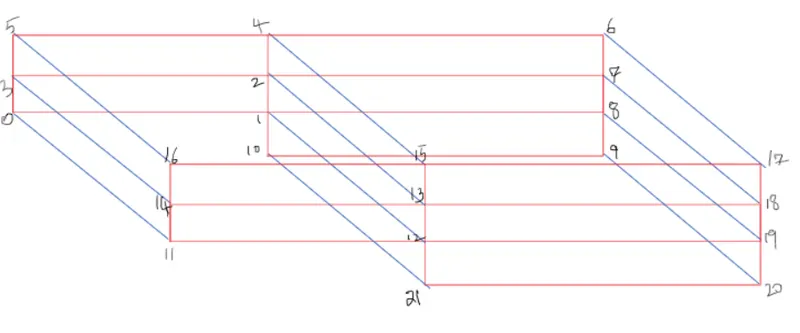
Number of blocks = 5
The arrangement of blocks is as follow:

To understand it more clearly take a look at the figure below:
Mesh Specification:
- Number of cells along the X-direction(longer dimension) = 200
- Number of cells along with the y-direction = 10
Desired Output:
- Run the first simulation without grading factor
- Run the second simulation with a mesh grading factor of 0.2, 0.5, 0.8. Compare the effect of grading factor with necessary contour & plots.
- Measure the velocity profile at 0.085m from the inlet of the geometry with a line plot.
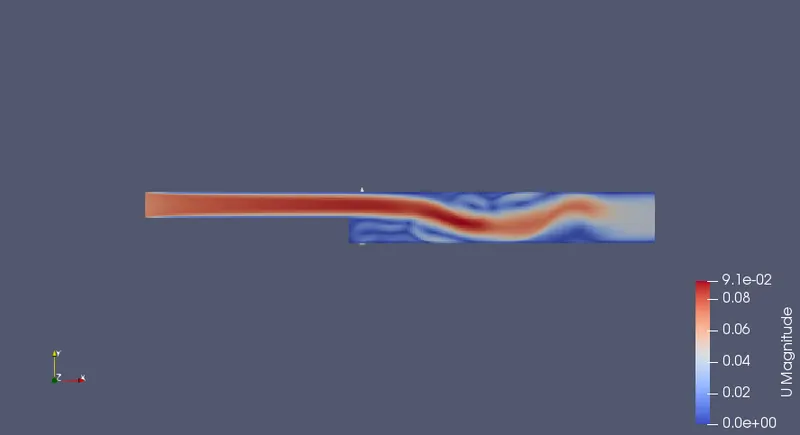
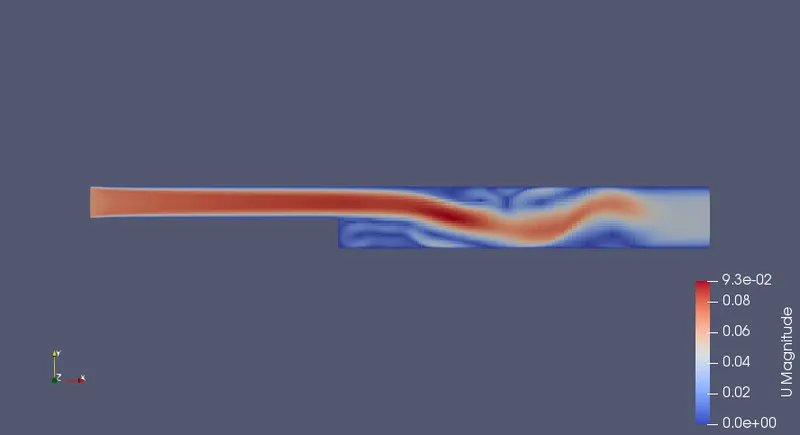
- Compare velocity magnitude contour near the step region for the above-mentioned grading factors.
OpenFoam Code for creating given geometry using BlockMesh
/*--------------------------------*- C++ -*----------------------------------*
  =========                 |
        /  F ield         | OpenFOAM: The Open Source CFD Toolbox
       /   O peration     | Website:  https://openfoam.org
      /    A nd           | Version:  9
     /     M anipulation  |
*---------------------------------------------------------------------------*/
FoamFile
{

    format      ascii;
    class       dictionary;
    object      blockMeshDict;
}
// * * * * * * * * * * * * * * * * * * * * * * * * * * * * * * * * * * * * * //

convertToMeters 1;

vertices
(
    (0 0 0) //0
    (0.08 0 0) //1
    (0.08 0.005 0) //2
    (0 0.005 0)  //3
    (0.08 0.01 0)  //4
    (0 0.01 0)  //5
    (0.2 0.01 0)  //6
    (0.2 0.005 0)  //7
    (0.2 0 0) //8
    (0.2 -0.01 0) //9
    (0.08 -0.01 0) //10

    (0 0 0.001)  //11
    (0.08 0 0.001)  //12
    (0.08 0.005 0.001)  //13
    (0 0.005 0.001)  //14
    (0.08 0.01 0.001)  //15
    (0 0.01 0.001)  //16
    (0.2 0.01 0.001)  //17
    (0.2 0.005 0.001)  //18
    (0.2 0 0.001)  //19
    (0.2 -0.01 0.001)  //20
    (0.08 -0.01 0.001) // 21
);
blocks
(
    hex (0 1 2 3 11 12 13 14) (80 5 1) simpleGrading (0.2 5 1)
    hex (3 2 4 5 14 13 15 16) (80 5 1) simpleGrading (0.2 0.2 1)
    hex (2 7 6 4 13 18 17 15) (120 5 1) simpleGrading (5 0.2 1)
    hex (1 8 7 2 12 19 18 13) (120 5 1) simpleGrading (5 5 1)
    hex (10 9 8 1 21 20 19 12) (120 10 1) simpleGrading (5 5 1)
);

edges
(
);

boundary
(
    inlet
    {
        type patch;
        faces
        (
            (0 11 14 3)
            (3 14 16 5)
        );
    }
    outlet
    {
    	type patch;
    	faces
    	(
    		(9 8 19 20)
    		(8 7 18 19)
    		(7 6 17 18)
    	);

    }
    upperwalls
    {
    	type wall;
    	faces
    	(

    		(5 16 15 4)
    		(4 15 17 6)

    	);

    }
    lowerwalls
    {
    	type wall;
    	faces
    	(
    		(0 1 12 11)
    		(10 9 20 21)
    		(10 21 12 1)

    	);

    }
    frontAndBack
    {
        type empty;
        faces
        (
            (3 2 1 0)
            (5 4 2 3)
            (4 6 7 2)
            (2 7 8 1)
            (1 8 9 10)
            (11 12 13 14)
            (14 13 15 16)
            (13 18 17 15)
            (12 19 18 13)
            (21 20 19 12)

        );
    }
 );
mergePatchPairs
(
);


// ************************************************************************* //
With the applied grading factor 0.2
/*--------------------------------*- C++ -*----------------------------------*
  =========                 |
        /  F ield         | OpenFOAM: The Open Source CFD Toolbox
       /   O peration     | Website:  https://openfoam.org
      /    A nd           | Version:  9
     /     M anipulation  |
*---------------------------------------------------------------------------*/
FoamFile
{

    format      ascii;
    class       dictionary;
    object      blockMeshDict;
}
// * * * * * * * * * * * * * * * * * * * * * * * * * * * * * * * * * * * * * //

convertToMeters 0.01;

vertices
(
    (0 0 0)
    (8 0 0)
    (8 0.5 0)
    (0 0.5 0)
    (8 1 0)
    (0 1 0)
    (20 1 0)
    (20 0.5 0)
    (20 0 0)
    (20 -1 0)
    (8 -1 0)

    (0 0 0.6)
    (8 0 0.6)
    (8 0.5 0.6)
    (0 0.5 0.6)
    (8 1 0.6)
    (0 1 0.6)
    (20 1 0.6)
    (20 0.5 0.6)
    (20 0 0.6)
    (20 -1 0.6)
    (8 -1 0.6)


);

blocks
(
    hex (0 1 2 3 11 12 13 14) (80 10 1) simpleGrading (0.2 5 1)

    hex (3 2 4 5 14 13 15 16) (80 10 1) simpleGrading (0.2 0.2 1)

    hex (2 7 6 4 13 18 17 15) (120 10 1) simpleGrading (5 0.2 1)

    hex (1 8 7 2 12 19 18 13) (120 10 1) simpleGrading (5 5 1)

    hex (10 9 8 1 21 20 19 12) (120 20 1) simpleGrading (5 5 1)

);

edges
(
);

boundary
(
    inlet
    {
        type patch;
        faces
        (
            (0 11 14 3)
            (3 14 16 5)

        );
    }
    outlet
    {
        type patch;
        faces
        (
            (9 8 19 20)
            (8 7 18 19)
            (7 6 17 18)
        );
    }
    frontAndBack
    {
        type empty;
        faces
        (
            (0 3 2 1)
            (11 12 13 14)
            (3 5 4 2)
            (13 15 16 14)
            (2 4 6 7)
            (13 18 17 15)
            (1 2 7 8)
            (12 19 18 13)
            (10 1 8 9)
            (21 20 19 12)


        );
    }

        noslipwall
    {
        type wall;
        faces
        (
            (4 5 16 15)
            (4 15 17 6)
            (0 1 12 11)
            (9 20 21 10)
            (1 10 21 12)

        );
    }

);

mergePatchPairs
(

);

// ************************************************************************* //
CONTROLDICT
/*--------------------------------*- C++ -*----------------------------------*
  =========                 |
        /  F ield         | OpenFOAM: The Open Source CFD Toolbox
       /   O peration     | Website:  https://openfoam.org
      /    A nd           | Version:  9
     /     M anipulation  |
*---------------------------------------------------------------------------*/
FoamFile
{

    format      ascii;
    class       dictionary;
    location    "system";
    object      controlDict;
}
// * * * * * * * * * * * * * * * * * * * * * * * * * * * * * * * * * * * * * //

application     icoFoam;

startFrom       startTime;

startTime       0;

stopAt          endTime;

endTime         0.5;

deltaT          0.005;

writeControl    timeStep;

writeInterval   20;

purgeWrite      0;

writeFormat     ascii;

writePrecision  6;

writeCompression off;

timeFormat      general;

timePrecision   6;

runTimeModifiable true;


// ************************************************************************* //
PRESSURE FILE
/*--------------------------------*- C++ -*----------------------------------*
  =========                 |
        /  F ield         | OpenFOAM: The Open Source CFD Toolbox
       /   O peration     | Website:  https://openfoam.org
      /    A nd           | Version:  9
     /     M anipulation  |
*---------------------------------------------------------------------------*/
FoamFile
{

    format      ascii;
    class       volScalarField;
    object      p;
}
// * * * * * * * * * * * * * * * * * * * * * * * * * * * * * * * * * * * * * //

dimensions      [0 2 -2 0 0 0 0];

internalField   uniform 0;

boundaryField
{
    inlet
    {
        type            zeroGradient;
    }

    outlet
    {
        type            fixedValue;
        value           uniform 0;
    }

    frontAndBack
    {
        type            empty;
    }
    noslipwall
    {
        type            zeroGradient;
    }
}

// ************************************************************************* //
VELOCITY FILE
/*--------------------------------*- C++ -*----------------------------------*
  =========                 |
        /  F ield         | OpenFOAM: The Open Source CFD Toolbox
       /   O peration     | Website:  https://openfoam.org
      /    A nd           | Version:  9
     /     M anipulation  |
*---------------------------------------------------------------------------*/
FoamFile
{

    format      ascii;
    class       volVectorField;
    object      U;
}
// * * * * * * * * * * * * * * * * * * * * * * * * * * * * * * * * * * * * * //

dimensions      [0 1 -1 0 0 0 0];

internalField   uniform (0 0 0);

boundaryField
{
    inlet
    {
        type            fixedValue;
        value           uniform (1 0 0);
    }

    outlet
    {
        type            zeroGradient;
    }

    frontAndBack
    {
        type            empty;
    }
    noslipwall
    {
        type            noSlip;
    }
}

// ************************************************************************* //
TRANSPORT PROPERTIES
/*--------------------------------*- C++ -*----------------------------------*
  =========                 |
        /  F ield         | OpenFOAM: The Open Source CFD Toolbox
       /   O peration     | Website:  https://openfoam.org
      /    A nd           | Version:  9
     /     M anipulation  |
*---------------------------------------------------------------------------*/
FoamFile
{

    format      ascii;
    class       dictionary;
    location    "constant";
    object      transportProperties;
}
// * * * * * * * * * * * * * * * * * * * * * * * * * * * * * * * * * * * * * //

nu              [0 2 -1 0 0 0 0] 1e-6;


// ************************************************************************* //
OUTPUT
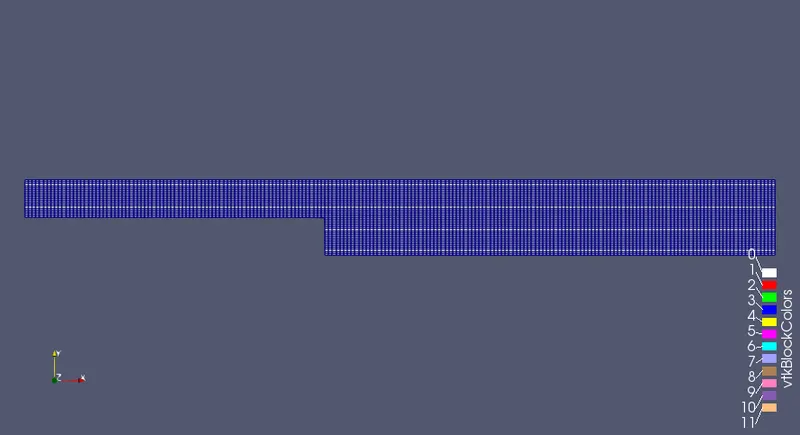
Without assigning any grading factor the block mesh is as shown below.
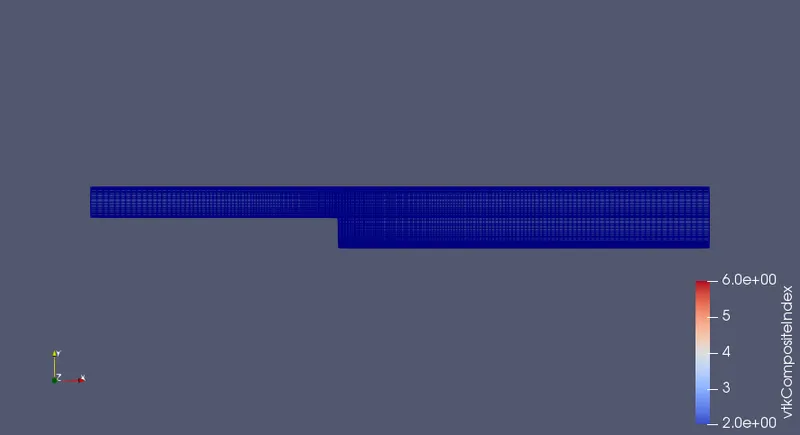
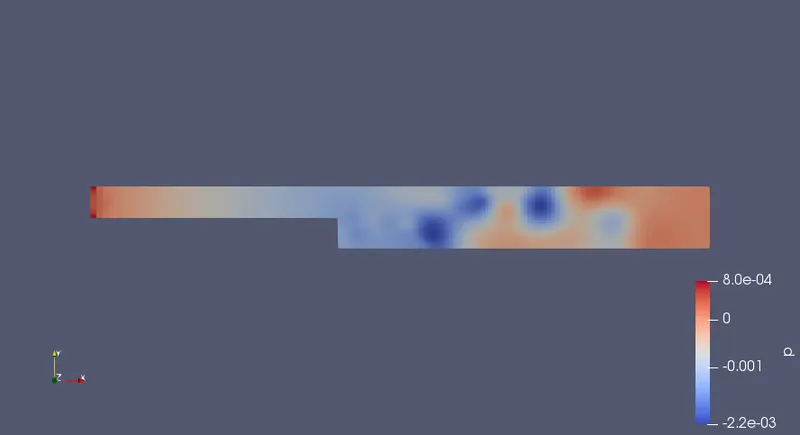
For the given grading factor 0.2 the results are as follows.
The velocity flow diagram without applying grading factor.
The velocity flow diagram for the grading factor 0.2
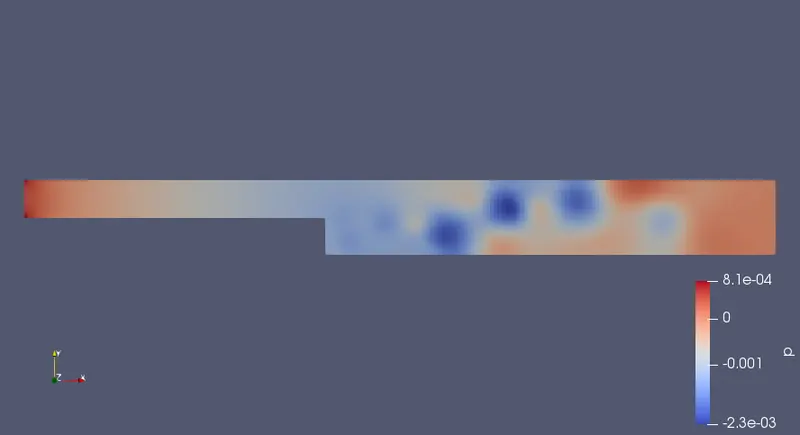
The pressure flow diagram without applying grading factor.
The pressure flow diagram for the given grading factor 0.2
The plot for the velocity at 0.085 without applying grading fcator.
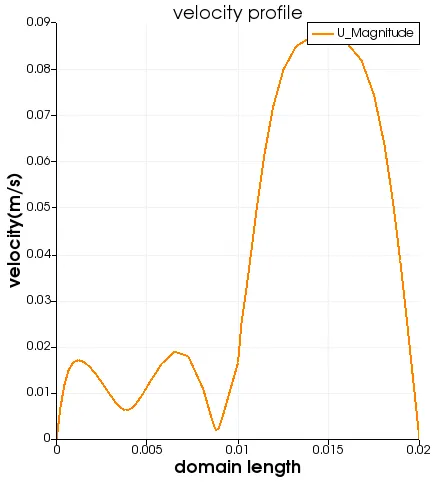
The plot for the velocity at 0.085 for the given grading fcator 0.2 is as follows.
CONCLUSION.
By changing the simple grading factor from the value of 0.2 to 1 the mesh becomes finer and the solution becomes very accurate.
Overall the change in the size of simple grading factor (mesh size) the results remains the same as approximately.
The execution time is lower for lower meshing grading factor.