Week - 8 - Creating component and property
Objective
- Ask the user to enter name of a component and its thickness
- Write a code that will automatically create components and assign thickness to it
- The code should decide on its own what type of collector should be created depending on the user profile/deck.
- According to deck the code should decide , whether a property needs to be created or not.
- Auto color the created component and property
Here in this code i have written for two profiles which i merely used for my projects.
Problem Statement
we can create component with respective property but the problem occurs here with thickness assignment as we are giving 1p0 as input entry, but here it needs to takes as 1.0. we acheived with automatic creation as 1p0 to 1.0. please find the code as below
Code with Explanation
set a .window ##setting up window##
catch {destroy $a} ##already exists close it and open##
toplevel $a -class toplevel ## top level showcase##
wm title $a "Automatic_Comp_Creation" ## window name as Automatic_Comp_Creation##
wm geometry $a 340x240+100+200 ## window Size ##
label $a.01 -text "Component_Name" -bg grey -font {times 14 bold}; place $a.01 -x 10 -y 30 -width 160 -height 30 ## Component Name input label##
label $a.02 -text "Thickness" -bg grey -font {times 14 bold}; place $a.02 -x 10 -y 70 -width 100 -height 30 ## Thickness Input label##
entry $a.03 -textvariable ::var1; place $a.03 -x 180 -y 30 -width 150 -height 30 ## entry input of component name##
entry $a.04 -textvariable ::var2; place $a.04 -x 180 -y 70 -width 150 -height 30 ## entry input of thickness ##
button $a.05 -text "Create" -command {Create} -bg green -font {times 16 bold} ; place $a.05 -x 70 -y 110 -width 170 -height 30 ## create automatic of two different profiles##
button $a.06 -text "CombinedName" -command {combinedname} -bg yellow -font {times 16 bold} ; place $a.06 -x 10 -y 150 -width 160 -height 30 ## it will combine the component name and thickness as such errors will avoid example in abaqus##
entry $a.07 -text ::z; place $a.07 -x 180 -y 150 -width 150 -height 30 ## output of combined name as given in "Combinedname" procedure##
button $a.08 -text "ThicknessCheck" -command {Thickness} -bg yellow -font {times 14 bold} ; place $a.08 -x 10 -y 190 -width 160 -height 30 ## thickness check, it will convert the thickness input as 1p0 to 1.0 to avoid thickness errors ##
entry $a.09 -text ::m; place $a.09 -x 180 -y 190 -width 150 -height 30 ## output of thickness update in "Thickness" prcoedure##
proc combinedname {} {
set ::z {}
append ::z $::var1
append ::z "_$::var2"
}
procedure of combined name
combining the var1 as component name and appending the var2 with underscore as preprocessor needs
as such linking with the string name as ::Z
proc Thickness {} {
set ::m {}
set s $::var2
set k [string index $s 0]
set l [string index $s 2]
set ::m [expr $k.$l]
}
Procedure of Thickness
from the var2 entry as 1p0
in the string variable as first and last linking with different strings
and making as 1.0 with the expression and linking with other string which we can use as thickness input
proc abaqus {} {
*createentity comps includeid=0 name=$::z ##creating component with entry##
*createentity props includeid=0 name=$::z ## Creating property with similar name as entry##
*setvalue props id=1 cardimage="SHELLSECTION" ## card image as shell section in abaqus##
*setvalue props id=1 STATUS=1 111=$::m ## thickness as input procedure as string set $::m##
*setvalue comps id=1 propertyid={props 1} ## assigning the prop with respective prop##
*createmark components 1 "$::z" ##saving the comps##
*autocolorwithmark components 1 ##auto color the saved comps##
*createmark properties 1 "$::z" ##saving the props##
*autocolorwithmark properties 1 ##auto color the sabed props##
}
proc nastran {} {
*createentity comps includeid=0 name=$::z ##creating component with entry##
*createentity props includeid=0 name=$::z ## Creating property with similar name as entry##
*setvalue props id=1 cardimage=PSHELL ## card image as pshell in abaqus##
*setvalue props id=1 STATUS=1 95=$::m ## thickness as input procedure as string set $::m##
*setvalue comps id=1 propertyid={props 1} ## assigning the prop with respective prop##
*createmark components 1 "$::z" ##saving the comps##
*autocolorwithmark components 1 ##auto color the saved comps##
*createmark properties 1 "$::z" ##saving the props##
*autocolorwithmark properties 1 ##auto color the sabed props##
}
Proc Create {} {
if {[hm_info templatetype ]=={abaqus} } { ## if profile is abaqus then it proceeds to abaqus procedure of creating comps and goes on##
abaqus ;
} else { ## if not then it proceeds to nastran profile ##
nastran ;
}
}
Ask the user to enter name of a component and its thickness
set a .window
catch {destroy $a}
toplevel $a -class toplevel
wm title $a "Automatic_Comp_Creation"
wm geometry $a 340x240+100+200
label $a.01 -text "Component_Name" -bg grey -font {times 14 bold}; place $a.01 -x 10 -y 30 -width 160 -height 30
label $a.02 -text "Thickness" -bg grey -font {times 14 bold}; place $a.02 -x 10 -y 70 -width 100 -height 30
entry $a.03 -textvariable ::var1; place $a.03 -x 180 -y 30 -width 150 -height 30
entry $a.04 -textvariable ::var2; place $a.04 -x 180 -y 70 -width 150 -height 30
button $a.05 -text "Create" -command {Create} -bg green -font {times 16 bold} ; place $a.05 -x 70 -y 110 -width 170 -height 30
button $a.06 -text "CombinedName" -command {combinedname} -bg yellow -font {times 16 bold} ; place $a.06 -x 10 -y 150 -width 160 -height 30
entry $a.07 -text ::z; place $a.07 -x 180 -y 150 -width 150 -height 30
button $a.08 -text "ThicknessCheck" -command {Thickness} -bg yellow -font {times 14 bold} ; place $a.08 -x 10 -y 190 -width 160 -height 30
entry $a.09 -text ::m; place $a.09 -x 180 -y 190 -width 150 -height 30
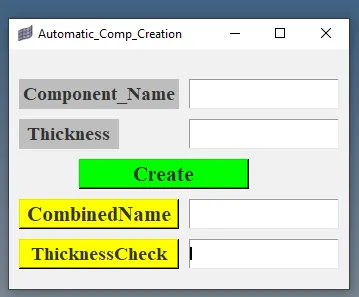
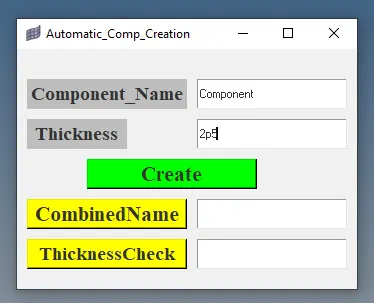
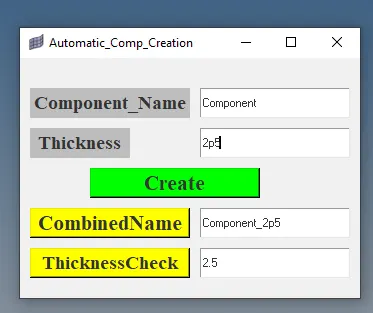
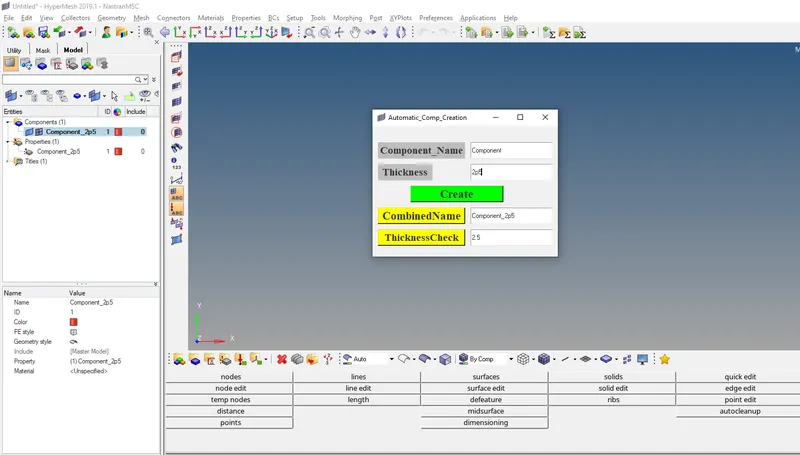
after entering the entries we need to check combined name and thickness as for our reference with clicking the yellow buttons then we can proceed with green button create.
Write a code that will automatically create components and assign thickness to it
we have procedures as below
proc combinedname {} {
set ::z {}
append ::z $::var1
append ::z "_$::var2"
}
proc Thickness {} {
set ::m {}
set s $::var2
set k [string index $s 0]
set l [string index $s 2]
set ::m [expr $k.$l]
}
proc abaqus {} {
*createentity comps includeid=0 name=$::z
*createentity props includeid=0 name=$::z
*setvalue props id=1 cardimage="SHELLSECTION"
*setvalue props id=1 STATUS=1 111=$::m
*setvalue comps id=1 propertyid={props 1}
*createmark components 1 "$::z"
*autocolorwithmark components 1
*createmark properties 1 "$::z"
*autocolorwithmark properties 1
}
proc nastran {} {
*createentity comps includeid=0 name=$::z
*createentity props includeid=0 name=$::z
*setvalue props id=1 cardimage=PSHELL
*setvalue props id=1 STATUS=1 95=$::m
*setvalue comps id=1 propertyid={props 1}
*createmark components 1 "$::z"
*autocolorwithmark components 1
*createmark properties 1 "$::z"
*autocolorwithmark properties 1
}
The code should decide on its own what type of collector should be created depending on the user profile/deck.
Proc Create {} {
if {[hm_info templatetype ]=={abaqus} } {
abaqus ;
} else {
nastran ;
}
}
if the profile is in abaqus then it will create abaqus procedure or else it will as per nastran
According to deck the code should decide , whether a property needs to be created or not. Auto color the created component and property
proc abaqus {} {
*createentity comps includeid=0 name=$::z
*createentity props includeid=0 name=$::z
*setvalue props id=1 cardimage="SHELLSECTION"
*setvalue props id=1 STATUS=1 111=$::m
*setvalue comps id=1 propertyid={props 1}
*createmark components 1 "$::z"
*autocolorwithmark components 1
*createmark properties 1 "$::z"
*autocolorwithmark properties 1
}
proc nastran {} {
*createentity comps includeid=0 name=$::z
*createentity props includeid=0 name=$::z
*setvalue props id=1 cardimage=PSHELL
*setvalue props id=1 STATUS=1 95=$::m
*setvalue comps id=1 propertyid={props 1}
*createmark components 1 "$::z"
*autocolorwithmark components 1
*createmark properties 1 "$::z"
*autocolorwithmark properties 1
}
Conclusion
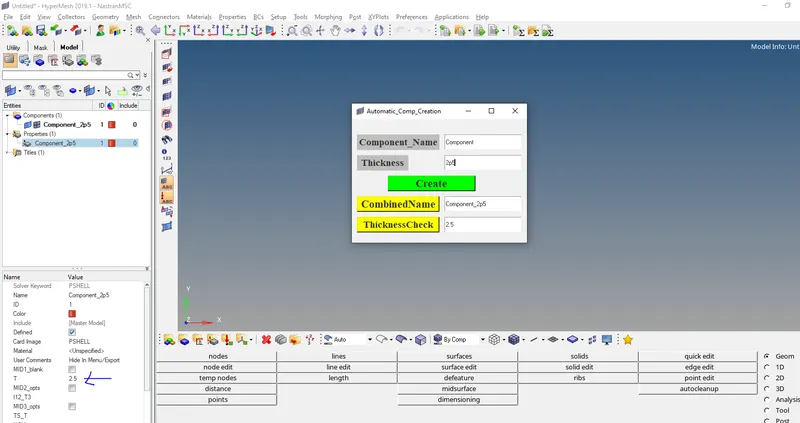
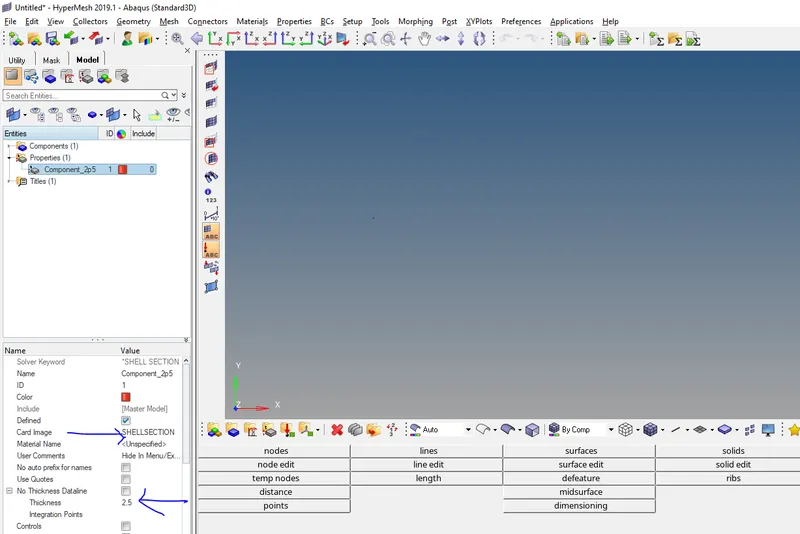
Here i have attached the code with automatic creation of comp and property with advanced thickness assignment and autocolor too
For Nullcase
set a .window
catch {destroy $a}
toplevel $a -class toplevel
wm title $a "Automatic_Comp_Creation"
wm geometry $a 340x240+100+200
label $a.01 -text "Component_Name" -bg grey -font {times 14 bold}; place $a.01 -x 10 -y 30 -width 160 -height 30
label $a.02 -text "Thickness" -bg grey -font {times 14 bold}; place $a.02 -x 10 -y 70 -width 100 -height 30
entry $a.03 -textvariable ::var1; place $a.03 -x 180 -y 30 -width 150 -height 30
entry $a.04 -textvariable ::var2; place $a.04 -x 180 -y 70 -width 150 -height 30
button $a.05 -text "Create" -command {Create} -bg green -font {times 16 bold} ; place $a.05 -x 70 -y 110 -width 170 -height 30
button $a.06 -text "CombinedName" -command {combinedname} -bg yellow -font {times 16 bold} ; place $a.06 -x 10 -y 150 -width 160 -height 30
entry $a.07 -text ::z; place $a.07 -x 180 -y 150 -width 150 -height 30
button $a.08 -text "ThicknessCheck" -command {Thickness} -bg yellow -font {times 14 bold} ; place $a.08 -x 10 -y 190 -width 160 -height 30
entry $a.09 -text ::m; place $a.09 -x 180 -y 190 -width 150 -height 30
proc combinedname {} {
set ::z {}
append ::z $::var1
append ::z "_$::var2"
}
proc Thickness {} {
set ::m {}
set s $::var2
set k [string index $s 0]
set l [string index $s 2]
set ::m [expr $k.$l]
}
proc abaqus {} {
if {[hm_entityinfo exist comps $::z ]==0 } {
*createentity comps includeid=0 name=$::z
*createentity props includeid=0 name=$::z
*setvalue props id=1 cardimage="SHELLSECTION"
*setvalue props id=1 STATUS=1 111=$::m
*setvalue comps id=1 propertyid={props 1}
*createmark components 1 "$::z"
*autocolorwithmark components 1
*createmark properties 1 "$::z"
*autocolorwithmark properties 1
} else {
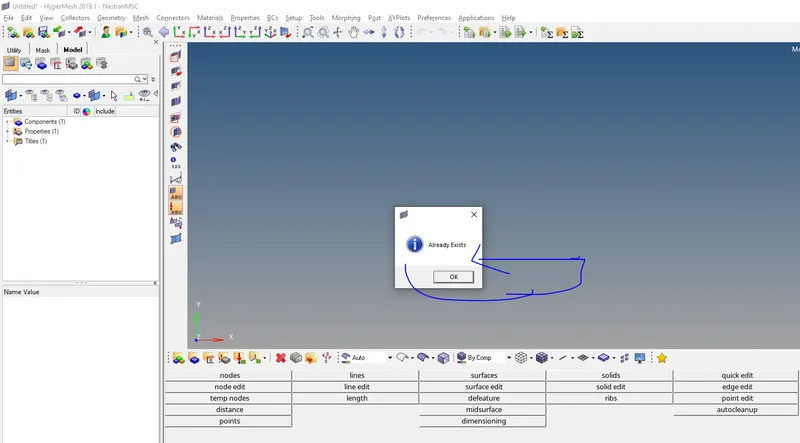
tk_messageBox -message "Already Exists" -icon info -type ok -----## NullCase##
}
}
proc nastran {} {
if {[hm_entityinfo exist comps $::z ]==0 } {
*createentity comps includeid=0 name=$::z
*createentity props includeid=0 name=$::z
*setvalue props id=1 cardimage=PSHELL
*setvalue props id=1 STATUS=1 95=$::m
*setvalue comps id=1 propertyid={props 1}
*createmark components 1 "$::z"
*autocolorwithmark components 1
*createmark properties 1 "$::z"
*autocolorwithmark properties 1
} else {
tk_messageBox -message "Already Exists" -icon info -type ok -----## NullCase##
}
}
Proc Create {} {
if {[hm_info templatetype ]=={abaqus} } {
abaqus ;
} else {
nastran ;
}
}