Week - 5 - Checking and correcting the Normals
1.Write a code to display normal of surface
Objective : To write the code for displaying Normals
Problem Statement:
Showing the normals as displayed geometry
Code :
*createmark all
*createmark surfaces 1 "displayed"
*surfacedisplaynormals surfaces 1 0
*surfacereversenormals2 surfaces 1 0 1
*normalsoff
Code Explanation:
*createmark all ---- whatever the saved or marked items, it will be cleared
*createmark surfaces 1 "displayed“ --- saving the displayed surfaces
*surfacedisplaynormals surfaces 1 0 --- surface display normal in color mode
*surfacereversenormals2 surfaces 1 0 1 –reversing the normals
*normalsoff --- off the normals
Conclusion:
So, here we can displayed the normal as per video lecture.
1.Write a code to display normal as explained in Lecture 5
Objective : To write the code for displaying Normals
Problem Statement:
Showing the normals as displayed in the panel
Code :
*clearmarkall 1
*setnormalsdisplaytype 1
*createmark elements 1 "displayed"
*normalsdisplay elements 1
Code Explanation:
*clearmarkall 1 --- whatever the saved or marked items, it will be cleared
*setnormalsdisplaytype 1 --- showing normal display as color mode
*createmark elements 1 "displayed“ --- selecting the elements as displayed
*normalsdisplay elements 1 – displaying normal as selected as displayed
Conclusion:
So, here we can displayed the normal as per video lecture.
Full Code:
*clearmarkall 1
*setnormalsdisplaytype 1
*createmark elements 1 "displayed"
*normalsdisplay elements 1
*clearmarkall 1
*createmarkpanel elements 1 "select elements"
*normalsreverse elements 1
*createmark elements 1 "displayed"
*normalsdisplay elements 1
*normalsoff
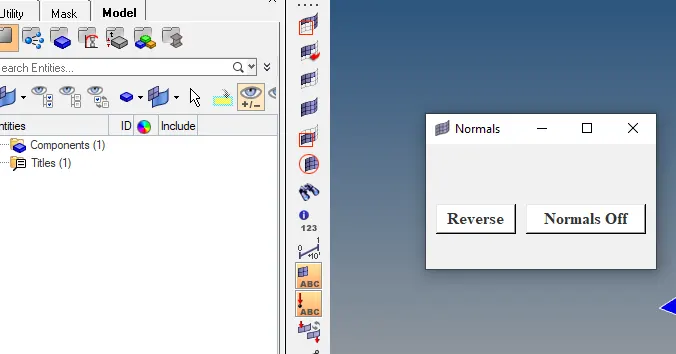
1.Create a widget containing two buttons for “reverse normals” and “normal off”
Objective : To create widget contains buttons for reverse normal and normaloff
Problem Statement:
Using window option we need to create buttons and applying commands
Code :
set a .window
catch {destroy $a}
toplevel $a -class toplevel
wm title $a "Normals"
wm geometry $a 230x125+100+200
button $a.01 -text "Reverse" -command {*createmark elements 1 "displayed"; *normalsreverse elements 1} -bg white -font {times 12 bold}; place $a.01 -x 10 -y 60 -width 80 -height 30
button $a.02 -text "Normals Off" -command {*createmark elements 1 "displayed" ; *normalsoff} -bg white -font {times 12 bold}; place $a.02 -x 100 -y 60 -width 120 -height 30
Code Explanation:
set a .window -- setting up window with variable
catch {destroy $a} – if already exists, closing
toplevel $a -class toplevel – indicates the top side
wm title $a "Normals“ – name of window normals
wm geometry $a 230x125+100+200 – size of window
button $a.01 -text "Reverse" -command {*createmark elements 1 "displayed"; *normalsreverse elements 1} -bg white -font {times 12 bold}; place $a.01 -x 10 -y 60 -width 80 -height 30 ---- reverse button with command of reversing normals
button $a.02 -text "Normals Off" -command {*createmark elements 1 "displayed" ; *normalsoff} -bg white -font {times 12 bold}; place $a.02 -x 100 -y 60 -width 120 -height 30 --- normal off button with command
Conclusion:
So, here we created buttons with command options.
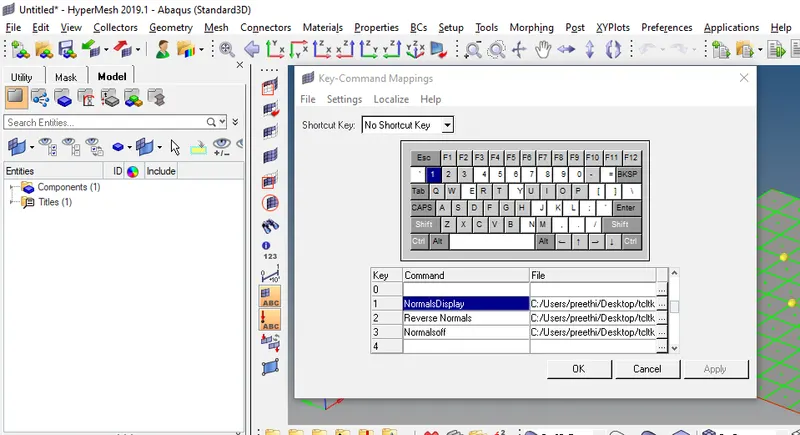
1.Also assign these procedures to keyboard buttons of your choice
Objective : assigning the procedures to keyboard shortcuts
Problem Statement:
Using shortcutkey 1 and 2 assigning the procedures
Code :
*createmark elements 1 "displayed"; *normalsreverse elements 1
*normalsoff
Code Explanation:
*createmark elements 1 "displayed"; *normalsreverse elements 1 ---- saved in reverse.tcl and assign to shortcut key 1 using
Preferences --- keyboard settings---using path and tcl
*normalsoff---- saved in reverse.tcl and assign to shortcut key 2 using Preferences --- keyboard settings---using path and tcl
Conclusion:
So, here we have assigned these procedures to shortcut keys.
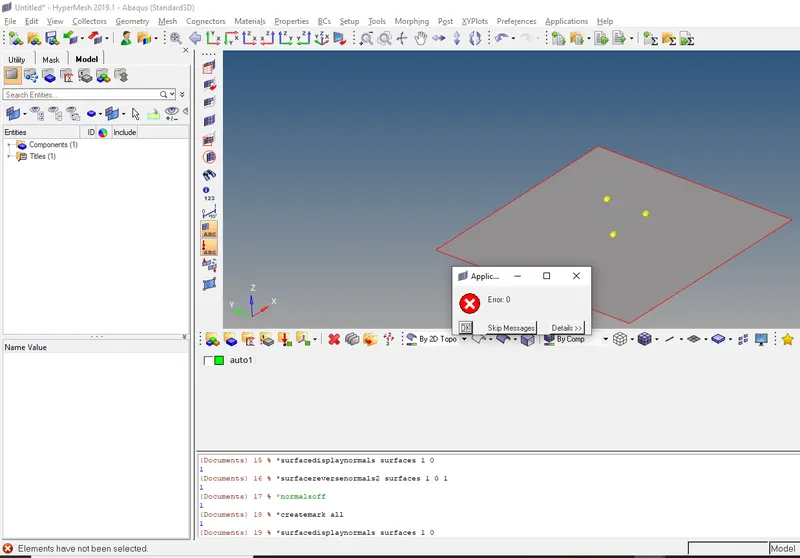
Null Case
Tried with null case without elements displayed and selection
Its showing error as elements have not been selected
below are some screenshots please check