Week 8 - BlockMesh Drill down challenge
GIVEN:
- Number of cells along the x direction (longer dimension) = 200
- Number of cells along the longer y direction = 20
- Boundary Conditions: Inlet and Outlet = 0.01, Top and Bottom wall = 0.20, sidewall = 0.01.
- Without grading and with grading 0.2.
- velocity profile 0.085
Procedure:
- we have to find the file that has 'cavity'.And copy the 'cavity' in the run folder in order to edit and run the simulate. Cavity folder consist of 'system' folder and '0' folder which consist of the 'BlockMeshDict' and 'controlDict' file, 'p' and 'U' folder respectively.These folder contains the code that are required to solve this question.
- Edit the folders using the command 'gedit' according to the question.Use command 'blockMesh' to construct meshing and 'icoFoam' to run stimulation.Now use 'paraFoam' to open the annimation.
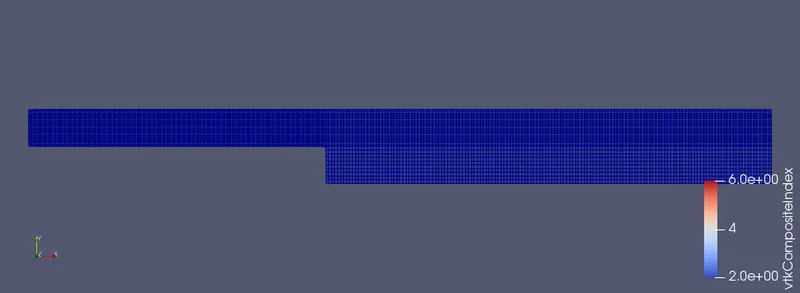
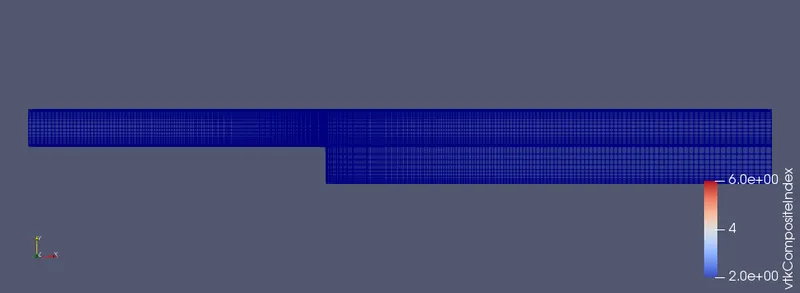
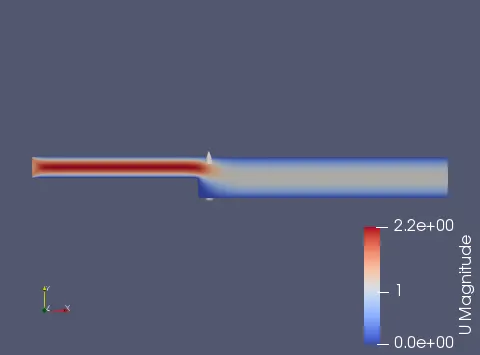
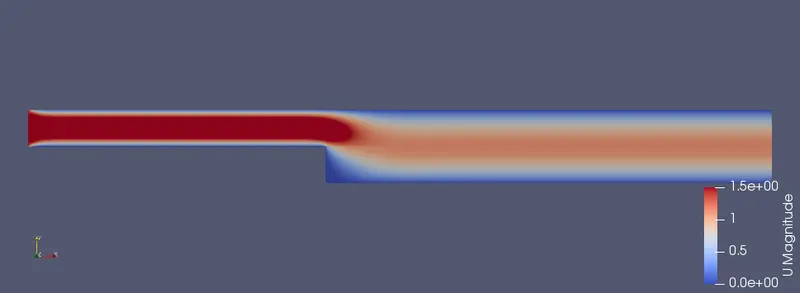
- 'SurfacewithEdges' option to view the meshing and 'U' option to get the flow stimulation.
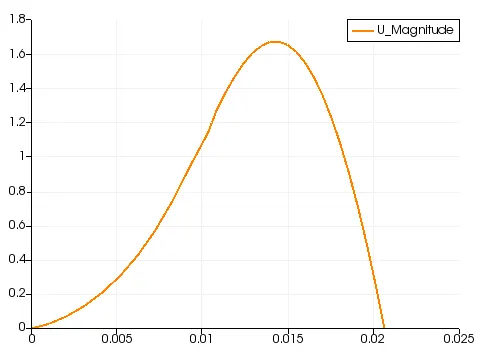
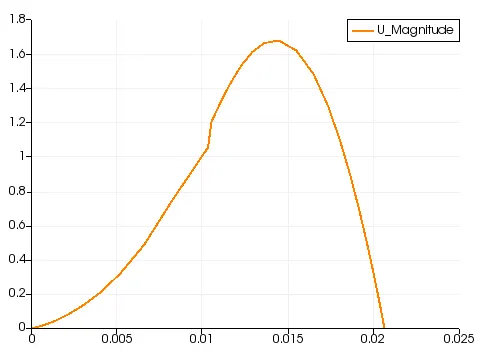
- Using the 'plot over the line' option in the filters tool to get the plot, set 'x' value 0.085 click apply to generate plot.
code:
/*--------------------------------*- C++ -*----------------------------------*\
  =========                 |
  \\      /  F ield         | OpenFOAM: The Open Source CFD Toolbox
   \\    /   O peration     | Website:  https://openfoam.org
    \\  /    A nd           | Version:  8
     \\/     M anipulation  |
\*---------------------------------------------------------------------------*/
FoamFile
{
    version     2.0;
    format      ascii;
    class       dictionary;
    object      blockMeshDict;
}
// * * * * * * * * * * * * * * * * * * * * * * * * * * * * * * * * * * * * * //

convertToMeters 0.01;

vertices
(
    (0 0 0)
    (8 0 0)
    (8 0.5 0)
    (0 0.5 0)
    (8 1 0)
    (0 1 0)
    (20 1 0)
    (20 0.5 0)
    (20 0 0)
    (20 -1 0)
    (8 -1 0)
    (0 0 0.5)
    (8 0 0.5)
    (8 0.5 0.5)
    (0 0.5 0.5)
    (8 1 0.5)
    (0 1 0.5)
    (20 1 0.5)
    (20 0.5 0.5)
    (20 0 0.5)
    (20 -1 0.5)
    (8 -1 0.5)
);

blocks
(
    hex (0 1 2 3 11 12 13 14) (150 10 1) simpleGrading (1 1 1)
    hex (3 2 4 5 14 13 15 16) (150 10 1) simpleGrading (1 1 1)
    hex (2 7 6 4 13 18 17 15) (150 10 1) simpleGrading (1 1 1)
    hex (1 8 7 2 12 19 18 13) (150 10 1) simpleGrading (1 1 1)
    hex (10 9 8 1 21 20 19 12) (150 10 1) simpleGrading (1 1 1)
);

edges
(
);

boundary
(
   inlet
    {
        type wall;
        faces
        (
            (0 11 14 3)
            (3 14 16 5)
        );
    }
   outlet
    {
        type wall;
        faces
        (
            (6 17 18 7)
            (7 18 19 8)
            (8 19 20 9)
        );
    }
    front
    {
        type empty;
        faces
        (
            (11 12 13 14)
            (14 13 15 16)
            (13 18 17 15)
            (12 19 18 13)
            (21 20 19 12)
        );
    }
    back
    {
        type empty;
        faces
        (
            (0 3 2 1)
            (5 4 2 3)
            (4 6 7 2)
            (2 7 8 1)
            (1 8 9 10)
        );
    }
    topandbottom
    {
        type wall;
        faces
        (
            (0 1 12 11)
            (1 10 21 12)
            (10 9 20 21)
            (5 16 15 4)
            (4 15 17 6)
        );
    }

);

mergePatchPairs
(
);

// ************************************************************************* //


/*--------------------------------*- C++ -*----------------------------------*\
  =========                 |
  \\      /  F ield         | OpenFOAM: The Open Source CFD Toolbox
   \\    /   O peration     | Website:  https://openfoam.org
    \\  /    A nd           | Version:  8
     \\/     M anipulation  |
\*---------------------------------------------------------------------------*/
FoamFile
{
    version     2.0;
    format      ascii;
    class       dictionary;
    location    "system";
    object      controlDict;
}
// * * * * * * * * * * * * * * * * * * * * * * * * * * * * * * * * * * * * * //

application     icoFoam;

startFrom       startTime;

startTime       0;

stopAt          endTime;

endTime         0.05;

deltaT          1e-05;

writeControl    timeStep;

writeInterval   20;

purgeWrite      0;

writeFormat     ascii;

writePrecision  6;

writeCompression off;

timeFormat      general;

timePrecision   6;

runTimeModifiable true;


// ************************************************************************* //


/*--------------------------------*- C++ -*----------------------------------*\
  =========                 |
  \\      /  F ield         | OpenFOAM: The Open Source CFD Toolbox
   \\    /   O peration     | Website:  https://openfoam.org
    \\  /    A nd           | Version:  8
     \\/     M anipulation  |
\*---------------------------------------------------------------------------*/
FoamFile
{
    version     2.0;
    format      ascii;
    class       volScalarField;
    object      p;
}
// * * * * * * * * * * * * * * * * * * * * * * * * * * * * * * * * * * * * * //

dimensions      [0 2 -2 0 0 0 0];

internalField   uniform 0;

boundaryField
{
    inlet
    {
        type            zeroGradient;
    }
    outlet
    {
        type            fixedValue;
        value           uniform 0;
    }

    front
    {
        type            empty;
    }
    back
    {
        type            empty;
    }

    topandbottom
    {
        type            zeroGradient;
    }
}

// ************************************************************************* //


/*--------------------------------*- C++ -*----------------------------------*\
  =========                 |
  \\      /  F ield         | OpenFOAM: The Open Source CFD Toolbox
   \\    /   O peration     | Website:  https://openfoam.org
    \\  /    A nd           | Version:  8
     \\/     M anipulation  |
\*---------------------------------------------------------------------------*/
FoamFile
{
    version     2.0;
    format      ascii;
    class       volVectorField;
    object      U;
}
// * * * * * * * * * * * * * * * * * * * * * * * * * * * * * * * * * * * * * //

dimensions      [0 1 -1 0 0 0 0];

internalField   uniform (0 0 0);

boundaryField
{
    inlet
    {
        type            fixedValue;
        value           uniform (1.5 0 0);
    }

    outlet
    {
        type            zeroGradient;
    }

    front
    {
        type            empty;
    }
    Back
    {
        type            empty;
    }
    topandbottom
    {
        type            noSlip;
    }
}

// ************************************************************************* //
Code (For Grading with 0.2):
Remaining code is same as that of without Grading part.
blocks
(
    hex (0 1 2 3 11 12 13 14) (150 10 1) simpleGrading (0.2 5 1)
    hex (3 2 4 5 14 13 15 16) (150 10 1) simpleGrading (0.2 0.2 1)
    hex (2 7 6 4 13 18 17 15) (150 10 1) simpleGrading (5 0.2 1)
    hex (1 8 7 2 12 19 18 13) (150 10 1) simpleGrading (5 5 1)
    hex (10 9 8 1 21 20 19 12) (150 10 1) simpleGrading (5 5 1)
);
Meshing:
Without Grading ie..Grading Factor is 1
With Grading ie..Grading Factor is 0.2
Flow For without Grading:
Flow For Grading:
Plot:
For without Grading
For With Grading:
CONCLUSION:
From the plot above it is clear that the Grading Factor definitely causing some effect on the stimulation.Eventhough the plots and the flow diagram looks much similar Meshing is the difference.For different Grading Factor, the results show some changes in the velocity profile.Finner the mesh better accurate in the solution.
Results from 'x'=0.085,
- With Grading 0.2 Velocity value=0.61573 m/s.
- Without Grading Velocity value=0.62068 m/s.