Week - 7 - Checking and correcting the edges
AIM: Checking and correcting the edges using tcl/tk script
OBJECTIVE: The objective of this challenge is to create a code that:
1. Displays free and T edges for displayed elements
2. Assigns red colour to free edges and cyan colour to T-edges.
3. Makes all other components transparent except edges.
4. Automatically creates temp nodes for “free nodes” for a tolerance value of 0.01.
5. Turn off free edge display and restore the window to the way it was.
6. Map these codes over a key and also create a tk widget for the same.
PROCEDURE:
1. To perform the given task, open any code editor ( here we use Notepad++) and type a code as follows:
# Code to create a window of required dimensions
set a .window
catch {destroy $a}
toplevel $a -class TopLevel
wm title $a "EDGES"
wm geometry $a 150X250+50+50; update
wm resizable $a 0 0
wm deiconify $a

This code creates a new window in hypermesh having name as “EDGES” and having geometry of 150X250.
# Code to create buttons:
button $a.01 -text "Free Edges" -command {free_edges} -bg grey -font {times 10 bold}
place $a.01 -x 35 -y 10 -width 80 -height 40
button $a.02 -text "T Edges" -command {T_edges} -bg grey -font {times 10 bold}
place $a.02 -x 35 -y 70 -width 80 -height 40
button $a.03 -text "Both" -command {both} -bg grey -font {times 10 bold}
place $a.03 -x 35 -y 130 -width 80 -height 40
button $a.04 -text "Off" -command {off} -bg grey -font {times 10 bold}
place $a.04 -x 35 -y 190 -width 80 -height 40

# Code to display free edges
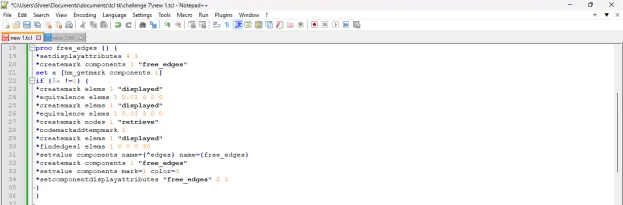
proc free_edges {} {
*setdisplayattributes 4 1
*createmark components 1 "free_edges"
set a [hm_getmark components 1]
if {$a !=0} {
*createmark elems 1 "displayed"
*equivalence elems 1 0.01 0 0 0
*createmark elems 1 "displayed"
*equivalence elems 1 0.01 3 0 0
*createmark nodes 1 "retrieve"
*nodemarkaddtempmark 1
*createmark elems 1 "displayed"
*findedges1 elems 1 0 0 0 30
*setvalue components name={^edges} name={free_edges}
*createmark components 1 "free_edges"
*setvalue components mark=1 color=3
*setcomponentdisplayattributes "free_edges" 2 1
}
}
# Code to display T-edges
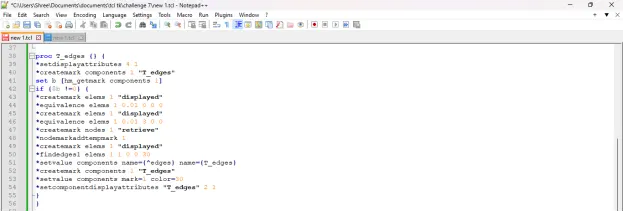
proc T_edges {} {
*setdisplayattributes 4 1
*createmark components 1 "T_edges"
set b [hm_getmark components 1]
if {$b !=0} {
*createmark elems 1 "displayed"
*equivalence elems 1 0.01 0 0 0
*createmark elems 1 "displayed"
*equivalence elems 1 0.01 3 0 0
*createmark nodes 1 "retrieve"
*nodemarkaddtempmark 1
*createmark elems 1 "displayed"
*findedges1 elems 1 1 0 0 30
*setvalue components name={^edges} name={T_edges}
*createmark components 1 "T_edges"
*setvalue components mark=1 color=30
*setcomponentdisplayattributes "T_edges" 2 1
}
}
# Code to display both
proc both {} {
free_edges
T_edges
*setcomponentdisplayattributes "free_edges" 2 1
*setcomponentdisplayattributes "T_edges" 2 1
}

# Code to turn off free edge display and restore the window to the way it was
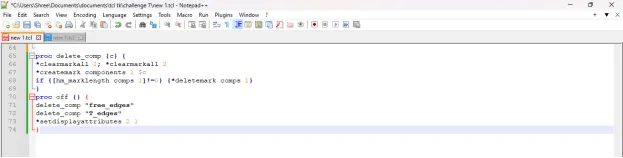
proc delete_comp {c} {
*clearmarkall 1; *clearmarkall 2
*createmark components 1 $c
if {[hm_marklength comps 1]!=0} {*deletemark comps 1}
}
proc off {} {
delete_comp "free_edges"
delete_comp "T_edges"
*setdisplayattributes 2 1
}
2. After writing the code save the file.
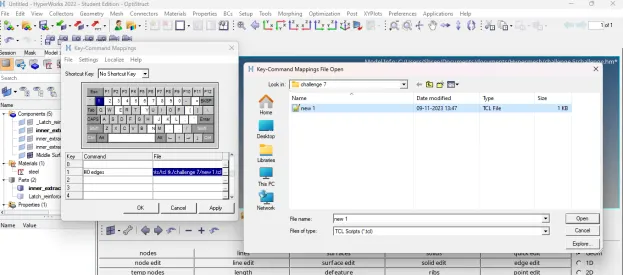
3. Then open any model in hypermesh and run this file in hypermesh using shortcut key assign to it.
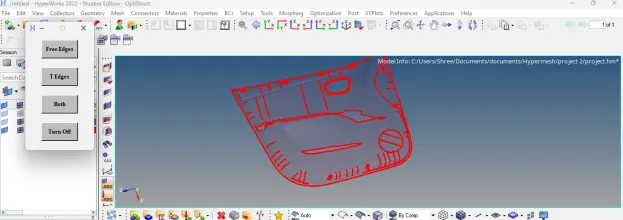
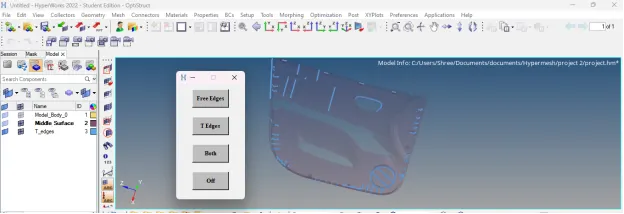
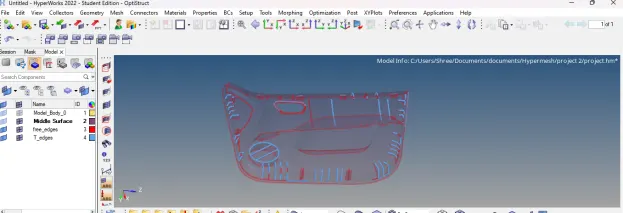
4. After running this code in hypermesh, following result will appear:
TCL COMMAND EXPLANATION:
1. *setdisplayattributes: Sets all components in the model to the specified style and coloring method
style
Set to:
· 0 wire frame
· 1 hidden line
· 2 hidden line with mesh
· 3 hidden line with features
· 4 hidden line transparent
colortype
Determines how the components are colored. The options are:
· 0 none
· 1 component color
· 2 assigned plots
· 3 contours
2. *equivalence: Equivalences or finds duplicate nodes of selected components, elements or nodes within a tolerance
3. *nodemarkaddtempmark: Places a node on the temporary node mark
4. *findedges1: Finds element free or T-connected edges
5. *setvalue: Updates an existing entity/entities with new/modified data. Data names, attributes, and metadata are allowed to be modified, assuming the proper card image is also assigned. If the specified data name is “name” and the entity type is enabled for the name pool, the provided name is used to update the solver name
6. *setcomponentdisplayattributes: Sets a component to the specified style and color
CONCLUSION: After executing proper tcl/tk code:
1. We are able to display free and T edges for displayed elements.
2. We are able to assign red colour to free edges and cyan colour to T-edges.
3. We are able to make all other components transparent except edges.
4. We are able to turn off free edge display and restore the window to the way.