Week - 7 - Checking and correcting the edges
AIM:
To check and correcting the edges.
OBJECTIVE:
- Create a code that displayed free and T edges for displayed elements.
- Free edge color red and T edge cyan.
- Except for edges, all other components must be made transparent.
- Also, temp nodes must be automatically created for “free nodes” for a tolerance value of 0.01.
- Also, create a code to turn off free edge display and restore the window to the way it was.
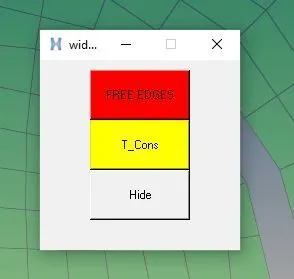
- Map these codes over a key and also create a tk widget for the same.
PROCEDURE:
Initially, the display is set to transparent mode using (*setdisplayattributes ) command.
Two Different functions were created to display Double cons and Triple cons.
- Elements displayed were selected using the (*createmark)command
- Then edges of the selected elements are shown using the (*findedges1) command for Free edges and T Connected edge the edge_type values are 0 and 1.
- Then component with name ^edges is renamed with "respective edge name " using (*setvalue) command
- temp nodes are created by marking the node using( *equivalence )with tolerance of 0.01 and (*nodemarkaddtempmark )
Syntax
- *setdisplayattributesstyle colortype
style Set to:
- 0 wire frame
- 1 hidden line
- 2 hidden line with mesh
- 3 hidden line with features
- 4 hidden line transparent
colortype Determines how the components are colored. The options are:
- 0 none
- 1 component color
- 2 assigned plots
- 3 contours
- *findedges1entity_type mark_id edge_type created_entity smooth break_angle
entity_type The entity types to find edges for. Valid values are comps and elements .mark_idThe mark ID containing the entities. Valid values are 1 and 2.
edge_type The type of edges to find:
- 0 - Free edges.
- 1 - T-connected edge
created_entity The entity type to create on the found edges:
- 0 - Plot elements
- 1 - Free lines
smooth The smoothing to use when created_entity is 1:
- 0 - No smoothing.
- 1 - Smooth the lines through the nodes.
- *equivalenceentity_type mark_id tolerance mode location numbering
entity_type The entity types to consider. Valid values are elems, comps and nodes.
mark_id The ID of the mark containing the input entities. Valid values are 1 and 2.
tolerance The tolerance used to find neighboring nodes to equivalence.modeOperating mode of the command:
- 0 - Preview found nodes.
- 1 - Equivalence found nodes.
- 3 - Place found nodes on user mark.
location Location of equivalenced nodes:
- 0 - Equivalence at the location of the node with the lowest ID.
- 1 - Equivalence at the location of the node with the highest ID.
- 2 - Equivalence at the midpoint of the two nodes.
numbering The numbering of the retained node:
- 0 - Retain the number of the node with the lowest ID.
- 1 - Retain the number of the node with the highest ID.
CODE:
*setdisplayattributes 4 1
set ::a1 {}
set ::b {}
proc Freeedges {} {
*createmark comps 1 "free_edges"
set ::a1 [hm_getmark comps 1]
if {$::a1=={}} {
*createmark elements 1 "displayed"
*findedges1 elements 1 0 0 0 30
*setvalue comps name={^edges} name={free_edges}
*createmark elems 1 "displayed"
*equivalence elems 1 0.5 0 0 30
*equivalence elems 1 0.5 3 0 30
*createmark nodes 1 "retrieve"
*nodemarkaddtempmark 1
} else {
tk_messageBox -message "FREE EDGES already exists" -icon info -type ok
}
}
proc T_connec {} {
*createmark comps 2 "T_connections"
set ::b [hm_getmark comps 2]
if {$::b=={}} {
*createmark elements 1 "displayed"
*findedges1 elements 1 1 0 0 30
*setvalue comps name={^edges} name={T_connections}
*createmark components 1 "T_connections"
*createmark elems 1 "displayed"
*setvalue comps mark=1 color=#FFFF00
*equivalence elems 1 0.5 0 0 30
*equivalence elems 1 0.5 3 0 30
*createmark nodes 1 "retrieve"
*nodemarkaddtempmark 1
} else {
tk_messageBox -message "T_Cons already exists" -icon info -type ok
}
}
proc hide {} {
*createmark components 1 "free_edges"
*createmark components 2 "T_connections"
*createstringarray 1 "elements_on" "geometry_on"
*hideentitybymark 1 1 1
*hideentitybymark 2 1 1
*setdisplayattributes 2 1
}
set a .widget
catch {destroy $a}
toplevel $a
wm geometry $a 200x190+750+250
wm resizable $a 0 0
wm deiconify $a
button $a.1 -text "FREE EDGES" -bg "red" -command Freeedges
place $a.1 -x 50 -y 10 -width 100 -height 50
button $a.2 -text "T_Cons" -bg "#FFFF00" -command T_connec
place $a.2 -x 50 -y 60 -width 100 -height 50
button $a.3 -text "Hide" -command hide
place $a.3 -x 50 -y 110 -width 100 -height 50
OUTPUT:
RESULT:
- The code has been created and displayed for T-edges & free elements.
- Free edge is indicated in colour red and T edge in cyan.
- Except for edges, all other components transparent.
- Temp nodes is created for “free nodes” for a tolerance value of 0.01.
- Code has been created to turn off free edge display and restore the window to the way it was.
- Maps has been coded over a key and tk widget is created for the same.