Week 6-Meshing of Hood Challenge
Introduction:
The hood (North American English) or bonnet (Commonwealth English) is the hinged cover over the engine of motor vehicles. Hoods can open to allow access to the engine compartment, or trunk (boot in Commonwealth English) on rear-engine and some mid-engine vehicles) for maintenance and repair.
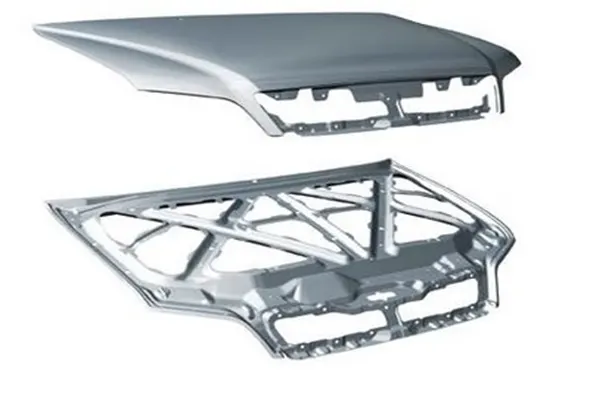
In recent years, the work has been done on the bumper and hood design of the vehicle front end to reduce the injuries to the pedestrians in the event of a pedestrian vehicle collision. The front portion of the vehicle gets damaged including bonnet when met with an accident. So there is need to change the existing design of bonnet or by changing the material. The bonnet is the hinged cover over the engine of motor vehicles that allows access to the engine compartment for maintenance and repair. Bonnet usually do not directly open onto the passenger cell which greatly reduces the importance (weighting) of certain of the functional requirements normally associated with closures such as air tightness, passenger safety, low cycle fatigue strength etc. The objective of these measures is to reduce the number of road accident fatalities and the severity of injuries sustained by pedestrians involved in a collision with a vehicle in urban traffic. Impact frequency and seriousness of injury has been studied for many years, resulting in rating systems and improved design. The bonnet system is an access panel to the engine compartment to enable maintenance of power train, drive belts, battery, fluid levels and lamp units. It is fundamentally a reinforced skin panel with many Safety and quality requirements.
Engine Hood:
The hood which is also known as ENCON, serves as an access panel to engine compartment of an Automobile. It is an assembly made of Outer and Inner panels to meet various safety and design requirements.
The followings are the design considerations involved in the design of Engine Hood.
- Pedestrian Safety
- Vehicle quality
- Occupant Safety
- Styling
- Manufacturability
Types of Hoods:
- Invalid Hood or Built IN
- Wrap Around Hood
- Hood With Fenders
- Hood with Border Diagonal Frames
- Hood with Brace Frames
_________________________________________________________________________________________________________________
PREPROCESSING OF HOOD USING HYPERMESH
Aim: To extract mid-surface and generate mesh on Hood using Hyper mesh.
Given Model:
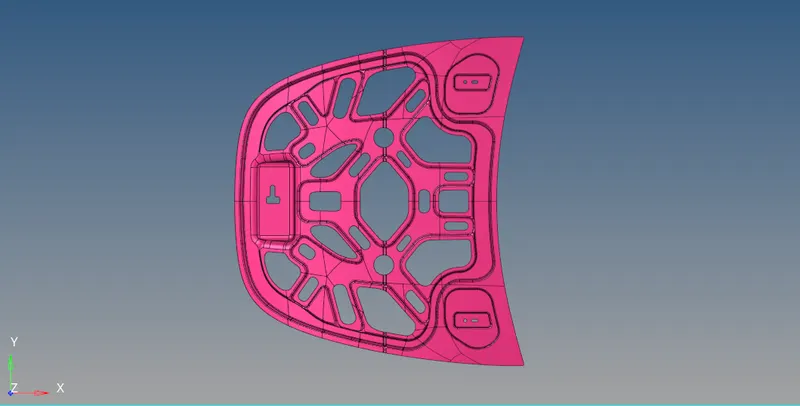
Steps Involved:
- Importing geometry and cleanup.
- Extracting Mid-surface and assigning properties.
- Meshing the surface with in the given quality criteria.
Quality criteria:
Target Element Length = 5 Units
| S.N | Quality Criteria | Value |
| 1 | Aspect Ratio | 5 |
| 2 | Skewness | 45 |
| 3 | Warping | 15 |
| 4 | Taper | 0.5 |
| 5 | Min. Length | 2 Units |
| 6 | Max. Length | 8 Units |
| 7 | Min angle Quad | 45 |
| 8 | Max angle Quad | 135 |
| 9 | Min angle Tria | 20 |
| 10 | Max angle Tria | 120 |
| 10 | Tria % | 10 |
Procedure:
Step 1: Importing geometry and cleanup:
- To import the geometry, go to file >> Import Geoment>> select the file >> Import.
- After importing the geometry, the geometry is checked for any missing surfaces or triple cons. If there are no errors present in the geometry then the geometry is ready for the mid-surface extraction.
Step 2: Extracting mid-surface and assigning properties:
- Mid-surface can be extracted by any of the 4 methods below.
- Offset + plane + sweep.
- Offset + plane.
- Offset
- Skin Offset.
- To extract the mid-surface, go to geom >> mid-surface >> select any extraction option >> select the surface >> extract. In this challenge offset + plane + sweep is used.
- After extracting the mid-surface, it is checked for any geometrical errors like needle faces, missing surfaces and triple cons. If any of the errors present then it should be rectified immediately.
- Now the properties like thickness, material etc. need to be assigned to the mid-surface. To assign the properties, select model in database and right click and choose create and then property.
- Now all the properties are entered in the property tab and the properties are assigned to the respective mid-surfaces.
- To assign the properties to mid-surface, right click on the mid-surface and then select assign and select the respective properties which needs to be assigned.
Inner Extract:
- First of all make sure that only “Inner Extract” component is active.
- Delete all solids from the component.
- Create Mid surface for only Inner Extract by selecting particular surfaces.
- Since this component is axis symmetric, we can cut it in to half and mesh it.
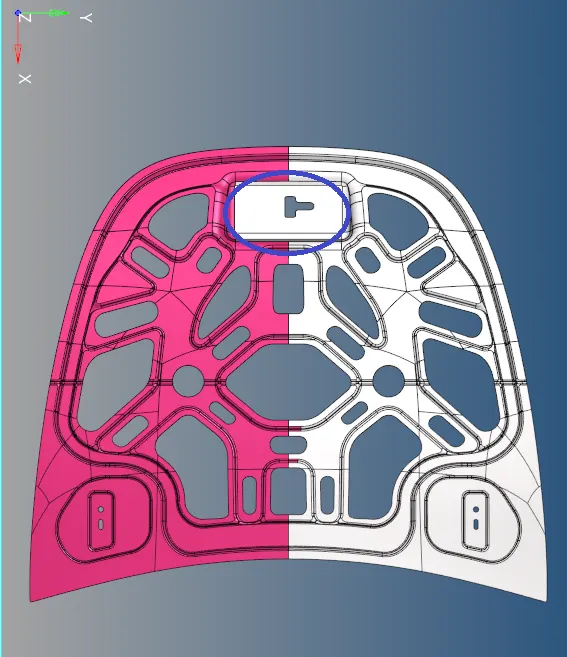
- As shown in above image, only the marked portion is not symmetric.
- So we can mesh that at the last.
- As shown in above image, split the midsurface and keep half of that for meshing.
- Start the Meshing with the closed area with less free edges.
- And avoid washer surfaces if possible.
- Keep the Mesh flow as per geometry and create mesh with less tria elements.
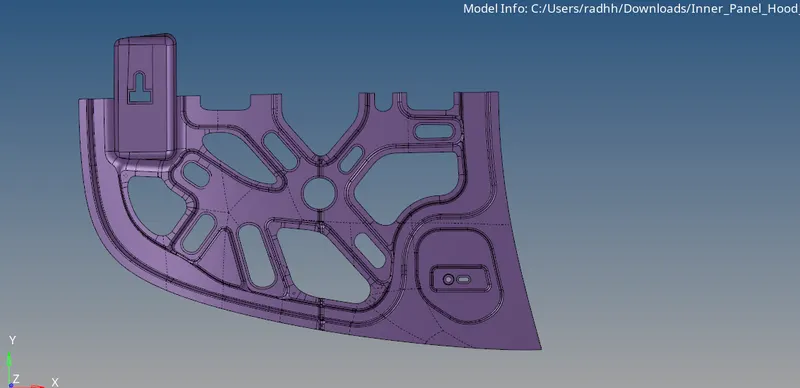
- Complete the mesh of the hald portion of the Inner Extract as shown in above image.
- Now we can reflect the elements on the other side and complete the total mesh on the component.
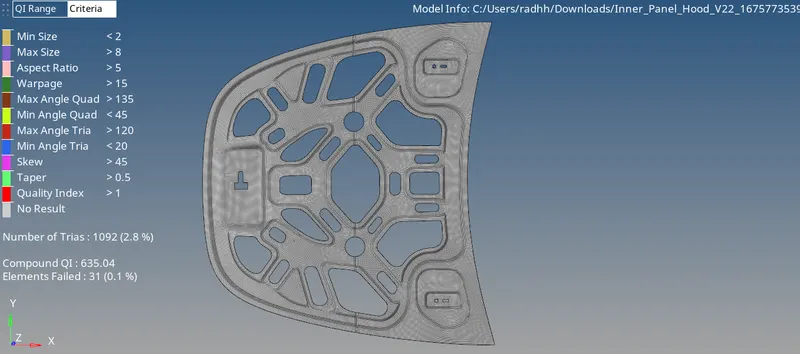
Conclusion: For the given hood panel mid-surface is extracted and mesh is generated with in the given quality criteria.