PYTHON Project: Data Analysis of an Engine (File Parsing)
Aim:
To write a code in PYTHON that extracts the data from the data file and to achieve Data Visualization, Compatibility Check and Basic Performance Calculation.
Theory:
Parsing means to break it down into component parts so that its syntax can be analyzed, categorized, and understood [1]. By doing this we are going to a string into parts then recognizing the parts to convert it into something simpler than a string. File parsing is to resolve the things into component or subpart form and describe the syntactic file. That is, reading in data stream and building a memory model of it.
When extensive simulations are performed, a massive amount of data is produced. In such circumstances, manually searching for the relevant data becomes tiresome. To make things easier, tools that analyze and show data automatically are being developed.
The data file used here is 'engine_data.out'.
The link to the above said document is: engine_data.out
This data file consists of 17 columns of various recorded engine and thermodynamic parameters for more than 8000 instants. The first to 17th column of the data file represents, 1: Crank [deg], 2: Pressure [MPa], 3: Max Pressure [MPa], 4: Min Pressure [MPa], 5: Mean Temperature [K], 6: Max Temperature [K], 7: Min Temperature [K], 8: Volume [m^3], 9: Mass [kg], 10: Density [kg/m^3], 11: Integrated HR [J], 12: HR Rate [J/time], 13: C_p [J/kg-K], 14: C_v [J/kg-K], 15: gamma, 16: Kinematic Viscosity [m^2/s], and 17: Dynamic Viscosity [N.s/m^2].
The code to be developed is aimed for the following tasks:
- Data visualizer:
The script is to take column numbers as the input and plot the respective columns as separate images. Each file is to be saved by the name of the column. Also, the plot labels is to be extracted from the file. That is, if a request for a plot between column 1 (crank angle) and column 8(volume), then the label information is to be automatically extracted and appear as labels in the plots. -
Compatibility check:
The code is to exit gracefully, if a non-compatible file is provided as an input. It is expected to say something like "File not recognized. Please provide a valid CONVERGE output file". -
Basic performance calculation:
Calculation of the area under the P-V diagram, where P is in column 2 and V is in column 8.
Calculation of the power output of the engine at RPM of 1500.
Calculation of specific fuel consumption, if the engine consumes 20 micro grams of fuel (per 1 stroke cycle).
For the calculation of basic performance for 4-Stroke Otto Cycle, the following equations can be used:
`"Work done per cycle = Area under P-V Curve" = A " "[MJ]`
`"Power Output"=A*n*10^6 " "[ W]`
`n="Number of cycles per second"`
`n=N/(2*60); " for 4-stroke engine"`
`n=N/60; " for 2-stroke engine"`
`N="Rotations per min"`
`"Specific Fuel Consumption", SFC=("Fuel consumed in kg/hr")/("Power Output in kW"`
Objectives:
- Understanding the concept of file parsing in PYTHON and the commands required for it.
- Understanding the Engine Parameters and its calculation.
- Writing a program in PYTHON for file parsing.
- Incorporating the compatibility of file in the program.
- Incorporating the Data visualizer in the program for the chosen parameters according to their column chosen.
- Incorporating the performance calculation from the Pressure vs Volume graph.
- Automatically saving the corresponding plots with their parameter name as figure name.
Program for File Parsing:
The programming is done in PYTHON.
# Data Analysis

import math
import matplotlib.pyplot as plt
import numpy as np

# File Input
file = (input("Enter the name of the file including extension .out: "))


# Compatibility Check
try:
	data = open(file,'r')
	print('n File succesfully recognized.')
except FileNotFoundError:
	print('n Please Enter a Valid File Name with proper extension')
	exit()

# Setting Line counter
line_count = 1


for line in data:
	if line_count == 3:					#to get the types of parameters in file
		Parameter = line.split()		#splitting the datas in the line separated by space
		columns = len(Parameter)		#to get the total no of parameters in the file
		print("n n The File has total",columns-1," Parameters")


		for line_new in data:			#for extracting units

			if line_count == 4:			#since units are at line 4
				unit = line_new.split()	#for displaying unit
			break

		for c_no in range(1,columns):
			print(c_no, line.split()[c_no],line_new.split()[c_no])
		break
	line_count = line_count+1


print('n Choose the two Parameters from the listed list for comparison')
print('!!! Type only the corresponding number of the Parameter')
x = int(input('n Enter the Parameter Number for x-axis: '))
y = int(input('Enter the Parameter Number for y-axis: '))


# Collection required datas from the file
x_data = []		#for datas in x-axis
y_data = []		#for datas in y-axis

line_count = 1	#for counting the lines in file

# Extraction of data
for line in open(file,'r'):

	# extraction of Label for plotting
	if line_count == 3:
		x_label = line.split()[x]
		y_label = line.split()[y]

	# extracting the units of label for plotting
	if line_count == 4:
		x_unit = line.split()[x]
		y_unit = line.split()[y]


	# extraction of x values and y values
	if '#' not in line:
		x_data.append(float(line.split()[x-1]))
		y_data.append(float(line.split()[y-1]))

	line_count = line_count+1


# Plotting
figure_name = y_label+' vs '+x_label+'.png' #setting figure name
plt.figure()
plt.plot(x_data,y_data)
plt.xlabel(x_label+x_unit)
plt.ylabel(y_label+y_unit)
plt.title(y_label+' vs '+x_label)
plt.savefig(figure_name)
plt.show()

# For the Calculation of Work Done, Power and Specific Fuel Consumption
if x == 8 and y == 2:		#for PV diagram for the power and work calculation
	Area = np.trapz(y_data,x_data)
	Work = (Area/1000)*pow(10,6)	# pow for MPa to Pa conversion and 1000 for J to KJ

	RPM = 1500
	Power = Work*0.5*(RPM/60)			# in kW: 4-stroke

	# Assumption: Fuel consumption = 20 micro grams per one stroke cycle
	FC = 20*pow(10,-6)	#fuel consumption in grams per stroke
	FCH = FC*1500*60	#Fuel consumption per hour
	SFC = FCH/Power		#Specific fuel consumption [g/kW-hr]

	# Displaying
	print('n n n Additional Calculations from PV Diagram')
	print('Area under PV diagram is ',Work,' kJ')
	print('Power output of Engine at 1500rpm is ',Power,' kW (as 4-Stroke)')
	print('Specific Fuel Consumption of Engine is ', SFC, ' g/kW-hr')
Each step of the program is explained with comments.
Explanation of the Program:
Compatibility is the input file is checked using the try and except command. The general instructions are provided to make sure the input file name is proper. First the for loop is run in order to extract the Parameters (in line 3) present in the file and their corresponding units (in line 4). The user is then notified about the available parameters from the file for selection for comparison purposes by displaying the detected parameters with their units. The user is allowed to input the number corresponding to the parameter for both x-axis and y-axis for comparison. The for loop is run again in order to extract the data for the respective 2 chosen parameters only. The lines with no '#' symbols were considered as those were the lines with data. Then the comparison graph is plotted and shown making sure that it shows appropriate information on the parameters used in x and y axis. For extracting this label, again the line.split command is used for the line 3.
The program was developed such a way that if the user choose the Pressure and Volume as variables, then the additional Performance calculations were done. That is, if the user choose the x-axis parameter as "8' and y-axis parameter as "2", then the program automatically calculates the area under the PV diagram, which is actually the work done by the engine. The other calculations include Power output of the engine and Specific fuel consumption.
Output of the Program:
Initially, when the program is run, an REPL [2] pop up will happen as shown below: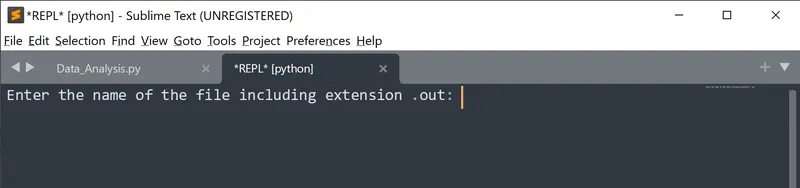
The program expects to type the proper name of the file. If a non-proper file name or a file without the extension is entered, that is non compatible file, then the program displays "Please Enter a Valid File Name with proper extension" as shown below: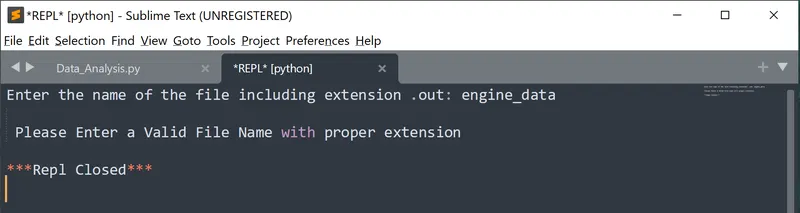
If proper file name is provided with extension, then the output will be as shown below: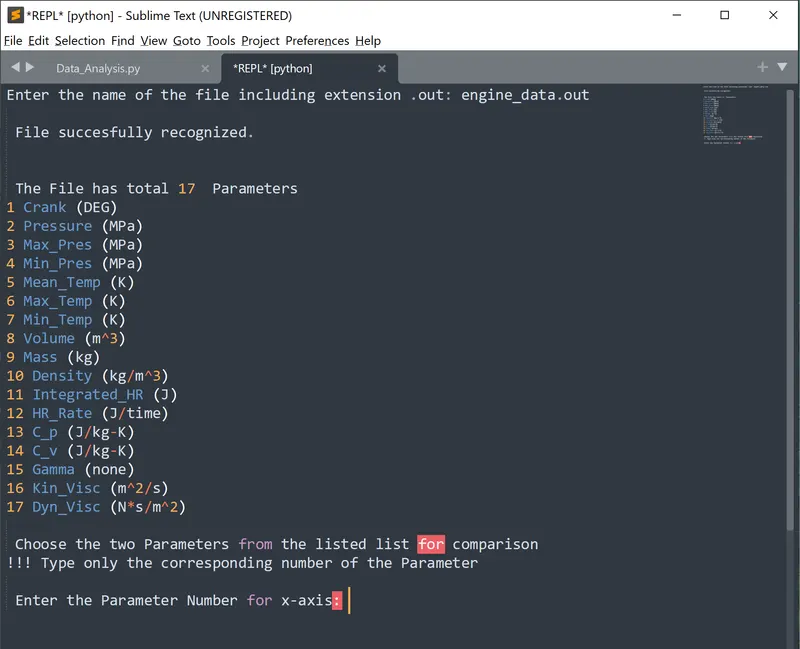
The program first displays the available parameters in the file and initially ask to choose the parameter that needs to be taken in x-axis for comparison as shown above. If proper parameter is provided, it asks for the y-axis parameter as shown below and the respective graph will be plotted.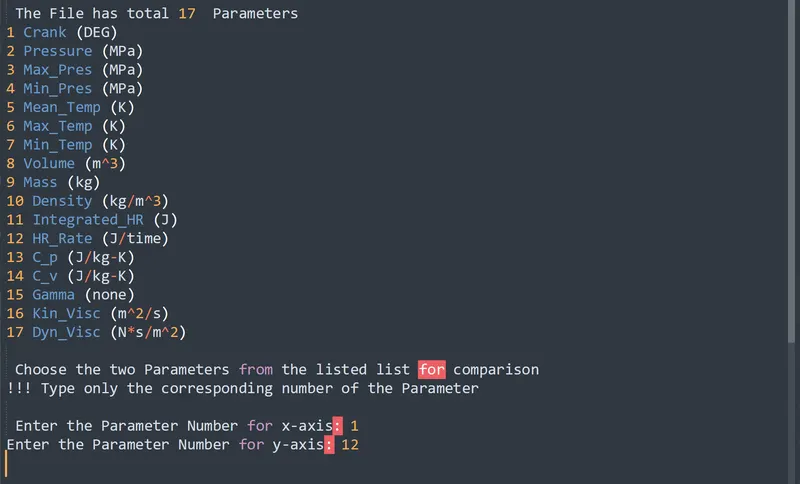
Here, the parameters crank and HR_rate were chosen, and the following figure was obtained.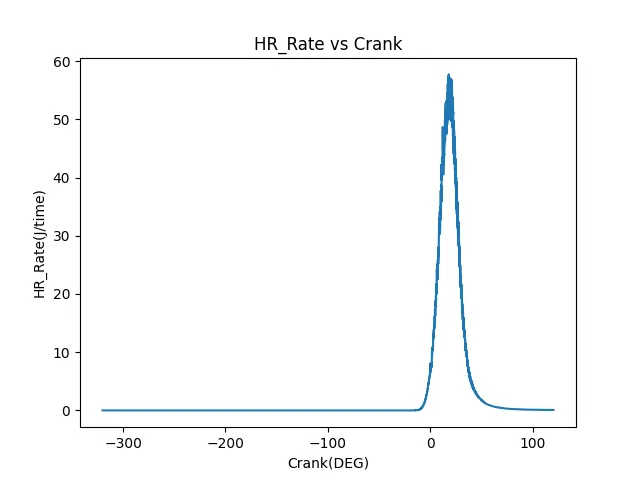
If the parameters volume and pressure were chosen for comparison, additional performance calculations would have been done as shown below with corresponding graph: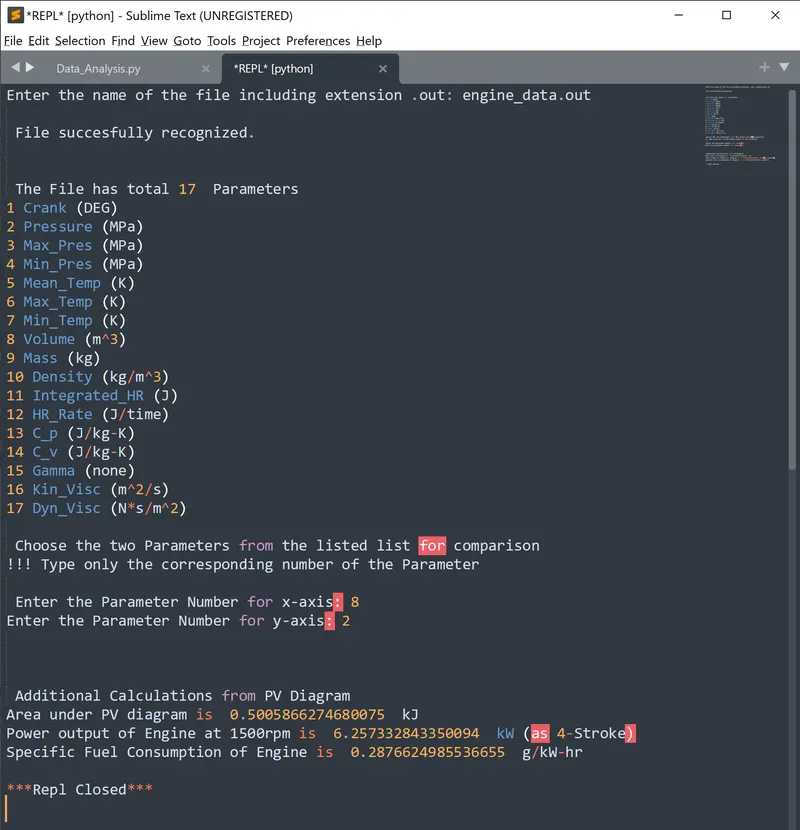
The area under PV-diagram, which is equivalent to the work done by the engine equals 0.50058 kJ, Power output is obtained to be 6.25 kW and Specific fuel consumption to b1 0.2876 g/kW-hr.
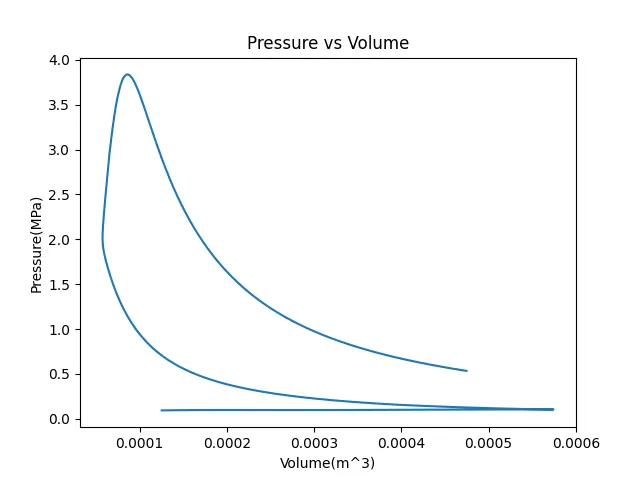
The plotted figures as automatically saved with their corresponding parameter names as figure name as shown below: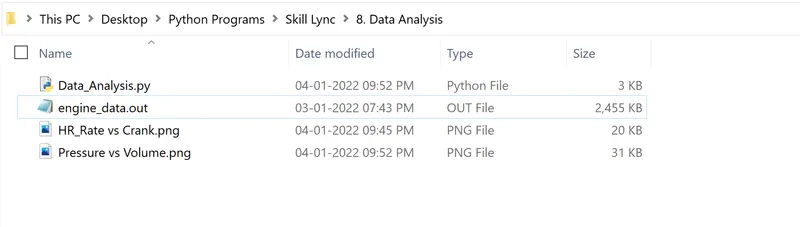
If other parameters too where chosen, then their corresponding figures would have been appeared here.
Conclusion:
The theoretical concepts of engine parameters and file parsing has been understood. A program in PYTHON was created for file parsing. File parsing was done successfully for the Engine Parameter data, and their plots was created for comparison according to the chosen parameters. These plotted images were stored separately according to their parameter names automatically. The Engine performance parameters such as Work done, Power and Specific fuel consumption was calculated.
Reference:
[1] https://www.computerhope.com/jargon/p/parse.htm
[2] https://skill-lync.com/knowledgebase/explaining-repl-and-how-to-use-it
[3] https://www.youtube.com/watch?v=rIl0mmYSPIc
[4] https://skill-lync.com/student-projects/week-6-data-analysis-39