MATLAB Project: 2R Robotic Arm
Aim
To write a MATLAB program to simulate the forward kinematics of a 2R Robotic Arm and create the animation of the motion.
Theory
A robotic arm is basically a type of mechanical arm, usually programmed as similar to that of a human arm. For such mechanisms, the links are connected by joints allowing it have either rotational or translational motion or displacement. A 2R robotic arm is such a robotic arm which have two rotational motion. That is, the two links of the mechanism will have rotational motion over a 2D plane with only single degree of freedom.
Concept
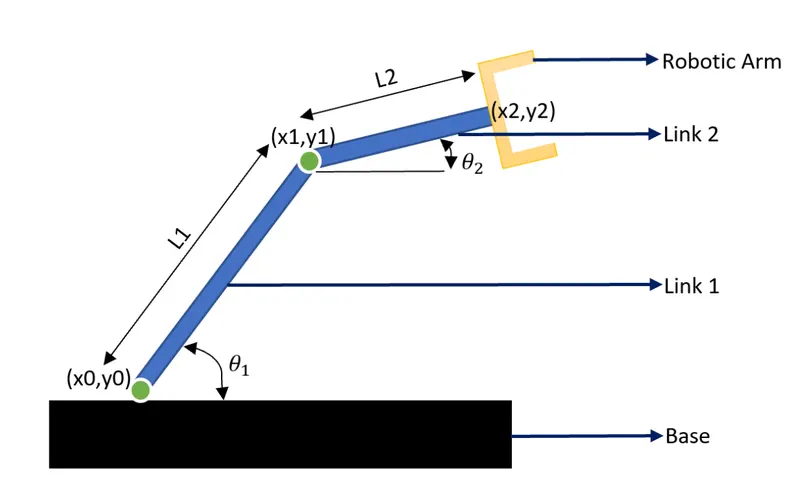
The figure shows the 2R robotic arm where it's constituent parts are labelled, namely Base, Link 1, Link 2 and robotic arm or manipulator.
Here, `L_1` and `L_2` are the dimension of two links, Link 1 and Link 2 of the mechanism which undergoes rotational motion. The Link 1 rotates about the fixed point (`x_0,y_0`). The other end of the Link 1 will be at the position (`x_1,y_1`). The one end of the Link 2 will have the position (`x_1,y_1`) and will rotate about this point. The other end of the Link 2 will be at the position (`x_2,y_2`).
Let's consider that the (x0,y0) is at the origin which is the fixed position.
ie, (`x_0,y_0`)=(0,0) => `x_0`=0; `y_0`=0;
Let `theta_1` and `theta_2` be the angles subtended by both Link 1 and 2 with respect to the x-axis. Therefore,
`x_1 = L_1*cosθ_1` and `y_1=L_1*sinθ_1`
`x_2=x_1+L_2*cosθ_2` and `y_2=y_1+L_2*sinθ_2`
Objectives
- Understanding the concept of 2R Robotic arm.
- Creating the code for 2R robotic arm
- Making animation of the robotic arm.
Program
% Challenge
% Program to simulate the forward kinematics of a 2R Robotic Arm

clear all
close all
clc

% Assigning values to Length of arms
L1 = 2;
L2 = 1;

% x1,y1 represent the initial position of arm which is fixed;
% x2,y2 represent the other cordinate of first arm which is linked to the
% second arm;
% x3,y3 represent the other end of the second arm;
% theta1 and theta2 represent the angle made by the arm w.r.t x-axis;

% Assigning values to theta1 and theta2
theta1 = linspace(0,90,25);
theta2 = linspace(0,90,15);

% Since (x0,y0) is fixed position, it assigning as value
x0 = 0;
y0 = 0;  % assuming (x0,y0) is at the origin;


% f_no is the frame number; Initialising its value as 1
f_no = 1;

% For loop is used for the motion of each link where the i represent each
% position of Link 1 and j for Link 2.

for i = 1:length(theta1)
    for j = 1:length(theta2)
        x1 = L1.*cosd(theta1(i));
        y1 = L1.*sind(theta1(i));
        x2 = L2.*cosd(theta2(j))+x1;
        y2 = L2.*sind(theta2(j))+y1;

        plot([x0 x1],[y0 y1],[x1 x2],[y1 y2],'linewidth',3);
        axis([0 3 0 3]);
        xlabel('x-axis');
        ylabel('y_axis');
        legend('Link 1','Link 2');
        title('Forward Kinematics of a 2R Robotic Arm');
        pause(0.3);

        % Recording Frames;
        M(f_no) = getframe(gcf); %capture each position to the variable M;
        f_no = f_no+1;           %increment of frame no.

    end
end

% Making Movie
movie(M);  %plays movie of the frames captured in M
videofile = VideoWriter('forward_kinematics.avi','Uncompressed AVI'); %write video data as AVI file into videofile
open(videofile) %open video file
writeVideo(videofile,M) %to create a video file from the array "M"
close(videofile) %close video file
Each step of the program is explained with comment.
Output of the Program
The video link for the animation created is provided below:
https://youtu.be/J9MsVpqX_-k
Some Modifications
The program was working perfectly fine but I decided to make some modifications. I decided to label the two links as "Link 1" and "Link 2" on to the animation. For that I decided to use the command: text(x,y,'text_name). So the next step was to find the x and y values for using the command. The points where named as (p1,q1) and (p2,q2) where the text to be displayed on the plot for the respective Link 1 and 2.
p1, q1, p2 and q2 equations are founded as:
p1 = 0.5*L1.*cosd(theta1(i));
q1 = 0.5*L1.*sind(theta1(i));
p2 = 0.5*L2.*cosd(theta2(j))+x1;
q2 = 0.5*L2.*sind(theta2(j))+y1;
these were added to the program.
The text command was then introduced to the program.
text(p1,q1,'Link 1');
text(p2,q2,'Link 2');
Modified Program
% Challenge
% Program to simulate the forward kinematics of a 2R Robotic Arm

clear all
close all
clc

% Assigning values to Length of arms
L1 = 2;
L2 = 1;

% x0,y0 represent the initial position of arm which is fixed;
% x1,y1 represent the other cordinate of first arm which is linked to the
% second arm;
% x2,y2 represent the other end of the second arm;
% theta1 and theta2 represent the angle made by the arm w.r.t x-axis;

% Assigning values to theta1 and theta2
theta1 = linspace(0,90,25);
theta2 = linspace(0,90,15);

% Since (x0,y0) is fixed position, it assigning as value
x0 = 0;
y0 = 0;  % assuming (x0,y0) is at the origin;


% f_no is the frame number; Initialising its value as 1
f_no = 1;

% For loop is used for each position of the motion of each link where the "i" represent each
% position of Link 1 and "j" for Link 2.

for i = 1:length(theta1)
    for j = 1:length(theta2)
        x1 = L1.*cosd(theta1(i));
        y1 = L1.*sind(theta1(i));
        x2 = L2.*cosd(theta2(j))+x1;
        y2 = L2.*sind(theta2(j))+y1;
        p1 = 0.5*L1.*cosd(theta1(i));
        q1 = 0.5*L1.*sind(theta1(i));
        p2 = 0.5*L2.*cosd(theta2(j))+x1;
        q2 = 0.5*L2.*sind(theta2(j))+y1;
        plot([x0 x1],[y0 y1],[x1 x2],[y1 y2],'linewidth',3);
        text(p1,q1,'Link 1');
        text(p2,q2,'Link 2');
        axis([0 3 0 3]);
        xlabel('x-axis');
        ylabel('y_axis');
        legend('Link 1','Link 2');
        title('Forward Kinematics of a 2R Robotic Arm');
        pause(0.1);

        % Recording Frames;
        M(f_no) = getframe(gcf); %capture each position to the variable M;
        f_no = f_no+1;           %increment of frame no.

    end
end

% Making Movie
movie(M);  %plays movie of the frames captured in M
videofile = VideoWriter('forward_kinematics_modified.avi','Uncompressed AVI'); %write video data as AVI file into videofile
open(videofile) %open video file
writeVideo(videofile,M) %to create a video file from the array "M"
close(videofile) %close video file
Output of the modified program
The video link for the animation created using the modified program is provided below:
https://youtu.be/TRHOedkh53s
Conclusion
The MATLAB program to simulate the robotic arm has been successfully created and the corresponding animation has been created.