Week-6 Calculate the Stretch Ratio by comparing the ELFORM (-2,-1,1,2) with Ogden_Material Model.
AIM: Calculate the Stretch Ratio by comparing the ELFORM (-2,-1,1,2) with Ogden_Material Model
Objective :
- To check effect of different ELFORM on results.
- Select appropriate solver based on problem.
Procedure:
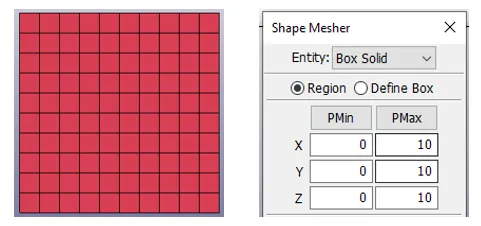
1. A 10×10×10 mm meshed box is created with 10 elements in each row and column.
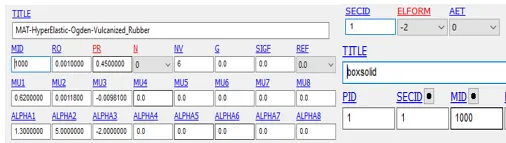
2. Material card is given, and solid section is selected with ELFORM value. Both material and section is assigned to Part.
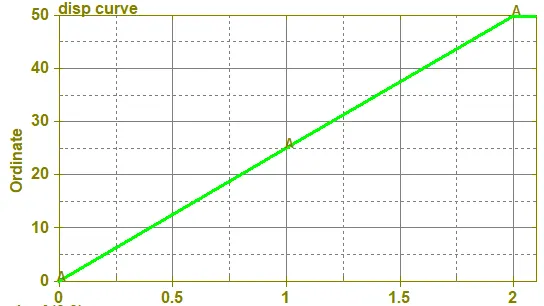
3. Now displacement is given to one edge of cube using prescribed motion set . For that, First a displacement curve is created. As termination time is 2ms, so 2.1ms curve is generated for system stability.
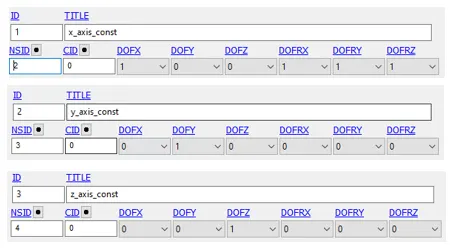
4. Different spc set are created because while deformation element will not behave abnormally. So with fixing node in x-dir, some nodes in z anf y dir are provided DOF.
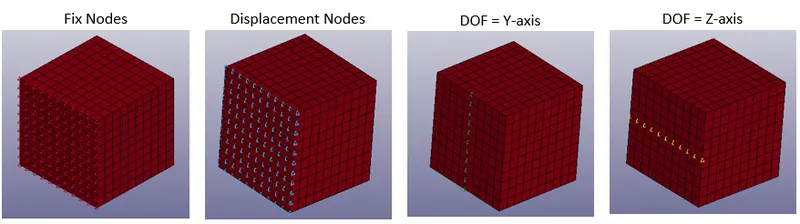
5. Element Binary + SLFLAG=1 is selected to calculate the strain tensor.
6. SOLVER TYPE:
As our problem is mostly static and our material is non linear so this is a type of non-linear static problem. For these kind of problem IMPLICIT approch is better to use.
- Double precision solver is selected as implicit is not supported by single precision.
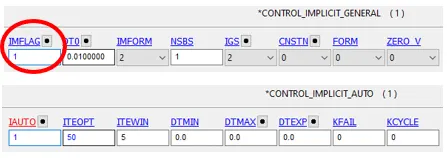
- IMPLICIT GENERAL keyword is used to activate the IMPLICIT solver.
- IMPLICIT AUTO is also selected to change the time step. Here for default value of ITEOPT (11) and ITEWIN (5), my complete simulation is completed in 2 time steps, so to counter that both value are changed ITEOPT = 50 and ITEWIN to 5.
RESULTS :
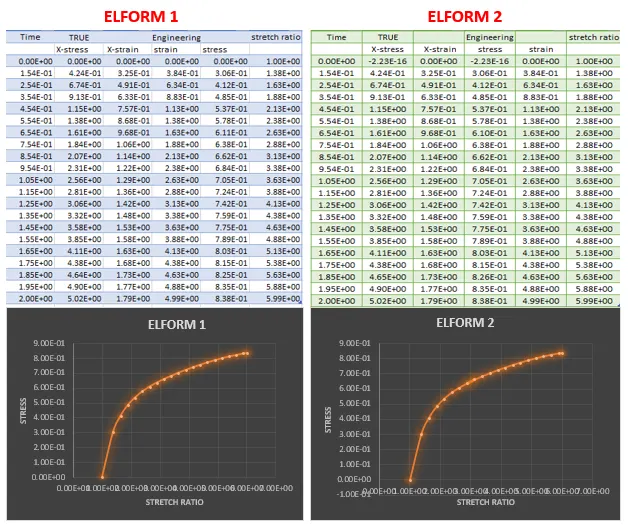
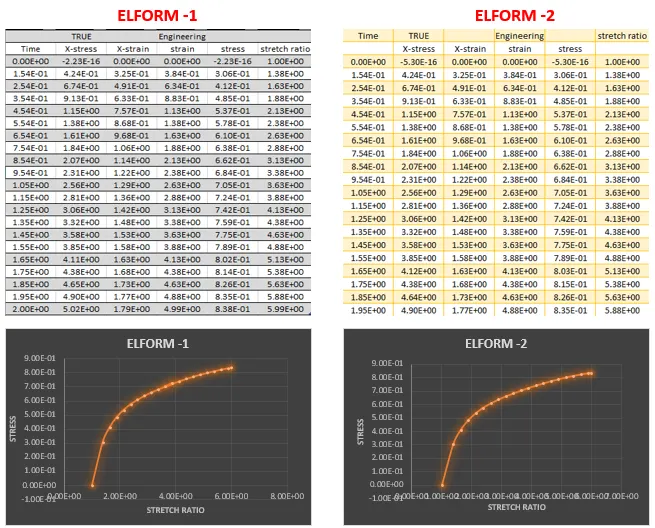
- From the post processing we got the true stress strain value, so first we need to convert them to engineering stress and strain. After that plot is generated between stretch ratio and engineering stress. Formulas for conversion are
engineering strain = exp(true strain) - 1;
stretch ratio = 1 + engineering strain;
engineering stress = true stress / (1 + engineering strain);
- As this is very small problem, so ELFORM has very negligible effect. All results are almost same. Only different observed was in the computational time.
- Results plots are very different that shown in problem figure.
|
ELFORM TYPE |
Simulation time |
|
1 |
6 Sec |
|
2 |
8 Sec |
|
-1 |
8 Sec |
|
-2 |
13 Sec |
Animation:
Learning Outcome:
1. Learned about implicit analysis (assigning memory, select solver type, ITEWIN, ITEOPT)
2. Learned about use of different ELFORM and their impact on simulation
Conclusion:
Result plots are very different from the figure shown in problem. For stretch ratio 5 our model is stress value of .8 MPa and problem figure has 1.9 MPa stress. This high variation may be due to the the non-linearity of the material. As this is very small problem, so ELFORM has very negligible effect. All results are almost same. Only different observed was in the computational time.