Week-6 Calculate the Stretch Ratio by comparing the ELFORM (-2,-1,1,2) with Ogden_Material Model.
AIM:
To create a 10*10*10mm model with Ogden material and calculate the stretch ratio of the model using Element formulation 1,-1,2,-2.
Setup:
1) model creation-
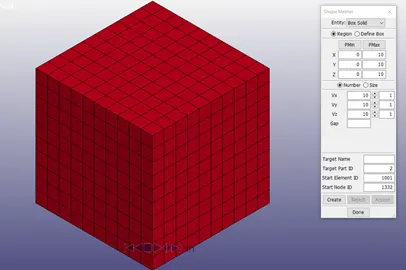
Open LS-PrePost ,go to Element and mesh and select shape mesher.
enter the dimensions as 10mm in all direction.
2) Part-
After the creation of the model, the material card is defined. for the cration of the MAT_OGDEN_RUBBER card the material properties are specifed as given in the Question.
SECTION_SOLID card is used to define the section. Since the ploblem is given to use differnt element formulations, the ELFORM will be changed respectively. The different ELFORM used are,
1, -1, 2, -2.
3) Boundary
Since the boundary conditions should be relatable to the real life environment, applying boundary_SPC at one end is not sufficient.
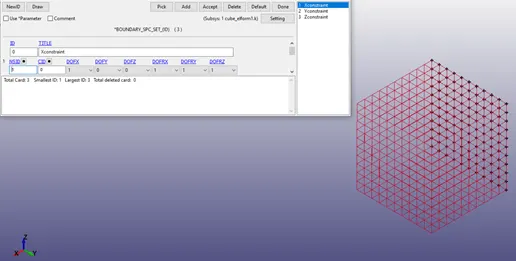
First the model is constrained in x-direction and all DOF as seen above by selecting the nodes normal to X direction .
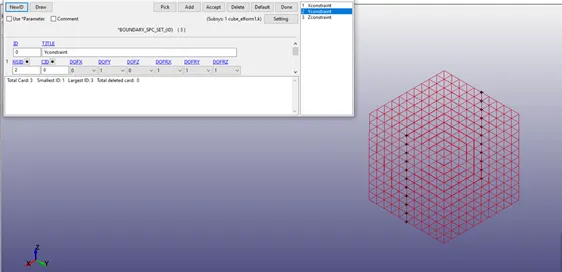
Then the model is constrained in Y-direction and all DOF as seen above.
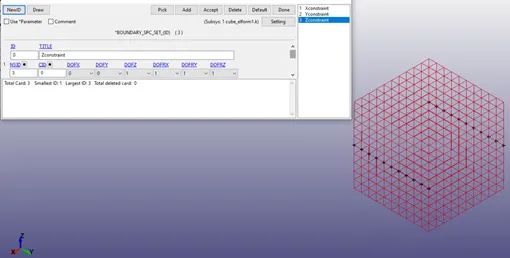
The model is constrained in Z-direction and all DOF.
Now Prescribed_Motion_Set card is used to define the displacement of the model.
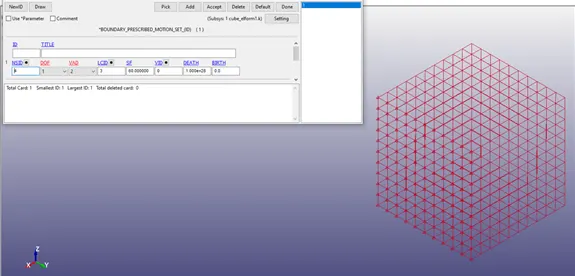
4) Control-
The material used, ODGEN_RUBBER, is a Hyperelastic material which is non linear in nature. due to his the model is non_linear.
This analysis is Quasi-static since it involves large deformation under static condition.
Due to the above reasons this model is solved using implicit method.
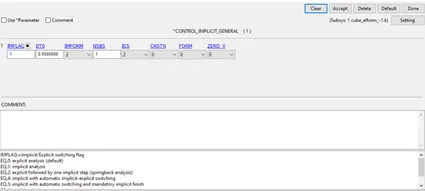
in control, first CONTROL_IMPLICIT_GENERAL card is defined. here IMFLAG is given as 1 as it converts the default Explicit solver to implicit solver and the DT0 is given as 0.05ms.
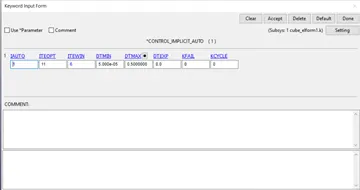
CONTROL_IMPLICIT_AUTO card is defined with IAUTO as 1 which adjusts the Timestep automatically.
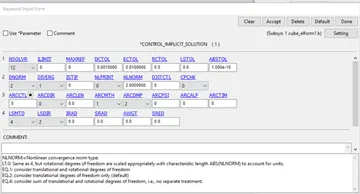
CONTROL_IMPLICIT_SOLUTION card is used to choose between linear and non linear analysis in Implicit solver.
CONTROL_IMPLICIT_SOLVER is used to do stifness matrix inversion
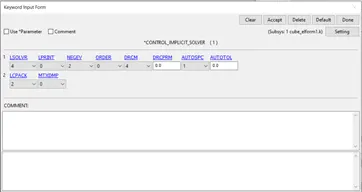
the d3plot is set and the solver is run in LS-Dyna library.
These same above steps are followed by changing the ELFORM for the 4 different cases.
RESULTS
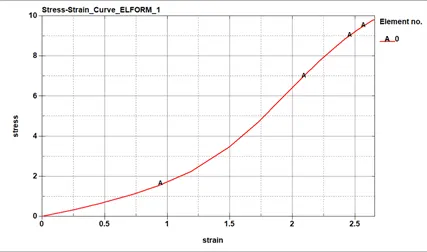
The above graph represents true stress Vs true strain of the material with ELFORM 1.
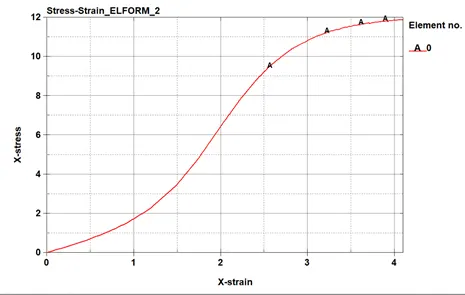
The above graph represents true stress Vs true strain of the material with ELFORM 2.
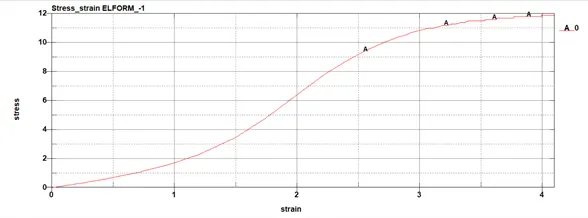
The above graph represents true stress Vs true strain of the material with ELFORM -1.
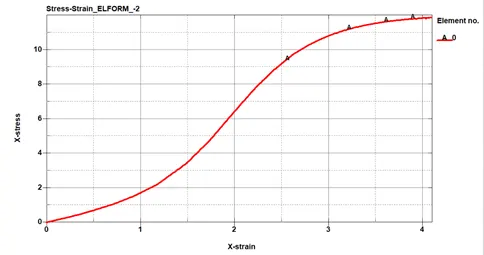
The above graph represents true stress Vs true strain of the material with ELFORM -2.
True stress and True strain graphs have been plotted and saved in .csv folder. Now the graph has to be plotted for Engineering stress and Stretch ratio.
For this purpose the conversion of true stress and true strain to Engineering stress and Engineering strain has to be done using the following formulaes,
`epsi_t=ln(1+epsi_e)=lnlamda.....(1)`
`sigma_t=sigma_e*(1+epsi_e)......(2)`
`lamda=1+epsi_e.....(3)`
where,
`epsi_t=`true strain
`epsi_e=`Engineering strain
`lamda= stretch ratio`
`sigma_t=True stress`
`sigma_e=`engineering stress
modifiying the above equations engineering stress, strain and stretch ratio are calculated.
`epsi_e=Exp^(epsi_t)-1`
`sigma_e=sigma_t/lamda`
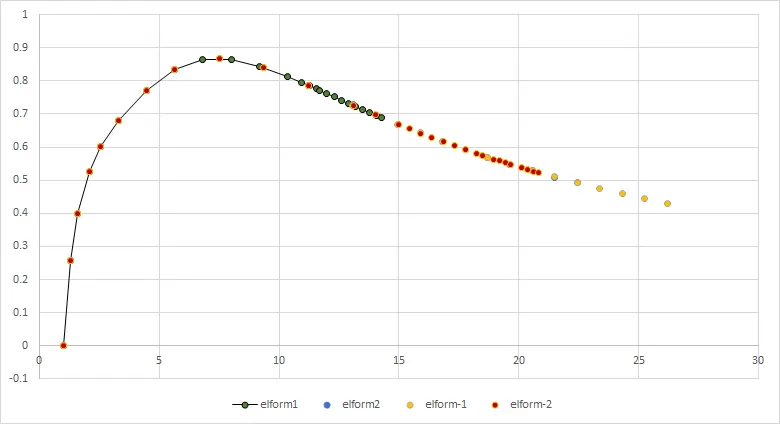
by using the above formulas values have been calculated for all the ELFORMS and the graph of Engineering stress vs Stretch ration is plotted,
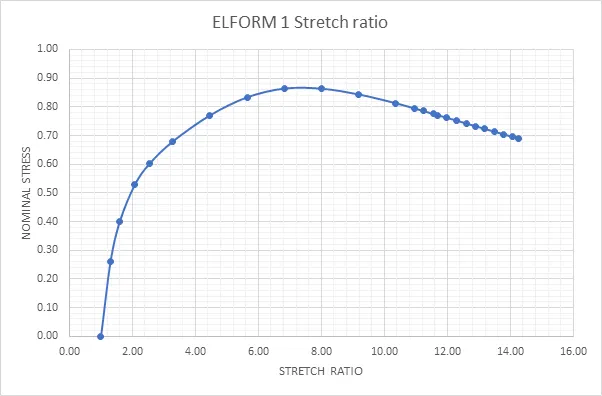
The stress at the Stretch ratio 5 for ELFORM 1 is 0.8 Mpa.
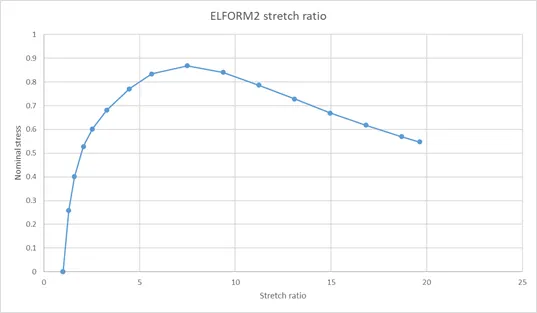
The stress at the Stretch ratio 5 for ELFORM 2 is 0.8 Mpa.
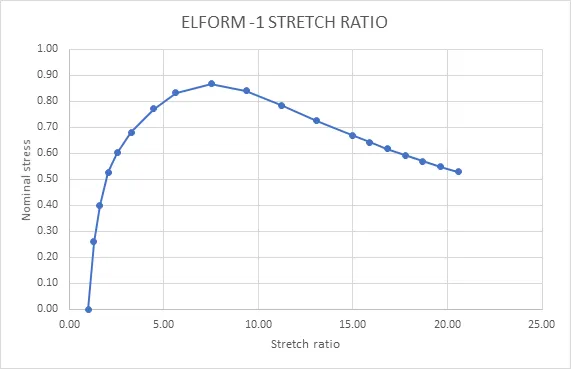
The stress at the Stretch ratio 5 for ELFORM -1 is 0.8 Mpa.
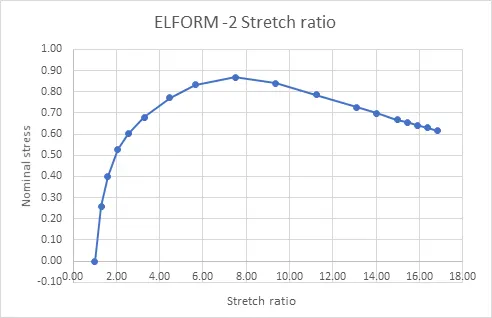
The stress at the Stretch ratio 5 for ELFORM -2 is 0.8 Mpa.
Conclusion
We can conclude that the stretch increases as the stress iduced on the part model increases. We can notice a huge deformation in the hyperelastic material even after the yeild point while this cant be seen in other materials.We can aso visulize that the deformation occurs in an non-linear manner since the change in stress is not linear to the change in strain.