Week 4 -Wire Bending Challenge
OBJECTIVE:
- The objective of this challenge is to perform a static structural analysis and to Simulate the bending of a wire in ANSYS. And we have to use Copper Alloy (Non Linear), Aluminium Alloy (Non Linear) and Magnesium Alloy ( Non Linear) for the wire alone. And we need to find out the Equivalent stress and Equivalent strain on the wire alone. As will as to compare the results.
INTRODUCTION:
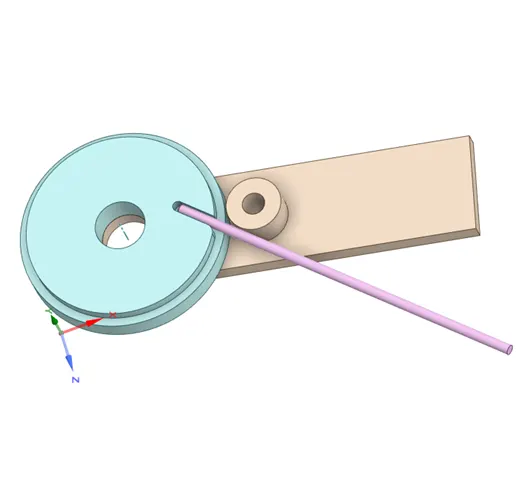
- Wire bending is the process of bending an wire to the certain angle and it is based on the requirements. Wire bending involves many type of bending as well as cutting. But in our challenge we have to know have a wire bent will experience different types of stresses and strains, when a wide variety of material is used to the wire. And also we compare the results in between them. The model here we used consists of Wire, Lever and Wheel.
PROCEDURE:
- Open the ANSYS Workbench software. Under the Analysis system select the Static structural and wait for few seconds to pop up the window, which contains Engineering data, Geometry, Model, setup, Solution and Results.
- Under geometry import the Wire Bending model.
- Update the model by right click and edit the Model for Preprocessing.
- Wait for few seconds and ANSYS Mechanical will open as shown below. Rename the parts as Wire, Lever and Wheel.
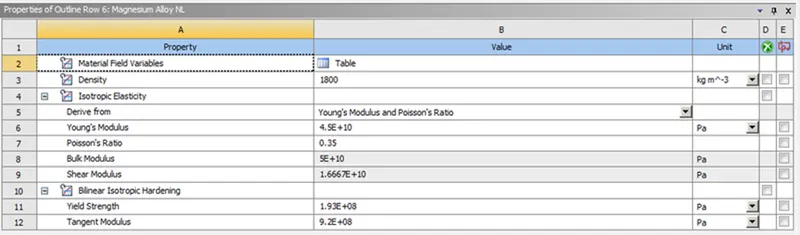
- Assign the material to the model, By classifying the required needs into three cases, And assign material to the model based on the cases.
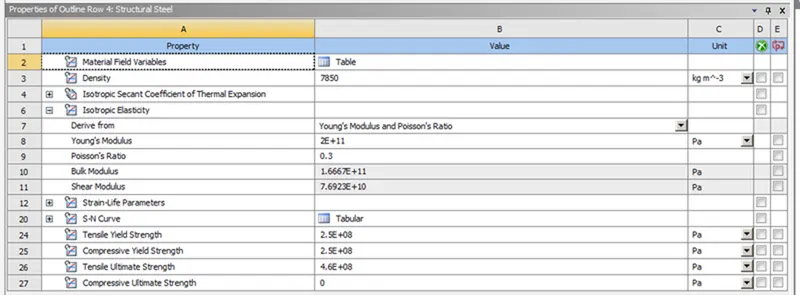
Material used to the wire:
- Case-1: Copper Alloy (Non Linear)
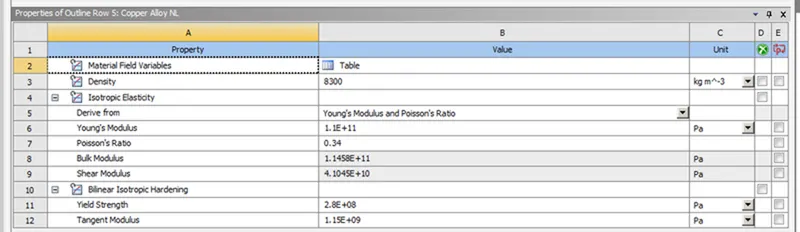
- Case-2: Aluminium Alloy (Non Linear)
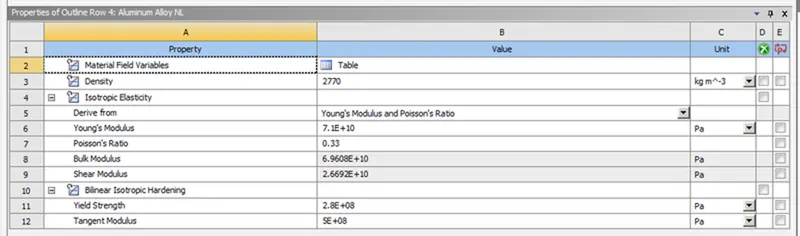
- Case-3: Magnesium Alloy ( Non Linear)
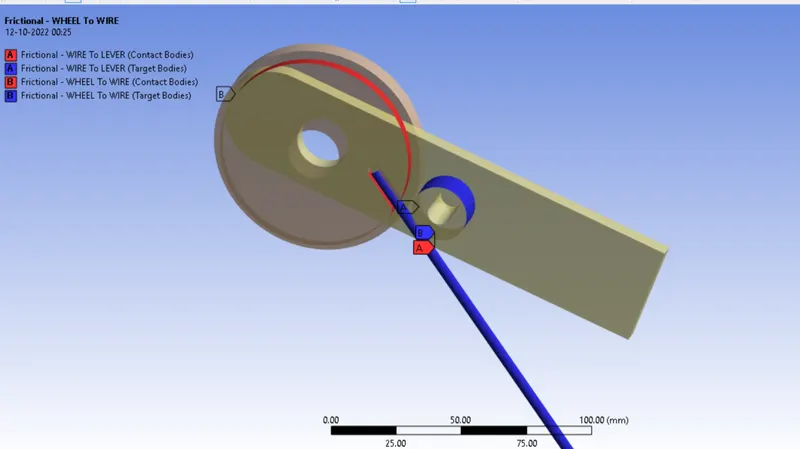
Contact between the parts
- We have three default contact and delete first two contact and duplicate the third contact as well as flip the contact. Select the faces as shown below.
- Frictional contact between the wire to lever and wheel to wire are Defined with a frictional coefficient of 0.2, formulation as augmented Lagrange, normal stiffness factor as 0.1, update stiffness as each iteration, interface treatment as add offset ramped effects.
Mesh
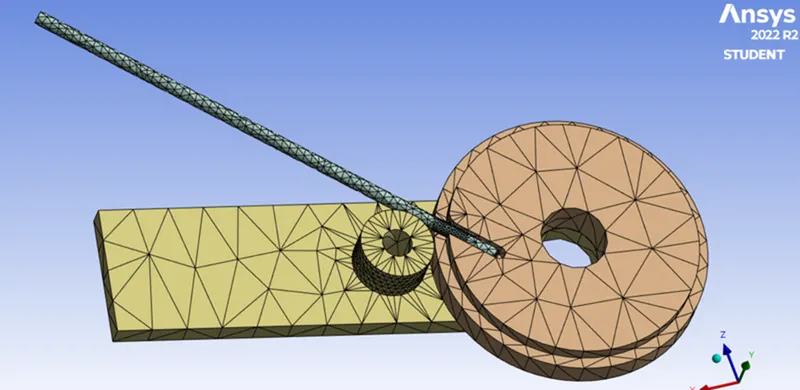
- In ANSYS automatic mesh will be performed with Default mesh size and select the sizing option and select the wire and lever as shown below, assign the element size as 2.2mm. Similarly select the wire and element type as sphere of influence, assign the value of 0.8mm and radius as 7mm as shown below (i.e. Ansys student version will have a limited number of elements and nodes.)
- Analysis settings Change no. of steps as 8, for first step change auto time as on, large deflection on, Weak springs program controlled, solver type as Direct, define by time, initial time step as 0.1, minimum time step as 1e^-2, Maximum time step as 0.2, output controls all as yes, select the time step 2-8 and change auto time as on, define by time, carry over time as on and minimum time step as 1e^-2 and maximum time step as 1.
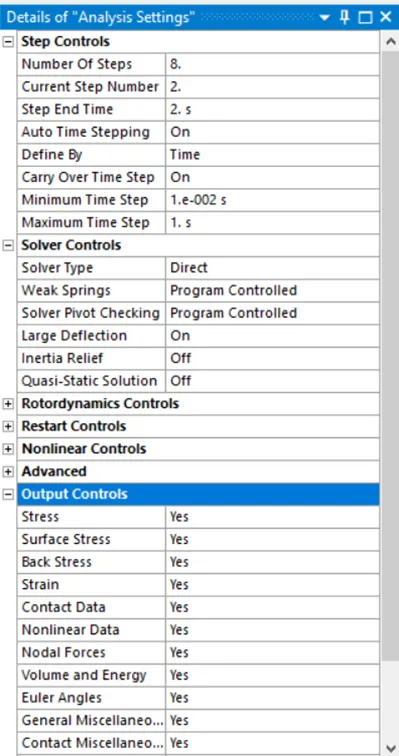
Analysis settings:
- Defining loads to the model.
- a) Insert a fixed support and click the inner surface of wheel and fix it.
- b) Insert a fixed support and click the surface of wire as shown below and fix it.
- c) Insert a revolute joint to the lever and select the face as shown below and change the type as revolute and connection type as body to ground. Make sure that the axis of rotation should be in Z-axis.
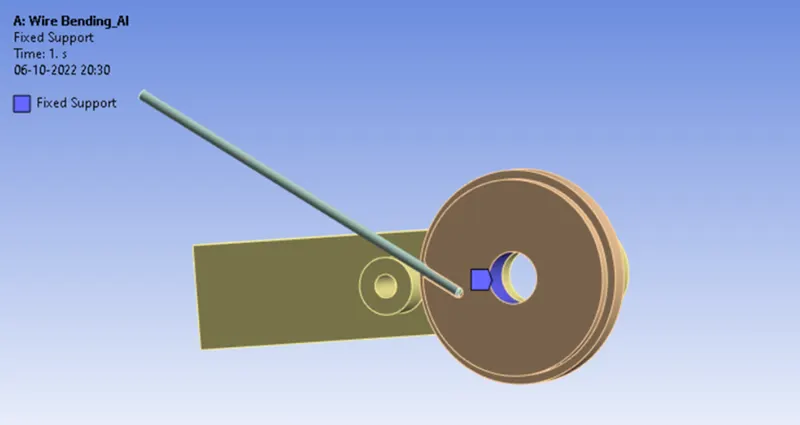
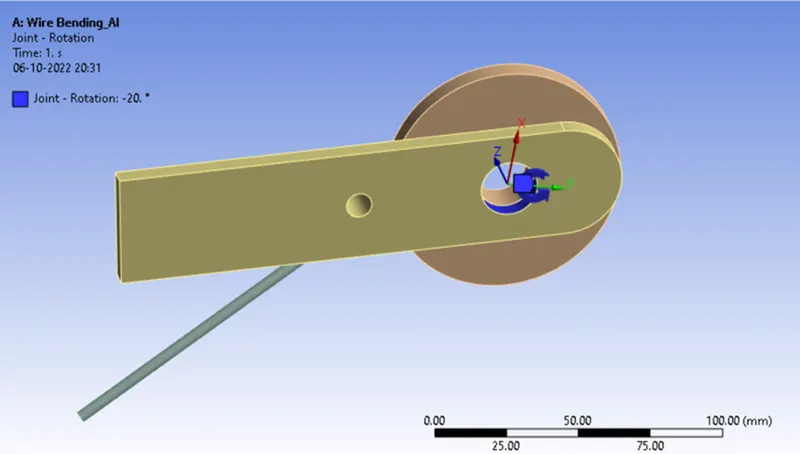
- Insert a joint load and select the revolute joint as rotation type, DOF as Z and a magnitude of 0,-20,-40,-60,-80,-100,-120,-140,-140.
- Now request for the outputs such as equivalent stress, equivalent elastic strain, Total deformation.
- SOLVE the solution
- FOLLOW THE SAME PROCEDURE FOR CASE-2 AND CASE-3, JUST CHANGE THE MATERIAL OF WIRE FOR THE RESPECTIVE CASES.
SIMULATION RESULT: (CASE 2)
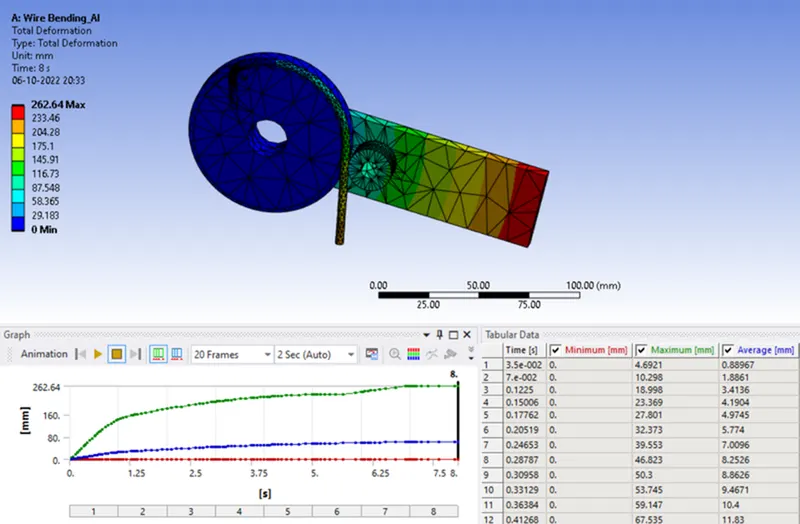
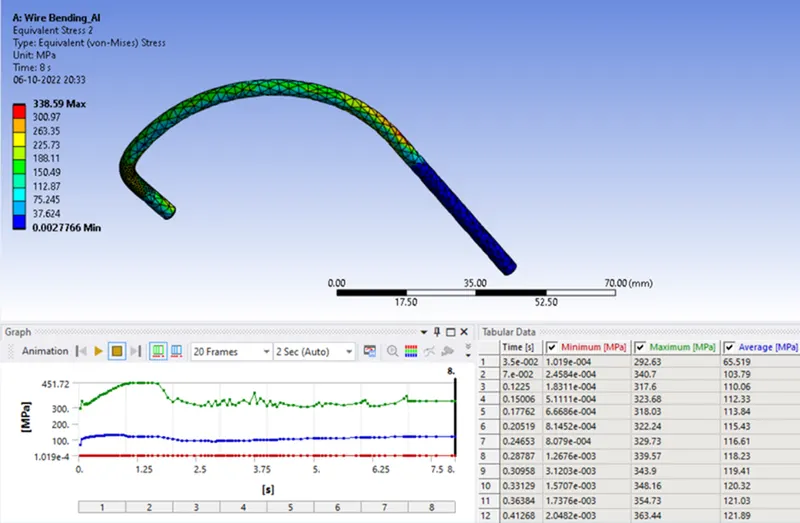
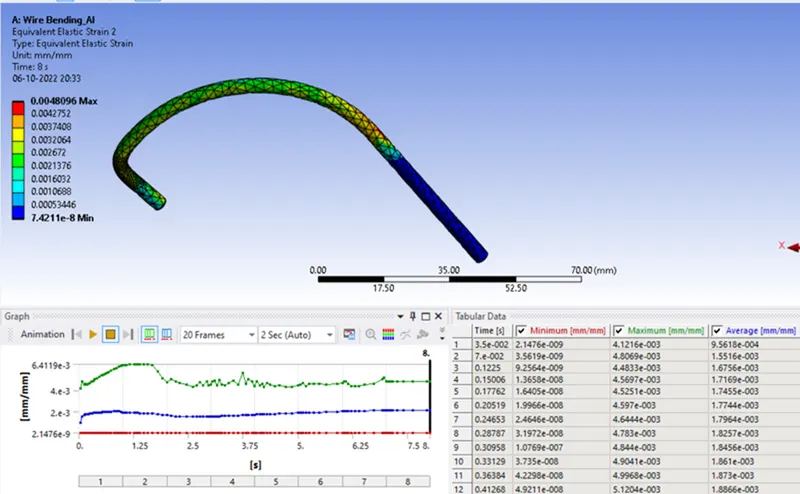
- Simulation results for case-1 the material used for the model is Copper alloy(NL), for case-2 Aluminium Alloy (NL) and for Case-3 Magnesium Alloy (NL). To find out the Equivalent stress, Equivalent elastic strain and Total Deformation and compare the results for the three materials in a tabular form.
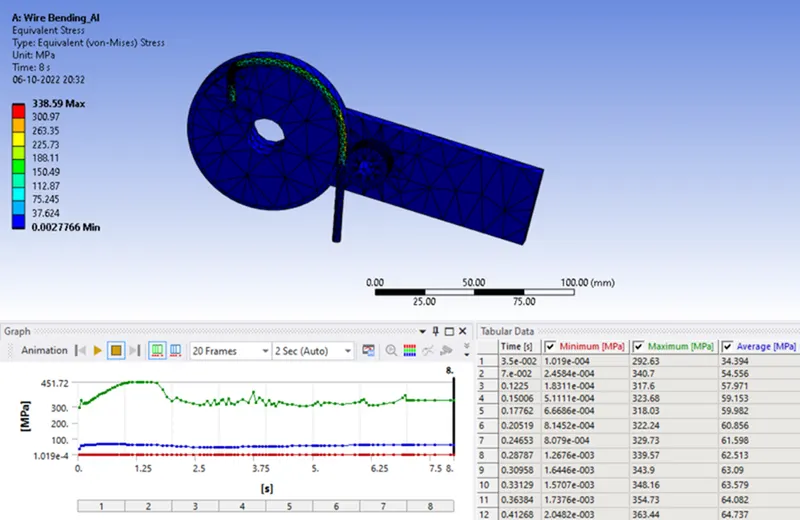
- EQUIVALENT STRESS-
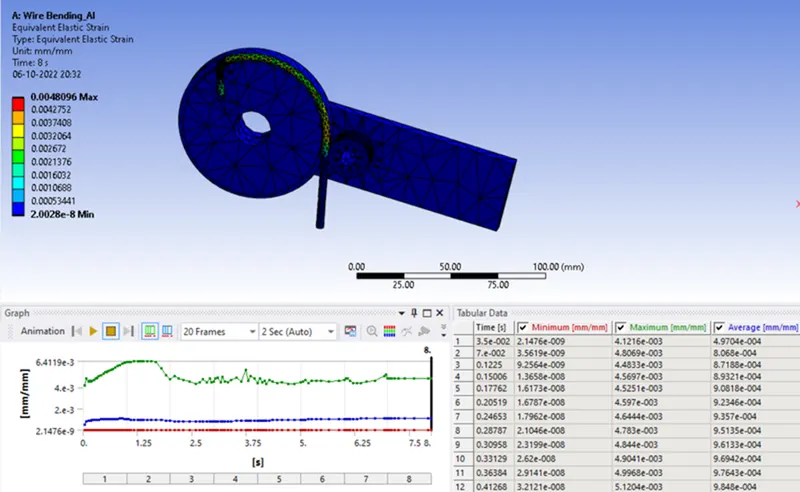
- EQUIVALENT ELASTIC STRAIN:
- TOTAL DEFORMATION
- EQUIVALENT STRESS ON WIRE:
- EQUIVALENT STRAIN ON WIRE:
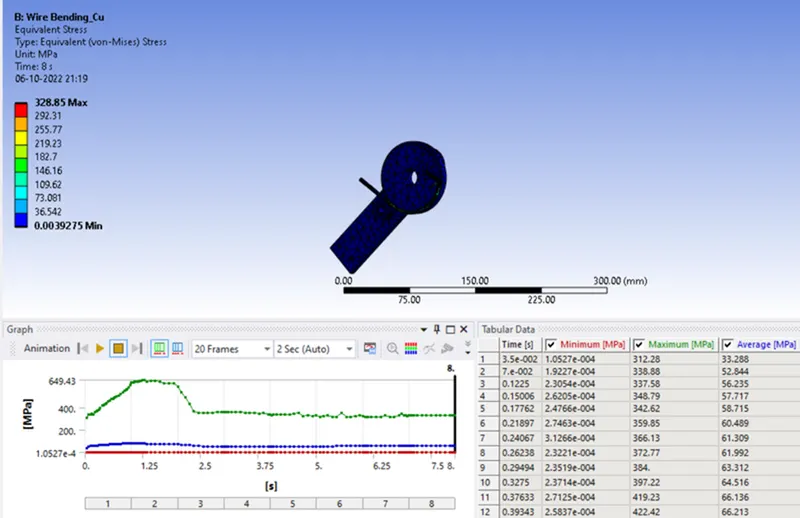
CASE 1: COPPER ALLOY
- EQUIVALENT STRESS-
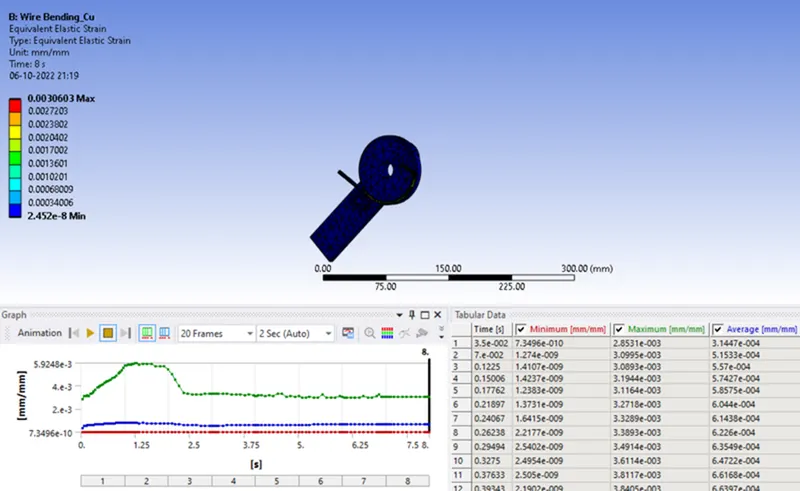
- EQUIVALENT ELASTIC STRAIN-
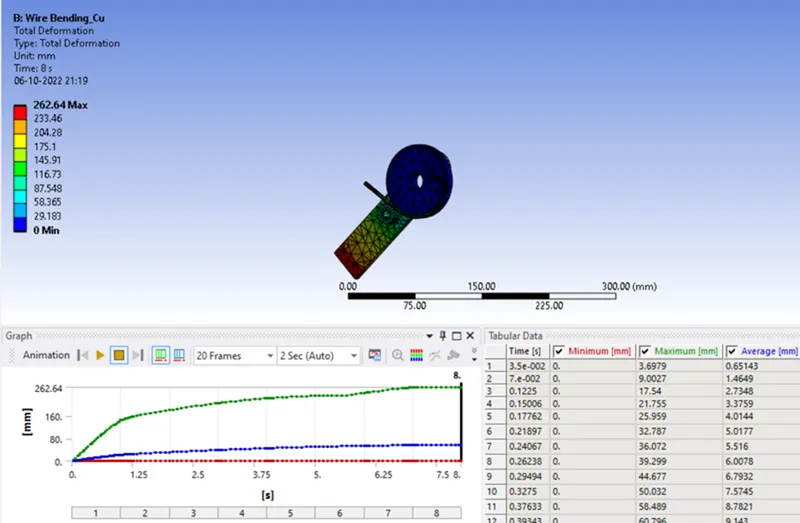
- TOTAL DEFORMATION-
CASE 3: MAGNESIUM ALLOY
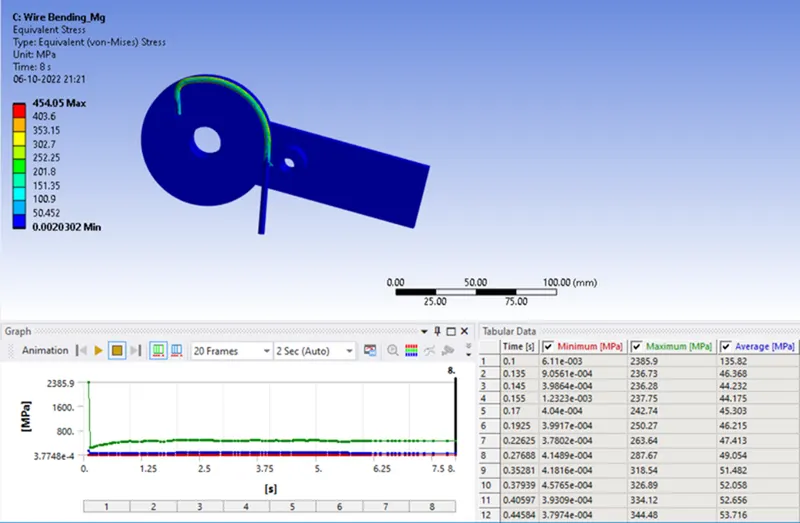
- EQUIVALENT STRESS-
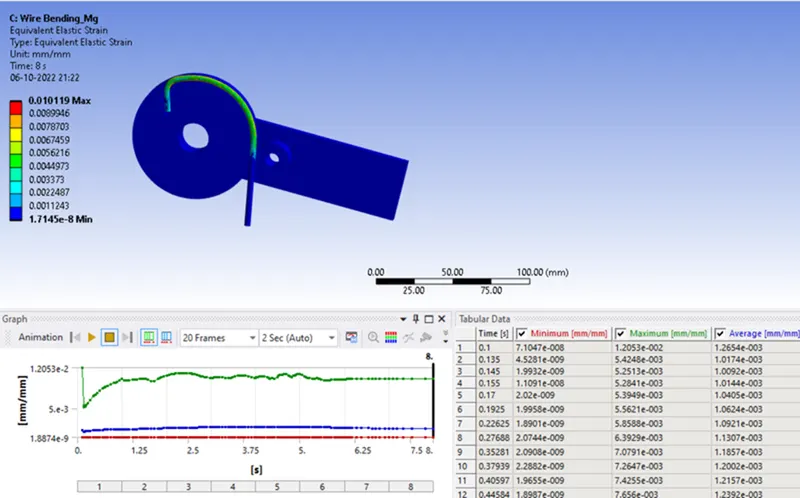
- EQUIVALENT ELASTIC STRAIN-
TABULAR RESULTS:
|
MATERIAL |
Equivalent Stress |
Equivalent Elastic Strain |
Equivalent Stress of Wire |
Equivalent Elastic Strain of Wire |
Total Deformation |
|
|
Copper Alloy (Non Linear) |
MAX: 328.85 MIN: 0.0039275 |
MAX: 0.0030603 MIN: 2.452e-8 |
MAX: 328.85 MIN: 0.0054709 |
MAX: 0.0030603 MIN: 9.486e-8 |
MAX: 262.64 MIN: 0 |
|
|
Aluminium Alloy (Non Linear) |
MAX: 338.59 MIN: 0.0027766 |
MAX: 0.0048096 MIN: 2.0028e-8 |
MAX: 338.59 MIN: 0.0027766 |
MAX: 0.0048096 MIN: 7.4211e-8 |
MAX: 262.64 MIN: 0 |
|
|
Magnesium Alloy ( Non Linear) |
MAX: 454.05 MIN: 0.0020302 |
MAX: 0.010119 MIN: 1.7145e-8 |
MAX: 454.05 MIN: 0.002030 |
MAX: 0.010119 MIN: 5.99924e-8 |
MAX: 262.64 MIN: 0 |
- Due to change in Analysis setting for Magnesium alloy (kept time Minimum than the previous copper and aluminum alloy ) it gives better results than the others. In comparison Between Copper and Aluminum , Aluminum has higher stress and strain than the copper
CONCLUSION:
- From the above result Magnesium material experiences more stress of 454.05, when compared with other two material. copper material experiences less stress of 328.85, when compared with other two material. Aluminium material experiences moderate stress when compared with other two material. Magnesium material experiences high strain when compared with other two material. The total deformation for all material remains same.