Week 4 - Genetic Algorithm
Aim: - To write a code in MATLAB to optimize a stalagmite function and to find global maxima of the function.
Objective: - A. Using Genetic Algorithm (ga) to find global maxima to the following stalagmite function-
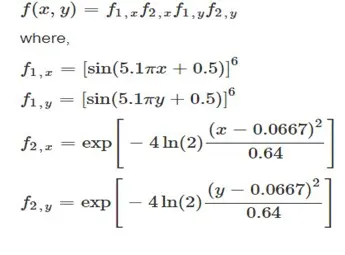
B.To plot the graph of following studies with F maximum with no. of iterations-
- solution with unbounded constrains.
- solution with bounded constrains
- solution with bounded constrains with increased population size.
Governing principle: - Genetic algorithm— It is an analytical search technique that is used to solve optimization problems based on genetic and natural selection principles which mimics biological evolution. The genetic algorithm randomly selects individual s from current population, then either modify by crossover or mutation to generate next generation. Over successive generations, the population evolve to an optimal or near optimal solution.
It has following stages: -
- Initial population: - the set of individuals at the start of process is called initial population. This is selected on the basis of set parameters.
- Fitness function: - it determines how fit the individual is. Every individual is given a fitness score. The probability of getting selected is based on this fitness score.
- Selection: - the idea is to select the fittest individual and let them pass to further process.
- Cross over & Mutation: - this modifies the selected individual and mate them to get better individuals’ offspring, then this offspring is added to the population. In crossover pair of individuals are selected and their genes are crossed over from a certain point to produce new individual. In Mutation a single individual gene is exchanged within itself so as to create new individual.
- Termination: - The algorithm terminates if the population has converged (does not produce offspring which are significantly different from the previous generation). Then it is said that the genetic algorithm has provided a set of solutions to our problem.
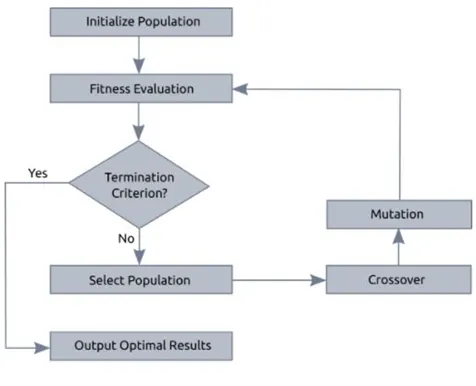
Above figure represents the basic structure of genetic algorithm.
Syntax of Genetic Algorithm (ga) in MATLAB:-
[x,fval] = ga(fun,nvars,A,b,Aeq,beq,lb,ub,nonlcon,IntCon,options)
- x - Local unconstrained minimum
- fun - Objective function
- nvars - Number of variables used
- A & B - subject to the linear inequalities "A*x ≤ b" exists in the function
- Aeq & Beq - subject to the linear equalities “Aeq*x = beq" exists in the function
- lb - Set of lower bound on the design variables
- ub - Set of upper bound on the design variables
- nonlcon - The function nonlcon accepts x and returns vectors C and Ceq, representing the nonlinear inequalities and equalities respectively.
- IntCon - Takes integer values
- options - This argument allows add extra parameters like increasing population size. The options argument is created by the command "optimoptions."
If any of the given term are not known then it is written as “ []”.
Code in MATLAB: -
Code for the function of stalagmite: -
function [f]=stalagmite(input) %writing the function of stalagmite f1=(sin((5.1*pi*input(1))+.5))^6; f2=(sin((5.1*pi*input(2))+.5))^6; f3=exp(-4*log(2)*((input(1)-0.0667)^2)/0.64); f4=exp(-4*log(2)*((input(2)-0.0667)^2)/0.64); f= -(f1*f2*f3*f4); %-ve sign added so as to get maxima of the function end
code for the GA in MATLAB: -
close all
clear all
clc
%input variables
x=linspace(0,1,100);
y=linspace(0,1,100);
n=50;
%creating a 2D array of inputs
[xx,yy]=meshgrid(x,y);
%calling the function for each pair of inputs in the 2D array
for i=1:length(xx)
    for j=1:length(yy)
        input(1)=xx(i,j);
        input(2)=yy(i,j);
        f(i,j)=-stalagmite(input);

    end
end
tic      % starting the timer
%calling the ga solver for n no. of times
for k=1:n
    [input,fout(k)]=ga(@stalagmite,2);
    xout(k)=input(1);          %storing the local maximas in the xout and y out
    yout(k)=input(2);
end

study1_time=toc     %stopping the timer

%plotting the outputs
figure(1)
subplot(2,1,1)
hold on
surfc(x,y,f)
xlabel('X values')
ylabel('Y values')
zlabel('F values')
shading interp
plot3(xout,yout,-fout,'marker','o','markerfacecolor','r') %-ve sign used to get the maxima
title('unbounded inputs')
subplot(2,1,2)
plot(-fout)  %  plotting the -fout vs no. of iterations
xlabel('iterations')
ylabel('function maxima')
hold off

%for bounded solutions
tic
for i=1:n
    %writting the proper syntax for bounded solution to increase the
    %optimality
     [input,fout(i)]=ga(@stalagmite,2,[],[],[],[],[0,0],[1,1]);
    xout(i)=input(1);
    yout(i)=input(2);
end
study2_time=toc
%ploting the bounded outputs
figure(2)
subplot(2,1,1)
hold on
surfc(x,y,f)
xlabel('X values')
ylabel('Y values')
zlabel('F values')
shading interp
plot3(xout,yout,-fout,'marker','o','markerfacecolor','r')
title('bounded inputs')
subplot(2,1,2)
plot(-fout)
xlabel('iterations')
ylabel('function maxima')

%case 3
%bounded solutions with increased population size
options=optimoptions('ga')
options=optimoptions(options,'populationsize',250)  %increasing the initial population space
tic
for i=1:n
     [input,fout(i)]=ga(@stalagmite,2,[],[],[],[],[0,0],[1,1],[],[],options);
    xout(i)=input(1);
    yout(i)=input(2);
end
study2_time=toc
%plotting for the increased no of population
figure(3)
subplot(2,1,1)
hold on
surfc(x,y,f)
xlabel('X values')
ylabel('Y values')
zlabel('F values')
shading interp
plot3(xout,yout,-fout,'marker','o','markerfacecolor','r')
title('bounded inputs with increased population')
subplot(2,1,2)
plot(-fout)
xlabel('iterations')
ylabel('function maxima')
Results:- The global maxima for the function is at [x,y]=[0.0668331 , 0.0668326] and the max value of the function is 1.
Study 1:- the plot for unbounded output is –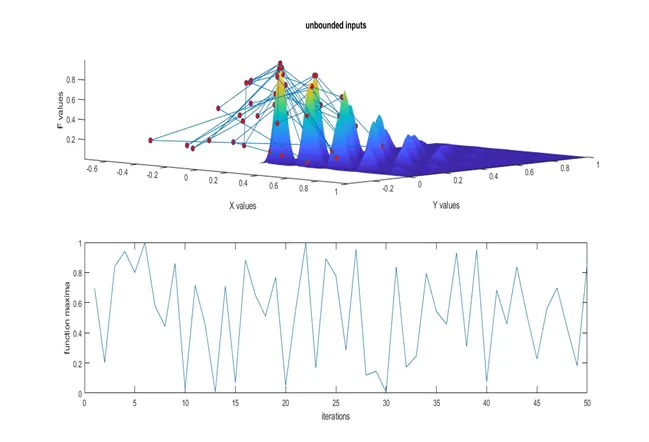
Study 2: – the plot for bounded output is –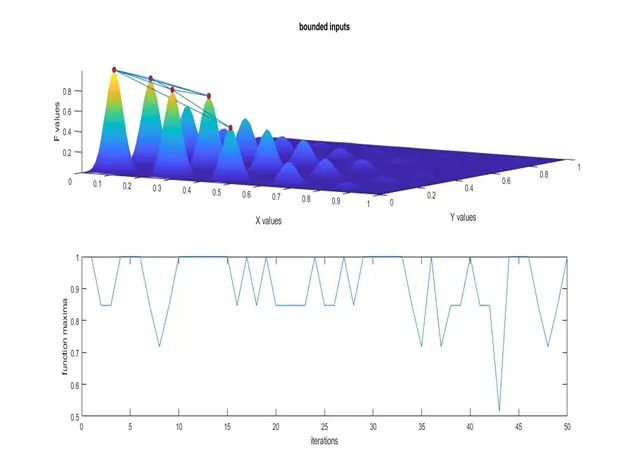
Study 3: – The plot for increased population is –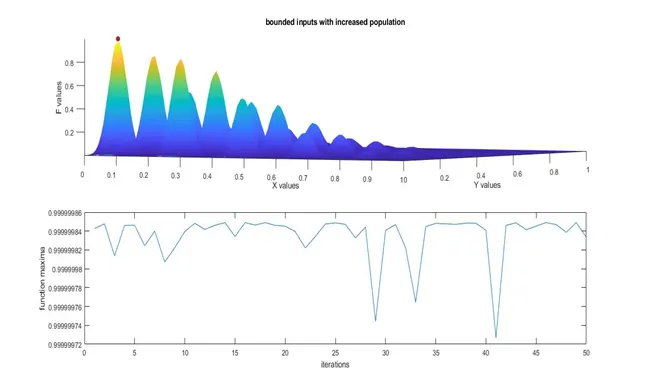
Error faced while programming:-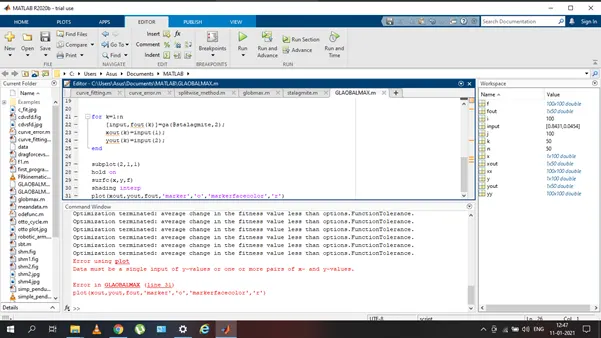
Here plot command was used instead of plot3 command . Rectified after google searches and helpdesk.
Refferences: -