Week 3 - Solving second order ODEs
AIM:- To write a program in MATLAB that will simulate pendulum motion and to plot displacement & velocity with respect to time.
Objective:-1.To solve the following Ordinary Differential Equation (ODE)-
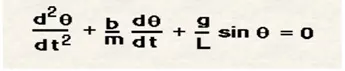
Which represent equation of motion of simple pendulum with damping.then to plot the displacement and velocity w.r.t time.
2.To simulate simple pendulum motion with the help of result of ODE.
Governing physics and equations:- When a pendulum is at rest and is disturbed from its position i.e. a push or pull is given then the pendulum starts to perform harmonic or periodic motion. The differential equation which represents its motion is
`d^2/dt^2 (theta) +b/md/dt theta+g/l sintheta =0` -------- eqn 1
Where represents the position in radian, b is damping coefficient is the mass, g is acceleration due to gravity, l is the length of connecting thread.
on solving the differential equation, we get the corresponding position and speed of the pendulum at different time. The motion slowdown and eventually comes to rest after some time depending on the damping coefficient.
Calculations:- Given data inputs are as follows:
Mass of the bob (m)=1 kg length of the string /thread/rod=1 m
Damping coefficient (b)=.05 kg.m-s/rad accleration due to gravity= 9.81 m/s2
Initial displacement = 0 rad initial velocity= 3rad/s
Time span = 0-20 second
MATLAB code:-
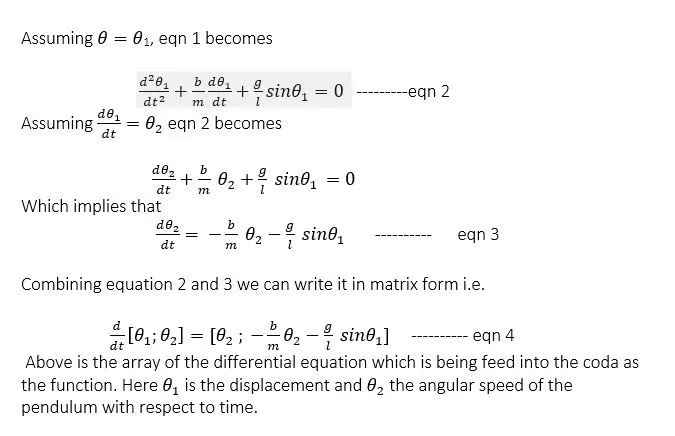
- Gather all the input data and equation
- Use ode45 solver to get the displacement as well as velocity values as output, plot them with respect to time .
- Make loop to represent the string and bob motion by generating the frame for each time loop runs. Hence making a videofile of it
The code is as follow :-
close all
clear all
clc
%entering given inputs
l=1;
m=1;
g=9.81;
b=.05;

th0=[0;3];
t_span=linspace(0,20,200);
[t,r]=ode45(@(t,th) odefunc(t,th,b,g,l,m),t_span,th0); % using inbuilt differential solver
subplot(6,1,[4:6]);         %making subplots
plot(t,r(:,1));
hold on
plot(t,r(:,2))
xlabel('Time')
ylabel('displacement & velocity')
legend("displacement(radian)","velocity(in rad./sec")
title("displacement & velocity Vs time")
grid on
ct=1;             % initializing loop counter
for i=1:length(r(:,1))
    x0=0;
    y0=0;
    x1=l*sin(r(i,1));               %since displacement in radian hence sin() not sind().
    y1=-l*cos(r(i,1));              %calculating the x1,y1 i.e. end points of the thread
    subplot(6,1,[1:2]);
    hold on
    title("pendulum motion ")
    cla                    % clearing the plot each time the loop runs so as to better and clear motion
    axis([-2,2,-1.2 ,0.3]);
    plot([-0.5,0.5],[0,0],'linewidth',5,'color','k')
    plot([x0,x1],[y0,y1],'linewidth',3,'color','b'); % ploting string structure for each times loop runs
    plot(x1,y1,'o','markerfacecolor','r','markersize',15); % making bob with o marker
    grid on
    xlabel('x axis')
    ylabel('y axis')
    hold off
    pause(0.05);
    M(ct)=getframe(gcf);                    %capturing and storing figures as frames of animation
    ct=ct+1;
end
%making movie/simulation of the capture frame
movie(M);
videofile=VideoWriter('simple_pendulum_od.avi','uncompressed AVI');
open(videofile);
writeVideo(videofile,M);
close(videofile);
There is a function used in the program which provides the relation between the given parameter, position and time . the code for it is as follow:-
function [dth_dt]= odefunc(t,th,b,g,l,m)

th1=th(1);             %assigning th1 and th2
th2=th(2);
dth1_dt= th2;          %assigning relation between th1 and th2
dth2_dt= -(b/m)*th2-(g/l)*sin(th1);   % representing th2 as function og th1 and itself
dth_dt=[dth1_dt;dth2_dt];          % forming a matrix of th1 and th2
end
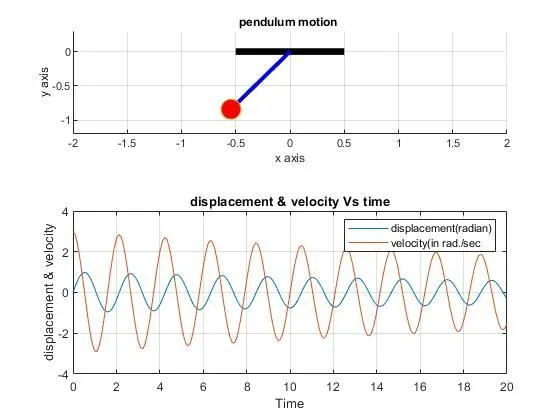
Conclusion:- 1. The differential equation I solved and different value of position and speed is obtained in the form of array .the results are being plotted on the following figure:-
2. The simulation of pendulum is made and the link for the vedio is:- https://youtu.be/bOBI9frdXn8
Error faced while coding:-
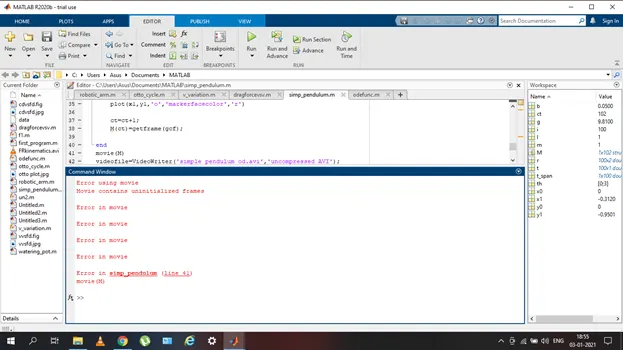
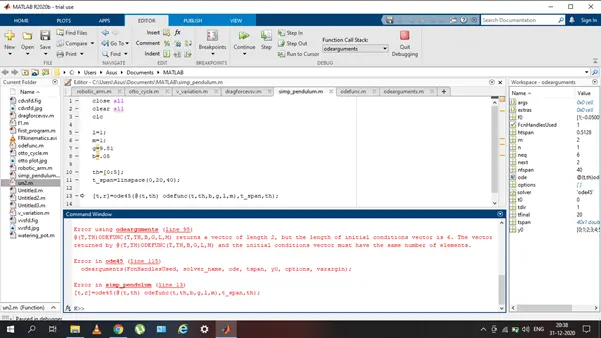
steps to rectify the error:- 1.google search 2. rewatch course video 3.Matlab help for function names