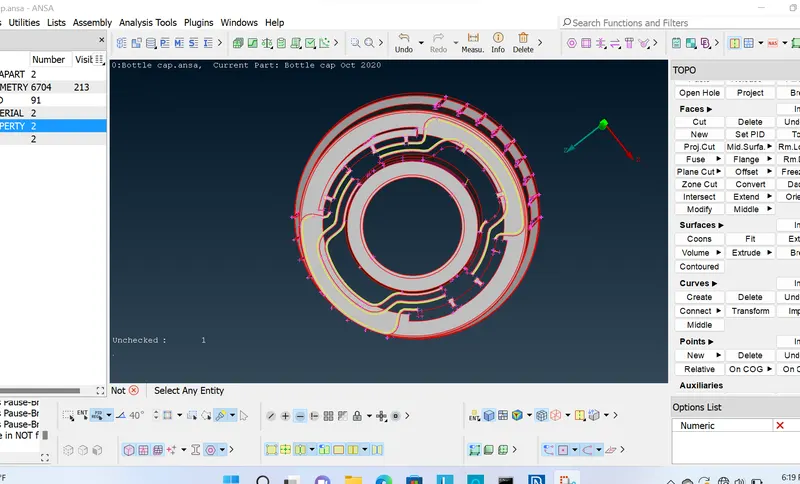
Week - 4 - 2D meshing for Plastic components
Aim:-
1. My aim is to generate the Mid-surface of the bottle cap model
2. Create Mesh on the obtained mid-surface, as per the given quality criteria.
3. After clearing the quality, "Draw shell as mid" also need to be generated.
Procedure:-
1. Create the mid-surface using offset method.
2. For the features of varying thickness, create the mid using "Curve middle".
3. For the portion which has more number of cuts, this will show as an unchecked surface while geometry checks, so create the new surface for that.
4. After achieving the proper mid-surface, create the mesh using "Best".
5. After creating the mesh, apply quality criteria, and clear the quality issues using, "Reconstruction, Reshape, Smooth, Split, Join, Swap, Elements Delete & New commands.
6. Assign property id's to all the surfaces & elements as per their parent geometry thickness.
7. Apply "Draw shell as solid".
Learning Outcomes:-
1. How to use Curve middle command.
2. How to use Middle Command.
3. How to use Cons2curve command.
4. How to generate new surfaces from the curves.
5. How to generate the mid-surface of the area of varying thickness.
6. How to fix quality of the mesh.
7. How to mesh the casting.
8. How to use faces extend, intersect and Move grid commands.
Conclusion:-
1. Mid-surface of the bottle cap model with the mesh is generated according to all the quality criteria.