Week - 4 - 2D meshing for Plastic components
Aim
For the given Bottle Cap model:
- Check for geometrical errors
- Generate the mid surface
- Mesh with the predefined quality criteria
- Assign the thickness and PID's to the surfaces based on the parent geometry
Procedure
First of all, the model is opened in ANSA and then Topo was given to the entire model to stitch all the surfaces. Further steps are as follows:
- Geometry Clean up
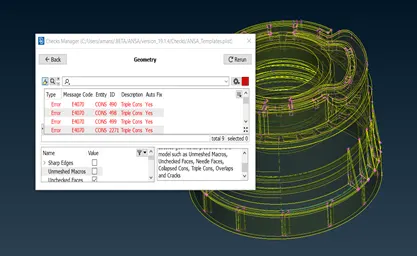
Figure 1. A model with geometrical error
First of all, geometry was checked using the geometry option in checks. Above fig. 1 is showing component with geometrical errors. After fixing triple cons, unchecked faces manually and needle faces, cracks overlap automatically using the fix option, all the geometrical errors were cleaned.
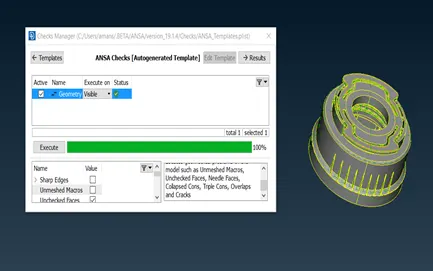
Figure 2. Geometry clean up
- Generating the mid surfaces
After geometry clean-up, mid surfaces were extracted for all the entities. Faces offset, Face middle, and curves middle options were used to get the mid surfaces for the entire model. For the entities where thickness is varying along the length, middle curves were generated, and then the surface was generated using the faces>new>coons option. For the entities of constant cross-section area over the entire length, the face>middle option was used for generating the mid surface. For the threaded area, the mid surface was extracted by direct drawing the middle curves on the inner area of thread in inner and outer surfaces. The final mid surface for the entire model was looked as below:
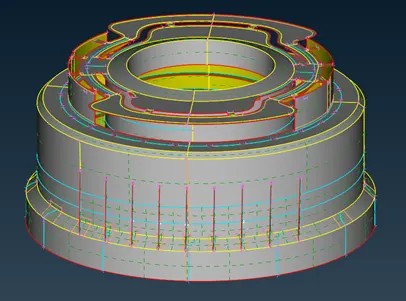
Figure 3. Final Mid Surface of Entire Model
After obtaining the mid surface, CAD geometry was compared with the mid surface.
- Shell Mesh Generation:
Quality criteria for meshing were given as –
|
S.No |
Quality Criteria |
Value |
|
1 |
Target/Average length |
1 |
|
2 |
Minimum Length |
0.5 |
|
3 |
Maximum Length |
3 |
|
4 |
Aspect |
3 |
|
5 |
Warpage |
15 |
|
6 |
Skewness |
45 |
|
7 |
Jacobian |
0.7 |
|
8 |
Minimum Quad Angle |
45 |
|
9 |
Maximum Quad Angle |
135 |
|
10 |
Minimum Tria Angle |
30 |
|
11 |
Maximum Tria Angle |
120 |
|
10 |
Tria Percentage |
15 |
After setting up the quality criteria, shell meshing was done for the given model with reconstructing and smooth option enabled. Smooth mesh flow was obtained for the entire component.
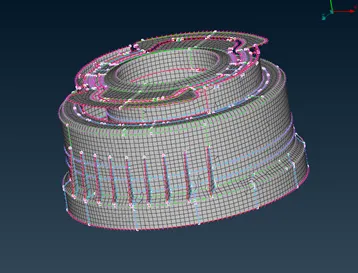
Figure 4. Meshed Mid Surface
- Thickness and PID’s Assignment:
After obtaining a smoother mesh flow, all the surfaces were assigned separate PID’s according to thickness values in the parent geometry.
Learning Outcomes:
- Learned to deal with complex plastic components like Bottle Cap.
- Got the way to vanish the geometrical errors manually and automatically.
- Learned to generate the mid surface by offset, middle curves, and face middle options.
- Learned to perform the meshing and to deal with off elements.
- Learned to assign separate PID’s and thickness values.
Conclusion
- The model was checked for geometrical errors.
- The mid surface was generated for the given model.
- The mid surface was meshed as per the given quality criteria.
- Thickness and separate PIDs were assigned to the surfaces.