Week 4-1D Element Creation Challenge
Aim:
To complete meshing and do the specified connection for the given model.
Procedure:
The first step is to import the model into graphic model
After importing the model the next stage is to delete the solid surface of the model. Then the next step is to extract the midsurface of the model.
After extraction of the midsurface then the next stage is to do auto cleanup of the model.
After completion of clean up next is tod meshing.From the meshing window select the surface of the model and import mixed mesh on the model.
After copletiom of meshing create the specified conncection in the model.Make RBE3 AND RBE2 connections in the specified region.
After this create the CBAR,CROD,CBEAM AND ELASTIC SPRING connection.
a. Rod element:- Translational DOF should be Constrained with RBE2 link
Cross-Section: BOX- Dimension a= 12 mm
dimension b=10 mm
Thickness t= 0.75 mm
b. Beam element:- All DOF should be constrained with RBE3 link
Cross-Section: I Section- Dimension a= 8 mm
Dimension b= 10 mm
Dimension c= 8.5 mm
Thickness t1= 0.75 mm
Thickness t2= .6 mm
Thickness t3= .6 mm
c. Bar element:- Constrain only x and y DOFs With RBE3 link
Cross-section: X section- Dimension DIM1= 5 mm
Thickness DIM2= 1.2 mm
Dimension DIM3= 10 mm
Thickness DIM4= 1.2mm
d. & e. Apply the mass of magnitude 10 with the RBE2 link
f. Join the two components with Spring elements .
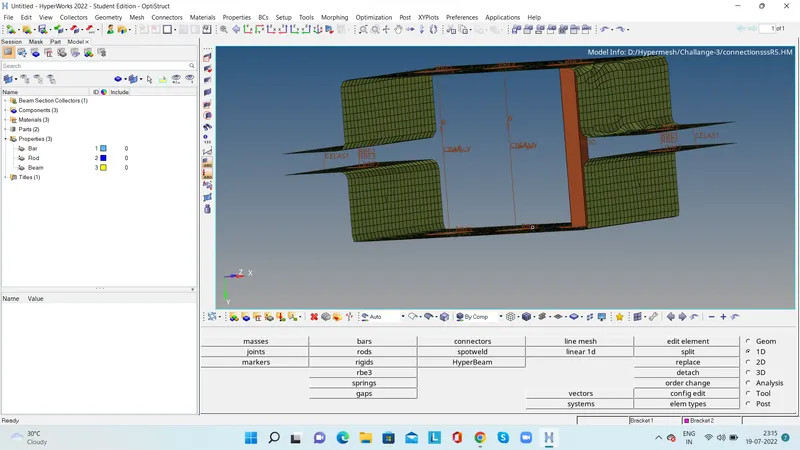
Complete the connection and make the hyperbeam as per the given requirement.and assign the property for the connections.
Conclusion:
Completed mmeshing and created connection and installed hyperbeam and property for the connections.