(4) Module 1 : Week 4 Challenge ---> To implement the control logic of a Washing Machine and a Gear Shift separately
Week-4 Challenges: The solutions to this week's challenges are to be provided in a project format. This week has two challenges, which are described below with proper format and with all the needed theory, data, and graphs.
Objective: To implement the control logic of a "Washing Machine" Stateflow and to create a Simulink chart of "Gear Shift" logic.
Part-1 Solution: The problem statement says that a control logic of a "Washing Machine" using Stateflow has to be made with the following criteria:
- If the power supply is available, the system gets activated
- If the Water supply is not available, stop the process & indicate through LED
- Soaking time should be 200s followed by Washing time of 100s
- Then rinsing happens for the next 20s & dryer runs for 50s
A washing machine (laundry machine or clothes washer) is a home appliance used to do everyday laundry. The term is mostly applied to machines that use water as opposed to dry cleaning or ultrasonic cleaners. The user adds laundry detergent or liquid solution of the same, to the wash water.
To represent the same, separate LEDs are used to indicate the status of the Power Supply and the Water supply. Also, LEDs are used to indicate every step of a standard washing machine process so that one can understand which process is going on, at a particular moment. The processes are Soaking, Washing, Rinsing and Drying. One LED is provided for the Washing Completion status.
The "Washing Machine" control logic is created with the help of a Stateflow chart which is given below:
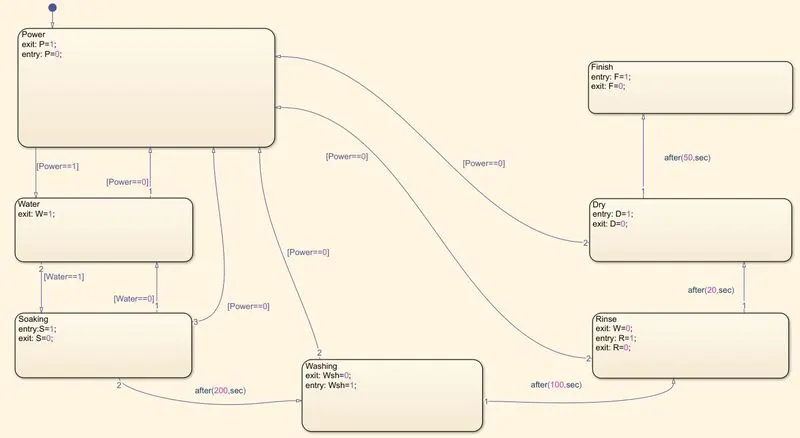
In this Stateflow, seven blocks are created which shows two separate inputs(Power & Water Supply) and four different outputs stages(Soaking, Washing, Rinsing & Drying) and one final output to indicate the Washing Completion status. Time delays are given as per the problem statement for the transition of control from one stage to another. Special arrangements are also made to address the practical scenarios so that we can understand, what will happen if the power supply or the water supply suddenly gets interrupted during the process. The control logic is created as the picture of Stateflow shows, with defining variables and giving them proper values and initiations at certain stages.
One important thing to mention here is that the actual simulation time differs from the practical timeline which is given in the problem. One step in this simulation is worth 8 seconds and the first two steps are to ON both the Power and Water supply respectively. Due to this, Total Simulation Time = Actual Time + 16 Seconds.
It's important to mention that the type of Washing Machine Mechanism used here is fully automated, where the water enters from the inlet by the control of the machine itself. So, if there is no power supply at the very beginning of the process, then the water supply will also not take place and if there is no water in the tank then also the further processes will not get completed. The system only gets activated if there is an available power supply present in the system(as per the problem statement).
Here, Three different scenarios have been addressed which are:
(1) Power Supply ON, Water Supply OFF
(2) Power Supply OFF, Water Supply ON and
(3) Power Supply ON, Water Supply ON
The complete Simulink models of all three cases are given below with proper descriptions in each case.
Slider switches are used for toggling the values of the Power and Water supply separately. All outputs are fed to separate scopes and also the same are fed to a single scope to understand all the stages in comparison to each other, during the entire process. The whole washing process needs a total of 370 seconds to complete (S-200, Wsh-100, R-20 & D-50), and to address that, the Simulation is run for 400 seconds for the final simulation.
All three Simulink models are shown during the 24th second of the total simulation time as default in these diagrams.
Case (1): Power Supply ON & Water Supply OFF
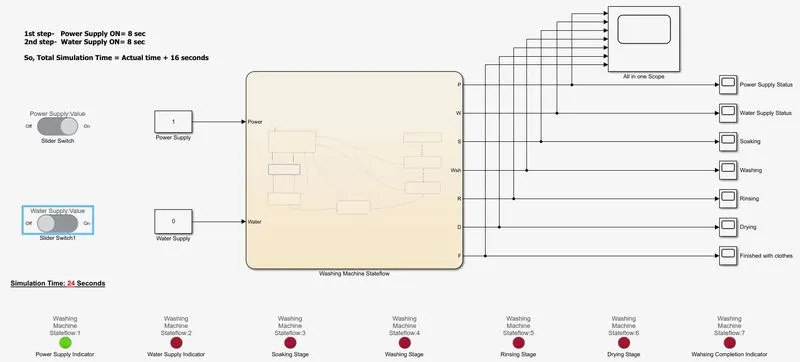
Here, LED is showing that power supply is available but water supply is not. So, the Soaking process is not started even after 24 seconds. Unless the water supply is given to the system, further processes will not take place.
The scope result is given below:
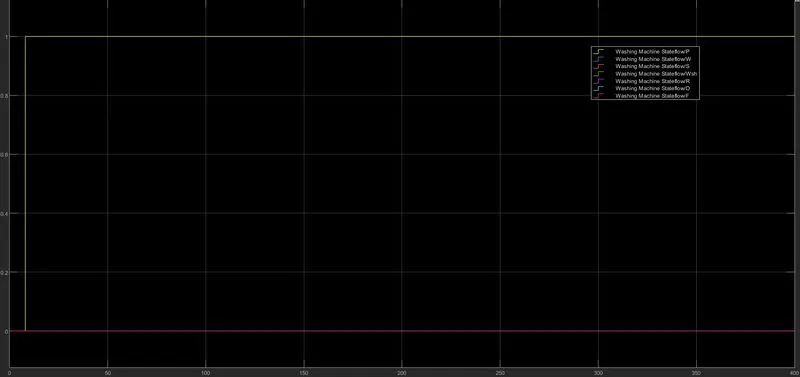
As we can see, only power is ON but water supply is not given. That is why no further stages took place of the Stateflow.
Case (2): Power Supply OFF & Water Supply ON
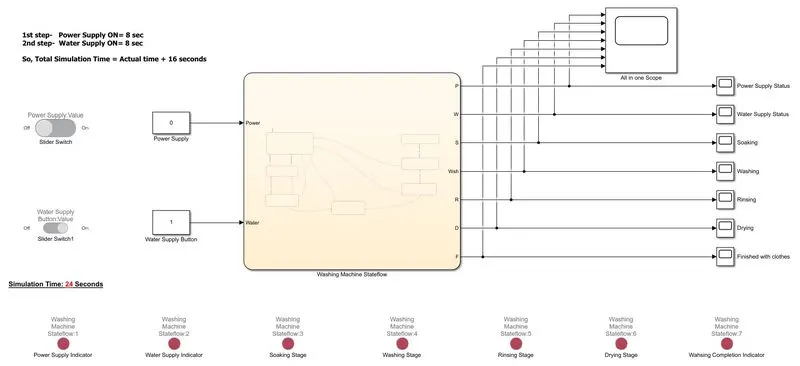
As is mentioned earlier that the washing machine is a full-automated one, the system only gets activated when the power supply is available. That is why there is no progress of washing machine stages are happening even after 24 seconds of simulation. As you can see from the picture that the water supply button is pressed but due to lack of power supply it is not working.
Case (3): Power Supply ON & Water Supply ON
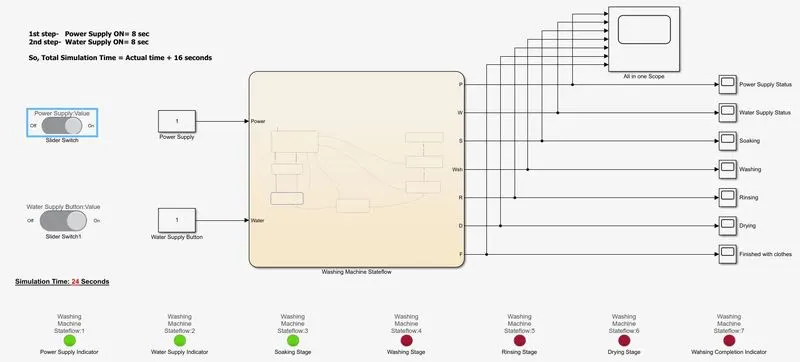
Here, both the power and water supply are active and that's why after 24 seconds of simulation, the soaking process has already in operation(it started at 16th minute). So, the washing machine is working fine up to this condition.
Now, to complete the whole process the same model is simulated for 400 seconds and the process completion is indicated by turning on a specific LED.
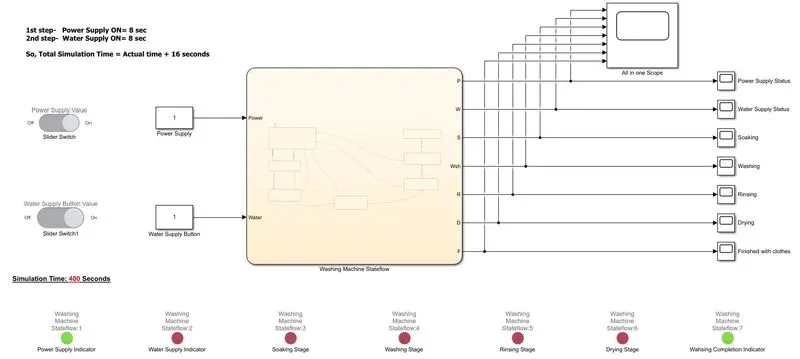
We can see clearly from the above model that the process is completed after 400 seconds of simulation and the same is indicated by turning green a specific LED. The LED arrangements for a specific stage can be given like this:
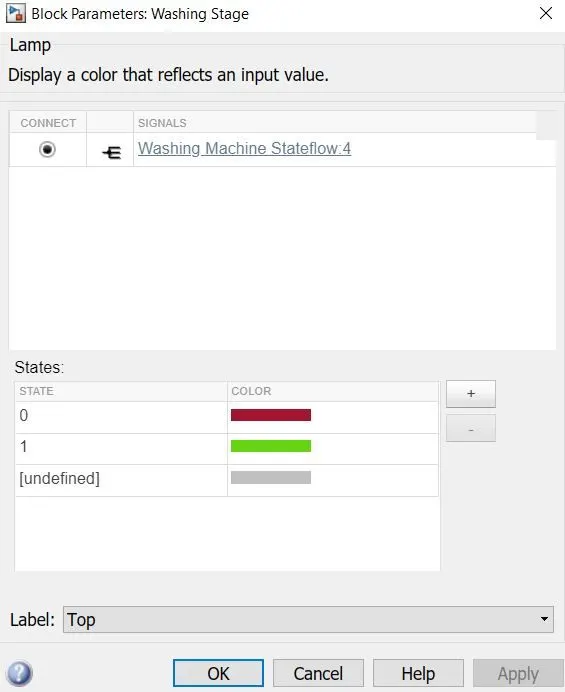
The results of all the Inputs and Outputs are shown by using a single scope is given below:
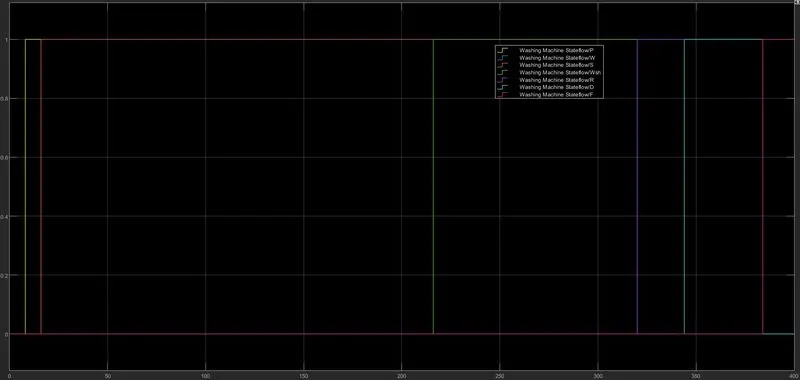
From this scope we can see, some of the values overlapped with each other. We can easily enable or disable one or more specific signals from the legend option and have our desired data be seen accordingly. To understand the timeline and behavior of each stage, every output is given to a separate scope to understand all of it easily.
The process is completed at 386 seconds which is 370 seconds for the actual timeline. Similarly, all the stages and their timeline can be verified from the scope results themselves.
So, we can say the objective of this problem statement is successfully achieved.
Part-2 Solution:
A manual transmission(MT) is a multi-speed transmission where gear changes require the driver to select the gears by manually operating a gear stick and clutch, which is usually a foot pedal for cars.
Early automobiles used sliding mesh manual transmissions with up to three forward gear ratios. Since the 1950s, constant mesh manual transmissions have become increasingly commonplace and the number of forwarding ratios has increased to 5-speed and 6-speed manual transmissions for current vehicles.
But during modern times, the alternative to a manual transmission is automatic transmissions; common types of automatic transmissions are hydraulic automatic transmission (AT), automated manual transmission (AMT), dual-clutch transmission (DCT), and continuously variable transmission (CVT).
In this problem statement, no specific type of transmission is mentioned but 5 ranges of speeds are provided, and for a certain speed range what gear number should go, that is also being mentioned. The speed ranges are like below:
Speed Range(Km/Hr) Gear
0 to 15 1
16 to 25 2
26 to 40 3
41 to 60 4
Above 61 5
Here, the transmission is to be assumed any automatic one where it will automatically change the gear without the help of a driver, depending on which speed range the car is in.
To represent the specific model a Simulink chart is being prepared with the control logic where the above characteristics have been considered.
The Stateflow chart of the "Gear shift" logic is given below:
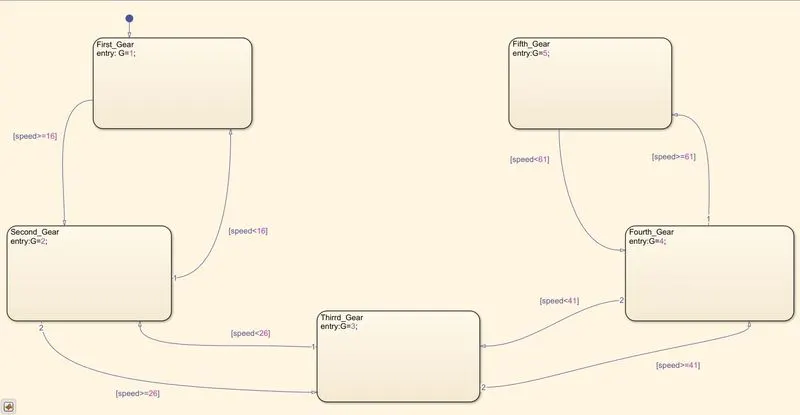
Here, conditional operators are used in each block to specify at a particular speed range which specific gear will act. Ultimately, the control logic is achieved with the Stateflow chart as per the requirements. The Simulink model for the whole system is given below:
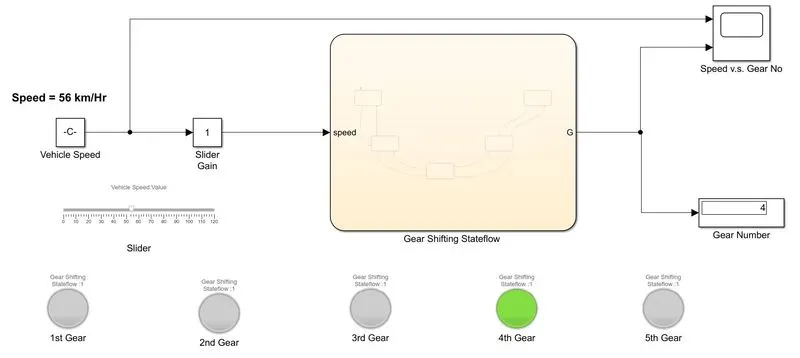
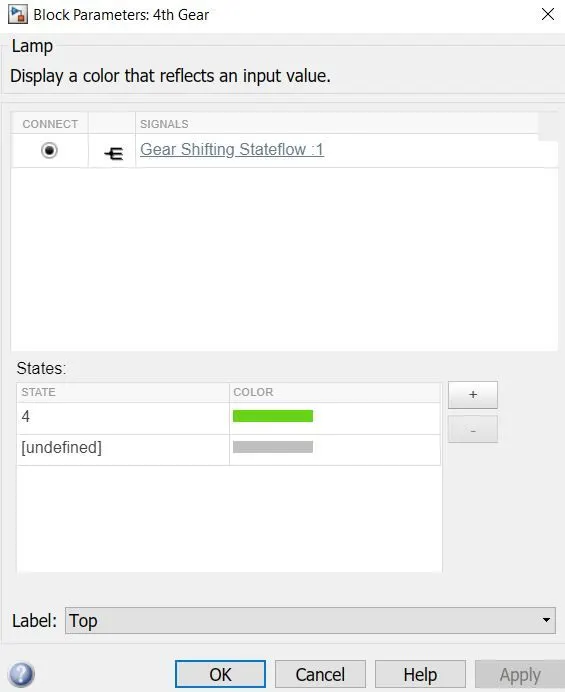
Here, 5 Gears are implemented and each gear has a lamp attached to it. When the lamp goes green it means that the car is running on that specific gear. The input speed is given to the Stateflow chart and the output from the same is nothing but the active gear number. To achieve variable speeds as input; a slider gain block is used along with the constant block and to vary the vehicle speed during simulation a slider block is connected with the constant block by which one can able to vary the speed as per the requirements. The simulation time is set to infinity, which gives us the freedom to vary the speed as per our need, and also there is no limitation on time. When a minimum time has been passed which is needed for the simulation, we can stop the simulation and can get the needed "Speed vs gear No." data from the output scope and a display block is provided to numerically see at which gear the car is running on. Also, by varying the slider to arbitrary values we can observe which gear the car is running on. For example, at the speed of 12Km/Hr the lamp of gear no 1 will go green and at a speed of 68 Km/Hr, the lamp associated with gear no 5 will go green. Here in this model diagram, the vehicle has a speed of 56 Km/Hr and the lamp of gear no 4 is gone green; which justifies the correct control logic for the given problem statement. The lamps are set up like the below example:
To have enough data for the speed vs output data, the speed is being varied from 0 to a little above 100 Km/Hr and then brought back to zero and again has been varied to a little over 90 Km/Hr and then given a steady value at 56 Km/Hr. The slider is here giving input speed to the system but it also acts like the speedometer of the car where it is limited between a range of having value 0-120Km/Hr.
The scope data is given below to show the effectiveness of the chart and also at which speed which gear the car is running on.
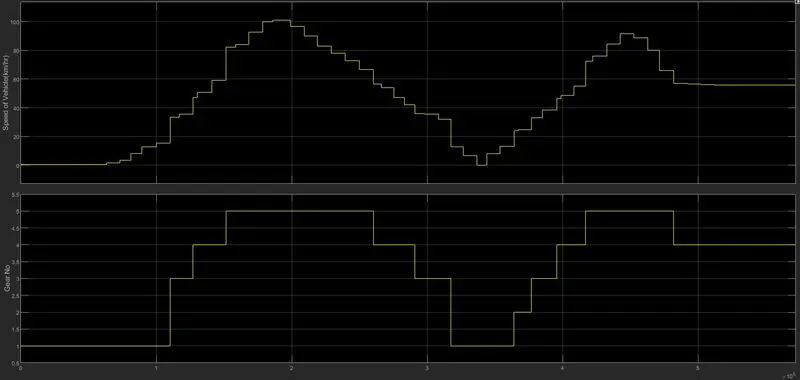
From the results of the scope, Vehicle Speed vs Gear No is clearly visible and the variations of each of them are clear due to placing both the values in one single scope. Finally, We can say that our objective regarding this problem statement of the gear shift logic has been achieved successfully.