Week 4.1 - Solving second order ODEs
AIM :-
In Engineering, ODE is used to describe the transient behavior of a system. A simple example is a pendulum
The way the pendulum moves depends on the Newtons second law. When this law is written down, we get a second order Ordinary Differential Equation that describes the position of the "ball" w.r.t time.
Similarly, there are hundreds of ODEs that describe key phenomena and if you have the ability to solve these equations then you will be able to simulate any of theses systems.
Your objective is to write a program that solves the following ODE. This ODE represents the equation of motion of a simple pendulum with damping
OBJECTIVE :-
L=1 metre,
m=1 kg,
b=0.05.
g=9.81 m/s2.
By using the above data Simulate the motion between 0-20 sec, for angular displacement=0,angular velocity=3 rad/sec at time t=0.
ERROR :-
I got lots of errors in doing this program. After that eventually all my code part executed successfully.
CODE :-
function code
function [dtheta_dt]= ode_function(t,theta,b,g,l,m)

theta1= theta(1);
theta2= theta(2);
dtheta1_dt = theta2;
dtheta2_dt = -(b/m)*theta2-(g/l)*sin(theta1);
dtheta_dt = [dtheta1_dt; dtheta2_dt];

end
main code
clear all
close all
clc

b= 0.05;
g= 9.81;
l= 1;
m= 0.1;

% initial condition
 theta_0 =[0;3];

% time span
 t_span = linspace(0,20,600);

%slove ODE
[t,results] = ode45(@(t,theta) ode_function(t,theta,b,g,l,m),t_span,theta_0);
figure(1)
plot(t,results(:,1))
hold on
plot(t,results(:,2))
xlabel('time')
ylabel('displacement')
print('SIMPLE PENDULUM','-dpng')
 ct = 1;
for i= 1:length(results(:,1))

    x=0;
    y=0;

    x1=-l*sin(results(i, 1));
    y1=-l*cos(results(i, 1));

    figure(2)
    plot([x x1],[y y1],'LineWidth',2)
    hold on
    plot(x1,y1,'.','MarkerSize',50)
    hold on
    plot([-4,4],[0,0],'linewidth',5)
    hold off
    title('simple pendulum')
    axis([-9,9,-4,4])
%     pause(0.1)
    M(ct) = getframe(gcf);
    ct = ct+1;
end
movie(M)
Videofile=VideoWriter('Pendulum.avi','motion JPEG AVI');
open(Videofile)
writeVideo(Videofile,M)
close(Videofile)
VIDEO LINK :-
https://drive.google.com/file/d/1UqWBkSRmedS5CvywaoTuPF3giZF2uWo8/view?usp=sharing
RESULTS :-
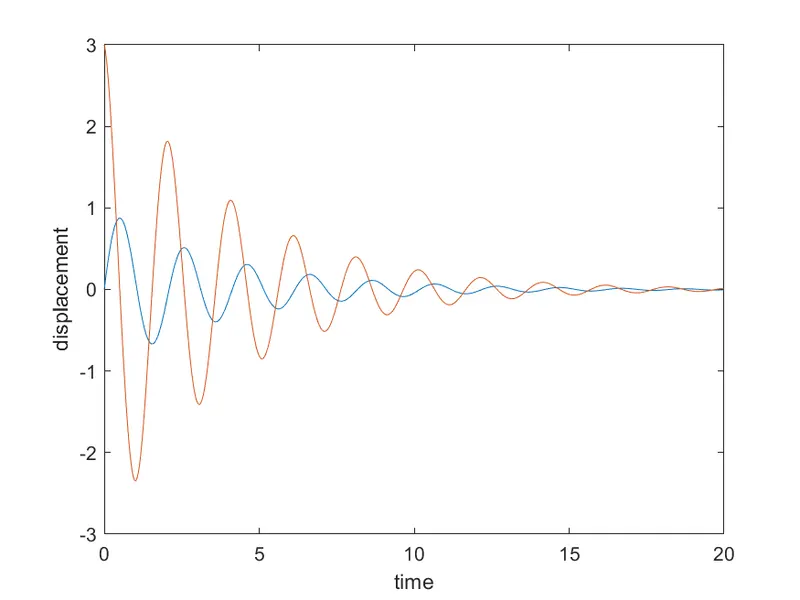
CONCLUSION :-
Hence it is video of simple pendulum is generated.