Week 4.1 - Solving second order ODEs
Objective:- To solve a second-order ODE of a simple pendulum and create its animation.
Theory:-
ODE represents the equation of motion of a simple pendulum with damping: -
(d^2 θ) / dt^2+ (b/m)*( dθ/dt)+(g/L)*sinθ = 0 .......Equation-1
Simplifying the above ODE: -
θ1 = θ2
dθ/dt = dθ1/dt = θ2 .....................Equation-2
(d^2 θ) / dt^2 = dθ2/dt
dθ2/dt = -(b/m)*θ2-(g/L)*sinθ1 .......Equation-3
Matlab Program for ode45 function:-
%Defining function
function[dthetadt] = ode_simple_pendulum(t,theta,L,m,b,g)
theta1 = theta(1);
theta2 = theta(2);
dtheta1_dt = theta2;
dtheta2_dt = -(b/m)*theta2-(g/L)*sin(theta1);
dthetadt = [ dtheta1_dt;dtheta2_dt];
end
Matlab program for main function: -
clear all
close all
clc
% defining input values for simple pendulum
L=1;
m =1;
b=0.05;
g=9.81;
% defining intial condition
theta_0 = [0;3];
t_span = linspace(0,20,1000);
% solving oDE Using ode45
[t,result] = ode45(@(t,theta)ode_simple_pendulum(t,theta,L,m,b,g),t_span,theta_0);
% Plotting graphs
figure(1)
plot(t,result(:,1),'linewidth',1)
hold on
plot(t,result(:,2),'linewidth',1)
axis([0 20 -3 3]);
xlabel('time in seconds')
ylabel('Angular Velocity in rad/sec and Angular displacement')
plot(t,result(:,2));
hold on
grid on;
hold off
legend('Displacement' , 'Angular Velocity');

% Creating Pendulum Animation
ct = 1;
theta = result(:,1);
for i = 1:length(theta)
theta1 = theta(i);
x0=0;
y0=0;
x1 = 1*sin(theta1);
y1 = -1*cos(theta1);
figure(2);
title('Simple Pendulum Motion');
plot([ -1.1 1.1],[0,0],'color','k','linewidth',4);
hold on
plot([ x0 x1],[y0,y1],'color','m','linewidth',2);
hold on
plot(x1,y1,'o','markers',20,'markerfacecolor','b');
hold off
grid on
axis([-1.5 1.5 -1.5 0.5]);
pause(0.01);
M(ct)= getframe(gcf);
ct=ct+1;
end
% Movie Making and Saving
movie(M)
Videofile = VideoWriter('Simple_Pendulum_Motion.avi','uncompressed avi');
open(Videofile);
writeVideo(Videofile,M);
close(Videofile);
YouTube Video Link: -
Output Graph:-
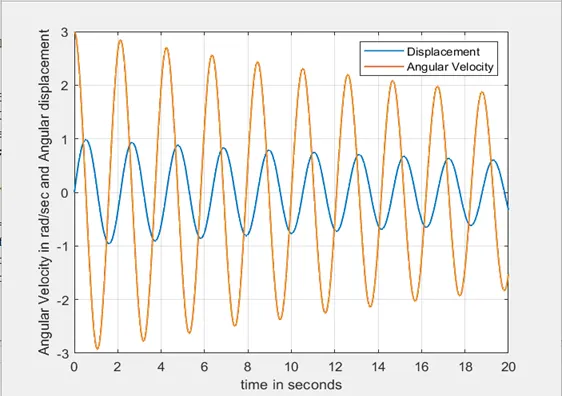
Conclusion:-
The Simple pendulum animation is created successfully.