Week 4.1 - Solving second order ODEs
clear all
close all
clc
% inputs for the second order ODE
b = 0.05;
g = 9.81;
l = 1;
m = 1;
%Initial Conditons for ODE
theta_0 = [0;3];
<!-- [if mso]>
<![endif]-->
<![endif]-->
% Time Points
t_span = linspace(0,20,120);
<!-- [if mso]>
<![endif]-->
<![endif]-->
%solution of ODE
[t, results] = ode45(@(t,theta) ode_fun(t, theta, b,g,l,m),t_span,theta_0);
<!-- [if mso]>
<![endif]-->
<![endif]-->
plot(t,results(:,1))
hold on
plot(t,results(:,2))
title('Motion of a pendulum')
ylabel('Displacement/Angular Velocity')
xlabel('Time')
legend('Displacement','Angular Velocity')
ct=1; % it represents each and every frame
<!-- [if mso]>
<![endif]-->
<![endif]-->
for i=1:length(t)
% Coordinates of pendulum with respect to angular displacement as
�scribed
x0=0;
y0=0;
x1=l*sin(results(i,1));
y1=-l*cos(results(i,1));
% Plotting the pendulum movement for proper analysis
figure(2)
plot([x0,x1],[y0,y1])
hold on
plot([-1.5 1.5],[0 0],'color','b','LineWidth',4)
axis([-1.5 1.5 -1.5 0.5])
plot(x1,y1,'o','MarkerSize',25 , 'MarkerFaceColor','g')
pause(0.0001)
hold off
<!-- [if mso]>
<![endif]-->
<![endif]-->
% Frames getting captured
M(ct)=getframe(gcf);
ct=ct+1;
end
% Creating a video file of Simple Pendulum
movie(M)
Videofile=VideoWriter('simple_pendulum.avi','Uncompressed AVI');
open(Videofile)
writeVideo(Videofile,M)
close(Videofile)
<!-- [if mso]>
<![endif]-->
<![endif]-->
Code Explanation:-
Line 5-8: Constants and parameters for the second order ODE.
Line 10: theta_0 = [0;3]; - Sets initial conditions for the pendulum.
Line 13: t_span = linspace(0,20,120); - Generates time points for simulation.
Line 16-17: Solves the ODE using ode45 with the given initial conditions.
Line 18-24: Plots angular displacement and velocity over time.
Line 25: ct=1; - Initializes frame counter for animation.
Line 27: for i=1:length(t) - Loop for iterating through time steps.
Line 30-33: Calculates x, y coordinates of the pendulum bob.
Line 35: figure(2) - Selects the figure for pendulum animation.
Line 36: plot([x0,x1],[y0,y1]) - Plots the pendulum movement line.
Line 37: hold on - Allows adding more elements to the plot.
Line 38: plot([-1.5 1.5],[0 0],'color','b','LineWidth',4) - Plots reference line.
Line 39: axis([-1.5 1.5 -1.5 0.5]) - Sets plot axis limits.
Line 40: plot(x1,y1,'o','MarkerSize',25 , 'MarkerFaceColor','g') - Plots pendulum bob marker.
Line 41: pause(0.0001) - Introduces a short pause for animation.
Line 45: M(ct)=getframe(gcf); - Records the current figure frame.
Line 46: ct=ct+1; - Increments the frame counter.
Line 49: movie(M) - Displays the captured frames as a movie.
Line 51: Videofile=VideoWriter('simple_pendulum.avi','Uncompressed AVI'); - Specifies video file settings.
Line 52: open(Videofile) - Opens the video file for writing.
Line 53: writeVideo(Videofile,M) - Writes frames to the video.
Line 54: close(Videofile) - Closes the video file
Line 10: theta_0 = [0;3]; - Sets initial conditions for the pendulum.
Line 13: t_span = linspace(0,20,120); - Generates time points for simulation.
Line 16-17: Solves the ODE using ode45 with the given initial conditions.
Line 18-24: Plots angular displacement and velocity over time.
Line 25: ct=1; - Initializes frame counter for animation.
Line 27: for i=1:length(t) - Loop for iterating through time steps.
Line 30-33: Calculates x, y coordinates of the pendulum bob.
Line 35: figure(2) - Selects the figure for pendulum animation.
Line 36: plot([x0,x1],[y0,y1]) - Plots the pendulum movement line.
Line 37: hold on - Allows adding more elements to the plot.
Line 38: plot([-1.5 1.5],[0 0],'color','b','LineWidth',4) - Plots reference line.
Line 39: axis([-1.5 1.5 -1.5 0.5]) - Sets plot axis limits.
Line 40: plot(x1,y1,'o','MarkerSize',25 , 'MarkerFaceColor','g') - Plots pendulum bob marker.
Line 41: pause(0.0001) - Introduces a short pause for animation.
Line 45: M(ct)=getframe(gcf); - Records the current figure frame.
Line 46: ct=ct+1; - Increments the frame counter.
Line 49: movie(M) - Displays the captured frames as a movie.
Line 51: Videofile=VideoWriter('simple_pendulum.avi','Uncompressed AVI'); - Specifies video file settings.
Line 52: open(Videofile) - Opens the video file for writing.
Line 53: writeVideo(Videofile,M) - Writes frames to the video.
Line 54: close(Videofile) - Closes the video file
Function Explanation:-
Defines a function named ode_fun with input arguments ~, theta, b, g, l, m.
Extracts the angular displacement (theta1) and angular velocity (theta2) from the input vector theta.
Calculates the derivatives of angular displacement (dtheta1_dt) and angular velocity (dtheta2_dt) .
Combines the calculated derivatives into a column vector dtheta_dt
Extracts the angular displacement (theta1) and angular velocity (theta2) from the input vector theta.
Calculates the derivatives of angular displacement (dtheta1_dt) and angular velocity (dtheta2_dt) .
Combines the calculated derivatives into a column vector dtheta_dt
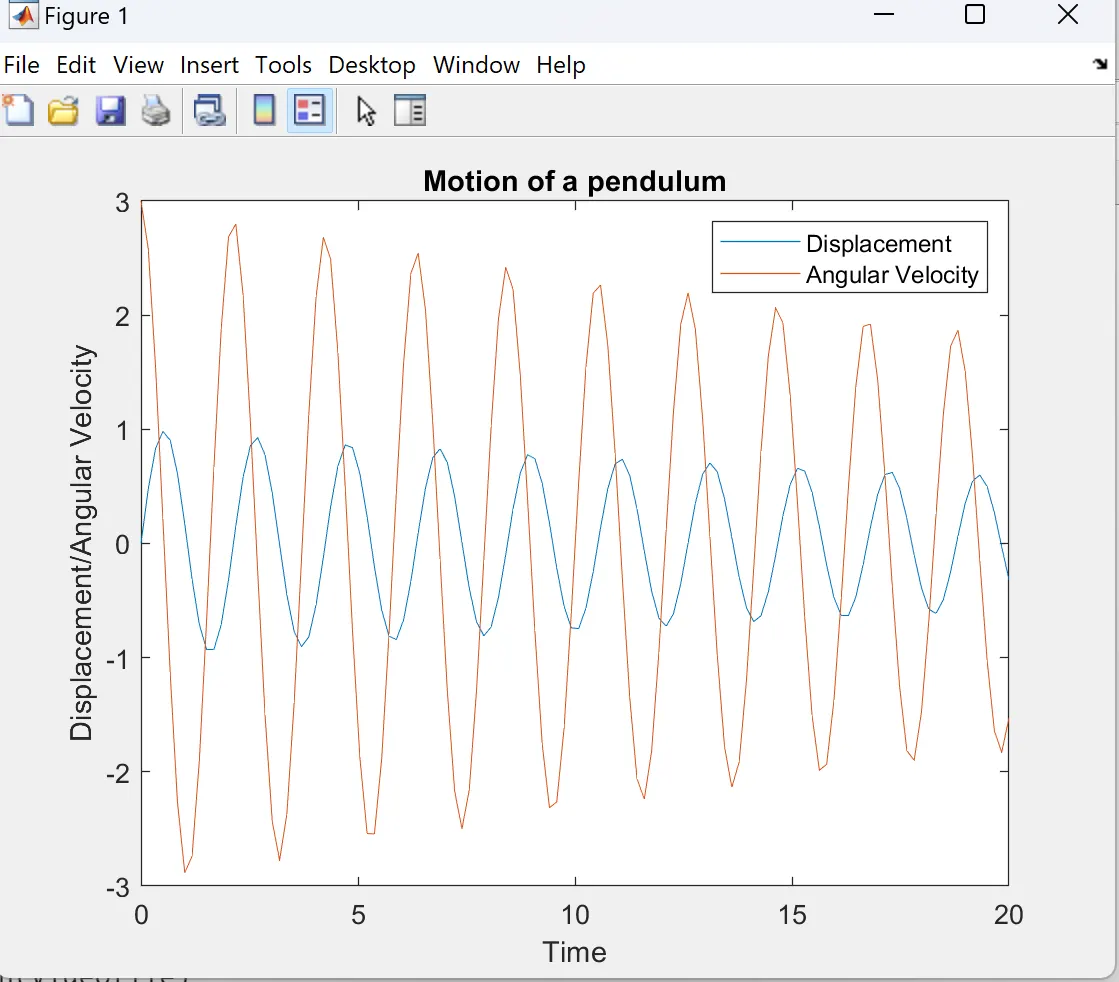
Graph of Simple Pendulum
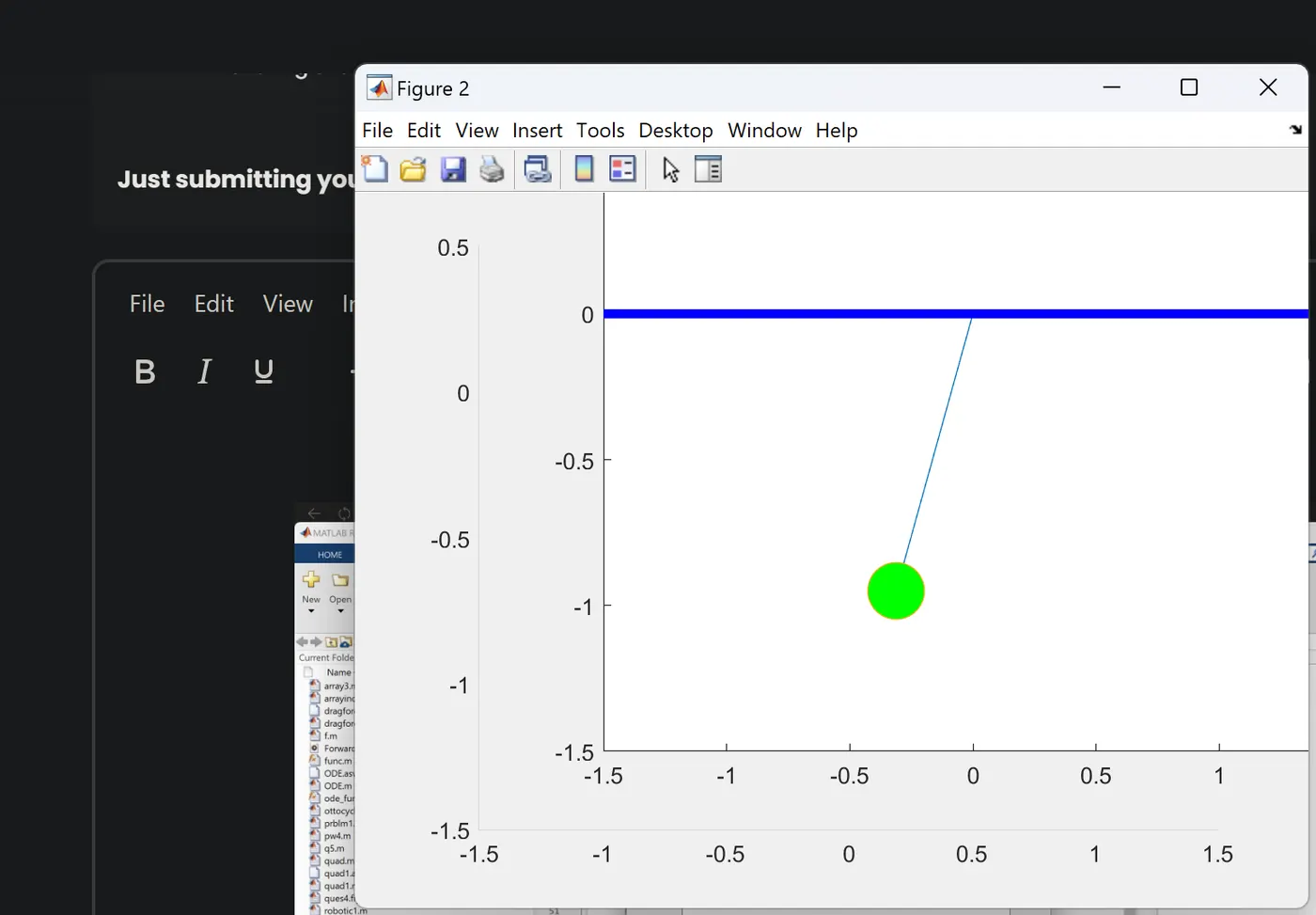
Screenshot of Animation of Simple Pendulum
You Tube Link:- https://youtu.be/B56PIufz43Q
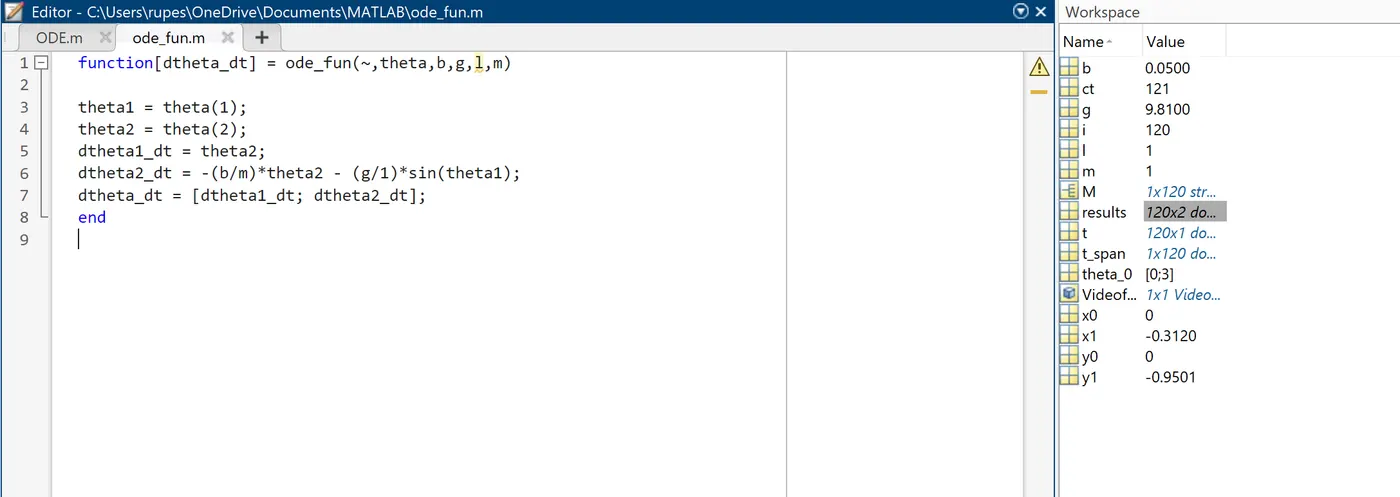
Function for the ODE
Errors faced :-
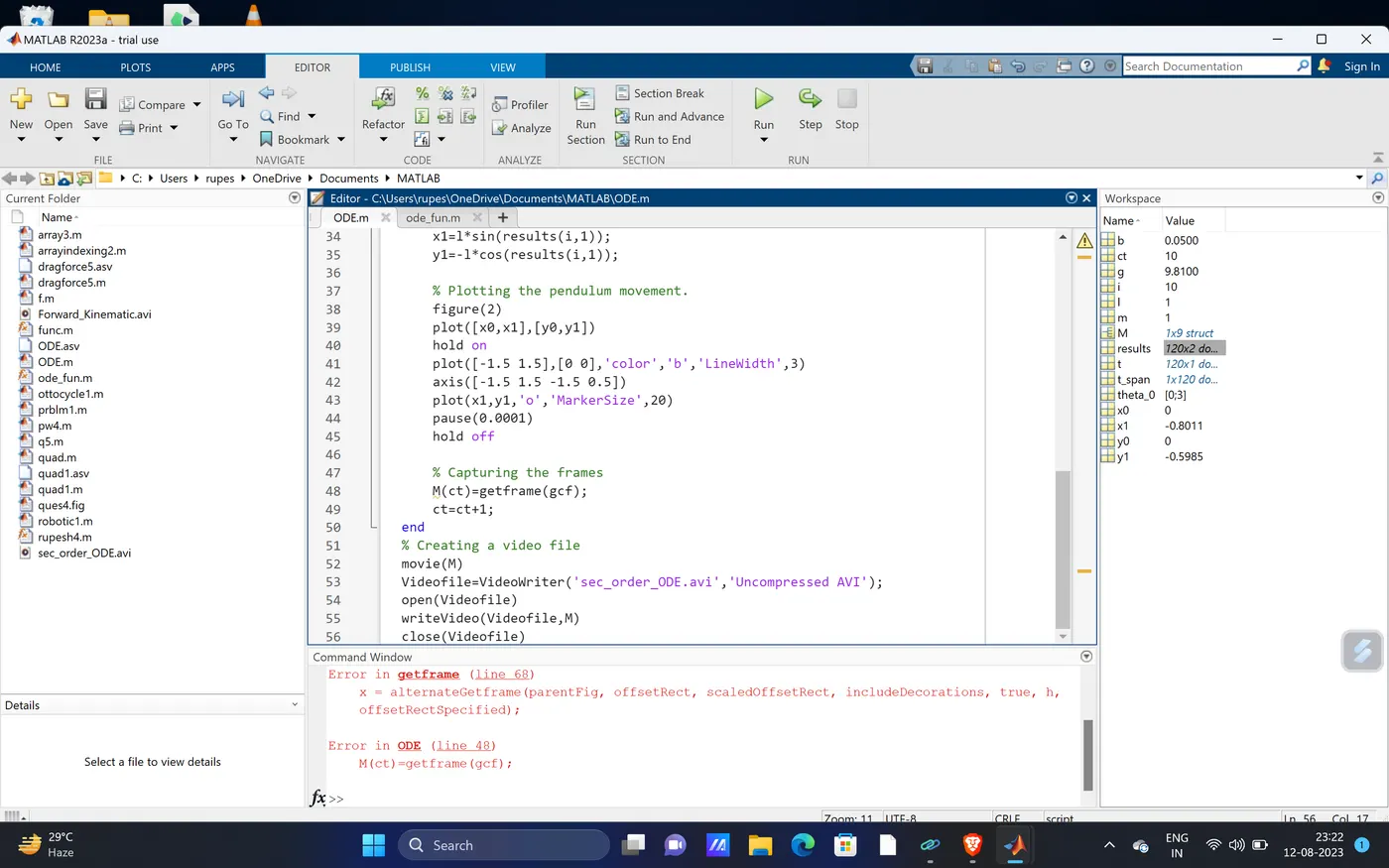
Error Explanation:-
In this error screeshot the error is encountered in M(ct) = getframe(gcf) , because of ct is not initialized and frames were not getting represented.
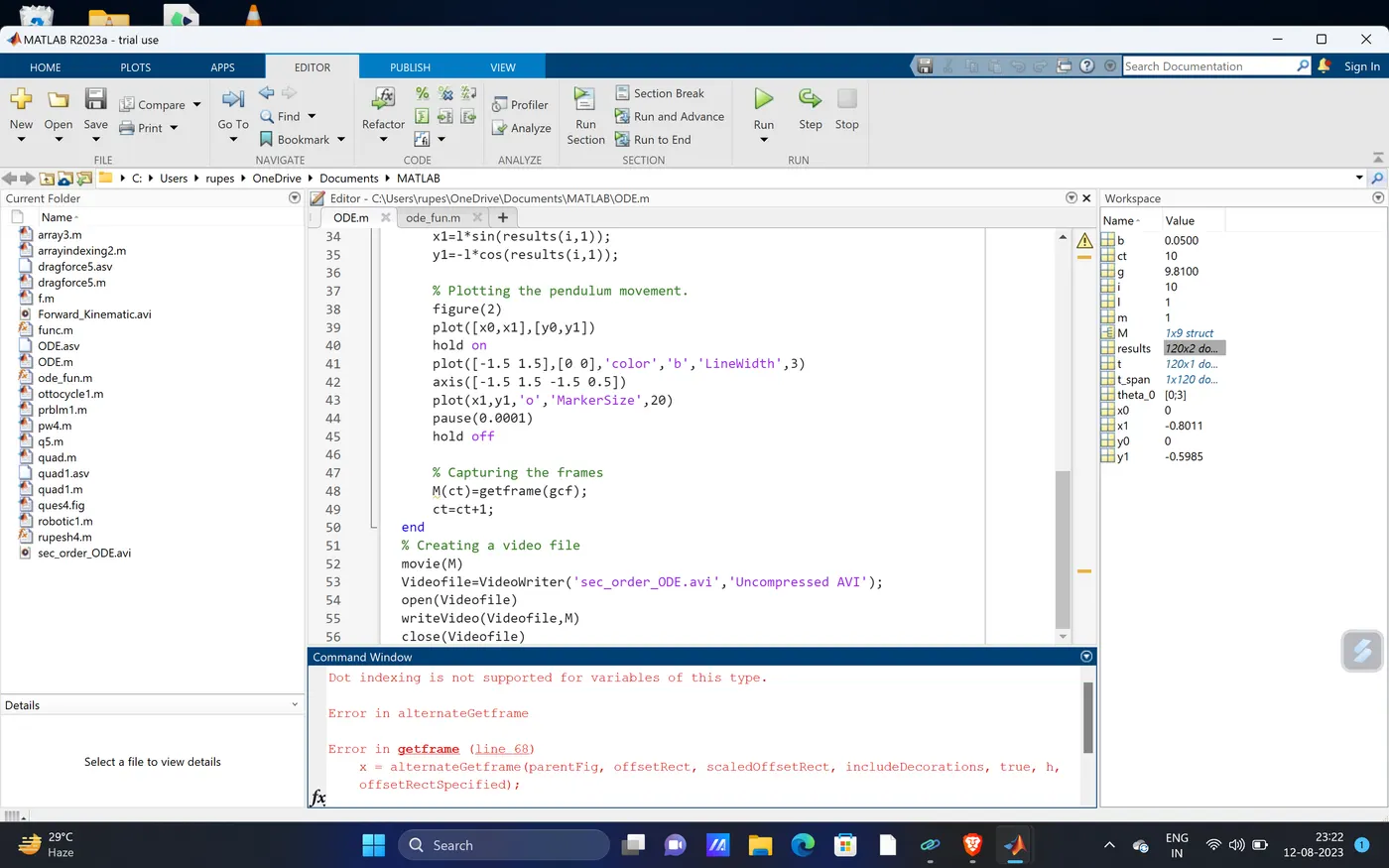
Error Explanation:- A small error encountered in getframe because the initial variable was not declared.
Report is attached with this.