Week 4.1 - Solving second order ODEs
AIM:- Solving the second order ordnery differential equation (ODE) using matlab , caluculating tne displacement,velocity of swinging pendulum and animate the motion of the pendulum
INTRODUCTION
A simple pendulum consists of a bob (point-mass) m hanging from a (massless) string of length L and fixed at a pivot point P. When displaced to an initial angle and released, the pendulum will swing back and forth with periodic motion.
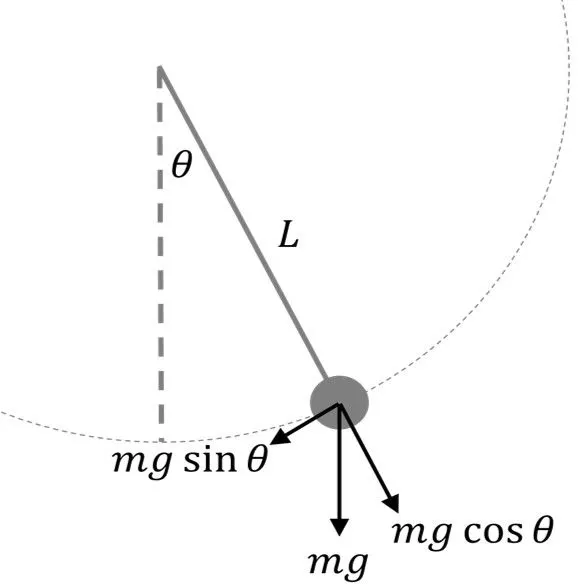
The period of a pendulum does not depend on the mass of the ball, but only on the length of the string. Two pendula with different masses but the same length will have the same period. Two pendula with different lengths will different periods; the pendulum with the longer string will have the longer period. By applying Newton's secont law for rotational systems, the equation of motion for the pendulum may be obtained
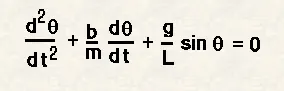
Where,
θ = angular displacement of the pendulum
t = time
b = damping coefficient
m = mass of the bob
g = gravity
L = length of the pendulum
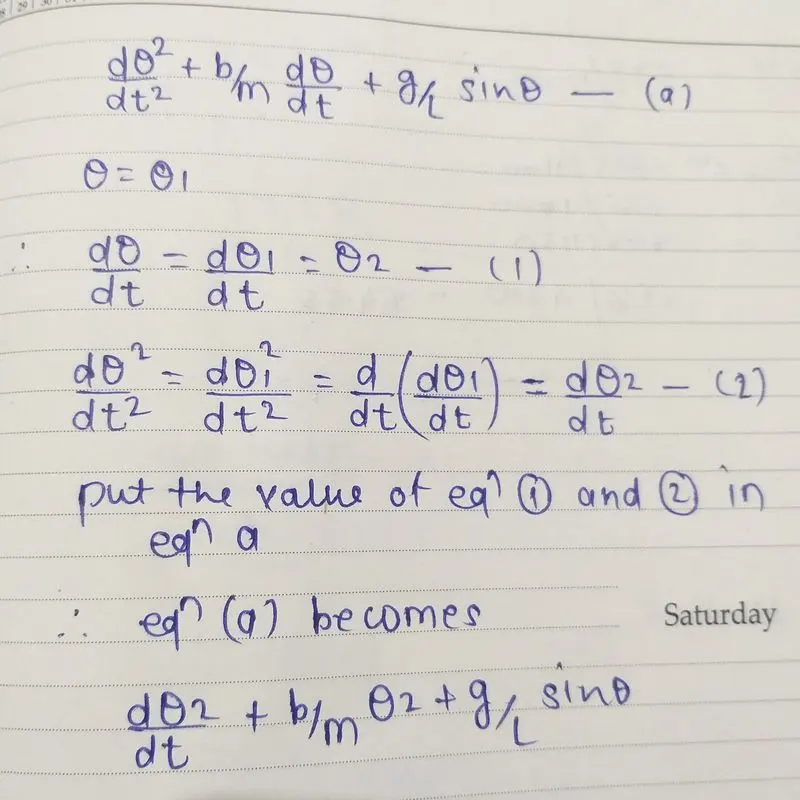
in the matlab we can not solve the 2nd order ordenary differential equation (ODE) directly, so we have to convert the 2nd order ODE into two first order ODE then we use ode45 function The syntax for ode45 is [t,y]=ode45(@(t,y) odefun,tspan,y0,options) so convert the above equation in 2 first-order equations it is done as follows
Given inputs
b=0.05
g=9.81m/s^2
l=1m
m=1Kg
time span= 0-10sec
At t=0 angular displacement=0,angular velocity=5 rad/sec
PROGRAM
close all
clear all
clc

% damping coefficient
b = 0.05;

%gravitational acceleration (m/s^2)
g = 9.81;

% length of the string (m)
l = 1;

% mass of the bob (kg)
m = 1;

% initial condition displacement is 0 and initial velocity is 3 rad/s
initial_condition = [0;3];

% time period for the oscilation of oscillation is 20 sec
t_span = linspace(0,20,600);

%solve ode
[t, results] = ode45(@(t,theta) ode_func(t, theta, b,g,l,m),t_span,initial_condition);

figure(1)
plot(t,results(:,1),'color','green')
hold on
plot(t,results(:,2),'color','blue')
legend('angular displacement','angular velocity')

ct=1;
angle= results(:,1);
for i= 1:length(angle)
    Angle = angle(i);

    %origin_points
    x_start = 0;
    y_start = 0;
    %end points
    x_end = l*sin(Angle);
    y_end = -l*cos(Angle);
figure(2)
plot([-1,1],[0,0],'linewidth',4)
hold on
plot([x_start x_end],[y_start y_end],'linewidth',3,'Color','red')
hold on
plot(x_end,y_end,'marker','o','MarkerSize',15,'MarkerFaceColor','yellow')
axis([-1.5 1.5 -1.5 1])
pause(0.03)
hold off
M(ct) = getframe(gcf);
ct= ct+1;
end
movie(M)
videofile=VideoWriter('second_order_ode_for_pendulum.avi','Uncompressed AVI');
open(videofile)
writeVideo(videofile,M)
close(videofile)
ODE FUNCTION
function [dtheta_dt] = ode_func(t,theta,b,g,l,m)
theta1 = theta(1);
theta2 = theta(2);
dtheta1_dt = theta2;
dtheta2_dt = -(b/m)*theta2 -(g/l)*sin(theta1);
dtheta_dt = [dtheta1_dt; dtheta2_dt];
end
Detail explanation of each of program
1. fist step is to define the given input data such as mass of the bob, damping coefficient, length of the string etc and initial condition
2. then solving the ODE with the help of inbuild ode 45 function in matlab, the ode 45 is the function of time and theta, and another function is used which is seperately written function program
3. in next step graph has been plotted between time with respect to displacement and angular velocity
4. for loop is uesd for representing the changing value of angular displacement. befor that a counter loop is added, xstart,ystart and xend,yend and their relation are entered to from a pendulum string . markersize commend is use to form a pendulum bob
5. the M command is ued to capture the every fram for each for loop runs the increment ct= ct+1 is added for increament of each frame evey time loop runs
6. the movie animation is created in the final stage of the program the videowrite command is use to assign the movie format, the avi format iss used, open command is ued to open the video file, video write command is ues to play the video and close command is use to close the video
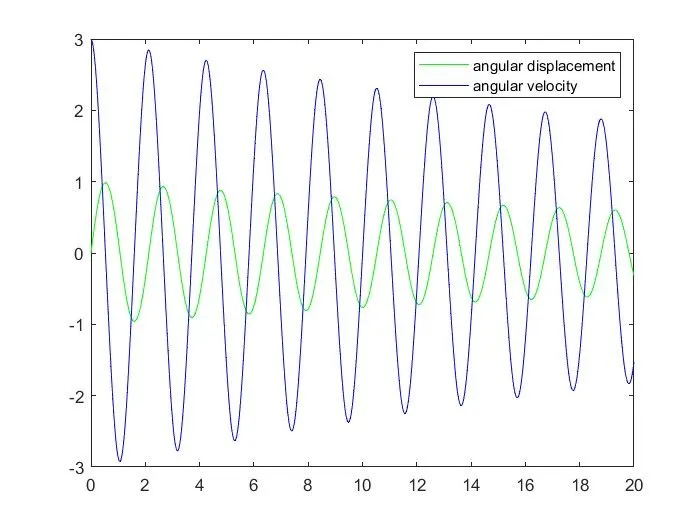
link for the animation of pendulum
https://www.youtube.com/watch?v=4mgAP_5DUkk
errors
pendulum oscallating in inverted direction
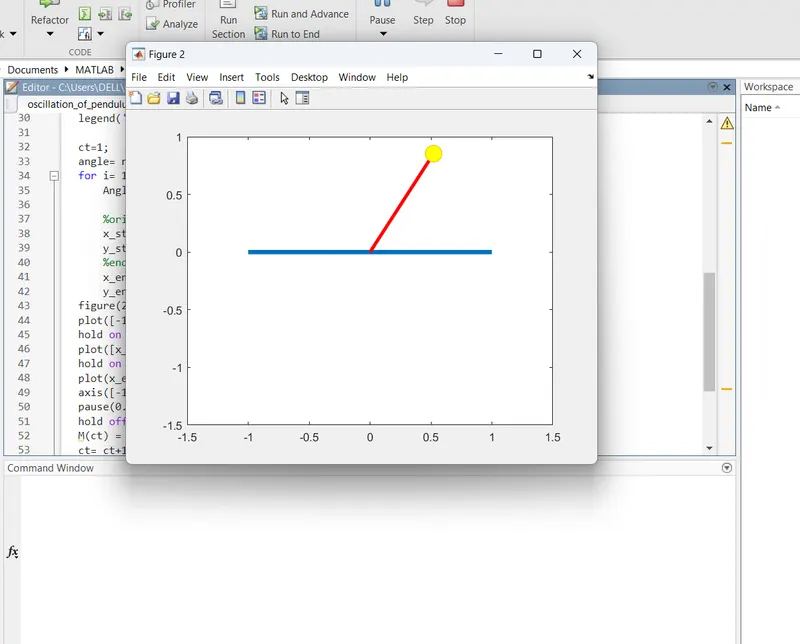
the coordinate y_end= l*cos(Angle) change to y_end= - l*cos(Angle)
Conclusion
the simulation of oscillation of pendulum is sucessfully created in matlab